Best Other Office Software - Page 61

How Many Other Office Software Products Does G2 Track?

Total Products under this Category: 1,052

Category Stats (Nov 2026)

  • Average Rating: 4.42/5 (↑0.02 vs Oct 2026) The average rating of products in this category, based on all submitted ratings
  • Top Trending Product: Spoke (+1.32%) - Among all products in this category, Spoke recorded the largest rating increase compared to last month

Last updated: November 15, 2026

How Does G2 Rank Other Office Software Products?

Why You Can Trust G2's Software Rankings:

  • 30 Analysts and Data Experts
  • 1,400+ Authentic Reviews
  • 1,052+ Products
  • Unbiased Rankings

G2's software rankings are built on verified user reviews, rigorous moderation, and a consistent research methodology maintained by a team of analysts and data experts. Each product is measured using the same transparent criteria, with no paid placement or vendor influence. While reviews reflect real user experiences, which can be subjective, they offer valuable insight into how software performs in the hands of professionals. Together, these inputs power the G2 Score, a standardized way to compare tools within every category.

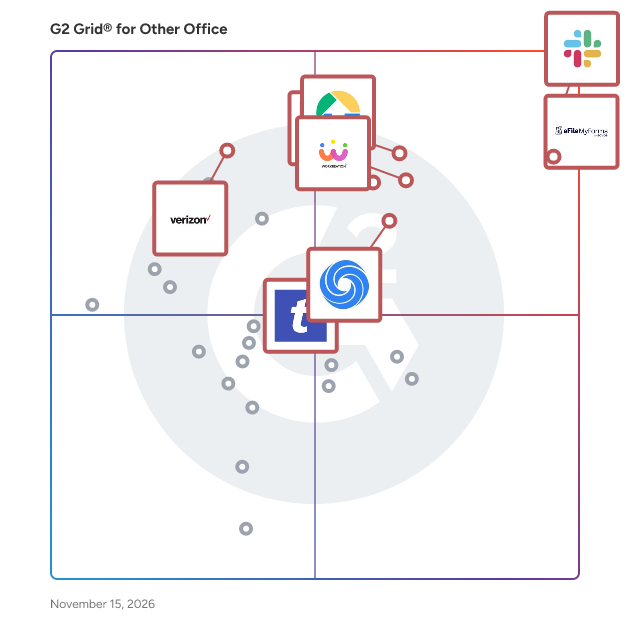
G2 Grid® for Other Office Software

G2 Grid® for Other Office Software plotting products by satisfaction and market presence

Highlighted products: Slack Connector for Jira, Sovos eFileMyForms, Google Drive & Docs for Confluence, Workreation®, Drive Uploader, NoteGPT, TransferNow, and Verizon Business Messaging.

Underlying data: [Grid® JSON](https://www.g2.com/categories/other-office/grids.json?focus%5B%5D=slack-connector-for-jira&focus%5B%5D=sovos-efilemyforms&focus%5B%5D=google-drive-docs-for-confluence&focus%5B%5D=workreation&focus%5B%5D=drive-uploader&focus%5B%5D=notegpt&focus%5B%5D=transfernow&focus%5B%5D=verizon-business-messaging)

Sync2

Sync2 is a powerful software solution designed to synchronize Microsoft Outlook data across multiple devices and platforms, including Google services, iPhones, Android devices, and more. It ensures that your emails, calendars, contacts, and tasks are consistently updated, providing seamless access to your information regardless of the device or platform you use. Key Features and Functionality: - Multi-Device Synchronization: Sync Outlook data with various devices and services, including Google, iPhone/iPad, Android, Blackberry, Windows Phone, Nokia Symbian, Exchange, Outlook PST files, and iCloud. - Automated Synchronization: Set up automatic synchronization to keep your data up-to-date without manual intervention. - Unlimited Calendar Sharing: Share your Outlook calendars with others, facilitating better collaboration and scheduling. - Support and Upgrades: Enjoy free support and upgrades, ensuring your software remains current and functional. Primary Value and User Solutions: Sync2 addresses the challenge of managing and accessing consistent Outlook data across multiple devices and platforms. By automating the synchronization process, it eliminates the need for manual updates, reducing the risk of data discrepancies and saving time. This ensures that users have reliable and up-to-date information at their fingertips, enhancing productivity and collaboration.

Who Is the Company Behind Sync2?

  • Seller: 4Team
  • Year Founded: 1999
  • HQ Location: Coral Springs, US
  • LinkedIn® Page: www.linkedin.com
    21 employees on LinkedIn®

SysInfo MDB Reader Tool

SysInfo MDB Viewer is a dedicated software tool that allows users to open, view, and read Microsoft Access database files (MDB and ACCDB) without requiring Microsoft Access installation. It effectively handles corrupt files, letting users preview tables, queries, and other database objects. This user-friendly program is compatible with all Windows OS versions, making it ideal for quickly inspecting Access database content.

Who Is the Company Behind SysInfo MDB Reader Tool?

SysInfo OST Viewer Tool

SysInfo OST Viewer Tool is an advanced software solution designed to open, view, read, and analyze Outlook OST files without requiring Microsoft Outlook, Exchange Server, or an active Microsoft 365 account. It supports healthy, password-protected, oversized, orphaned, and minorly corrupted OST files, along with PST files. Users can upload single or multiple files simultaneously and preview mailbox data while preserving the original folder hierarchy. The software provides a detailed six-tab preview, including Body, Attachments, Notes, Header, MIME, and Raw HTML, allowing users to inspect emails and their associated information. It also displays contacts, calendars, tasks, notes, attachments, and other mailbox components. With its Smart Search functionality, users can locate specific emails using From, To, Subject, Date Range, and attachment filters. The tool allows users to export OST data into PST, EML, MSG, PDF, MBOX, and CSV formats or migrate mailbox data to Office 365. Additional features include date-based filtering, duplicate email removal, keyword filtering, flexible attachment handling, custom folder naming, and automatic activity logs. Its Skip and Resume Export functionality helps continue interrupted export operations without processing already completed files again. The software supports offline access, read-only operations, and multiple language options. It is compatible with Outlook and Exchange OST files and works on Windows and Mac systems, including Apple Silicon devices. The free demo version allows users to preview and export up to 100 emails per folder. SysInfo OST Viewer Tool is suitable for individuals, IT administrators, system administrators, forensic investigators, and enterprises that need to inspect, verify, and manage Outlook mailbox data efficiently.

Who Is the Company Behind SysInfo OST Viewer Tool?

AI can help you find the answers. G2 helps you trust them.

Connect G2 to Claude or ChatGPT for answers grounded in G2's trusted reviews, comparisons, and pricing from real user insights.

How it works

SysInfo PDF Bates Numbering Tool

The SysInfo PDF Bates Numberer Tool is an easy-to-use software that helps you add page numbers (Bates numbers) to one or multiple PDF files at once. It's great for organizing legal, business, or medical documents. You can customize the number format, add prefixes, suffixes, dates, confidential text, and even background images or text. It also works with password-protected PDFs and lets you set or remove encryption. The tool includes a preview feature so you can check the result before saving. It runs on all Windows versions and doesn’t need Adobe Acrobat. A free version is available with a watermark, while the full version removes it.

Who Is the Company Behind SysInfo PDF Bates Numbering Tool?

SysTools CSV Merger Software

SysTools CSV Merger is a powerful and user-friendly utility designed to combine multiple CSV files into a single, organized CSV file without data loss. Whether you need to merge customer databases, sales reports, contact lists, inventory records, financial data, or any other comma-separated values (CSV) files, the software performs the merging process quickly while maintaining complete data integrity. It is an ideal solution for businesses, data analysts, marketers, researchers, and professionals who regularly work with large CSV datasets. The software supports merging unlimited CSV files in a single operation, regardless of their size. Users can add individual CSV files or entire folders containing multiple CSV files, and the application automatically combines them into one consolidated file. It preserves the original data structure, rows, columns, field values, delimiters, and formatting throughout the merging process, ensuring the resulting CSV remains accurate and ready for further use. SysTools CSV Merger intelligently handles header rows during the merge process by retaining only one header in the final output while appending all remaining data records correctly. This eliminates duplicate column names and creates a clean, well-structured CSV file suitable for importing into databases, spreadsheet applications, CRM systems, or business intelligence tools. To provide greater flexibility, the software offers advanced merge options that allow users to combine CSV files with similar structures while maintaining data consistency. It supports standard CSV files generated by Microsoft Excel, Google Sheets, LibreOffice Calc, databases, web applications, and other third-party software. The application is built to process large CSV files efficiently without compromising performance. Even datasets containing millions of records can be merged smoothly while preserving data accuracy. The software ensures that special characters, Unicode text, line breaks, commas, quotes, and delimiters remain intact during processing, preventing data corruption or formatting issues. SysTools CSV Merger features an intuitive interface that enables users to merge CSV files in just a few simple steps. No technical expertise is required, making it suitable for both beginners and experienced professionals. Users simply add the required CSV files, choose the destination location, and start the merge process.

Who Is the Company Behind SysTools CSV Merger Software?

SysTools CSV Splitter Software

SysTools CSV Splitter is a powerful and reliable utility designed to split large CSV files into smaller, manageable files without altering the original data. Whether you're dealing with oversized CSV files that exceed Microsoft Excel's row limitations, importing data into databases, or processing massive datasets, the software provides a fast and secure way to divide CSV files while maintaining complete data integrity. It is an ideal solution for data analysts, database administrators, marketers, developers, researchers, and businesses handling large volumes of CSV data. The software offers multiple splitting options to meet different requirements. Users can split CSV files by number of rows, file size, or number of output files, providing complete flexibility based on their workflow. Whether you need to divide a multi-gigabyte CSV file into smaller parts or create evenly sized CSV files for easier sharing and processing, the software performs the task efficiently without data loss. SysTools CSV Splitter intelligently preserves the original file structure during the splitting process. It maintains column headers, field values, delimiters, row order, formatting, Unicode characters, special symbols, and text encoding in every output file. Each split CSV file remains fully compatible with Microsoft Excel, Google Sheets, LibreOffice Calc, MySQL, SQL Server, PostgreSQL, Oracle, Power BI, Tableau, and other applications that support CSV files. Built with a high-performance processing engine, the software efficiently handles extremely large CSV files containing millions of records or several gigabytes of data. It performs the splitting operation quickly while consuming minimal system resources, making it suitable for both individual users and enterprise environments.

Who Is the Company Behind SysTools CSV Splitter Software?

Tabbled

Who Is the Company Behind Tabbled?

Teams PowerPack - Call Analytics

Teams PowerPack – Call Analytics is a tool for Microsoft Teams that enhances business performance by providing better visibility into call activity. It allows users to monitor call performance and quality in one place. Teams PowerPack has a user-friendly interface, provides native reporting of Teams data, and offers powerful search and filtering tools for efficient analysis.

Who Is the Company Behind Teams PowerPack - Call Analytics?

Telesign Phone ID

Phone ID provides real-time insights related to a submitted end-user’s phone number. It offers a full suite of mobile identity attributes that help businesses to more accurately verify users, detect risk, and protect their platform. See product description below for more detail.

Who Is the Company Behind Telesign Phone ID?

TempFreeMail

Free temporary email addresses with no signup — keep your inbox as long as you need

Who Is the Company Behind TempFreeMail?

Template Chooser

Start Every Task with the Right Template. Your Template Hub for All Your Shared and Organizational Templates Across Microsoft 365! Are you still battling with outdated templates or battling with several duplicates, not knowing where to find the most up-to-date version? The Template Chooser enables easy access to your centrally shared and branded organizational templates across apps like Word, Excel, PowerPoint, Teams, SharePoint, and many others. This product creates and manages a single source of truth for your templates, ensuring that users across your organization will always use the most current templates across all applications and devices. This solution simplifies the process of finding and using the right templates, making sure they're always aligned with your brand and up to date. Key Benefits - Better Business Outcomes: Access to up-to-date templates ensures your documents are always current and on-brand. - Eliminate Confusion: No more wondering where to find the latest templates, everything is stored and managed in one central location. - Always Available: Easily access the latest templates from anywhere, whether you're using Office, Teams, SharePoint, or any browser. With the Template Chooser, your organization will no longer struggle to find and use the right templates. It ensures that your team is always working with the most current and correctly branded templates, streamlining work processes, boosting productivity, and empowering your branded communication across your organization.

Who Is the Company Behind Template Chooser?

  • Seller: officeatwork
  • Year Founded: 1975
  • HQ Location: Zug, CH
  • LinkedIn® Page: www.linkedin.com
    14 employees on LinkedIn®
  • Ownership: Martin S. Seifert
  • Phone: +41 41 544 71 00
Neeraja Prakash
NP
Researched and written by Neeraja Prakash
Updated June 16, 2025