Speedy Host
Who Is the Company Behind Speedy Host?
- Seller: Speedy Host
- HQ Location: N/A
-
LinkedIn® Page: www.linkedin.com
1 employees on LinkedIn®
Total Products under this Category: 1,052
Last updated: November 15, 2026
Why You Can Trust G2's Software Rankings:
G2's software rankings are built on verified user reviews, rigorous moderation, and a consistent research methodology maintained by a team of analysts and data experts. Each product is measured using the same transparent criteria, with no paid placement or vendor influence. While reviews reflect real user experiences, which can be subjective, they offer valuable insight into how software performs in the hands of professionals. Together, these inputs power the G2 Score, a standardized way to compare tools within every category.
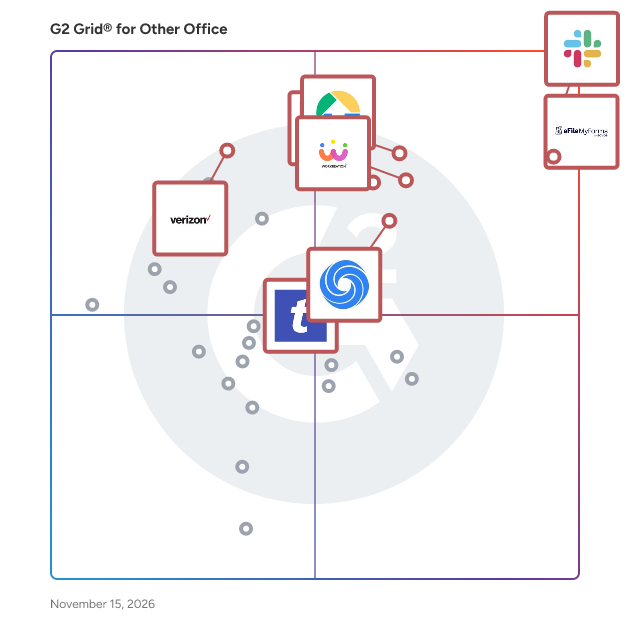
Highlighted products: Slack Connector for Jira, Sovos eFileMyForms, Google Drive & Docs for Confluence, Workreation®, Drive Uploader, NoteGPT, TransferNow, and Verizon Business Messaging.
Underlying data: [Grid® JSON](https://www.g2.com/categories/other-office/grids.json?focus%5B%5D=slack-connector-for-jira&focus%5B%5D=sovos-efilemyforms&focus%5B%5D=google-drive-docs-for-confluence&focus%5B%5D=workreation&focus%5B%5D=drive-uploader&focus%5B%5D=notegpt&focus%5B%5D=transfernow&focus%5B%5D=verizon-business-messaging)
Spellguard is a security platform for AI agents that routes all messages and tool calls through a Trusted Execution Environment for real-time policy enforcement, encrypted messaging, and tamper-proof audit logging.
Connect G2 to Claude or ChatGPT for answers grounded in G2's trusted reviews, comparisons, and pricing from real user insights.
Split PST File Software is a Windows tool that takes one oversized Outlook PST or OST data file and writes it out as several smaller PST parts. When you need to split PST file archives that have grown slow or crept toward the old 2 GB ANSI limit, it reads the data file directly, with no Outlook running and nothing uploaded. Your source is only read, never changed. Outlook has no built-in way to divide a data file, and its Compact Now command only reclaims empty space. Moving folders by hand into new files works for a small mailbox but turns slow and error-prone on a big one. This program does the job in one run: it can split PST file content in one of four ways, and you decide which folders take part. The result is a set of ordinary PST files that Outlook opens like any other, so you can attach the parts you still use and store the rest. 🛠️ How to use 1. Add one PST or OST file. Its folder tree loads on the left with checkboxes. 2. Untick folders you can live without, for example Deleted Items and Junk. 3. Pick a mode: By Size, By Date period, By Folder or By Sender, then set its value. 4. Choose a destination folder and press Start. Each part is saved as its own PST beside a CSV summary. 💼 Why IT and office teams pick it By Size cuts between messages with a cap in MB or GB (1 GB by default), so no email is torn across two files. By Date period groups mail by Year, Month or Week, with names like 2023.pst and 2024.pst. By Folder sends every top-level folder to a separate PST and keeps the hierarchy inside it. By Sender builds one PST per correspondent, and rare senders share an others.pst. A CSV report lists every part with its file name, message count and size. All processing stays on the local PC, which matters for private mail. 👥 Who uses it Helpdesk staff who inherit huge mailbox archives that time out during backup. Legal and compliance teams who need one custodian or one year in a file of its own. People with a decade of mail in a single data file who want to split PST file archives per year before something breaks. ❓ FAQ Can I split PST file into smaller parts without Outlook? Yes. The program reads the PST or OST itself, so Outlook does not need to be installed or open. How do I split PST mail into yearly files? Select By Date period and set Year. Every calendar year is written as its own PST, and undated items get a separate part. Will the parts be exactly the size I set? Close to it. Splitting happens between messages, so a part can land a little under the cap, and an extra large message becomes a part on its own. Does it modify my original file? No. The source is opened read-only and new PST files go to the folder you choose. 🖥️ The free trial processes a sample of your mail with no sign-up. Runs on Windows 11 and 10 with 4 GB of RAM and 1 GB of free disk space.
SPREADSHEETS are notoriously difficult to validate. Undetected errors have caused large financial losses and expensive litigation. The Spreadsheet Detective provides many features that can reduce errors and aid in model risk management.
SpudgerHQ is repair shop management software built around the day-to-day workflow of device repair businesses. It brings repairs, customers, devices, inventory, purchasing, point of sale, customer orders, reporting, and end-of-day operations together in one connected system. From the moment a customer walks in, SpudgerHQ helps keep the entire repair journey organized. Shops can capture customer and device details, document the issue and device condition, assign a technician, add parts and services, set pricing, track repairs waiting for parts, complete QA checks, collect payment, and retain the full repair history. SpudgerHQ also includes Device Damage Sketch, allowing staff to visually document pre-existing damage during intake, as well as digital Repair Agreements that customers can review and sign using QR or email signing sessions. Signed agreements are preserved with the repair, creating a clear historical record of what the customer agreed to. Customer and device histories make it easier to recognize returning customers and see their previous repairs and transactions. Instead of starting from scratch each time, shops can reuse existing customer and device information throughout their workflows. The built-in Point of Sale supports product and serialized-device sales, customer selection, discounts, split payments, and receipt printing. For sales that will be fulfilled later, Customer Orders allow shops to reserve stock or a specific serialized device, take deposits, track remaining balances, and complete fulfillment when the order is ready. Inventory management supports both quantity-based products and individually tracked devices using IMEI or serial numbers. Shops can manage purchasing and receiving, capture serialized device identifiers, print barcode and asset labels, make stock adjustments, and perform blind or guided stocktakes with variance review. SpudgerHQ also includes sales reporting, business-day and end-of-day cash management, configurable cash denominations, staff PIN access, and Workspace Lock for shared front-counter devices. SpudgerHQ is web-based and runs in the browser on desktop, tablet, and mobile. It is built for repair shops that need more than basic repair-ticket software. The goal is simple: keep the front counter, repair bench, inventory, sales, and daily operations connected in one place.
"All-in-One Phone Shop System with Great Staff Tracking"
Rating: 5.0/5.0 stars
— James N.
SQL Spreads is an Excel Add-in that allows non-technical end users to easily Update, Insert and Delete data in SQL Server tables directly from within Excel. A SQL Spreads Designer creates controlled SQL Spreads Excel documents that are connected to a SQL Server database and then shared with Data Editors (non-technical end users) where they take ownership and update the centralized data in SQL Server themselves.
StackFill is web-to-print personalization without the recreation tax. Most web-to-print platforms make a shop rebuild every design inside their own editor before customers can personalize it. StackFill starts from the print PDF you already approved for press. Upload the master file — a business card, letterhead, name badge, postcard or sell sheet. Click the elements customers are allowed to change, such as name, title, phone or a dropdown of office addresses, and lock everything else. Then send a hosted fill link, or drop the StackFill widget into your Shopify, WooCommerce or custom storefront. Customers type into the editable fields, see a live proof against your real artwork, and can pay before ordering. You receive print-ready output built from the locked template: CMYK-aware, trim- and bleed-aware, with PDF/X-1a and preflight checks. One template serves a single customer or a CSV of hundreds in one batch run. Plans start free; paid plans from $29/month.
Stardock is a leading innovator in consumer technology, including desktop extension software, gaming and digital subscriptions.
StatementLoom converts PDF bank and credit-card statements into files bookkeeping software imports: QBO for QuickBooks Online and Desktop, QFX for Quicken, OFX, Excel, CSV and a Xero-ready CSV. Before any download, each statement is checked against itself: the opening balance plus every transaction must equal the closing balance, and every running balance printed on the statement must follow from the row above. When a row does not fit, StatementLoom shows which one, and it can be corrected before export. Pages that never reconcile are not charged. Bookkeepers keep each client's statements apart in one workspace, with unlimited clients and seats on paid plans. Uploads are deleted automatically 24 hours after upload by default (workspaces can choose 7 or 30 days), and statements are never used to train AI models. StatementLoom reads text PDFs downloaded from online banking; scanned or photographed statements are not supported yet. A free converter handles up to 10 pages a day without an account and downloads Excel or CSV. A free viewer opens QBO, QFX and OFX files in the browser.
StencilPro is an AI-powered tattoo stencil creation tool designed to streamline the process of converting intricate tattoo designs into clean, precise stencils suitable for thermal printing. By leveraging advanced machine learning algorithms, StencilPro analyzes uploaded images, identifies key elements, and transforms them into professional-grade line art stencils within seconds. This rapid processing significantly reduces the time traditionally required for manual stencil preparation, allowing tattoo artists to focus more on their artistry and client interactions. The platform offers a user-friendly experience through a straightforward three-step process: users upload their tattoo design in common formats such as JPG or PNG; the AI system processes the image, optimizing contrast, correcting color balance, and enhancing gradients to ensure clarity; and finally, the generated stencil is ready for download and immediate use with thermal printers or traditional transfer methods. This seamless workflow ensures that artists can produce high-quality stencils efficiently, enhancing both productivity and the overall tattooing experience. StencilPro is equipped with several features tailored to meet the needs of professional tattoo artists. The AI-powered processing ensures precision by analyzing designs and converting them into clean line art, effectively removing backgrounds and optimizing for transfer paper. The system's lightning-fast processing capabilities enable the generation of professional stencils in seconds, a task that would otherwise take hours if done manually. Additionally, the platform is optimized for thermal printers and tattoo transfer paper, ensuring that the stencils are ready for immediate application. To cater to a diverse user base, StencilPro offers multiple subscription plans. The Starter Artist plan, priced at $9.99 per month, provides 50 AI-generated stencils monthly and includes high-quality PNG downloads, basic customer support, standard processing speed, and email support. The Pro Artist plan, at $14.99 per month, offers 100 AI-generated stencils per month, along with priority customer support, faster processing speed, and priority email support. For tattoo studios and shops with multiple artists, the Studio plan is available at $34.99 per month, offering 300 AI-generated stencils monthly, phone and email support, the fastest processing speed, and upcoming team access features. In addition to its core functionalities, StencilPro provides supplementary tools to enhance the stencil creation process. The Lite tracer allows for instant tracing with adjustable darkness, detail, and line-weight sliders, facilitating quick and efficient stencil creation. The Uniquify feature enables artists to create variations of existing designs, offering a range of uniqueness levels to suit different client preferences. The Armband tool assists in bending band designs to wrap evenly around the arm, ensuring a perfect fit. Lastly, the Canvas feature allows for the layout of multiple designs on a single A4 sheet, complete with size copies, cropping, rotation, text, layers, and printing capabilities for subscribers. Trusted by professional artists worldwide, StencilPro has become an essential tool in many tattoo studios. Its combination of advanced AI technology, user-friendly interface, and comprehensive features makes it a valuable asset for artists seeking to enhance their stencil creation process and overall workflow.
The ASTPP (A Smart TelePhony Platform) product, ASTPP can integrate with STIR/SHAKEN authentication to enhance call security and help businesses combat fraudulent calls. By implementing STIR/SHAKEN, ASTPP users can benefit from a more secure and reliable call environment, reducing the likelihood of receiving nuisance calls and bolstering trust in caller identification. This integration is part of a broader effort to improve call quality and protect end-users from unwanted and potentially harmful communications.
