Best Other Office Software - Page 49

How Many Other Office Software Products Does G2 Track?

Total Products under this Category: 1,052

Category Stats (Nov 2026)

  • Average Rating: 4.42/5 (↑0.02 vs Oct 2026) The average rating of products in this category, based on all submitted ratings
  • Top Trending Product: Spoke (+1.32%) - Among all products in this category, Spoke recorded the largest rating increase compared to last month

Last updated: November 15, 2026

How Does G2 Rank Other Office Software Products?

Why You Can Trust G2's Software Rankings:

  • 30 Analysts and Data Experts
  • 1,400+ Authentic Reviews
  • 1,052+ Products
  • Unbiased Rankings

G2's software rankings are built on verified user reviews, rigorous moderation, and a consistent research methodology maintained by a team of analysts and data experts. Each product is measured using the same transparent criteria, with no paid placement or vendor influence. While reviews reflect real user experiences, which can be subjective, they offer valuable insight into how software performs in the hands of professionals. Together, these inputs power the G2 Score, a standardized way to compare tools within every category.

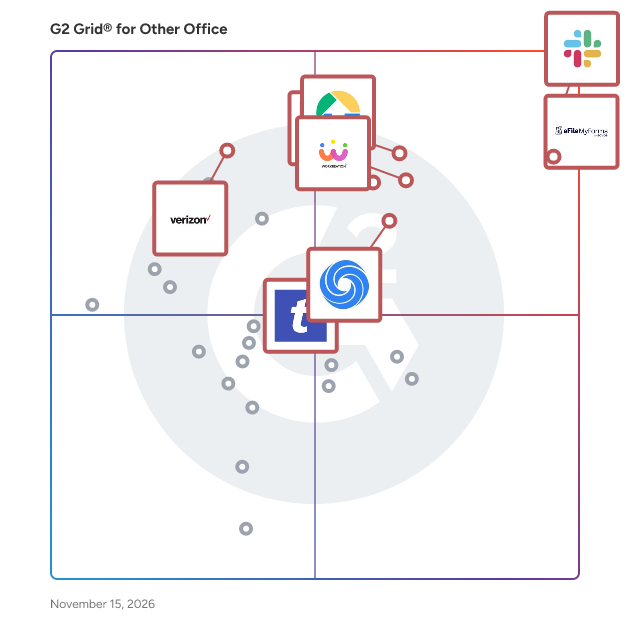
G2 Grid® for Other Office Software

G2 Grid® for Other Office Software plotting products by satisfaction and market presence

Highlighted products: Slack Connector for Jira, Sovos eFileMyForms, Google Drive & Docs for Confluence, Workreation®, Drive Uploader, NoteGPT, TransferNow, and Verizon Business Messaging.

Underlying data: [Grid® JSON](https://www.g2.com/categories/other-office/grids.json?focus%5B%5D=slack-connector-for-jira&focus%5B%5D=sovos-efilemyforms&focus%5B%5D=google-drive-docs-for-confluence&focus%5B%5D=workreation&focus%5B%5D=drive-uploader&focus%5B%5D=notegpt&focus%5B%5D=transfernow&focus%5B%5D=verizon-business-messaging)

Poper Blocker

Poper Blocker is a browser extension designed to enhance your online experience by automatically blocking pop-ups, ads, cookie requests, overlays, and other distractions across various websites. Compatible with Google Chrome, Microsoft Edge, and Firefox, it ensures a cleaner, more focused browsing environment. Key Features and Functionality: - Comprehensive Ad Blocking: Effectively removes all types of pop-ups and ads, including those on YouTube and social media platforms like Facebook, Instagram, LinkedIn, and Twitter. - Cookie Consent Removal: Automatically hides cookie request banners, streamlining your browsing experience. - Overlay and Notification Blocking: Eliminates disruptive overlays and site notifications that can hinder content visibility. - Social Media Content Filtering: Allows users to control their social media feeds by hiding posts containing specific keywords. - Customizable Interface: Enables users to hide any web element with a simple click, offering a personalized browsing experience. Primary Value and User Benefits: Poper Blocker addresses the common frustrations of online users by eliminating intrusive pop-ups, ads, and other distractions, leading to a smoother and more enjoyable browsing experience. Its comprehensive blocking capabilities ensure that users can focus on their desired content without interruptions. Additionally, the social media content filter empowers users to curate their feeds, reducing exposure to unwanted topics. By providing these features, Poper Blocker enhances productivity and user satisfaction during web navigation.

Who Is the Company Behind Poper Blocker?

Postilize

A digital AI assistant that recognizes key business events, drafts messages and allows users to retain customers, upsell and gain new business.

Who Is the Company Behind Postilize?

Powerline Connect

Powerline Connect is an AI-powered storm response platform built for powerline contractors, utilities, and storm restoration companies. It centralizes storm call-outs, crew building, fleet management, roster management, certifications tracking, and broker-ready reporting in one streamlined platform — replacing scattered group chats, spreadsheets, and phone trees. Built by lineman who have lived storm response, Powerline Connect eliminates manual coordination so teams can mobilize faster and deploy crews with confidence to restore power quickly and safely.

Who Is the Company Behind Powerline Connect?

AI can help you find the answers. G2 helps you trust them.

Connect G2 to Claude or ChatGPT for answers grounded in G2's trusted reviews, comparisons, and pricing from real user insights.

How it works

Presify

Presify is a Microsoft Teams presence tracker. It keeps the presence history Teams doesn't, so managers of remote and hybrid teams can see who's online, when, and for how long. The green dot shows one moment. It isn't the whole story. Someone can stay green all day and barely be around, and a mouse jiggler keeps Teams green just fine. Someone who always looks yellow might be doing their best work at 11pm. Presify keeps the record, so your read on your team comes from the pattern, not a glance. See the pattern: a timeline for every person and team, every status change on a 24-hour day view, online-time totals and trends, and up to a year of history depending on plan. Spot presence that looks gamed: six automatic flags on Pro and Scale (Standard includes one), each showing its math. Four of them (unbroken Available, no idle time, robotic regularity, no activity variation) are patterns a mouse jiggler or keep-alive script tends to leave; overnight presence and weekend uniformity flag unusual hours, which can just as easily be someone working late. A flag is a pattern worth a look, not proof. Quick and light: one read-only Microsoft sign-in by your Microsoft 365 admin, about five minutes. Nothing is installed on anyone's laptop. No screenshots, no keystrokes, no message content. Ask your AI assistant: a read-only Model Context Protocol (MCP) connector, on every plan, lets Claude, ChatGPT, Microsoft Copilot, or other MCP clients answer questions about presence history, online time, and flags. Presence isn't productivity. Presify gives you a directional read and a better starting point for a conversation. Need screenshots, keystroke logging, app tracking, or timesheets? Presify isn't that tool. Available to US customers, with a free trial and no credit card.

Who Is the Company Behind Presify?

Presstimator

Presstimator is a print estimating software that provides extensive and customizable costs and settings for production of newspapers and the commercial web offset press.

Who Is the Company Behind Presstimator?

Product Directory Plugin

The Product Directory Plugin for WordPress allows you to create a curated catalog of products with rich media like images and videos. It features an intuitive search and filter system for easy navigation. You can also monetize the directory by charging fees for adding and maintaining product listings.

Who Is the Company Behind Product Directory Plugin?

Productivity Page

Productivity Page simplifies note-taking with an intuitive design that's easy to use without advanced technical skills.

Who Is the Company Behind Productivity Page?

Professor Excel Tools

Professor Excel Tools is a lightweight Excel Add-In with more than 125 features. All functions are located on a new ribbon in Excel. - Get a whole new ribbon in Excel: Extend Excel with more than 125 very useful features. - Start right away: Professor Excel Tools are easy to use but still very powerful. - No crammed computer, no spam. Our add-in doesn’t use any background resources and doesn’t slow down your computer. The features include: - Amazing copy & paste functions solving all the shortcomings of the built-in paste options. - Real time-savers: Unique Excel functions or bulk-edit existing formulas and functions. - Need special elements in Excel? Bulk insert text, special symbols or flags with just a mouse click. - Editing cells the smart way: Instead of spending a lot of time on searching through Excel features, just apply often used functions with a click. And not only to one cell, but to all selected cells at the same time. - Powerful Workbook Tools: Break all links in Excel, create a table of contents, merge Excel files and Excel sheets, edit (hidden) named ranges and much, much more… - Formatting made easy: Use the Layout tools to apply professional formatting. Not only to the current worksheet, but also to the whole workbook! - Finished working on your contents? Share it with others with just a click. Or reduce the file size for large Excel files.

Who Is the Company Behind Professor Excel Tools?

ProofSnap

ProofSnap turns a web page into a sealed evidence package that anyone can verify. It is built for lawyers, investigators, OSINT analysts, journalists and compliance teams who need to show what a page displayed and when. It works as a browser extension for Chrome and Edge and as a server-side REST API with a web dashboard. The extension captures the page you are looking at, including content behind a login: full-page screenshot, HTML and text, metadata (URL, NTP-verified time, DNS, WHOIS, HTTP headers), an evidence PDF, a forensic log and a chain of custody record aligned with ISO/IEC 27037. It has dedicated capture for WhatsApp Web, Telegram, Discord, Slack, Messenger and LinkedIn, plus video recording, multi-tab sessions and certification of local files. With the API, captures run on ProofSnap servers in the EU, independent of the person who requests them. Schedule captures, receive webhooks, organise them into matters, place them on legal hold and download packages from the dashboard. Every file is hashed with SHA-256 and listed in a manifest signed with an RSA-4096 key. Depending on plan, the manifest is anchored to Bitcoin via OpenTimestamps and can carry an eIDAS qualified electronic timestamp from Disig a.s., a Qualified Trust Service Provider on the EU Trusted List. Packages can include a pre-filled FRE 902(13)/(14) declaration template for US filings. Anyone can verify a package without ProofSnap, using the bundled scripts, the free web Trust Verifier or the MIT-licensed command-line verifier. The evidence PDF is available in 29 languages. Subscriptions start at 8.99 USD per month with a 7-day trial, and pay-per-use packs are available.

Who Is the Company Behind ProofSnap?

ProposalKit.io

ProposalKit.io is a proposal tool for small creative agencies, typically 2 to 15 people, sending custom project proposals in the $5,000 to $50,000 range. The product is built around one idea: users control the content, ProposalKit.io controls the design. Instead of a blank canvas, users get a form-based editor with structured sections: cover, the challenge, the approach, timeline, investment, acceptance. Fill in the sections, and ProposalKit.io renders the final proposal using pre-designed templates. No font picker, no spacing controls, no layout work. Most agencies don't have a designer touching every proposal. Existing tools either output something that looks like a generic template or require hours of manual styling to look presentable. ProposalKit.io skips that by treating the template as the design system and the user as the writer. Who it's for The owner or principal of a small creative agency, the person writing and sending proposals themselves. Web design studios, branding shops, marketing consultants, software studios, photographers. Not built for enterprise sales teams, RFP-heavy industries, or organizations with multi-stage approval workflows. What's included Pre-designed proposal templates Form-based editor with structured sections Per-proposal analytics: open tracking, time spent per section, share detection Client share pages with no ProposalKit.io branding on any plan Electronic acceptance and signature Industry content presets across creative verticals Inline image uploads What it's not ProposalKit.io is not a document editor. There is no rich-text formatting, no font picker, no layout customization. Users who want full design control over every proposal are better off with Proposify or PandaDoc. ProposalKit.io is for agencies that would rather get consistent, well-designed output than customize every proposal.

Who Is the Company Behind ProposalKit.io?

Prosurfingtools

Prosurfingtools is a surf training app for coaches. Run technique sessions for surfers who want to progress and competition heats for those who want to win. Give feedback on every wave, send messages straight to your surfers' smartwatches while they're in the water, and review every session afterwards. And now with video analysis with AI.

Who Is the Company Behind Prosurfingtools?

Neeraja Prakash
NP
Researched and written by Neeraja Prakash
Updated June 16, 2025