Best Other Office Software - Page 31

How Many Other Office Software Products Does G2 Track?

Total Products under this Category: 629

Category Stats (Nov 2026)

  • Average Rating: 4.41/5 (↑0.01 vs Oct 2026) The average rating of products in this category, based on all submitted ratings
  • Top Trending Product: Sider (+7.14%) - Among all products in this category, Sider recorded the largest rating increase compared to last month

Last updated: November 01, 2026

How Does G2 Rank Other Office Software Products?

Why You Can Trust G2's Software Rankings:

  • 30 Analysts and Data Experts
  • 1,300+ Authentic Reviews
  • 629+ Products
  • Unbiased Rankings

G2's software rankings are built on verified user reviews, rigorous moderation, and a consistent research methodology maintained by a team of analysts and data experts. Each product is measured using the same transparent criteria, with no paid placement or vendor influence. While reviews reflect real user experiences, which can be subjective, they offer valuable insight into how software performs in the hands of professionals. Together, these inputs power the G2 Score, a standardized way to compare tools within every category.

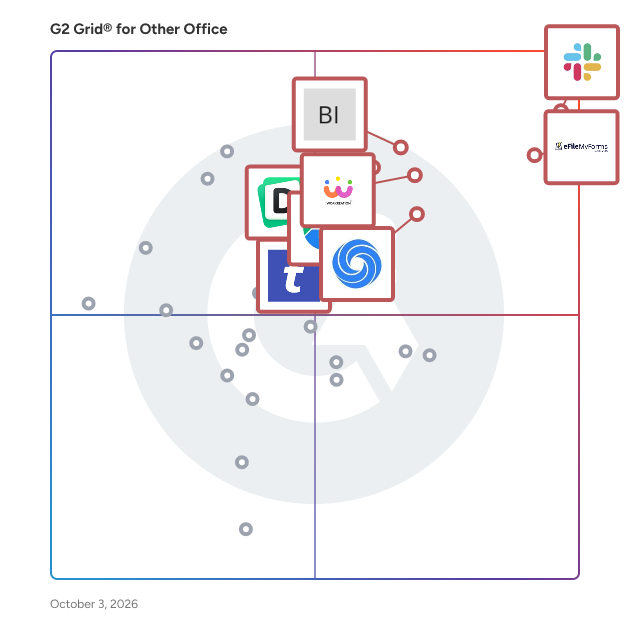
G2 Grid® for Other Office Software

G2 Grid® for Other Office Software plotting products by satisfaction and market presence

Highlighted products: Slack Connector for Jira, Sovos eFileMyForms, Google Drive & Docs for Confluence, Workreation®, Drive Uploader, NoteGPT, TransferNow, and Diffchecker.

Underlying data: [Grid® JSON](https://www.g2.com/categories/other-office/grids.json?focus%5B%5D=slack-connector-for-jira&focus%5B%5D=sovos-efilemyforms&focus%5B%5D=google-drive-docs-for-confluence&focus%5B%5D=workreation&focus%5B%5D=drive-uploader&focus%5B%5D=notegpt&focus%5B%5D=transfernow&focus%5B%5D=diffchecker)

PDF to MD

PDF to MD converts PDFs into editable Markdown for notes, documentation, and knowledge workflows. Basic conversion runs locally in the browser without uploading the PDF. Users can review and edit the output before exporting Markdown for tools such as Obsidian and Notion. Optional cloud OCR provides text recognition for scanned documents, while API and MCP access support automated document workflows. Basic conversion is free to try; Pro features and cloud OCR are paid options.

Who Is the Company Behind PDF to MD?

Pentalogic Reminder

Pentalogic Reminder is delivered as a SharePoint web part and an NT Service. Once installed on a SharePoint server you add it to a Web Part Page and then configure it to 'watch' one of your lists and send out Reminder emails according to your requirements.

Who Is the Company Behind Pentalogic Reminder?

AI can help you find the answers. G2 helps you trust them.

Connect G2 to Claude or ChatGPT for answers grounded in G2's trusted reviews, comparisons, and pricing from real user insights.

How it works

PlantUML Diagrams for Confluence

Stratus Add-ons is a vendor of Atlassian apps with over 10 years of development experience in the Atlassian Ecosystem.

Who Is the Company Behind PlantUML Diagrams for Confluence?

Poper Blocker

Poper Blocker is a browser extension designed to enhance your online experience by automatically blocking pop-ups, ads, cookie requests, overlays, and other distractions across various websites. Compatible with Google Chrome, Microsoft Edge, and Firefox, it ensures a cleaner, more focused browsing environment. Key Features and Functionality: - Comprehensive Ad Blocking: Effectively removes all types of pop-ups and ads, including those on YouTube and social media platforms like Facebook, Instagram, LinkedIn, and Twitter. - Cookie Consent Removal: Automatically hides cookie request banners, streamlining your browsing experience. - Overlay and Notification Blocking: Eliminates disruptive overlays and site notifications that can hinder content visibility. - Social Media Content Filtering: Allows users to control their social media feeds by hiding posts containing specific keywords. - Customizable Interface: Enables users to hide any web element with a simple click, offering a personalized browsing experience. Primary Value and User Benefits: Poper Blocker addresses the common frustrations of online users by eliminating intrusive pop-ups, ads, and other distractions, leading to a smoother and more enjoyable browsing experience. Its comprehensive blocking capabilities ensure that users can focus on their desired content without interruptions. Additionally, the social media content filter empowers users to curate their feeds, reducing exposure to unwanted topics. By providing these features, Poper Blocker enhances productivity and user satisfaction during web navigation.

Who Is the Company Behind Poper Blocker?

Postilize

A digital AI assistant that recognizes key business events, drafts messages and allows users to retain customers, upsell and gain new business.

Who Is the Company Behind Postilize?

Presstimator

Presstimator is a print estimating software that provides extensive and customizable costs and settings for production of newspapers and the commercial web offset press.

Who Is the Company Behind Presstimator?

Product Directory Plugin

The Product Directory Plugin for WordPress allows you to create a curated catalog of products with rich media like images and videos. It features an intuitive search and filter system for easy navigation. You can also monetize the directory by charging fees for adding and maintaining product listings.

Who Is the Company Behind Product Directory Plugin?

  • Seller: CreativeMinds
  • Year Founded: 2014
  • HQ Location: Kfar Bin-Nun, IL
  • Twitter: @CMPlugins
    1,493 Twitter followers
  • LinkedIn® Page: www.linkedin.com
    51 employees on LinkedIn®

Productivity Page

Productivity Page simplifies note-taking with an intuitive design that's easy to use without advanced technical skills.

Who Is the Company Behind Productivity Page?

Professor Excel Tools

Professor Excel Tools is a lightweight Excel Add-In with more than 125 features. All functions are located on a new ribbon in Excel. - Get a whole new ribbon in Excel: Extend Excel with more than 125 very useful features. - Start right away: Professor Excel Tools are easy to use but still very powerful. - No crammed computer, no spam. Our add-in doesn’t use any background resources and doesn’t slow down your computer. The features include: - Amazing copy & paste functions solving all the shortcomings of the built-in paste options. - Real time-savers: Unique Excel functions or bulk-edit existing formulas and functions. - Need special elements in Excel? Bulk insert text, special symbols or flags with just a mouse click. - Editing cells the smart way: Instead of spending a lot of time on searching through Excel features, just apply often used functions with a click. And not only to one cell, but to all selected cells at the same time. - Powerful Workbook Tools: Break all links in Excel, create a table of contents, merge Excel files and Excel sheets, edit (hidden) named ranges and much, much more… - Formatting made easy: Use the Layout tools to apply professional formatting. Not only to the current worksheet, but also to the whole workbook! - Finished working on your contents? Share it with others with just a click. Or reduce the file size for large Excel files.

Who Is the Company Behind Professor Excel Tools?

PST Converter

Magic Soft PST Converter is a standalone utility designed to access, preview, and export data from Outlook PST files into multiple widely-used formats. Operating entirely offline, it does not require Microsoft Outlook installation, making it suitable for individuals, IT professionals, system administrators, and corporate enterprises. The software supports conversion of PST files to formats such as EML, MBOX, MSG, PDF, CSV, VCF, and ICS. This versatility facilitates seamless data migration across different email clients and operating systems. Users can process single or multiple PST files simultaneously, enhancing efficiency in managing large datasets. Key features include the ability to handle healthy, corrupted, password-protected, or oversized PST files without Outlook dependencies. It preserves the original folder hierarchy, timestamps, headers, metadata, and attachments, ensuring data integrity during the conversion process. The read-only processing mode guarantees that the original PST files remain unaltered. The built-in preview function allows users to inspect mailbox items, including emails, contacts, calendars, tasks, notes, and attachments, before initiating the export. This ensures that only the necessary data is converted, optimizing storage and organization. Magic Soft PST Converter is compatible with all versions of Windows operating systems and supports both ANSI and UNICODE PST files. It offers a free demo version that previews all items and converts a limited number per folder, allowing users to evaluate its capabilities before purchasing a license. In summary, Magic Soft PST Converter provides a comprehensive solution for accessing and converting PST file data without the need for Outlook, offering flexibility and reliability for various data management needs.

Who Is the Company Behind PST Converter?

PST Splitter

Cigati PST Splitter is a powerful and reliable solution designed to divide large Outlook PST files into smaller, manageable parts without compromising data integrity. The software efficiently splits PST files based on size, date, folder, or email ID, making it ideal for users dealing with oversized or corrupted PST files. It ensures that all mailbox components, including emails, attachments, contacts, calendars, and other items, remain intact and properly structured during the splitting process. With a user-friendly interface, Cigati PST Splitter simplifies complex operations, allowing both technical and non-technical users to perform file splitting with ease. The tool supports all versions of Microsoft Outlook and Windows OS, ensuring broad compatibility. Additionally, it maintains original folder hierarchy and metadata, preventing any data loss or alteration. Whether you need to improve Outlook performance, manage storage efficiently, or prevent file corruption, Cigati PST Splitter provides a secure and efficient way to handle large PST files.

Who Is the Company Behind PST Splitter?

  • Seller: Cigati Solutions
  • Year Founded: 2018
  • HQ Location: Noida, Uttar Pradesh
  • Twitter: @Cigatisolution
    11 Twitter followers
  • LinkedIn® Page: www.linkedin.com
    4 employees on LinkedIn®

Public Appointment Scheduling

Approved Contact automatically syncs open dates and times to facilitate secure cross-company discussions with trusted business contacts.

Who Is the Company Behind Public Appointment Scheduling?

Public Folder Analyzer

Priasoft Public Folder Analyzer Priasoft Public Folder Analyzer is a comprehensive tool for managing and optimizing public folders in Microsoft Exchange and Office 365 environments. It offers detailed reporting on folder sizes, item counts, permissions, and usage patterns, helping organizations gain critical insights into their public folder infrastructure. Key Features: Comprehensive Reporting: Gain insights into folder sizes, item counts, permissions, and usage. Advanced Remediation: Export, delete, and split folder contents efficiently. Scalability: Supports hierarchies with over 100,000 folders. Intuitive Interface: User-friendly design for easy navigation and actionable insights. Deep Item-Level Analysis: Detailed analysis of usage patterns and interactions. Compare Report Data: Track changes over time for better decision-making. Priasoft’s expertise ensures that this tool meets the needs of large and complex environments, providing reliability and ease of use. For more detailed information, visit the Priasoft product page https://www.priasoft.com/exchange-migration/public-folder-analysis/.

Who Is the Company Behind Public Folder Analyzer?

  • Seller: Priasoft
  • Year Founded: 1999
  • HQ Location: Tempe, US
  • Twitter: @priasoft
    32 Twitter followers
  • LinkedIn® Page: www.linkedin.com
    7 employees on LinkedIn®
Neeraja Prakash
NP
Researched and written by Neeraja Prakash
Updated June 16, 2025