Best Other Office Software - Page 30

How Many Other Office Software Products Does G2 Track?

Total Products under this Category: 523

Category Stats (Sep 2026)

  • Average Rating: 4.4/5 The average rating of products in this category, based on all submitted ratings
  • Top Trending Product: NoteGPT (+0.81%) - Among all products in this category, NoteGPT recorded the largest rating increase compared to last month

Last updated: September 06, 2026

How Does G2 Rank Other Office Software Products?

Why You Can Trust G2's Software Rankings:

  • 30 Analysts and Data Experts
  • 1,100+ Authentic Reviews
  • 523+ Products
  • Unbiased Rankings

G2's software rankings are built on verified user reviews, rigorous moderation, and a consistent research methodology maintained by a team of analysts and data experts. Each product is measured using the same transparent criteria, with no paid placement or vendor influence. While reviews reflect real user experiences, which can be subjective, they offer valuable insight into how software performs in the hands of professionals. Together, these inputs power the G2 Score, a standardized way to compare tools within every category.

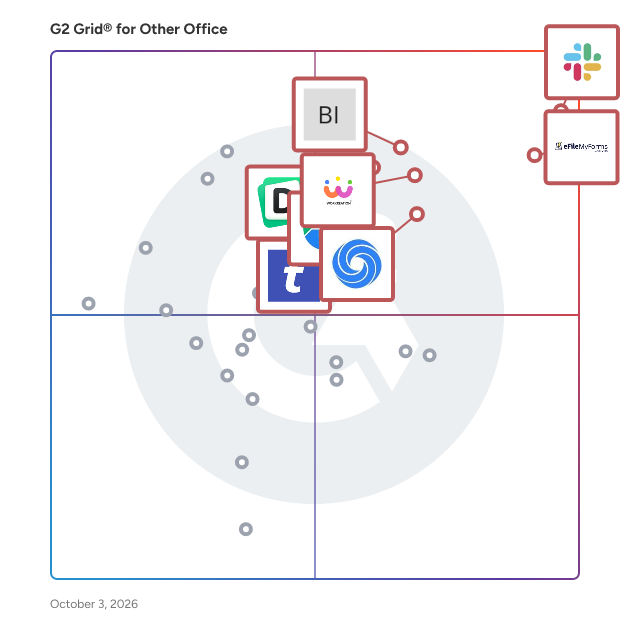
G2 Grid® for Other Office Software

G2 Grid® for Other Office Software plotting products by satisfaction and market presence

Highlighted products: Slack Connector for Jira, Google Drive & Docs for Confluence, Workreation®, NoteGPT, Drive Uploader, Diffchecker, TransferNow, and DocsAutomator.

Underlying data: [Grid® JSON](https://www.g2.com/categories/other-office/grids.json?focus%5B%5D=slack-connector-for-jira&focus%5B%5D=google-drive-docs-for-confluence&focus%5B%5D=workreation&focus%5B%5D=notegpt&focus%5B%5D=drive-uploader&focus%5B%5D=diffchecker&focus%5B%5D=transfernow&focus%5B%5D=docsautomator)

SmartMenu

SmartMenus is a jQuery Website Menu Plugin.

Average Rating: 3.3/5.0

Total Reviews: 2

How Do G2 Users Rate SmartMenu?

  • Quality of Support: 9.2/10 (Category avg: 8.7/10)
  • Ease of Use: 8.3/10 (Category avg: 9.0/10)

Who Is the Company Behind SmartMenu?

  • Seller: Vadikom
  • HQ Location: N/A
  • Twitter: @vadikom
    116 Twitter followers
  • LinkedIn® Page: www.linkedin.com
    1 employees on LinkedIn®

Who Uses This Product?

  • Company Size: 100% Medium

What Are Recent G2 Reviews of SmartMenu?

Smart Service Qualification - Encash your Network

SmartSQ is a cutting-edge Queue Management System offered by Lepton Software. Our advanced solution empowers businesses to revolutionize their customer service experience by streamlining queue management processes. Key Features: Automated Ticketing: Efficiently organize customer queues with automated ticketing, ensuring a fair and organized waiting system. Real-time Queue Monitoring: Gain real-time visibility into queue status, wait times, and service availability for proactive management. Customer Notifications: Keep customers informed and engaged with SMS alerts and digital displays, reducing perceived wait times. Analytics and Reporting: Access comprehensive data and insightful reports to optimize resources, identify bottlenecks, and enhance service levels. Customizable Interface: Tailor the system to match your brand's identity and seamlessly integrate it into your existing infrastructure. Benefits: Enhanced Customer Experience: Minimize wait times, improve service efficiency, and provide a seamless and personalized experience. Boosted Staff Productivity: Empower your staff with effective tools to manage customer queues, leading to faster service delivery. Optimized Resource Allocation: Utilize data-driven insights to allocate resources efficiently and optimize staff schedules. Actionable Business Insights: Leverage powerful analytics to identify trends, measure performance, and make informed decisions.

Who Is the Company Behind Smart Service Qualification - Encash your Network?

Snippets for Confluence

Snippets for Confluence is a powerful add-on designed to enhance collaboration by enabling users to seamlessly embed code snippets into Confluence pages and blog posts. By simply pasting a snippet URL into the editor, the content is automatically embedded using the Snippet macro, ensuring that documentation remains synchronized with the latest code changes. Key Features and Functionality: - Embed Code Snippets: Easily integrate code snippets from various providers, including Bitbucket Server, Bitbucket Cloud, and GitHub Gist, directly into Confluence pages. - Automatic Synchronization: Ensure that embedded code snippets always reflect the most recent version, maintaining up-to-date documentation without manual intervention. - Access Control: Manage visibility and access permissions for snippets, allowing for private, workspace-shared, or publicly accessible code segments. - Commenting and Collaboration: Facilitate team collaboration by enabling comments on snippets, fostering discussions and feedback directly within Confluence. - Cloning Capability: Clone snippets with a single click to work on them locally, then push changes back to Bitbucket Cloud, streamlining the development workflow. - Starred Snippets Collection: Organize and quickly access frequently used snippets by starring them, creating a personalized collection for efficient reuse. Primary Value and User Benefits: Snippets for Confluence addresses the challenge of keeping technical documentation aligned with evolving codebases. By embedding live code snippets that automatically update, it eliminates the need for manual updates, reducing errors and saving time. This integration fosters a more collaborative environment, allowing teams to share, discuss, and manage code snippets within Confluence, thereby enhancing productivity and ensuring that documentation remains accurate and current.

Who Is the Company Behind Snippets for Confluence?

  • Seller: Appfire
  • Year Founded: 2005
  • HQ Location: Boston, Massachusetts
  • Twitter: @Appfire
    1,632 Twitter followers
  • LinkedIn® Page: www.linkedin.com
    727 employees on LinkedIn®

SnipZip

SnipZip is a macOS archive utility for creating, inspecting, and extracting compressed files. The software supports over 20 formats, including ZIP, 7Z, RAR, TAR, ISO, and CAB. The search function allows files to be located and extracted from archives without unpacking the entire contents. Images, PDFs, and text files can be previewed within archives before extraction. Nested archives can be browsed in place without extracting intermediate layers. Finder Quick Look integration enables archive contents to be previewed directly in Finder. Apple Shortcuts support allows archive tasks to be automated. The Pro version includes a Workflow Builder for chaining actions into reusable workflows. All file processing occurs locally on the device, with no uploads or telemetry. The free version handles basic ZIP operations, while the Pro version adds password protection, archive splitting, and command-line tools.

Who Is the Company Behind SnipZip?

Softaken IMAP Attachment Extractor

Softaken IMAP Attachment Extractor Software is the most prominent and efficient software. It extracts all the attachments from the selected email folders without generating any error. It allows users to save their results to selected locations. This software gives 100% accurate and error-free results. It is designed to run on Windows, so it can be easily installed on Windows 11, 10, 8.1, 8, 7, XP, Vista and all operating systems. No folder structure and email attributes are affected while exporting IMAP attachments. The entire IMAP attachment extraction process is done safely without any issues or data loss. Users just need an internet connection and proper login credentials to download IMAP server attachments. Extracting attachments from an IMAP server is so simple and intuitive with the help of this tool that any beginner or professional user can use it. Key Features: It can save all attachments from the IMAP server. It supports all IMAP servers like Gmail, Yahoo Mail, AOL, Office365, etc. Extract IMAP attachments into different file formats like DOC, PNG, JPG, RAR, XLS, etc. It extracts all attachments from the IMAP server in bulk. This tool also provides a free demo package in which users can extract some attachments from the IMAP server for free. For any query, the user can contact their technical team for assistance; they are available round the clock.

Who Is the Company Behind Softaken IMAP Attachment Extractor?

SoftMagnat PST Files Splitter

SoftMagnat PST Files Splitter is a dedicated application intended to split large PST files into smaller, easier-to-handle sections. It provides various splitting options, including by size, date, or email identification. The program accommodates password-protected documents, UNICODE and ANSI formats, and mitigates data damage from excessively large PST files.

Who Is the Company Behind SoftMagnat PST Files Splitter?

Somorr

Somorr Is a company oriented in e-mail verification and it ensure the validity of the recipient e-mail address. It's a solution often used by salespeople and marketers - Salesman uses it to verify the e-mail address before sending the e-mail to the prospect. - There's use it to verify their bulk list before sending a newsletter. Somorr email verifier, have the reputation of being one of the best solutions out there, because they are completely different algorithm power with artificial intelligence (AI) to verify e-mail addresses.

Who Is the Company Behind Somorr?

  • Seller: Somorr
  • Year Founded: 2022
  • HQ Location: Montreal, CA
  • LinkedIn® Page: www.linkedin.com
    2 employees on LinkedIn®

Source Editor for Confluence

Source Editor for Confluence is a powerful browser-based tool that enables users to directly edit the XHTML storage format of Confluence pages. This capability allows for precise control over page formatting, facilitating tasks such as fixing formatting issues, migrating macros, and enhancing overall page structure. Key Features and Functionality: - Intuitive XHTML Editing: Modify the underlying XHTML of Confluence pages to address formatting challenges and customize content presentation. - Convenient Access: Access the editor via a button on each Confluence page, streamlining the editing process. - Advanced Editing Tools: Utilize features like find and replace with regex support, code folding, and syntax highlighting to enhance editing efficiency. - Preview Changes Instantly: Preview edits before submission to ensure desired outcomes without iterative back-and-forth adjustments. - User-Friendly Interface: Benefit from a Visual Studio Code-based interface with light and dark modes, minimap navigation, and precise copy-paste functionality. Primary Value and User Solutions: Source Editor for Confluence empowers users to have granular control over their page content by providing direct access to the page's source code. This tool is particularly valuable for users seeking to correct formatting anomalies, implement customizations beyond the standard editor's capabilities, and streamline the migration of macros. By offering a suite of advanced editing features within an intuitive interface, it enhances productivity and ensures that Confluence pages meet specific formatting and content requirements.

Who Is the Company Behind Source Editor for Confluence?

  • Seller: Appfire
  • Year Founded: 2005
  • HQ Location: Boston, Massachusetts
  • Twitter: @Appfire
    1,632 Twitter followers
  • LinkedIn® Page: www.linkedin.com
    727 employees on LinkedIn®

Sovos eFileMyForms

File 1099s & W-2s online. No subscription. Pay per form. eFileMyForms, powered by Sovos, is a self-service electronic filing platform for IRS information returns — including 1099-NEC, 1099-MISC, 1099-INT, 1099-DIV, W-2, W-2G, and ACA 1095 forms. Designed for small businesses, bookkeepers, and accounting professionals, eFileMyForms lets you import recipient data, validate TIN and name combinations against IRS records, submit forms electronically to federal and participating state agencies, and deliver recipient copies through print-and-mail or eDelivery. Unlike subscription-based tools, eFileMyForms uses pay-per-form pricing with no annual commitment — so you pay only for the forms you actually file. Built-in error checks flag common mistakes before submission, and the platform supports IRS IRIS filing for the mandatory post-FIRE transition. Backed by Sovos and its 35+ years of tax compliance expertise, eFileMyForms is an IRS-authorized electronic filing provider.

Who Is the Company Behind Sovos eFileMyForms?

  • Seller: Sovos
  • Year Founded: 2015
  • HQ Location: Wilmington, MA
  • Twitter: @SovosCompliance
    1,360 Twitter followers
  • LinkedIn® Page: www.linkedin.com
    1,856 employees on LinkedIn®

Spreadsheet Detective

SPREADSHEETS are notoriously difficult to validate. Undetected errors have caused large financial losses and expensive litigation. The Spreadsheet Detective provides many features that can reduce errors and aid in model risk management.

Who Is the Company Behind Spreadsheet Detective?

SQL Spreads

SQL Spreads is an Excel Add-in that allows non-technical end users to easily Update, Insert and Delete data in SQL Server tables directly from within Excel. A SQL Spreads Designer creates controlled SQL Spreads Excel documents that are connected to a SQL Server database and then shared with Data Editors (non-technical end users) where they take ownership and update the centralized data in SQL Server themselves.

Who Is the Company Behind SQL Spreads?

Stardock

Stardock is a leading innovator in consumer technology, including desktop extension software, gaming and digital subscriptions.

Who Is the Company Behind Stardock?

  • Seller: Stardock
  • Year Founded: 1993
  • HQ Location: Plymouth, MI
  • Twitter: @Stardock
    30,355 Twitter followers
  • LinkedIn® Page: www.linkedin.com
    56 employees on LinkedIn®

STIR/SHAKEN Call Authentication

The ASTPP (A Smart TelePhony Platform) product, ASTPP can integrate with STIR/SHAKEN authentication to enhance call security and help businesses combat fraudulent calls. By implementing STIR/SHAKEN, ASTPP users can benefit from a more secure and reliable call environment, reducing the likelihood of receiving nuisance calls and bolstering trust in caller identification. This integration is part of a broader effort to improve call quality and protect end-users from unwanted and potentially harmful communications.

Who Is the Company Behind STIR/SHAKEN Call Authentication?

  • Seller: ASTPP
  • Year Founded: 2013
  • HQ Location: Ahmedabad, IN
  • LinkedIn® Page: www.linkedin.com
    1 employees on LinkedIn®
Neeraja Prakash
NP
Researched and written by Neeraja Prakash
Updated June 16, 2025