Best Other Office Software - Page 19

How Many Other Office Software Products Does G2 Track?

Total Products under this Category: 629

Category Stats (Nov 2026)

  • Average Rating: 4.41/5 (↑0.01 vs Oct 2026) The average rating of products in this category, based on all submitted ratings
  • Top Trending Product: Sider (+7.14%) - Among all products in this category, Sider recorded the largest rating increase compared to last month

Last updated: November 01, 2026

How Does G2 Rank Other Office Software Products?

Why You Can Trust G2's Software Rankings:

  • 30 Analysts and Data Experts
  • 1,300+ Authentic Reviews
  • 629+ Products
  • Unbiased Rankings

G2's software rankings are built on verified user reviews, rigorous moderation, and a consistent research methodology maintained by a team of analysts and data experts. Each product is measured using the same transparent criteria, with no paid placement or vendor influence. While reviews reflect real user experiences, which can be subjective, they offer valuable insight into how software performs in the hands of professionals. Together, these inputs power the G2 Score, a standardized way to compare tools within every category.

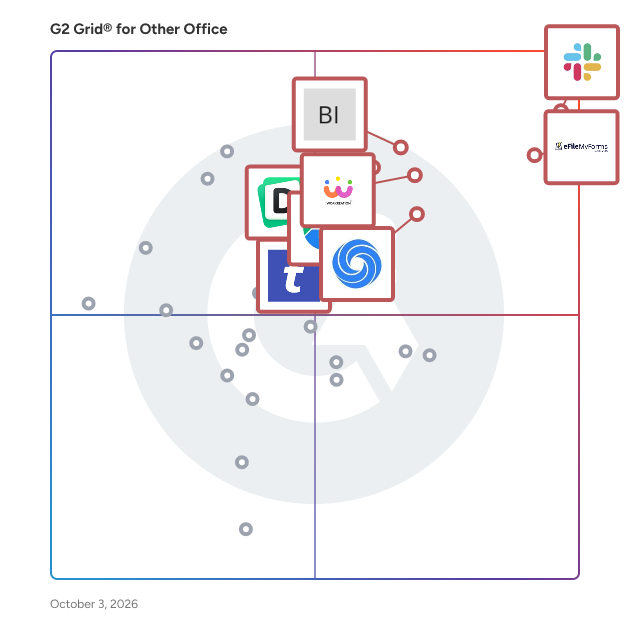
G2 Grid® for Other Office Software

G2 Grid® for Other Office Software plotting products by satisfaction and market presence

Highlighted products: Slack Connector for Jira, Sovos eFileMyForms, Google Drive & Docs for Confluence, Workreation®, Drive Uploader, NoteGPT, TransferNow, and Diffchecker.

Underlying data: [Grid® JSON](https://www.g2.com/categories/other-office/grids.json?focus%5B%5D=slack-connector-for-jira&focus%5B%5D=sovos-efilemyforms&focus%5B%5D=google-drive-docs-for-confluence&focus%5B%5D=workreation&focus%5B%5D=drive-uploader&focus%5B%5D=notegpt&focus%5B%5D=transfernow&focus%5B%5D=diffchecker)

Date Picker by Powerviz

Date Picker by Powerviz is an advanced Date slicer that lets you apply page-level filters to a date-type column. This slicer is highly customizable and user-friendly. It has the developer friendly wizard to build the visual with few clicks. It has all the advanced features such as default selection, presets, themes, and slicer sync mode, in addition to a range of customizations.

Who Is the Company Behind Date Picker by Powerviz?

  • Seller: Powerviz
  • HQ Location: South Plainfield, US
  • Twitter: @Powerviz_ai
    7 Twitter followers
  • LinkedIn® Page: www.linkedin.com
    5 employees on LinkedIn®

Date Picker for Microsoft Excel

Date Picker for Excel by Uniform Software Limited is a Microsoft Excel add-in that makes entering and editing dates faster, easier, and more reliable. Instead of manually typing dates and worrying about regional date formats such as MM/DD/YYYY versus DD/MM/YYYY, users can select dates from an intuitive pop-up calendar directly inside Excel. The add-in works quietly in the background and automatically recognizes cells that are likely to contain dates. When you select an appropriate cell, a small calendar button can appear next to it, allowing you to choose a date with just a few clicks. Date Picker is designed for anyone who works with dates regularly in Excel, including business users, project managers, administrators, accountants, analysts, planners, and anyone maintaining Excel-based schedules, forms, lists, or databases. Why Use Date Picker for Excel? Entering dates manually in Excel can be surprisingly error-prone. Users may enter dates in the wrong regional format, mistype a value, or spend unnecessary time navigating through dates. Date Picker provides a simple alternative: • Select a date from a visual calendar instead of typing it manually. • Automatically detect cells that are likely to contain dates. • Navigate multiple months at once. • Support international and custom Excel date formats. • Display week numbers when needed. • Configure the first day of the week to match your region or workflow. • Access the calendar from an Excel cell or through the right-click shortcut menu. • Customize the calendar's appearance and behavior. • Continue using your existing Excel workbooks without modifying each workbook individually. Key Features Automatic Date Cell Detection - Date Picker can automatically identify cells that are intended for dates. It can use several signals, including: • Existing Excel date format codes • Date-like cell values • Cells immediately below existing date values • Column headings containing the word "date" The column-heading detection feature supports more than 50 languages, making the add-in suitable for Excel users working with different regional and language settings. Pop-Up Calendar - When you select a date cell, Date Picker can display a convenient in-cell button that opens the calendar. Select a date from the calendar and the value is entered into the Excel cell. The calendar can also be configured to appear automatically or opened on demand, depending on how you prefer to work. Multi-Month Calendar For tasks involving dates across a longer period, you can display multiple months simultaneously. The calendar supports layouts of up to 10 × 10 months, making it useful for project planning, scheduling, date-range selection, and other activities where navigating between months is important. International Date Format Support Different countries and organizations use different date formats. A date such as 03/04/2026 can mean March 4 or April 3 depending on the regional convention. Date Picker helps reduce this type of confusion by working with Excel's date formats and providing options for custom date-format handling. Users can also configure specific Excel format codes as valid or invalid for date detection. This makes the add-in particularly useful for international teams and workbooks that use non-standard or customized date formats. 50+ Language Support Date Picker's automatic date-column detection recognizes the word "date" in more than 50 languages. This allows the date detection system to work with Excel installations using different languages and regional settings. Week Numbers The calendar can display week numbers, including ISO week numbers, which can be useful for project management, production planning, reporting, scheduling, and other workflows organized around calendar weeks. You can also configure which day is considered the first day of the week. Right-Click Integration For users who prefer working directly within the spreadsheet rather than using the Ribbon, Date Picker can add a Pop-up Calendar command to Excel's cell right-click menu. This provides a convenient way to open the calendar without moving to the Ribbon. Automatic Date Formatting Date Picker can optionally apply your preferred date format to cells that do not already have an appropriate format. This can help maintain consistent date formatting throughout a spreadsheet. Customizable Calendar Appearance The calendar can be customized to better match your Excel environment. You can configure elements such as: • Calendar border • Background • Title bar • Trailing dates • Calendar layout • Number of months displayed • Windows theme colors • Saved color presets You can save preferred color combinations as presets and switch between them when needed. Default Date When working with blank cells, you can configure a default date for the calendar instead of always opening on the current date. This can be particularly useful when entering a large number of dates associated with a specific project, reporting period, or scheduling period. Excel Ribbon Integration Date Picker integrates with Excel's Ribbon interface. You can install it as a dedicated Pop-up Calendar Ribbon tab or as a compact group within Excel's Insert tab. The add-in can also be enabled or disabled instantly when you do not need the calendar. Designed for Everyday Excel Work Date Picker is useful in many common Excel scenarios, including: • Project schedules and project plans • Employee and personnel records • Customer databases • Sales and order records • Financial spreadsheets • Accounting and bookkeeping • Invoices and quotations • Expense reports • Inventory management • Appointment and event schedules • Production planning • Delivery schedules • Research and data collection • Administrative forms • Business reports • Excel-based databases • Any spreadsheet requiring frequent date entry Because the add-in works at the Excel level, it can be used with existing workbooks rather than requiring users to redesign individual spreadsheets around a particular date-picker control. A Better Alternative to Manual Date Entry Excel already provides powerful date functionality, but entering dates manually can still lead to inconsistent formatting and unnecessary typing. Date Picker provides a visual date-selection workflow while retaining Excel's normal date values and functionality. This means dates selected through the calendar can continue to be used for calculations, sorting, filtering, charts, PivotTables, formulas, and other Excel features. The result is a more convenient way to enter dates without changing the way users work with Excel data. Works with Existing Excel Workbooks Date Picker is designed as an Excel add-in rather than a feature that must be individually embedded into each workbook. Once installed, it can work with your Excel files without requiring you to add a separate date-picker control to every worksheet or template. This is especially useful for users and organizations that work with many different Excel files. Microsoft Excel Compatibility Date Picker supports: • Microsoft Excel 365 • Microsoft Excel 2021 • Microsoft Excel 2019 • Microsoft Excel 2016 • Microsoft Excel 2013 It supports both 32-bit and 64-bit Excel installations on Windows 10 and Windows 11. Available Through Microsoft Store and Microsoft Marketplace Date Picker is sold through Microsoft Store and Microsoft Marketplace, providing convenient purchasing and deployment options for different types of users. Microsoft Store is a convenient choice for users who use a Microsoft account, particularly for personal use. Microsoft Marketplace is designed for users with work or school accounts and can be especially convenient for business and enterprise environments. Microsoft Marketplace subscriptions can be managed through the Microsoft 365 administration environment. A traditional desktop edition is also available for users who prefer a conventional software installation and licensing model. Simple Installation and Deployment For the Microsoft Store edition, installation is handled through Microsoft Store. For the Microsoft Marketplace edition, organizations can manage the subscription through their Microsoft environment. Who Is Date Picker For? Date Picker is a good fit for: • Individual Excel users who enter dates frequently • Small businesses using Excel for day-to-day operations • Project managers maintaining schedules in Excel • Accounting and finance teams • Administrative staff • Sales and customer-service teams • Analysts and data-entry users • Organizations maintaining Excel-based forms and databases • International teams working with different date formats • Anyone who wants a faster and more convenient way to enter dates in Excel Key Benefits at a Glance • Faster date entry — Select dates from a calendar instead of typing them. • Fewer date-format mistakes — Reduce confusion between regional date formats. • Automatic detection — Let the add-in identify likely date cells automatically. • International support — Recognizes date-column headings in 50+ languages. • Multi-month navigation — Display multiple months simultaneously. • Flexible access — Use the in-cell button, Ribbon, or right-click menu. • Customizable — Adjust calendar layout, colors, week numbers, and other settings. • Excel-native workflow — Continue working with normal Excel dates, formulas, sorting, filtering, and reporting. • Works across workbooks — No need to add a separate date-picker control to every Excel file. • Microsoft Store availability — Convenient installation and subscription management for Microsoft account users. • Microsoft Marketplace availability — Convenient purchasing and administration for organizations and business users. Date Picker for Excel makes one of the most common Excel tasks—entering dates—simpler, faster, and less error-prone.

Who Is the Company Behind Date Picker for Microsoft Excel?
Dealroom 360

Shared B2B dealrooms built for Salesforce + Slack. Every deal has two sides, and only one of them has software. The rep has pipeline, forecasts, activity history and a dozen dashboards. The buying committee, the people who actually decide, has whatever happened to land in their inbox. So deals stall in places nobody can see. The security questionnaire sits with someone who was never on the call. The contract goes to a procurement lead who was forwarded a thread with no context. The champion is doing their best to sell internally using an attachment they can't be sure is current. A dealroom fixes the visible half of that: one address, always current, open to everyone who matters. Driving it from Salesforce fixes the rest, because a room the rep has to maintain by hand is a room that's out of date by Thursday. - Build a personalised dealroom straight from the Opportunity in Salesforce - Questions, bookings and live chats are summarised by AI and logged as Salesforce Activities, automatically. - Contracts signed in Dealroom360 land back as Salesforce Documents, never lose a contract again. - Room events move the opportunity stage on their own

Who Is the Company Behind Dealroom 360?

AI can help you find the answers. G2 helps you trust them.

Connect G2 to Claude or ChatGPT for answers grounded in G2's trusted reviews, comparisons, and pricing from real user insights.

How it works

DeleteOnClick

DeleteOnClick is a straightforward utility designed to securely and permanently delete files from your computer, ensuring they cannot be recovered by any means. By integrating directly into the Windows context menu, it allows users to erase sensitive data with a simple right-click, providing an efficient solution for maintaining privacy and data security. Key Features: - One-Click Secure Deletion: Permanently removes files with a single right-click, making them unrecoverable. - Compliance with U.S. DOD Standards: Adheres to the U.S. Department of Defense 5220.22-M secure file deletion standard. - File Renaming Before Deletion: Renames files to random filenames prior to deletion, preventing identification of the original file names. - Wipe Free Disk Space: Offers options to quickly or securely wipe all free space on a disk, ensuring previously deleted files are irretrievable. - Secure Recycle Bin Emptying: Provides the ability to securely empty the recycle bin, permanently erasing its contents. - Attribute and Date Wiping: Wipes all file dates and attributes before deletion to eliminate residual data traces. The primary value of DeleteOnClick lies in its ability to provide users with a reliable and user-friendly method for permanently erasing sensitive files, thereby safeguarding personal and confidential information from unauthorized recovery. This is particularly crucial for individuals and organizations that handle sensitive data and require assurance that deleted files cannot be restored.

Average Rating: 4.6/5.0

Total Reviews: 12

How Do G2 Users Rate DeleteOnClick?

  • Quality of Support: 9.0/10 (Category avg: 8.7/10)
  • Ease of Use: 9.6/10 (Category avg: 9.0/10)

Who Is the Company Behind DeleteOnClick?

  • Seller: 2BrightSparks
  • Year Founded: 2004
  • HQ Location: N/A
  • Twitter: @2BrightSparks
    1,798 Twitter followers
  • LinkedIn® Page: www.linkedin.com
    4 employees on LinkedIn®

Who Uses This Product?

  • Company Size: 67% Small, 25% Medium

What Are Recent G2 Reviews of DeleteOnClick?

Deltasoft Randomizer

DeltaSoft's Text, Image, Audio, and Video Randomizer offers comprehensive randomization capabilities: Text Randomizer: - Generates millions of variations in minutes. - Supports three languages: Russian, English, and Simplified Chinese. - Offers three synonym databases and transliteration. - Allows text stylization and isolation of keywords. - Automatic and manual modes for easy use. Image Randomizer: - Batch processing with fifteen effects. - Text overlay with spintax support. - Random metadata generation for uniqueness. Audio Randomizer: - Enhances conversion rates with spectrogram. - Eleven customizable effects for audio messages. - Spectrogram visualization for visual interest. Video Randomizer: - Eleven video effects for versatility. Additional features include list management, email parsing, and nickname generation. Continuous updates and user-requested features ensure a user-friendly experience. Flexible resource allocation prevents system overload. Multitasking capabilities allow simultaneous operations. Language support in interface and documentation caters to global users.

Who Is the Company Behind Deltasoft Randomizer?

Design Your Packaging

Wax Papers Co makes custom packaging design more accessible by bringing creative customization and a variety of food packaging solutions together. Use our online design tool to develop packaging concepts that suit your products, communicate your brand identity, and help your business present food in a distinctive and professional way. Visit : https://waxpapers.co/

Who Is the Company Behind Design Your Packaging?

DFY Inbox Setup

DFY Inbox Setup is a cold email infrastructure platform that gives lead generation agencies, founders and B2B sales teams ready-to-send cold email inboxes on their own sending domains, without doing the technical setup themselves. Customers order online in a few minutes. They choose Google Workspace inboxes, Microsoft 365 (Outlook) inboxes or Azure bulk inboxes, pick sending domains that look like their brand (bought for them, or their own domains), and set the sender names for every inbox. The platform shows the price as the order is built, and larger orders can request a quote. The DFY Inbox Setup team then buys or connects the domains, adds SPF, DKIM, DMARC and MX records to every domain, creates each inbox, and checks every inbox by hand before delivery. Microsoft 365 inboxes also get DKIM signing and authenticated SMTP switched on, so they connect to sending tools without extra work. Most orders are ready in 24 to 48 hours. When an order is ready, customers download a CSV formatted for Instantly, Smartlead or other cold email sending tools, or ask the team to connect the inboxes for them. A customer dashboard shows every inbox, domain and order with live status for each step, and agencies can manage separate client workspaces from one account. Key details: - Google Workspace inboxes from $3 per inbox per month, Microsoft 365 inboxes from $3.50, and Azure bulk inboxes at $40 per domain per month for up to 100 inboxes. - 3 inboxes per domain recommended for Google Workspace and Microsoft 365, with a maximum of 5. - Domains bought for customers at $12 per year; customers can bring their own domains for free. - No setup fee, minimum order of 10 inboxes, billed monthly, cancel any time. -

Who Is the Company Behind DFY Inbox Setup?

DidItBetter

Exchange public folder sync for calendars, contacts, tasks, posts/mail. Sync your global address list (GAL) to mobiles.

Who Is the Company Behind DidItBetter?

  • Seller: DidItBetter Software
  • Year Founded: 1988
  • HQ Location: Tampa Bay area, US
  • Twitter: @diditbetter
    8 Twitter followers
  • LinkedIn® Page: www.linkedin.com
    3 employees on LinkedIn®

Discord Timestamp

Discord Timestamp Generator lets you create a dynamic date-time display in your Discord messages. Simply choose your time and copy the code into Discord. The result will be a dynamic timestamp that displays differently for everyone based on their own timezone.

Who Is the Company Behind Discord Timestamp?

Disfora

Disfora is a privacy-first comment system and Disqus alternative. Add threaded comments, five-star ratings, polls and forms to any website with one line of code. Comments support markdown, @mentions, GIFs and votes; ratings allow one vote per reader; polls can be scheduled; and form submissions land in a spam-filtered inbox with email alerts and CSV export. The widget renders in the page (no iframe), carries no ads or third-party trackers, and can run on your own subdomain with first-party cookies. 22 ready-made automation rules catch spam, slurs and scams before they post, alongside banned keywords, shadow bans and team roles with an audit log. Signed webhooks send every comment, rating and form event to your own tools. Works on any site, including static sites, Next.js, Ghost, Webflow and WordPress via the official plugin, plus Chrome and Firefox extensions. Disqus comments can be imported. Free for one site; paid plans from $5/month.

Who Is the Company Behind Disfora?

DMYourCRM

DMYourCRM connects Slack to your CRM and provides the flexibility to track CRM events in Slack. From receiving new leads to checking task statuses, discussing deals, and more, you’ll have a complete picture of what’s happening in your sales right within your Slack. Discuss deals, share insights, and make decisions right in Slack. When a notification comes through, your team can quickly chat about it, ask questions, or share relevant information. It’s as if everyone’s on the same page instantly, keeping the sales process smooth and transparent. Available CRMs: Capsule CRM Why do people use DMYourCRM? ✔ Informing in real-time: Important tasks, like following up with leads or closing deals, won’t slip through the cracks. The reminders in Slack keep everyone focused on what needs to get done. No need to constantly log into the CRM to check for updates. ✔ Quick response to events: With instant notifications, your team can respond to customer inquiries faster, make quick decisions, and as a result, achieve better conversion rates and financial outcomes. ✔ Less App Switching is saving time: Instead of jumping between Slack and the CRM all day, the team gets what they need right in Slack. It saves time and makes things easier.

Who Is the Company Behind DMYourCRM?

  • Seller: DMYourCRM
  • Year Founded: 2024
  • HQ Location: Los Angeles, US
  • LinkedIn® Page: www.linkedin.com
    2 employees on LinkedIn®

DocBoss

DocBoss is a web-based document control system specifically designed to streamline the documentation processes for process equipment suppliers. It addresses the unique challenges faced by suppliers in managing and submitting project documentation to engineering firms, ensuring compliance with diverse and stringent customer requirements. One of the core functionalities of DocBoss is its ability to automate the creation of detailed document registers. By leveraging equipment data, the system auto-populates comprehensive lists of required documents, reducing manual input and minimizing errors. This automation extends to the generation of cover sheets, transmittals, and file naming conventions, all tailored to meet specific customer standards. DocBoss also enhances document tracking and management. It provides an efficient, automated tracking system that records every document exchange, offering clear visibility into the status of each document. This feature eliminates the need for complex spreadsheets and manual tracking, allowing users to monitor outstanding documents and expedite late submissions effectively. The system simplifies the compilation of final databooks or record books. With a single click, users can generate fully compliant databooks complete with bookmarks, hyperlinks, tables of contents, and all required metadata. This functionality ensures that final documentation packages are accurate and delivered promptly, facilitating faster project completion and payment processes. Additionally, DocBoss includes a Prices & Estimates module, enabling suppliers to account for and bill the documentation work provided to customers. This feature allows for the creation of detailed pricing estimates related to documentation fees, helping suppliers quantify the time and effort expended and potentially turning the document control function into a profit center. By automating these critical aspects of document control, DocBoss helps suppliers reduce manual workload, improve accuracy, and enhance overall productivity in managing project documentation.

Who Is the Company Behind DocBoss?

  • Seller: Docboss
  • Year Founded: 2010
  • HQ Location: Calgary, CA
  • Twitter: @docbosscom
    120 Twitter followers
  • LinkedIn® Page: www.linkedin.com
    5 employees on LinkedIn®

Doc.Desktop

Index and sort documents in a few clicks. Doc.Desktop accelerates business processes by allowing you to insert your documents into any application (ged, ecm, bpm, crm, erp, etc.) by indexing and classifying them. Doc.Desktop is a powerful tool, it intervenes at the production level. The software allows you to convert files to PDF / PDF-A from the desktop or the Windows file system or leave them in their native formats, classify and index them according to your wishes and then send them in the electronic administration documents or your own solution. Thanks to the user interface fully designed for you with unmatched ergonomics, you will work faster and gain efficiency. Doc.Desktop is a professional modular application designed to meet the needs of the most demanding. INTEGRATION WITH EVERY SYSTEM Doc.Desktop has a series of connectors that allow you to connect to all your applications in a few clicks, be it SharePoint, AIRS, Doc.ECM, Alfresco, Nuxeo, DropBox, Google Drive, Bonita, and many others such as, for example, all Business applications. The solution also allows a standard export of fields in XML or CSV and transform your documents into PDF/A. Doc.Desktop also offers the possibility to communicate with any ODBC compatible database. Thanks to this flexibility, Doc.Desktop software stands out as the application that allows all users in the organization to quickly and easily enter and classify all their documents in the applications of all systems. Doc.Desktop also extends the insertion of its documents to the company as a whole, operating in addition to the standard installations under Windows, the installations under Terminal Serveur and the Citrix ® servers.

Who Is the Company Behind Doc.Desktop?

  • Seller: Doc.Series
  • Year Founded: 2014
  • HQ Location: Bevaix, CH
  • Twitter: @Doc_Series
    24 Twitter followers
  • LinkedIn® Page: www.linkedin.com
    10 employees on LinkedIn®

Docking & MDI for WPF

Docking & MDI for WPF is a complete docking tool window and multiple document interface solution.

Who Is the Company Behind Docking & MDI for WPF?

Neeraja Prakash
NP
Researched and written by Neeraja Prakash
Updated June 16, 2025