Best Other Office Software - Page 17

How Many Other Office Software Products Does G2 Track?

Total Products under this Category: 629

Category Stats (Nov 2026)

  • Average Rating: 4.41/5 (↑0.01 vs Oct 2026) The average rating of products in this category, based on all submitted ratings
  • Top Trending Product: Sider (+7.14%) - Among all products in this category, Sider recorded the largest rating increase compared to last month

Last updated: November 01, 2026

How Does G2 Rank Other Office Software Products?

Why You Can Trust G2's Software Rankings:

  • 30 Analysts and Data Experts
  • 1,300+ Authentic Reviews
  • 629+ Products
  • Unbiased Rankings

G2's software rankings are built on verified user reviews, rigorous moderation, and a consistent research methodology maintained by a team of analysts and data experts. Each product is measured using the same transparent criteria, with no paid placement or vendor influence. While reviews reflect real user experiences, which can be subjective, they offer valuable insight into how software performs in the hands of professionals. Together, these inputs power the G2 Score, a standardized way to compare tools within every category.

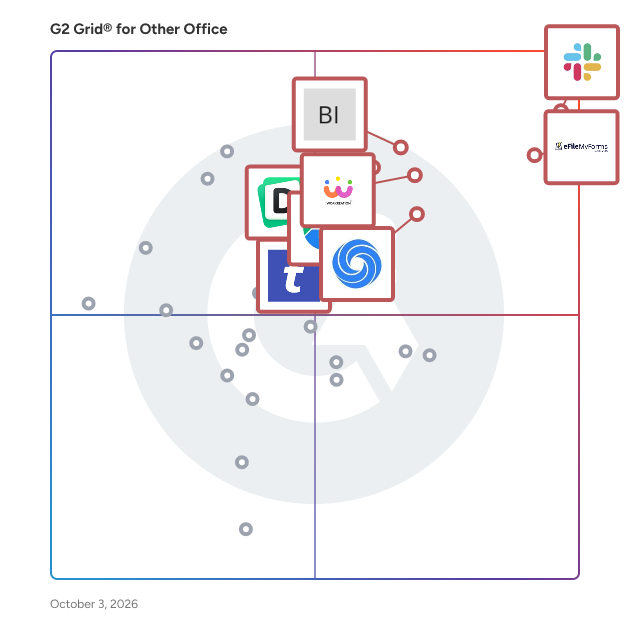
G2 Grid® for Other Office Software

G2 Grid® for Other Office Software plotting products by satisfaction and market presence

Highlighted products: Slack Connector for Jira, Sovos eFileMyForms, Google Drive & Docs for Confluence, Workreation®, Drive Uploader, NoteGPT, TransferNow, and Diffchecker.

Underlying data: [Grid® JSON](https://www.g2.com/categories/other-office/grids.json?focus%5B%5D=slack-connector-for-jira&focus%5B%5D=sovos-efilemyforms&focus%5B%5D=google-drive-docs-for-confluence&focus%5B%5D=workreation&focus%5B%5D=drive-uploader&focus%5B%5D=notegpt&focus%5B%5D=transfernow&focus%5B%5D=diffchecker)

Compliance Tracker 365

Compliance Tracker 365 is a SharePoint app that allows documents and pages to be targeted to individual or groups and tracked for reading. Targeting is setup by applying tags to content and people. Where they are the same, content is shown for reading. This approach provides a fast and flexible solution, requiring minimum administration and providing maximum visibility of content.

Who Is the Company Behind Compliance Tracker 365?

Conan Desktop

Conan Desktop is a modular desktop application by A.N.T. (Belgium) for records managers, archivists and information managers. Convert turns whole folders into PDF/A-2b and other long-term formats, with automatic redaction of sensitive information that truly removes the underlying text. Metadata describes files using your own profile, with a local language model whose suggestions you approve. RMTool analysis turns an RMTool export into a report on duplicates, folder age and change over time. Everything works without an internet connection.

Who Is the Company Behind Conan Desktop?

  • Seller: A.N.T.
  • Year Founded: 2019
  • HQ Location: Schoten, BE
  • LinkedIn® Page: www.linkedin.com
    3 employees on LinkedIn®

Conference Management Software

Conference management, abstract submission, conference websites, project management, polls, and surveys. We handle everything you need for your conference in one software package. And for one price. There is never a question about how much our product costs.

Who Is the Company Behind Conference Management Software?

AI can help you find the answers. G2 helps you trust them.

Connect G2 to Claude or ChatGPT for answers grounded in G2's trusted reviews, comparisons, and pricing from real user insights.

How it works

Connected Software

Connected Software is a leading provider of software for client-side email and address book migration, including solutions for Microsoft Outlook, Gmail, Microsoft Exchange, AOL, and Lotus Notes. Connected Software is credited with a long list of innovations in the industry, including being the first to offer migration support for Microsoft Outlook, Microsoft Outlook Express, Netscape 4, and AOL email and address books.

Who Is the Company Behind Connected Software?

Connector for Google Drive & Confluence

The Connector for Google Drive & Confluence is a powerful integration tool designed to seamlessly embed Google Drive files directly into Confluence pages. This integration enhances collaboration by allowing users to access, preview, and edit Google Drive documents without leaving the Confluence environment. By centralizing document management, teams can reduce context switching and improve productivity. Key Features and Functionality: - Embed Google Drive Files: Directly insert Google Docs, Sheets, Slides, and other file types into Confluence pages, enabling users to view and edit documents within the Confluence interface. - Google File Picker Integration: Utilize the Google file picker to easily select and display files from Google Drive, including support for Team Drives. Users can sort, search, and upload files directly from Confluence. - Folder Embedding: Embed entire Google Drive folders into Confluence pages, providing a comprehensive view of all relevant documents and facilitating efficient document repository management. - Seamless Authentication: Authenticate using standard Google OAuth, allowing for easy client-side authentication and the ability to switch between multiple G Suite accounts. Primary Value and User Benefits: The Connector for Google Drive & Confluence addresses the challenge of managing documents across multiple platforms by integrating Google Drive's robust document storage capabilities with Confluence's collaborative workspace. This integration eliminates the need for users to switch between applications, thereby streamlining workflows and enhancing team productivity. By providing a centralized document management system accessible directly within Confluence, teams can ensure that all members have immediate access to the latest versions of documents, reducing errors and improving collaboration efficiency.

Who Is the Company Behind Connector for Google Drive & Confluence?

  • Seller: ServiceRocket
  • Year Founded: 2001
  • HQ Location: Palo Alto, US
  • Twitter: @ServiceRocket
    2,154 Twitter followers
  • LinkedIn® Page: www.linkedin.com
    257 employees on LinkedIn®

Contactous

Contactous is a platform designed to convert business cards to revenue and uncover quality leads and relationships in organizations by providing clean data from all business cards.

Who Is the Company Behind Contactous?

  • Seller: Contactous Ptd Ltd
  • Year Founded: 2016
  • HQ Location: Singapore, SG
  • Twitter: @contactousapp
    14 Twitter followers
  • LinkedIn® Page: linkedin.com
    4 employees on LinkedIn®

Content Chooser

The Right Content, For Every Task. Your Content Hub for All Your Shared and Organizational Content Across Microsoft 365! Are you struggling to keep track of and access the latest versions of your content across multiple platforms? Do you waste time searching for the most up-to-date product images, sales pitches, or quick responses? The Content Chooser makes it simple for users to access and organize their content no matter where they are working from. With this product, users can quickly insert the latest versions of corporate content like product pictures, sales messages, legal terms, and pre-made responses into their work, whether in documents, emails, presentations or in browser tasks. This product provides a one-stop solution, allowing users to easily manage and access their latest content across various applications. This ensures that everyone in the organization is always using the most up-to-date and consistent content, improving overall productivity, efficiency and branded communication. Key Benefits - Improved Content Management: Get all your latest content in one place, ready to use across any platform. - Save Time: Quickly find and use the latest content without the hassle, letting you focus on more important tasks. - Enhanced Consistency: Improve communication within the organization by using the most up-to-date and standardized content. With the Content Chooser, managing your shared content becomes a simpler, more efficient process. This means less time wasted and more time spent on what's important, with consistent and current content across all your applications.

Who Is the Company Behind Content Chooser?

  • Seller: officeatwork
  • Year Founded: 1975
  • HQ Location: Zug, CH
  • Twitter: @officeatwork365
    62 Twitter followers
  • LinkedIn® Page: www.linkedin.com
    14 employees on LinkedIn®
  • Ownership: Martin S. Seifert

Convert OLM File to PST

Convert OLM File to PST is an OLM to PST converter that runs on a Windows PC. Give it the archive Outlook for Mac produced with File, Export, and it writes a Unicode PST that Windows Outlook loads through its usual menu. Windows Outlook cannot import such an archive, and the free workaround pushes the entire mailbox through an online account before syncing it down again. This OLM to PST converter takes the short route: it reads the export locally and builds the PST in one pass, folder tree included. 🛠️ How to use 1. In Outlook for Mac choose File, Export and save the mailbox archive. 2. Move that archive to the Windows computer and add it with Open OLM. 3. Pick a destination folder and press Start. If a PST with that name already exists, choose Overwrite, Rename or Skip. 4. When the summary shows the message count, attach the new PST in Windows Outlook with the Open Outlook Data File command under the File menu. 💼 Why IT and office teams pick it All the work happens on the local machine, so there is nothing to upload and no borrowed account to sync through for hours. You can run the OLM to PST converter on a PC where Outlook is closed or was never installed. The mailbox hierarchy stays as it was on the Mac, so nobody has to sort hundreds of messages back into folders by hand. Each message keeps its subject, HTML or plain body, sender, To and Cc recipients, sent date and read flag. Attachments come out byte-identical. Korean, Hebrew and other non-Latin subjects are kept exactly. The result is a standard Outlook data file, verified in Outlook 2016, which help desk staff can attach in a few clicks. Going from OLM to PST this way also avoids the second copy of the mailbox that a cloud detour leaves behind on someone else's server. 👥 Who uses it IT admins retiring Mac workstations and giving staff Windows PCs, one exported mailbox per person. People who traded a MacBook for a Windows laptop and miss their old correspondence. Office managers handed an archive that a former colleague left on a shared drive. Small IT service shops that keep an OLM to PST converter in the toolkit for clients who change platforms. ❓ FAQ Can you convert OLM to PST without a Mac? Yes. Once the archive is exported, the Mac is no longer needed. Everything after that runs on Windows. Which Outlook for Mac versions does it read? Exports from Outlook for Mac 2011, 2016, 2019 and Microsoft 365 for Mac. They all write the same archive format. Can I process several archives at once? Each run takes one archive and produces one PST, so a team's exports are handled one after another, each in a couple of clicks. Is my mailbox uploaded anywhere? No. Reading the archive and writing the PST both happen on your local disk. 💻 Free trial with no sign-up. Runs on Windows 11, 10, 8.1, 8 and 7 (32 or 64 bit), 4 GB of RAM and 1 GB of free disk space.

Who Is the Company Behind Convert OLM File to PST?

Convert OST to PST Software

Convert OST to PST Software is a Windows desktop tool for one job: convert OST to PST when Outlook can no longer open the offline cache. It reads the .ost file directly, including an orphaned one whose profile or mail account no longer exists, and saves a Unicode .pst that repeats the original folder tree. Reading and writing both happen on the PC, so the mailbox is never uploaded. 🔰 How to use the program 1. Copy the .ost from the old PC or a backup to a local disk. 2. Open the file in the program. No Outlook profile or server connection is involved. 3. Check the folder tree to confirm that Inbox, Sent Items and the subfolders are all there. 4. Choose the folder where the new .pst should be saved. 5. Start the export and watch the message counter. The source .ost is left unchanged. 6. In Outlook, attach the result from the File menu, under Open, as an Outlook Data File. 👍 Why IT and office teams pick it to convert OST to PST - Outlook imports .pst archives and nothing else, so a leftover cache needs a converter before anyone can read it. - It works with no Outlook on the machine, which suits a helpdesk bench PC that has no Office license. - An OST to PST converter that runs offline keeps a confidential mailbox out of web upload forms. - The output is not a flat dump. Nested folders land where they were in the source. - Each message arrives with its sender, subject and dates, both the plain text and the HTML body, its attachments and its read state. - Empty system folders such as Search Root are left out, so the archive opens clean. - Outlook 2016 and later versions open the finished archive like any other data file. ✅ Who uses it - IT admins who receive a returned laptop with a cached mailbox and a deleted account. - Help desks rebuilding a PC whose Exchange cache lost its profile. - Former employees and contractors who kept nothing but the cache from their own computer. - Records and compliance staff who must keep a departed colleague's correspondence as a portable archive. - Small offices that find old caches on retired machines after a server was shut down. ❓ FAQ Is Outlook needed to read an OST? Not here. The program parses the file itself and saves a .pst, so the PC needs no Outlook. What does orphaned mean for an OST? The profile or the mail account behind the cache was removed. Outlook will not reattach it, yet the messages are still inside and you can convert OST to PST from it. How do OST and PST differ? An .ost is a synced copy tied to one profile and one account. A .pst stands alone, and any Outlook can open it. Does it handle password-protected files? No. An encrypted or password-protected .ost is reported as an error. ℹ️ Free trial: download it with no sign-up. Lifetime, yearly, monthly and business licenses are offered. OST to PST conversion needs Windows 10 or 11. A Mac version, a command line mode and a link to live Exchange or IMAP are not part of the product.

Who Is the Company Behind Convert OST to PST Software?

CopierBridge

CopierBridge keeps scan to email working on copiers, scanners and business apps after Microsoft 365 turns off basic SMTP AUTH by default at the end of December 2026 (Microsoft notice MC786329). Each device gets its own username and password and keeps sending over SMTP on port 587 (STARTTLS) or 465 (TLS); CopierBridge sends every message through the customer's own Microsoft 365 mailbox with Microsoft's approved OAuth sign-in. Messages are passed on, not stored. $9 a device a month; the first device is free for 14 days.

Who Is the Company Behind CopierBridge?

Copy Down

Automatically copy down formulas on Google form response submissions.

Who Is the Company Behind Copy Down?

Cotharticren

Chemistry Modeling with Emphasis in Aerospace Built around the Steam Cycle

Who Is the Company Behind Cotharticren?

Counterclicker

Counter Clicker is a simple and easy-to-use online counting tool for tracking clicks, taps, repetitions, scores, and numbers. It helps users count quickly and accurately without needing a physical tally counter.

Who Is the Company Behind Counterclicker?

CP Momentum

Box scores show what happened. They don't show who finished the block, who stayed composed after a mistake, or who gave full effort on the backside of the play. CP Momentum gives football coaching staffs a consistent way to measure those intangibles (effort, toughness, composure and decision-making) and track them over a season. Coaches choose measures from a library of intangible measures. Each measure comes with clear examples of what does and doesn't count, so several coaches grade the same play the same way. During games or practice, Live Record lets a coach score habits possession by possession from a phone on the sideline. Every grade feeds Momentum charts that show each athlete's trend across the season. When a coach puts a coaching plan in place, the charts show the trend before and after it, so the staff can see whether the behavior actually changed. Plans are shareable and export to Word. AI Insights writes plain-English summaries of the trends. Player names are never sent to the AI; athletes are anonymized. For staffs without time to grade film, an optional per-game add-on has Complete Performance analysts watch the game film and grade the team's measures play by play. Results flow straight into the Momentum charts. Multiple coaches can work in the same team account. Plans are available for individual athletes, private coaches and full programs, and every plan starts with a 14-day free trial with no credit card required.

Who Is the Company Behind CP Momentum?

Neeraja Prakash
NP
Researched and written by Neeraja Prakash
Updated June 16, 2025