Best Other Office Software - Page 13

How Many Other Office Software Products Does G2 Track?

Total Products under this Category: 629

Category Stats (Nov 2026)

  • Average Rating: 4.41/5 (↑0.01 vs Oct 2026) The average rating of products in this category, based on all submitted ratings
  • Top Trending Product: Sider (+7.14%) - Among all products in this category, Sider recorded the largest rating increase compared to last month

Last updated: November 01, 2026

How Does G2 Rank Other Office Software Products?

Why You Can Trust G2's Software Rankings:

  • 30 Analysts and Data Experts
  • 1,300+ Authentic Reviews
  • 629+ Products
  • Unbiased Rankings

G2's software rankings are built on verified user reviews, rigorous moderation, and a consistent research methodology maintained by a team of analysts and data experts. Each product is measured using the same transparent criteria, with no paid placement or vendor influence. While reviews reflect real user experiences, which can be subjective, they offer valuable insight into how software performs in the hands of professionals. Together, these inputs power the G2 Score, a standardized way to compare tools within every category.

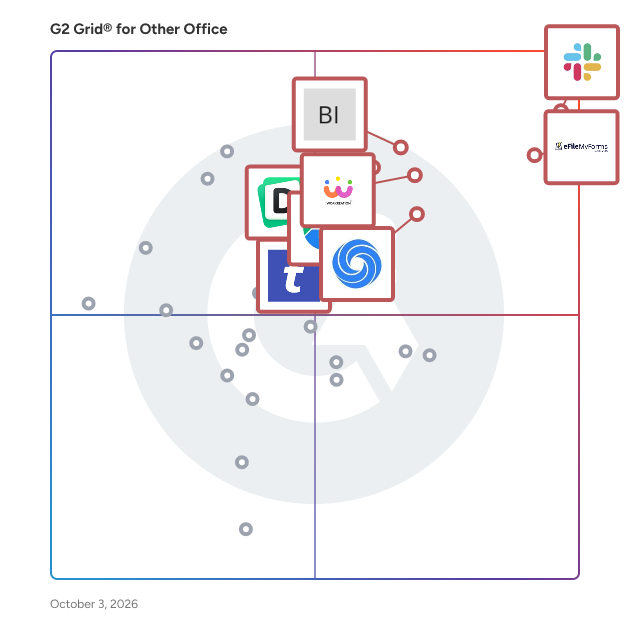
G2 Grid® for Other Office Software

G2 Grid® for Other Office Software plotting products by satisfaction and market presence

Highlighted products: Slack Connector for Jira, Sovos eFileMyForms, Google Drive & Docs for Confluence, Workreation®, Drive Uploader, NoteGPT, TransferNow, and Diffchecker.

Underlying data: [Grid® JSON](https://www.g2.com/categories/other-office/grids.json?focus%5B%5D=slack-connector-for-jira&focus%5B%5D=sovos-efilemyforms&focus%5B%5D=google-drive-docs-for-confluence&focus%5B%5D=workreation&focus%5B%5D=drive-uploader&focus%5B%5D=notegpt&focus%5B%5D=transfernow&focus%5B%5D=diffchecker)

Artifin.ai

Artifin.ai is an AI-powered platform designed to revolutionize financial management for businesses by automating complex processes and providing intelligent insights. Launched in July 2023 and headquartered in Palo Alto, United States, Artifin.ai leverages advanced artificial intelligence to streamline financial operations, enhance decision-making, and drive efficiency. Key Features and Functionality: - Automated Financial Processes: Artifin.ai automates routine financial tasks, reducing manual effort and minimizing errors. - Intelligent Insights: The platform provides data-driven insights to support strategic financial decisions. - Scalability: Designed to accommodate businesses of various sizes, Artifin.ai scales to meet diverse financial management needs. Primary Value and User Solutions: Artifin.ai addresses the challenges of manual financial management by offering an AI-driven solution that enhances accuracy, efficiency, and strategic insight. By automating complex processes and providing intelligent analytics, the platform empowers businesses to make informed decisions, optimize financial performance, and focus on core operations.

Who Is the Company Behind Artifin.ai?

Aryson PDF Protection

Aryson PDF Protection software allows you to protect your PDF documents from editing, printing, copying & extracting file information. This software allows protecting your single as well as multiple PDF files at the same time. PDF File Protection software is able to protect any versions of Adobe Acrobat PDF document. It allows setting user level as well as owner password in PDF file. This stand-alone application which means that Acrobat other PDF products are not required. This software runs with both 32bit and 64-bit windows platforms of all versions of Windows OS including windows10 and other older versions. This software offers a safe and quick way to protect PDF files without requiring Acrobat. It has a lot of interactive features and supports single as well as multiple PDF files at a time. This tool is strongly compatible with all versions of Microsoft OS. This software does not require any prior knowledge or expertise to use, any technical or non-technical person can easily use this. This tool has advanced GUI that makes it easy to use for clients and we also provide free support to the clients who face problems during software use. Aryson PDF protection tool for the protection of single or multiple PDF files from being copied, edited, printed and extracted. Uses password and other parameters for PDF protection and saves protected files at the desired location. This software offers a demo version that allows the to password protect the PDF file and saves it with a watermark.

Who Is the Company Behind Aryson PDF Protection?

  • Seller: Aryson Technologies
  • Year Founded: 2014
  • HQ Location: Noida, Uttar Pradesh
  • Twitter: @Arysontec
    46 Twitter followers
  • LinkedIn® Page: www.linkedin.com
    99 employees on LinkedIn®

Aryson PST Compress

Aryson PST Compress is one of the best and most reliable tools to compress the size of large PST files with high precision. With the help of this utility, you can compress single or multiple PST files effortlessly. The software will show you the details of each PST file folder like Total Message Count, To, Subject, From, Body, and Bcc. Additionally, users can remove the attachments from PST file. This tool supports all versions of the Windows OS and Outlook.

Who Is the Company Behind Aryson PST Compress?

  • Seller: Aryson Technologies
  • Year Founded: 2014
  • HQ Location: Noida, Uttar Pradesh
  • Twitter: @Arysontec
    46 Twitter followers
  • LinkedIn® Page: www.linkedin.com
    99 employees on LinkedIn®

AI can help you find the answers. G2 helps you trust them.

Connect G2 to Claude or ChatGPT for answers grounded in G2's trusted reviews, comparisons, and pricing from real user insights.

How it works

AskCSV

AskCSV transforms spreadsheets into insights, analyzing CSV files for better data understanding.

Who Is the Company Behind AskCSV?

AskNotion

AskNotion enhances writing and organization by utilizing ChatGPT trained on Notion Pages, offering personalized insights.

Who Is the Company Behind AskNotion?

Ask Voltane

Voltane helps energy developers decide where to build. It puts land, grid, risk and market data on one map covering the United States and Europe, so a team can screen sites on both continents without buying a separate tool for each. In the US, Voltane screens sites at the parcel level in Texas, Virginia, Ohio and Indiana. It also covers 504 candidate nuclear sites in 49 states, including former and retiring coal plants, for microreactor, SMR and large reactor projects. In Europe, Voltane scores more than 90,000 areas across 30 countries. Developers can see which regions are worth a closer look before they work at the parcel level. Project types include solar, storage, wind, gas, geothermal and nuclear. Each site shows its distance to transmission lines and substations by voltage, along with flood, wetland, slope, protected land and other constraints. Data center locations sit on the same map for teams looking for power and land for large loads. With Ask Voltane, a developer describes a project in plain English. Voltane screens its own data against those requirements and returns a shortlist in three groups: sites that meet the known requirements, sites that need more information, and sites that are excluded, each with the reason. When data is missing, the site is marked unknown. It is never counted as a pass or a fail. Users can save sites, share links, export shortlists to CSV and print site reports. Every layer shows its source and date. Voltane is a first-pass screening assistant. It is not legal or financial advice.

Who Is the Company Behind Ask Voltane?

  • Seller: Voltane
  • Year Founded: 2026
  • HQ Location: Washington, D.C., US
  • LinkedIn® Page: www.linkedin.com
    1 employees on LinkedIn®

Who Uses This Product?

  • Company Size: 100% Small

What Are Recent G2 Reviews of Ask Voltane?

Aspose.Total Comparison

Aspose.Total Comparison has provided complete functionality for efficiently comparing multiple files online with ease. File comparison is a very useful operation that matches different files with each other to find out any differences. The online free comparison app has provided support for several leading document formats such as PDF, DOCX, XLSX, PPTX, VSDX, HTML, EPUB, RTF, XPS, ODT, ODP, and many more. The app is built by using state of the art Aspose APIs which smoothly works on all major platforms including Windows, Mac, Android and iOS. In order to use the app you don’t need to install it on your machine, you just need a modern browser like Chrome, Opera and Firefox. To compare two documents for differences you need to select the files using the file selection area and press the “COMPARE” button. After the successful documents comparison operation users can download the resultant file highlighting the difference. The app also allows sending the resultant file as an email attachment.

Who Is the Company Behind Aspose.Total Comparison?

  • Seller: Aspose
  • Year Founded: 2002
  • HQ Location: Sydney, AU
  • Twitter: @aspose
    13,018 Twitter followers
  • LinkedIn® Page: www.linkedin.com
    134 employees on LinkedIn®

ASSIST Biz

ASSIST is a document management software that keeps your financial records in order. From invoices, receipts to other business records, ASSIST files these documents digitally, extracts key data elements from these documents for easy review and reporting.

Who Is the Company Behind ASSIST Biz?

Attachment Checker for Confluence

Attachment Checker for Confluence is a security-focused application designed to enhance the safety and integrity of files uploaded to Confluence spaces. By integrating seamlessly with Confluence, this app provides an essential layer of protection against malicious threats. It allows administrators to enforce file type restrictions, perform virus scans on all attachments, and manage space quotas effectively. This ensures that only authorized and safe files are uploaded, maintaining the security and efficiency of your Confluence environment. Key Features and Functionality: - File Type Restrictions: Administrators can configure whitelists or blacklists of file extensions, controlling which types of files can be uploaded to Confluence. - Virus Scanning: The app integrates with third-party virus scanners to automatically scan all uploaded attachments. If an infected file is detected, a comment is added to the page, alerting the user and maintaining transparency. - Space Quota Management: System administrators can set attachment quotas for each space, preventing excessive disk usage and ensuring optimal performance. Users are notified when quotas are reached, prompting necessary housekeeping. - Attachment Summary Reports: Provides detailed reports on disk space usage by attachments at the space level, aiding in monitoring and managing storage effectively. - Fine-Grained File Size Limits: Allows setting different file size limits for various user groups, enabling tailored control over attachment uploads based on organizational needs. Primary Value and Problem Solved: Attachment Checker for Confluence addresses critical security and resource management challenges within Confluence environments. By enforcing file type restrictions and integrating virus scanning, it prevents unauthorized and potentially harmful files from being uploaded, thereby safeguarding the system against malware and ensuring compliance with organizational policies. The space quota management feature helps in conserving disk space and bandwidth, preventing system slowdowns due to excessive storage use. Overall, the app enhances the security, efficiency, and reliability of Confluence by providing administrators with robust tools to control and monitor attachment uploads.

Who Is the Company Behind Attachment Checker for Confluence?

Attachment Checker for Jira

Attachment Checker for Jira is a comprehensive security solution designed to safeguard your Jira instance by managing and monitoring file attachments. It enables administrators to enforce strict policies on the types of files that can be uploaded, ensuring that only authorized and safe attachments are permitted. By integrating with antivirus scanners, the plugin proactively scans all uploaded files for potential threats, thereby enhancing the overall security and performance of your Jira environment. Key Features and Functionality: - File Type Management: Administrators can define and enforce policies to whitelist or blacklist specific file extensions, controlling which file types are allowed or blocked from being uploaded. - Duplicate File Detection: The plugin alerts users if an attachment with the same filename already exists within an issue, preventing confusion and redundancy. - Virus Scanning: Every uploaded attachment is scanned for viruses, with notifications provided if any threats are detected, ensuring that infected files do not compromise the system. - Attachment Limits: Administrators can set limits on the number of attachments per issue and restrict the total attachment size, helping to conserve disk space and maintain system performance. - Access Control: The plugin allows for the restriction of attachment downloads to specific user groups and logs download activities, enhancing security and compliance. - Missing Attachment Scanner: A background scan identifies missing attachments, facilitating data recovery and reducing errors within Jira. Primary Value and User Benefits: Attachment Checker for Jira addresses critical security and operational challenges by ensuring that only authorized and safe files are attached to issues. It mitigates the risk of virus infections, prevents unauthorized file uploads, and conserves system resources by managing attachment sizes and duplicates. By providing comprehensive control over file attachments, the plugin enhances the integrity and performance of your Jira instance, offering peace of mind to administrators and users alike.

Who Is the Company Behind Attachment Checker for Jira?

Autory

Autory is a no-code automation platform designed to enhance productivity by enabling users to create complex workflows without any programming knowledge. By integrating APIs, GPT-3, and code snippets, Autory allows users to automate repetitive tasks, streamline processes, and build modular workflows tailored to their specific needs. This user-friendly platform empowers individuals and businesses to harness the power of artificial intelligence and automation, thereby saving time and increasing efficiency. Key Features and Functionality: - No-Code Automation: Autory enables users to design and implement complex workflows without writing any code, making automation accessible to a broader audience. - Seamless GPT-3 Integration: The platform integrates effortlessly with GPT-3, allowing users to leverage advanced language processing capabilities within their automated workflows. - Modular Design: Users can create and chain together multiple work blocks, promoting modularization and abstraction, which enhances flexibility and scalability in automation processes. - Versatile Data Handling: Autory supports various data types, including text, image, and audio, enabling a wide range of automation possibilities across different industries and use cases. Primary Value and Solutions Provided: Autory addresses the challenge of automating complex workflows without the need for coding expertise. By offering a no-code platform with seamless GPT-3 integration and modular design, it empowers users to automate repetitive tasks, thereby saving time and boosting productivity. This solution is particularly beneficial for small business owners, marketing professionals, and data analysts who seek to streamline their operations and focus on high-value activities without investing in extensive technical training.

Who Is the Company Behind Autory?

AyaNova

AyaNova service management and work order software includes workorders, dispatching, scheduling, preventive maintenance, quotes, contracts, notifications, inventory tracking including serial numbers, custom fields, equipment tracking, custom reports, QuickBooks interface, and mobile web browser interface.

Who Is the Company Behind AyaNova?

Basta

Who Is the Company Behind Basta?

  • Seller: Basta
  • Year Founded: 2022
  • HQ Location: Reykjavík, IS
  • LinkedIn® Page: www.linkedin.com
    11 employees on LinkedIn®

Batch MHTML to PDF Converter Software

Batch MHTML to PDF Converter Software is a Windows desktop MHTML to PDF converter for people who keep saved web pages and need them as documents. Add a folder of .MHT or .MHTML archives, pick PDF or TXT, and the program writes one file per page or a single combined PDF. Everything runs offline on your own PC, so the archive is never uploaded to a web service. That makes it a fit for files you are not allowed to share. 📌 How to use 1. Drag your .MHT or .MHTML files into the window, or add a whole folder as one flat list. 2. Choose PDF or TXT in the format box. PDF keeps the saved layout, TXT keeps only the words. 3. For a single document, switch on the merge option and give the output a name. 4. Pick an output folder and press Start. 🛠 Why IT and office teams pick it Chrome, Internet Explorer, the old Edge and Word each pack a page slightly differently. The parser copes with every variant on its own, so nobody has to sort files by origin first. Pages laid out with CSS Grid, Flexbox and calc() keep their columns in the result. Content from embedded iframes appears in the PDF at its original spot. When an archive is cut short or its MIME parts are corrupted, you get a warning and a PDF built from whatever survived. One bad page does not stop the batch, and the summary at the end says how many failed. Links that try to reach files outside the archive are blocked, so a foreign MHT cannot copy something from your drive into the PDF. For a help desk this means one MHTML to PDF converter that IT can approve without a cloud review. 👥 Who uses it Owners of old archive folders saved over years in Internet Explorer. Legal, support and compliance staff who receive web archives from ticket systems or discovery exports but file cases as PDF. System administrators who get tickets about files that will not open and would rather hand out PDFs once with an MHTML to PDF converter that stays on the local machine. ❓ FAQ What is an MHT or MHTML file? It is a complete web page packed into one MIME container, with its images and CSS inside. The two extensions mean the same format, and the program accepts both. Can I convert MHTML to PDF without uploading the file? Yes. All rendering happens on your computer, and the program does not go online to load the current version of the page. The PDF shows the page as it was on the day you saved it. Does it handle large archives? A 93 MB archive is processed in chunks, which keeps memory use low. Cyrillic in page content and in folder names survives the mhtml to pdf step. What does it not do? It does not download pages by URL, it has no OCR, and it does not turn PDF back into MHTML. 💻 Free trial and requirements The free trial needs no sign-up and allows three exports a day on your own files. Runs on Windows 11, 10, 8.1, 8 and 7, 32 or 64 bit. There is no Mac build.

Who Is the Company Behind Batch MHTML to PDF Converter Software?

Neeraja Prakash
NP
Researched and written by Neeraja Prakash
Updated June 16, 2025