Best Other Email Software - Page 8

How Many Other Email Software Products Does G2 Track?

Total Products under this Category: 264

Category Stats (Sep 2026)

  • Average Rating: 4.49/5 (↓0.01 vs Aug 2026) The average rating of products in this category, based on all submitted ratings
  • Top Trending Product: FreeCustom.Email (+0.61%) - Among all products in this category, FreeCustom.Email recorded the largest rating increase compared to last month

Last updated: September 01, 2026

How Does G2 Rank Other Email Software Products?

Why You Can Trust G2's Software Rankings:

  • 30 Analysts and Data Experts
  • 800+ Authentic Reviews
  • 264+ Products
  • Unbiased Rankings

G2's software rankings are built on verified user reviews, rigorous moderation, and a consistent research methodology maintained by a team of analysts and data experts. Each product is measured using the same transparent criteria, with no paid placement or vendor influence. While reviews reflect real user experiences, which can be subjective, they offer valuable insight into how software performs in the hands of professionals. Together, these inputs power the G2 Score, a standardized way to compare tools within every category.

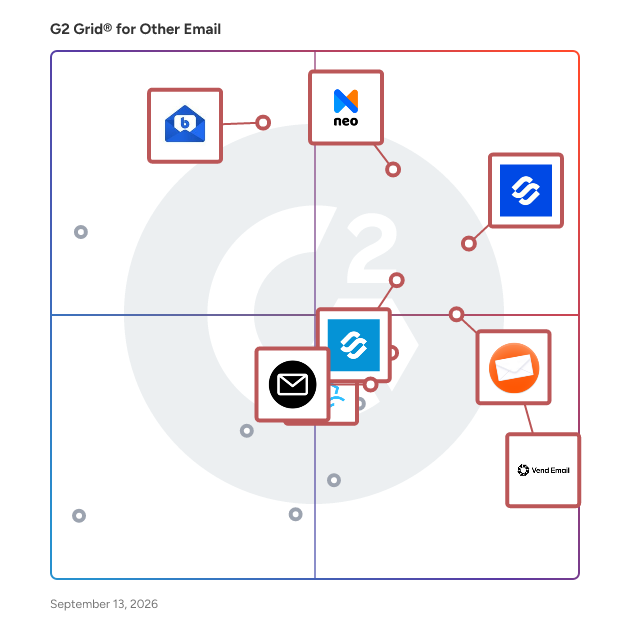
G2 Grid® for Other Email Software

G2 Grid® for Other Email Software plotting products by satisfaction and market presence

Highlighted products: Infraforge, Neo, BlueMail, Reverse Email Lookup, Vend Email, Primeforge, ImprovMX, and FreeCustom.Email.

Underlying data: [Grid® JSON](https://www.g2.com/categories/other-email/grids.json?focus%5B%5D=infraforge&focus%5B%5D=neo-email&focus%5B%5D=bluemail&focus%5B%5D=reverse-email-lookup&focus%5B%5D=vend-email&focus%5B%5D=primeforge&focus%5B%5D=improvmx&focus%5B%5D=freecustom-email)

Angry Email Translator

Angry Email Translator is a free productivity tool that transforms angry emails into polite ones, maintaining a positive communication environment.

Who Is the Company Behind Angry Email Translator?

Ant Text

Ant Text is an email management software for a quality of email content and template management that increases brand awareness.

Who Is the Company Behind Ant Text?

API PILOT

PilotVerify is an online tool to clean and validate email addresses in real-time via API or Bulk via csv.

Who Is the Company Behind API PILOT?

Aryson Email Archiving Software

Aryson Email Archiving Software is a comprehensive solution designed to securely archive emails from various web and cloud-based email clients, including Gmail, Office 365, Yahoo, and more. This tool enables users to back up complete mailbox data—comprising emails, attachments, and associated metadata—into multiple file formats such as PST, PDF, EML, MSG, MBOX, and various document and image formats. By preserving the original folder hierarchy and formatting, it ensures data integrity during the archiving process. The software also offers features like date range filtering for selective backups, removal of duplicate emails, and the option to free up server space by deleting emails post-archiving. Its user-friendly interface makes it accessible for both technical and non-technical users. Key Features and Functionality: - Multi-Platform Support: Archives emails from over 20 web and cloud-based email clients, including Gmail, Office 365, Yahoo, and IMAP services. - Versatile Export Options: Saves emails in various formats such as PST, PDF, EML, MSG, MBOX, DOCX, JPEG, and more, catering to diverse user needs. - Complete Mailbox Backup: Ensures comprehensive archiving of emails along with attachments and metadata, maintaining the original folder structure. - Selective Archiving: Offers date range filtering to archive emails from specific periods, enhancing efficiency. - Duplicate Removal: Identifies and removes duplicate emails during the archiving process to optimize storage. - Server Space Management: Provides an option to delete emails from the server after archiving, freeing up valuable server space. - User-Friendly Interface: Designed with an intuitive interface, making it accessible for users with varying technical expertise. Primary Value and User Solutions: Aryson Email Archiving Software addresses critical challenges in email data management by providing a secure and efficient method to archive emails from multiple platforms. It ensures data integrity and accessibility by preserving the original folder hierarchy and formatting. The software's ability to export emails into various formats allows users to maintain backups compatible with different applications and compliance requirements. Features like selective archiving, duplicate removal, and server space management enhance operational efficiency and optimize storage resources. Overall, it offers a reliable solution for individuals and organizations seeking to safeguard their email data against loss, corruption, or unauthorized access.

Who Is the Company Behind Aryson Email Archiving Software?

  • Seller: Aryson Technologies
  • Year Founded: 2014
  • HQ Location: Noida, Uttar Pradesh
  • Twitter: @Arysontec
    46 Twitter followers
  • LinkedIn® Page: www.linkedin.com
    101 employees on LinkedIn®

Aryson MBOX Migrator

Aryson MBOX Migrator is one such an ideal software that allows users to import MBOX file into Gmail, Yahoo, Hotmail, IMAP, Thunderbird & Zimbra online. It also saves emails from an MBOX file into PST, EML, MSG, EMLX, PDF, HTML, TXT etc. The MBOX Migration software has a date range filter option that allows users to filter the specific email according to the date and migrate them. It also migrates the single as well as multiple MBOX files into different file formats and email clients at the same time. This software import the MBOX file into all version of MS Outlook including 2019, 2016 and below versions. With the help of this software, users can print the emails of the MBOX file as a PDF file with all email properties. The Demo Version of this software allows users to migrate or import the 25 email items per folders for free. Aryson MBOX Migration Tool installs and runs on all versions of Windows OS including Win 10 and below versions. After the demo version evaluation, you can use the pro version of this software at a lower cost.

Who Is the Company Behind Aryson MBOX Migrator?

  • Seller: Aryson Technologies
  • Year Founded: 2014
  • HQ Location: Noida, Uttar Pradesh
  • Twitter: @Arysontec
    46 Twitter followers
  • LinkedIn® Page: www.linkedin.com
    101 employees on LinkedIn®

Aryson OLM Splitter Tool

Aryson OLM Splitter Tool is a powerful utility designed to split large Outlook for Mac (OLM) files into smaller, manageable parts without compromising data integrity. It helps users efficiently organize oversized mailbox files, making them easier to store, share, and manage. This tool is especially useful for users dealing with large OLM files that may cause performance issues or difficulties during migration and backup processes. Key Features Split large OLM files into smaller parts based on size, date, or folder Maintain original folder hierarchy and data structure Preserve email properties such as attachments, metadata, and formatting Option to split specific folders or entire mailbox data Fast and secure processing without data loss User-friendly interface suitable for both beginners and professionals How It Works The software provides a simple and streamlined process. Users can load their OLM file into the tool, choose the desired splitting criteria (size, date, or folder), and select the destination path. Once configured, the tool quickly divides the file into smaller OLM files while preserving all mailbox details. No technical expertise is required, making it accessible for all types of users. What’s New in This Version Improved splitting speed for large OLM files Enhanced UI for better user experience Advanced filtering options for precise splitting Performance optimizations and minor bug fixes System Requirements and Limitations System Requirements: Operating System: Windows 11, 10, 8.1, 8, 7 RAM: Minimum 2 GB (4 GB recommended) Disk Space: At least 100 MB free space Supports OLM files from Outlook for Mac

Who Is the Company Behind Aryson OLM Splitter Tool?

  • Seller: Aryson Technologies
  • Year Founded: 2014
  • HQ Location: Noida, Uttar Pradesh
  • Twitter: @Arysontec
    46 Twitter followers
  • LinkedIn® Page: www.linkedin.com
    101 employees on LinkedIn®

Atomic Mail

Atomic Mail is a solution built with privacy as its core principle. Based in Estonia in 2024, this product is built on the latest and most powerful encryption technologies, providing blockchain class security in simple and user-friendly interface. Atomic Mail is GDPR compliant, meaning it adheres to strict regulations that require companies to secure emails containing sensitive data of EU citizens. This makes it particularly valuable for users who are highly concerned about the protection of their personal information.

Average Rating: 3.5/5.0

Total Reviews: 2

How Do G2 Users Rate Atomic Mail?

  • Has the product been a good partner in doing business?: 8.3/10 (Category avg: 8.9/10)
  • Ease of Admin: 8.3/10 (Category avg: 8.8/10)
  • Ease of Use: 7.5/10 (Category avg: 9.2/10)
  • Quality of Support: 7.5/10 (Category avg: 8.8/10)

Who Is the Company Behind Atomic Mail?

Who Uses This Product?

  • Company Size: 100% Medium

What Do G2 Reviewers Say About Atomic Mail?

AI-generated summary from verified user reviews

Pros
  • Users value the mass emailing capabilities of Atomic Mail, enhancing their marketing efforts through efficient management and analysis.
  • Users value the data analytics capabilities of Atomic Mail, which significantly enhance their email management and marketing efforts.
Cons
  • Users feel that the prices could be reduced, making Atomic Mail more accessible without compromising quality.
  • Users find the limited features of Atomic Mail restrictive due to a lack of integrations with other software.

Atom Mail

Atom Mail is more than just an inbox — it’s a smart communication hub designed for growing businesses. Built as part of the Atom Suite ecosystem, Atom Mail gives MSMEs the simplicity of Gmail with the security, control, and collaboration features enterprises rely on. With built-in AI categorization, smart filters, and team tagging, messages never get lost. Managers can set custom domains in minutes, while employees enjoy a clutter-free, focused workspace. Unlike traditional email tools, Atom Mail integrates directly with Atom HR, Accounting, and Builder — so workflows don’t stop at your inbox. Why MSMEs choose Atom Mail: Custom domains for professional branding without IT hassle Smart inbox & AI filters to reduce noise and surface priority tasks Team tagging & shared threads to keep projects aligned Seamless integration with Atom Suite 360 for HR, Accounting & more Enterprise-grade security with role-based access & encryption Atom Mail helps businesses communicate faster, stay organized, and look professional — without the cost or complexity of enterprise email systems.

Who Is the Company Behind Atom Mail?

Attach2Cloud

Attach2Cloud Automatically uploads your Microsoft Outlook attached files to OneDrive, SharePoint Online and Teams and replaces them by Modern Attachments (links) when you send your emails. Thanks to Attach2Cloud, you can now use MS Outlook to send files up to 250 GB per file and without any email size limit. Attach2Cloud can operate fully automatically based on parameters, or semi-automatically; in this case a UI is displayed when sending your Outlook emails containing attached files, allowing to select the attached files to upload to OneDrive SharePoint Online or Teams, and, on a per file basis, their destination in the cloud (on OneDrive folder, SharePoint Online library, or Teams), their sharing permission, and optionally, a number of days after which the file must be deleted). Attach2Cloud includes many other MS 365 Cloud integration features for MS Outlook, like upload rules based on attached file size and types, and on email size, inserting invitations to upload files to OneDrive in one click in emails being edited, uploading files attached to existing emails to the MS 365 cloud, and in its latest version 6, an MS Outlook Cloud Navigator Side Panel offering a view to your OneDrive, SharePoint Online and Teams folders and files and supporting bi-directional drag drop of files, from this side panel to emails and from emails to this side panel.

Who Is the Company Behind Attach2Cloud?

Attachment Save for Exchange

Attachment Save is a Microsoft Exchange Server solution for automatic saving, deleting attachments and messages right on the Exchange server using specified criteria.

Who Is the Company Behind Attachment Save for Exchange?

  • Seller: MAPILab
  • Year Founded: 2002
  • HQ Location: United States
  • LinkedIn® Page: www.linkedin.com
    13 employees on LinkedIn®

Automatic Email Manager

Are you tired of wasting time and energy on repetitive email tasks, such as printing attachments, converting emails to PDF, and sending auto-replies? Look no further than Automatic Email Manager, a powerful software that automates these tasks and more. Installed locally on your PC or server, Automatic Email Manager uses customizable rules and actions to manage new emails and attachments with ease. With this software, you can: • Automatically print email bodies and attachments (e.g., invoices, orders, reports) to any printer on your network • Convert emails to PDF, images, EML, MSG, text, and save them to network folders for archiving or third-party software • Send notifications to Slack, Microsoft Teams, Telegram, and more, including message subjects, email bodies, and attachments • Export emails to a CSV database in real-time, assign categories, change email subjects, and organize your inbox with ease Your Privacy Matters Unlike cloud-based solutions, Automatic Email Manager works locally on your computer, ensuring that your data remains secure and private. Our software is designed to be extremely easy to use, and our thousands of satisfied customers can attest to the time-saving benefits it provides. Boost Your Productivity Today So why not give it a try? Get Automatic Email Manager today and start breaking free from email overload. Your sanity (and your inbox) will thank you.

Who Is the Company Behind Automatic Email Manager?

  • Seller: Rofiles
  • Year Founded: 2004
  • HQ Location: Rennes, FR
  • LinkedIn® Page: www.linkedin.com
    1 employees on LinkedIn®

AwardWallet Email Parsing API

Email Parsing API allows you to extract structured information from an unstructured email. Specifically, you can extract travel itineraries from virtually any travel provider using this REST API. The email parser API can automatically process incoming emails, it will extract data from incoming emails and using webhook integrations send the resulting structured data to your endpoint. The main benefit of this email scraping technology is that you can import travel reservations that belong to your users regardless of how these reservations were booked.

Who Is the Company Behind AwardWallet Email Parsing API?

  • Seller: AwardWallet
  • Year Founded: 2004
  • HQ Location: Bethlehem, US
  • Twitter: @AwardWallet
    5,726 Twitter followers
  • LinkedIn® Page: www.linkedin.com
    18 employees on LinkedIn®

Bitqueues

Canned Responses Ultimate for Gmail & Gsuite Respond to Repetitive mails 10x faster! Improve Personal & Team Productivity with Shared Canned Responses for Teams! Create & Categorise unlimited Canned Responses in Gmail with Attachments Create perfectly formatted canned emails Gmail with embedded images in Rich Text / Html Simply copy-paste content and retain perfect formatting while you create email template in Gmail One-click Sharing & management of Google canned responses with team members Quickly search for personal and shared canned email response templates by keywords Preset From/To/cc/bcc/Subject fields to auto-populate for an individual response or inherit settings from category Canned Responses for Gmail Now accessible on Mobile devices running Android

Who Is the Company Behind Bitqueues?

BitRecover ® MBOX Splitter

The BitRecover MBOX Splitter is a reliable and performance-driven utility designed for users who need to manage oversized MBOX files with ease and precision. Widely trusted by IT professionals, email administrators, and individual users, this tool becomes especially useful when large mailbox files start affecting system speed, email client performance, or data accessibility. It intelligently divides bulky MBOX files into smaller, well-organized segments without disturbing the original content structure, ensuring complete data integrity throughout the process. One of its standout advantages is its flexibility—users can split files based on size, date range, or other logical parameters, making it adaptable to different workflow needs. The software is built to support bulk processing, allowing multiple files to be handled in a single operation, which saves time and effort in professional environments. Its simple working approach ensures that even non-technical users can operate it smoothly: install the tool, add MBOX files or folders, choose the desired splitting option, and initiate the process to get neatly divided output files. BitRecover also offers a free trial version, enabling users to explore its functionality and evaluate performance before making a decision. Backed by a reputable brand known for delivering dependable data management solutions, this tool stands out as a practical choice for anyone looking to simplify MBOX file handling while maintaining accuracy and efficiency.

Who Is the Company Behind BitRecover ® MBOX Splitter?

Neeraja Prakash
NP
Researched and written by Neeraja Prakash
Updated June 16, 2025