Best Other Email Software - Page 11

How Many Other Email Software Products Does G2 Track?

Total Products under this Category: 264

Category Stats (Sep 2026)

  • Average Rating: 4.49/5 (↓0.01 vs Aug 2026) The average rating of products in this category, based on all submitted ratings
  • Top Trending Product: FreeCustom.Email (+0.61%) - Among all products in this category, FreeCustom.Email recorded the largest rating increase compared to last month

Last updated: September 01, 2026

How Does G2 Rank Other Email Software Products?

Why You Can Trust G2's Software Rankings:

  • 30 Analysts and Data Experts
  • 800+ Authentic Reviews
  • 264+ Products
  • Unbiased Rankings

G2's software rankings are built on verified user reviews, rigorous moderation, and a consistent research methodology maintained by a team of analysts and data experts. Each product is measured using the same transparent criteria, with no paid placement or vendor influence. While reviews reflect real user experiences, which can be subjective, they offer valuable insight into how software performs in the hands of professionals. Together, these inputs power the G2 Score, a standardized way to compare tools within every category.

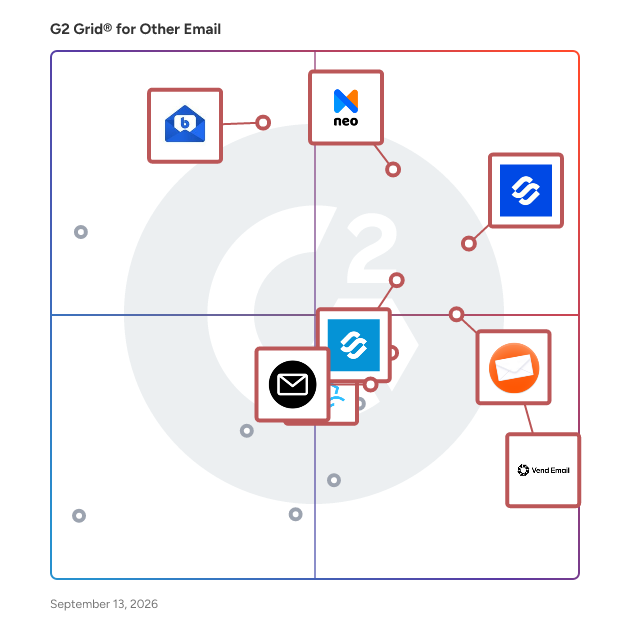
G2 Grid® for Other Email Software

G2 Grid® for Other Email Software plotting products by satisfaction and market presence

Highlighted products: Infraforge, Neo, BlueMail, Reverse Email Lookup, Vend Email, Primeforge, ImprovMX, and FreeCustom.Email.

Underlying data: [Grid® JSON](https://www.g2.com/categories/other-email/grids.json?focus%5B%5D=infraforge&focus%5B%5D=neo-email&focus%5B%5D=bluemail&focus%5B%5D=reverse-email-lookup&focus%5B%5D=vend-email&focus%5B%5D=primeforge&focus%5B%5D=improvmx&focus%5B%5D=freecustom-email)

EmailMagic AI

AI that Writes Emails, Fast Get emails done quickly and easily, so you can be sure that the emails you send will look and feel like it was you who wrote them.

Who Is the Company Behind EmailMagic AI?

Email Migration Software

Email Migration Software is a comprehensive solution that allows users to convert or export data of 20+ file formats and email programs. Many professionals or business organizations deal with various file formats and email programs, and this utility suits them for backing up or migrating their data into different file formats or email clients. Some of its extensive functionalities are: 1. Users can migrate their email data files into different file formats such as PST, PDF, MBOX, CSV, MSG, HTML, EML, and EMLX. 2. It also facilitates them to import emails into Gmail, Office 365, GoDaddy Email, Yahoo Mail, Amazon Webmail, Yandex Mail, Thunderbird, etc. 3. It has a user-friendly interface that allows users to accomplish the backup process by maintaining high integrity. 4. You can also apply filters for specific files from a particular time period. 5. Additionally, it provides an option to delete or remove duplicate emails from the data items.

Who Is the Company Behind Email Migration Software?

  • Seller: Migrate Cloud Data
  • Year Founded: 2022
  • HQ Location: Noida, Uttar Pradesh
  • Twitter: @migrate_cloud
    5 Twitter followers
  • LinkedIn® Page: www.linkedin.com
    1 employees on LinkedIn®

Email Monster

Email Monster consolidates emails from multiple senders or aliases into a single digest, delivered weekly or monthly, effectively reducing inbox clutter. This feature is part of a broader service offering unlimited temporary email addresses that forward to your real email, enhancing privacy and allowing you to control who can contact you without exposing your primary email address. These temporary addresses can be easily created or deactivated, providing a flexible solution to manage spam and keep your inbox organized.

Who Is the Company Behind Email Monster?

EmailPreviewServices

EmailPreviewServices is a comprehensive email testing and optimization platform designed to enhance the effectiveness of email marketing campaigns. It offers a suite of tools that allow marketers, designers, and developers to preview, test, and analyze emails across various devices and email clients, ensuring optimal rendering and deliverability before reaching recipients. By identifying and resolving potential issues prior to dispatch, EmailPreviewServices helps businesses improve engagement rates and achieve better marketing outcomes. Key Features and Functionality: - Email Design Testing: Provides real-time previews of emails on a wide range of devices and email clients, ensuring consistent and accurate rendering. - Spam and Inbox Testing: Evaluates emails against spam filters and monitors inbox placement, helping to improve deliverability and avoid spam folders. - Advanced Email Analytics: Offers in-depth analysis of email campaigns, including metrics such as open rates, click-through rates, user engagement, and geolocation data. - White-Label API: Allows seamless integration with existing applications, enabling automation of email testing processes and customization to fit specific business needs. - Drag & Drop Email Editor: Features an intuitive interface for creating and editing email templates, facilitating efficient design workflows. Primary Value and User Solutions: EmailPreviewServices addresses the critical need for businesses to ensure their email communications are visually appealing, functionally effective, and successfully delivered to recipients' inboxes. By providing tools for thorough testing and analysis, it empowers users to identify and rectify potential issues before emails are sent, leading to higher engagement rates, improved deliverability, and more successful email marketing campaigns. This proactive approach saves time and resources while enhancing the overall effectiveness of email communications.

Who Is the Company Behind EmailPreviewServices?

Email Sorter Ultimate

Email Sorter Ultimate is an enterprise-grade Windows desktop application designed to categorize high-volume email lists based on true mail exchange (MX) server infrastructure. Rather than relying on basic domain extension matching, Email Sorter Ultimate queries DNS Type 15 records in real time to identify the exact mail servers behind every address—automatically isolating Microsoft 365, Google Workspace, Yahoo, AOL, Yandex, GoDaddy, and enterprise webmail hosts. Featuring a proprietary Zimbra Judger engine, the software identifies Synacor Zimbra Collaboration Suite (ZCS) hosts by evaluating secondary MX trees, webmail REST/SOAP API signatures, and STARTTLS SSL certificates across ports 25 and 587. Email Sorter Ultimate runs 100% locally on the user's machine, executing up to 50,000 DNS lookups per minute with zero SMTP handshake pinging, ensuring zero spam-trap or bounce risks during list preparation. Key Features & Capabilities DNS MX Record Resolution: Automatically classifies bulk lists across 60+ pre-configured mail providers by resolving host server MX records. Proprietary Zimbra Judger: Accurately isolates hidden Zimbra hosted domains using deep signature checks, secondary MX trees, and SSL/TLS certificate evaluation. High-Speed Async Engine: Processes over 500,000 records in a single batch at speeds exceeding 50,000 addresses per minute. Zero Bounce / Spam-Trap Risk: Performs parsing strictly through local DNS queries without initiating active SMTP connections to recipient MTAs. Automated List Hygiene: Removes duplicate entries, syntax errors, and corrupted email formats automatically during file import. Flexible File I/O: Supports importing .txt, .csv, and .xls files, exporting categorized output files organized by server host. On-Device Data Privacy: Operates entirely locally without uploading contact data to external cloud servers, maintaining full GDPR and CCPA compliance.

Who Is the Company Behind Email Sorter Ultimate?

  • Seller: ASTGD
  • Year Founded: 2008
  • HQ Location: Rajshahi, BD
  • LinkedIn® Page: www.linkedin.com
    18 employees on LinkedIn®

Email to Case Advance

Email-to-Case Advance builds on the native capabilities of Salesforce Email-to-Case, allowing support teams to automate email-based case management, improve agent productivity, and deliver prompt customer experiences. Key Features - Clean Case Comment Creation: Convert email conversations into clean, readable Salesforce case comments by removing unnecessary email threads. - Advanced Recipient Management: Keep everyone informed with support for To, CC, BCC, Watchers, Case Teams, and Account Teams. - Case Comment Timeline; View emails, case comments, drafts, and case history in a unified, searchable conversation timeline. - Smart Add Case Comment Page: Reply to customers, update case fields, manage recipients, add attachments, and use canned responses from a single workspace. - Duplicate Case Detection & Merge: Identify duplicate cases, merge child cases into a parent case, and eliminate redundant support requests. - Forwarded Email Management: Automatically process internally forwarded emails while preserving the original customer context. - Knowledge Article Suggestions: Automatically recommend relevant Salesforce Knowledge articles based on email content or case subject to accelerate case resolution. - Email Loop Prevention: Prevent auto-responder loops and unnecessary case creation with configurable email loop detection. - Configurable Business Rules: Personalize comment pages, workflows, recipient rules, and automation to match your organization's support processes. Best Suited For You can even take your support operations a step further with E2CA Agent, the AI-powered assistant built into Email-to-Case Advance. Empower agents to instantly summarize lengthy case comments, receive AI-powered next-best-action recommendations, and schedule case comments for timely follow-ups, all from a single tab. With intelligent automation and AI-driven assistance, Email-to-Case Advance helps organizations resolve cases faster, improve agent productivity, and deliver exceptional customer experiences at scale.

Who Is the Company Behind Email to Case Advance?

  • Seller: Grazitti Interactive
  • Year Founded: 2008
  • HQ Location: Panchkula, IN
  • Twitter: @Grazitti
    3,572 Twitter followers
  • LinkedIn® Page: www.linkedin.com
    1,446 employees on LinkedIn®

Email Tree

Reply to emails and solve customer requests in seconds!

Who Is the Company Behind Email Tree?

eSoftTools Outlook Attachments Extractor

Download and try eSoftTools Outlook Attachments Extractor software. This is a smart and result-oriented program to safely extract attachments from Outlook data files. At one time, extract unlimited attachments from multiple PST/OST/NST files through this tool. Manually adding PST files as well as searching Outlook data files from a users drive, both options are available in the tool. Before extracting attachments, the software shows a live preview of all Outlook emails, contacts, calendar and other items. The software shows the entire folder of Outlook data files and allows users to make a selection of only the needed folder for attachment extraction. With ease, it extracts outlook attachments and allows users to extract specific ones by filtering attachments. Users can select attachment types from a predefined list and also input specific attachment extensions manually. A mail filter function is also available in the software to help users. This mail filter option allows users to extract attachments from Outlook emails of some specific date. To use it, users just need to select a start and end date. It works without Outlook and supports PST/OST/NST files for attachment extraction. With ease, users can use it to extract outlook attachments of any size from both Unicode and ANSI outlook files. The software supports all Outlook editions, including Outlook 2021, 2019, 2016, 2013, 2010, 2007, 2003, 2000, and below editions. Without facing any kind of problem, users can run this software on all editions of Windows O/s: 11, 10, 7, 8.1, 8, 7, Vista, XP, and others. For new users, the software comes with a demo edition facility that helps users analyze the software's features and operation. With the demo, users can extract 15 attachments from each folder of PST/OST files with no charges.

Who Is the Company Behind eSoftTools Outlook Attachments Extractor?

  • Seller: eSoftTools
  • Year Founded: 2014
  • HQ Location: Fort Mill SC, US
  • Twitter: @esofttools
    97 Twitter followers
  • LinkedIn® Page: www.linkedin.com
    20 employees on LinkedIn®

ExecFile

A Unified Social Selling Platform for B2B Inside Sales Teams

Who Is the Company Behind ExecFile?

FixVare Gmail Backup Tool

FixVare Gmail Backup Tool is a Windows-based utility that allows users to back up Gmail emails. This tool can save and export Gmail emails in multiple file formats, such as PST, EML, EMLX, MBOX, MSG, HTML, and many more. This utility is capable of switching from one Gmail account to another. With this program, users can safely download all Gmail emails to the local system in several file formats. Users of this utility can export Gmail emails into PST files for any Outlook version, such as 2021, 2019, 2016, 2013, 2010, 2007, etc. This tool keeps the data integrity intact while performing the backup process. This utility gives a user-friendly interface so any novice and IT expert can back up their Gmail without any trouble. You can download this compatible tool on any Windows operating system. Free trial and Paid both options provided to their customers with 24/7 technical support.

Who Is the Company Behind FixVare Gmail Backup Tool?

FixVare MBOX to EML Converter

FixVare MBOX to EML Converter can be used for MBOX email message conversion into EML format. This adaptable utility can transfer large amounts of MBOX files into EML. With this utility, transforming MBOX-based email clients such as Mozilla Thunderbird, SeaMonkey, Eudora, etc., into EML-based email applications becomes much easier. MBOX files contain email attributes like cc, bcc, subject, date, etc., and transfer them into EML format. The filter option of this utility helps transfer only selective MBOX emails in EML. Users can export a batch MBOX file at once, which saves lots of time and effort. Installing Thunderbird or any other email clients is not necessary during the conversion process, as it operates independently. Once the conversion is complete, all email formatting, metadata, and folder hierarchy will remain intact. With the user-friendly interface of this utility, it allows non-technical users to transform their files easily without having any prior experience in technology. The program is 100% safe to use and performs a fast conversion process. FixVare MBOX to EML Converter is available in two editions. First, there is a free trial in which users can transfer 25 emails for free and learn the working process of this program. Secondly, the program offers license editions that enable the conversion of the entire mailbox simultaneously

Who Is the Company Behind FixVare MBOX to EML Converter?

Folder Permissions Manager

Folder Permissions Manager is tool that allows administrators to centrally manage mailbox delegates and folder permissions on Office 365 and Exchange Server.

Who Is the Company Behind Folder Permissions Manager?

  • Seller: Symprex
  • Year Founded: 1999
  • HQ Location: Guildford, England
  • Twitter: @Symprex
    46 Twitter followers
  • LinkedIn® Page: www.linkedin.com
    9 employees on LinkedIn®

ForwardMX

ForwardMX is a simple but powerful email forwarding service helping you to receive all your emails to a central inbox fast & simple by changing the MX records for your Domain.

Who Is the Company Behind ForwardMX?

  • Seller: ForwardMX
  • HQ Location: N/A
  • Twitter: @forwardmx_io
    104 Twitter followers
  • LinkedIn® Page: www.linkedin.com
    1 employees on LinkedIn®

Free Mail

Free Mail is a disposable and temporary email service that gives you a short-term email address. It’s perfect for signing up for websites, apps, or newsletters when you don’t want to share your real email. These addresses are usually active for a limited time, and they help keep your inbox free from spam. You can use Free Mail to stay anonymous, avoid unwanted emails, and protect your privacy online without the hassle of creating a permanent account. How Does Temporary Email Work? Temporary email works by generating a random, disposable email address that you can use immediately-no signup, no password. When someone sends a message to that address, it appears in your temp inbox on the same website. Most services auto-delete the inbox and messages after a set time, usually within minutes or hours. It’s a quick way to receive verification emails or links without exposing your real email to spam or data breaches. Why Do People Use Disposable Emails? People use disposable emails for quick, low-risk interactions online. These temporary addresses help protect privacy, reduce spam, and avoid clutter in personal inboxes. They're especially useful in situations where trust is low or the interaction is one-time. Avoiding spam: One of the main reasons people use disposable emails is to keep their real inbox clean. By using a temp email, users can avoid being flooded with promotional messages or unwanted newsletters. Signing up on unsafe sites: When a website looks shady or asks for an email without a clear reason, a disposable email is a safer choice. It keeps personal info hidden and lowers the risk of data leaks. Testing or development purposes: Developers often use temporary emails to test sign-up forms or email features during development. It helps them check functionality without clogging up their main accounts or creating multiple real addresses. How to Use Free Mail (Step-by-Step) Using Free Mail is simple and quick. You don’t need to register or download anything. Here’s how it works: Visit a Temporary Mail website Go to a trusted temp mail provider like freemail.ai Copy your temporary email address The site will instantly generate an email address. Copy it to use wherever needed. Paste it where required Use the temp email to sign up for websites, get verification codes, or download files. Check the inbox Messages sent to your temp email will appear on the same page. No login required. Delete or let it expire Most temp emails auto-delete after a short time, usually 10 to 60 minutes, or when you close the page.

Who Is the Company Behind Free Mail?

Neeraja Prakash
NP
Researched and written by Neeraja Prakash
Updated June 16, 2025