Best OCR Software - Page 29

How Many OCR Software Products Does G2 Track?

Total Products under this Category: 465

Category Stats (Nov 2026)

  • Average Rating: 4.46/5 The average rating of products in this category, based on all submitted ratings
  • Top Trending Product: PaperLess (+1.41%) - Among all products in this category, PaperLess recorded the largest rating increase compared to last month

Last updated: November 01, 2026

How Does G2 Rank OCR Software Products?

Why You Can Trust G2's Software Rankings:

  • 30 Analysts and Data Experts
  • 7,000+ Authentic Reviews
  • 465+ Products
  • Unbiased Rankings

G2's software rankings are built on verified user reviews, rigorous moderation, and a consistent research methodology maintained by a team of analysts and data experts. Each product is measured using the same transparent criteria, with no paid placement or vendor influence. While reviews reflect real user experiences, which can be subjective, they offer valuable insight into how software performs in the hands of professionals. Together, these inputs power the G2 Score, a standardized way to compare tools within every category.

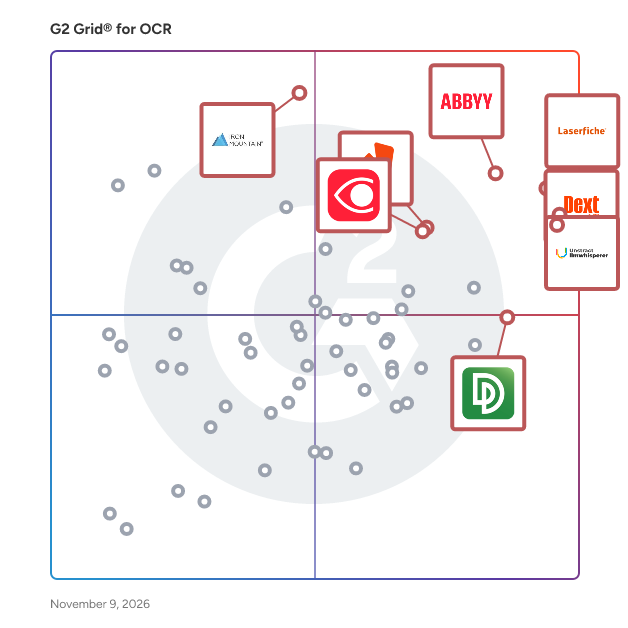
G2 Grid® for OCR Software

G2 Grid® for OCR Software plotting products by satisfaction and market presence

Highlighted products: Laserfiche, Dext, Unstract LLMWhisperer, ABBYY Intelligent Document Processing, Iron Mountain InSight DXP - Intelligent Document Processing, Nitro PDF, FineReader PDF for Windows and Mac, and DocuPipe.

Underlying data: [Grid® JSON](https://www.g2.com/categories/ocr/grids.json?focus%5B%5D=laserfiche&focus%5B%5D=dext&focus%5B%5D=unstract-llmwhisperer&focus%5B%5D=abbyy-intelligent-document-processing&focus%5B%5D=iron-mountain-insight-dxp-intelligent-document-processing&focus%5B%5D=nitro-pdf&focus%5B%5D=finereader-pdf-for-windows-and-mac&focus%5B%5D=docupipe)

Sparrow Document AI

Sparrow is an open-source Python library and API system for extracting structured data from documents using Vision Language Models (VLMs). It processes invoices, receipts, forms, bank statements, tables, and other document types to return structured JSON data. Beyond document extraction, Sparrow supports custom text instruction processing for any AI task including data analysis, summarization, decision making, and general text processing workflows. Sparrow extracts text and data from images (PNG, JPG) and multi-page PDFs using JSON schema validation to ensure accurate data extraction. The system can process complex documents including tables, forms, and multi-page financial reports. Additionally, it handles custom instruction-based requests such as arithmetic operations, text analysis, content summarization, and other AI-powered tasks without requiring document input. The platform offers multiple backend support including MLX for Apple Silicon, Ollama, vLLM, PyTorch, and Hugging Face Cloud GPU. It provides RESTful API endpoints for integration, an interactive web interface for document upload and processing, a command-line interface for batch processing, and includes a built-in analytics dashboard with workflow monitoring. Sparrow features a pluggable pipeline system with Sparrow Parse for vision processing, Sparrow Instructor for text instruction processing, and Sparrow Agents for complex workflows. The system uses schema-based extraction with automatic validation and offers on-device processing capability for data privacy. Agent-based workflow orchestration includes visual monitoring powered by Prefect. Common use cases include automated invoice and receipt processing, financial document analysis, form data extraction, table structure recognition, custom AI instruction processing, text analysis and summarization, and multi-step document processing workflows. Sparrow runs on Python 3.10+ and offers both open-source (GPL 3.0) and commercial licensing options.

Who Is the Company Behind Sparrow Document AI?

SS&C Chorus Document Automation

Captricity’s AI-powered automation enables paper to travel at the speed of digital. Captricity is used by eight of the top ten U.S. insurance companies and other enterprises to extract and enhance data from any customer channel—including handwritten documents—and deliver it seamlessly into downstream business systems.

Who Is the Company Behind SS&C Chorus Document Automation?

  • Seller: SS&C Blue Prism
  • Year Founded: 2001
  • HQ Location: Windsor, CT
  • LinkedIn® Page: www.linkedin.com
    1,099 employees on LinkedIn®
  • Ownership: NASDAQ: SSNC

AI can help you find the answers. G2 helps you trust them.

Connect G2 to Claude or ChatGPT for answers grounded in G2's trusted reviews, comparisons, and pricing from real user insights.

How it works

Staple AI

Staple AI is compliance infrastructure for AI-powered document flows. Boards at regulated enterprises are now accountable for AI-generated outputs. Staple AI is built for that reality: a deterministic, cryptographically verifiable document processor where every extracted value is defensible. Unlike generative IDP vendors that extract data without an evidence trail, Staple processes documents with a full chain of custody from source to ERP entry. The same document produces the same output every time. No re-guessing. No black-box outputs your auditors can't trace. The compliance stack, pre-built: Rebuilding audit-ready infrastructure from scratch costs time and money most enterprises don't have. Staple ships with SOC 2 Type II, ISO 27001, ISO 42001, HIPAA, GDPR, and PEPPOL certification already in scope. That's the certification surface a regulated enterprise would otherwise need to rebuild on their own. Cryptographic provenance at the field level: Every extracted value carries a machine-readable chain of custody through Staple's MSD layer. From the source document to the ERP entry, every field is queryable on demand. When a regulator or internal audit asks "where did this number come from," you have an answer. Built for multinational operations: Staple processes documents across 300+ languages, with native handling for CJK and SEA scripts. Multi-jurisdiction e-invoice coverage spans PEPPOL, InvoiceNow, MyInvois, and expanding regional mandates. Regional instances across APAC, China, EU, and Americas address data-residency requirements where they matter most. The IDP built for SAP Three dedicated SAP Concur modules. 30+ country coverage. Native SAP integration without middleware. Backed by SAP.iO, with a CRO who scaled SAP Concur Asia from $0 to $100M ARR. What Staple handles: Invoices, receipts, purchase orders, KYC documents, contracts, bank statements, delivery orders, insurance claims, tax documents. Template-free. Self-learning. 95%+ accuracy. 3 to 9 seconds per document at 99.99% uptime. Trusted by enterprises across 58 countries, Staple connects to SAP Concur, Oracle, Microsoft Dynamics, and ingests from email, Dropbox, Google Drive, WhatsApp, and SFTP. The built-in matching engine handles up to 5-way document reconciliation, one click. The difference that matters: Most IDP vendors give you extracted data. Staple gives you extracted data with a defensible evidence chain. In a world where your board is on the hook for AI outputs, that distinction is the whole thing.

Average Rating: 4.5/5.0

Total Reviews: 1

Who Is the Company Behind Staple AI?

  • Seller: Staple AI
  • Year Founded: 2019
  • HQ Location: Singapore, SG
  • LinkedIn® Page: www.linkedin.com
    57 employees on LinkedIn®

Who Uses This Product?

  • Company Size: 100% Medium

What Do G2 Reviewers Say About Staple AI?

AI-generated summary from verified user reviews

Pros
  • Users highlight the speed and convenience of Staple AI, making data extraction fast and straightforward.
  • Users appreciate the speed and convenience of Staple AI for quick data extraction and clear data visibility.
  • Users appreciate the speed and convenience of Staple AI, enabling quick document processing and clear data visibility.
  • Users value the speed and convenience of Staple AI, making data extraction quick and user-friendly.
  • Users praise the speed and convenience of Staple AI, making data extraction quick and straightforward.
Cons
  • Users face frequent extraction errors in invoice management, requiring manual verification of important fields and details.
  • Users face missing features like inadequate extraction of product descriptions, causing frequent verification of important details.

What Are Recent G2 Reviews of Staple AI?

Statement Desk

StatementDesk converts PDF bank statements to Excel and CSV for accountants and bookkeepers. Upload statements from 200+ banks, and the AI automatically categorizes transactions, normalizes merchant names, and exports in QuickBooks and Xero-ready formats. Supports batch processing of multiple statements, team usage across client files, and integrates with Google Drive. Built specifically for accounting workflows not a generic PDF tool.

Average Rating: 5.0/5.0

Total Reviews: 1

How Do G2 Users Rate Statement Desk?

  • Has the product been a good partner in doing business?: 10.0/10 (Category avg: 9.1/10)

Who Is the Company Behind Statement Desk?

Who Uses This Product?

  • Company Size: 100% Small

What Are Recent G2 Reviews of Statement Desk?

Sutherland Extract

extract.ai is a comprehensive document processing platform, offering an all-in-one solution for handling documents from ingestion to data intelligence. The easy-to-use platform streamlines the entire document processing journey, efficiently managing tasks from initial document capture to extracting and leveraging meaningful data insights.

Average Rating: 4.3/5.0

Total Reviews: 2

Who Is the Company Behind Sutherland Extract?

  • Seller: Sutherland
  • Year Founded: 1986
  • HQ Location: Pittsford (Rochester), NY
  • LinkedIn® Page: www.linkedin.com
    68,677 employees on LinkedIn®

Who Uses This Product?

  • Company Size: 50% Large, 50% Medium

What Do G2 Reviewers Say About Sutherland Extract?

AI-generated summary from verified user reviews

Pros
  • Users appreciate the automation capabilities of Sutherland Extract, enabling seamless data extraction with minimal setup required.
  • Users appreciate the user-friendly data extraction of Sutherland Extract, making navigation and document uploads effortless.
  • Users appreciate the user-friendly interface of Sutherland Extract, making data management simple and accessible for everyone.
  • Users appreciate the ease of use of Sutherland Extract, enabling effortless navigation for all skill levels.
  • Users appreciate the implementation ease of Sutherland Extract, finding it user-friendly and straightforward to navigate.
Cons
  • Users report challenges with complex setup in Sutherland Extract, leading to incorrect data extraction and increased manual corrections.
  • Users experience data inaccuracy in Sutherland Extract due to difficulties with complex document structures, leading to extra manual corrections.
  • Users experience documentation issues with Sutherland Extract, leading to incorrect data extraction and increased manual effort.
  • Users face challenges with missing features in Sutherland Extract, particularly in handling documents with complex structures effectively.

What Are Recent G2 Reviews of Sutherland Extract?

Swift-Slide

Swift-Slide is a web-based tool that converts PDFs and slide images into PowerPoint files with editable text. It helps teams update proposals, reports, training materials, and AI-generated slides when the original editable files are unavailable. OCR recognizes text, and AI restores the background where the original text was removed. Users can revise wording and adjust text positioning and formatting in the browser before exporting to PPTX. Charts and diagrams are not automatically rebuilt as native PowerPoint shapes; conversion quality depends on the source material. Users can convert and edit one page of their own material without signing up. Free registration is required to download the result. The interface supports Japanese and English, and free and paid plans are available. Swift-Slide is operated by Swift-Triad LLC, based in Japan.

Who Is the Company Behind Swift-Slide?

SysInfo PDF Extractor Pro

SysInfo PDF Extractor Pro Tool is the most suitable utility to extract images, text, attachments, and other illustrations. It has the feature to preview PDF data in three different modes in the panel. Moreover, users can easily skip previously extracted data to avoid duplication of items in the storage. It provides the free demo version where users can extract only the first page of the added PDF file on all Windows OS.

Who Is the Company Behind SysInfo PDF Extractor Pro?

Table2XL

Convert PDF tables to Excel in seconds! Just take a screenshot of the table. https://table2xl.com

Average Rating: 3.5/5.0

Total Reviews: 1

Who Is the Company Behind Table2XL?

Who Uses This Product?

  • Company Size: 100% Large

TableFlow

TableFlow is an AI-powered document processing and workflow automation platform designed to transform unstructured documents into structured data with exceptional accuracy and speed. By leveraging advanced semantic AI, TableFlow understands document structures, contexts, and relationships, enabling businesses to automate data extraction, classification, and reconciliation processes. This reduces manual effort by over 90% and accelerates document processing times from hours to mere minutes. Key Features and Functionality: - Data Extraction: Accurately extracts structured data from various document formats, including PDFs, spreadsheets, and images, handling complex layouts and handwritten text. - Document Classification: Automatically identifies and categorizes documents, recognizing types such as invoices, receipts, and contracts without predefined templates. - AI Reconciliation: Compares documents across multiple sources, identifying discrepancies and ensuring data consistency, even when formats differ. - Review Experience: Provides an intuitive interface for data validation and correction, with tools for quick edits, comments, and approvals, facilitating real-time collaboration. - Analytics & Reporting: Offers real-time dashboards to monitor document volumes, processing times, and success rates, aiding in identifying bottlenecks and optimizing workflows. Primary Value and Solutions Provided: TableFlow addresses the challenges of manual document processing by automating data extraction and reconciliation tasks, significantly reducing human error and operational costs. Its AI-driven approach ensures over 95% accuracy, surpassing traditional OCR methods, and processes documents in under 30 seconds. This enables businesses to scale operations confidently, improve efficiency, and enhance data accuracy across various workflows.

Who Is the Company Behind TableFlow?

  • Seller: TableFlow
  • Year Founded: 2022
  • HQ Location: San Francisco, US
  • LinkedIn® Page: www.linkedin.com
    2 employees on LinkedIn®

TACTIC | Open Source

TACTIC is a flexible, open source web based framework used for building a wide variety of enterprise solutions that require Digital Asset Management and Workflow components. Building an end-user TACTIC deployment will usually take time (and other resources) to achieve a fully functioning business solution for your organization. Components of TACTIC: Data Management: TACTIC applications can make use of arbitrary data models, access multiple databases from disparate locations and deliver them in a single unified interface. File System Management: Digital files can be organized by any relevant metadata, including name, file type, date, project or producer. Automated file naming conventions and event triggering ensure files are consistently named and stored in secure, predictable locations. Workflow & Automation: Automated event triggering system applies customized business logic to custom workflows, streamlining the workflow process and ensuring teams stay on track and on time. Web Framework: Web-based applications allows you to share, preview, develop and deliver digital assets 24/7 across the globe. Improve brand visibility/ maximize brand resources with fully customizable interfaces, themes, views and widgets. Notable Features TACTIC has a large repertoire of notable features that reduce the complexity and time required to build and deploy enterprise data-driven applications. Reference Apps TACTIC can be used to build a wide variety of HTML5-driven applications. Take a look at what types of solutions TACTIC can provide. Benefits to Using TACTIC TACTIC combines elements of traditional Digital Asset Management (DAM), Production Asset Management (PAM) and Enterprise Content Management (ECM) tools to streamline production environments. Configuration and customization is built on standard HTML5, CSS and Javascript components, so new users work in a familiar programming environment. With its accessible interface and flexible data and open source models, TACTIC is a fully customizable workflow solution that can be molded to any company's unique workflow needs. TACTIC tracks digital assets through the production process in real time, transforming data into searchable assets as you work. It automates the naming, sorting, tracking and searching of digital assets, making workflow organization instantaneous and automatic. By automating key data management functions, TACTIC ensures that delivery is always smooth and that files never get lost or go missing. TACTIC's powerful API provides access to all the functionality of the server back-end, granting users the ability to make changes to data and to make use of the check-in functionality. API implementations exist for Python, Javascript, the .NET platform and any language with the XMLRPC implementations. Many clients have used TACTIC's API and back-end to connect and unify multiple disparate systems with a single standard architecture.

Average Rating: 4.0/5.0

Total Reviews: 3

How Do G2 Users Rate TACTIC | Open Source?

  • Has the product been a good partner in doing business?: 8.3/10 (Category avg: 9.1/10)

Who Is the Company Behind TACTIC | Open Source?

Who Uses This Product?

  • Company Size: 100% Small

What Are Recent G2 Reviews of TACTIC | Open Source?

What Are G2 Users Discussing About TACTIC | Open Source?

TestFast

Who Is the Company Behind TestFast?

  • Seller: TestFast
  • Year Founded: 2025
  • HQ Location: Aberdeen, GB
  • LinkedIn® Page: www.linkedin.com
    1 employees on LinkedIn®

Text-R Professional

Do you have PDF documents or images with embedded text that can't be copied or edited? Manually typing long texts is time-consuming and often error-prone. That's where Text-R comes in – the ideal solution for accurate and fast text recognition (OCR) right on your Windows PC. The Problem: Non-Editable Texts in PDFs and Images Many PDF files and scanned images contain text that is only available as an image. This text cannot be copied, searched or edited. When large documents are involved, manual typing is not an option – the time required would simply be too great. The solution: Text-R makes text recognition easy With Text-R, you can turn inaccessible text from PDF files and images into editable documents in just a few steps and without any prior technical knowledge. The easy-to-use software is easy to understand right away and allows you to export text to a new, editable PDF or RTF document (e.g. for Microsoft Word).

Who Is the Company Behind Text-R Professional?

Neeraja Prakash
NP
Researched and written by Neeraja Prakash
Updated March 4, 2025