Best Note-Taking Software - Page 15

How Many Note-Taking Software Products Does G2 Track?

Total Products under this Category: 244

Category Stats (Nov 2026)

  • Average Rating: 4.4/5 (↑0.01 vs Oct 2026) The average rating of products in this category, based on all submitted ratings
  • Top Trending Product: Fyxer (+1.05%) - Among all products in this category, Fyxer recorded the largest rating increase compared to last month

Last updated: November 01, 2026

How Does G2 Rank Note-Taking Software Products?

Why You Can Trust G2's Software Rankings:

  • 30 Analysts and Data Experts
  • 103,900+ Authentic Reviews
  • 244+ Products
  • Unbiased Rankings

G2's software rankings are built on verified user reviews, rigorous moderation, and a consistent research methodology maintained by a team of analysts and data experts. Each product is measured using the same transparent criteria, with no paid placement or vendor influence. While reviews reflect real user experiences, which can be subjective, they offer valuable insight into how software performs in the hands of professionals. Together, these inputs power the G2 Score, a standardized way to compare tools within every category.

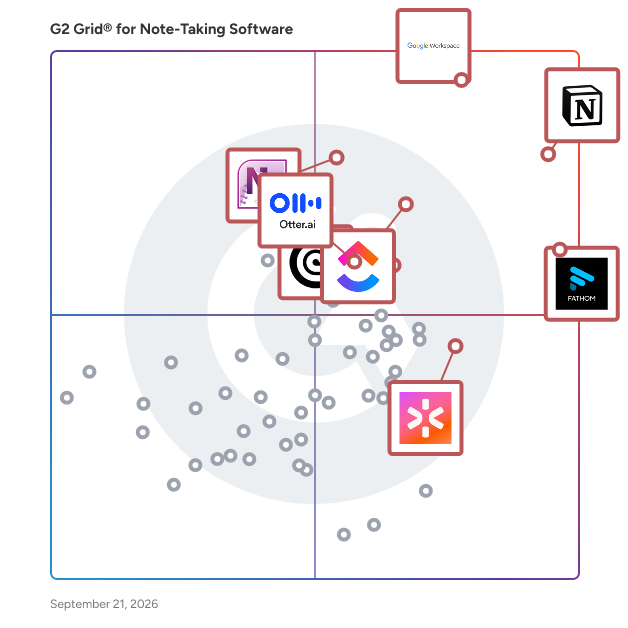
G2 Grid® for Note-Taking Software

G2 Grid® for Note-Taking Software plotting products by satisfaction and market presence

Highlighted products: Notion, Google Workspace, Fathom, ClickUp, Microsoft OneNote, Rev, CoRecruit (formerly Quil), and Otter.ai.

Underlying data: [Grid® JSON](https://www.g2.com/categories/note-taking-software/grids.json?focus%5B%5D=notion&focus%5B%5D=google-workspace&focus%5B%5D=fathom-video&focus%5B%5D=clickup&focus%5B%5D=microsoft-onenote&focus%5B%5D=rev&focus%5B%5D=corecruit-formerly-quil&focus%5B%5D=otter-ai)

SomNote

SomNote is a beautifully designed note-taking application that enables users to effortlessly record and organize their thoughts, ideas, and important information across multiple devices. With its intuitive interface and robust features, SomNote caters to both personal and professional needs, ensuring that your notes are always accessible and securely stored. Key Features and Functionality: - Cross-Device Synchronization: Seamlessly sync your notes across iOS, Android, and web platforms, allowing access from smartphones, tablets, and desktops. - Rich Media Attachments: Enhance your notes by attaching photos, documents, and drawings, making your entries more comprehensive and engaging. - Organizational Tools: Utilize color-coded folders to categorize and manage your notes efficiently, facilitating quick retrieval and better organization. - Security Measures: Protect your private notes with password security, ensuring that sensitive information remains confidential. - Advanced Search Functionality: Quickly locate specific notes using keyword searches, saving time and enhancing productivity. - Automatic Backup: Safeguard your data with automatic backups, preventing loss of information due to device issues or accidental deletions. Primary Value and User Solutions: SomNote addresses the common challenges of note management by providing a unified platform where users can create, organize, and access their notes anytime, anywhere. Its cross-device synchronization ensures that your information is always up-to-date, regardless of the device used. The inclusion of rich media attachments allows for more dynamic and informative notes, while robust organizational tools and security features offer peace of mind and efficiency. By combining these functionalities, SomNote enhances productivity and ensures that important information is always at your fingertips.

Who Is the Company Behind SomNote?

SoulSaga

SoulSaga is AI journaling software that transforms personal reflections into literary narrative chapters. The platform allows individuals to write through guided prompts or free-form entries, which the software converts into narrative prose. The system creates coherent story chapters rather than summaries, maintaining consistency in characters, locations, and events across multiple entries. SoulSaga identifies recurring themes and motifs within the writing, presenting them through visual timelines and archetypal analysis. The software draws on previous entries to generate personalized, context-driven questions designed to encourage deeper reflection. All entries are stored securely and are never shared with third parties or used for AI training purposes. The platform offers both guided and free-writing modes, allowing individuals to choose their preferred journaling approach. Users can export their accumulated reflections as a cohesive book format.

Who Is the Company Behind SoulSaga?

Speech to Note

Speech to Note is an AI-powered speech recognition tool designed to convert spoken words into accurate, shareable text notes instantly. By leveraging advanced speech-to-text technology, it enables users to transcribe their thoughts, lectures, meetings, or any audio content into concise summaries without the need for typing. This platform supports over 40 languages, making it accessible to a diverse user base. With features like offline mode, customizable note formats, and seamless organization through folders and tags, Speech to Note streamlines the note-taking process, enhancing productivity and efficiency. Key Features and Functionality: - Real-Time Transcription: Instantly transcribe spoken words into text, capturing every detail accurately. - Multi-Language Support: Supports over 40 languages, catering to a global audience. - Customizable Note Formats: Choose from over 30 smart note formats, including summaries, outlines, Q&A formats, and flashcards, to suit various needs. - Offline Mode: Save and access notes without an internet connection, ensuring productivity anytime, anywhere. - Organizational Tools: Utilize folders and tags to categorize and manage notes efficiently. - Sharing and Exporting: Share notes via links or export them in various formats for collaboration and further use. - Mobile Accessibility: Capture ideas, meetings, and conversations on-the-go with the AI-powered mobile app. Primary Value and User Solutions: Speech to Note addresses the common challenge of manual note-taking by providing a hands-free, efficient solution for converting speech into structured text. It is particularly beneficial for professionals, students, and individuals who need to capture information quickly and accurately. By automating the transcription process, it allows users to focus more on their interactions and less on writing, thereby enhancing engagement and productivity. The platform's versatility in supporting multiple languages and customizable formats makes it a valuable tool for diverse applications, from academic settings to professional environments.

Who Is the Company Behind Speech to Note?

AI can help you find the answers. G2 helps you trust them.

Connect G2 to Claude or ChatGPT for answers grounded in G2's trusted reviews, comparisons, and pricing from real user insights.

How it works

Sprocket Orbit

A shared wiki for team notes and knowledge, stored securely in Microsoft 365. Sprocket Orbit - Collaborative AI wiki for Microsoft Teams Sprocket Orbit is a collaborative markdown wiki that lives inside Microsoft Teams and your Microsoft 365 tenant. It gives your team a fast, flexible space to write how-tos, runbooks, meeting notes, decisions, and onboarding docs, and connects your AI assistants so their work stops disappearing into chat windows. The problem it solves Most teams want a space for working knowledge that's faster and more flexible than SharePoint pages, but tools like Notion and Obsidian live outside Microsoft 365, which puts company knowledge outside your compliance boundary. OneNote and Loop don't fill the gap either: OneNote's proprietary format and free-form canvas resist structure and AI editing, and Loop locks you into Microsoft's own Copilot inside containers you don't fully control. Orbit is built to answer a different question: can your team and the AI assistants they already use read and write the same notes together, without copy-paste in the middle? Real-time co-authoring Edit the same note simultaneously with your team. Everyone's cursor is visible, and no one's changes are ever overwritten. AI assistants work alongside your team Orbit speaks the Model Context Protocol (MCP), so Copilot, Claude, Codex, and other MCP-compatible assistants connect directly to your workspace. They search, read, and update notes with the same permissions and version history as any team member, and every change they make is tracked like a human edit. Ask Claude to draft a support runbook from a conversation and it patches the note in Orbit. Ask Copilot what the team decided about a rollout and it reads the answer straight from your wiki. Documentation gets captured as part of the work, not written up after the fact. Connected documentation Link related notes as you write. Backlinks, full-text search, and a workspace graph keep information easy to locate as your wiki grows. Writing that feels effortless A plain editor that formats as you type: headings, checklists, tables, diagrams, and maths, with no toolbar in the way. Your documents never leave your organisation Orbit authenticates with your Microsoft accounts and writes every note directly to the SharePoint sites and OneDrive folders you designate. There's no separate data store and nothing is copied to Orbit's servers. Your existing permissions, retention policies, and compliance tooling apply exactly as they do for any other file in your tenant. If someone can't open a file in SharePoint, they can't open it in Orbit, so your IT team stays in control. No lock-in Every note is a standard markdown file in OneDrive or SharePoint. If you ever stop using Orbit, your content stays exactly where it always was, with no export step required. You can keep reading and editing the files with any tool you like. Getting started Install Orbit from the Teams Store using your Microsoft identity. Ten seats are included, with no request form and no credit card. Choose a SharePoint site or OneDrive folder where your notes will be stored. Invite your team and start writing together, right inside Microsoft Teams. Orbit is free to install, with the first 10 seats included on every tenant.

Average Rating: 5.0/5.0

Total Reviews: 1

How Do G2 Users Rate Sprocket Orbit?

  • Has the product been a good partner in doing business?: 10.0/10 (Category avg: 9.1/10)
  • Quality of Support: 10.0/10 (Category avg: 8.5/10)
  • Ease of Use: 10.0/10 (Category avg: 8.9/10)

Who Is the Company Behind Sprocket Orbit?

Who Uses This Product?

  • Company Size: 100% Small

What Are Recent G2 Reviews of Sprocket Orbit?

Stock

Who Is the Company Behind Stock?

  • Seller: Stock
  • Year Founded: 2014
  • HQ Location: 千代田区, JP
  • LinkedIn® Page: www.linkedin.com
    9 employees on LinkedIn®

Summary AI

What is Summary AI? Summary AI is an AI note taker and meeting assistant that helps professionals and students record, transcribe, translate, and summarize meetings, conversations, lectures, interviews, calls, and recordings. It turns spoken content and uploaded files into searchable transcripts, organized notes, key points, decisions, and action items, so you can spend less time taking notes and more time focusing on the conversation. AI Meeting Notes Summary AI helps you capture meetings and conversations without manually writing everything down. - Record meetings, interviews, calls, lectures, and conversations - Capture meetings on Zoom, Google Meet, Microsoft Teams and Apple Watch - Get real-time transcription as people speak - Generate structured meeting notes and meeting minutes - Capture key points, decisions, and action items - Search transcripts and use timestamps to find specific moments - Translate conversations in real time across 120+ languages - Ask questions about your recordings and notes with AI Chat - Share summaries after a meeting - Transcription for Audio & Video Turn recordings into searchable text and get more from your content without listening to everything again. -Transcribe audio recordings into text - Transcribe video files and spoken content - Convert voice recordings to written notes - Upload audio and video files - Search transcripts to quickly find information - Generate summaries from long recordings - AI Summaries for Your Content Get the important information from long recordings and documents without going through everything from beginning to end. Summary AI can summarize: - Meetings and conversations - Audio recordings - Videos - PDFs - Documents Use AI Chat to ask questions about your content, clarify information, or find specific answers from your recordings and uploaded files. Built for Work, Study & Everyday Use - For professionals: Record team meetings, client calls, interviews, and one-on-ones while staying focused on the conversation. - For students: Record lectures and classes, create searchable transcripts, generate summaries, and return to specific moments with timestamps. - For everyday use: Capture phone calls, voice notes, ideas, conversations, and in-person meetings wherever they happen. Record Across Devices - Apple Watch: Start and control recordings directly from your Apple Watch - Record conversations, lectures, calls, and voice notes - Access your summaries across multiple devices - Keep recordings and notes easy to revisit - One App for Notes, Transcription & Summaries Summary AI brings AI note-taking, meeting notes, transcription, translation, and AI summarization together in one app. Record. Transcribe. Translate. Summarize. Share.

Who Is the Company Behind Summary AI?

sunmemo

Sunmemo is a lightweight offline productivity app for Windows that combines private notes, a todo workspace, and 60+ built-in utilities in one place. It runs 100% offline with no account, no ads, and no telemetry — your data stays on your machine. Available with a free 7-day trial on Microsoft Store.

Who Is the Company Behind sunmemo?

Superpowered

Superpowered is a freemium productivity tool that acts as an AI copilot for your meetings, assisting with organization and follow-ups.

Who Is the Company Behind Superpowered?

Support XDR

Support XDR is a productivity software with tools like easy bookmarking, a smart browser extension, tasks & apps management dashboards.

Who Is the Company Behind Support XDR?

Talkatoo

Talkatoo is an affordable, voice-enabled AI tool tailored for veterinary clinics, transforming speech to text at over 200 words per minute. With features like Auto-SOAP records, Desktop Dictation, and an AI Assistant, Talkatoo helps you reclaim time by instantly generating SOAP notes, enabling dictation across applications, and handling tasks like discharge instructions and translations. Simply download, click, and start speaking—no tech expertise required.

Average Rating: 4.3/5.0

Total Reviews: 11

How Do G2 Users Rate Talkatoo?

  • Quality of Support: 9.4/10 (Category avg: 8.5/10)
  • Ease of Use: 9.4/10 (Category avg: 8.9/10)

Who Is the Company Behind Talkatoo?

  • Seller: Talkatoo
  • Year Founded: 2019
  • HQ Location: Halifax, Nova Scotia
  • LinkedIn® Page: www.linkedin.com
    31 employees on LinkedIn®

Who Uses This Product?

  • Company Size: 73% Small, 18% Large

What Do G2 Reviewers Say About Talkatoo?

AI-generated summary from verified user reviews

Pros
  • Users find Talkatoo's ease of use exceptional, simplifying clinical documentation and enhancing productivity for doctors.
  • Users commend Talkatoo for its accurate veterinary term detection and user-friendly interface, enhancing clinical workflows.
  • Users praise the accuracy in detecting veterinary terms, enhancing efficiency for medical professionals with streamlined text conversion.
  • Users appreciate the accurate speech-to-text conversion in Talkatoo, enhancing clinical efficiency and saving valuable time.
  • Users value the time-saving features of Talkatoo, allowing more focus on patient care and communication.
Cons
  • Users encounter inaccuracy in voice-to-text conversion, struggling with speed and clarity during transcription.
  • Users note the limited language support in Talkatoo, hindering broader accessibility and user understanding.
  • Users often face poor customer support, experiencing delays in assistance during issues with Talkatoo.
  • Users find Talkatoo's pricing to be too high compared to cheaper alternatives, impacting its overall value.
  • Users find Talkatoo's price to be excessive, especially with cheaper alternatives providing satisfactory performance.

What Are Recent G2 Reviews of Talkatoo?

thesheet

Who Is the Company Behind thesheet?

  • Seller: Thesheet
  • Year Founded: 2023
  • HQ Location: City Centre, EE
  • LinkedIn® Page: www.linkedin.com
    4 employees on LinkedIn®

ThreadPage

ThreadPage gives each project or client one thread of notes. Freelancers, consultants, agencies and small teams add a note each time they work on something, with text, checklists, tables, images or files, and the last note shows where work stopped. Pro adds sync across devices and sharing: a client can get one thread, a team can get a folder, and invited people join free. Pro also lets ChatGPT, Claude, Claude Code and Codex read and add notes over MCP, only in the folders and threads you choose, and each Claude Code or Codex session gets its own @name that takes requests from any browser. ThreadPage has no built-in AI; assistants run under your own plans. A free version runs in the browser without an account.

Who Is the Company Behind ThreadPage?

Neeraja Prakash
NP
Researched and written by Neeraja Prakash
Updated March 3, 2025