Best Network Monitoring Software for Medium-Sized Businesses - Page 3

How Many Network Monitoring Software Products Does G2 Track?

Total Products under this Category: 228

Category Stats (Oct 2026)

  • Average Rating: 4.49/5 (↓0.01 vs Sep 2026) The average rating of products in this category, based on all submitted ratings
  • Top Trending Product: Netcrunch (+1.38%) - Among all products in this category, Netcrunch recorded the largest rating increase compared to last month

Last updated: October 01, 2026

How Does G2 Rank Network Monitoring Software Products?

Why You Can Trust G2's Software Rankings:

  • 30 Analysts and Data Experts
  • 19,900+ Authentic Reviews
  • 228+ Products
  • Unbiased Rankings

G2's software rankings are built on verified user reviews, rigorous moderation, and a consistent research methodology maintained by a team of analysts and data experts. Each product is measured using the same transparent criteria, with no paid placement or vendor influence. While reviews reflect real user experiences, which can be subjective, they offer valuable insight into how software performs in the hands of professionals. Together, these inputs power the G2 Score, a standardized way to compare tools within every category.

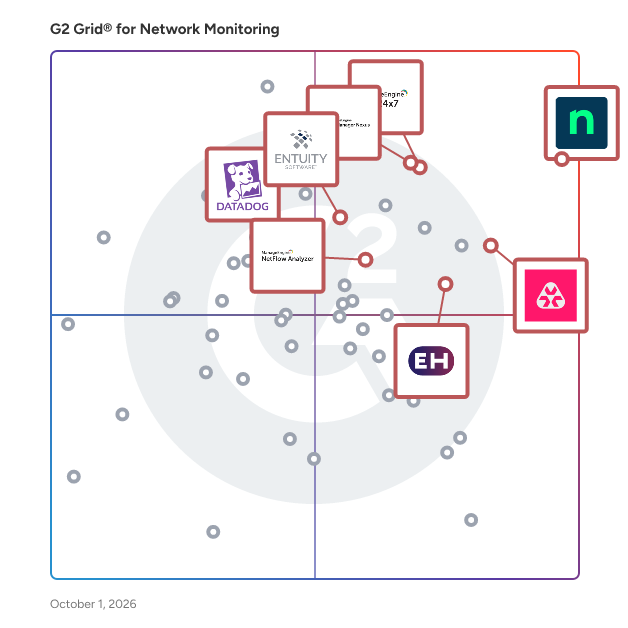
G2 Grid® for Network Monitoring Software

G2 Grid® for Network Monitoring Software plotting products by satisfaction and market presence

Highlighted products: NinjaOne, OpManager Nexus, Site24x7, Entuity, Remote Monitoring and Management, ManageEngine NetFlow Analyzer, Datadog, and ExtraHop.

Underlying data: [Grid® JSON](https://www.g2.com/categories/network-monitoring/grids.json?focus%5B%5D=ninjaone&focus%5B%5D=opmanager-nexus&focus%5B%5D=site24x7&focus%5B%5D=entuity&focus%5B%5D=remote-monitoring-and-management&focus%5B%5D=manageengine-netflow-analyzer&focus%5B%5D=datadog&focus%5B%5D=extrahop&segment=mid-market)

SolarWinds Standard Toolset

SolarWinds Engineer's Toolset is a comprehensive suite of over 60 network management tools designed to assist network engineers in monitoring, diagnosing, and troubleshooting network issues efficiently. This robust collection offers real-time monitoring, network diagnostics, and configuration management capabilities, all accessible through an intuitive interface. Key Features and Functionality: - Real-Time Monitoring and Alerting: Monitor network availability and health in real time, with instant alerts to address potential issues promptly. - Network Diagnostics: Utilize tools like Ping Sweep, DNS Analyzer, and TraceRoute to diagnose and resolve network problems swiftly. - Configuration Management: Manage device configurations with tools such as Config Downloader and Config Compare, ensuring consistency and compliance across the network. - Network Discovery: Automatically discover devices and IP addresses within the network using tools like Port Scanner and Switch Port Mapper. - Integration with SolarWinds Orion Platform: Seamlessly integrate with SolarWinds Network Performance Monitor (NPM) for enhanced troubleshooting and comprehensive network management. Primary Value and User Solutions: Engineer’s Toolset empowers network engineers by providing a centralized suite of tools that streamline network management tasks. By offering real-time insights, automated diagnostics, and configuration management, it reduces the time and effort required to identify and resolve network issues. This leads to improved network performance, minimized downtime, and enhanced operational efficiency, allowing engineers to focus on strategic initiatives rather than routine troubleshooting.

Average Rating: 4.0/5.0

Total Reviews: 27

How Do G2 Users Rate SolarWinds Standard Toolset?

  • Has the product been a good partner in doing business?: 8.0/10 (Category avg: 8.8/10)
  • Performance Monitoring: 8.3/10 (Category avg: 8.9/10)
  • Multi-Network Capability: 8.3/10 (Category avg: 8.7/10)
  • Path Analysis: 6.7/10 (Category avg: 8.4/10)

Who Is the Company Behind SolarWinds Standard Toolset?

  • Seller: SolarWinds Worldwide LLC
  • Year Founded: 1999
  • HQ Location: Austin, TX
  • Twitter: @solarwinds
    19,570 Twitter followers
  • LinkedIn® Page: www.linkedin.com
    2,864 employees on LinkedIn®
  • Ownership: NYSE: SWI

Who Uses This Product?

  • Company Size: 43% Large, 43% Medium

What Do G2 Reviewers Say About SolarWinds Standard Toolset?

AI-generated summary from verified user reviews

Pros
  • Users find the ease of use of SolarWinds Standard Toolset exceptional, requiring no expert skills to manage effectively.
  • Users value the easy deployment of SolarWinds Standard Toolset, making it accessible for all skill levels.
Cons
  • Users note that the product is expensive compared to other similar tools available in the market.

What Are Recent G2 Reviews of SolarWinds Standard Toolset?

What Are G2 Users Discussing About SolarWinds Standard Toolset?

Centreon Infra Monitoring

Centreon is a comprehensive IT monitoring solution designed to help organizations gain full visibility and control over their IT operations. By providing real-time insights into system performance, network health, and application availability, Centreon enables businesses to proactively manage their IT environments, ensuring uninterrupted operations and optimal resource utilization. Targeted primarily at IT departments and operations teams, Centreon serves a diverse range of industries, from small businesses to large enterprises. Its user-friendly interface and customizable dashboards make it accessible for both technical and non-technical users. This versatility allows organizations to tailor the monitoring experience to their specific needs, making it an invaluable tool for maintaining operational efficiency and enhancing service delivery. One of the key use cases for Centreon is its ability to prevent downtime through proactive issue detection. By continuously monitoring critical systems and applications, Centreon alerts IT teams to potential problems before they escalate into significant outages. This proactive approach minimizes disruptions and helps organizations maintain a reliable IT infrastructure, which is essential for meeting business demands and ensuring customer satisfaction. Centreon also emphasizes resource optimization, allowing businesses to maximize efficiency and reduce IT costs. By providing detailed insights into resource utilization, organizations can identify underperforming assets and make informed decisions about capacity planning and resource allocation. This capability enables businesses to streamline their IT operations, ultimately leading to cost savings and improved performance. In addition, Centreon enhances the user experience by delivering consistent, high-quality IT services. With its comprehensive monitoring capabilities, IT teams can ensure that applications and services are running smoothly, providing end-users with the reliable performance they expect. This focus on user experience fosters customer loyalty and supports overall business success by aligning IT services with organizational goals. Centreon distinguishes itself in the IT monitoring category by combining powerful monitoring features with a user-centric approach. Its ability to deliver actionable insights, prevent downtime, optimize resources, and enhance user experience makes it a vital tool for organizations looking to improve their IT operations and achieve business success.

Average Rating: 4.6/5.0

Total Reviews: 89

How Do G2 Users Rate Centreon Infra Monitoring?

  • Has the product been a good partner in doing business?: 8.1/10 (Category avg: 8.8/10)
  • Performance Monitoring: 8.7/10 (Category avg: 8.9/10)
  • Multi-Network Capability: 8.6/10 (Category avg: 8.7/10)
  • Path Analysis: 10.0/10 (Category avg: 8.4/10)

Who Is the Company Behind Centreon Infra Monitoring?

  • Seller: Centreon
  • Company Website:
  • Year Founded: 2005
  • HQ Location: Paris, France
  • Twitter: @Centreon
    697 Twitter followers
  • LinkedIn® Page: www.linkedin.com
    154 employees on LinkedIn®

Who Uses This Product?

  • Who Uses This: Network Engineer
  • Top Industries: Information Technology and Services, Internet
  • Company Size: 63% Medium, 25% Large

What Do G2 Reviewers Say About Centreon Infra Monitoring?

AI-generated summary from verified user reviews

Pros
  • Users appreciate the ease of use of Centreon Infra Monitoring, enjoying its flexibility and organized monitoring experience.
  • Users appreciate the ease of centralized monitoring with Centreon, enjoying a clear view of their entire infrastructure.
  • Users value the centralized monitoring capabilities of Centreon, providing a clear and organized view of their infrastructure.
  • Users value the real-time monitoring capabilities of Centreon, enhancing their ability to oversee diverse infrastructure seamlessly.
  • Users appreciate the flexible integrations of Centreon Infra Monitoring, seamlessly connecting with various tools and devices.
Cons
  • Users find the complex configuration process challenging, especially during setup and integration with other tools.
  • Users find Centreon Infra Monitoring to have a not user-friendly interface, complicating setup and upgrades significantly.
  • Users find the complex setup of Centreon Infra Monitoring time-consuming and challenging, particularly for newcomers.
  • Users find the difficult learning curve of Centreon Infra Monitoring challenging, particularly during setup and upgrades.
  • Users find the learning curve steep, particularly during setup and upgrades, requiring significant technical effort.

What Are Recent G2 Reviews of Centreon Infra Monitoring?

What Are G2 Users Discussing About Centreon Infra Monitoring?

Progress Flowmon Platform

Flowmon is a professional NPMD tool for effective network troubleshooting, performance monitoring, capacity planning, encrypted traffic analysis and cloud monitoring. Instead of just the red/green infrastructure status, it helps NetOps teams to understand user experience (UX) while keeping the amount of data noise and analytical work to a minimum. The Flowmon solution is a part of the Progress product portfolio.

Average Rating: 4.2/5.0

Total Reviews: 24

How Do G2 Users Rate Progress Flowmon Platform?

  • Has the product been a good partner in doing business?: 7.8/10 (Category avg: 8.8/10)
  • Performance Monitoring: 8.5/10 (Category avg: 8.9/10)
  • Multi-Network Capability: 8.3/10 (Category avg: 8.7/10)
  • Path Analysis: 8.1/10 (Category avg: 8.4/10)

Who Is the Company Behind Progress Flowmon Platform?

  • Seller: Progress Software
  • Year Founded: 1981
  • HQ Location: Burlington, MA.
  • Twitter: @ProgressSW
    48,773 Twitter followers
  • LinkedIn® Page: www.linkedin.com
    4,242 employees on LinkedIn®
  • Ownership: NASDAQ:PRGS

Who Uses This Product?

  • Top Industries: Information Technology and Services
  • Company Size: 52% Medium, 24% Small

What Are Recent G2 Reviews of Progress Flowmon Platform?

What Are G2 Users Discussing About Progress Flowmon Platform?

AI can help you find the answers. G2 helps you trust them.

Connect G2 to Claude or ChatGPT for answers grounded in G2's trusted reviews, comparisons, and pricing from real user insights.

How it works

Galgus

Galgus helps companies and entities to optimize their digital experience and improve the decision-making process through the provision of intelligence to Wi-Fi networks, so that they are automatically managed to guarantee the best connectivity in all environments and at the same time offer real-time location and presence data so that authorities and managers can know what is really happening in their businesses, cities and institutions. ​ Innovation is in our DNA, which is why we are constantly working to create products that respond to the connectivity and location needs of the future. ​

Average Rating: 4.9/5.0

Total Reviews: 31

How Do G2 Users Rate Galgus?

  • Has the product been a good partner in doing business?: 10.0/10 (Category avg: 8.8/10)
  • Performance Monitoring: 9.8/10 (Category avg: 8.9/10)
  • Multi-Network Capability: 9.8/10 (Category avg: 8.7/10)
  • Path Analysis: 9.7/10 (Category avg: 8.4/10)

Who Is the Company Behind Galgus?

  • Seller: Galgus
  • Year Founded: 2013
  • HQ Location: Camas, Seville
  • Twitter: @galgus_
    956 Twitter followers
  • LinkedIn® Page: www.linkedin.com
    13 employees on LinkedIn®

Who Uses This Product?

  • Top Industries: Marketing and Advertising
  • Company Size: 50% Small, 38% Medium

What Are Recent G2 Reviews of Galgus?

What Are G2 Users Discussing About Galgus?

Netreo

Netreo is the most comprehensive IT Operations full stack monitoring and AIOps company. We provide a single source of truth for proactive performance and availability monitoring for large enterprise networks, infrastructure, applications and business services. Our solution is used by: - IT Executives to have full visibility from the business service right down into the infrastructure and network that supports it. - IT Engineering departments as a decision support system for capacity planning, and architecting modern solutions. - IT Operations teams for real time visibility into what is failing in their environment, what bottlenecks exist and who it is affecting. We provide all of these insights for systems and vendor mixes in large heterogeneous and constantly evolving environments. We have an extensive and growing list of supported vendors (over 350 integrations) including network vendors, servers, storage, virtualization, cloud platforms and others. Our platform is also an extensible environment with the ability for our user community to build and share their integrations with others in our customer community.

Average Rating: 4.5/5.0

Total Reviews: 54

How Do G2 Users Rate Netreo?

  • Has the product been a good partner in doing business?: 9.2/10 (Category avg: 8.8/10)
  • Performance Monitoring: 9.0/10 (Category avg: 8.9/10)
  • Multi-Network Capability: 8.8/10 (Category avg: 8.7/10)
  • Path Analysis: 8.3/10 (Category avg: 8.4/10)

Who Is the Company Behind Netreo?

Who Uses This Product?

  • Top Industries: Information Technology and Services, Primary/Secondary Education
  • Company Size: 37% Medium, 34% Large

What Are Recent G2 Reviews of Netreo?

What Are G2 Users Discussing About Netreo?

PingPlotter

Sometimes solving a network problem takes more than rebooting the router. When that's the case, understanding the cause of the problem is essential to finding a solution. Is it your local network, the website you're accessing, or something in between? PingPlotter makes finding and proving the source of network problems easier. It tests the route between your computer and a target website then graphs the results. Visual evidence helps diagnose problems faster. It also helps persuade others to make changes if you find a problem with a network you do not control. Analyzing network performance with PingPlotter can be as simple or complex and you need. All it takes to get started is entering a target and clicking the trace button. From there, the tool will collect latency and packet loss data until you capture the information you need. If you're interested in more in depth analysis, plenty of features are available for testing with different packet types, getting alerted about problems, and perpetually monitoring entire networks. Free trials available at www.pingplotter.com/download.html

Average Rating: 4.6/5.0

Total Reviews: 46

How Do G2 Users Rate PingPlotter?

  • Has the product been a good partner in doing business?: 8.3/10 (Category avg: 8.8/10)
  • Performance Monitoring: 9.2/10 (Category avg: 8.9/10)
  • Multi-Network Capability: 7.9/10 (Category avg: 8.7/10)
  • Path Analysis: 8.5/10 (Category avg: 8.4/10)

Who Is the Company Behind PingPlotter?

  • Seller: Pingman Tools
  • Year Founded: 1998
  • HQ Location: Boise, ID
  • Twitter: @PingmanTools
    154 Twitter followers
  • LinkedIn® Page: www.linkedin.com
    1 employees on LinkedIn®

Who Uses This Product?

  • Top Industries: Information Technology and Services, Insurance
  • Company Size: 57% Small, 34% Medium

What Do G2 Reviewers Say About PingPlotter?

AI-generated summary from verified user reviews

Pros
  • Users find PingPlotter to be very easy to set up and use, providing instant access to needed information.
  • Users find the easy setup of PingPlotter quick and straightforward, providing instant access to necessary information.
  • Users find PingPlotter's monitoring services invaluable for effectively tracking and managing their internet connections.
  • Users find PingPlotter to be very helpful for monitoring network connectivity, ensuring smooth and reliable connections.
  • Users find PingPlotter to be a reliable tool for effective network diagnostics and monitoring performance.
Cons
  • Users find configuration difficulties in PingPlotter, especially when exporting information for sharing with others.
  • Users find the navigation issues in PingPlotter frustrating, wishing for a smoother user experience.

What Are Recent G2 Reviews of PingPlotter?

What Are G2 Users Discussing About PingPlotter?

Nagios Network Analyzer

Nagios Network Analyzer is an enterprise-class network flow monitoring solution that provides organizations with comprehensive insight into network traffic patterns and bandwidth usage. By supporting industry-standard flow data technologies such as NetFlow, sFlow, J-Flow, and IPFIX, it enables in-depth assessment of a network's overall health. The intuitive web interface offers advanced visualizations and customizable dashboards, allowing users to monitor network performance effectively. Integrated with tools like Wireshark, Suricata, and Nmap, Nagios Network Analyzer enhances network security through real-time packet capture, intrusion detection, and network mapping. Its automated alerting system notifies users of abnormal activities or bandwidth anomalies, facilitating prompt issue resolution. Seamless integration with Nagios XI ensures centralized monitoring and reporting, making it a versatile tool for maintaining network reliability and security. Key Features and Functionality: - Comprehensive Flow Data Analysis: Supports NetFlow v5, v7, v9, sFlow, J-Flow, and IPFIX, providing granular visibility into network traffic. - Advanced Visualizations: Offers intuitive graphs and customizable dashboards for real-time monitoring of network performance and bandwidth usage. - Integrated Security Tools: Incorporates Wireshark for packet analysis, Suricata for intrusion detection, and Nmap for network discovery, enhancing threat detection and response capabilities. - Automated Alerting System: Delivers notifications for abnormal network activities or bandwidth thresholds, enabling proactive issue management. - Seamless Nagios XI Integration: Allows centralized monitoring and reporting by integrating with Nagios XI, streamlining network management processes. Primary Value and User Solutions: Nagios Network Analyzer empowers organizations to proactively monitor and analyze network traffic, ensuring optimal performance and security. By providing real-time insights into bandwidth utilization and potential threats, it enables IT teams to detect and address issues before they impact critical business operations. The integration with industry-standard tools and the automated alerting system enhance the efficiency of network management, reducing downtime and improving overall network reliability.

Average Rating: 4.2/5.0

Total Reviews: 30

How Do G2 Users Rate Nagios Network Analyzer?

  • Has the product been a good partner in doing business?: 6.9/10 (Category avg: 8.8/10)
  • Performance Monitoring: 9.4/10 (Category avg: 8.9/10)
  • Multi-Network Capability: 9.2/10 (Category avg: 8.7/10)
  • Path Analysis: 9.0/10 (Category avg: 8.4/10)

Who Is the Company Behind Nagios Network Analyzer?

  • Seller: Nagios
  • Year Founded: 2007
  • HQ Location: Saint Paul, MN
  • Twitter: @nagiosinc
    5,495 Twitter followers
  • LinkedIn® Page: www.linkedin.com
    80 employees on LinkedIn®

Who Uses This Product?

  • Top Industries: Information Technology and Services, Internet
  • Company Size: 60% Medium, 33% Large

What Do G2 Reviewers Say About Nagios Network Analyzer?

AI-generated summary from verified user reviews

Pros
  • Users commend the accurate traffic visualization and dashboard features of Nagios Network Analyzer for effective monitoring.
  • Users appreciate the in-depth traffic analysis and advanced functionalities offered by Nagios Network Analyzer.
  • Users appreciate the ease of use of Nagios Network Analyzer, allowing in-depth traffic analysis and advanced functionalities.
  • Users commend the reliability of Nagios Network Analyzer, noting its accurate traffic visualization and top talker insights.
Cons
  • Users find the complex configuration process challenging, particularly with third-party software integration gaps.
  • Users find setup and configuration complex, with challenges in integrating Nagios Network Analyzer with third-party software.
  • Users experience integration issues, finding the setup complex and third-party software connectivity lacking.

What Are Recent G2 Reviews of Nagios Network Analyzer?

What Are G2 Users Discussing About Nagios Network Analyzer?

Tian Lin
TL
Researched and written by Tian Lin
Updated