# Best Heatmap Tools - Page 6

  *By [Alanna Iwuh](https://research.g2.com/insights/author/alanna-iwuh)*

   Heatmap tools report on how web or mobile visitors behave when interacting within a singular web page on a website or mobile device. Marketers and web developers use heatmaps to visualize where visitors click, hover, and scroll on a web page. Heat maps visually represent the recorded clicks and mouse movements of the website or mobile visitor and create in-page data for marketers and UI/UX designers to analyze. This information shows how well or poorly the page’s design draws the viewer’s attention and where designs can be improved, thus increasing engagement and conversion.

Heatmap tools are deployed on top of existing web development infrastructure and [web content management software](https://www.g2.com/categories/web-content-management). Often, these products include features of [digital analytics software](https://www.g2.com/categories/digital-analytics) or other [conversion rate optimization software](https://www.g2.com/categories/conversion-rate-optimization), such as [product analytics software](https://www.g2.com/categories/product-analytics) and [session replay software](https://www.g2.com/categories/session-replay). While products in this category have expanded to address heat maps for both web visitors using PC or tablets and mobile devices or mobile apps, features like [mobile app analytics software](https://www.g2.com/categories/mobile-app-analytics) have been an additional product offering for optimizing mobile experiences.

To qualify for inclusion in the Heatmap Tools category, a product must:

- Create or overlay heat maps of or onto screenshots of existing web pages or mobile interfaces
- Track, monitor, or record the number of clicks on specific elements or areas of a web page
- Collect data on a per-page or individual user sessions basis
- Offer report filtration via specific behaviors or visitor demographic


## Category Overview

**Total Products under this Category:** 82


## Trust & Credibility Stats

**Why You Can Trust G2's Software Rankings:**

- 30 Analysts and Data Experts
- 10,200+ Authentic Reviews
- 82+ Products
- Unbiased Rankings

G2's software rankings are built on verified user reviews, rigorous moderation, and a consistent research methodology maintained by a team of analysts and data experts. Each product is measured using the same transparent criteria, with no paid placement or vendor influence. While reviews reflect real user experiences, which can be subjective, they offer valuable insight into how software performs in the hands of professionals. Together, these inputs power the G2 Score, a standardized way to compare tools within every category.


## Best Heatmap Tools At A Glance

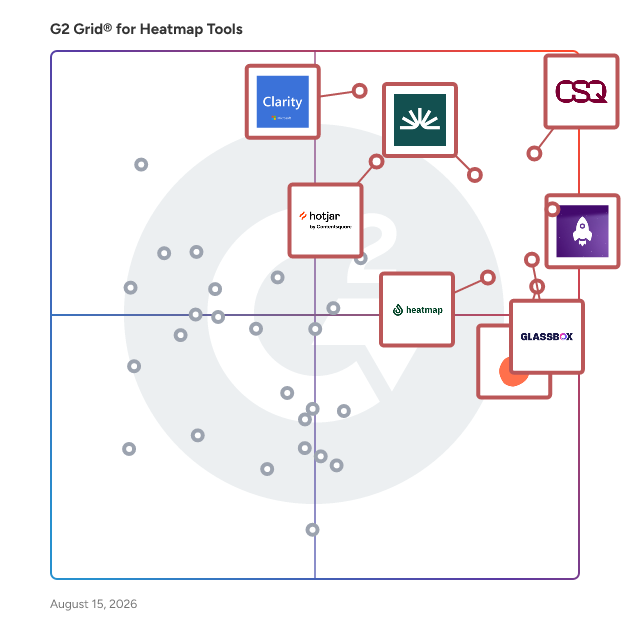
- **Leader:** [LogRocket](https://www.g2.com/products/logrocket/reviews)
- **Highest Performer:** [Silktide](https://www.g2.com/products/silktide/reviews)
- **Easiest to Use:** [Glassbox](https://www.g2.com/products/glassbox/reviews)
- **Top Trending:** [Hotjar](https://www.g2.com/products/hotjar/reviews)
- **Best Free Software:** [Smartlook](https://www.g2.com/products/smartlook/reviews)


---

**Sponsored**

### Sentry

Sentry is an application monitoring and error tracking platform that helps developers identify, debug, and resolve software issues in production environments across web, mobile, desktop, game, and AI-powered applications. The platform captures errors, crashes, and performance problems in real time, providing developers with stack traces, user context, and diagnostic data needed to reproduce and fix bugs. Sentry supports over 100 programming languages and frameworks, including JavaScript, Python, Java, Ruby, PHP, Go, React, Django, and mobile platforms like iOS and Android. Core monitoring capabilities: - Error tracking groups similar errors into issues, showing frequency, affected users, and the exact code location where problems occur - Performance monitoring traces requests through distributed systems to identify slow database queries, API bottlenecks, and code-level performance problems - Session Replay records user interactions leading up to errors, capturing clicks, network activity, and console logs for easier reproduction - Logs captures structured log data from your applications alongside errors and traces, enabling search and filtering by message content, severity level, and custom attributes - AI observability provides visibility into LLM applications, AI agents, and Model Context Protocol servers, tracking prompts, model calls, tool usage, and token consumption Developers integrate Sentry by installing an SDK and adding a few lines of code to their application. The platform automatically captures unhandled exceptions, while developers can manually track custom errors and performance metrics. Sentry processes events in real time, sending alerts through Slack, email, PagerDuty, or other notification channels when issues occur. Additional features and capabilities: - AI-powered debugging through Seer, which analyzes errors to identify root causes and suggest code fixes with high accuracy - Distributed tracing that follows requests across microservices, serverless functions, and third-party APIs to pinpoint failure points - Custom dashboards and alerts for monitoring specific metrics, error rates, or performance thresholds important to each team - Profiling tools that provide code-level visibility into where time is being spent in production, identifying slow functions, call stacks, and performance regressions across backend services and frontend/mobile user flows - Workflow integrations with GitHub, Jira, GitLab, Azure DevOps, and other development tools to create tickets or link errors to commits automatically The platform serves development teams at organizations ranging from individual developers to large enterprises. More than 100,000 organizations use Sentry, processing billions of error events daily. Sentry offers both cloud-hosted and self-hosted deployment options, with pricing tiers based on event volume. A free tier supports small projects and individual developers.


[Visit website](https://www.g2.com/external_clickthroughs/record?secure%5Bad_program%5D=ppc&amp;secure%5Bad_slot%5D=category_product_list&amp;secure%5Bcategory_id%5D=631&amp;secure%5Bdisplayable_resource_id%5D=315&amp;secure%5Bdisplayable_resource_type%5D=Category&amp;secure%5Bmedium%5D=sponsored&amp;secure%5Bplacement_reason%5D=neighbor_category&amp;secure%5Bplacement_resource_ids%5D%5B%5D=1398&amp;secure%5Bprioritized%5D=false&amp;secure%5Bproduct_id%5D=17313&amp;secure%5Bresource_id%5D=631&amp;secure%5Bresource_type%5D=Category&amp;secure%5Bsource_type%5D=category_page&amp;secure%5Bsource_url%5D=https%3A%2F%2Fwww.g2.com%2Fcategories%2Fheatmap-tools%3Fpage%3D6&amp;secure%5Btoken%5D=fab605782dab17729d65efbbe48e8cf8596eece2600b1124710c227342f0e5b2&amp;secure%5Burl%5D=https%3A%2F%2Fsentry.io%2Flp%2Ferror-monitoring-for-developers%2F%3Futm_source%3Dg2%26utm_medium%3Dreview-site%26utm_campaign%3Derrors-fy27q1-evergreen%26utm_content%3Dstatic-ad-bug-tracking-trysentry&amp;secure%5Burl_type%5D=custom_url&amp;secure%5Bvisitor_segment%5D=180)

---


## Parent Category

[Conversion Rate Optimization Tools](https://www.g2.com/categories/conversion-rate-optimization-tools)


## Related Categories

- [Digital Analytics Software](https://www.g2.com/categories/digital-analytics)
- [Session Replay Software](https://www.g2.com/categories/session-replay)
- [Product Analytics Software](https://www.g2.com/categories/product-analytics)


