Best General-Purpose CAD Software - Page 5

How Many General-Purpose CAD Software Products Does G2 Track?

Total Products under this Category: 151

Category Stats (Oct 2026)

  • Average Rating: 4.35/5 The average rating of products in this category, based on all submitted ratings
  • Top Trending Product: GstarCAD (+2.02%) - Among all products in this category, GstarCAD recorded the largest rating increase compared to last month

Last updated: October 26, 2026

How Does G2 Rank General-Purpose CAD Software Products?

Why You Can Trust G2's Software Rankings:

  • 30 Analysts and Data Experts
  • 12,800+ Authentic Reviews
  • 151+ Products
  • Unbiased Rankings

G2's software rankings are built on verified user reviews, rigorous moderation, and a consistent research methodology maintained by a team of analysts and data experts. Each product is measured using the same transparent criteria, with no paid placement or vendor influence. While reviews reflect real user experiences, which can be subjective, they offer valuable insight into how software performs in the hands of professionals. Together, these inputs power the G2 Score, a standardized way to compare tools within every category.

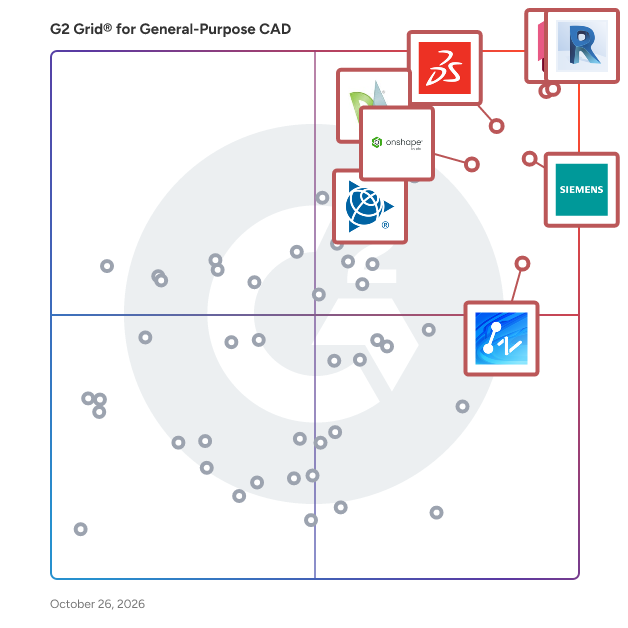
G2 Grid® for General-Purpose CAD Software

G2 Grid® for General-Purpose CAD Software plotting products by satisfaction and market presence

Highlighted products: Revit, AutoCAD, Designcenter Solid Edge, SOLIDWORKS, Onshape, SketchUp, ZWCAD, and DraftSight.

Underlying data: [Grid® JSON](https://www.g2.com/categories/general-purpose-cad/grids.json?focus%5B%5D=revit&focus%5B%5D=autocad&focus%5B%5D=designcenter-solid-edge&focus%5B%5D=solidworks&focus%5B%5D=onshape&focus%5B%5D=sketchup&focus%5B%5D=zwcad&focus%5B%5D=draftsight)

Space Designer 3D

Space Designer 3D is a browser-based floor plan and interior design tool developed by Asynth, an independent French company founded in 2009 by two architects. Draw accurate 2D floor plans, furnish rooms from a catalog of thousands of ready-to-use items, and step inside your project in real-time 3D, all from your web browser with nothing to install. Built for homeowners, interior designers, architects, real estate professionals, retailers, and educators, Space Designer 3D removes the learning curve of traditional CAD. Walls, doors, and windows snap into place with automatic measurements, multi-level plans let you design a full building, and a one-click photorealistic rendering turns any project into a presentation-ready image. Projects live in the cloud and can be shared, embedded on a website, or branded for client-facing work on the Business and Enterprise plans. Whether you are testing a renovation, presenting a layout to a client, or creating floor plans for property listings, Space Designer 3D takes you from idea to a shareable 3D design in minutes. Inside Space Designer 3D, you work in a simple 2D plan view and switch to an immersive 3D mode at any time. The furniture and fixtures library covers kitchens, bathrooms, bedrooms, living rooms, offices, and outdoor spaces, so you can decorate a full home or a single room down to the last detail. Every project generates an automatic inventory of the items you place, with names, dimensions, and quantities, which is handy for quotes and shopping lists. When your design is ready, export it as a PNG, JPG, or PDF file, or as DXF and IFC for CAD and BIM software. Premium, Ultimate, and Team plans start at $25 per month and each include a 5-day free trial, unlocking 4K rendering, AI image tools, more projects, and advanced exports; a limited free Starter plan is also available. Teams, retailers, and agencies use the Business and Enterprise plans to add their own product catalogs and present designs under their own brand.

Average Rating: 3.4/5.0

Total Reviews: 5

Who Is the Company Behind Space Designer 3D?

  • Seller: Asynth
  • Year Founded: 2010
  • HQ Location: Aix-en-Provence, FR
  • Twitter: @SpaceDesigner3D
    706 Twitter followers
  • LinkedIn® Page: www.linkedin.com
    26 employees on LinkedIn®
  • Ownership: Privately Held

Who Uses This Product?

  • Company Size: 60% Small, 40% Medium

What Do G2 Reviewers Say About Space Designer 3D?

AI-generated summary from verified user reviews

Pros
  • Users find that Space Designer 3D is very easy to use, allowing quick start with simple draft designs.
  • Users find Space Designer 3D to be easy to use for simple draft designs, making it accessible for non-designers.
  • Users find Space Designer 3D offers simple use, making it easy for non-designers to start drafting quickly.
Cons
  • Users find the learning curve steep, making Space Designer 3D less user-friendly at the beginning.
  • Users find the steep learning curve of Space Designer 3D challenging, requiring time to master the interface.

What Are Recent G2 Reviews of Space Designer 3D?

BobCAD-CAM

BobCAD CAM is for product designers, mechanical engineers, machinists, and makers. Powerful and affordable CNC programming solutions for mill, mill-turn, lathe, router, laser, plasma, waterjet, and wire EDM machines. 2.5, 3, 4 & 5 axis machining, advanced simulation, reporting, and post-processing. Easy to use, learn, and own. Free weekly ongoing live training designed to crush the learning curve and speed up your success! BobCAD-CAM customers are some of the most productive and profitable manufacturers in the world! One can find BobCAD-CAM being used to program CNC parts in many different industries. Aerospace, automotive, consumer, custom fabrication, defense/military, education, mold/pattern, music, production shop, sporting goods, tool & die, woodworking.

Average Rating: 3.6/5.0

Total Reviews: 13

How Do G2 Users Rate BobCAD-CAM?

  • Has the product been a good partner in doing business?: 3.9/10 (Category avg: 8.5/10)
  • Drawing: 10.0/10 (Category avg: 8.9/10)
  • File Import : 6.7/10 (Category avg: 8.3/10)
  • Views: 8.3/10 (Category avg: 8.6/10)

Who Is the Company Behind BobCAD-CAM?

  • Seller: BobCAD-CAM
  • Year Founded: 1985
  • HQ Location: Tampa, US
  • Twitter: @bobcad_cam
    2,462 Twitter followers
  • LinkedIn® Page: www.linkedin.com
    114 employees on LinkedIn®

Who Uses This Product?

  • Company Size: 92% Small, 8% Medium

What Are Recent G2 Reviews of BobCAD-CAM?

What Are G2 Users Discussing About BobCAD-CAM?

CADfix

CADfix is the leading software solution for CAD model translation, repair, healing, defeaturing and simplification. It is packaged as a desktop or server solution, with extensible modular functionality dependent upon the end user's source and target systems.

Average Rating: 4.5/5.0

Total Reviews: 3

How Do G2 Users Rate CADfix?

  • Has the product been a good partner in doing business?: 10.0/10 (Category avg: 8.5/10)
  • Drawing: 5.0/10 (Category avg: 8.9/10)
  • File Import : 9.2/10 (Category avg: 8.3/10)
  • Views: 10.0/10 (Category avg: 8.6/10)

Who Is the Company Behind CADfix?

Who Uses This Product?

  • Company Size: 33% Large, 33% Medium

What Are Recent G2 Reviews of CADfix?

What Are G2 Users Discussing About CADfix?

AI can help you find the answers. G2 helps you trust them.

Connect G2 to Claude or ChatGPT for answers grounded in G2's trusted reviews, comparisons, and pricing from real user insights.

How it works

DesignSpark Mechanical

DesignSpark Mechanical is a 3D CAD modeling software developed by RS Components, designed to facilitate rapid prototyping and product development for engineers across various industries. Unlike traditional CAD tools that often require extensive training and experience, DesignSpark Mechanical employs a direct modeling approach, allowing users to create and modify complex geometries through intuitive push-pull gestures. This user-friendly interface enables both novice and experienced engineers to transition from concept sketches to functional prototypes efficiently. One of the standout features of DesignSpark Mechanical is its compatibility with industry-standard file formats, including STEP, IGES, DWG, DXF, and STL. This interoperability ensures seamless integration into existing design workflows and simplifies collaboration among teams using different CAD platforms. Additionally, the software offers an integrated 3D model library, providing access to over a billion manufacturer-approved part models. These models can be easily inserted into projects, streamlining the design process and ensuring accuracy in component specifications. The software is structured into three subscription plans to cater to varying user needs: 1. Explorer Plan: This free plan provides access to core direct modelling tools for creating and editing 3D geometry, with no restriction on project size. Users can import ECAD data using IDF, analyse designs with measurement and mass property tools, and evaluate geometry using draft angle and curvature analysis. The plan also includes equation-driven and constraint-based sketching capabilities, enabling accurate and controlled design creation. 2. Creator Plan: Building upon the Explorer plan, the Creator plan introduces advanced features such as the 3D Mirror tool, which allows for the creation of symmetrical designs by flipping objects over a mirror line or plane. It also offers detailing options for drawing sheets, including full Geometric Dimensioning and Tolerancing (GD&T) support and adherence to industry standards like ASME, JIS, ISO, and GB. Additionally, users can perform reverse engineering by converting 3D scanned meshes (e.g., STL files) into solid models. 3. Engineer Plan: The most comprehensive plan, the Engineer plan encompasses all features of the Creator plan and adds the Assembly Tool. This tool enables the creation of assemblies that behave like real-world products by applying constraints, controlling movement, generating exploded views, and adding tracelines for clear product communication. The Engineer plan is tailored for professionals requiring advanced assembly capabilities and detailed design documentation. DesignSpark Mechanical's direct modeling kernel simplifies the creation and modification of complex geometries without the constraints of traditional parametric modeling. Users can join line segments and curves into surfaces, make copies and patterns with the Move tool, and utilize 3D editing tools like Pull, Combine, and Blend to achieve desired shapes. The software also supports sketching with equations, allowing for the definition of custom curve patterns in both 2D and 3D spaces. To enhance productivity, DesignSpark Mechanical offers customization options, enabling users to tailor keyboard shortcuts, workspace views, rendering settings, and toolbar layouts to their preferences. This adaptability ensures that the software aligns with individual workflows and enhances the overall user experience. In summary, DesignSpark Mechanical provides a versatile and accessible platform for 3D CAD modeling, accommodating a wide range of engineering applications from rapid prototyping to detailed product design. Its combination of intuitive direct modeling, extensive feature set, and flexible subscription plans makes it a valuable tool for engineers seeking efficient and effective design solutions.

Average Rating: 5.0/5.0

Total Reviews: 3

How Do G2 Users Rate DesignSpark Mechanical?

  • Drawing: 9.4/10 (Category avg: 8.9/10)
  • File Import : 9.4/10 (Category avg: 8.3/10)
  • Views: 10.0/10 (Category avg: 8.6/10)

Who Is the Company Behind DesignSpark Mechanical?

Who Uses This Product?

  • Company Size: 67% Medium, 33% Small

What Are Recent G2 Reviews of DesignSpark Mechanical?

DWG FastView Plus

A lightest, easy-to-use viewer with most compact interface plus tools for fast and simply view, measure, plot and share DWG/DXF files.

Average Rating: 4.3/5.0

Total Reviews: 9

How Do G2 Users Rate DWG FastView Plus?

  • Has the product been a good partner in doing business?: 8.3/10 (Category avg: 8.5/10)
  • Drawing: 7.5/10 (Category avg: 8.9/10)
  • File Import : 8.3/10 (Category avg: 8.3/10)
  • Views: 9.2/10 (Category avg: 8.6/10)

Who Is the Company Behind DWG FastView Plus?

  • Seller: Gstarsoft
  • Year Founded: 2001
  • HQ Location: Suzhou, CN
  • Twitter: @Gstarsoft_CAD
    1,616 Twitter followers
  • LinkedIn® Page: www.linkedin.com
    77 employees on LinkedIn®

Who Uses This Product?

  • Company Size: 50% Medium, 50% Small

What Do G2 Reviewers Say About DWG FastView Plus?

AI-generated summary from verified user reviews

Pros
  • Users value the real-time cloud collaboration in DWG FastView Plus, enabling seamless multi-user editing and interaction.
  • Users love the real-time cloud collaboration feature of DWG FastView Plus, enhancing interactive mobile CAD workflows significantly.
  • Users appreciate the real-time cloud collaboration of DWG FastView Plus, enhancing their interactive mobile CAD review experience.
  • Users value the real-time cloud collaboration feature of DWG FastView Plus, enhancing interactive workflows for mobile CAD reviews.
  • Users value the cross-platform portability of DWG FastView Plus, enabling seamless collaboration across any device.
Cons
  • Users feel that DWG FastView Plus has design difficulties, particularly with limited editing capabilities for complex geometry.
  • Users find the editing capabilities limited, making it challenging to modify complex geometry effectively in DWG FastView Plus.
  • Users find the editing capabilities limited, making complex modifications a frustrating experience compared to desktop CAD platforms.

What Are Recent G2 Reviews of DWG FastView Plus?

What Are G2 Users Discussing About DWG FastView Plus?

HiCAD

HiCAD provides architectural CAD software with tools for effective engineering process optimization.

Average Rating: 3.0/5.0

Total Reviews: 3

How Do G2 Users Rate HiCAD?

  • Drawing: 8.3/10 (Category avg: 8.9/10)
  • File Import : 8.9/10 (Category avg: 8.3/10)
  • Views: 9.2/10 (Category avg: 8.6/10)

Who Is the Company Behind HiCAD?

Who Uses This Product?

  • Company Size: 75% Large, 25% Small

What Are Recent G2 Reviews of HiCAD?

What Are G2 Users Discussing About HiCAD?

nanoCAD Mechanica module

Mechanica module extends the nanoCAD platform with 2D and 3D mechanical design. Its parametric engine works with the included library of standard parts, and the many built-in calculators generate drawings quickly.

Average Rating: 4.8/5.0

Total Reviews: 3

How Do G2 Users Rate nanoCAD Mechanica module?

  • Has the product been a good partner in doing business?: 10.0/10 (Category avg: 8.5/10)
  • Drawing: 10.0/10 (Category avg: 8.9/10)
  • File Import : 6.7/10 (Category avg: 8.3/10)
  • Views: 8.3/10 (Category avg: 8.6/10)

Who Is the Company Behind nanoCAD Mechanica module?

  • Seller: Nanosoft AS
  • Year Founded: 2022
  • HQ Location: Lillestrøm, NO
  • Twitter: @smartnanocad
    168 Twitter followers
  • LinkedIn® Page: www.linkedin.com
    15 employees on LinkedIn®

Who Uses This Product?

  • Company Size: 67% Small, 33% Medium

What Do G2 Reviewers Say About nanoCAD Mechanica module?

AI-generated summary from verified user reviews

Pros
  • Users find nanoCAD Mechanica as a cost-effective CAD solution with powerful features tailored for mechanical design.
  • Users find nanoCAD Mechanica a powerful and cost-effective choice for their mechanical design needs.
  • Users find nanoCAD Mechanica a cost-effective solution for powerful mechanical design features tailored to industry needs.
Cons
  • Users experience a difficult learning curve with nanoCAD Mechanica, making it challenging for new users to adapt.
  • Users report high system requirements for nanoCAD Mechanica, making it challenging for some configurations to run smoothly.
  • Users report a significant learning curve with nanoCAD Mechanica, making it challenging for new users to adapt.
  • Users experience compatibility issues with other CAD formats, making workflows inefficient and challenging for integration.

What Are Recent G2 Reviews of nanoCAD Mechanica module?

What Are G2 Users Discussing About nanoCAD Mechanica module?

TurboFloorPlan

The Professional Home Design Solution - TurboFloorPlan 3D Home & Landscape Pro 2015 is the easiest way to design your dream home! Plan all phases of your home from foundation, HVAC, electrical, and plumbing to the walls, windows, doors and custom roof. Visualize a new kitchen, bath, or room addition with custom cabinets, lighting, furniture and appliances. Easily edit to see design alternatives. Even design outdoor landscapes including decks, fences, paths, lawns and gardens with custom topography and outdoor lighting. It’s everything you need! • 2D/3D design with precise auto-dimensions • Automatic cost estimator and "Building Green" design tips • Design Tools, Landscape Tools, Building Structure Tools • Interior and Exterior Lighting Simulations & Fixtures • Multiple ways to view your TurboFloorPlan Design • QuickStart™ for a simple way to create custom home designs • Floor Plan Trace to scan and trace your own floor plans • Professional Designed Home Plan Templates • Thousands of drag-and-drop symbols

Average Rating: 3.5/5.0

Total Reviews: 3

How Do G2 Users Rate TurboFloorPlan?

  • Has the product been a good partner in doing business?: 6.7/10 (Category avg: 8.5/10)

Who Is the Company Behind TurboFloorPlan?

  • Seller: TurboCAD
  • Year Founded: 1983
  • HQ Location: Novato, CA
  • Twitter: @imsidesign
    110 Twitter followers
  • LinkedIn® Page: www.linkedin.com
    126 employees on LinkedIn®

Who Uses This Product?

  • Company Size: 100% Small

What Do G2 Reviewers Say About TurboFloorPlan?

AI-generated summary from verified user reviews

Pros
  • Users find TurboFloorPlan to be extremely easy to use, making design layout quick and beginner-friendly.
  • Users find TurboFloorPlan's user-friendly drawing tools ideal for quickly creating designs, especially for beginners.
  • Users find TurboFloorPlan to be very intuitive, making it easy to learn with helpful tutorial videos.
  • Users appreciate the ease of use in layout design of TurboFloorPlan, making it ideal for beginners.
  • Users find the online training invaluable for learning TurboFloorPlan quickly and easily, even with minimal computer knowledge.
Cons
  • Users desire more customization options in TurboFloorPlan to enhance their design experience and creativity.
  • Users note limited modeling options in TurboFloorPlan, making it challenging to tackle complex design projects effectively.
  • Users find missing features problematic, especially for complex projects requiring detailed designs and custom elements.

What Are Recent G2 Reviews of TurboFloorPlan?

What Are G2 Users Discussing About TurboFloorPlan?

CAD Pro

CAD Pro is a drafting software that has easy-to-use tools for home design, floor plans, house plans, home improvement, home repair, home remodeling, house floor plans and landscaping.has easy-to-use tools for home design, floor plans, house plans, home improvement, home repair, home remodeling, house floor plans and landscaping.

Average Rating: 2.8/5.0

Total Reviews: 2

How Do G2 Users Rate CAD Pro?

  • Drawing: 1.7/10 (Category avg: 8.9/10)
  • File Import : 1.7/10 (Category avg: 8.3/10)
  • Views: 0.0/10 (Category avg: 8.6/10)

Who Is the Company Behind CAD Pro?

Who Uses This Product?

  • Company Size: 50% Small, 50% Medium

What Are Recent G2 Reviews of CAD Pro?

What Are G2 Users Discussing About CAD Pro?

CARD/1

The professional CAD software CARD/1 provides unique features when working on projects, thus increasing your lead on the competition: you'll always be one step ahead.

Average Rating: 3.8/5.0

Total Reviews: 2

How Do G2 Users Rate CARD/1?

  • Drawing: 10.0/10 (Category avg: 8.9/10)
  • File Import : 8.3/10 (Category avg: 8.3/10)
  • Views: 6.7/10 (Category avg: 8.6/10)

Who Is the Company Behind CARD/1?

Who Uses This Product?

  • Company Size: 50% Small, 50% Medium

What Are Recent G2 Reviews of CARD/1?

JTS IntelliCAD

JTS IntelliCAD is an economical 2D Drafting and 3D Wireframe Modeling CAD software meant for Engineers, Architects and other technical consultants. JTS IntelliCAD works in native DWG & DXF CAD software to create and edit drawings.

Average Rating: 4.0/5.0

Total Reviews: 2

How Do G2 Users Rate JTS IntelliCAD?

  • Drawing: 8.3/10 (Category avg: 8.9/10)
  • File Import : 10.0/10 (Category avg: 8.3/10)
  • Views: 10.0/10 (Category avg: 8.6/10)

Who Is the Company Behind JTS IntelliCAD?

Who Uses This Product?

  • Company Size: 100% Medium, 50% Small

What Are Recent G2 Reviews of JTS IntelliCAD?

MechDesigner

Use MechDesigner CAD Software to design complex mechanisms, cams and motions.

Average Rating: 4.5/5.0

Total Reviews: 2

How Do G2 Users Rate MechDesigner?

  • Drawing: 10.0/10 (Category avg: 8.9/10)
  • File Import : 10.0/10 (Category avg: 8.3/10)
  • Views: 10.0/10 (Category avg: 8.6/10)

Who Is the Company Behind MechDesigner?

Who Uses This Product?

  • Company Size: 100% Medium

What Are Recent G2 Reviews of MechDesigner?

nanoCAD Platform + 3D Solid Modeling module

nanoCAD Pro provides you the Autodesk Inventor-style tool for 3D solid modelling

Average Rating: 4.3/5.0

Total Reviews: 2

How Do G2 Users Rate nanoCAD Platform + 3D Solid Modeling module?

  • Drawing: 10.0/10 (Category avg: 8.9/10)
  • File Import : 9.2/10 (Category avg: 8.3/10)
  • Views: 8.3/10 (Category avg: 8.6/10)

Who Is the Company Behind nanoCAD Platform + 3D Solid Modeling module?

  • Seller: Nanosoft AS
  • Year Founded: 2022
  • HQ Location: Lillestrøm, NO
  • Twitter: @smartnanocad
    168 Twitter followers
  • LinkedIn® Page: www.linkedin.com
    15 employees on LinkedIn®

Who Uses This Product?

  • Company Size: 50% Large, 50% Medium

What Are Recent G2 Reviews of nanoCAD Platform + 3D Solid Modeling module?

pCon.planner

Discover the possibilities of pCon.planner!

Average Rating: 4.3/5.0

Total Reviews: 2

How Do G2 Users Rate pCon.planner?

  • Has the product been a good partner in doing business?: 10.0/10 (Category avg: 8.5/10)

Who Is the Company Behind pCon.planner?

  • Seller: EasternGraphics
  • Year Founded: 1995
  • HQ Location: Ilmenau, DE
  • Twitter: @EasternGraphics
    14 Twitter followers
  • LinkedIn® Page: www.linkedin.com
    100 employees on LinkedIn®

Who Uses This Product?

  • Company Size: 100% Small

What Are Recent G2 Reviews of pCon.planner?

4MCAD

4MCAD is reliable and low-cost AutoCAD like software alternative. It is powered by IntelliCAD, providing 2D/3D CAD Complete Design, Raster Image, Rendering, BIM/IFC import, 3D Solids, VBA support, PDF2DWG etc.

Average Rating: 4.0/5.0

Total Reviews: 1

How Do G2 Users Rate 4MCAD?

  • Drawing: 8.3/10 (Category avg: 8.9/10)
  • File Import : 8.3/10 (Category avg: 8.3/10)
  • Views: 6.7/10 (Category avg: 8.6/10)

Who Is the Company Behind 4MCAD?

  • Seller: 4M
  • Year Founded: 1986
  • HQ Location: N/A
  • LinkedIn® Page: www.linkedin.com
    203 employees on LinkedIn®

Who Uses This Product?

  • Company Size: 100% Small

What Are Recent G2 Reviews of 4MCAD?

What Are G2 Users Discussing About 4MCAD?

Daniel Rivera
DR
Researched and written by Daniel Rivera
Updated October 3, 2024