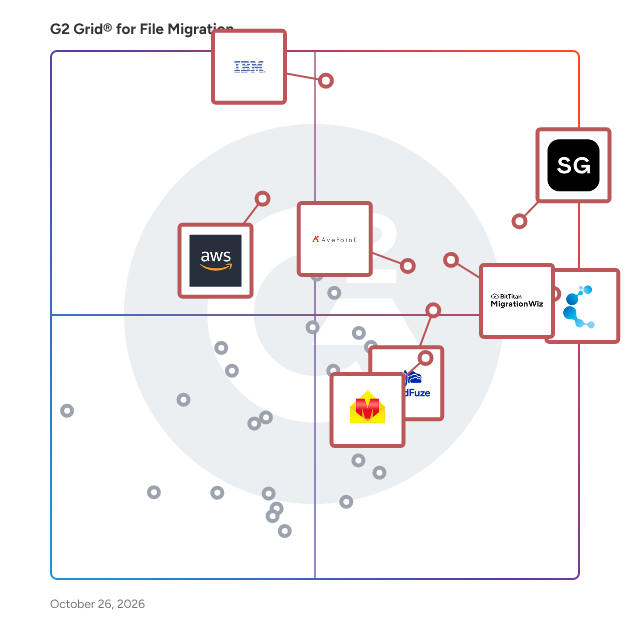
# Best File Migration Software

*By [Neeraja Prakash](https://research.g2.com/insights/author/neeraja-prakash)*


File migration software helps companies complete the process of upgrading to new systems by assisting with the relocation of all enterprise-level files and documents from the old folders to the new ones. These solutions, also referred to as content transformation or content integration tools, often provide features for data encryption, backup assistance, and tracking migration histories on both a systemwide and file-specific level. The compatibility of file migration tools with source and destination platforms varies depending on the software. They may integrate with entire classes of software, such as [enterprise content management (ECM)](https://www.g2.com/categories/enterprise-content-management-ecm), or specific tools such as [SharePoint](https://www.g2.com/products/sharepoint/reviews) or [Office 365](https://www.g2.com/products/office-365/reviews). Some file migration tools can also move over company calendars, contact lists, and conversations to newly installed platforms. Successfully utilizing a file migration tool can save IT departments much of the time and stress associated with manual migration of files, and offer benefits such as consolidation and reorganization of files in the process.

To qualify for inclusion in the File Migration category, a product must:

- Sync two or more disparate storage systems
- Assist with bulk migration of large amounts of files and various file types
- Provide data security tools, backup assistance, or integration with backup software to keep files safe during migration


## How Many File Migration Software Products Does G2 Track?
**Total Products under this Category:** 202

### Category Stats (Jun 2026)
- **Average Rating**: 4.37/5 The average rating of products in this category, based on all submitted ratings
- **Top Trending Product**: CloudFuze (+3.23%) - Among all products in this category, CloudFuze recorded the largest rating increase compared to last month
*Last updated: June 24, 2026*


## How Does G2 Rank File Migration Software Products?

**Why You Can Trust G2's Software Rankings:**

- 30 Analysts and Data Experts
- 1,700+ Authentic Reviews
- 202+ Products
- Unbiased Rankings

G2's software rankings are built on verified user reviews, rigorous moderation, and a consistent research methodology maintained by a team of analysts and data experts. Each product is measured using the same transparent criteria, with no paid placement or vendor influence. While reviews reflect real user experiences, which can be subjective, they offer valuable insight into how software performs in the hands of professionals. Together, these inputs power the G2 Score, a standardized way to compare tools within every category.


## Which File Migration Software Is Best for Your Use Case?

- **Leader:** [MigrationWiz](https://www.g2.com/products/migrationwiz/reviews)
- **Highest Performer:** [CloudM](https://www.g2.com/products/cloudm/reviews)
- **Easiest to Use:** [Cloudiway](https://www.g2.com/products/cloudiway/reviews)
- **Top Trending:** [ShareGate](https://www.g2.com/products/sharegate/reviews)
- **Best Free Software:** [ShareGate](https://www.g2.com/products/sharegate/reviews)


---

**Sponsored**

### ShareGate

ShareGate is a Microsoft 365 migration and governance software platform that helps IT professionals move business data to Microsoft 365 and maintain control of their environments after migration. Trusted by over 100,000 IT pros, ShareGate addresses two distinct operational challenges for IT teams managing Microsoft 365 at scale: executing complex tenant-to-tenant and cross-platform migrations accurately, and maintaining ongoing visibility and governance across collaboration environments. ShareGate Migrate supports organizations moving content between Microsoft 365 tenants and from third-party platforms. Key capabilities include: • Tenant-to-tenant migration for SharePoint, Microsoft Teams, OneDrive, and Exchange Online • Cross-platform migration from Google Workspace, Box, and on-premises file shares • Pre-migration environment analysis covering permissions, ownership, and content structure • Post-migration verification and reporting • Concurrent migration support with workload coverage scaled by plan tier ShareGate Protect supports IT teams managing Microsoft 365 governance on an ongoing basis. Key capabilities include: • Tenant-wide visibility into access, workspace health, guest permissions, and license utilization • Identification of oversharing, inactive workspaces, ownership gaps, and external access drift • Guided remediation tools for fixing access and governance issues without custom scripting • AI and Microsoft Copilot access exposure indicators to support readiness assessments • Cost and license visibility with dollar-value indicators for operational decision-making ShareGate is used by IT professionals and managed service providers across organizations of varying sizes, with particular adoption among teams managing Microsoft 365 environments through mergers, acquisitions, and organizational restructuring. The platform is designed to reduce manual effort and administrative overhead across both migration projects and ongoing governance operations.


[Visit website](https://www.g2.com/external_clickthroughs/record?secure%5Bad_program%5D=ppc&amp;secure%5Bad_slot%5D=category_product_list&amp;secure%5Bcategory_id%5D=1162&amp;secure%5Bdisplayable_resource_id%5D=1190&amp;secure%5Bdisplayable_resource_type%5D=Category&amp;secure%5Bmedium%5D=sponsored&amp;secure%5Bplacement_reason%5D=neighbor_category&amp;secure%5Bplacement_resource_ids%5D%5B%5D=1190&amp;secure%5Bprioritized%5D=false&amp;secure%5Bproduct_id%5D=40307&amp;secure%5Bresource_id%5D=1162&amp;secure%5Bresource_type%5D=Category&amp;secure%5Bsource_type%5D=category_page&amp;secure%5Bsource_url%5D=https%3A%2F%2Fwww.g2.com%2Fcategories%2Ffile-migration%3Fpage%3D9&amp;secure%5Btoken%5D=2270c23a7fe7c33fcc4406e02a2d8a47b42711d21c3597db70d6d844d8b2bd53&amp;secure%5Burl%5D=https%3A%2F%2Fsharegate.com%2Fdemo%2F%3Futm_source%3Dg2%26utm_medium%3Dppc%26utm_campaign%3Dg2_advertising%26utm_content%3Dsponsored_listing&amp;secure%5Burl_type%5D=book_demo)

---

## What Are the Top-Rated File Migration Software Products in 2026?
### 1. [MigrationWiz](https://www.g2.com/products/migrationwiz/reviews)
All cloud migrations start with MigrationWiz, a fully automated, 100% SaaS migration solution that can be accessed at any time from anywhere. Sign up, configure, and initiate mailbox, document, personal archive, public folder, Microsoft Teams and Active Directory migration projects from a single, centralized user interface. Why MigrationWiz? Easy to Use - 100% SaaS with no special training, installations, or professional services required. One simple UI for all workloads. Fast &amp; Scalable - Quickly move users and data to the Destination at-scale. Migrate as fast as Source bandwidth allows. Secure &amp; Compliant - Data encrypted at rest and in-transit through Azure datacenters. Regional processing options available; we never store user data. Enterprise Reliability - Support migrations with seat counts in the thousands and complex business scenarios like mergers, acquisitions, or divestitures.


**Average Rating:** 4.7/5.0
**Total Reviews:** 275
**How Do G2 Users Rate MigrationWiz?**

- **Quality of Support:** 8.9/10 (Category avg: 8.7/10)
- **Ease of Use:** 9.2/10 (Category avg: 9.0/10)

**Who Is the Company Behind MigrationWiz?**

- **Seller:** [Idera, Inc.](https://www.g2.com/sellers/idera-inc-6c9eda01-43cf-4bd5-b70c-70f59610d9a0)
- **Year Founded:** 1999
- **HQ Location:** Houston, TX
- **Twitter:** @MigrationWiz (482 Twitter followers)
- **LinkedIn® Page:** https://www.linkedin.com/company/bittitan (73 employees on LinkedIn®)

**Who Uses This Product?**
- **Who Uses This:** Cloud Consultant
- **Top Industries:** Information Technology and Services, Computer &amp; Network Security
- **Company Size:** 41% Mid-Market, 39% Small-Business


#### What Are MigrationWiz's Pros and Cons?

**Pros:**

- Migration Ease (164 reviews)
- Ease of Use (87 reviews)
- Customer Support (72 reviews)
- Implementation Ease (34 reviews)
- Cloud Services (28 reviews)

**Cons:**

- Slow Migration (32 reviews)
- Pricing Issues (27 reviews)
- Poor Customer Support (21 reviews)
- Complex Usability (11 reviews)
- Expensive (10 reviews)


### What Do G2 Reviewers Say About MigrationWiz?
*AI-generated summary from verified user reviews*

**Pros:**

- Users value the **migration ease** of MigrationWiz, finding it highly efficient and simplifying complex processes significantly.
- Users appreciate the **ease of use** of MigrationWiz, making it suitable for migrations of any size.
- Users praise the **responsive customer support** of MigrationWiz, providing timely assistance and valuable suggestions during migration.
- Users highly value the **implementation ease** of MigrationWiz, appreciating its user-friendly setup and seamless migration process.
- Users value the **intuitive interface and seamless automation** of MigrationWiz, ensuring efficient cloud and email migrations.

**Cons:**

- Users find the **slow migration** process frustrating, especially with large mailboxes and bandwidth limitations affecting performance.
- Users find the **pricing issues** unfavorable, as add-on costs and multiple licenses make MigrationWiz expensive.
- Users often face **poor customer support** with MigrationWiz, finding troubleshooting difficult without timely assistance or clear error messages.
- Users find the **usability complex** for first-time use, requiring a learning curve to grasp licensing and configurations.
- Users find the **pricing for MigrationWiz quite expensive** , especially with additional costs for various features and larger migrations.

#### What Are Recent G2 Reviews of MigrationWiz?

**"[Easy to Use, Responsive Support, and Works Great After Setup](https://www.g2.com/survey_responses/migrationwiz-review-8407671)"**

**Rating:** 4.0/5.0 stars
*— Clay B.*

[Read full review](https://www.g2.com/survey_responses/migrationwiz-review-8407671)

---

**"[Simple and Fast Cloud Migration, An Invaluable Time Saver](https://www.g2.com/survey_responses/migrationwiz-review-12077935)"**

**Rating:** 4.5/5.0 stars
*— Verified User in Environmental Services*

[Read full review](https://www.g2.com/survey_responses/migrationwiz-review-12077935)

---


#### What Are G2 Users Discussing About MigrationWiz?

- [What is MigrationWiz used for?](https://www.g2.com/discussions/what-is-migrationwiz-used-for)

### 2. [ShareGate](https://www.g2.com/products/sharegate/reviews)
ShareGate is a Microsoft 365 migration and governance software platform that helps IT professionals move business data to Microsoft 365 and maintain control of their environments after migration. Trusted by over 100,000 IT pros, ShareGate addresses two distinct operational challenges for IT teams managing Microsoft 365 at scale: executing complex tenant-to-tenant and cross-platform migrations accurately, and maintaining ongoing visibility and governance across collaboration environments. ShareGate Migrate supports organizations moving content between Microsoft 365 tenants and from third-party platforms. Key capabilities include: • Tenant-to-tenant migration for SharePoint, Microsoft Teams, OneDrive, and Exchange Online • Cross-platform migration from Google Workspace, Box, and on-premises file shares • Pre-migration environment analysis covering permissions, ownership, and content structure • Post-migration verification and reporting • Concurrent migration support with workload coverage scaled by plan tier ShareGate Protect supports IT teams managing Microsoft 365 governance on an ongoing basis. Key capabilities include: • Tenant-wide visibility into access, workspace health, guest permissions, and license utilization • Identification of oversharing, inactive workspaces, ownership gaps, and external access drift • Guided remediation tools for fixing access and governance issues without custom scripting • AI and Microsoft Copilot access exposure indicators to support readiness assessments • Cost and license visibility with dollar-value indicators for operational decision-making ShareGate is used by IT professionals and managed service providers across organizations of varying sizes, with particular adoption among teams managing Microsoft 365 environments through mergers, acquisitions, and organizational restructuring. The platform is designed to reduce manual effort and administrative overhead across both migration projects and ongoing governance operations.


**Average Rating:** 4.6/5.0
**Total Reviews:** 149
**How Do G2 Users Rate ShareGate?**

- **Quality of Support:** 9.0/10 (Category avg: 8.7/10)
- **Ease of Use:** 9.0/10 (Category avg: 9.0/10)

**Who Is the Company Behind ShareGate?**

- **Seller:** [Workleap](https://www.g2.com/sellers/workleap)
- **Company Website:** https://workleap.com/
- **Year Founded:** 2006
- **HQ Location:** Montréal, Québec, Canada
- **Twitter:** @WorkleapHQ (1,132 Twitter followers)
- **LinkedIn® Page:** https://www.linkedin.com/company/workleaphq/ (382 employees on LinkedIn®)

**Who Uses This Product?**
- **Top Industries:** Information Technology and Services, Financial Services
- **Company Size:** 63% Enterprise, 24% Mid-Market


#### What Are ShareGate's Pros and Cons?

**Pros:**

- Ease of Use (26 reviews)
- Migration Ease (20 reviews)
- User Interface (14 reviews)
- Easy Setup (13 reviews)
- Reporting (7 reviews)

**Cons:**

- Lacking Features (5 reviews)
- Expensive (4 reviews)
- Poor Interface Design (4 reviews)
- Slow Migration (4 reviews)
- Slow Loading (3 reviews)


### What Do G2 Reviewers Say About ShareGate?
*AI-generated summary from verified user reviews*

**Pros:**

- Users find ShareGate&#39;s interface to be **intuitive and easy to use** , simplifying the migration process significantly.
- Users find **migration easy** with ShareGate, enabling quick, efficient transitions to SharePoint Online with minimal training.
- Users find ShareGate&#39;s **intuitive and easy-to-navigate UI** helpful for straightforward migration tasks and reporting.
- Users find **ShareGate&#39;s easy setup** and intuitive interface enhances their migration experience significantly, minimizing complexities.
- Users value the **clear and concise reporting** in ShareGate, enhancing efficiency in data migration tasks.

**Cons:**

- Users find ShareGate lacking in **essential features** , with requests for migration options and improvements frequently unmet.
- Users find ShareGate **expensive** , especially with costs rising for multiple administrators and limited features in the base product.
- Users find the **poor interface design** of ShareGate frustrating, especially with hidden options and complicated navigation.
- Users experience **slow migration speeds** and issues like lengthy duration and potential crashes affecting business operations.
- Users often face **slow loading** times during large migrations, impacting overall efficiency and business operations.

#### What Are Recent G2 Reviews of ShareGate?

**"[I have used ShareGate for some time now and it never fails to disappoint](https://www.g2.com/survey_responses/sharegate-review-11250554)"**

**Rating:** 5.0/5.0 stars
*— Jamie V.*

[Read full review](https://www.g2.com/survey_responses/sharegate-review-11250554)

---

**"[Never want to live without SharePoint &amp; Teams Migrations, Governance, and Reporting](https://www.g2.com/survey_responses/sharegate-review-12628924)"**

**Rating:** 5.0/5.0 stars
*— Darlene S.*

[Read full review](https://www.g2.com/survey_responses/sharegate-review-12628924)

---


#### What Are G2 Users Discussing About ShareGate?

- [How much does ShareGate cost?](https://www.g2.com/discussions/how-much-does-sharegate-cost) - 1 comment
- [Is ShareGate free?](https://www.g2.com/discussions/is-sharegate-free) - 1 comment
- [Is ShareGate a Microsoft product?](https://www.g2.com/discussions/is-sharegate-a-microsoft-product) - 2 comments, 1 upvote
- [What is ShareGate desktop?](https://www.g2.com/discussions/what-is-sharegate-desktop)

### 3. [Cloudiway](https://www.g2.com/products/cloudiway/reviews)
Cloudiway is a comprehensive Software-as-a-Service (SaaS) platform designed to facilitate seamless cloud migrations and ensure enterprise coexistence. It enables organizations to efficiently transfer data and content across various cloud environments, including Microsoft 365, Google Workspace, and other platforms, while maintaining data integrity and minimizing downtime. Key Features and Functionality: - Mailbox Migration: Transfers emails, calendars, contacts, and tasks between platforms such as Microsoft Exchange, Google Workspace, Lotus Notes, and Zimbra, ensuring no data loss or business disruption. - File and Site Migration: Migrates files and documents from sources like Google Drive, OneDrive, Box, and Dropbox, preserving permissions and metadata. It also handles complex migrations of collaborative sites, such as Google Sites to SharePoint Online. - Teams and Collaboration Migration: Facilitates the migration of Microsoft Teams, Slack, and Google Chat environments, including channels, conversations, files, and memberships. - Enterprise Coexistence: Ensures seamless collaboration between different email platforms during and after migrations through features like Global Address List synchronization (GALSync) and centralized email signature management. - Device Migration: Supports cross-tenant device migration for Windows devices, preserving user profiles, Outlook configurations, Office licenses, and settings during transitions between Microsoft 365 tenants. Primary Value and Solutions Provided: Cloudiway addresses the complexities associated with cloud migrations by offering a unified platform that supports a wide range of migration scenarios, including tenant-to-tenant consolidations, mergers, divestitures, and platform transitions. Its robust security measures, built on Microsoft Azure infrastructure with SOC 2 Type 2 certification, ensure data protection and compliance throughout the migration process. By automating and streamlining migration tasks, Cloudiway minimizes downtime, reduces operational risks, and enables organizations to achieve a smooth transition to their desired cloud environment.


**Average Rating:** 4.9/5.0
**Total Reviews:** 218
**How Do G2 Users Rate Cloudiway?**

- **Quality of Support:** 9.7/10 (Category avg: 8.7/10)
- **Ease of Use:** 9.7/10 (Category avg: 9.0/10)

**Who Is the Company Behind Cloudiway?**

- **Seller:** [Cloudiway](https://www.g2.com/sellers/cloudiway)
- **Year Founded:** 2010
- **HQ Location:** Annecy, Auvergne-Rhône-Alpes
- **Twitter:** @cloudiway (815 Twitter followers)
- **LinkedIn® Page:** https://www.linkedin.com/company/2823202 (22 employees on LinkedIn®)

**Who Uses This Product?**
- **Who Uses This:** Virtual Assistant
- **Top Industries:** Information Technology and Services, Accounting
- **Company Size:** 58% Small-Business, 29% Mid-Market


#### What Are Cloudiway's Pros and Cons?

**Pros:**

- Migration Ease (114 reviews)
- Tracking (48 reviews)
- Cloud Services (47 reviews)
- Ease of Use (34 reviews)
- Customer Support (28 reviews)

**Cons:**

- Complex Setup (30 reviews)
- Learning Difficulty (19 reviews)
- Complex Usability (15 reviews)
- Poor Interface Design (15 reviews)
- Information Deficiency (9 reviews)


### What Do G2 Reviewers Say About Cloudiway?
*AI-generated summary from verified user reviews*

**Pros:**

- Users value the **structured migration process** of Cloudiway, appreciating its efficiency and ease during large-scale moves.
- Users value the **structured migration process** of Cloudiway, which simplifies tracking and enhances productivity during data transfers.
- Users appreciate the **flexible and efficient cloud migration** with Cloudiway, ensuring smooth transitions and minimal manual effort.
- Users appreciate the **ease of use** of Cloudiway, making data migration quick and hassle-free for their teams.
- Users commend the **knowledgeable and prompt support** from Cloudiway, ensuring smooth and reliable migration experiences.

**Cons:**

- Users find the **complex setup** process time-consuming and requiring technical knowledge for successful implementation.
- Users find the **learning difficulty** challenging due to the technical setup required for effective use of Cloudiway.
- Users find **complex usability** in Cloudiway, requiring significant time and effort to fully understand its features.
- Users find the **interface design poor** , with unclear menu labels and a dense, overly technical layout.
- Users find **information deficiency** in Cloudiway, seeking clearer guidance and simplified terminology for a better experience.

#### What Are Recent G2 Reviews of Cloudiway?

**"[Made a Confusing Migration Feel Manageable](https://www.g2.com/survey_responses/cloudiway-review-12979263)"**

**Rating:** 5.0/5.0 stars
*— Prakhar S.*

[Read full review](https://www.g2.com/survey_responses/cloudiway-review-12979263)

---

**"[Smooth Overall Migration, But Requires Proper Initial Setup](https://www.g2.com/survey_responses/cloudiway-review-12659465)"**

**Rating:** 5.0/5.0 stars
*— Tanuj K.*

[Read full review](https://www.g2.com/survey_responses/cloudiway-review-12659465)

---


### 4. [IBM Aspera on Cloud](https://www.g2.com/products/ibm-aspera-on-cloud/reviews)
IBM Aspera on Cloud is a hosted SaaS service of IBM Aspera. Rather than optimize or accelerate data transfer, IBM Aspera’s high-speed data transfer fully utilizes available network bandwidth to maximize speed and quickly scale up with no theoretical limit, without impacting other network traffic. The result is unmatched transfer speeds, end-to-end security, reliability, and exceptional bandwidth control. IBM Aspera on Cloud also offers intuitive file sharing, big data transfer, workflow automation, central administration, and real-time visibility.


**Average Rating:** 4.4/5.0
**Total Reviews:** 131
**How Do G2 Users Rate IBM Aspera on Cloud?**

- **Quality of Support:** 8.7/10 (Category avg: 8.7/10)
- **Ease of Use:** 8.6/10 (Category avg: 9.0/10)

**Who Is the Company Behind IBM Aspera on Cloud?**

- **Seller:** [IBM](https://www.g2.com/sellers/ibm)
- **Company Website:** https://www.ibm.com
- **Year Founded:** 1911
- **HQ Location:** Armonk, New York, United States
- **Twitter:** @IBMSecurity (74,660 Twitter followers)
- **LinkedIn® Page:** https://www.linkedin.com/company/1009/ (328,202 employees on LinkedIn®)

**Who Uses This Product?**
- **Top Industries:** Information Technology and Services, Computer Software
- **Company Size:** 42% Small-Business, 29% Mid-Market


#### What Are IBM Aspera on Cloud's Pros and Cons?

**Pros:**

- Security (32 reviews)
- Speed Efficiency (32 reviews)
- Large Files (24 reviews)
- Reliability (22 reviews)
- Ease of Use (19 reviews)

**Cons:**

- Expensive (30 reviews)
- Training Required (15 reviews)
- Pricing Concerns (10 reviews)
- Lacking Features (7 reviews)
- Internet Dependence (4 reviews)


### What Do G2 Reviewers Say About IBM Aspera on Cloud?
*AI-generated summary from verified user reviews*

**Pros:**

- Users commend the **high security** of IBM Aspera on Cloud, ensuring safe and reliable data transfers seamlessly.
- Users value the **high-speed performance** of IBM Aspera on Cloud, enhancing efficiency in transferring large files securely.
- Users appreciate the **fast and secure transfer of large files** with IBM Aspera on Cloud, enhancing team efficiency.
- Users value the **reliability** of IBM Aspera on Cloud, ensuring fast and secure transfers of large files consistently.
- Users appreciate the **user-friendly interface** of IBM Aspera on Cloud, making cloud computing accessible and straightforward.

**Cons:**

- Users find the **pricing model expensive** , particularly for small teams facing unexpected costs during heavy transfers.
- Users find that the **training required** can be challenging, especially for non-technical colleagues and beginners.
- Users express concerns over **high pricing** , especially for smaller teams, which can be unexpected with increased transfer needs.
- Users highlight a **lack of features** in IBM Aspera on Cloud, particularly in user interface and multi-directional transfers.
- Users find the **dependency on network conditions** problematic, affecting reliability and ease of use compared to other platforms.

#### What Are Recent G2 Reviews of IBM Aspera on Cloud?

**"[Reliable Large File Transfers That Improved Team Collaboration](https://www.g2.com/survey_responses/ibm-aspera-on-cloud-review-12736021)"**

**Rating:** 4.5/5.0 stars
*— Siddhartha P.*

[Read full review](https://www.g2.com/survey_responses/ibm-aspera-on-cloud-review-12736021)

---

**"[Aspera Delivers Fast, Reliable Large-File Transfers with Strong Visibility and Control](https://www.g2.com/survey_responses/ibm-aspera-on-cloud-review-12824286)"**

**Rating:** 4.0/5.0 stars
*— Arkajit D.*

[Read full review](https://www.g2.com/survey_responses/ibm-aspera-on-cloud-review-12824286)

---


#### What Are G2 Users Discussing About IBM Aspera on Cloud?

- [What is the maximum speed of an Aspera transfer?](https://www.g2.com/discussions/what-is-the-maximum-speed-of-an-aspera-transfer)
- [How does IBM Aspera work?](https://www.g2.com/discussions/how-does-ibm-aspera-work) - 1 comment, 2 upvotes
- [Is IBM Aspera Connect free?](https://www.g2.com/discussions/is-ibm-aspera-connect-free) - 1 comment, 2 upvotes
- [What is IBM Aspera?](https://www.g2.com/discussions/what-is-ibm-aspera)

### 5. [AvePoint Confidence Platform](https://www.g2.com/products/avepoint-confidence-platform/reviews)
AvePoint is the global leader in data protection, unifying data security, governance, and resilience to provide a trusted foundation for AI. More than 28,000 customers rely on the AvePoint Confidence Platform to secure, govern, and rapidly recover data across Microsoft, Google, Salesforce, and other cloud environments. With a single platform for lifecycle control, multicloud governance, and rapid recovery paired with clear ownership across the business, we prevent overexposure and sprawl, modernize legacy and fragmented data, and minimize data loss and interruption. Our global partner ecosystem includes approximately 6,000 MSPs, VARs, and SIs, and our solutions are available in over 100 cloud marketplaces. To learn more, visit www.avepoint.com.


**Average Rating:** 4.5/5.0
**Total Reviews:** 115
**How Do G2 Users Rate AvePoint Confidence Platform?**

- **Quality of Support:** 9.0/10 (Category avg: 8.7/10)
- **Ease of Use:** 9.1/10 (Category avg: 9.0/10)

**Who Is the Company Behind AvePoint Confidence Platform?**

- **Seller:** [AvePoint](https://www.g2.com/sellers/avepoint)
- **Company Website:** https://www.avepoint.com/
- **Year Founded:** 2001
- **HQ Location:**  Jersey City, NJ
- **Twitter:** @AvePoint (9,747 Twitter followers)
- **LinkedIn® Page:** https://www.linkedin.com/company/46024/ (2,589 employees on LinkedIn®)

**Who Uses This Product?**
- **Top Industries:** Information Technology and Services, Computer Software
- **Company Size:** 42% Mid-Market, 28% Small-Business


#### What Are AvePoint Confidence Platform's Pros and Cons?

**Pros:**

- Ease of Use (64 reviews)
- Cloud Backup (29 reviews)
- Backup Frequency (25 reviews)
- Security (25 reviews)
- Easy Setup (22 reviews)

**Cons:**

- Expensive (12 reviews)
- Backup Issues (10 reviews)
- Poor Customer Support (9 reviews)
- Slow Performance (9 reviews)
- Technical Issues (9 reviews)


### What Do G2 Reviewers Say About AvePoint Confidence Platform?
*AI-generated summary from verified user reviews*

**Pros:**

- Users find the **ease of use** of AvePoint Confidence Platform enhances daily operations and seamless integration.
- Users find AvePoint&#39;s **cloud backup solution** valuable for its secure, automated, and hassle-free data management capabilities.
- Users appreciate the **automatic backup frequency** of AvePoint Confidence Platform, ensuring secure and reliable data protection effortlessly.
- Users value the **strong data backup capabilities** of AvePoint Confidence Platform, ensuring security and peace of mind.
- Users find the AvePoint Confidence Platform has an **easy setup** , allowing seamless integration and implementation for data security.

**Cons:**

- Users find the **cost of AvePoint Confidence Platform** to be quite high compared to similar service providers.
- Users face **backup issues** due to timeouts, lacking notifications for errors, and bandwidth consumption during data backups.
- Users often find **poor customer support** frustrating, with challenges in timely responses and connection issues.
- Users experience **slow performance** with the AvePoint Confidence Platform, especially during data retrieval and multitasking tasks.
- Users face **technical issues** with backup methods, connectivity errors, and system slowdowns affecting their overall experience.

#### What Are Recent G2 Reviews of AvePoint Confidence Platform?

**"[Reliable Backups and Seamless Restores](https://www.g2.com/survey_responses/avepoint-confidence-platform-review-12366631)"**

**Rating:** 4.5/5.0 stars
*— Josh U.*

[Read full review](https://www.g2.com/survey_responses/avepoint-confidence-platform-review-12366631)

---

**"[All-in-One SaaS Data Protection, Governance &amp; Compliance Made Easy](https://www.g2.com/survey_responses/avepoint-confidence-platform-review-12348858)"**

**Rating:** 5.0/5.0 stars
*— Stefan N.*

[Read full review](https://www.g2.com/survey_responses/avepoint-confidence-platform-review-12348858)

---


#### What Are G2 Users Discussing About AvePoint Confidence Platform?

- [What is AvePoint Cloud Backup used for?](https://www.g2.com/discussions/what-is-avepoint-cloud-backup-used-for) - 1 comment

### 6. [CloudFuze](https://www.g2.com/products/cloudfuze/reviews)
CloudFuze is a comprehensive cloud office migration solution designed to assist large enterprises, small and medium-sized businesses (SMBs), and managed service providers in securely and efficiently migrating their critical data across various cloud environments. This platform specializes in transferring a wide array of digital assets, including user accounts, files, chat messages, emails, links, digital whiteboards, and cloud tenant data, ensuring a seamless transition from one cloud service to another. The target audience for CloudFuze encompasses organizations of all sizes looking to enhance their cloud capabilities. Whether a business is undergoing a merger, changing cloud providers, or simply optimizing its digital workspace, CloudFuze offers tailored solutions to meet diverse migration needs. The platform is particularly beneficial for those who require a fully managed service, allowing them to focus on their core operations while the migration logistics are handled by experts. Key features of CloudFuze include unlimited migrations, which means that users can transfer an extensive volume of data without the worry of leaving anything behind. The fully managed service covers every aspect of the migration process, from initial assessments to post-migration support, ensuring that businesses can adapt quickly to their new cloud environments. Additionally, the platform supports a variety of use cases, making it versatile enough to cater to specific business requirements. Security and compliance are paramount in CloudFuze’s operations. The platform adheres to industry standards and regulations, such as GDPR and SOC 2 Type 2, ensuring that all data transfers are conducted securely. The seamless integration capabilities with popular cloud services like Microsoft 365, Google Workspace, Slack, and Dropbox further enhance the user experience by providing a cohesive migration process. Moreover, CloudFuze offers scalable solutions that can accommodate the complexities of any migration scenario, making it suitable for businesses of all sizes. Customizable approaches allow organizations to tailor the migration process to their unique requirements, while expert guidance throughout the migration phases ensures that users benefit from deep expertise in cloud solutions. By choosing CloudFuze, organizations can transform their cloud data management and streamline their migration efforts with confidence.


**Average Rating:** 4.0/5.0
**Total Reviews:** 43
**How Do G2 Users Rate CloudFuze?**

- **Quality of Support:** 8.5/10 (Category avg: 8.7/10)
- **Ease of Use:** 8.8/10 (Category avg: 9.0/10)

**Who Is the Company Behind CloudFuze?**

- **Seller:** [CloudFuze](https://www.g2.com/sellers/cloudfuze)
- **Company Website:** https://www.cloudfuze.com
- **Year Founded:** 2013
- **HQ Location:** Cary, US
- **Twitter:** @CloudFuze (769 Twitter followers)
- **LinkedIn® Page:** https://www.linkedin.com/company/cloudfuze (62 employees on LinkedIn®)

**Who Uses This Product?**
- **Company Size:** 47% Mid-Market, 33% Small-Business


#### What Are CloudFuze's Pros and Cons?

**Pros:**

- Migration Ease (9 reviews)
- Cloud Services (7 reviews)
- Ease of Use (6 reviews)
- Customer Support (4 reviews)
- Data Storage (4 reviews)

**Cons:**

- Poor Customer Support (4 reviews)
- Slow Migration (4 reviews)
- Storage Limitations (4 reviews)
- Access Limitations (3 reviews)
- Information Deficiency (3 reviews)


### What Do G2 Reviewers Say About CloudFuze?
*AI-generated summary from verified user reviews*

**Pros:**

- Users commend CloudFuze for its **migration ease** , facilitating seamless data transfers and a smooth transition process.
- Users value the **flexibility of CloudFuze** for connecting various cloud sources and streamlining migration processes.
- Users find CloudFuze to be **extremely easy to use** , appreciating the seamless and automated file transfer process.
- Users highly value the **excellent customer support** from CloudFuze, highlighting responsiveness and helpful guidance throughout the process.
- Users value the **seamless data migration** capabilities of CloudFuze, enabling smooth transitions across various cloud platforms.

**Cons:**

- Users struggle with **poor customer support** , experiencing slow communication and unfulfilled promises during the migration process.
- Users report a **painfully slow migration** process, with issues like missing histories and poor communication impacting their experience.
- Users express frustration over **storage limitations** and challenges, leading to a slow and problematic migration experience.
- Users face significant **access limitations** with CloudFuze, as support dependency hampers smooth data migration and communication.
- Users face **information deficiency** during migration, as limited file previews hinder effective document confirmation and clarity.

#### What Are Recent G2 Reviews of CloudFuze?

**"[Simplifying Cloud-to-Cloud Migrations with Good Visibility and Control](https://www.g2.com/survey_responses/cloudfuze-review-12961891)"**

**Rating:** 4.0/5.0 stars
*— Ricardo M.*

[Read full review](https://www.g2.com/survey_responses/cloudfuze-review-12961891)

---

**"[Effortless Cloud Migration with CloudFuze](https://www.g2.com/survey_responses/cloudfuze-review-12949519)"**

**Rating:** 5.0/5.0 stars
*— Dana B.*

[Read full review](https://www.g2.com/survey_responses/cloudfuze-review-12949519)

---


### 7. [CloudM](https://www.g2.com/products/cloudm/reviews)
CloudM is a comprehensive data management solution designed to assist IT teams in migrating, archiving, and backing up data seamlessly and securely. With a focus on automation and efficiency, CloudM provides a suite of tools that cater to the specific needs of organizations transitioning to cloud platforms like Google Workspace and Microsoft 365. By streamlining data management processes, CloudM enables teams to focus on strategic initiatives rather than manual tasks. The CloudM suite includes several key products, each tailored to address different aspects of data management. CloudM Migrate facilitates rapid and secure data migrations from over 20 source platforms, ensuring that emails, contacts, calendars, and files are transferred with minimal disruption. Its scalable performance and flexible deployment options make it suitable for organizations of all sizes, while pre-migration environment scans help identify potential issues before the migration process begins. This capability is particularly beneficial for businesses looking to transition to cloud services without the risk of data loss or downtime. In addition to migration, CloudM Automate addresses the need for efficiency in data management by automating repetitive tasks such as onboarding and offboarding employees. With over 30 customizable automated steps, organizations can set up workflows that run in the background, significantly reducing the time spent on manual processes. This feature not only enhances productivity but also ensures compliance with organizational policies, making it an essential tool for IT departments managing large teams. CloudM Backup and CloudM Archive further enhance data security and cost management. CloudM Backup protects Google Workspace data from accidental deletions and cyber threats, offering advanced restoration features that bolster data resilience. Meanwhile, CloudM Archive helps organizations manage their data retention policies and reduce licensing costs by automating license reassignment and applying tailored retention strategies. This dual approach to data protection and cost efficiency is crucial for organizations looking to maintain compliance while optimizing their cloud expenditures. Lastly, CloudM Email Signatures simplifies the process of creating and deploying email signatures across departments. By automating this task, organizations can ensure consistency in branding and communication while streamlining the onboarding process for new employees. With a commitment to security, proven reliability, and comprehensive support, CloudM stands out as a trusted partner for organizations navigating the complexities of cloud data management.


**Average Rating:** 4.6/5.0
**Total Reviews:** 36
**How Do G2 Users Rate CloudM?**

- **Quality of Support:** 8.8/10 (Category avg: 8.7/10)
- **Ease of Use:** 8.9/10 (Category avg: 9.0/10)

**Who Is the Company Behind CloudM?**

- **Seller:** [CloudM](https://www.g2.com/sellers/cloudm)
- **Company Website:** https://www.cloudm.io/
- **Year Founded:** 2008
- **HQ Location:** Manchester, GB
- **Twitter:** @cloudm_co (415 Twitter followers)
- **LinkedIn® Page:** https://www.linkedin.com/company/cloud-m (74 employees on LinkedIn®)

**Who Uses This Product?**
- **Top Industries:** Information Technology and Services
- **Company Size:** 39% Mid-Market, 36% Small-Business


#### What Are CloudM's Pros and Cons?

**Pros:**

- Customer Support (9 reviews)
- Migration Ease (8 reviews)
- Cloud Computing (6 reviews)
- Ease of Use (6 reviews)
- Cloud Services (5 reviews)

**Cons:**

- Slow Migration (3 reviews)
- Technical Difficulties (3 reviews)
- Complexity (1 reviews)
- Complex Setup (1 reviews)
- Complex Usability (1 reviews)


### What Do G2 Reviewers Say About CloudM?
*AI-generated summary from verified user reviews*

**Pros:**

- Users commend the **exceptionally responsive customer support** of CloudM, providing quick and helpful assistance throughout the migration process.
- Users value the **hassle-free migration process** with CloudM, appreciating its organization, support, and ease of use.
- Users find **data migration effortless** with CloudM&#39;s intuitive configuration and efficient incremental features, enhancing the migration experience.
- Users value the **intuitive ease of use** of CloudM, making migration smooth and hassle-free with excellent support.
- Users commend the **easy data migration** process with CloudM, highlighting effective configuration and responsive support.

**Cons:**

- Users find **slow migration speeds** frustrating, requiring frequent support interactions and facing errors without adequate logging information.
- Users often face **technical difficulties** with CloudM, experiencing migration errors and limited troubleshooting options without logs.
- Users often face **complexity in migration tasks** due to insufficient logging and unclear error messages in CloudM.
- The **complex setup** process can be challenging for users without IT experience, making migration difficult and daunting.
- Users find the **complex usability** of CloudM challenging, especially when trying to navigate advanced features initially.

#### What Are Recent G2 Reviews of CloudM?

**"[Solid Tool for E-Mail Migration](https://www.g2.com/survey_responses/cloudm-review-12813617)"**

**Rating:** 4.0/5.0 stars
*— William B.*

[Read full review](https://www.g2.com/survey_responses/cloudm-review-12813617)

---

**"[Excellent Onboarding and Support with an Easy, Efficient Setup](https://www.g2.com/survey_responses/cloudm-review-12948619)"**

**Rating:** 5.0/5.0 stars
*— Tom M.*

[Read full review](https://www.g2.com/survey_responses/cloudm-review-12948619)

---


### 8. [NetApp Cloud Volumes ONTAP](https://www.g2.com/products/netapp-cloud-volumes-ontap/reviews)
NetApp® Cloud Volumes ONTAP® offers a self-managed, unified storage management solution built on NetApp’s industry-leading ONTAP® software—empowering organizations with unmatched control and flexibility across block and file workloads in hybrid and multicloud environments. Seamlessly integrated with all major cloud providers, it runs natively on each cloud platform (Microsoft Azure, Google Cloud, AWS), allowing you to deploy and manage storage for mission-critical applications, databases, containers, and user files without requiring extra tooling or complex configuration. With support for iSCSI, NVMe/TCP, NFS, SMB/CIFS, and S3, Cloud Volumes ONTAP brings enterprise-class data services to your cloud environment. &amp;nbsp;


**Average Rating:** 4.5/5.0
**Total Reviews:** 26
**How Do G2 Users Rate NetApp Cloud Volumes ONTAP?**

- **Quality of Support:** 8.5/10 (Category avg: 8.7/10)
- **Ease of Use:** 8.9/10 (Category avg: 9.0/10)

**Who Is the Company Behind NetApp Cloud Volumes ONTAP?**

- **Seller:** [NetApp](https://www.g2.com/sellers/netapp)
- **Year Founded:** 1992
- **HQ Location:** Sunnyvale, California
- **Twitter:** @NetApp (118,015 Twitter followers)
- **LinkedIn® Page:** https://www.linkedin.com/company/2105/ (12,682 employees on LinkedIn®)
- **Ownership:** NASDAQ

**Who Uses This Product?**
- **Top Industries:** Information Technology and Services, Computer &amp; Network Security
- **Company Size:** 41% Enterprise, 32% Small-Business


#### What Are NetApp Cloud Volumes ONTAP's Pros and Cons?

**Pros:**

- Comprehensive Solutions (1 reviews)
- Data Storage (1 reviews)
- Ease of Use (1 reviews)
- Features (1 reviews)
- High Availability (1 reviews)

**Cons:**

- Command Line Difficulty (1 reviews)
- Not User-Friendly (1 reviews)
- Poor Interface Design (1 reviews)
- Poor UI (1 reviews)
- Poor Usability (1 reviews)


### What Do G2 Reviewers Say About NetApp Cloud Volumes ONTAP?
*AI-generated summary from verified user reviews*

**Pros:**

- Users value the **comprehensive solutions** offered by NetApp Cloud Volumes ONTAP, ensuring efficiency and reliability in storage.
- Users value the **powerful and reliable data storage** capabilities of NetApp Cloud Volumes ONTAP for their needs.
- Users value the **user-friendly interface** of NetApp Cloud Volumes ONTAP, enhancing their overall experience with efficient storage solutions.
- Users praise the **user-friendly interface** and **powerful CLI** , enhancing performance and availability of NetApp Cloud Volumes ONTAP.
- Users value the **high availability** of NetApp Cloud Volumes ONTAP, ensuring reliable access to their data.

**Cons:**

- Users find the **command line interface difficult** , complicating their experience with frequent GUI changes.
- Users find the frequent changes in the **user interface** frustrating, leading them to prefer the command line interface.
- Users find the **frequently changing GUI** of NetApp Cloud Volumes ONTAP to be confusing, preferring the CLI instead.
- Users find the **frequent GUI changes** frustrating, ultimately preferring the CLI for consistent performance.
- Users find the **poor usability** of NetApp Cloud Volumes ONTAP frustrating, often resorting to CLI for simplicity.

#### What Are Recent G2 Reviews of NetApp Cloud Volumes ONTAP?

**"[Efficient Cloud Data Management with NetApp Cloud Volumes ONTAP](https://www.g2.com/survey_responses/netapp-cloud-volumes-ontap-review-7814117)"**

**Rating:** 4.5/5.0 stars
*— Manoj K.*

[Read full review](https://www.g2.com/survey_responses/netapp-cloud-volumes-ontap-review-7814117)

---

**"[Review of NetApp Cloud Volumes ONTAP](https://www.g2.com/survey_responses/netapp-cloud-volumes-ontap-review-8142540)"**

**Rating:** 5.0/5.0 stars
*— Sebastian M.*

[Read full review](https://www.g2.com/survey_responses/netapp-cloud-volumes-ontap-review-8142540)

---


#### What Are G2 Users Discussing About NetApp Cloud Volumes ONTAP?

- [What are the three benefits of NetApp cloud volumes ONTAP?](https://www.g2.com/discussions/what-are-the-three-benefits-of-netapp-cloud-volumes-ontap)
- [How does cloud volumes ONTAP work?](https://www.g2.com/discussions/how-does-cloud-volumes-ontap-work)
- [What is NetApp ONTAP used for?](https://www.g2.com/discussions/netapp-cloud-volumes-ontap-what-is-netapp-ontap-used-for)
- [What is NetApp cloud volume ONTAP?](https://www.g2.com/discussions/what-is-netapp-cloud-volume-ontap)

### 9. [Slack to Teams Migration using AVAMIGRATRON](https://www.g2.com/products/slack-to-teams-migration-using-avamigratron/reviews)
AVAMIGRATRON helps you migrate from Slack to Microsoft Teams, a full-blown enterprise solution. AVAMIGRATRON is the most comprehensive automated solution for migrating businesses &amp; organizations from Slack to Microsoft Teams. The product that migrates all the content from Slack to Teams in a like-for-like manner without compromising Slack’s user experience. The tool that migrates the data from various Slack workspace plans (Free, Standard, Plus and Enterprise Grid) to Microsoft Teams with 100% accuracy and complete security. Key Features: • Unified User Experience • Simplified Single Repository Approach • Reduced Overhead Costs • Secured Information Protection Migration Capabilities: • Slack Workspace Inventory Assessment for Migration - AVAMIGRATRON will assess the slack workspaces like Users List, Channels List, Multi-party Chats List, and Direct chats List. Based on the inventory chats, and file volume will plan for Slack to Teams Migration. • Map Slack and Office 365 Users - Slack users are mapped to the corresponding accounts created in Microsoft Teams to ensure created/modified contents are migrated and retained under the respective users. • Migrate Slack Channels - AVAMIGRATRON migrates slack public, private, and external shared channels to newly created or already present Microsoft Teams Channel based on the business needs. Messages are migrated to the Posts tab and files are migrated to the Files tab in the Microsoft Teams. • Migrate Slack Channel Creator and Members - The creator of the Slack channel will be the owner of the Teams and the members of the Slack channel will be the members of Teams. • Migrate Slack Group Chats (1:1 &amp; 1:N chats) – Mapping the Slack and Teams chats to proceed with the migration. Messages are migrated to the Chats tab and files are migrated to the Files tab in the Microsoft Teams. • Slack App configurations - Based on the Slack app business requirements will proceed further to implement/integrate the app on Microsoft Teams


**Average Rating:** 4.7/5.0
**Total Reviews:** 13
**How Do G2 Users Rate Slack to Teams Migration using AVAMIGRATRON?**

- **Quality of Support:** 9.0/10 (Category avg: 8.7/10)
- **Ease of Use:** 9.4/10 (Category avg: 9.0/10)

**Who Is the Company Behind Slack to Teams Migration using AVAMIGRATRON?**

- **Seller:** [AVASOFT](https://www.g2.com/sellers/avasoft-1b3903ef-2f5a-421d-a729-4aaf06c29523)
- **Year Founded:** 2009
- **HQ Location:** Blue Bell, Pennsylvania
- **Twitter:** @AVASOFTWARE (1,119 Twitter followers)
- **LinkedIn® Page:** https://www.linkedin.com/company/3736159 (777 employees on LinkedIn®)

**Who Uses This Product?**
- **Company Size:** 62% Small-Business, 38% Mid-Market


#### What Are Recent G2 Reviews of Slack to Teams Migration using AVAMIGRATRON?

**"[Seamless Programming Defines Confidence in Teamwork](https://www.g2.com/survey_responses/slack-to-teams-migration-using-avamigratron-review-10237212)"**

**Rating:** 4.0/5.0 stars
*— Asa H.*

[Read full review](https://www.g2.com/survey_responses/slack-to-teams-migration-using-avamigratron-review-10237212)

---

**"[Slack to Teams Migration](https://www.g2.com/survey_responses/slack-to-teams-migration-using-avamigratron-review-10393967)"**

**Rating:** 5.0/5.0 stars
*— Louie S.*

[Read full review](https://www.g2.com/survey_responses/slack-to-teams-migration-using-avamigratron-review-10393967)

---


### 10. [MASV](https://www.g2.com/products/masv/reviews)
MASV is the premier platform for fast, secure, and reliable file management and transfer. Perfect for media and film professionals, video and post-production teams, creative agencies, oil and gas, energy, architecture, engineering firms, and other enterprises that need to move large amounts of data, MASV streamlines complex file transfer processes with a user-friendly interface, robust security features, and seamless integrations with popular tools. Pay only for the transfer and storage you use or get the best value with a subscription. Either way, there’s no need to count seats or track hidden expenses with MASV. MASV ensures file transfer costs remain predictable and aligned with your needs, offering scalable solutions for startups, enterprises, and everything in between. Onboard faster, send and receive files with ease, and manage client assets without hassle. MASV’s intuitive interface means even non-technical users can share large files securely without IT support. No firewalls, software installations, or plugins. We drop into your workflow through no-code integrations and an easy-to-work-with API. Your sensitive data has strict security requirements. MASV delivers enterprise-grade protection by default—ensuring every transfer is secure and compliant. MASV offers: - ISO 27001, SOC 2, TPN Gold Shield Compliance - Role-based permissions, SSO, MFA, and authentication - File tracking, integrity checks, and observability - Fault protection for reliable file transfers and more No compression. No splitting. No hacks. Send and receive files of unlimited size and volumes at unmatched speeds, with built-in automatic recovery that shrugs off interruptions. Our custom-branded portals ensure receiving files is simple, secure, and reliable, all within a web browser. Whether you need to send or receive large video files, CAD documents, geospatial files, or high-resolution images, MASV guarantees secure, fast, and seamless file transfer without size restrictions to multiple destinations with just one transfer. MASV connects with cloud and connected on-prem storage, media asset managers, collaboration tools, and more so your files go exactly where they need to without manual uploads. Whether you’re delivering to Frame.io for review, Amazon S3 for storage, or Google Drive for sharing, MASV ensures every transfer lands where it needs to go – no extra steps or IT required. Automate your workflows and send files to multiple destinations simultaneously for efficient and secure one-to-many file transfers across cloud, on-prem, and hybrid devices. These integrations make it easier for you to move, track, and store large media assets in the cloud at no extra charge. Just set up once and we’ll handle the rest. MASV effortlessly handles growing data demands with a platform built for volume. It integrates directly into machine learning pipelines, AI pipelines, and cloud ecosystems for frictionless workflows—allowing for faster big data ingestion and reduced time to market for AI workflows. MASV enables responsible AI development with built-in tools for transparent data provenance and consent management. The platform empowers organizations to capture, transfer, and train on datasets with accountability at every step of the machine learning operations. Bring professional-grade UX, security, and performance to your app with our API, cross-platform Agent, and other drop-in solutions. Enhance your managed file transfer platform with role-based permissions, encrypted file movement, and automated workflows. Need a custom solution? The developer-friendly MASV API seamlessly integrates secure file transfer capabilities into existing workflows and systems. MASV is the easiest-to-use, fastest, and most secure file transfer platform for cloud and hybrid workflows. From creators to enterprises, get up and running in minutes, not days. Refreshingly simple. Unbelievably powerful. Try MASV for free today.


**Average Rating:** 4.8/5.0
**Total Reviews:** 43
**How Do G2 Users Rate MASV?**

- **Quality of Support:** 9.7/10 (Category avg: 8.7/10)
- **Ease of Use:** 9.5/10 (Category avg: 9.0/10)

**Who Is the Company Behind MASV?**

- **Seller:** [ MASV](https://www.g2.com/sellers/masv)
- **Company Website:** https://masv.io
- **Year Founded:** 2019
- **HQ Location:** Ottawa ON (Canada)
- **Twitter:** @masvfast
- **LinkedIn® Page:** https://www.linkedin.com/company/masv (42 employees on LinkedIn®)

**Who Uses This Product?**
- **Top Industries:** Media Production, Motion Pictures and Film
- **Company Size:** 78% Small-Business, 7% Mid-Market


#### What Are MASV's Pros and Cons?

**Pros:**

- Ease of Use (20 reviews)
- Customer Support (11 reviews)
- Reliability (8 reviews)
- Speed (8 reviews)
- Large Files Handling (7 reviews)

**Cons:**

- Complexity (2 reviews)
- Expensive (2 reviews)
- Pricing Issues (2 reviews)
- Cost Issues (1 reviews)
- Difficult Learning (1 reviews)


### What Do G2 Reviewers Say About MASV?
*AI-generated summary from verified user reviews*

**Pros:**

- Users appreciate the **ease of use** of MASV, highlighting its simplicity and efficiency for team collaboration.
- Users value the **remarkable customer service** of MASV, noting prompt and effective responses to their inquiries.
- Users praise the **reliability** of MASV, ensuring seamless performance without breakdowns or issues.
- Users highlight the **exceptional speed** of MASV, making file transfers effortless and efficient.
- Users praise MASV for its **fast and reliable handling of large media files** , making transfers effortless and seamless.

**Cons:**

- Users find the **complexity of the interface** challenging, affecting ease of use and leading to delivery mistakes.
- Users find MASV **expensive** , but consider its efficiency and reliability to justify the higher cost.
- Users note that while MASV has a **high cost** , its efficiency and reliability often justify the price.
- Users express concerns about the **high costs** associated with MASV, finding it a significant drawback for their budgets.
- Users find the **difficult learning curve** of MASV frustrating, affecting their ability to use it intuitively.

#### What Are Recent G2 Reviews of MASV?

**"[MASV Makes Large File Sharing Effortless for Video Editing](https://www.g2.com/survey_responses/masv-review-12921922)"**

**Rating:** 5.0/5.0 stars
*— Elissar K.*

[Read full review](https://www.g2.com/survey_responses/masv-review-12921922)

---

**"[Fast, Reliable Large File Transfer That Just Works](https://www.g2.com/survey_responses/masv-review-12340682)"**

**Rating:** 4.0/5.0 stars
*— Tod R.*

[Read full review](https://www.g2.com/survey_responses/masv-review-12340682)

---


#### What Are G2 Users Discussing About MASV?

- [What is Masv used for?](https://www.g2.com/discussions/what-is-masv-used-for)

### 11. [Duplicator Pro](https://www.g2.com/products/duplicator-pro/reviews)
Duplicator Pro successfully gives WordPress users the ability to migrate, copy, move or clone a site from one location to another and also serves as a simple backup utility. Duplicator Pro handles serialized and base64 serialized replacements. Standard WordPress migration and WordPress backups are easily handled by this plugin as are zero downtime migrations.


**Average Rating:** 4.8/5.0
**Total Reviews:** 53
**How Do G2 Users Rate Duplicator Pro?**

- **Quality of Support:** 9.5/10 (Category avg: 8.7/10)
- **Ease of Use:** 9.5/10 (Category avg: 9.0/10)

**Who Is the Company Behind Duplicator Pro?**

- **Seller:** [Snap Creek](https://www.g2.com/sellers/snap-creek)
- **Year Founded:** 2015
- **HQ Location:** Gilbert, Arizona
- **Twitter:** @snapcreek
- **LinkedIn® Page:** https://www.linkedin.com/company/snap-creek-software/

**Who Uses This Product?**
- **Top Industries:** Marketing and Advertising, Internet
- **Company Size:** 98% Small-Business, 2% Mid-Market


#### What Are Recent G2 Reviews of Duplicator Pro?

**"[The easiest way to move a website and clean up all the links at the same time](https://www.g2.com/survey_responses/duplicator-pro-review-3794142)"**

**Rating:** 5.0/5.0 stars
*— Kim B.*

[Read full review](https://www.g2.com/survey_responses/duplicator-pro-review-3794142)

---

**"[Duplicator Pro simplifies the backup process](https://www.g2.com/survey_responses/duplicator-pro-review-4579710)"**

**Rating:** 4.0/5.0 stars
*— Gonzalo C.*

[Read full review](https://www.g2.com/survey_responses/duplicator-pro-review-4579710)

---


#### What Are G2 Users Discussing About Duplicator Pro?

- [What is Duplicator Pro used for?](https://www.g2.com/discussions/what-is-duplicator-pro-used-for)

### 12. [C2 Transfer](https://www.g2.com/products/c2-transfer/reviews)
C2 Transfer is Synology’s all-new cloud-based file transfer solution that is designed to provide end-to-end encrypted file transfer service without sacrificing simplicity and easy management. As Synology prioritizes our user’s safety, the files uploaded on to this service are encrypted and identities such as recipients will be verified through advanced verification settings. To make sure the workflow is secure but easy at once, file transfers and requests and users can be managed from an intuitive dashboard and from most devices. C2 Transfer aims to help businesses introduce safer file sharing and cybersecurity habits in workplaces.


**Average Rating:** 4.7/5.0
**Total Reviews:** 11
**How Do G2 Users Rate C2 Transfer?**

- **Quality of Support:** 9.0/10 (Category avg: 8.7/10)
- **Ease of Use:** 9.5/10 (Category avg: 9.0/10)

**Who Is the Company Behind C2 Transfer?**

- **Seller:** [Synology C2](https://www.g2.com/sellers/synology-c2)
- **Year Founded:** 2000
- **HQ Location:** New Taipei City , TW
- **Twitter:** @Synology (67,298 Twitter followers)
- **LinkedIn® Page:** https://www.linkedin.com/company/synology (974 employees on LinkedIn®)

**Who Uses This Product?**
- **Company Size:** 73% Mid-Market, 18% Small-Business


#### What Are Recent G2 Reviews of C2 Transfer?

**"[Best service to send and receive files](https://www.g2.com/survey_responses/c2-transfer-review-8956922)"**

**Rating:** 4.5/5.0 stars
*— Alok K.*

[Read full review](https://www.g2.com/survey_responses/c2-transfer-review-8956922)

---

**"[Easy storage and transfer files](https://www.g2.com/survey_responses/c2-transfer-review-9124864)"**

**Rating:** 4.5/5.0 stars
*— Verified User in Information Technology and Services*

[Read full review](https://www.g2.com/survey_responses/c2-transfer-review-9124864)

---


### 13. [AnyMP4 TransMate](https://www.g2.com/products/anymp4-transmate/reviews)
AnyMP4 TransMate can transfer iOS data to iPhone/iPad/iPod/Android/computer and transfer files from Android to Android /iPhone/iPad/iPod/computer. Meanwhile, it has many powerful features like Contacts Backup/Restore, Ringtone Maker, HEIC Converter and more to make sure that you can better manage mobile phone data. Key Features 1. Transfer data between iOS/Android device and PC. TransMate allows you to easily transfer data between iOS, Android and PC like music, videos, photos, messages, voice memos, and more. It can back up all kinds of iOS/Android files from phone to your Windows computer. Moreover, it supports popular phones like iPhone 11 Pro Max/11 Pro/11, iPhone XS, iPhone XS Max, iPhone XR, iPhone X, iPhone 8, iPad, iPod, Samsung Galaxy S10, HTC, HUAWEI, etc. 2. Transfer files between iOS and Android devices. You can transfer data from iOS to iOS devices. You can also transfer from Android to Android devices. Powerfully, transferring data between iPhone and Android is also supported. What&#39;s more, you can delete, create, change files on iPhone and Android. 3. Back up or restore Contacts. You can back up important data from iPhone/iPad/iPod/Android to PC with this professional and easy data transfer product. The data can be saved as excel, text or HTML formats on your PC. You can also back up files from iOS to iOS or from Android to Android. 4. HEIC Converter and Ringtone Maker. This strong file management utility can create MP3/M4R Ringtones with your favorite music. What&#39;s more, you can also convert HEIC to JPEG/PNG without any quality loss. 5. Easy-to-use interface. AnyMP4 TransMate enables you to back up and restore massive iPhone/Android contacts in one click.


**Average Rating:** 4.4/5.0
**Total Reviews:** 95
**How Do G2 Users Rate AnyMP4 TransMate?**

- **Quality of Support:** 8.3/10 (Category avg: 8.7/10)
- **Ease of Use:** 8.5/10 (Category avg: 9.0/10)

**Who Is the Company Behind AnyMP4 TransMate?**

- **Seller:** [AnyMP4 Studio](https://www.g2.com/sellers/anymp4-studio)
- **HQ Location:** N/A
- **LinkedIn® Page:** https://www.linkedin.com/company/No-Linkedin-Presence-Added-Intentionally-By-DataOps (1 employees on LinkedIn®)

**Who Uses This Product?**
- **Top Industries:** Information Technology and Services, Computer Software
- **Company Size:** 75% Small-Business, 20% Mid-Market


#### What Are Recent G2 Reviews of AnyMP4 TransMate?

**"[Effortless Data Transfer and Management](https://www.g2.com/survey_responses/anymp4-transmate-review-9637387)"**

**Rating:** 5.0/5.0 stars
*— DEVANABOINA R.*

[Read full review](https://www.g2.com/survey_responses/anymp4-transmate-review-9637387)

---

**"[Easy transfer and simpler iPhone management](https://www.g2.com/survey_responses/anymp4-transmate-review-12513252)"**

**Rating:** 4.5/5.0 stars
*— Juan  T.*

[Read full review](https://www.g2.com/survey_responses/anymp4-transmate-review-12513252)

---


#### What Are G2 Users Discussing About AnyMP4 TransMate?

- [What do you like most about AnyMP4 TransMate for data transfer, and what could be improved?](https://www.g2.com/discussions/what-do-you-like-most-about-anymp4-transmate-for-data-transfer-and-what-could-be-improved)

### 14. [AWS DataSync](https://www.g2.com/products/aws-datasync/reviews)
AWS DataSync is a data transfer service that makes it easy for you to automate moving data between on-premises storage and Amazon S3 or Amazon Elastic File System (Amazon EFS).


**Average Rating:** 4.2/5.0
**Total Reviews:** 13
**How Do G2 Users Rate AWS DataSync?**

- **Quality of Support:** 8.5/10 (Category avg: 8.7/10)
- **Ease of Use:** 8.1/10 (Category avg: 9.0/10)

**Who Is the Company Behind AWS DataSync?**

- **Seller:** [Amazon Web Services (AWS)](https://www.g2.com/sellers/amazon-web-services-aws-3e93cc28-2e9b-4961-b258-c6ce0feec7dd)
- **Year Founded:** 2006
- **HQ Location:** Seattle, WA
- **Twitter:** @awscloud (2,232,483 Twitter followers)
- **LinkedIn® Page:** https://www.linkedin.com/company/amazon-web-services/ (156,424 employees on LinkedIn®)
- **Ownership:** NASDAQ: AMZN

**Who Uses This Product?**
- **Company Size:** 46% Mid-Market, 46% Small-Business


#### What Are Recent G2 Reviews of AWS DataSync?

**"[Solves a lot of problems, specially with security](https://www.g2.com/survey_responses/aws-datasync-review-4996412)"**

**Rating:** 5.0/5.0 stars
*— Pedro B.*

[Read full review](https://www.g2.com/survey_responses/aws-datasync-review-4996412)

---

**"[Betterand easy to use service](https://www.g2.com/survey_responses/aws-datasync-review-7306936)"**

**Rating:** 5.0/5.0 stars
*— Hemanth k.*

[Read full review](https://www.g2.com/survey_responses/aws-datasync-review-7306936)

---


#### What Are G2 Users Discussing About AWS DataSync?

- [Is AWS DataSync fully managed?](https://www.g2.com/discussions/aws-datasync-is-aws-datasync-fully-managed)
- [Is AWS DataSync fully managed?](https://www.g2.com/discussions/is-aws-datasync-fully-managed)
- [What is a requirement when using AWS DataSync?](https://www.g2.com/discussions/aws-datasync-what-is-a-requirement-when-using-aws-datasync)
- [What is a requirement when using AWS DataSync?](https://www.g2.com/discussions/what-is-a-requirement-when-using-aws-datasync)
- [What is AWS DataSync?](https://www.g2.com/discussions/aws-datasync-what-is-aws-datasync)

### 15. [Movebot](https://www.g2.com/products/movebot/reviews)
Movebot is the leading next-generation data migration tool. There&#39;s a better way to move data between storage platforms. Any platforms. Emails, or files, it doesn’t matter. Move any supported data type into the storage of your choice, with no convoluted pricing or setup. Fully cloud hosted and managed, there is no need manage or run infrastructure or pay per user license. Movebot scales to handle PBs of data and has detailed reporting at every stage of the migration--before, during, and after--providing real-time monitoring with easy and predictive troubleshooting. Movebot is the only migration platform with comprehensive bidirectional support for all major platforms. Move between over 30 platforms including on-prem file servers and NAS devices. There&#39;s a better way to move data between storage platforms. Any platforms. Emails, or files, it doesn’t matter. Move any supported data type into the storage of your choice, with no convoluted pricing or setup.


**Average Rating:** 4.9/5.0
**Total Reviews:** 20
**How Do G2 Users Rate Movebot?**

- **Quality of Support:** 9.9/10 (Category avg: 8.7/10)
- **Ease of Use:** 9.2/10 (Category avg: 9.0/10)

**Who Is the Company Behind Movebot?**

- **Seller:** [Couchdrop](https://www.g2.com/sellers/couchdrop)
- **Year Founded:** 2017
- **HQ Location:** Christchurch, Canterbury
- **Twitter:** @couchdrop_ (842 Twitter followers)
- **LinkedIn® Page:** https://www.linkedin.com/company/couchdrop-sftp-mft/ (24 employees on LinkedIn®)

**Who Uses This Product?**
- **Company Size:** 57% Small-Business, 24% Mid-Market


#### What Are Movebot's Pros and Cons?

**Pros:**

- Connectivity (1 reviews)
- Customer Support (1 reviews)
- Ease of Use (1 reviews)
- Migration Ease (1 reviews)


### What Do G2 Reviewers Say About Movebot?
*AI-generated summary from verified user reviews*

**Pros:**

- Users appreciate the **simple connectivity** of Movebot, finding the setup process easy and efficient for migrations.
- Users praise the **responsive customer support** of Movebot, providing helpful and personalized assistance throughout the process.
- Users appreciate the **ease of use** of Movebot, noting its intuitive process and helpful support for migrations.
- Users appreciate the **migration ease** of Movebot, highlighting the intuitive process and responsive support during transitions.


#### What Are Recent G2 Reviews of Movebot?

**"[Easy to Use and Speeds Up Migration](https://www.g2.com/survey_responses/movebot-review-12572505)"**

**Rating:** 5.0/5.0 stars
*— Shahril R.*

[Read full review](https://www.g2.com/survey_responses/movebot-review-12572505)

---

**"[Great product backed by great support.](https://www.g2.com/survey_responses/movebot-review-12009741)"**

**Rating:** 5.0/5.0 stars
*— Alex B.*

[Read full review](https://www.g2.com/survey_responses/movebot-review-12009741)

---


#### What Are G2 Users Discussing About Movebot?

- [What is Movebot used for?](https://www.g2.com/discussions/what-is-movebot-used-for)

### 16. [Box Shuttle](https://www.g2.com/products/box-shuttle/reviews)
Box Shuttle helps organizations migrate large amounts of data- anywhere from hundreds of gigabytes to hundreds of terabytes- from an existing file server, ECM or cloud data source.


**Average Rating:** 4.2/5.0
**Total Reviews:** 11
**How Do G2 Users Rate Box Shuttle?**

- **Quality of Support:** 9.2/10 (Category avg: 8.7/10)
- **Ease of Use:** 7.7/10 (Category avg: 9.0/10)

**Who Is the Company Behind Box Shuttle?**

- **Seller:** [Box](https://www.g2.com/sellers/box)
- **Year Founded:** 1998
- **HQ Location:** Redwood City, CA
- **Twitter:** @Box (78,537 Twitter followers)
- **LinkedIn® Page:** https://www.linkedin.com/company/box/ (4,311 employees on LinkedIn®)
- **Ownership:** NYSE:BOX

**Who Uses This Product?**
- **Company Size:** 55% Small-Business, 27% Enterprise


#### What Are Recent G2 Reviews of Box Shuttle?

**"[The application indicated for those who work as a team and need a large cloud.](https://www.g2.com/survey_responses/box-shuttle-review-2492705)"**

**Rating:** 4.5/5.0 stars
*— Harold David D.*

[Read full review](https://www.g2.com/survey_responses/box-shuttle-review-2492705)

---

**"[Best cloud based app](https://www.g2.com/survey_responses/box-shuttle-review-2491964)"**

**Rating:** 5.0/5.0 stars
*— Lekha A.*

[Read full review](https://www.g2.com/survey_responses/box-shuttle-review-2491964)

---


#### What Are G2 Users Discussing About Box Shuttle?

- [What is Box Shuttle used for?](https://www.g2.com/discussions/what-is-box-shuttle-used-for)

### 17. [EmailDoctor OST to PST Converter](https://www.g2.com/products/emaildoctor-ost-to-pst-converter/reviews)
EmailDoctor OST to PST Converter is a technology driven application which is used on the downtime or crahsed Exchange Server to convert OST file to different other reliable file format.


**Average Rating:** 4.4/5.0
**Total Reviews:** 19
**How Do G2 Users Rate EmailDoctor OST to PST Converter?**

- **Quality of Support:** 9.0/10 (Category avg: 8.7/10)
- **Ease of Use:** 9.2/10 (Category avg: 9.0/10)

**Who Is the Company Behind EmailDoctor OST to PST Converter?**

- **Seller:** [SysTools Software Pvt. Ltd](https://www.g2.com/sellers/systools-software-pvt-ltd)
- **Year Founded:** 2007
- **HQ Location:** Pune, IN
- **Twitter:** @SysTools (396 Twitter followers)
- **LinkedIn® Page:** https://www.linkedin.com/company/No-Linkedin-Presence-Added-Intentionally-By-DataOps (1 employees on LinkedIn®)

**Who Uses This Product?**
- **Company Size:** 42% Small-Business, 37% Mid-Market


#### What Are Recent G2 Reviews of EmailDoctor OST to PST Converter?

**"[Errorless converter for importing Microsoft Outlook data from OST to PST.](https://www.g2.com/survey_responses/emaildoctor-ost-to-pst-converter-review-7090154)"**

**Rating:** 5.0/5.0 stars
*— Sujon R.*

[Read full review](https://www.g2.com/survey_responses/emaildoctor-ost-to-pst-converter-review-7090154)

---

**"[EmailDoctor OST to PST Converter .](https://www.g2.com/survey_responses/emaildoctor-ost-to-pst-converter-review-7318546)"**

**Rating:** 4.5/5.0 stars
*— Vikas R.*

[Read full review](https://www.g2.com/survey_responses/emaildoctor-ost-to-pst-converter-review-7318546)

---


### 18. [Cloud FastPath](https://www.g2.com/products/cloud-fastpath/reviews)
Cloud FastPath is a cloud-based migration solution. We migrate the world&#39;s content to the cloud. Features include automation, advanced logging and reporting, migration scheduling, WAN optimization, multi-user management, account and permission mapping.


**Average Rating:** 4.6/5.0
**Total Reviews:** 17
**How Do G2 Users Rate Cloud FastPath?**

- **Quality of Support:** 9.2/10 (Category avg: 8.7/10)
- **Ease of Use:** 9.3/10 (Category avg: 9.0/10)

**Who Is the Company Behind Cloud FastPath?**

- **Seller:** [Tervela](https://www.g2.com/sellers/tervela)
- **HQ Location:** Boston, Massachusetts
- **Twitter:** @CloudFastPath (752 Twitter followers)
- **LinkedIn® Page:** https://www.linkedin.com/company/30817/ (13 employees on LinkedIn®)

**Who Uses This Product?**
- **Company Size:** 59% Small-Business, 29% Mid-Market


#### What Are Recent G2 Reviews of Cloud FastPath?

**"[FastPath is impressive](https://www.g2.com/survey_responses/cloud-fastpath-review-8527764)"**

**Rating:** 5.0/5.0 stars
*— ISAIAS G.*

[Read full review](https://www.g2.com/survey_responses/cloud-fastpath-review-8527764)

---

**"[Efficient Cloud Migration Made Easy: A Review of Cloud FastPath Content Management](https://www.g2.com/survey_responses/cloud-fastpath-review-8031123)"**

**Rating:** 5.0/5.0 stars
*— Farhan S.*

[Read full review](https://www.g2.com/survey_responses/cloud-fastpath-review-8031123)

---


#### What Are G2 Users Discussing About Cloud FastPath?

- [What is Cloud FastPath used for?](https://www.g2.com/discussions/what-is-cloud-fastpath-used-for)

### 19. [Cloudsfer](https://www.g2.com/products/cloudsfer/reviews)
The ultimate solution for fast, secure and smooth content migration, backup &amp; sync between Cloud &amp; On Premise storage providers such as Google Drive, Dropbox, Box, SharePoint, OneDrive, Azure, Amazon S3, File System, Egnyte and many more. Cloudsfer is simple to use, robust solution addressing all data migration needs of consumers, SMB and enterprises. Try for free now: www.cloudsfer.com


**Average Rating:** 4.4/5.0
**Total Reviews:** 14
**How Do G2 Users Rate Cloudsfer?**

- **Quality of Support:** 7.3/10 (Category avg: 8.7/10)
- **Ease of Use:** 9.5/10 (Category avg: 9.0/10)

**Who Is the Company Behind Cloudsfer?**

- **Seller:** [Tzunami](https://www.g2.com/sellers/tzunami)
- **Year Founded:** 1999
- **HQ Location:** New York, NY
- **Twitter:** @tzunami (173 Twitter followers)
- **LinkedIn® Page:** https://www.linkedin.com/company/126996/ (29 employees on LinkedIn®)

**Who Uses This Product?**
- **Company Size:** 50% Small-Business, 36% Mid-Market


#### What Are Recent G2 Reviews of Cloudsfer?

**"[Migration tool from on premise to cloud](https://www.g2.com/survey_responses/cloudsfer-review-10249615)"**

**Rating:** 5.0/5.0 stars
*— Saurabh S.*

[Read full review](https://www.g2.com/survey_responses/cloudsfer-review-10249615)

---

**"[Files system to ONEDRIVE](https://www.g2.com/survey_responses/cloudsfer-review-8214713)"**

**Rating:** 5.0/5.0 stars
*— Verified User in Program Development*

[Read full review](https://www.g2.com/survey_responses/cloudsfer-review-8214713)

---


#### What Are G2 Users Discussing About Cloudsfer?

- [What is Cloudsfer used for?](https://www.g2.com/discussions/what-is-cloudsfer-used-for)

### 20. [Quest Software](https://www.g2.com/products/quest-software/reviews)
Quest Software is a provider of innovative solutions in data management, cybersecurity, and platform modernization, serving over 45,000 organizations worldwide, including more than 90% of the Fortune 500. With over 30 years of experience, Quest empowers enterprises to manage and secure their IT environments effectively, enabling them to navigate complex technological landscapes and drive innovation confidently. Key Features and Functionality: - Data Management: Quest offers comprehensive tools for database management, administration, and automation, including the Toad product line, which supports various databases such as Oracle, SQL Server, and MySQL. - Cybersecurity: The company provides advanced identity threat prevention, detection, and response solutions through products like Security Guardian, ensuring robust protection against cyber threats. - Platform Modernization: Quest facilitates seamless migration and modernization of IT infrastructures with solutions like On Demand Migration, enabling efficient Active Directory and Microsoft 365 tenant migrations. - Unified Endpoint Management: With Quest KACE, organizations can manage and secure diverse endpoints across hybrid environments, ensuring consistent policy enforcement and compliance. - Data Replication and High Availability: Quest&#39;s SharePlex offers real-time, cross-platform database replication, enhancing data availability and supporting cloud integration strategies. Primary Value and Solutions for Users: Quest Software addresses critical challenges faced by modern enterprises, including data complexity, cybersecurity threats, and the need for IT agility. By providing integrated solutions that simplify data management, enhance security postures, and streamline platform migrations, Quest enables organizations to: - Enhance Operational Efficiency: Automate routine tasks and optimize database performance, reducing manual effort and minimizing downtime. - Strengthen Security Measures: Implement proactive threat detection and rapid response mechanisms to safeguard sensitive information and maintain compliance. - Facilitate Digital Transformation: Support seamless migration to modern platforms, ensuring business continuity and enabling the adoption of emerging technologies like AI. By leveraging Quest Software&#39;s solutions, enterprises can confidently manage their IT environments, mitigate risks, and accelerate innovation to stay competitive in a rapidly evolving digital landscape.


**Average Rating:** 4.6/5.0
**Total Reviews:** 12
**How Do G2 Users Rate Quest Software?**

- **Quality of Support:** 8.5/10 (Category avg: 8.7/10)
- **Ease of Use:** 9.4/10 (Category avg: 9.0/10)

**Who Is the Company Behind Quest Software?**

- **Seller:** [Quest Software](https://www.g2.com/sellers/quest-software)
- **Year Founded:** 1987
- **HQ Location:** Austin, TX
- **Twitter:** @Quest (17,109 Twitter followers)
- **LinkedIn® Page:** https://www.linkedin.com/company/2880/ (3,569 employees on LinkedIn®)
- **Ownership:** NYSE: DGX

**Who Uses This Product?**
- **Company Size:** 54% Mid-Market, 31% Small-Business


#### What Are Recent G2 Reviews of Quest Software?

**"[Efficient, clearly designed and easy to navigate.](https://www.g2.com/survey_responses/quest-software-review-7933624)"**

**Rating:** 5.0/5.0 stars
*— whitney c.*

[Read full review](https://www.g2.com/survey_responses/quest-software-review-7933624)

---

**"[Spotlight On SQL Server](https://www.g2.com/survey_responses/quest-software-review-11715518)"**

**Rating:** 4.0/5.0 stars
*— Verified User in Primary/Secondary Education*

[Read full review](https://www.g2.com/survey_responses/quest-software-review-11715518)

---


#### What Are G2 Users Discussing About Quest Software?

- [What is Quest Suite?](https://www.g2.com/discussions/what-is-quest-suite)
- [How many customers does Quest Software have?](https://www.g2.com/discussions/how-many-customers-does-quest-software-have)
- [Is Quest Software owned by Dell?](https://www.g2.com/discussions/is-quest-software-owned-by-dell)

### 21. [Outlook PST Merger](https://www.g2.com/products/outlook-pst-merger/reviews)
PST Merger swiftly merges all your Outlook PST files into one including its contacts, events, notes, attachments, etc. It merges multiple PST files efficiently with greater ease. PST Merge Tool is an effective solution that helps you to Merge unlimited PST files developed by all the editions of MS Outlook (97, 98, 2000, 2003, 2007, 2010, 2013, 2016, 2020) into one single Outlook PST file. The software can also combine (Inbox, Drafts, Outbox, Sent Items, Deleted Items) &amp; email properties (to, cc, bcc, attachments, etc). Also, It merges PST File emails, folders with subfolders, attachments, images, message properties. It supports all the versions of the Microsoft Windows operating system. You can try its demo version and evaluate its performance.


**Average Rating:** 4.4/5.0
**Total Reviews:** 37
**How Do G2 Users Rate Outlook PST Merger?**

- **Quality of Support:** 9.0/10 (Category avg: 8.7/10)
- **Ease of Use:** 9.2/10 (Category avg: 9.0/10)

**Who Is the Company Behind Outlook PST Merger?**

- **Seller:** [MSOutlookHelp](https://www.g2.com/sellers/msoutlookhelp)
- **HQ Location:** N/A
- **Twitter:** @ms_outlookhelp (1 Twitter followers)
- **LinkedIn® Page:** https://www.linkedin.com/company/msoutlookhelp/ (2 employees on LinkedIn®)

**Who Uses This Product?**
- **Company Size:** 46% Mid-Market, 27% Small-Business


#### What Are Recent G2 Reviews of Outlook PST Merger?

**"[Pst Merger Review](https://www.g2.com/survey_responses/outlook-pst-merger-review-7431758)"**

**Rating:** 4.0/5.0 stars
*— Vikas R.*

[Read full review](https://www.g2.com/survey_responses/outlook-pst-merger-review-7431758)

---

**"[Most convenient and fast](https://www.g2.com/survey_responses/outlook-pst-merger-review-7796388)"**

**Rating:** 5.0/5.0 stars
*— Richa  S.*

[Read full review](https://www.g2.com/survey_responses/outlook-pst-merger-review-7796388)

---


### 22. [LinkFixer Advanced](https://www.g2.com/products/linkfixer-advanced/reviews)
We handle a hidden cause of lost data and downtime. How To Have All Your Links Automatically Fixed Whenever Files Are Moved Or Renamed. Weapon for the No-Downtime IT Jedi. Auto-Preservation Of Your Good Links. LinkFixer Advanced™ protects your file links. Use it before a data migration or any type of file system restructuring to avoid the gut-wrenching (sometimes job-threatening) consequences of broken links. Auto-Repair Of Your Broken Links. Alternatively, if you have already completed such a project and have missing data, LinkFixer Advanced can fix your broken links about a bazillion times faster than trying to fix them manually or by using some replace tool. No Matter Where You Migrate, We Protect Your File Links. Whether you’re moving to SharePoint, OpenText, Office 365, OneDrive or Dropbox, we make sure your links are protected.


**Average Rating:** 4.1/5.0
**Total Reviews:** 12
**How Do G2 Users Rate LinkFixer Advanced?**

- **Quality of Support:** 7.8/10 (Category avg: 8.7/10)
- **Ease of Use:** 9.4/10 (Category avg: 9.0/10)

**Who Is the Company Behind LinkFixer Advanced?**

- **Seller:** [LinkTek](https://www.g2.com/sellers/linktek)
- **Year Founded:** 2002
- **HQ Location:** Clearwater, FL
- **Twitter:** @FixYourLinks (817 Twitter followers)
- **LinkedIn® Page:** https://www.linkedin.com/company/1318019 (67 employees on LinkedIn®)

**Who Uses This Product?**
- **Company Size:** 50% Mid-Market, 25% Enterprise


#### What Are Recent G2 Reviews of LinkFixer Advanced?

**"[It&#39;s helped to make integration easy with file system](https://www.g2.com/survey_responses/linkfixer-advanced-review-8282692)"**

**Rating:** 4.0/5.0 stars
*— Ashish C.*

[Read full review](https://www.g2.com/survey_responses/linkfixer-advanced-review-8282692)

---

**"[Manage File Links With LinkTek](https://www.g2.com/survey_responses/linkfixer-advanced-review-8468874)"**

**Rating:** 4.5/5.0 stars
*— Karan K.*

[Read full review](https://www.g2.com/survey_responses/linkfixer-advanced-review-8468874)

---


#### What Are G2 Users Discussing About LinkFixer Advanced?

- [What is LinkTek used for?](https://www.g2.com/discussions/what-is-linktek-used-for) - 1 upvote

### 23. [Apeaksoft MobieTrans](https://www.g2.com/products/apeaksoft-mobietrans/reviews)
Professional iOS file transfer software which can safely and easily transfer photos, contacts, etc. between iPhone/iPad/iPod and computer, also between iOS devices.


**Average Rating:** 4.5/5.0
**Total Reviews:** 11
**How Do G2 Users Rate Apeaksoft MobieTrans?**

- **Quality of Support:** 7.6/10 (Category avg: 8.7/10)
- **Ease of Use:** 9.5/10 (Category avg: 9.0/10)

**Who Is the Company Behind Apeaksoft MobieTrans?**

- **Seller:** [Apeaksoft Studio](https://www.g2.com/sellers/apeaksoft-studio)
- **HQ Location:** Genève, CH
- **Twitter:** @ApeaksoftStudio (80 Twitter followers)
- **LinkedIn® Page:** https://www.linkedin.com/company/apeakstudio/ (2 employees on LinkedIn®)

**Who Uses This Product?**
- **Company Size:** 55% Small-Business, 36% Mid-Market


#### What Are Recent G2 Reviews of Apeaksoft MobieTrans?

**"[Nothing better to transfer data than Apeaksoft Mobie Trans](https://www.g2.com/survey_responses/apeaksoft-mobietrans-review-7042652)"**

**Rating:** 5.0/5.0 stars
*— Leonardo J. B.*

[Read full review](https://www.g2.com/survey_responses/apeaksoft-mobietrans-review-7042652)

---

**"[Review for Apeaksoft MobieTrans](https://www.g2.com/survey_responses/apeaksoft-mobietrans-review-6985264)"**

**Rating:** 5.0/5.0 stars
*— Rajpal V.*

[Read full review](https://www.g2.com/survey_responses/apeaksoft-mobietrans-review-6985264)

---


### 24. [SysTools Office 365 Import](https://www.g2.com/products/systools-office-365-import/reviews)
Utility to Import PST to Office 365 User Account With Outlook Entire Data Items


**Average Rating:** 4.3/5.0
**Total Reviews:** 13
**How Do G2 Users Rate SysTools Office 365 Import?**

- **Quality of Support:** 9.3/10 (Category avg: 8.7/10)
- **Ease of Use:** 8.1/10 (Category avg: 9.0/10)

**Who Is the Company Behind SysTools Office 365 Import?**

- **Seller:** [SysTools Software](https://www.g2.com/sellers/systools-software)
- **Year Founded:** 2007
- **HQ Location:** Pune, IN
- **Twitter:** @SYSTOOLS (396 Twitter followers)
- **LinkedIn® Page:** https://www.linkedin.com/company/2976252/ (140 employees on LinkedIn®)

**Who Uses This Product?**
- **Company Size:** 46% Small-Business, 38% Mid-Market


#### What Are Recent G2 Reviews of SysTools Office 365 Import?

**"[Import Files to 365 Without any Data Loss](https://www.g2.com/survey_responses/systools-office-365-import-review-8418150)"**

**Rating:** 4.5/5.0 stars
*— Sonal D.*

[Read full review](https://www.g2.com/survey_responses/systools-office-365-import-review-8418150)

---

**"[Ease of Import](https://www.g2.com/survey_responses/systools-office-365-import-review-8314967)"**

**Rating:** 5.0/5.0 stars
*— Verified User in Information Technology and Services*

[Read full review](https://www.g2.com/survey_responses/systools-office-365-import-review-8314967)

---


### 25. [Dockit Migrator](https://www.g2.com/products/dockit-migrator/reviews)
Migrate to SharePoint 2016/2013/2010/2007/Office 365/OneDrive for Business using Vyapin Dockit Migrator for SharePoint. You can migrate SharePoint and file share content to SharePoint servers and SharePoint Online / OneDrive for Business (Office 365) using this product. 6th generation SharePoint migration solution supporting SharePoint 2001 / 2003 / 2007 / 2010 / 2013 / 2016. Handles a variety of migration scenarios - both simple and complex, with its rich and powerful feature set. One of the very first file share to SharePoint migration


**Average Rating:** 4.3/5.0
**Total Reviews:** 26
**How Do G2 Users Rate Dockit Migrator?**

- **Quality of Support:** 8.9/10 (Category avg: 8.7/10)
- **Ease of Use:** 8.2/10 (Category avg: 9.0/10)

**Who Is the Company Behind Dockit Migrator?**

- **Seller:** [Vyapin](https://www.g2.com/sellers/vyapin)
- **Year Founded:** 1996
- **HQ Location:** Chennai, Tamil Nadu
- **Twitter:** @vyapinsoftware (94 Twitter followers)
- **LinkedIn® Page:** https://www.linkedin.com/company/661868/ (29 employees on LinkedIn®)

**Who Uses This Product?**
- **Top Industries:** Computer Software
- **Company Size:** 50% Mid-Market, 31% Small-Business


#### What Are Recent G2 Reviews of Dockit Migrator?

**"[Shortcut to Content Migration](https://www.g2.com/survey_responses/dockit-migrator-review-9651901)"**

**Rating:** 5.0/5.0 stars
*— OBEIDUL M.*

[Read full review](https://www.g2.com/survey_responses/dockit-migrator-review-9651901)

---

**"[Excellent Content Migration Tool](https://www.g2.com/survey_responses/dockit-migrator-review-7009260)"**

**Rating:** 5.0/5.0 stars
*— Harish S.*

[Read full review](https://www.g2.com/survey_responses/dockit-migrator-review-7009260)

---


## What Is File Migration Software?

[Content Management Systems](https://www.g2.com/categories/content-management)

## What Software Categories Are Similar to File Migration Software?

- [Cloud Migration Software](https://www.g2.com/categories/cloud-migration)


---

## How Do You Choose the Right File Migration Software?

### What You Should Know About File Migration Software

### What is File Migration Software?

File migration software, also known as data migration software, facilitates data transfer from one system to another by transforming, validating, and loading the data. These tools can also provide features for data encryption, backup assistance, and tracking migration histories. File migration software can integrate with entire enterprise content management systems or specific tools such as SharePoint and Office 365. These tools are an alternative to self-scripted migrations, which can be taxing, time consuming, and not cost effective. Ready-to-use migration tools save IT teams the time and stress associated with manual migration and can offer additional benefits such as consolidation and reorganization of files in the process. To understand the software better, it is important to know the different types of file migrations that exist, such as:

- **Storage migration**** :** This refers to the process of moving data to more modern arrays that allow other systems to access it. This migration aims to shift to a system that offers faster performance and cost-effective scaling while retaining the standard file management features such as cloning, backup, and disaster recovery.
- **Cloud migration**** :** As the name suggests, this is the process of moving data to cloud storage. This can be moving data from an on-premises data center to cloud or from one cloud to another.&amp;nbsp;
- **Application migration**** :** This entails moving a specific application program and its components from one environment to another. This could mean moving data from an on-premises center to a cloud, from one cloud to another, or moving the application’s data to an updated form of the application. Components that are transferred include the database, data, and IT processes.&amp;nbsp;

### What are the Common Features of File Migration Software?

The following are some core features within file migration software that help users with each step in the migration process:

**Migration:** These tools will help with the different steps in migrating the data from one environment to another, including preparing the data for migration, planning the migration, migration, and post-migration audits.&amp;nbsp;

**Reporting:** This software allows users to centralize their reporting using pre-built or custom reports. These reports enable administrators to monitor the migration process, identify and fix issues, and monitor usage and compliance. The software will monitor the environment and feed usage and access information to dashboards so that the reports are up to date.

**Data transfer scheduling:** Some tools have built-in scheduling systems that allow users to periodically run data migrations at hourly, daily, or weekly intervals. This capability also allows users to avoid writing scripts to manage repeated transfers.&amp;nbsp;

**Data encryption and validation:** These tools will manage data encryption at rest and in transit during migrations. They will ensure that data remains intact during the process by conducting integrity checks along the way. The checks ensure that the data written to the destination matches the data read from the source.&amp;nbsp;

**Bandwidth optimization and control:** Data migration tools have built-in granular controls to optimize bandwidth consumption. Administrators can turn speeds up during off hours and set limits where network availability is needed for other reasons.

### What are the Benefits of File Migration Software?

The following are the benefits of using file migration software.

**Free up employee time:** Using file migration software to help with data migration and system updates can free up time that it would otherwise take employees to manually complete this process. Also, updated systems allow for faster performance and efficiencies that further help to save employees time.

**Improve operational efficiency:** The simplified management of data that file migration software allows and the better reliability, greater performance, and reduced errors resulting from an updated data environment improve a business’s operational efficiency.

**Easier restructuring:** The file migration process is a great time for businesses to restructure their data. Data restructure is a major project to undertake, but the tools provided by file migration software and the tasks that are already underway during the file migration process make data restructuring simpler. Restructuring can also be done after data migration. Updating to a modern system makes the data more accessible, transferable, and secure—all of which help to make data restructuring easier.&amp;nbsp;

### Who Uses File Migration Software?

**IT teams:** While individuals from various teams in a business will be involved with the file migration process and decision making, the IT team will oversee and undertake the bulk of the work. Members of this team have the most knowledge of existing systems, data structures, and data types and how to correctly transform the data to prepare it for migration. Thus, they will own the task of migration and bring stakeholders in as needed.&amp;nbsp;

#### Software Related to File Migration

Related solutions that can be used together with file migration software include:

[File converter software:](https://www.g2.com/categories/file-converter) File conversion is often necessary when file migration is taking place. Files need to be prepared for transfer, which sometimes means they need to be converted into a different format compatible with the new system they will be migrated to. File converter software converts files from one format to another.

### Challenges with File Migration Software

Software solutions can come with their own set of challenges.&amp;nbsp;

**Lack of communication with employees:** Data is stored by a business for multiple purposes, and more times than not, it is actively used by employees. So it is important to notify the teams that use the files and data regularly that the migration is happening, along with when and for how long they may not be able to access the data.

**Lack of planning:** Having a solid plan in place for a data migration will save time and frustration for the IT team and other impacted teams. Planning includes setting a timeline for various stages of the migration, outlining who will be involved and their responsibilities, and having backup and recovery plans in place.

**Insufficient data preparation:** Data preparation can be difficult to manage, especially if there are a large number of files involved. Hiring a specialist who will bring their own software to manage the preparation and migration process may be worthwhile.

### How to Buy File Migration Software

#### Requirements Gathering (RFI/RFP) for File Migration Software

Before beginning to search for a file migration tool, it’s important to understand the business requirements for the different steps in the migration process. Depending on the types of data involved, the data sources and destinations, and the amount of the data, there are different tools that will be best suited to optimize performance and minimize costs. Some additional factors to consider are:

- **Reliability:** Some products, especially cloud-based tools, are more reliable than others, as they have higher uptime due to highly redundant architectures.
- **Security:** Businesses must choose a file migration tool that meets compliance and security requirements.&amp;nbsp;
- **Data sources and destinations:** Depending on where the company is migrating data, the buyer can choose between self-scripted solutions, on-premises tools, and cloud-based solutions. Self-scripted tools allow data to be migrated to almost any destination, but they aren’t highly scalable. Most cloud-based and on-premise solutions can manage large volumes of data and numerous data destinations and sources.
- **Performance and scalability:** Cloud-based migration tools perform the best with large data volumes due to their flexibility.

#### Compare File Migration Software Products

**Create a long list**

After listing down requirements, buyers can browse products at a high level to create a long list. These products won’t necessarily meet all the requirements, so buyers will need to prioritize their list of requirements. By visiting g2.com’s category for file migration software, buyers may sift through the file migration tools and add products to their “My List” within g2.com.

**Create a short list**

Once buyers have created a short list, they can further sort their options by checking the product’s ratings on the G2 Grid® and reading user reviews to understand their peers’ experience with the software. This way, buyers can find the best file migration software for their needs.

**Conduct demos**

After narrowing down the selection, buyers must contact the vendors to schedule demonstrations of the solution. Businesses can contact many vendors directly on g2.com to request demos by selecting the “Get a Quote” button. At each demo, buyers must be sure to ask the same questions and use case scenarios to best evaluate each product.

#### Selection of File Migration Software

**Choose a selection team**

The IT team will be responsible for making most of the decisions regarding data migration. They should bring in stakeholders from other teams as needed, such as those that work with the data daily and members of senior management who can make cost decisions and help set a timeline for migration.

**Negotiation**

Pricing is usually determined by storage space requirements, with discounts being offered if large volumes of data need to be handled.&amp;nbsp;

**Final decision**

The IT team should make the final decision with input from important stakeholders.


