  # Best File Converter Software - Page 61

  *By [Neeraja Prakash](https://research.g2.com/insights/author/neeraja-prakash)*


   File converter software converts a document from one file type to another. These solutions offer simple step-by-step processes to perform conversions, so that a user simply needs to upload the original document, select which file type they’d like the document to be converted to, and convert. Additionally, file converter software offers batch conversions so users can convert multiple documents to the same format at one time, and also typically supports converting between two specific file types. File converter software may also offer a recovery mode, so files can be safely converter from one format to another. These solutions typically integrate with [file reader software](https://www.g2.com/categories/file-reader) to ensure that users can always access the files they need to read.

To qualify for inclusion in the File Converter category, a product must:

- Convert documents from one file type to another
- Offer batch file conversions
- Provide data recovery so that files convert accurately


## How Many File Converter Software Products Does G2 Track?
**Total Products under this Category:** 1,400

### Category Stats (Jun 2026)
- **Average Rating**: 4.37/5 The average rating of products in this category, based on all submitted ratings
- **New Reviews This Quarter**: 477
- **Buyer Segments**: Small-Business 47% │ Mid-Market 28% │ Enterprise 25% Represents the distribution of reviewers across all products in this category.
- **Top Trending Product**: 4K video downloader Pro (+1.49%) - Among all products in this category, 4K video downloader Pro recorded the largest rating increase compared to last month
*Last updated: June 09, 2026*

  
## How Does G2 Rank File Converter Software Products?

**Why You Can Trust G2's Software Rankings:**

- 30 Analysts and Data Experts
- 13,300+ Authentic Reviews
- 1,400+ Products
- Unbiased Rankings

G2's software rankings are built on verified user reviews, rigorous moderation, and a consistent research methodology maintained by a team of analysts and data experts. Each product is measured using the same transparent criteria, with no paid placement or vendor influence. While reviews reflect real user experiences, which can be subjective, they offer valuable insight into how software performs in the hands of professionals. Together, these inputs power the G2 Score, a standardized way to compare tools within every category.

  
## Which File Converter Software Is Best for Your Use Case?

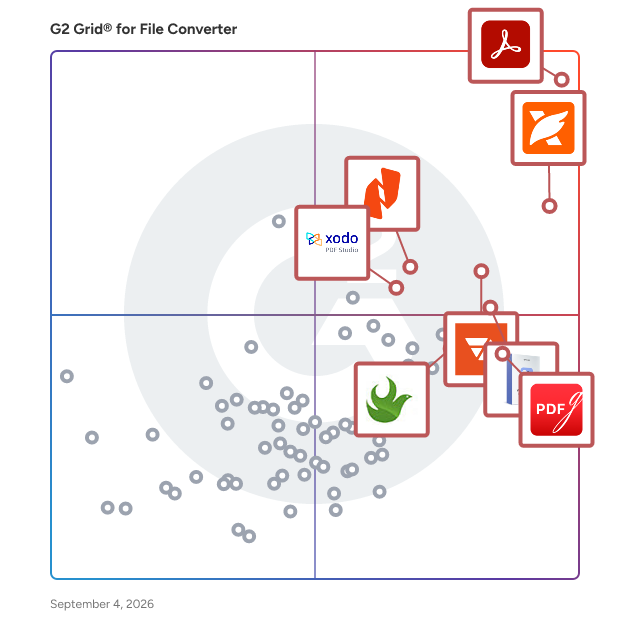
- **Leader:** [Adobe Acrobat](https://www.g2.com/products/adobe-acrobat/reviews)
- **Highest Performer:** [Movavi Video Converter](https://www.g2.com/products/movavi-video-converter/reviews)
- **Easiest to Use:** [Adobe Acrobat](https://www.g2.com/products/adobe-acrobat/reviews)
- **Top Trending:** [Foxit PDF Editor](https://www.g2.com/products/foxit-pdf-editor/reviews)
- **Best Free Software:** [Foxit PDF Editor](https://www.g2.com/products/foxit-pdf-editor/reviews)

  
---

**Sponsored**

### Conga Composer

Flexible. Scalable. Embedded. Conga Composer transforms how businesses generate documents Disconnected systems and manual workflows make document generation slow, error-prone, and costly. Conga Composer streamlines this by embedding automated document creation into your existing tools. It supports multiple formats, merges data from any source, and scales effortlessly, empowering teams to deliver accurate, beautifully branded documents faster, with less effort and greater control. Conga Composer excels in document generation with key advantages: Launch Anywhere – Trigger document generation from buttons, flows, Apex, or external systems- no custom code needed. Multi-Format Support – Create Word, PDF, Excel, PowerPoint, and HTML email templates. Dynamic Content – Use conditional logic, charts, dashboards, rich text, and global currencies. High-Volume Ready – Supports large templates (25MB), merged outputs (250MB), and batch processing. Enterprise Scalability – Reusable templates and behaviors across departments and use cases. eSignature Integration – Seamless pairing with Conga Sign for end-to-end agreement workflows. Revenue Lifecycle Alignment – Only vendor that integrates doc gen into CLM, CPQ, and full revenue processes. Admin-Friendly Setup – Built for Salesforce admins and business users—no developer dependency. Proven Performance – Trusted by 8,000+ businesses; millions of documents generated monthly. Future-Ready – Monitoring AI trends to invest when enterprise-grade reliability is guaranteed. With these strengths, Conga Composer delivers a scalable, flexible, and automated solution for efficient document generation.


[Visit website](https://www.g2.com/external_clickthroughs/record?secure%5Bad_program%5D=ppc&amp;secure%5Bad_slot%5D=category_product_list&amp;secure%5Bcategory_id%5D=1706&amp;secure%5Bdisplayable_resource_id%5D=152&amp;secure%5Bdisplayable_resource_type%5D=Category&amp;secure%5Bmedium%5D=sponsored&amp;secure%5Bplacement_reason%5D=neighbor_category&amp;secure%5Bplacement_resource_ids%5D%5B%5D=152&amp;secure%5Bplacement_resource_ids%5D%5B%5D=237&amp;secure%5Bprioritized%5D=false&amp;secure%5Bproduct_id%5D=274&amp;secure%5Bresource_id%5D=1706&amp;secure%5Bresource_type%5D=Category&amp;secure%5Bsource_type%5D=category_page&amp;secure%5Bsource_url%5D=https%3A%2F%2Fwww.g2.com%2Fcategories%2Ffile-converter%3Fpage%3D52&amp;secure%5Btoken%5D=e4f811bb7e0c4dcd51b96ebeefbe980a52e683223d792ac0e83995886193c87d&amp;secure%5Burl%5D=https%3A%2F%2Fconga.com%2Fdemo%3Futm_campaign%3Dg2clickcampaign-composer-demo%26utm_source%3Dg2%26utm_medium%3Dreview-site%26utm_content%3D&amp;secure%5Burl_type%5D=book_demo)

---

  
    ## What Is File Converter Software?
  [Collaboration &amp; Productivity Software](https://www.g2.com/categories/collaboration-productivity)
  ## What Software Categories Are Similar to File Converter Software?
    - [E-Signature Software](https://www.g2.com/categories/e-signature)
    - [Document Creation Software](https://www.g2.com/categories/document-creation)
    - [PDF Editors](https://www.g2.com/categories/pdf-editor)

  
---

## How Do You Choose the Right File Converter Software?

### What You Should Know About File Converter Software

### What is File Converter Software?

In the digital age, we speak in the language of files. We have more than we know what to do with: documents, videos, audio files, photos, and numerous other formats. In order for them to reach their final destination or be used by the right person, their extensions or file types often need to be updated along the way. This is where conversion comes into play.

Different media players or devices process raw files in different ways. If you download a user manual as a PDF, for example, this might not be supported by the applications on your computer. On the other hand, if you create a video but send it to a client for review, they may not be able to view it as created since you used a specific kind of software. These are just two (of many) cases where a converter tool would come in handy. With the right converter app, you can prepare this information for a new medium while preserving the contents. This way your documents can zip about as necessary between the varied applications your coworkers or clients may be using. The ability to convert files empowers your business with freedom and flexibility in creating, sharing, and using as many files as possible.

Key Benefits of File Converter Software

- Allow users to conveniently upload or drag and drop files for conversion
- Easily convert single or multiple files from their original format to the intended one while maintaining their high quality
- Export completed files into a designated output folder

### What are the Different Kinds of File Converter Software?

Due to the complexity of various files, the majority of products in this category are designed to identify, compress, and convert particular formats and output them in a select number of different formats. Conversion, especially of large or detailed data (e.g., video, audio), is an intensive task. So rather than attempt to handle too many conversions, at the risk of doing a poor job with a particular format, these products are designed for converting files of a specific type.

It’s easy to get a sense of these specializations by browsing the products featured in this category. In fact, many of the developers put the file types right in the name of the tool. Once you have an idea of the types of files you need to work with, or the specific extensions you’re aiming for in the end, you should be able to discern how a given application will assist you by reading the product name and the description. Whether you’re looking for a video converter, image converters, or something designed for Word documents, there is likely a solution to fit your needs. And because these products are typically small and affordable to download, you may wind up with several in the end.

### What are the Potential Issues with File Converter Software?

**Crashing —** Depending on the user interface, the type of file, and the file size, conversion could take anywhere from a few seconds to several hours. In this span of time, your app may lag or crash for any number of reasons, forcing you to start over from the beginning. This could also occur with your hardware if it is being overworked with a large transfer, or even just a random lapse in performance. If your source files are saved and backed up, this isn’t the end of the world. But it could cause frustration if you are on a deadline of any sort.

**Incomplete Transfers —** Occasionally, when you convert a complex file, something can be lost in translation. This could mean that some content is missing from the completed file, components are out of place, or audio is missing from your video. It’s important to double-check your finished files to be sure they are processed successfully and as you intended. If there are any problems, check the settings on your program first to see if there is anything amiss.

**Limitations —** As we previously discussed, products in this category are extremely specialized to handle one or just a few types of files. If you have a video converter, for example, it handles not only a specific media type—but probably a specific format related to that media type and not much else. If your job entails repeated conversions of different files, you may have to download a number of products to complete the full range of tasks. This is an easy fix on the surface, but these limitations could prove aggravating for some users.

### Software and Services Related to File Converter Software

Along the lifecycle of your company’s files, a number of other software tools are likely to make an appearance. This begins with the brainstorming and developing of files. Solutions such as [audio editing software](https://www.g2.com/categories/audio-editing), [graphic design software](https://www.g2.com/categories/graphic-design), [document creation software](https://www.g2.com/categories/document-creation), and [video software](https://www.g2.com/categories/video) help users produce the kind of rich multimedia that is often associated with file conversion. If you are aware from the beginning which formats will be required for your end audience, these platforms may allow you to export files and save files with various extensions—so you essentially have multiple versions of the same file and don’t need to convert again. But even in these situations, it is helpful to have an audio file converter, or whichever kind you need, at your disposal.

After your documents are created, they may travel between a number of users, disks, and devices over the course of their lives. This is where some of these additional software types may come into play.

[**File Storage and Sharing Software**](https://www.g2.com/categories/file-storage-and-sharing) **—** These tools are perhaps the most basic way to keep your files secure, organized, and accessible by the people in your organization who need them. With this software, users are allotted a certain amount of storage capacity and can upload their files into folders based on the project, team, file type, or however else they might want to organize them. Permissions are then determined by the system administrator or the individual uploaders as to who can view, edit, or download the files—whether this person is a fellow employee or a client across the world. These platforms are typically compatible with a wide range of file formats, but in cases where certain file types aren’t supported by the software, you can leverage a conversion tool to convert it as needed based on the type (e.g., a video converter to convert videos).

[**Backup Software**](https://www.g2.com/categories/backup) **—** Your important files are always at risk of being damaged, lost during transfers or computer crashes, or simply misplaced somewhere along the way. There is always the chance of user error as well. Backup software is designed to create note-for-note copies of selected batches of data or files from servers, devices, or databases. This is a proactive measure to take especially when it comes to valuable, confidential data or documents/files that were significant labors of love. If you are planning to transfer large-scale files after you convert them, you should definitely consider backing them up to be safe.

[**Digital Asset Management Software**](https://www.g2.com/categories/digital-asset-management) **—** For media files you plan to use frequently, such as branded marketing materials (e.g., logos, banners, promotional videos), these tools can help streamline your storage, sharing, and collaborating processes. Digital asset management (DAM) products typically work with popular audio formats, image files, and video files, with features like thumbnail views to give creative and marketing teams a clean view of their files. Some DAM tools can also convert files between formats right from the platform and can host various versions of the same file so you can have different file formats ready when you need them.

[**Email Software**](https://www.g2.com/categories/email) **—** Email is the most tried-and-true method of transferring files, so long as they aren’t too large. In the event of oversized videos or bulk batches of photos, it is recommended to use file storage and sharing software, video hosting software, or photo management software to transfer between clients, viewers, and colleagues. But for most other documents, sending them at email attachments is a fast, painless way to get them where they need to go. This also allows you to write a message in the body of the email to accompany the files that can help introduce it, ask questions, or add context for the recipient.


