# Best File Converter Software - Page 22

*By [Neeraja Prakash](https://research.g2.com/insights/author/neeraja-prakash)*


File converter software converts a document from one file type to another. These solutions offer simple step-by-step processes to perform conversions, so that a user simply needs to upload the original document, select which file type they’d like the document to be converted to, and convert. Additionally, file converter software offers batch conversions so users can convert multiple documents to the same format at one time, and also typically supports converting between two specific file types. File converter software may also offer a recovery mode, so files can be safely converter from one format to another. These solutions typically integrate with [file reader software](https://www.g2.com/categories/file-reader) to ensure that users can always access the files they need to read.

To qualify for inclusion in the File Converter category, a product must:

- Convert documents from one file type to another
- Offer batch file conversions
- Provide data recovery so that files convert accurately


## How Many File Converter Software Products Does G2 Track?
**Total Products under this Category:** 1,407

### Category Stats (Jul 2026)
- **Average Rating**: 4.37/5 The average rating of products in this category, based on all submitted ratings
- **Top Trending Product**: Geekersoft Free PPT to PDF (+4.36%) - Among all products in this category, Geekersoft Free PPT to PDF recorded the largest rating increase compared to last month
*Last updated: July 03, 2026*


## How Does G2 Rank File Converter Software Products?

**Why You Can Trust G2's Software Rankings:**

- 30 Analysts and Data Experts
- 13,400+ Authentic Reviews
- 1,407+ Products
- Unbiased Rankings

G2's software rankings are built on verified user reviews, rigorous moderation, and a consistent research methodology maintained by a team of analysts and data experts. Each product is measured using the same transparent criteria, with no paid placement or vendor influence. While reviews reflect real user experiences, which can be subjective, they offer valuable insight into how software performs in the hands of professionals. Together, these inputs power the G2 Score, a standardized way to compare tools within every category.


## Which File Converter Software Is Best for Your Use Case?

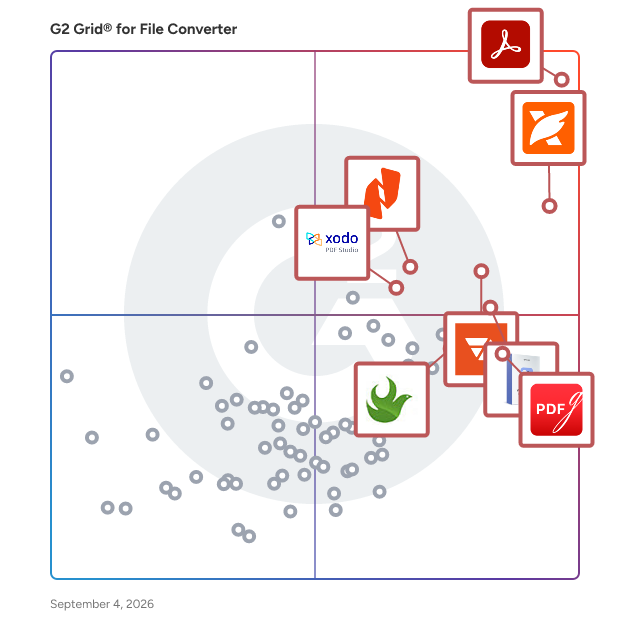
- **Leader:** [Adobe Acrobat](https://www.g2.com/products/adobe-acrobat/reviews)
- **Highest Performer:** [Movavi Video Converter](https://www.g2.com/products/movavi-video-converter/reviews)
- **Easiest to Use:** [Adobe Acrobat](https://www.g2.com/products/adobe-acrobat/reviews)
- **Top Trending:** [Foxit PDF Editor](https://www.g2.com/products/foxit-pdf-editor/reviews)
- **Best Free Software:** [Foxit PDF Editor](https://www.g2.com/products/foxit-pdf-editor/reviews)


---

**Sponsored**

### LinkSquares

LinkSquares is a type of contract lifecycle management (CLM) solution designed to help users transform static contracts into dynamic business assets. This all agentic AI-powered platform enables organizations to gain deeper insights into their contractual agreements, minimize associated risks, and drive strategic value throughout their operations. With a robust architecture that leverages advanced artificial intelligence, LinkSquares redefines how businesses manage their contracts, making the process more efficient and integrated. Targeted primarily at legal teams and business professionals, LinkSquares caters to organizations of various sizes, including notable clients such as DraftKings, ProPharma, and TIME. The platform is particularly beneficial for teams that handle a high volume of contracts and require a streamlined approach to contract management. By providing tools that facilitate drafting, redlining, and analyzing contracts, LinkSquares empowers users to focus on strategic decision-making rather than getting bogged down in operational tasks. One of the key features of LinkSquares is its agentic architecture, which allows the platform to understand contracts in context. This capability enables users to execute necessary actions throughout the contract lifecycle via a natural language interface. Legal teams can easily assess risks, trigger workflows, and manage obligations all within a single system. The platform also offers post-signature analysis, allowing users to evaluate contracts after they have been executed, ensuring that all obligations are met and risks are mitigated. LinkSquares adds significant value by shifting the focus from merely managing contracts to leveraging them as strategic business tools. This transformation leads to faster decision-making processes and a reduction in risk exposure. By automating routine tasks and providing actionable insights, LinkSquares allows teams to allocate more time to high-impact strategic initiatives. The result is a more agile and informed approach to contract management that aligns with broader business goals. Overall, LinkSquares stands out in the CLM category by combining advanced AI capabilities with a user-friendly interface, making it easier for organizations to harness the power of their contracts. This innovative platform not only enhances operational efficiency but also supports businesses in navigating the complexities of contract management in an increasingly dynamic environment.


[Visit website](https://www.g2.com/external_clickthroughs/record?secure%5Bad_program%5D=ppc&amp;secure%5Bad_slot%5D=category_product_list&amp;secure%5Bcategory_id%5D=1706&amp;secure%5Bchosen_at%5D=2026-07-03T13%3A48%3A21Z&amp;secure%5Bdisplayable_resource_id%5D=152&amp;secure%5Bdisplayable_resource_type%5D=Category&amp;secure%5Bmedium%5D=sponsored&amp;secure%5Bplacement_reason%5D=neighbor_category&amp;secure%5Bplacement_resource_ids%5D%5B%5D=152&amp;secure%5Bprioritized%5D=false&amp;secure%5Bproduct_id%5D=59442&amp;secure%5Bresource_id%5D=1706&amp;secure%5Bresource_type%5D=Category&amp;secure%5Bsource_type%5D=category_page&amp;secure%5Bsource_url%5D=https%3A%2F%2Fwww.g2.com%2Fcategories%2Ffile-converter%3Fpage%3D22&amp;secure%5Btoken%5D=e5d3c4ef57e9a98beb57e44a6630432c4abbd0270212f52d09e892b6f5785d04&amp;secure%5Burl%5D=https%3A%2F%2Flinksquares.com%2Fdemo-request%2F%3Fdcid%3D701UI00000W69xZYAR&amp;secure%5Burl_type%5D=book_demo)

---

## What Are the Top-Rated File Converter Software Products in 2026?
### 1. [CloudXena ICS Converter Tool](https://www.g2.com/products/cloudxena-ics-converter-tool/reviews)
The CloudXena ICS Converter Tool is a powerful and enterprise-grade utility designed to simplify the conversion and migration of ICS (iCalendar) files into multiple formats. It enables users to export ICS files to PST, PDF, CSV, MBOX, DOCX, and more while maintaining complete data integrity, including event details, attachments, and metadata. The software supports bulk conversion without any file size limitations, making it suitable for both individual users and large organizations. With its advanced preview panel, users can verify calendar data before conversion, ensuring accuracy and reliability. The tool also offers intelligent filtering options to remove duplicate entries and convert data within a specific date range. Additionally, it supports direct migration to platforms like Gmail, Office 365, and iCloud. Designed with a user-friendly interface, the software works smoothly across all Windows versions and operates offline to ensure maximum data security.


**Who Is the Company Behind CloudXena ICS Converter Tool?**

- **Seller:** [CloudXena](https://www.g2.com/sellers/cloudxena)
- **HQ Location:** N/A
- **LinkedIn® Page:** https://www.linkedin.com/company/No-Linkedin-Presence-Added-Intentionally-By-DataOps (1 employees on LinkedIn®)


### 2. [CloudXena JSON Converter Tool](https://www.g2.com/products/cloudxena-json-converter-tool/reviews)
CloudXena JSON Converter Tool is an advanced utility designed to open, view, validate, and convert JSON files into multiple formats like PDF, DOCX, HTML, JPG, PNG, SVG, and more. It supports batch conversion, intelligent filtering, secure offline processing, and accurate data handling across Windows, Mac, and Linux platforms.


**Who Is the Company Behind CloudXena JSON Converter Tool?**

- **Seller:** [CloudXena](https://www.g2.com/sellers/cloudxena)
- **HQ Location:** N/A
- **LinkedIn® Page:** https://www.linkedin.com/company/No-Linkedin-Presence-Added-Intentionally-By-DataOps (1 employees on LinkedIn®)


### 3. [CloudXena MBOX Converter](https://www.g2.com/products/cloudxena-mbox-converter/reviews)
CloudXena MBOX Converter Tool is a powerful and reliable solution designed to simplify the conversion and migration of MBOX files across multiple platforms and formats. It efficiently handles MBOX files from email clients such as Apple Mail, Thunderbird, and Google Takeout, ensuring a smooth and accurate process without data loss. The software allows users to preview email content, including attachments and metadata, before starting the conversion, giving complete control over the process. With its advanced capabilities, users can convert MBOX files into various formats like PST, PDF, EML, MSG, and CSV, or directly migrate data to platforms such as Office 365, Gmail, iCloud, and IMAP servers. It supports bulk conversion without file size limitations, maintains the original folder hierarchy, and ensures high data integrity throughout. Additionally, features like duplicate email removal, date-range filtering, flexible attachment handling, and the ability to split large PST files make it a comprehensive solution for both individual users and professionals. Compatible with both Windows and macOS, CloudXena MBOX Converter Tool offers a user-friendly interface that requires no technical expertise, making email migration fast, secure, and hassle-free.


**Who Is the Company Behind CloudXena MBOX Converter?**

- **Seller:** [CloudXena](https://www.g2.com/sellers/cloudxena)
- **HQ Location:** N/A
- **LinkedIn® Page:** https://www.linkedin.com/company/No-Linkedin-Presence-Added-Intentionally-By-DataOps (1 employees on LinkedIn®)


### 4. [CloudXena OLM Converter Tool](https://www.g2.com/products/cloudxena-olm-converter-tool/reviews)
CloudXena OLM Converter Tool is a powerful and reliable solution that helps users convert Outlook for Mac OLM files into multiple formats and email platforms with complete accuracy. It enables the migration of emails, contacts, calendars, tasks, and attachments while preserving the original folder hierarchy and data integrity.


**Who Is the Company Behind CloudXena OLM Converter Tool?**

- **Seller:** [CloudXena](https://www.g2.com/sellers/cloudxena)
- **HQ Location:** N/A
- **LinkedIn® Page:** https://www.linkedin.com/company/No-Linkedin-Presence-Added-Intentionally-By-DataOps (1 employees on LinkedIn®)


### 5. [CloudXena OST to PDF Converter](https://www.g2.com/products/cloudxena-ost-to-pdf-converter/reviews)
CloudXena OST to PDF Converter for Mac is a powerful and versatile solution designed to convert OST files into PDF and multiple other formats with complete accuracy and ease. This tool allows users to access, preview, and read OST file data without requiring MS Outlook, making it highly convenient for both technical and non-technical users. It supports bulk conversion of multiple OST files in a single process while maintaining original folder hierarchy and data integrity throughout. Users can export emails with or without attachments, save attachments separately, and even remove duplicate emails based on specific criteria such as To, From, Subject, and Body. The software also provides advanced filtering options, enabling conversion of selected emails within a defined date range for better control. Additionally, it offers flexibility to save the output PDF files in the source location or a custom path as needed. With support for various formats including PST, MBOX, EML, CSV, DOC, HTML, and image formats, along with compatibility across Mac and Windows operating systems, this utility ensures a secure, efficient, and error-free conversion experience for seamless email data management and sharing.


**Who Is the Company Behind CloudXena OST to PDF Converter?**

- **Seller:** [CloudXena](https://www.g2.com/sellers/cloudxena)
- **HQ Location:** N/A
- **LinkedIn® Page:** https://www.linkedin.com/company/No-Linkedin-Presence-Added-Intentionally-By-DataOps (1 employees on LinkedIn®)


### 6. [CloudXena OST to PST Converter](https://www.g2.com/products/cloudxena-ost-to-pst-converter/reviews)
CloudXena OST to PST Converter is a reliable and feature-rich solution designed to convert OST files into PST and multiple other formats with complete accuracy. The software helps users migrate inaccessible, orphaned, or large OST files without data loss while maintaining the original folder hierarchy, email formatting, metadata, and attachments. The tool supports batch conversion of single or multiple OST files and allows users to export OST data into PST, PDF, MBOX, EML, MSG, CSV, DOC, and more. It also enables direct migration to Office 365, Gmail, Thunderbird, iCloud, Apple Mail, and other platforms.


**Who Is the Company Behind CloudXena OST to PST Converter?**

- **Seller:** [CloudXena](https://www.g2.com/sellers/cloudxena)
- **HQ Location:** N/A
- **LinkedIn® Page:** https://www.linkedin.com/company/No-Linkedin-Presence-Added-Intentionally-By-DataOps (1 employees on LinkedIn®)


### 7. [CloudXena PST File Converter](https://www.g2.com/products/cloudxena-pst-file-converter/reviews)
CloudXena PST File Converter is an advanced solution designed to seamlessly convert Outlook PST files into multiple file formats and email platforms. It supports exporting data to MBOX, EML, MSG, PDF, HTML, CSV, TIFF, DOC, and several other formats while maintaining complete data accuracy. The tool also offers direct migration to clients like Thunderbird, Apple Mail, Gmail, Office 365, Yahoo Mail, and other IMAP accounts. During conversion, it preserves original email formatting, metadata, folder structure, attachments, and inline graphics. With features like selective conversion, date-based filtering, file preview, and batch processing, it ensures faster and more efficient handling of large PST files. Being a secure and fully offline utility, it provides a reliable environment for smooth, error-free PST conversion on all Windows systems.


**Who Is the Company Behind CloudXena PST File Converter?**

- **Seller:** [CloudXena](https://www.g2.com/sellers/cloudxena)
- **HQ Location:** N/A
- **LinkedIn® Page:** https://www.linkedin.com/company/No-Linkedin-Presence-Added-Intentionally-By-DataOps (1 employees on LinkedIn®)


### 8. [CloudXena PST File Viewer](https://www.g2.com/products/cloudxena-pst-file-viewer/reviews)
CloudXena PST File Reader lets you open, preview, and convert PST files on both Mac and Windows without needing Outlook installed. Load single or multiple PST files at once, view emails with attachments, and convert to PDF, MBOX, EML, MSG, HTML, CSV, and more in just a few clicks. Built for users who need to access orphaned PST files, old email archives, or data from damaged Outlook installations, the tool works without modifying any original data. Duplicate emails are removed automatically, large PST files can be split into smaller parts, and a date filter lets you convert only the emails you need. The free version allows unlimited PST preview and conversion of up to 50 emails per folder with no credit card required.


**Who Is the Company Behind CloudXena PST File Viewer?**

- **Seller:** [CloudXena](https://www.g2.com/sellers/cloudxena)
- **HQ Location:** N/A
- **LinkedIn® Page:** https://www.linkedin.com/company/No-Linkedin-Presence-Added-Intentionally-By-DataOps (1 employees on LinkedIn®)


### 9. [CocoConvert](https://www.g2.com/products/cococonvert/reviews)
CocoConvert is a privacy-first online file conversion platform that supports over 220 file formats across documents, images, videos, and audio. The platform is designed for speed, simplicity, and security. Users can convert files directly in the browser without creating an account, making it ideal for quick and hassle-free workflows. Key features include batch file processing, high-speed server-side conversions, and automatic file deletion within approximately 60 minutes to ensure user privacy. CocoConvert supports a wide range of tools including PDF merging and splitting, image resizing and compression, video trimming, audio extraction, and format conversion. The platform is optimized for both casual users and professionals who need reliable, scalable file processing without compromising privacy.


**Who Is the Company Behind CocoConvert?**

- **Seller:** [CocoConvert](https://www.g2.com/sellers/cococonvert)
- **HQ Location:** N/A
- **LinkedIn® Page:** https://www.linkedin.com/company/No-Linkedin-Presence-Added-Intentionally-By-DataOps (1 employees on LinkedIn®)


### 10. [Contenta Converter PREMIUM](https://www.g2.com/products/contenta-converter-premium/reviews)
Contenta Converter PREMIUM handles batch image conversion, resizing, and processing for professionals who work with large volumes of photos. It reads 60+ image formats — including 25+ camera RAW types (Canon CR2/CR3, Nikon NEF, Sony ARW, Fujifilm RAF), HEIC, AVIF, WEBP, PSD, PDF, and SVG — and writes to 20+ output formats with per-format quality control. Batch Processing &amp; Workflows Process thousands of images in a single operation with multi-core optimization. Built-in workflow presets export photos sized for Amazon, Etsy, Shopify, eBay, Instagram, TikTok, Pinterest, YouTube, MLS, Zillow, and other platforms — no manual resizing needed. AI-Powered Enhancement Includes AI upscaling (2x and 4x magnification using Real-ESRGAN) and AI background removal, both applied in batch without requiring cloud services or API keys. Effects, Watermarks &amp; Metadata Apply 35+ effects (blur, sharpen, black &amp; white, sepia, color adjustments), add text or logo watermarks, and read/write EXIF, IPTC, and XMP metadata. Auto-rename files with custom patterns and organize output into subfolders automatically. RAW Processing Process 25+ camera RAW formats with built-in white balance, denoising, and color controls — no separate RAW editor required. PDF Albums Create multi-page PDF photo albums (1, 2, 4, or 6 images per page) or split multi-page PDFs into individual images. CLI &amp; Automation Every license includes a command-line interface with 15 commands for scripting and an MCP server for integration with AI agents. Supports watch folders for automatic processing of incoming files, profile save/load, and JSON output. Pricing One-time purchase at $129 (lifetime license) or $79/year subscription. 30-day free trial with full features. No subscription required for the lifetime option. Platform: Windows 10/11 (64-bit)


**Who Is the Company Behind Contenta Converter PREMIUM?**

- **Seller:** [Contenta Software](https://www.g2.com/sellers/contenta-software)
- **HQ Location:** N/A
- **LinkedIn® Page:** https://www.linkedin.com/company/No-Linkedin-Presence-Added-Intentionally-By-DataOps (1 employees on LinkedIn®)


### 11. [Convert Eaze](https://www.g2.com/products/convert-eaze/reviews)
What is Convert Eaze? Convert Eaze is an all-in-one, web-based file conversion and management tool designed to help users quickly and efficiently convert, compress, merge, and manage various file types without the need for complex software installations. Built for ease of use and flexibility, Convert Eaze supports a wide range of file formats, making it ideal for individuals, content creators, students, and professionals who need fast and reliable file processing. Key Features: Comprehensive File Conversion: Convert files between popular formats across multiple categories: Video: MP4, AVI, MOV, WMV, etc. Audio: MP3, WAV, AAC, FLAC, etc. Images: JPEG, PNG, GIF, BMP, and more Documents: PDF, DOCX, TXT, RTF, etc. E-books: EPUB, MOBI, AZW, and others Archives: ZIP, RAR, 7Z, TAR, etc. Spreadsheets &amp; Presentations: XLSX, CSV, PPTX, ODP, etc. File Compression: Reduce file sizes without compromising quality. Merge Tools: Combine multiple files into a single document or media file. Secure &amp; Private: All conversions are processed in-browser or with secure file handling protocols, ensuring user data privacy. Who It’s For: Convert Eaze is perfect for users looking for a hassle-free solution to manage diverse file types—whether for work, education, or personal projects. Why Choose Convert Eaze? It’s fast, reliable, accessible from any browser, and eliminates the need for multiple apps or technical skills. With its intuitive interface and support for dozens of file types, Convert Eaze streamlines digital file tasks for anyone, anywhere.


**Who Is the Company Behind Convert Eaze?**

- **Seller:** [Convert Eaze](https://www.g2.com/sellers/convert-eaze)
- **HQ Location:** N/A
- **Twitter:** @converteaze
- **LinkedIn® Page:** https://www.linkedin.com/company/No-Linkedin-Presence-Added-Intentionally-By-DataOps (1 employees on LinkedIn®)


### 12. [Convertra](https://www.g2.com/products/convertra/reviews)
AI agent that autonomously optimizes e-commerce conversion, search, and customer journeys for beauty and DTC brands. Uses behavioral AI to adapt product discovery and reduce bounce rates in real-time.


**Who Is the Company Behind Convertra?**

- **Seller:** [Convertra](https://www.g2.com/sellers/convertra)
- **HQ Location:** N/A
- **LinkedIn® Page:** https://www.linkedin.com/company/No-Linkedin-Presence-Added-Intentionally-By-DataOps (1 employees on LinkedIn®)


### 13. [Coolmuster HEIC Converter](https://www.g2.com/products/coolmuster-heic-converter/reviews)
Coolmuster HEIC Converter supports converting HEIC file format to other much more compatible image formats. Thus, you can easily open, view, and deal with your HEIC files on your iPhone/iPad. As a high-quality quick &amp; easy HEIC to JPG converter, it helps you to convert HEIC to JPG/JPEG/PNG in batches. And Coolmuster HEIC Converter can keep the original image quality. What&#39;s more, you can set up the output image as you like.


**Who Is the Company Behind Coolmuster HEIC Converter?**

- **Seller:** [Coolmuster](https://www.g2.com/sellers/coolmuster)
- **Year Founded:** 2005
- **HQ Location:** Shenzhen, cn
- **LinkedIn® Page:** https://www.linkedin.com/company/coolmuster/ (2 employees on LinkedIn®)


### 14. [CSV to VCF Converter](https://www.g2.com/products/csv-to-vcf-converter/reviews)
CSV to VCF Converter is the best utility to convert CSV files to VCF/vCard and PDF format. It effortlessly converts single or multiple CSV files in bulk. The software has easy-to-navigate user interface, which makes the conversion task easy even for non-tech users. The CSV to VCF Converter perfectly works on all Windows and Mac OS. Check out its free demo version to explore its features and functions.


**Who Is the Company Behind CSV to VCF Converter?**

- **Seller:** [MSOutlookHelp](https://www.g2.com/sellers/msoutlookhelp)
- **HQ Location:** N/A
- **Twitter:** @ms_outlookhelp (1 Twitter followers)
- **LinkedIn® Page:** https://www.linkedin.com/company/msoutlookhelp/ (2 employees on LinkedIn®)


### 15. [DataHelp DXL to PST Wizard](https://www.g2.com/products/datahelp-dxl-to-pst-wizard/reviews)
DataHelp DXL to PST Wizard exports Lotus Domino DXL files to the Outlook PST format.


**Who Is the Company Behind DataHelp DXL to PST Wizard?**

- **Seller:** [DataHelp Software](https://www.g2.com/sellers/datahelp-software)
- **Year Founded:** 2016
- **HQ Location:** Pune, Maharastra
- **Twitter:** @datahelptool (3 Twitter followers)
- **LinkedIn® Page:** https://www.linkedin.com/company/datahelp-software (3 employees on LinkedIn®)


### 16. [DataHelp EML to PST Wizard](https://www.g2.com/products/datahelp-eml-to-pst-wizard/reviews)
DataHelp EML to PST Wizard tool converts EML files or folder of EML files into a single PST file with their attachments.


**Who Is the Company Behind DataHelp EML to PST Wizard?**

- **Seller:** [DataHelp Software](https://www.g2.com/sellers/datahelp-software)
- **Year Founded:** 2016
- **HQ Location:** Pune, Maharastra
- **Twitter:** @datahelptool (3 Twitter followers)
- **LinkedIn® Page:** https://www.linkedin.com/company/datahelp-software (3 employees on LinkedIn®)


### 17. [DataHelp EMLX to PST Converter](https://www.g2.com/products/datahelp-emlx-to-pst-converter/reviews)
EMLX to PST converter tool to convert Apple Mail emails EMLX files to PST Outlook supportable format.


**Who Is the Company Behind DataHelp EMLX to PST Converter?**

- **Seller:** [DataHelp Software](https://www.g2.com/sellers/datahelp-software)
- **Year Founded:** 2016
- **HQ Location:** Pune, Maharastra
- **Twitter:** @datahelptool (3 Twitter followers)
- **LinkedIn® Page:** https://www.linkedin.com/company/datahelp-software (3 employees on LinkedIn®)


### 18. [DataHelp NSF to PST Converter](https://www.g2.com/products/datahelp-nsf-to-pst-converter/reviews)
DataHelp NSF to PST Converter wizard is designed to convert multiple Lotus Notes NSF files to Outlook PST format.


**Who Is the Company Behind DataHelp NSF to PST Converter?**

- **Seller:** [DataHelp Software](https://www.g2.com/sellers/datahelp-software)
- **Year Founded:** 2016
- **HQ Location:** Pune, Maharastra
- **Twitter:** @datahelptool (3 Twitter followers)
- **LinkedIn® Page:** https://www.linkedin.com/company/datahelp-software (3 employees on LinkedIn®)


### 19. [DataHelp OLM to Office 365 Wizard](https://www.g2.com/products/datahelp-olm-to-office-365-wizard/reviews)
DataHelp OLM to Office 365 Wizard is a proficient tool to import Mac Outlook OLM Files to Exchange Online (Office 365).


**Who Is the Company Behind DataHelp OLM to Office 365 Wizard?**

- **Seller:** [DataHelp Software](https://www.g2.com/sellers/datahelp-software)
- **Year Founded:** 2016
- **HQ Location:** Pune, Maharastra
- **Twitter:** @datahelptool (3 Twitter followers)
- **LinkedIn® Page:** https://www.linkedin.com/company/datahelp-software (3 employees on LinkedIn®)


### 20. [DataHelp OLM to PST Wizard](https://www.g2.com/products/datahelp-olm-to-pst-wizard/reviews)
DataHelp OLM to PST wizard is designed to help migrate and convert Mac OLM Files to PST format.


**Who Is the Company Behind DataHelp OLM to PST Wizard?**

- **Seller:** [DataHelp Software](https://www.g2.com/sellers/datahelp-software)
- **Year Founded:** 2016
- **HQ Location:** Pune, Maharastra
- **Twitter:** @datahelptool (3 Twitter followers)
- **LinkedIn® Page:** https://www.linkedin.com/company/datahelp-software (3 employees on LinkedIn®)


### 21. [DataHelp Software EDB to PST Wizard](https://www.g2.com/products/datahelp-software-edb-to-pst-wizard/reviews)
DataHelp Software EDB to PST Wizard is a EDB to PST Converter that allows to export multiple exchange .edb file into Outlook PST.


**Who Is the Company Behind DataHelp Software EDB to PST Wizard?**

- **Seller:** [DataHelp Software](https://www.g2.com/sellers/datahelp-software)
- **Year Founded:** 2016
- **HQ Location:** Pune, Maharastra
- **Twitter:** @datahelptool (3 Twitter followers)
- **LinkedIn® Page:** https://www.linkedin.com/company/datahelp-software (3 employees on LinkedIn®)


### 22. [DataHelp Software MSG to PST Wizard](https://www.g2.com/products/datahelp-software-msg-to-pst-wizard/reviews)
DataHelp MSG to PST converter tool is an advanced solution to convert multiple MSG files to PST with attachment.


**Who Is the Company Behind DataHelp Software MSG to PST Wizard?**

- **Seller:** [DataHelp Software](https://www.g2.com/sellers/datahelp-software)
- **Year Founded:** 2016
- **HQ Location:** Pune, Maharastra
- **Twitter:** @datahelptool (3 Twitter followers)
- **LinkedIn® Page:** https://www.linkedin.com/company/datahelp-software (3 employees on LinkedIn®)


### 23. [DataHelp Windows Live Mail Converter](https://www.g2.com/products/datahelp-windows-live-mail-converter/reviews)
DataHelp Windows Live Mail converter tool to export Emails Data (EML files) to PST format, to access Windows Live Mail emails into Outlook


**Who Is the Company Behind DataHelp Windows Live Mail Converter?**

- **Seller:** [DataHelp Software](https://www.g2.com/sellers/datahelp-software)
- **Year Founded:** 2016
- **HQ Location:** Pune, Maharastra
- **Twitter:** @datahelptool (3 Twitter followers)
- **LinkedIn® Page:** https://www.linkedin.com/company/datahelp-software (3 employees on LinkedIn®)


### 24. [Datalogics Adobe PDF Converter](https://www.g2.com/products/datalogics-adobe-pdf-converter/reviews)
Adobe PDF Converter\* is a PDF API which allows developers to quickly and easily convert Encapsulated PostScript (EPS) and PostScript (PS) files to Adobe’s Portable Document Format (PDF). The industry-standard Adobe Distiller and Distiller Server are themselves built upon PDF Converter SDK; and now this PDF API is available separately to application developers. \*Please note that the Adobe PDF Converter was formerly known as Adobe Normalizer.


**Who Is the Company Behind Datalogics Adobe PDF Converter?**

- **Seller:** [Datalogics](https://www.g2.com/sellers/datalogics)
- **Year Founded:** 1967
- **HQ Location:** Wilmington, US
- **LinkedIn® Page:** https://www.linkedin.com/company/datalogics/ (44 employees on LinkedIn®)

**Who Uses This Product?**
- **Company Size:** 100% Small-Business


#### What Are Recent G2 Reviews of Datalogics Adobe PDF Converter?

**"[very good](https://www.g2.com/survey_responses/datalogics-adobe-pdf-converter-review-7448790)"**

**Rating:** 4.5/5.0 stars
*— METEDIO ERNESTO M.*

[Read full review](https://www.g2.com/survey_responses/datalogics-adobe-pdf-converter-review-7448790)

---


### 25. [DataNumen Exchange Recovery](https://www.g2.com/products/datanumen-exchange-recovery/reviews)
DataNumen Exchange Recovery (formerly Advanced Exchange Recovery) is a OST recovery tool and OST to PST conversion tool for Microsoft Exchange offline folder (.ost) files.


**Who Is the Company Behind DataNumen Exchange Recovery?**

- **Seller:** [DataNumen](https://www.g2.com/sellers/datanumen)
- **Year Founded:** 2001
- **HQ Location:** Central, HK
- **Twitter:** @DataNumen (209 Twitter followers)
- **LinkedIn® Page:** https://www.linkedin.com/company/205691/ (12 employees on LinkedIn®)


## What Is File Converter Software?

[Collaboration &amp; Productivity Software](https://www.g2.com/categories/collaboration-productivity)

## What Software Categories Are Similar to File Converter Software?

- [E-Signature Software](https://www.g2.com/categories/e-signature)
- [Document Creation Software](https://www.g2.com/categories/document-creation)
- [PDF Editors](https://www.g2.com/categories/pdf-editor)


---

## How Do You Choose the Right File Converter Software?

### What You Should Know About File Converter Software

### What is File Converter Software?

In the digital age, we speak in the language of files. We have more than we know what to do with: documents, videos, audio files, photos, and numerous other formats. In order for them to reach their final destination or be used by the right person, their extensions or file types often need to be updated along the way. This is where conversion comes into play.

Different media players or devices process raw files in different ways. If you download a user manual as a PDF, for example, this might not be supported by the applications on your computer. On the other hand, if you create a video but send it to a client for review, they may not be able to view it as created since you used a specific kind of software. These are just two (of many) cases where a converter tool would come in handy. With the right converter app, you can prepare this information for a new medium while preserving the contents. This way your documents can zip about as necessary between the varied applications your coworkers or clients may be using. The ability to convert files empowers your business with freedom and flexibility in creating, sharing, and using as many files as possible.

Key Benefits of File Converter Software

- Allow users to conveniently upload or drag and drop files for conversion
- Easily convert single or multiple files from their original format to the intended one while maintaining their high quality
- Export completed files into a designated output folder

### What are the Different Kinds of File Converter Software?

Due to the complexity of various files, the majority of products in this category are designed to identify, compress, and convert particular formats and output them in a select number of different formats. Conversion, especially of large or detailed data (e.g., video, audio), is an intensive task. So rather than attempt to handle too many conversions, at the risk of doing a poor job with a particular format, these products are designed for converting files of a specific type.

It’s easy to get a sense of these specializations by browsing the products featured in this category. In fact, many of the developers put the file types right in the name of the tool. Once you have an idea of the types of files you need to work with, or the specific extensions you’re aiming for in the end, you should be able to discern how a given application will assist you by reading the product name and the description. Whether you’re looking for a video converter, image converters, or something designed for Word documents, there is likely a solution to fit your needs. And because these products are typically small and affordable to download, you may wind up with several in the end.

### What are the Potential Issues with File Converter Software?

**Crashing —** Depending on the user interface, the type of file, and the file size, conversion could take anywhere from a few seconds to several hours. In this span of time, your app may lag or crash for any number of reasons, forcing you to start over from the beginning. This could also occur with your hardware if it is being overworked with a large transfer, or even just a random lapse in performance. If your source files are saved and backed up, this isn’t the end of the world. But it could cause frustration if you are on a deadline of any sort.

**Incomplete Transfers —** Occasionally, when you convert a complex file, something can be lost in translation. This could mean that some content is missing from the completed file, components are out of place, or audio is missing from your video. It’s important to double-check your finished files to be sure they are processed successfully and as you intended. If there are any problems, check the settings on your program first to see if there is anything amiss.

**Limitations —** As we previously discussed, products in this category are extremely specialized to handle one or just a few types of files. If you have a video converter, for example, it handles not only a specific media type—but probably a specific format related to that media type and not much else. If your job entails repeated conversions of different files, you may have to download a number of products to complete the full range of tasks. This is an easy fix on the surface, but these limitations could prove aggravating for some users.

### Software and Services Related to File Converter Software

Along the lifecycle of your company’s files, a number of other software tools are likely to make an appearance. This begins with the brainstorming and developing of files. Solutions such as [audio editing software](https://www.g2.com/categories/audio-editing), [graphic design software](https://www.g2.com/categories/graphic-design), [document creation software](https://www.g2.com/categories/document-creation), and [video software](https://www.g2.com/categories/video) help users produce the kind of rich multimedia that is often associated with file conversion. If you are aware from the beginning which formats will be required for your end audience, these platforms may allow you to export files and save files with various extensions—so you essentially have multiple versions of the same file and don’t need to convert again. But even in these situations, it is helpful to have an audio file converter, or whichever kind you need, at your disposal.

After your documents are created, they may travel between a number of users, disks, and devices over the course of their lives. This is where some of these additional software types may come into play.

[**File Storage and Sharing Software**](https://www.g2.com/categories/file-storage-and-sharing) **—** These tools are perhaps the most basic way to keep your files secure, organized, and accessible by the people in your organization who need them. With this software, users are allotted a certain amount of storage capacity and can upload their files into folders based on the project, team, file type, or however else they might want to organize them. Permissions are then determined by the system administrator or the individual uploaders as to who can view, edit, or download the files—whether this person is a fellow employee or a client across the world. These platforms are typically compatible with a wide range of file formats, but in cases where certain file types aren’t supported by the software, you can leverage a conversion tool to convert it as needed based on the type (e.g., a video converter to convert videos).

[**Backup Software**](https://www.g2.com/categories/backup) **—** Your important files are always at risk of being damaged, lost during transfers or computer crashes, or simply misplaced somewhere along the way. There is always the chance of user error as well. Backup software is designed to create note-for-note copies of selected batches of data or files from servers, devices, or databases. This is a proactive measure to take especially when it comes to valuable, confidential data or documents/files that were significant labors of love. If you are planning to transfer large-scale files after you convert them, you should definitely consider backing them up to be safe.

[**Digital Asset Management Software**](https://www.g2.com/categories/digital-asset-management) **—** For media files you plan to use frequently, such as branded marketing materials (e.g., logos, banners, promotional videos), these tools can help streamline your storage, sharing, and collaborating processes. Digital asset management (DAM) products typically work with popular audio formats, image files, and video files, with features like thumbnail views to give creative and marketing teams a clean view of their files. Some DAM tools can also convert files between formats right from the platform and can host various versions of the same file so you can have different file formats ready when you need them.

[**Email Software**](https://www.g2.com/categories/email) **—** Email is the most tried-and-true method of transferring files, so long as they aren’t too large. In the event of oversized videos or bulk batches of photos, it is recommended to use file storage and sharing software, video hosting software, or photo management software to transfer between clients, viewers, and colleagues. But for most other documents, sending them at email attachments is a fast, painless way to get them where they need to go. This also allows you to write a message in the body of the email to accompany the files that can help introduce it, ask questions, or add context for the recipient.


