Best E-Commerce Tools - Page 48

How Many E-Commerce Tools Products Does G2 Track?

Total Products under this Category: 1,155

Category Stats (Sep 2026)

  • Average Rating: 4.45/5 The average rating of products in this category, based on all submitted ratings
  • Top Trending Product: ReverseLogix (+1.05%) - Among all products in this category, ReverseLogix recorded the largest rating increase compared to last month

Last updated: September 01, 2026

How Does G2 Rank E-Commerce Tools Products?

Why You Can Trust G2's Software Rankings:

  • 30 Analysts and Data Experts
  • 7,800+ Authentic Reviews
  • 1,155+ Products
  • Unbiased Rankings

G2's software rankings are built on verified user reviews, rigorous moderation, and a consistent research methodology maintained by a team of analysts and data experts. Each product is measured using the same transparent criteria, with no paid placement or vendor influence. While reviews reflect real user experiences, which can be subjective, they offer valuable insight into how software performs in the hands of professionals. Together, these inputs power the G2 Score, a standardized way to compare tools within every category.

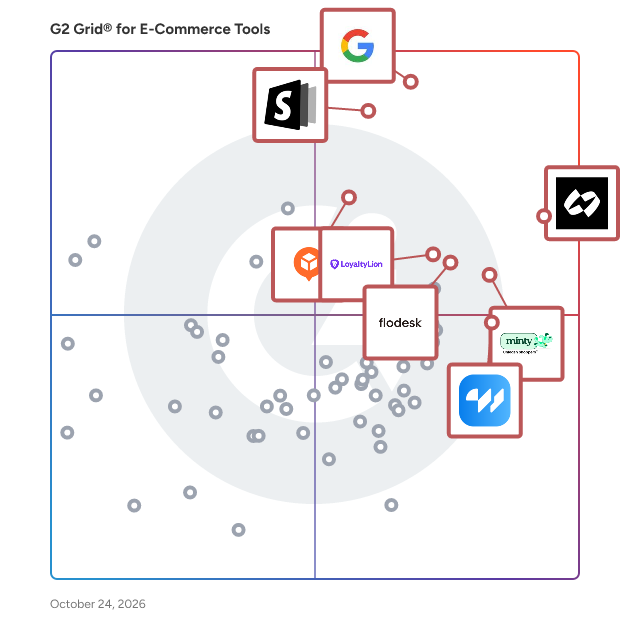
G2 Grid® for E-Commerce Tools

G2 Grid® for E-Commerce Tools  plotting products by satisfaction and market presence

Highlighted products: Chargeflow, Google Pay for Business, Commerce Components by Shopify, Elfsight, Minty Business, Flodesk, LoyaltyLion, and wetracked.io.

Underlying data: [Grid® JSON](https://www.g2.com/categories/e-commerce-tools/grids.json?focus%5B%5D=chargeflow-inc-chargeflow&focus%5B%5D=google-pay-for-business&focus%5B%5D=commerce-components-by-shopify&focus%5B%5D=elfsight&focus%5B%5D=minty-business&focus%5B%5D=flodesk&focus%5B%5D=loyaltylion&focus%5B%5D=wetracked-io)

Magento 2 Mega Menu Extension

Magento 2 Mega Menu Extension helps you to create a dynamic navigation menu for your Magento eCommerce Store. Create Custom Horizontal & Vertical Mega Menu. - Support Magento Commerce B2B Customer Segments - Support Varnish Caching - Added hamburger menu design for desktops - Drag & drop menu items available to sort them well - Allows creating sticky menu - Display images & videos in Mega Menu & boost branding - Create visually appealing store with distinct animations effect - Link categories, CMS pages, external URLs & blocks to menu - Distinct design styles (horizontal, vertical, drill down) available - Allows the Mega menu to be placed anywhere within the site - Easily Installed and Customizable

Who Is the Company Behind Magento 2 Mega Menu Extension?

Magento 2 Membership Subscription Extension

Do you want to offer membership subscription plans to your customers? MageDelight Membership Subscription Magento 2 Extension is a powerful loyalty & subscription module that enhances the customer experience on your eCommerce store. - Now support, REST API - Auto Renew using Braintree Credit Cards Payment Method (Magento default) - Quickly create and manage unlimited membership package(s) - Able to view, add, edit and remove membership customers - Add unlimited promotion rules for memberships/customer groups - Email notification to customers about membership renewal - Display featured membership packages on the listing page with special tags - SEO friendly configuration for product pages COMPATIBLE WITH -COMMUNITY : 2.3.X - 2.4.X ENTERPRISE : 2.3.X - 2.4.X

Who Is the Company Behind Magento 2 Membership Subscription Extension?

Magento 2 Mobile App Builder by Knowband

The Mobile App Builder module will help the Magento 2 store admin to develop his own Mobile Application. Live chat makes you win your customers building a trust. The mobile and tablet responsive Mobile App get synced automatically without any efforts needed. Push Notifications helps you increase the conversion giving the customers a reason to shop at your store.

Who Is the Company Behind Magento 2 Mobile App Builder by Knowband?

  • Seller: Knowband
  • Year Founded: 2006
  • HQ Location: Noida, Uttar Pradesh
  • Twitter: @KnowbandPlugin
    500 Twitter followers
  • LinkedIn® Page: www.linkedin.com
    3 employees on LinkedIn®

Magento 2 Multi Blog Extension

Managing a blog on your Magento 2 Website gives you a lot of opportunities increased traffic and improved SEO included. The blog is the best marketing tool that plays a lot of functions and has multiple features to help you create the best customer experience for your customers and benefit from it at the same time. What if I told you could double that? Magento 2 Multi Blog extension allows you to manage 2 separate blogs on your website each one with its own set of features and double the benefit you get from managing only one blog. Features: -Responsive Design -Multi-layer Categories -Multi-layer Tags -Comment engines -RSS Feed Optimization -Blog XML Sitemap -SEO-friendly URLs -WYSIWYG editor -Post Search Widget -Blog Categories Tree Widget -Tags Cloud Widget -Recent and Featured Posts Widgets -Archive Widget -Author’s Block -Related Posts Feature -Blog Author Feature -Blog Import Feature -Related Blog Posts & Products -Media Gallery -Auto-publishing on Facebook -Social Share Buttons -Multi-store & Multi-website Support

Who Is the Company Behind Magento 2 Multi Blog Extension?

  • Seller: Magefan
  • Year Founded: 2015
  • HQ Location: Ternopil, UA
  • Twitter: @magento2fan
    385 Twitter followers
  • LinkedIn® Page: www.linkedin.com
    9 employees on LinkedIn®

Magento 2 Multiple Coupons

Magento 2 Multiple Coupons' extension helps store owners add multiple coupon codes in a single order during checkout. To streamline your coupon management, install this now and get 90 days of quick and free support.

Who Is the Company Behind Magento 2 Multiple Coupons?

  • Seller: MageAnts
  • Year Founded: 2016
  • HQ Location: Ahmedabad, Gujarat
  • Twitter: @MageAnts
    196 Twitter followers
  • LinkedIn® Page: www.linkedin.com
    19 employees on LinkedIn®

Magento 2 Multiple Wishlists

Magento 2 Multiple Wishlists extension helps your customers create to organize favorite products and create multiple wishlists as per their choices. Download this, reduce store abandonment and drive more sales to your store.

Who Is the Company Behind Magento 2 Multiple Wishlists?

  • Seller: MageAnts
  • Year Founded: 2016
  • HQ Location: Ahmedabad, Gujarat
  • Twitter: @MageAnts
    196 Twitter followers
  • LinkedIn® Page: www.linkedin.com
    19 employees on LinkedIn®

Magento 2 Multiselect Layered Navigation by FMEextensions

The Magento 2 Multi-Select Layered Navigation Extension by FMEextensions is a robust solution designed to enhance the browsing and filtering experience for customers on your Magento 2 store. This extension empowers shoppers to apply multiple attribute filters simultaneously, providing a flexible and efficient way to refine search results and find products that meet their specific criteria. Key Features: Multi-Select Attribute Filters: Allow customers to select and apply multiple attribute filters simultaneously within the layered navigation, providing a more flexible and dynamic browsing experience. Enhanced User Experience: Improve the overall user experience by enabling customers to refine search results more precisely, reducing the time and effort required to find products that match their preferences. Customizable Display Options: Tailor the display of multi-select filters in the layered navigation to match your store's theme and design, ensuring a cohesive and visually appealing integration. Ajax Loading: Implement Ajax-based loading for the layered navigation, allowing customers to apply multiple filters without refreshing the entire page, resulting in a seamless and faster browsing experience. Filter Reset Options: Provide customers with the ability to easily reset applied filters individually or all at once, ensuring a user-friendly and intuitive navigation interface. Responsive Design: Ensure a consistent and optimized browsing experience across devices, including desktops, tablets, and smartphones, allowing customers to refine search results on any device. Multi-Store Support: Extend multi-select layered navigation functionality across multiple store views or websites within a Magento 2 multi-store environment, catering to diverse product catalogs. Integration with Search Results: Seamlessly integrate multi-select filters with search results, ensuring that applied filters are reflected in product listings, providing a cohesive and accurate representation of available products. Compatibility with Third-Party Themes: Ensure compatibility with various third-party themes, allowing merchants to implement multi-select layered navigation without compromising the overall design and functionality of their Magento 2 store. The Magento 2 Multi-Select Layered Navigation Extension by FMEextensions is a valuable tool for merchants aiming to optimize the browsing and filtering capabilities of their Magento 2 store. By allowing customers to apply multiple attribute filters simultaneously, this extension contributes to an improved user experience, increased customer satisfaction, and streamlined product discovery on your Magento 2 store.

Who Is the Company Behind Magento 2 Multiselect Layered Navigation by FMEextensions?

  • Seller: FMEextensions
  • Year Founded: 2009
  • HQ Location: Canada
  • Twitter: @FMEextension
    704 Twitter followers
  • LinkedIn® Page: www.linkedin.com
    3 employees on LinkedIn®

Magento 2 Multi Store View Pricing

Magento 2 Multiple Store View Pricing extension helps store owners to set up different prices for the same product and sell products at different prices per store view. Manage the product prices and currencies for all your store views with this module.

Who Is the Company Behind Magento 2 Multi Store View Pricing?

  • Seller: MageAnts
  • Year Founded: 2016
  • HQ Location: Ahmedabad, Gujarat
  • Twitter: @MageAnts
    196 Twitter followers
  • LinkedIn® Page: www.linkedin.com
    19 employees on LinkedIn®

Magento 2 Multi Vendor Marketplace Extension

Magento 2 Multi-Vendor Marketplace Extension is all you need if you’re looking to transform your default Magento 2 store into a complete multi-seller e-commerce marketplace with multiple sellers, products, and payout settings. This helpful Extension offers many exciting features like a Vendor Dashboard, Vendor Panel, Set Product Approval, Vendor Management, Product Management, Commission Management, Order Management, and more. Magento 2 Multi-Vendor Marketplace works for any theme and template. For more details, kindly contact our support team. Features 1) Product Management: Approve, add, remove, or edit products with preset parameters from the admin panel. 2) Order Management: View, approve, add, remove, or edit orders by setting parameters from the admin panel. 3) Vendor Management: Add, remove, or edit vendors from the back end. 4) Commission Management: Ability to manually set the seller’s commission from the admin panel. 5) SEO Management: Comes with SEO friendly system to make pages easily readable for web crawlers. 6) Vendor Dashboard: Vendors can view and manage their dashboards. 7) Customizable: Ability to customize the template as per your unique needs. 8) Report system: Receive detailed insights with Extension’s advanced reporting system. Admin Features 1) Add/edit vendor information: Admin can add or remove a vendor and edit vendor information from the back end. 2) Set product approval: In case of admin approval is required before a vendor’s product appears in the store, the admin can set a parameter to enable it. The admin can set ON/OFF this approval requirement. 3) Set registration approval: Vendor can register from the front end. The admin can set ON/OFF this approval requirement. 4) View vendor orders from the admin panel: This Extension adds the vendor name as a filter in the order listing page. Admin can use that to filter orders based on vendor names. 5) Manage vendor orders: While vendors can manage their orders from the vendor panel, the admin can also manage them if required. 6) Manage product commission: Commission payable to admin, which is some percentage of the product price, can be set on a global level applying to the whole store, as well as on vendor level and a category level. Customer Features 1) Review for a vendor: Customers can give reviews and ratings to vendors. But a customer should have bought something from that vendor. 2) View vendor store page: Users can view the store page for a particular vendor by clicking on the vendor name from the product listing page. 3) Become a vendor: A regular user can apply to become a vendor using the options provided on the dashboard. Vendor Features 1) Vendor Panel: Vendors can manage products, orders, and their profile information from the vendor panel. This panel is shown on the user dashboard after login. 2) Register from the front end: The vendor can register from the front end of the website using vendor registration links given on the header and footer. 3) Manage profile: The vendor can modify their profile information during or after registration. 4) Manage store: Vendors can manage their information on the store page, which is created on the website for each vendor. 5) Add/delete/edit products: Vendors can manage products from the vendor panel. The following types of products can be added/edited by vendors: a) Simple products b) Configurable products c) Virtual product d) Downloadable products 6) After adding a product, approval is sought from the admin if the admin has enabled product approvals. 7) View orders: Vendors can see all their orders in a list view in the vendor panel, with filter options available. 8) Invoicing and Shipping functions: Vendors can process their orders. Usual Magento features for order processing, like "Invoice" and "Ship," are available in the vendor panel. 9) View store reviews: Customers can review vendors, and the vendor can view the reviews and ratings from customers. 10) View commission: For every order, the admin deducts a portion of the order amount, and the rest is passed on to the vendor. In this option, the vendor can see how much funds have been received from orders and how much the commission is payable to the admin. When the admin initiates a settlement, the vendor can view those details also in the vendor panel.

Who Is the Company Behind Magento 2 Multi Vendor Marketplace Extension?

  • Seller: Dotsquares
  • Year Founded: 2002
  • HQ Location: London
  • Twitter: @dotsquares
    1,696 Twitter followers
  • LinkedIn® Page: www.linkedin.com
    1,478 employees on LinkedIn®

Magento 2 Multi Vendor Marketplace Module

A Magento 2 Multi-Vendor Marketplace extension allows the store admin to transform their online store into a fully functional marketplace. Magento 2 Marketplace plugin doesn’t let you fall behind your competitors. Besides that, the Magento 2 Marketplace can upgrade the Magento 2 shop in a few simple steps. Multiple sellers enrolled at the Marketplace enable the admin to target a significant customer base. Huge traffic at the store means better conversion and a higher growth rate. Mobile app support of the Magento 2 Marketplace Module further enhances the reach and revenue of the store.

Who Is the Company Behind Magento 2 Multi Vendor Marketplace Module?

  • Seller: Knowband
  • Year Founded: 2006
  • HQ Location: Noida, Uttar Pradesh
  • Twitter: @KnowbandPlugin
    500 Twitter followers
  • LinkedIn® Page: www.linkedin.com
    3 employees on LinkedIn®

Magento 2 One Step Checkout Extension

Let your customer facilitates smart and simplified checkout to accelerate the whole shopping experience, and enhance customer satisfaction. Boost conversion rate by 40% and reduce shopping cart abandonment in your store with MageDelight One Step Checkout. - Smart single page to complete all the checkout steps - Customer Registration at the time of checkout - Allows customers to select delivery date and time - Extra fees option available at checkout - Lets you write a gift message for the order - Display Static blocks as custom header/footer on checkout page - Drag & drop facility available to swap the checkout steps COMPATIBLE WITH -COMMUNITY : 2.3.X - 2.4.X ENTERPRISE : 2.3.X - 2.4.X

Who Is the Company Behind Magento 2 One Step Checkout Extension?

Magento 2 Order Approval Rules

Magento 2 Order Approval Rules extension helps customers place an order and wait for admin approval to complete their orders. By installing this, the admin can set various conditions for placing an order by the customer.

Who Is the Company Behind Magento 2 Order Approval Rules?

  • Seller: MageAnts
  • Year Founded: 2016
  • HQ Location: Ahmedabad, Gujarat
  • Twitter: @MageAnts
    196 Twitter followers
  • LinkedIn® Page: www.linkedin.com
    19 employees on LinkedIn®

Magento 2 Order Archive by FMEextensions

The Magento 2 Order Archive Extension by FMEextensions offers an efficient solution for organizing and managing your store's order history. This extension empowers merchants with the ability to archive orders, enhancing the overall order management process in Magento 2 by optimizing performance and providing a streamlined view of historical transactions. Key Features: Order Archiving Functionality: Archive completed orders to maintain a clean and organized order history, preventing the clutter of old transactions and improving system performance. Flexible Archiving Rules: Set customizable archiving rules based on order status, date range, or other criteria, providing flexibility in determining which orders should be archived. Automatic Archiving: Automate the archiving process with scheduled tasks, ensuring that older orders are archived regularly without manual intervention, saving time and effort for store administrators. Search and Retrieval: Easily search and retrieve archived orders using various filters, allowing merchants to access historical order information whenever needed for reference or analysis. Performance Optimization: Improve the overall performance of your Magento 2 store by reducing the load on the system caused by a large number of active orders, resulting in faster response times and smoother operation. Order Status Transition: Configure rules for automatic order status transition before archiving, ensuring that orders are appropriately marked as archived while maintaining accurate order status records. Admin Notifications: Receive notifications about the archiving process, including successful archiving events or any potential issues, keeping administrators informed about the status of order archival. Restore Archived Orders: Restore archived orders to the active order history if needed, providing flexibility in managing and reviewing historical transactions. The Magento 2 Order Archive Extension by FMEextensions is a valuable tool for merchants seeking to optimize their order management process, enhance system performance, and maintain a well-organized and efficient order history in their Magento 2 store.

Who Is the Company Behind Magento 2 Order Archive by FMEextensions?

  • Seller: FMEextensions
  • Year Founded: 2009
  • HQ Location: Canada
  • Twitter: @FMEextension
    704 Twitter followers
  • LinkedIn® Page: www.linkedin.com
    3 employees on LinkedIn®

Magento 2 Order Attachment

The Magento 2 Order Attachment extension by MageAnts enhances the functionality of your Magento 2 store by allowing customers to attach various files—such as PDFs, images, and documents—to their orders during the checkout process. This feature is particularly beneficial for businesses that require additional documentation, like prescriptions or licenses, to process certain orders. Key Features and Functionality: - File Upload Capability: Customers can upload multiple file types, including PDFs, images, and Word documents, during the checkout process. - Admin Configuration: Store administrators can set parameters such as maximum file size, allowed file types, and the number of attachments per order. - Order Management: Both customers and administrators can view, manage, and download attached files from the order view section. - Email Notifications: The extension supports email notifications to inform administrators when customers add or edit attachments. - Commenting System: Customers and administrators can add comments to uploaded attachments, facilitating better communication. Primary Value and Problem Solved: This extension streamlines the order process for products or services that require supplementary documentation, ensuring that all necessary information is collected efficiently. By integrating file attachment capabilities directly into the checkout process, it reduces the need for follow-up communications and enhances customer satisfaction. Additionally, the ability to manage and review attachments within the Magento 2 admin panel simplifies order management for store owners.

Who Is the Company Behind Magento 2 Order Attachment?

  • Seller: MageAnts
  • Year Founded: 2016
  • HQ Location: Ahmedabad, Gujarat
  • Twitter: @MageAnts
    196 Twitter followers
  • LinkedIn® Page: www.linkedin.com
    19 employees on LinkedIn®

Magento 2 Order Attributes by FMEextensions

The Magento 2 Order Attributes Extension by FMEextensions is a robust solution designed to enhance the order management process on your Magento 2 store by allowing merchants to collect additional information from customers during the checkout process. This extension facilitates the customization of order attributes, providing a flexible and efficient way to gather specific details required for processing orders accurately. Key Features: Dynamic Order Attribute Creation: Create custom order attributes effortlessly within the Magento 2 admin panel, allowing merchants to collect additional information from customers during the checkout process. Multiple Attribute Types: Utilize various attribute types, including text fields, dropdowns, checkboxes, radio buttons, and more, ensuring flexibility in capturing different types of information based on business requirements. Attribute Dependency: Implement attribute dependencies to show or hide specific attributes based on customer selections, providing a dynamic and personalized checkout experience. Customizable Attribute Display: Define the position and appearance of custom order attributes on the checkout page, ensuring seamless integration with your store's design and layout. Required and Optional Attributes: Set custom order attributes as required or optional, allowing merchants to specify which information is crucial for order processing and which is optional for customers to provide. Visibility Control: Control the visibility of custom order attributes based on customer groups or specific conditions, tailoring the attribute display to different segments of your customer base. Attribute Validation: Implement validation rules for custom order attributes, ensuring that customers provide accurate and valid information during the checkout process. Multi-Store Support: Extend custom order attribute functionality across multiple store views or websites within a Magento 2 multi-store environment, allowing for consistent customization across diverse storefronts. Data Export and Import: Export and import custom order attribute data for efficient management and analysis, providing a streamlined approach to attribute configuration and updates. The Magento 2 Order Attributes Extension by FMEextensions is a versatile tool for merchants looking to enhance the checkout process, gather specific information for order processing, and customize the order attributes to align with their business needs. By providing flexibility in attribute creation, display, and management, this extension contributes to a more tailored and efficient order management experience on your Magento 2 store.

Who Is the Company Behind Magento 2 Order Attributes by FMEextensions?

  • Seller: FMEextensions
  • Year Founded: 2009
  • HQ Location: Canada
  • Twitter: @FMEextension
    704 Twitter followers
  • LinkedIn® Page: www.linkedin.com
    3 employees on LinkedIn®
Subhransu Sahu
SS
Researched and written by Subhransu Sahu
Updated October 3, 2024