Best E-Commerce Tools - Page 47

How Many E-Commerce Tools Products Does G2 Track?

Total Products under this Category: 1,155

Category Stats (Sep 2026)

  • Average Rating: 4.45/5 The average rating of products in this category, based on all submitted ratings
  • Top Trending Product: ReverseLogix (+1.05%) - Among all products in this category, ReverseLogix recorded the largest rating increase compared to last month

Last updated: September 01, 2026

How Does G2 Rank E-Commerce Tools Products?

Why You Can Trust G2's Software Rankings:

  • 30 Analysts and Data Experts
  • 7,800+ Authentic Reviews
  • 1,155+ Products
  • Unbiased Rankings

G2's software rankings are built on verified user reviews, rigorous moderation, and a consistent research methodology maintained by a team of analysts and data experts. Each product is measured using the same transparent criteria, with no paid placement or vendor influence. While reviews reflect real user experiences, which can be subjective, they offer valuable insight into how software performs in the hands of professionals. Together, these inputs power the G2 Score, a standardized way to compare tools within every category.

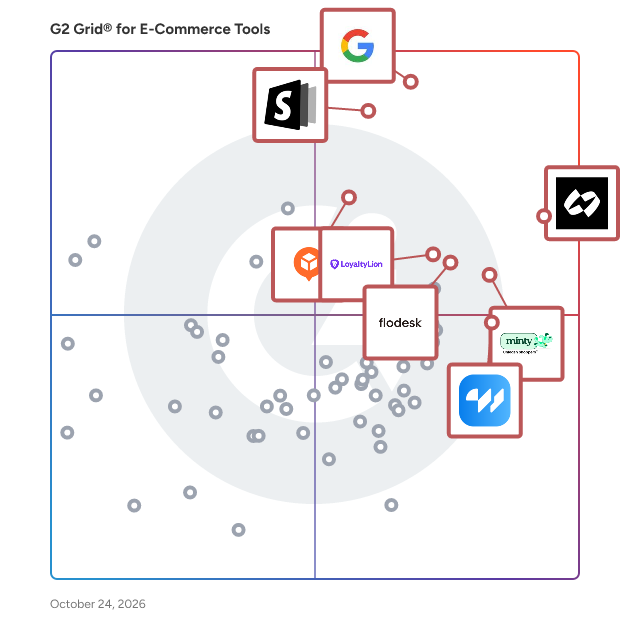
G2 Grid® for E-Commerce Tools

G2 Grid® for E-Commerce Tools  plotting products by satisfaction and market presence

Highlighted products: Chargeflow, Google Pay for Business, Commerce Components by Shopify, Elfsight, Minty Business, Flodesk, LoyaltyLion, and wetracked.io.

Underlying data: [Grid® JSON](https://www.g2.com/categories/e-commerce-tools/grids.json?focus%5B%5D=chargeflow-inc-chargeflow&focus%5B%5D=google-pay-for-business&focus%5B%5D=commerce-components-by-shopify&focus%5B%5D=elfsight&focus%5B%5D=minty-business&focus%5B%5D=flodesk&focus%5B%5D=loyaltylion&focus%5B%5D=wetracked-io)

Magento 2 Hide Price Extension

It's not always the best idea to display your product or service price. Sometimes you need to hide it to let customers reach out to you to increase engagement and get qualified leads. You may also want to hide the price to prevent your competitors from spying on your pricing strategy. The Magento 2 hide price extension allows Magento 2 merchants to easily and effectively hide product prices and/or the 'Add to Cart' button. They can replace it with custom text, link, image, or a quote form. Customers can either perform the required action mentioned as text or inquire about the product price. Features: - Hide price and/or 'Add to Cart' for all or specific products - Replace with text, link, image or a quote form - Apply to specific customers, customer groups, or store views - Manage price inquiries on a handy grid - Hide price on cross-sell and up-sell, and related products too - Hide prices for a specific time period

Who Is the Company Behind Magento 2 Hide Price Extension?

  • Seller: FMEextensions
  • Year Founded: 2009
  • HQ Location: Canada
  • Twitter: @FMEextension
    704 Twitter followers
  • LinkedIn® Page: www.linkedin.com
    3 employees on LinkedIn®

Magento 2 HTML Sitemap Extension

The Ultimate Sitemap Extension for Magento 2 allows you to create HTML Sitemap for your e-commerce store. It includes every page on the website in a well-organized table of data. You can simply click on the page link to open a particular page on a website. It contains category and product links on the sitemap as well. The Ultimate sitemap displays Categories and Products in separate views and Dependent Associated Views. Users can set one view to show category and product on the sitemap. This Extension also supports Add Additional or External Links from the system configuration section. Sitemap Extension provides a facility to manage page titles and page heading from the configuration section. It can also add user links in a sitemap like a login, register, etc. The Ultimate HTML sitemap extension can ultimately help improve website navigation and user experience, and it also helps improve your search engine rankings. Key Features 1) Generate & configure HTML Sitemap according to your requirements. 2) Display Page Links, including user, links like sign up and log in. 3) Display Category and Product Links. 4) Automatically adds Sitemap link in the footer area. 5) You can set the Category Product Dependency as well as Display Product And Categories in two views: Separate View or Dependent Associated View. 6) It supports Add Additional Links or External Links from the system configuration section. 7) It can manage Page Titles and Page Heading from the configuration section. 8) Enable Page Links and drive more visitors. 9) Compatible with Magento Community 2.4 and above.

Who Is the Company Behind Magento 2 HTML Sitemap Extension?

  • Seller: Dotsquares
  • Year Founded: 2002
  • HQ Location: London
  • Twitter: @dotsquares
    1,696 Twitter followers
  • LinkedIn® Page: www.linkedin.com
    1,478 employees on LinkedIn®

Magento 2 Image Optimization Extension

Having a lot of images on your website can have a crucial impact on your website load speed since the format they are in (.jpg/.png/.gif) is outdated and big in size. It can be crucial for those who are trying to pursue SEO trends and improve it. That is what Google has developed the WebP, next-generation image format. Magento 2 Image Optimization Extension allows you to convert all your website pictures into WebP format reducing their size with the slight quality change and enable lazy loading of those images on your website. This is the bundle of 2 products: Magento 2 WebP Images extension and Magento 2 Image Lazy Load Extension. You can choose the size and quality you would like the images to be converted to and the WebP Images module will automatically convert all previous and next added images into WebP. After this extension is installed, the visual difference won't be so noticeable. However, website speed will be improved due to the image size reduce which is something you can not pay attention to. At the same time, Image Lazy Load extension will load images gradually, just when scrolling down and not at once which will boot the website loading speed and reduce the page size. With Magento 2 Image Optimization module, you will improve your website's SEO and even attract more customers since no one likes to wait for the website page to load. Having fast performing websites gives you the advantage over your competitors. Features: -WebP Next Generation Optimized Images -Up to 50% File Size Reducing -Better SEO Ranking -Improved Website Performance -Multi-Browser Compatibility -Complex Magento Image Optimization Solution -Automated Image Optimization Processes

Who Is the Company Behind Magento 2 Image Optimization Extension?

  • Seller: Magefan
  • Year Founded: 2015
  • HQ Location: Ternopil, UA
  • Twitter: @magento2fan
    385 Twitter followers
  • LinkedIn® Page: www.linkedin.com
    9 employees on LinkedIn®

Magento 2 Import Coupon Codes

Magento 2 Import Coupon Codes extension allows store owners to easily and quickly import discount coupon codes through CSV files. Install this quick and effortless solution and reduce time spent on coupon management.

Who Is the Company Behind Magento 2 Import Coupon Codes?

  • Seller: MageAnts
  • Year Founded: 2016
  • HQ Location: Ahmedabad, Gujarat
  • Twitter: @MageAnts
    196 Twitter followers
  • LinkedIn® Page: www.linkedin.com
    19 employees on LinkedIn®

Magento 2 Import Export Product Attributes Extension

The extension will import/export attributes and attribute sets. The Attribute Import-Export module will save you precious hours.

Who Is the Company Behind Magento 2 Import Export Product Attributes Extension?

  • Seller: Dotsquares
  • Year Founded: 2002
  • HQ Location: London
  • Twitter: @dotsquares
    1,696 Twitter followers
  • LinkedIn® Page: www.linkedin.com
    1,478 employees on LinkedIn®

Magento 2 Improved Sorting

The quicker and easier a customer finds the product he is looking for, the higher the chances of him purchasing it. If he finds it difficult to find his desired product in your store, he is more likely to abandon the store. If you have thousands of products with varying attributes, you must have some sort of a mechanism by which customers can reach their desired product easily. This is where our Magento 2 sorting extension comes in. It allows your customers to sort products by 14 different parameters on category and search pages. For example, if a customer wants to find the cheapest product in a certain category, he can sort products by price in ascending order. If he wants to find the most rated products, he can sort it by rating, and so on. Improved product sorting improves customer's shopping experience and increases conversions. Features: - Offer 14 product sorting options - Reorder sorting options - Set the default sorting option

Who Is the Company Behind Magento 2 Improved Sorting?

  • Seller: FMEextensions
  • Year Founded: 2009
  • HQ Location: Canada
  • Twitter: @FMEextension
    704 Twitter followers
  • LinkedIn® Page: www.linkedin.com
    3 employees on LinkedIn®

Magento 2 Improved Sorting

Magento 2 Improved Sorting extension helps customers do sorting while searching product by date, price, rating, position and popularity. Assist your potential visitors to easily and rapidly find preferred products. Install now!

Who Is the Company Behind Magento 2 Improved Sorting?

  • Seller: MageAnts
  • Year Founded: 2016
  • HQ Location: Ahmedabad, Gujarat
  • Twitter: @MageAnts
    196 Twitter followers
  • LinkedIn® Page: www.linkedin.com
    19 employees on LinkedIn®

Magento 2 Improved Sorting by FMEextensions

FMEextensions introduces the Magento 2 Improved Sorting extension, a powerful tool designed to enhance the browsing experience for both store owners and customers. This extension transforms the way products are presented, providing efficient sorting options that contribute to a seamless and personalized shopping journey. Key Features: Customizable Sorting Options: Tailor product sorting to match your business needs with a wide array of customizable options. Whether sorting by popularity, best sellers, or specific attributes, this extension puts control in your hands. Attribute-Based Sorting: Effortlessly prioritize products based on specific attributes such as price, size, or color. This feature allows customers to quickly find exactly what they are looking for, streamlining the purchasing process. Multi-Store Compatibility: Seamlessly integrate the Improved Sorting extension across multiple stores within your Magento 2 setup. This ensures consistency and a unified shopping experience across various storefronts. Responsive Design Optimization: The extension is designed to work seamlessly on various devices, providing a responsive and user-friendly sorting experience. Whether customers are browsing on desktops, tablets, or mobile devices, the sorting functionality remains efficient and accessible. Dynamic User Interface: Enjoy an intuitive admin interface that simplifies the management of sorting options. Easily configure and fine-tune the sorting parameters to adapt to changing business requirements, ensuring a dynamic and user-centric online store. FMEextensions' Magento 2 Improved Sorting extension is a valuable addition for e-commerce businesses looking to optimize product visibility and simplify the navigation process, ultimately enhancing customer satisfaction and driving sales.

Who Is the Company Behind Magento 2 Improved Sorting by FMEextensions?

  • Seller: FMEextensions
  • Year Founded: 2009
  • HQ Location: Canada
  • Twitter: @FMEextension
    704 Twitter followers
  • LinkedIn® Page: www.linkedin.com
    3 employees on LinkedIn®

Magento 2 Language Switcher Extension

Moving your store to the global level is a neither easy nor fast process. It requires a lot of time and effort to launch and even more to manage. But is it worth it since it offers you a lot of opportunities? The first thing you have to pay attention to is the language. As many countries, you want to cover as many language packs you need to install in your store. Magento 2 naturally has a store switching tool that allows you, customers, to switch to the corresponding store view one they are on your website. But is really convenient for your users to constantly use the store switcher? Magento 2 Auto Language Switcher using the GeoIP database displays customers the store view in their local language. In order to define which store view to direct customers the extension analyzes customers' location or browser language is analyzed. Features: -Store View Redirect Based on Customer Browser Language -Store View Switcher Based on Visitor Geographic Location -Robots Restrictions -Integration With Custom Themes

Who Is the Company Behind Magento 2 Language Switcher Extension?

  • Seller: Magefan
  • Year Founded: 2015
  • HQ Location: Ternopil, UA
  • Twitter: @magento2fan
    385 Twitter followers
  • LinkedIn® Page: www.linkedin.com
    9 employees on LinkedIn®

Magento 2 Limit Quantity Grouped by Product

Magento 2 Limit Quantity Grouped By Product extension helps store owners set the minimum and maximum limit of the group product purchase quantity. Install now and get 90 days of free and quick support.

Who Is the Company Behind Magento 2 Limit Quantity Grouped by Product?

  • Seller: MageAnts
  • Year Founded: 2016
  • HQ Location: Ahmedabad, Gujarat
  • Twitter: @MageAnts
    196 Twitter followers
  • LinkedIn® Page: www.linkedin.com
    19 employees on LinkedIn®

Magento 2 Login as Customer

Magento 2 Login As Customer extension helps the potential store admin to login to customers’ accounts and save the login data securely and effectively. Install this and get full control of customers’ accounts without a security code.

Who Is the Company Behind Magento 2 Login as Customer?

  • Seller: MageAnts
  • Year Founded: 2016
  • HQ Location: Ahmedabad, Gujarat
  • Twitter: @MageAnts
    196 Twitter followers
  • LinkedIn® Page: www.linkedin.com
    19 employees on LinkedIn®

Magento 2 Login As Customer by FMEextensions

The Magento 2 Login as Customer Extension by FMEextensions is a powerful tool designed to streamline customer support and enhance the troubleshooting process on your Magento 2 store. This extension allows administrators to log in as registered customers directly from the admin panel, facilitating efficient problem-solving and providing a seamless customer service experience. Key Features: Quick Customer Login: Enable administrators to log in as customers with a single click directly from the Magento 2 admin panel, reducing the need for customers to share sensitive login credentials. Enhanced Customer Support: Empower customer support representatives to assist customers effectively by experiencing the storefront exactly as the customer does, helping to identify and resolve issues efficiently. Security and Permissions: Implement secure login procedures by ensuring that only authorized administrators with the necessary permissions can access the "Login as Customer" functionality, maintaining the integrity of customer accounts. Access Customer Dashboard: Gain access to the customer's dashboard, order history, and other account information, allowing administrators to troubleshoot, customize, or assist with any customer-specific queries. Audit Trail and Logging: Maintain a comprehensive audit trail of administrator activities when logging in as a customer, ensuring transparency and accountability in customer interactions. Compatibility with Multi-Store Environments: Support seamless login as a customer across multiple store views or websites within a Magento 2 multi-store environment, facilitating efficient customer support in diverse contexts. Customer Consent Notification: Display a notification to customers when administrators log in to their accounts, promoting transparency and trust in the troubleshooting or support process. Customizable Notifications: Customize the notification messages sent to customers, providing a personalized and informative communication about administrator interactions within their accounts. The Magento 2 Login as Customer Extension by FMEextensions is an invaluable tool for merchants looking to streamline customer support, troubleshoot issues efficiently, and enhance the overall customer service experience on their Magento 2 store. By providing administrators with secure access to customer accounts, this extension promotes transparency, security, and effective problem resolution.

Who Is the Company Behind Magento 2 Login As Customer by FMEextensions?

  • Seller: FMEextensions
  • Year Founded: 2009
  • HQ Location: Canada
  • Twitter: @FMEextension
    704 Twitter followers
  • LinkedIn® Page: www.linkedin.com
    3 employees on LinkedIn®

Magento 2 Maintenance Mode Extension

The Magento 2 Maintenance Mode Extension by MageAnts enables store owners to display a customized maintenance or "Coming Soon" page during website updates or upgrades. This ensures visitors are informed about ongoing maintenance activities, enhancing user experience and maintaining engagement. Key Features: - Custom Maintenance Page Design: Create personalized maintenance pages with custom messages, logos, colors, and background images to align with your brand identity. - Countdown Timer: Incorporate a countdown timer to inform visitors of the expected time until the website is live again, building anticipation and keeping users informed. - Newsletter Subscription: Add a subscription box to collect visitor emails, allowing you to notify them when the site is back online and maintain customer engagement. - Social Media Integration: Include social media links on the maintenance page, enabling visitors to connect with your brand on platforms like Facebook, Twitter, and Instagram. - Redirection Option: Redirect visitors to another page or link from the maintenance page, keeping them engaged with your content even during maintenance periods. - IP Whitelisting: Allow specific IP addresses to bypass maintenance mode, granting access to developers or team members for testing and updates. Primary Value and User Benefits: This extension addresses the challenge of maintaining a professional online presence during website maintenance. By providing a customizable and informative maintenance page, it prevents visitors from encountering broken links or error messages, thereby preserving trust and engagement. Features like the countdown timer and subscription box keep customers informed and connected, reducing potential revenue loss during downtime. Additionally, social media integration and redirection options offer alternative avenues for customer interaction, ensuring a seamless user experience even when the main site is temporarily unavailable.

Who Is the Company Behind Magento 2 Maintenance Mode Extension?

  • Seller: MageAnts
  • Year Founded: 2016
  • HQ Location: Ahmedabad, Gujarat
  • Twitter: @MageAnts
    196 Twitter followers
  • LinkedIn® Page: www.linkedin.com
    19 employees on LinkedIn®

Magento 2 Marketplace Extension

Take a step towards digital transformation with our powerful, future ready, customizable marketplace solutions. With the help of our MultiVendor marketplace solution, you will get a multi-vendor marketplace where different vendors can come to your shop & sell their products. Admin can charge commissions from vendors. 1.Your vendor can manage orders. 2.Your vendors can ship, invoice their orders. 3. Customer can give reviews and ratings. 4. Vendors can create all types of products available in Magento. 5. Vendors can request their pending payment. 6. You will get a shipping method free of cost. 7. You can charge commissions from your vendors product-type-wise, category-wise as well as miscellaneous.

Who Is the Company Behind Magento 2 Marketplace Extension?

  • Seller: CedCommerce
  • Year Founded: 2011
  • HQ Location: Lucknow, Uttar Pradesh
  • Twitter: @cedcommerce
    2,406 Twitter followers
  • LinkedIn® Page: www.linkedin.com
    70 employees on LinkedIn®

Magento 2 Mautic Integration Extension

Keeping a relationship with your customers is one of the components of a successful business. And what is the best way to engage with your customers than through email? Email Marketing is a new branch of marketing specializing in the peculiarities of emailing. Email allows you to notify your customers about some promotions on your website, offer them some deals or just say hi and ask to rate your services. there are plenty of reasons you could use emails for. There are different emailing platforms that allow you to automize the email sending. But how do you synchronize contacts between those platforms and your website? Magento 2 Mautic Integration extension allows you to automatically synchronize contacts between Mautic and your Magento. So, basically, once you synchronize your contacts with Mautic, newly added contacts will be automatically added to Mautic from that time on. Features: -Mautic API -Asynchronous Data Export -Fields Mapping -Website Monitoring / Javascript (JS) tracking

Who Is the Company Behind Magento 2 Mautic Integration Extension?

  • Seller: Magefan
  • Year Founded: 2015
  • HQ Location: Ternopil, UA
  • Twitter: @magento2fan
    385 Twitter followers
  • LinkedIn® Page: www.linkedin.com
    9 employees on LinkedIn®
Subhransu Sahu
SS
Researched and written by Subhransu Sahu
Updated October 3, 2024