Best E-Commerce Tools - Page 45

How Many E-Commerce Tools Products Does G2 Track?

Total Products under this Category: 1,155

Category Stats (Sep 2026)

  • Average Rating: 4.45/5 The average rating of products in this category, based on all submitted ratings
  • Top Trending Product: ReverseLogix (+1.05%) - Among all products in this category, ReverseLogix recorded the largest rating increase compared to last month

Last updated: September 01, 2026

How Does G2 Rank E-Commerce Tools Products?

Why You Can Trust G2's Software Rankings:

  • 30 Analysts and Data Experts
  • 7,800+ Authentic Reviews
  • 1,155+ Products
  • Unbiased Rankings

G2's software rankings are built on verified user reviews, rigorous moderation, and a consistent research methodology maintained by a team of analysts and data experts. Each product is measured using the same transparent criteria, with no paid placement or vendor influence. While reviews reflect real user experiences, which can be subjective, they offer valuable insight into how software performs in the hands of professionals. Together, these inputs power the G2 Score, a standardized way to compare tools within every category.

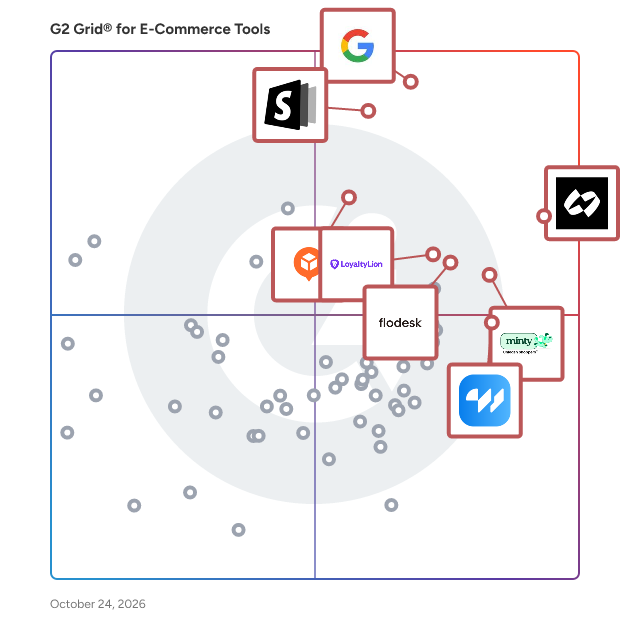
G2 Grid® for E-Commerce Tools

G2 Grid® for E-Commerce Tools  plotting products by satisfaction and market presence

Highlighted products: Chargeflow, Google Pay for Business, Commerce Components by Shopify, Elfsight, Minty Business, Flodesk, LoyaltyLion, and wetracked.io.

Underlying data: [Grid® JSON](https://www.g2.com/categories/e-commerce-tools/grids.json?focus%5B%5D=chargeflow-inc-chargeflow&focus%5B%5D=google-pay-for-business&focus%5B%5D=commerce-components-by-shopify&focus%5B%5D=elfsight&focus%5B%5D=minty-business&focus%5B%5D=flodesk&focus%5B%5D=loyaltylion&focus%5B%5D=wetracked-io)

Magento 2 Currency Switcher

Personalization is an important feature in e-commerce. It means displaying your content in a language that is local to customers, allowing customers to pay in local currencies, and providing features that are acceptable to local audience. Personalization improves customer's shopping experience, increases engagement and conversions. You might have seen ecommerce giants displaying prices in local currencies. For example, if a customer is coming from the USA, he/she sees the prices in USD, a customer from the UK will see them in GBP while Indian customers will be shown the prices in INR. This is because customers are more comfortable paying in local currencies. If you have a Magento 2 store, you can achieve this by using the Magento 2 currency switcher extension by FMEextensions. The extension detects customer's location from their IP addresses and converts product prices according to their location. Features: - Display product prices in local currency - Enable rounding off prices in local currency - Assign currency to each country - Maxmind GeoIP database for IP detection - Disable currency switching for specific search engines

Who Is the Company Behind Magento 2 Currency Switcher?

  • Seller: FMEextensions
  • Year Founded: 2009
  • HQ Location: Canada
  • Twitter: @FMEextension
    704 Twitter followers
  • LinkedIn® Page: www.linkedin.com
    3 employees on LinkedIn®

Magento 2 Currency Switcher Extension

In case you have the intention of selling globally and reach a wider range of customers you have to take care of not only your website's content but prices as well so that people coming to your store conveniently find prices displayed in their local currency. USD is a universally recognized currency together with EUR, but it might be hard for people to decide if it is worth buying something since it is better for them to see how much it cost in their currency. That is what Magento 2 Auto Currency extension was created for. It automatically converts prices on your store and displays them to your customers in their local currency using the GeoIP database which defines customers' location. Features: -Currently Based on Customer Geographic Location -GeoIP Database -Prices Pounding -Robot Restrictions -Custom Themes Integration

Who Is the Company Behind Magento 2 Currency Switcher Extension?

  • Seller: Magefan
  • Year Founded: 2015
  • HQ Location: Ternopil, UA
  • Twitter: @magento2fan
    385 Twitter followers
  • LinkedIn® Page: www.linkedin.com
    9 employees on LinkedIn®

Magento 2 Custom Checkout Fields by FMEextensions

The Magento 2 Custom Checkout Fields Extension by FMEextensions empowers merchants to tailor the checkout experience according to their unique business requirements. This powerful extension allows you to collect additional information from customers during the checkout process, helping you gather valuable data and enhance the overall customer journey. Key Features: Flexible Field Management: Easily add, edit, or remove custom fields in the checkout process, providing unparalleled flexibility to tailor the experience to your specific business needs. Various Field Types: The extension supports a variety of field types, including text fields, text areas, checkboxes, radio buttons, and more, allowing you to collect diverse types of information from customers. Conditional Fields: Implement conditional logic to show or hide specific fields based on customer responses or other selected criteria, creating a dynamic and personalized checkout experience. Validation Rules: Ensure the accuracy of collected data by applying custom validation rules to the added fields, prompting customers to enter information in the required format. Positioning Control: Arrange the custom fields in the desired order on the checkout page, ensuring a seamless integration with your store's design and maintaining a user-friendly layout. Multi-Store Support: Tailor the checkout process differently for various store views with multi-store support, accommodating the specific needs and preferences of different target audiences. Data Visibility: View and manage the collected custom field data directly from the Magento 2 admin panel, providing easy access to customer information and aiding in data analysis. Compatibility with Payment Gateways: Ensure compatibility with various payment gateways by seamlessly integrating custom fields into the checkout process without compromising payment functionality. The Magento 2 Custom Checkout Fields Extension by FMEextensions is an invaluable tool for merchants seeking to optimize the checkout experience, gather essential customer data, and create a personalized shopping journey that aligns with their business goals.

Who Is the Company Behind Magento 2 Custom Checkout Fields by FMEextensions?

  • Seller: FMEextensions
  • Year Founded: 2009
  • HQ Location: Canada
  • Twitter: @FMEextension
    704 Twitter followers
  • LinkedIn® Page: www.linkedin.com
    3 employees on LinkedIn®

Magento 2 Customer Approval

Magento 2 Customer Approval extension allows store owners to approve or reject a new account registration from customers in specific cases in a single go. Order this and get full control over frontend registration.

Who Is the Company Behind Magento 2 Customer Approval?

  • Seller: MageAnts
  • Year Founded: 2016
  • HQ Location: Ahmedabad, Gujarat
  • Twitter: @MageAnts
    196 Twitter followers
  • LinkedIn® Page: www.linkedin.com
    19 employees on LinkedIn®

Magento 2 Customer Group Payment Method

Magento 2 Customer Group Payment Method extension helps store owners restrict payment methods based on customer groups of the Magento 2 store. Download this and enjoy 90 days of free support.

Who Is the Company Behind Magento 2 Customer Group Payment Method?

  • Seller: MageAnts
  • Year Founded: 2016
  • HQ Location: Ahmedabad, Gujarat
  • Twitter: @MageAnts
    196 Twitter followers
  • LinkedIn® Page: www.linkedin.com
    19 employees on LinkedIn®

Magento 2 Customer Group Pricing by FMEextensions

The Magento 2 Customer Group Pricing Extension by FMEextensions empowers merchants to implement dynamic pricing strategies tailored to different customer segments. This extension provides a flexible and efficient solution to offer personalized pricing based on customer groups, enhancing customer loyalty and optimizing sales for your Magento 2 store. Key Features: Customizable Group-Based Pricing: Implement tiered or discounted pricing structures for specific customer groups, allowing merchants to create targeted pricing strategies to reward loyal customers, wholesalers, or other segmented groups. Multiple Customer Groups: Support an unlimited number of customer groups, providing the flexibility to create diverse pricing structures based on various criteria such as customer loyalty, membership status, or wholesale relationships. Product-Level Pricing Rules: Set product-specific pricing rules for different customer groups, enabling merchants to customize prices based on individual products within the store catalog. Bulk Import/Export Pricing: Streamline the management of customer group pricing by facilitating bulk import/export capabilities, allowing for efficient updates and adjustments to pricing structures. Time-Sensitive Pricing: Implement time-sensitive pricing rules for customer groups, enabling temporary promotions or exclusive discounts for specific periods, contributing to dynamic marketing strategies. Visibility Control: Choose to display or hide group-based prices on product pages, ensuring that customers see the most relevant pricing information based on their group affiliation. Category-Level Pricing: Apply group-based pricing at the category level, allowing merchants to extend custom pricing to entire product categories for a more streamlined and efficient management approach. User-Friendly Configuration: Configure and manage group-based pricing rules easily within the Magento 2 admin panel, providing a user-friendly interface for store administrators. Compatibility with Promotions: Seamlessly integrate group-based pricing with other promotional strategies and discounts, ensuring compatibility with the broader marketing initiatives of your Magento 2 store. The Magento 2 Customer Group Pricing Extension by FMEextensions is an essential tool for merchants looking to implement personalized pricing strategies, enhance customer satisfaction, and maximize sales opportunities by catering to the diverse needs of different customer groups on their Magento 2 store.

Who Is the Company Behind Magento 2 Customer Group Pricing by FMEextensions?

  • Seller: FMEextensions
  • Year Founded: 2009
  • HQ Location: Canada
  • Twitter: @FMEextension
    704 Twitter followers
  • LinkedIn® Page: www.linkedin.com
    3 employees on LinkedIn®

Magento 2 Custom Price

Magento 2 Custom Price extension is an easy delightful strategy to attract customers. Magento 2 Custom Price extension gives an opportunity for customers to send custom prices of products. Creation of products with custom prices. The set lowest amount for the payment. Edit prices on the product page or cart page. Why customs pricing? In this competitive environment when all the shoppers are selling the same products the producers do not get equal justice because some consumers want to buy the product at a high price while some customers want to buy the same item at a lower price, at that time you have to face many difficulties. Sometimes there are difficult situations or for some reason, the store admin cannot fix a fixed price for the store products, at that time the simple solution is to get a reasonable price for that product from the customer. Now Magento 2 Custom Price extension has arrived to fix this problem. How does custom pricing extension help !!! Using Code Decorator's Magento 2 custom price extension, the admin can set a minimum product price without telling their customers and ask customers for the price of that product in order to purchase it. It helps you extend your customer's honesty and trust by selling products at alternative prices. Get customer price from a customer for the product. Set your custom label to display on the store frontend The store admin can set a minimum product price for a product. An error will occur if the customer has set a price lower than the admin price Enable this extension globally or for specific products Set custom prices for any number of products and customers at once via CSV import How Magento 2 Custom Pricing Work? After configuring Magento 2 Custom Price extension the admin sets the minimum price of the product in the backend and then asks the user for a custom price when he wants to take the product. If the customs value is less than the minimum value of the admin then the error will be generated. Whenever users add the products with the custom price enabled to the shopping cart, they will only be allowed to check out with the price equal to or greater than the set minimum custom price. Otherwise, an alert message is displayed, not allowing you to proceed further. Benefits: Magento 2 Custom Price extension is very useful when the admin is confused about price-fixing. Assists with editable prices for custom products as well as payment for donations or charity The minimum price of the product can be set for the payment by the custom price extension. It allows customers to set the purchase price. Admin can change the price as per requirement. An error message is displayed immediately if the customer sets a price lower than the minimum price.

Who Is the Company Behind Magento 2 Custom Price?

  • Seller: Code Decorator
  • Year Founded: 2018
  • HQ Location: Bhavnagar, IN
  • Twitter: @codedecorator
    127 Twitter followers
  • LinkedIn® Page: www.linkedin.com
    4 employees on LinkedIn®

Magento 2 Daily Deals

Magento 2 Daily Deals extension helps store owners set up daily deals on their products, grab new buyers, and convert them into repeat customers. Install this effective plugin and stimulate your customer's purchases.

Who Is the Company Behind Magento 2 Daily Deals?

  • Seller: MageAnts
  • Year Founded: 2016
  • HQ Location: Ahmedabad, Gujarat
  • Twitter: @MageAnts
    196 Twitter followers
  • LinkedIn® Page: www.linkedin.com
    19 employees on LinkedIn®

Magento 2 Delete Account

Magento 2 Delete Account extension helps customers to leave the service of your store at any time and remove their data easily by clicking the delete my account button from there my account section. Download it and get 90 days of free support.

Who Is the Company Behind Magento 2 Delete Account?

  • Seller: MageAnts
  • Year Founded: 2016
  • HQ Location: Ahmedabad, Gujarat
  • Twitter: @MageAnts
    196 Twitter followers
  • LinkedIn® Page: www.linkedin.com
    19 employees on LinkedIn®

Magento 2 Delete Order Extension

The Delete Order(s) extension allows you to delete order(s) from your Magento storefront right from the orders grid on the admin side of your store. It gives you a batch/mass delete action feature to delete single or multiple orders from the orders grid.

Who Is the Company Behind Magento 2 Delete Order Extension?

  • Seller: Dotsquares
  • Year Founded: 2002
  • HQ Location: London
  • Twitter: @dotsquares
    1,696 Twitter followers
  • LinkedIn® Page: www.linkedin.com
    1,478 employees on LinkedIn®

Magento 2 Disable Compare

The Magento Disable Compare tool developed by CodeDecorator helps Admin users take this feature out of their Magento store website. Without product comparison customers can shop in an organized and simplified manner. Major Advantages - This feature stops all product comparison functions on all Magento 2 website pages. - The system will not need updated core code to stay reliable. - User-friendly interface for easy activation and deactivation of the feature. The Disable Compare extension for Magento 2 delivers store managers a simple and totally free approach to disabling product comparison. Product comparisons need to be disabled manually because Magento 2 does not include this functionality from its basic setup. Our extension gives you a simple and straightforward way to prevent customers from seeing product comparisons when you want a streamlined buying process. No other site features will be impacted because this extension blocks product comparisons on all pages throughout your Magento 2 store. When you use the Disable Compare Magento 2 extension by CodeDecorator it operates without disrupting normal shopping activities in your store. For more information Please Visit : https://codedecorator.com/magento-2-disable-compare.html

Who Is the Company Behind Magento 2 Disable Compare?

  • Seller: Code Decorator
  • Year Founded: 2018
  • HQ Location: Bhavnagar, IN
  • Twitter: @codedecorator
    127 Twitter followers
  • LinkedIn® Page: www.linkedin.com
    4 employees on LinkedIn®

Magento 2 Distance Based Shipping

Distance based shipping is a just shipping method that charges customers based on the distance from the store warehouse to their location. Greater the distance, higher the shipping cost. This shipping method is favorable to both customers and merchants as opposed to the fixed rate shipping where everyone is charged the same fee whether he is 10KM away or 100KM. The Magento 2 distance based shipping extension by FMEextensions allows you to add this shipping method to your store. You can add your warehouse location and add distance tiers with prices. When a customer enters his address while placing order, the distance is calculated from his location to the warehouse and the respective shipping fee is applied automatically. Features: - Give a custom name & title to the shipping method - Apply charges on whole cart or per item - Restrict distance based shipping to specific customers or groups - Enable distanced based shipping method for a specific duration - Select a distance unit - Many more features & options

Who Is the Company Behind Magento 2 Distance Based Shipping?

  • Seller: FMEextensions
  • Year Founded: 2009
  • HQ Location: Canada
  • Twitter: @FMEextension
    704 Twitter followers
  • LinkedIn® Page: www.linkedin.com
    3 employees on LinkedIn®

Magento 2 Duplicate Categories by FMEextensions

The Magento 2 Duplicate Categories Extension by FMEextensions is a powerful solution designed to simplify and expedite the process of creating and managing category structures on your Magento 2 store. This extension empowers merchants to efficiently duplicate categories, saving time and effort in replicating category configurations and attributes for a more streamlined and consistent category management experience. Key Features: Effortless Category Duplication: Duplicate categories with a simple click, allowing merchants to quickly replicate entire category structures, including subcategories, attributes, and configurations. Duplicate Specific Category Elements: Choose to duplicate specific elements of a category, such as products, images, and attributes, providing flexibility in tailoring the duplication process to meet specific requirements. Customizable Category Names and URLs: Customize the names and URLs of duplicated categories to avoid conflicts and ensure that the new categories seamlessly integrate with your store's structure and SEO practices. Preserve Category Relationships: Maintain parent-child relationships during the duplication process, ensuring that subcategories are correctly associated with their respective parent categories. Time-Saving Bulk Duplication: Duplicate multiple categories simultaneously using the extension's bulk duplication feature, saving time and effort for merchants managing large category structures. Automatic URL Key Generation: Automatically generate URL keys for duplicated categories based on the category names, ensuring SEO-friendly URLs without manual input. Duplicate Categories Across Store Views: Extend category duplication functionality across multiple store views or websites within a Magento 2 multi-store environment, providing consistency in category management across diverse storefronts. Editable Category Attributes: Modify category attributes, such as descriptions and meta information, during the duplication process, allowing for quick customization to suit the requirements of the new categories. Visual Confirmation: Receive visual confirmation of successful category duplication with notifications and prompts, ensuring transparency and accountability in the category management process. The Magento 2 Duplicate Categories Extension by FMEextensions is an indispensable tool for merchants looking to optimize their category management workflow. By providing a quick and efficient way to duplicate categories with customizable options, this extension streamlines the process of creating and managing category structures on your Magento 2 store.

Who Is the Company Behind Magento 2 Duplicate Categories by FMEextensions?

  • Seller: FMEextensions
  • Year Founded: 2009
  • HQ Location: Canada
  • Twitter: @FMEextension
    704 Twitter followers
  • LinkedIn® Page: www.linkedin.com
    3 employees on LinkedIn®

Magento 2 Duplicate Category

Magento 2 Duplicate Category extension allows store admins to easily copy a product category into a new one and make changes according to their choices. To save your time on store and category management, order this great module.

Who Is the Company Behind Magento 2 Duplicate Category?

  • Seller: MageAnts
  • Year Founded: 2016
  • HQ Location: Ahmedabad, Gujarat
  • Twitter: @MageAnts
    196 Twitter followers
  • LinkedIn® Page: www.linkedin.com
    19 employees on LinkedIn®
Subhransu Sahu
SS
Researched and written by Subhransu Sahu
Updated October 3, 2024