Blix
Who Is the Company Behind Blix?
- Seller: BLIX Document Management
- Year Founded: 2015
- HQ Location: Uberlândia, BR
-
LinkedIn® Page: www.linkedin.com
1 employees on LinkedIn®
Total Products under this Category: 750
Last updated: October 26, 2026
Why You Can Trust G2's Software Rankings:
G2's software rankings are built on verified user reviews, rigorous moderation, and a consistent research methodology maintained by a team of analysts and data experts. Each product is measured using the same transparent criteria, with no paid placement or vendor influence. While reviews reflect real user experiences, which can be subjective, they offer valuable insight into how software performs in the hands of professionals. Together, these inputs power the G2 Score, a standardized way to compare tools within every category.
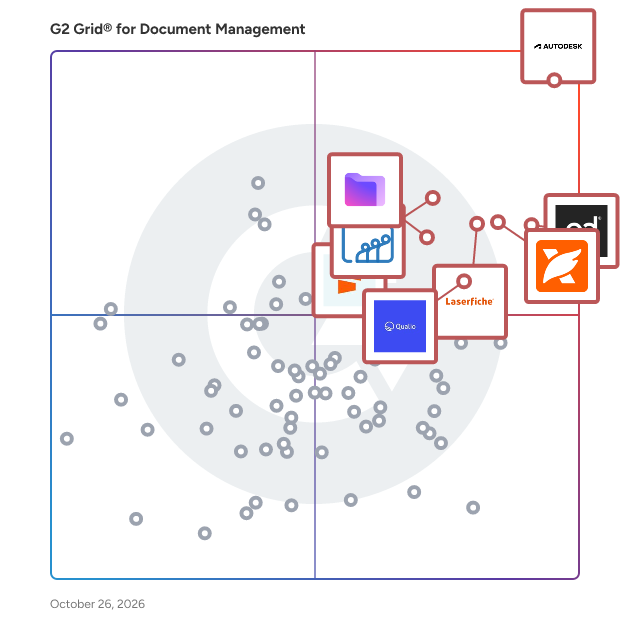
Highlighted products: Autodesk Forma (formerly Autodesk Construction Cloud), PandaDoc, Foxit PDF Editor, Laserfiche, Zoho WorkDrive, Proton Drive For Business, Qualio, and Seismic Enablement Cloud.
Underlying data: [Grid® JSON](https://www.g2.com/categories/document-management/grids.json?focus%5B%5D=autodesk-forma-formerly-autodesk-construction-cloud&focus%5B%5D=pandadoc&focus%5B%5D=foxit-pdf-editor&focus%5B%5D=laserfiche&focus%5B%5D=zoho-workdrive&focus%5B%5D=proton-drive-for-business&focus%5B%5D=qualio&focus%5B%5D=seismic-enablement-cloud)
BlueDoc is a Web-based document management system, for designing, storing, and controlling the documents in the electronic format.
Connect G2 to Claude or ChatGPT for answers grounded in G2's trusted reviews, comparisons, and pricing from real user insights.
You Need to Manage Your Company’s Documents and Expenses All in One Place With BOTIPIA, you begin by organizing your companies and branches, then manage your documents, expenses, and team—all the way to gaining a complete operational view that supports better decision-making. 1. Manage Companies and Branches - Manage one company or multiple companies and branches from a single account. - Link every document and expense to the relevant company and branch. - Keep each company’s and branch’s information clearly organized and separate. 2. Centralize and Organize Documents - Keep all your documents in one place instead of scattering them across folders, messages, and Excel spreadsheets. - Upload documents individually or in bulk. - Find any document within seconds using advanced search and classification. 3. Define Clear Responsibilities - Assign a clear person responsible for every document. - Know who is handling each document and what actions have been completed. - Send timely notifications to the responsible person and the team. 4. Track Dates and Receive Alerts - Track the issue, expiration, and renewal dates of every document. - Receive early alerts up to 90 days before expiration. - Follow each document from the first alert until the renewal is completed. 5. Know Renewal Costs in Advance - Record the cost associated with every document. - View upcoming renewal costs before payment is due. - Link document renewal costs to the expected renewal month to prevent unexpected expenses. 6. Manage Monthly Expenses - Keep all company expenses in one place. - Know which expenses have been paid and which remain outstanding. - Link every expense to the relevant company and branch. - Track monthly spending and understand where the company’s money is going. 7. Compare Costs and Make Better Decisions - View the total cost of each month clearly. - Compare any month with another at the click of a button. - Identify the highest- and lowest-cost months. - Understand why expenses increased or decreased. 8. Generate Professional Reports - Ready-made reports for document expiration dates. - Reports on upcoming renewal costs. - Reports on expenses, payments, and outstanding amounts. - Comprehensive reports for companies and branches. - Export and share reports with management according to your requirements. 9. Merge and Share Documents - Share any document with management or your team within seconds. - Merge multiple documents into a single file easily. - Send the merged file immediately when requested instead of searching for and sharing each document separately. 10. Communicate With Your Team - A dedicated in-platform chat for your team. - Discuss company status, documents, expenses, and general decisions. - Keep business conversations organized and accessible whenever needed. 11. Your AI-Powered Account Manager - An AI assistant that monitors your documents and files. - Analyzes costs and compares results across different months. - Tracks relevant news and exemptions and alerts you to important updates. - Provides a weekly overview of the status of your documents and records. - Generates insights and observations that support better decisions. 12. A Complete Monitoring Dashboard BOTIPIA gives you a real-time monitoring dashboard that clearly displays: - Document status and expiration dates. - The person responsible for each document. - Upcoming costs. - Paid and outstanding expenses. - The status of companies and branches. - Reports and alerts that require your attention. BOTIPIA gives you a clear view of what has been completed, what is currently due, and what is coming next—so you can act before problems arise and make decisions based on accurate information. Your documents, expenses, reports, and team—all in one place. BOTIPIA — Your Documents Under Control.
bSource is a solution for enterprise content management and syncing files, documents, and content.
BuildBase is a homebuilding ERP built by homebuilders for growing and established homebuilders across Canada and the U.S. Purpose-built for the residential construction industry, BuildBase brings the core operations of a homebuilding business together in one connected platform, giving teams the visibility and tools they need to manage the entire homebuilding lifecycle. BuildBase combines purchasing, construction management, accounting, sales, tendering, warranty management, vendor and customer management, smart invoicing, document management and AI-powered tools in one homebuilding software platform. By connecting these workflows and the data behind them, BuildBase helps homebuilders reduce disconnected processes, improve visibility across their operations and manage their business from a single system. The platform is designed to support homebuilders at different stages of growth. BuildBase Lite is built for growing homebuilders and custom builders looking for a flexible homebuilding ERP that can support their operations as they scale. BuildBase Enterprise is designed for larger, more structured homebuilders managing multiple communities, teams and complex operational requirements. Unlike general construction management software, BuildBase was born from a homebuilding operation. Our experience as homebuilders shapes the way we build and support the platform, giving us a practical understanding of the unique workflows and challenges involved in residential construction and homebuilding. Technology is only part of the BuildBase experience. We combine purpose-built homebuilding software with a high-touch partnership approach, working closely with our customers to understand their operations and help them get the most from the platform. Today, BuildBase supports 17,000+ homes and has processed more than $3.9 billion in construction spend across 560,000+ supplier invoices and nearly 10 million financial transactions. BuildBase helps homebuilders connect their people, processes and data so they can spend less time managing disconnected systems and more time building great homes and growing their business.
Büroflow is a German AI office-software for freelancers and small businesses — invoices, dunning letters, quotes and e-invoices (XRechnung/ZUGFeRD) in seconds.
Canyou - Employee Onboarding Software for Australian Businesses Canyou is employee onboarding software built for Australian businesses that can't afford to get it wrong. Most payroll platforms treat onboarding as a formality: collect a TFN declaration, grab bank details, tick a box. Canyou starts there, but it doesn't stop there. Onboarding gets a new starter into payroll. It doesn't keep them legal to work, and that gap is where licence-heavy businesses carry the most risk. Canyou runs the full new-starter process on the worker's own phone: tax file number declaration, superannuation choice with stapled fund lookups, bank details, contracts and e-signature, and role-specific licence and certification checks. Work rights are checked with the Department of Home Affairs, so businesses know a new starter is cleared to work before their first shift, not after. Licences and certifications (white cards, high-risk work tickets, working with children checks and more) are tracked to expiry, with automatic reminders before they lapse, so compliance doesn't quietly drop off once onboarding is done. Canyou is built for construction, labour hire and group training organisations, agriculture, education and training, and aged care, industries where a lapsed licence or an unchecked visa condition is a genuine legal exposure, not just an admin gap. Role-specific workflows mean a site labourer, an apprentice and an office hire each get exactly the checks and documents their role requires, nothing more. Completed records sync straight into Xero Payroll, so there's no manual re-entry and no gap between what's onboarded and what's paid. Training videos with questions confirm new starters have actually read site inductions and policies, not just clicked through them. Every record, including identity checks, signed documents and licence history, is kept audit-ready, so businesses can produce a clean compliance trail for a regulator, an insurer or an ISO audit without digging through email and paper files. Sensitive worker data is stored in Australia and is never sold. Canyou is used by 6,000+ Australian businesses and has managed onboarding for 500+ workers at a time for its larger customers, cutting onboarding from 6 to 10 hours of admin down to around 15 minutes per worker. For licence-heavy employers, Canyou means every new starter is not just hired but cleared to work, and stays that way.
CapjaDocs is a digital solution tailored for industries that require seamless document organisation, compliance, and accessibility. The platform integrates advanced QR code technology and a mobile-optimised eForm builder to simplify document management processes and improve operational efficiency. Core Features: - QR Code Integration Each folder is assigned a unique QR code. Scanning the code provides access to active, in-date content, while expired documents are automatically hidden. - QR Code Management Batch creation and allocation of QR codes to folders or external links. Reassign or deactivate codes as operational needs evolve. - Drag-and-Drop eForm Builder Design and deploy custom digital forms quickly. Embed forms into folders for instant access. Configure email notifications and set automatic expiration dates for forms. - Streamlined Compliance Centralise document storage and automate expiration management. Ensure teams access only the most up-to-date and relevant information.
Capsa is document management software for construction. It does one job properly: making sure everyone works from the latest version of every document, with a full record of what was issued and when. Built by a building contractor. Capsa came out of MAKE Projects, a UK construction company, after too many years of version confusion and disputes over who had seen what. Upload drawings, specs and contracts and Capsa organises them automatically. No folder structures, no filename conventions. Every revision stacks behind the current one. Every upload, access and change is logged and timestamped. For SME builders, architects, surveyors and project managers — projects too small for enterprise software and too important for Dropbox. Priced per project, not per seat. £75 per project per month, first 30 days free, unlimited users. Live in five minutes, no demo required. Completed projects move to Capsa Vault at £15 per month.
