Best Document Creation Software - Page 20

How Many Document Creation Software Products Does G2 Track?

Total Products under this Category: 343

Category Stats (Sep 2026)

  • Average Rating: 4.37/5 The average rating of products in this category, based on all submitted ratings
  • Top Trending Product: DocNexus (+2.22%) - Among all products in this category, DocNexus recorded the largest rating increase compared to last month

Last updated: September 01, 2026

How Does G2 Rank Document Creation Software Products?

Why You Can Trust G2's Software Rankings:

  • 30 Analysts and Data Experts
  • 156,500+ Authentic Reviews
  • 343+ Products
  • Unbiased Rankings

G2's software rankings are built on verified user reviews, rigorous moderation, and a consistent research methodology maintained by a team of analysts and data experts. Each product is measured using the same transparent criteria, with no paid placement or vendor influence. While reviews reflect real user experiences, which can be subjective, they offer valuable insight into how software performs in the hands of professionals. Together, these inputs power the G2 Score, a standardized way to compare tools within every category.

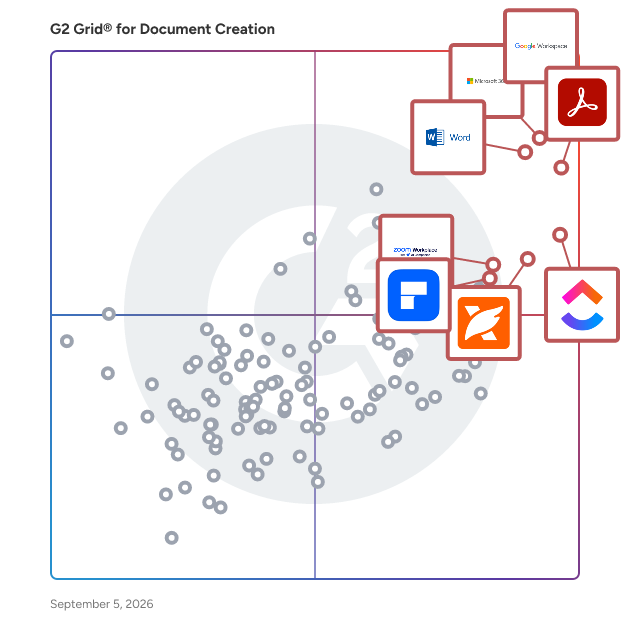
G2 Grid® for Document Creation Software

G2 Grid® for Document Creation Software plotting products by satisfaction and market presence

Highlighted products: Google Workspace, Microsoft 365, Adobe Acrobat, Microsoft Word, ClickUp, Foxit PDF Editor, Zoom Workplace, and Wondershare PDFelement.

Underlying data: [Grid® JSON](https://www.g2.com/categories/document-creation/grids.json?focus%5B%5D=google-workspace&focus%5B%5D=microsoft365&focus%5B%5D=adobe-acrobat&focus%5B%5D=microsoft-word&focus%5B%5D=clickup&focus%5B%5D=foxit-pdf-editor&focus%5B%5D=zoom-workplace&focus%5B%5D=wondershare-wondershare-pdfelement)

LegalDocs

LegalDocs is changing the way individuals and businesses manage legal paperwork. Our mission is simple: make legal processes more accessible, affordable, and hassle-free. From bills of sale and rental agreements to NDAs and more, we offer a wide range of ready-to-use, customizable legal documents designed to save you time and money. Whether you're a small business owner, freelancer, landlord, or just someone looking to handle legal matters independently, LegalDocs gives you the tools to do it confidently—no legal expertise required. Just choose your document, fill in the details, and download a professionally crafted, legally binding form in minutes.

Who Is the Company Behind LegalDocs?

  • Seller: LegalDocs
  • Year Founded: 1999
  • HQ Location: California, US
  • LinkedIn® Page: www.linkedin.com
    1 employees on LinkedIn®

MasterDoc

Web-based document builder allows you to create, revise and store all of your templates and document drafts at a single point of access.

Who Is the Company Behind MasterDoc?

Matilda Workspace

The All-New All-In-One Workspace for Modern Teams Embracing the concept of a unified workspace, Matilda brings a powerful suite of best-in-class apps together in one place, allowing teams across the globe to connect, create, coordinate, and delight their customers effortlessly. With its mission to simplify technology, Matilda empowers organisations to do more with less, making it an essential tool for startups to Fortune 500 companies alike. Key Features: -Powerful Apps Included: Matilda comes packed with a suite of powerful applications including Docs, Projects, Tables, Chat, Customers, and Copilot, ensuring that teams have all the tools they need to succeed. - Create with Ease: With Docs, teams can co-edit in real time, making document creation and coordination seamless. This feature aims to replace Google Docs, Notion, and Coda, by providing a more integrated and efficient experience. - Streamlined Project Management: Matilda's Projects feature allows for effortless management and tracking of every aspect of your projects. With capabilities like auto-scheduling, it's designed to replace tools like Jira, Trello, and Asana. - Advanced Data Management: Although Tables are coming soon, they promise to redefine data handling by syncing data from hundreds of sources or creating new collections, aiming to replace tools like Airtable, Notion, and Segment. - Seamless Communication: Chat brings all team communication into one place, integrated across projects, tasks, and docs, providing an alternative to Slack and MS Teams. - Customer Relationship Management: The soon-to-be-released Customers feature will allow teams to effortlessly track leads and manage customer interactions in one streamlined interface, aiming to replace Salesforce and Hubspot. - AI-Powered Assistance: Copilot offers custom AI assistants to help automate and streamline workflows, aiming to replace AI tools like ChatGPT and Google Bard. Conclusion: Matilda Workspace stands out as an all-encompassing solution that not only promises to streamline and simplify the way teams work but also embraces the future with its AI-powered capabilities and commitment to sustainability. Whether you’re managing projects, coordinating with your team, handling customer relationships, or leveraging AI for automation, Matilda Workspace provides an intuitive, powerful, and adaptable platform for every kind of team to thrive. Try Matilda today and experience the future of work, designed to help you deliver projects on time, every time.

Average Rating: 4.7/5.0

Total Reviews: 14

How Do G2 Users Rate Matilda Workspace?

  • Has the product been a good partner in doing business?: 9.7/10 (Category avg: 9.0/10)
  • Quality of Support: 8.9/10 (Category avg: 8.6/10)
  • Ease of Use: 9.1/10 (Category avg: 8.9/10)
  • Ease of Admin: 9.7/10 (Category avg: 8.9/10)

Who Is the Company Behind Matilda Workspace?

  • Seller: Matilda Workspace
  • Year Founded: 2024
  • HQ Location: San Francisco, California
  • Twitter: @matildaworkspce
    127 Twitter followers
  • LinkedIn® Page: www.linkedin.com
    2 employees on LinkedIn®

Who Uses This Product?

  • Company Size: 80% Small, 20% Medium

What Do G2 Reviewers Say About Matilda Workspace?

AI-generated summary from verified user reviews

Pros
  • Users love the seamless team collaboration within Matilda Workspace, simplifying communication and enhancing project management efficiency.
  • Users appreciate the rich functionalities of Matilda Workspace, streamlining project management and enhancing communication effortlessly.
  • Users find Matilda Workspace's ease of use exceptional, seamlessly integrating various tools for streamlined collaboration and task management.
  • Users appreciate the all-in-one functionality of Matilda Workspace, enhancing collaboration and simplifying project management.
  • Users appreciate the AI-powered Copilot in Matilda Workspace, enhancing efficiency and simplifying project management tasks.
Cons
  • Users notice missing features in Matilda Workspace, acknowledging potential improvements as it develops further in future updates.
  • Users note the lack of features in Matilda Workspace, highlighting the potential for future improvements and updates.
  • Users often face tiny bugs in Matilda Workspace, but the team is responsive and eager to improve the app.
  • Users find the learning curve challenging for some team members, though onboarding helps ease the transition.
  • Users feel that limited customization may restrict their experience with Matilda Workspace despite its other strong features.

What Are Recent G2 Reviews of Matilda Workspace?

Moasses

Your all-in-one platform for creating, editing, and managing professional business documents. Collaborate with your team, generate AI-powered content, and streamline your business workflow in a unified workspace.

Who Is the Company Behind Moasses?

Modern Numbered Headings for Confluence

Transform your Confluence pages into professional documents with Modern Numbered Headings for Confluence - the most advanced table of contents generator available. 🎯 Key Features 5 Professional Numbering Styles: Decimal: Standard numbers (1. 1.1. 1.2.) Roman Numerals: Classical format (I. I.I. I.II.) Alphabetic: Letter-based (A. A.A. A.B.) Outline Style: Business format (1) 1.1) 1.1.1) Mixed Style: Multi-level (1. A. i. a.) Smart Features: Live Preview: See exactly how your TOC will look before applying Level Filtering: Choose which heading levels to include (H1-H6) Indentation Control: Toggle hierarchical indentation on/off One-Click Operation: Insert or remove TOC instantly Auto-Navigation: Clickable links that scroll to sections Duplicate Prevention: Smart detection prevents multiple TOCs

Who Is the Company Behind Modern Numbered Headings for Confluence?

Motion

Motion is an AI-powered productivity platform designed to streamline work management by integrating tasks, projects, calendars, meetings, documents, and notes into a unified application. By leveraging artificial intelligence, Motion automates scheduling, task prioritization, and workflow optimization, enabling users to focus on high-impact activities without the burden of manual coordination. Key Features and Functionality: - AI Employees: Motion offers customizable AI assistants tailored to various roles, such as Executive Assistant, Sales Representative, Marketing Associate, Project Manager, and more. These AI employees can handle tasks like scheduling, email management, lead generation, content creation, and project coordination. - Automated Scheduling and Task Management: The platform intelligently plans daily schedules by analyzing tasks, deadlines, and priorities, dynamically adjusting to changes to ensure optimal productivity. - Project Management Tools: Motion provides AI-driven project planning, Gantt charts, workflow automation, and time tracking to facilitate efficient project execution. - Knowledge Management: Features like AI Meeting Notetaker and AI Docs Assistant help in capturing meeting notes, summarizing discussions, and organizing documents, reducing the time spent on administrative tasks. - Integrations: Motion seamlessly integrates with popular calendars (Google, Outlook, iCloud) and other tools, ensuring a cohesive workflow across different platforms. Primary Value and User Solutions: Motion addresses the common challenges of manual task coordination, scheduling conflicts, and inefficient project management by automating these processes through AI. This automation reduces the cognitive load on users, minimizes time spent on planning, and enhances overall productivity. By consolidating various work management tools into a single platform, Motion eliminates the need for multiple applications, providing a streamlined and efficient work environment for individuals and teams alike.

Total Reviews: 1

How Do G2 Users Rate Motion?

  • Quality of Support: 0.0/10 (Category avg: 8.6/10)
  • Ease of Use: 6.7/10 (Category avg: 8.9/10)

Who Is the Company Behind Motion?

  • Seller: Motion
  • Year Founded: 2019
  • HQ Location: Mountain View, US
  • LinkedIn® Page: www.linkedin.com
    104 employees on LinkedIn®

Who Uses This Product?

  • Company Size: 100% Small

What Do G2 Reviewers Say About Motion?

AI-generated summary from verified user reviews

Cons
  • Users are frustrated by cost limitations that restrict access to their data unless they pay substantial fees.
  • Users express frustration with the data deletion policy, feeling it resembles a ransom for accessing their information.
  • Users feel frustrated by the data management restrictions which limit access to their own information after the trial.
  • Users express concerns about the high cost of Motion, feeling trapped by data access fees and limited options.

NOVO Compare

NOVO Compare delivers a back to basics concept offering strong core functionality, focusing on features which add value. The result is built for speed and efficiency, NOVO includes user experience features like QuickCompare so you can execute a comparison in seconds.

Who Is the Company Behind NOVO Compare?

Objective Keystone

Objective Keystone has everything you need in one place. A full suite of authoring, publishing and stakeholder engagement tools to automate and manage the entire document production lifecycle. The result: increased speed-to-publishing and a lower cost of compliance.

Who Is the Company Behind Objective Keystone?

  • Seller: Objective Gov365
  • Year Founded: 1987
  • HQ Location: North Sydney, New South Wales, Australia
  • LinkedIn® Page: www.linkedin.com
    497 employees on LinkedIn®

Paper Killer

Paper Killer is a visual software specifically designed for the creation, management, publishing of hyperlinked electronic documentation.

Who Is the Company Behind Paper Killer?

Paqt

Make agreements fly without compromising speed and legal security

Who Is the Company Behind Paqt?

  • Seller: Paqt
  • Year Founded: 2019
  • HQ Location: Toronto, CA
  • LinkedIn® Page: www.linkedin.com
    4 employees on LinkedIn®

PDF Maker - Automate Documents

PDF Maker: Create Stunning PDFs Effortlessly Tired of repetitive document creation? PDF Maker by BustBrain Labs is your solution. This powerful tool lets you create professional-looking invoices, proposals, contracts, reports, and more in minutes. Here's what makes it special: Pre-designed templates: No need to start from scratch. Choose a template, fill in the blanks, and you're done. Easy customization: Add your logo, colors, and fonts for a personalized touch. Effortless automation: Say goodbye to repetitive tasks like formatting and calculations. User-friendly interface: No tech skills needed. Anyone can create stunning PDFs with ease.

Who Is the Company Behind PDF Maker - Automate Documents?

Neeraja Prakash
NP
Researched and written by Neeraja Prakash
Updated April 10, 2026