# Top Free Computer-Aided Manufacturing (CAM) Software

## How Many Computer-Aided Manufacturing (CAM) Software Products Does G2 Track?

**Total Products under this Category:** 106

### Category Stats (Sep 2026)

- **Average Rating:** 3.94/5 (↑0.02 vs Aug 2026) The average rating of products in this category, based on all submitted ratings
- **Top Trending Product:** MachineWorks (+2.12%) - Among all products in this category, MachineWorks recorded the largest rating increase compared to last month

_Last updated: September 01, 2026_

## How Does G2 Rank Computer-Aided Manufacturing (CAM) Software Products?

**Why You Can Trust G2's Software Rankings:**

- 30 Analysts and Data Experts
- 2,500+ Authentic Reviews
- 106+ Products
- Unbiased Rankings

G2's software rankings are built on verified user reviews, rigorous moderation, and a consistent research methodology maintained by a team of analysts and data experts. Each product is measured using the same transparent criteria, with no paid placement or vendor influence. While reviews reflect real user experiences, which can be subjective, they offer valuable insight into how software performs in the hands of professionals. Together, these inputs power the G2 Score, a standardized way to compare tools within every category.

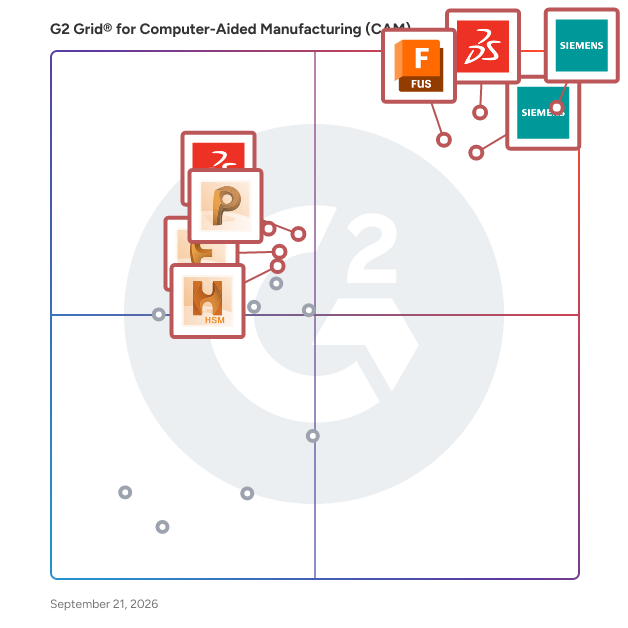
## G2 Grid® for Computer-Aided Manufacturing (CAM) Software
 ![G2 Grid® for Computer-Aided Manufacturing (CAM) Software plotting products by satisfaction and market presence](https://www.g2.com/categories/computer-aided-manufacturing-cam/grids.png?focus%5B%5D=67635&focus%5B%5D=1795&focus%5B%5D=1792&focus%5B%5D=5307&focus%5B%5D=67612&focus%5B%5D=58951&focus%5B%5D=67611&focus%5B%5D=67613)

Highlighted products: NX CAM, SOLIDWORKS, Designcenter Solid Edge, Autodesk Fusion, PowerMill, SolidWorks CAM, FeatureCAM, and HSM.

Underlying data: [Grid® JSON](https://www.g2.com/categories/computer-aided-manufacturing-cam/grids.json?focus%5B%5D=nx-cam&focus%5B%5D=solidworks&focus%5B%5D=designcenter-solid-edge&focus%5B%5D=autodesk-fusion&focus%5B%5D=powermill&focus%5B%5D=solidworks-cam&focus%5B%5D=featurecam&focus%5B%5D=hsm)

**Sponsored**

### CMS IntelliCAD

CMS IntelliCAD® is a sophisticated CAD software solution designed to meet the diverse needs of professionals in engineering, architecture, and consulting. This full-featured software provides users with an extensive array of 2D and 3D drawing tools that are compatible with Autodesk® AutoCAD®, making it an ideal choice for anyone who relies on CAD drawings for their work. With its intelligent design and powerful capabilities, CMS IntelliCAD serves as a reliable alternative for those seeking advanced CAD functionalities without the associated high costs. Targeted primarily at engineers, architects, and consultants, CMS IntelliCAD caters to a wide range of users who require precision and efficiency in their design processes. The software is particularly beneficial for professionals who need to create detailed drawings, models, and documentation. Its compatibility with .DWG file extensions ensures seamless integration with existing projects, allowing users to work with files from various sources without losing data integrity. Additionally, the software supports Building Information Modeling (BIM), enhancing its utility for modern architectural and engineering practices, which increasingly rely on collaborative and data-rich environments. One of the standout features of CMS IntelliCAD is its extensive customization options. Users can take advantage of a comprehensive programming toolkit that includes support for LISP, VBA, .Net, and IRX development. This flexibility allows users to tailor the software to their specific workflows, enhancing productivity and streamlining repetitive tasks. The ability to create custom commands and automate processes can significantly reduce the time spent on drafting and design, making it a valuable asset for busy professionals who need to maximize their efficiency. Moreover, CMS IntelliCAD offers extended interoperability with various file formats, including DGN, .STEP, .IGES, and .PDF. This broad compatibility ensures that users can collaborate effectively with colleagues and clients who may be using different software solutions. The software's robust features, combined with its affordability, make it an attractive option for businesses and individuals looking to enhance their CAD capabilities without compromising on quality or performance. CMS IntelliCAD stands out in the CAD software landscape by providing a powerful, customizable, and cost-effective solution for professionals in various fields. Its intelligent design, extensive compatibility, and support for advanced programming make it a practical choice for those who require a reliable tool for their design and drafting needs. The combination of these features positions CMS IntelliCAD as a strong contender in the competitive CAD market, appealing to both seasoned professionals and newcomers alike.

[Visit website](https://www.g2.com/external_clickthroughs/record?secure%5Bad_program%5D=ppc&secure%5Bad_slot%5D=category_product_list_llm&secure%5Bcategory_id%5D=1371&secure%5Bchosen_at%5D=2026-09-03T03%3A03%3A20Z&secure%5Bdisplayable_resource_id%5D=291&secure%5Bdisplayable_resource_type%5D=Category&secure%5Bmedium%5D=sponsored&secure%5Bplacement_reason%5D=neighbor_category&secure%5Bplacement_resource_ids%5D%5B%5D=291&secure%5Bprioritized%5D=false&secure%5Bproduct_id%5D=5497&secure%5Bresource_id%5D=1371&secure%5Bresource_type%5D=Category&secure%5Bsource_type%5D=category_page&secure%5Bsource_url%5D=https%3A%2F%2Fwww.g2.com%2Fcategories%2Fcomputer-aided-manufacturing-cam%2Ffree&secure%5Btoken%5D=67286f3c0349664483581fe5af42ab0f3989f21a2744a90720464ff9e6e75317&secure%5Burl%5D=https%3A%2F%2Fintellicadms.com%2Fsite%2F&secure%5Burl_type%5D=custom_url)

### [NX CAM](https://www.g2.com/products/nx-cam/reviews)

NX CAM is a cloud-based CAD/CAM/AM solution designed to empower users in the manufacturing sector by providing a comprehensive platform for NC programming and production management. This software leverages advanced cloud and artificial intelligence (AI) technologies to deliver a flexible, secure, and scalable experience tailored to meet diverse manufacturing needs. With NX CAM, teams can streamline deployment processes, enhance productivity, and customize solutions to address various part complexities and production requirements. Targeted primarily at manufacturers, engineers, and production managers, NX CAM caters to a wide range of industries, including aerospace, automotive, and consumer goods. The software is particularly beneficial for organizations looking to integrate their planning and shop floor operations through a digital thread. By utilizing consistent 3D models and data, users can ensure seamless connectivity between different stages of the manufacturing process, thereby improving overall efficiency and reducing errors. One of the standout features of NX CAM is its integrated NC programming capabilities, which allow users to automate and streamline their programming tasks. This is achieved through powerful, application-specific tools that cater to various machining processes, from 2.5-axis machining and mold manufacturing to simultaneous 5-axis milling and high-volume production. The software’s ability to handle complex operations in a single platform enables manufacturers to produce better parts at a faster pace, ultimately enhancing their competitive edge in the market. Additionally, NX CAM offers value-based licensing that allows organizations to rapidly scale their operations to meet current demands. Users have access to over 20 specialized add-ons, which can be easily integrated into their existing setup. These add-ons range from AI-driven chat functionalities to advanced CAD capabilities and specialized machining tools, allowing teams to expand their capabilities quickly and efficiently. This flexibility ensures that manufacturers can adapt to changing production needs without significant downtime or resource investment. Overall, NX CAM stands out in the CAD/CAM/AM software category by providing a robust, cloud-based solution that combines advanced technology with user-friendly features. Its ability to integrate various manufacturing processes into a single platform, coupled with its scalability and customization options, makes it a valuable tool for any organization looking to enhance its manufacturing capabilities and drive innovation in their production processes.

**Average Rating:** 4.3/5.0

**Total Reviews:** 321

#### How Do G2 Users Rate NX CAM?

- **Quality of Support:** 8.4/10 (Category avg: 8.3/10)
- **Operations:** 8.6/10 (Category avg: 8.3/10)
- **CNC Feature Recognition:** 8.6/10 (Category avg: 8.0/10)
- **Tooling and Toolpaths:** 8.9/10 (Category avg: 8.4/10)

#### Who Is the Company Behind NX CAM?

- **Seller:** [Siemens Digital Industries Software](https://www.g2.com/sellers/siemens-digital-industries-software)
- **Company Website:** www.sw.siemens.com
- **Year Founded:** 1980
- **HQ Location:** Plano, Texas
- **Twitter:** @siemenssoftware  
36,972 Twitter followers
- **LinkedIn® Page:** [www.linkedin.com](https://www.g2.com/external_clickthroughs/record?secure%5Bsource_type%5D=product_profile&secure%5Btoken%5D=1dd3753f2277968b1f3c28e3070b9762650d5b5c8485137227b26fcbc85343e0&secure%5Burl%5D=https%3A%2F%2Fwww.linkedin.com%2Fcompany%2F28423178%2F&secure%5Burl_type%5D=linkedin_company_website)  
20,941 employees on LinkedIn®

#### Who Uses This Product?

- **Who Uses This:** Application Engineer, Design Engineer
- **Top Industries:** Automotive, Mechanical or Industrial Engineering
- **Company Size:** 46% Small, 34% Medium

#### What Do G2 Reviewers Say About NX CAM?

_AI-generated summary from verified user reviews_

##### Pros

- Users value the **accuracy of tool paths** in NX CAM, leading to smooth and efficient operations.
- Users value the **AI-driven automation** in NX CAM, significantly reducing programming time and enhancing efficiency.
- Users value the **cloud collaboration** in NX CAM, enhancing efficiency and facilitating seamless teamwork in programming tasks.
- Users value the **ease of use** of NX CAM, benefiting from its intuitive interface and streamlined programming processes.
- Users praise the **implementation ease** of NX CAM, noting accurate tool paths and smooth operations.

##### Cons

- Users find the NX CAM's **difficult learning curve** challenging, especially when configuring the coordinate system and adjusting settings.

#### What Are Recent G2 Reviews of NX CAM?

**["Intuitive UI and Versatile Machining Capabilities"](https://www.g2.com/survey_responses/nx-cam-review-12646987)**

**Rating:** 5.0/5.0 stars

_— Ileana B._

[Read full review](https://www.g2.com/survey_responses/nx-cam-review-12646987)

**["Seamless CAD-CAM Integration with Powerful Toolpaths and Simulation"](https://www.g2.com/survey_responses/nx-cam-review-13208654)**

**Rating:** 5.0/5.0 stars

_— Amrit V._

[Read full review](https://www.g2.com/survey_responses/nx-cam-review-13208654)

### [Designcenter Solid Edge](https://www.g2.com/products/designcenter-solid-edge/reviews)

Designcenter Solid Edge is a portfolio of affordable, easy to deploy, maintain, and use software tools that advance all aspects of the product development process – mechanical and electrical design, simulation, manufacturing, technical documentation, data management, and cloud-based collaboration. Developed on Siemens' industry-leading technologies, Designcenter Solid Edge provides the most innovative and comprehensive approach to product development for the mainstream market.

**Average Rating:** 4.3/5.0

**Total Reviews:** 638

#### G2 Deal: 30% off your first year's subscription of Designcenter Solid Edge

Get 30% off any monthly or annual subscription of Designcenter Solid Edge and accelerate your product development process using best-in-class 3D design tools.

**Price:** ~~$110- $481 /month~~ → $77 - $336.70/month

[View this exclusive G2 deal](https://www.g2.com/deals/offers/2ee40c0e-8cb7-426e-819d-640685cd0ff5?source=categories)

#### How Do G2 Users Rate Designcenter Solid Edge?

- **Quality of Support:** 8.2/10 (Category avg: 8.3/10)
- **Operations:** 8.1/10 (Category avg: 8.3/10)
- **CNC Feature Recognition:** 7.9/10 (Category avg: 8.0/10)
- **Tooling and Toolpaths:** 8.4/10 (Category avg: 8.4/10)

#### Who Is the Company Behind Designcenter Solid Edge?

- **Seller:** [Siemens Digital Industries Software](https://www.g2.com/sellers/siemens-digital-industries-software)
- **Company Website:** www.sw.siemens.com
- **Year Founded:** 1980
- **HQ Location:** Plano, Texas
- **Twitter:** @siemenssoftware  
36,972 Twitter followers
- **LinkedIn® Page:** [www.linkedin.com](https://www.g2.com/external_clickthroughs/record?secure%5Bsource_type%5D=product_profile&secure%5Btoken%5D=1dd3753f2277968b1f3c28e3070b9762650d5b5c8485137227b26fcbc85343e0&secure%5Burl%5D=https%3A%2F%2Fwww.linkedin.com%2Fcompany%2F28423178%2F&secure%5Burl_type%5D=linkedin_company_website)  
20,941 employees on LinkedIn®

#### Who Uses This Product?

- **Who Uses This:** Design Engineer, Mechanical Engineer
- **Top Industries:** Mechanical or Industrial Engineering, Automotive
- **Company Size:** 53% Small, 29% Medium

#### What Do G2 Reviewers Say About Designcenter Solid Edge?

_AI-generated summary from verified user reviews_

##### Pros

- Users value the **ease of use** of Designcenter Solid Edge, appreciating its practical tools for efficient design and part reuse.
- Users value the **intuitive 3D modeling environment** of Solid Edge, enhancing speed and efficiency in design processes.
- Users appreciate the **synchronous technology** in Solid Edge for its ease of use and efficiency in design tasks.
- Users praise the **efficiency** of Designcenter Solid Edge, streamlining modeling and management of CAD files seamlessly.
- Users value the **ease of use** of Designcenter Solid Edge, enhancing efficiency and collaboration in the design process.

##### Cons

- Users experience a **challenging learning curve** with advanced features, affecting their efficiency and overall user experience.
- Users struggle with the **difficult learning curve** for advanced features, impacting efficiency and overall user experience.
- Users report **performance issues** with Solid Edge, particularly on older hardware and when handling large assemblies, impacting productivity.
- Users experience **slow performance** when handling larger assemblies, impacting workflow and delivery times.
- Users find the interface **not user-friendly** , with a steep learning curve and outdated design hindering efficient use.

#### What Are Recent G2 Reviews of Designcenter Solid Edge?

**["Powerful Synchronous Workflows and Innovative interface."](https://www.g2.com/survey_responses/designcenter-solid-edge-review-13176338)**

**Rating:** 5.0/5.0 stars

_— Ileana B._

[Read full review](https://www.g2.com/survey_responses/designcenter-solid-edge-review-13176338)

**["Solid Edge: Powerful, Reliable CAD That Boosts Design Efficiency"](https://www.g2.com/survey_responses/designcenter-solid-edge-review-13390237)**

**Rating:** 4.5/5.0 stars

_— Jessica K._

[Read full review](https://www.g2.com/survey_responses/designcenter-solid-edge-review-13390237)

#### What Are G2 Users Discussing About Designcenter Solid Edge?

- [What is Solid Edge used for?](https://www.g2.com/discussions/what-is-solid-edge-used-for) - 2 comments, 1 upvote
- [Is Solidworks or Solid Edge better?](https://www.g2.com/discussions/is-solidworks-or-solid-edge-better) - 6 comments, 2 upvotes
- [Is Solid Edge free?](https://www.g2.com/discussions/is-solid-edge-free) - 3 comments
- [What file type does Solid Edge use?](https://www.g2.com/discussions/what-file-type-does-solid-edge-use) - 2 comments
- [Is Solid Edge good?](https://www.g2.com/discussions/is-solid-edge-good) - 2 comments

### [Autodesk Fusion](https://www.g2.com/products/autodesk-fusion/reviews)

Autodesk Fusion connects capabilities, data, and people across the entire product development lifecycle. Fusion provides you with CAD, CAM, CAE and PCB tools along with PLM/PDM and MES (manufacturing execution system) capabilities to facilitate seamless workflows across your entire organization. Key features: - 3D Design and Modeling: Autodesk Fusion offers a robust set of tools for creating 3D models and designs, making it ideal for product development and industrial design. - Manufacturing Integration: With Autodesk Fusion, you can design and manufacture products using the same platform, streamlining the process from concept to production. - Electronics Design: PCB design capabilities are integrated into the Autodesk Fusion platform, allowing for the creation of electronic components as part of the overall product design process. - Simulation and Analysis: Autodesk Fusion includes simulation tools to test and optimize designs before manufacturing, reducing the need for physical prototypes. - Cloud Collaboration: As a cloud-based platform, Autodesk Fusion enables seamless collaboration among design and engineering teams, regardless of location. - Generative Design: This feature allows you to input design goals and constraints, and Autodesk Fusion will generate multiple design options that meet these criteria. By integrating the entire product development process into one platform, Autodesk Fusion allows users to bring products to market faster and more efficiently.

**Average Rating:** 4.5/5.0

**Total Reviews:** 510

#### How Do G2 Users Rate Autodesk Fusion?

- **Quality of Support:** 8.4/10 (Category avg: 8.3/10)
- **Operations:** 8.7/10 (Category avg: 8.3/10)
- **CNC Feature Recognition:** 8.4/10 (Category avg: 8.0/10)
- **Tooling and Toolpaths:** 8.7/10 (Category avg: 8.4/10)

#### Who Is the Company Behind Autodesk Fusion?

- **Seller:** [Autodesk](https://www.g2.com/sellers/autodesk)
- **Company Website:** www.autodesk.com
- **Year Founded:** 1982
- **HQ Location:** San Francisco
- **Twitter:** @autodesk  
273,215 Twitter followers
- **LinkedIn® Page:** [www.linkedin.com](https://www.g2.com/external_clickthroughs/record?secure%5Bsource_type%5D=product_profile&secure%5Btoken%5D=a2fe9ff0f27ad5413604e083d9467fcc58e4e387e3e0b0a04c70db95dce1df58&secure%5Burl%5D=https%3A%2F%2Fwww.linkedin.com%2Fcompany%2Fautodesk%2F&secure%5Burl_type%5D=linkedin_company_website)  
15,352 employees on LinkedIn®

#### Who Uses This Product?

- **Who Uses This:** Owner, Design Engineer
- **Top Industries:** Mechanical or Industrial Engineering, Design
- **Company Size:** 68% Small, 22% Medium

#### What Do G2 Reviewers Say About Autodesk Fusion?

_AI-generated summary from verified user reviews_

##### Pros

- Users find Autodesk Fusion's **ease of use** advantageous for linking 3D printers and managing personal projects seamlessly.
- Users appreciate the **customizable toolbars and advanced modeling tools** in Autodesk Fusion, enhancing productivity and design precision.
- Users praise the **design efficiency** of Autodesk Fusion, as customizable tools and easy navigation enhance productivity.
- Users commend the **user-friendly interface and extensive capabilities** of Autodesk Fusion 360, enhancing their design engineering experience.
- Users find Autodesk Fusion’s **ease of learning** beneficial for product design, especially with prior CAD experience.

##### Cons

- Users find **difficult learning** in Autodesk Fusion, making initial use challenging despite its smoother operation afterward.
- Users face a challenging **learning curve** in Autodesk Fusion, complicating design adjustments and assembly processes.
- Users face **assembly difficulties** due to limited customization options and complex timeline management when adjusting designs.
- Users express frustration over **missing features** like real-time editing and easy adjustments, impacting their overall experience.
- Users experience significant **performance issues** with Autodesk Fusion, including bugs, glitches, and slow processing.

#### What Are Recent G2 Reviews of Autodesk Fusion?

**["Autodesk Fusion 360 is a great parametric 3D modeling software"](https://www.g2.com/survey_responses/autodesk-fusion-review-5236244)**

**Rating:** 5.0/5.0 stars

_— Damaris C._

[Read full review](https://www.g2.com/survey_responses/autodesk-fusion-review-5236244)

**["Autodesk Fusion Streamlines Parametric 3D Design from Idea to Prototype"](https://www.g2.com/survey_responses/autodesk-fusion-review-13041979)**

**Rating:** 5.0/5.0 stars

_— Muzammil M._

[Read full review](https://www.g2.com/survey_responses/autodesk-fusion-review-13041979)

#### What Are G2 Users Discussing About Autodesk Fusion?

- [What is Fusion 360 used for?](https://www.g2.com/discussions/what-is-fusion-360-used-for) - 1 comment
- [Is Fusion 360 still free for hobbyists?](https://www.g2.com/discussions/fusion-360-is-fusion-360-still-free-for-hobbyists) - 1 comment
- [Is Fusion 360 a CAD software?](https://www.g2.com/discussions/is-fusion-360-a-cad-software) - 1 comment
- [What is Fusion 360 software used for?](https://www.g2.com/discussions/what-is-fusion-360-software-used-for)
- [What functionality does Fusion 360 offer its users?](https://www.g2.com/discussions/fusion-360-what-functionality-does-fusion-360-offer-its-users)

### [SolidCAM](https://www.g2.com/products/solidcam/reviews)

SolidCAM is a fully associative Computer Aided Manufacturing (CAM) add-in for SOLIDWORKS®, Autodesk® Inventor® and Solid Edge®.

**Average Rating:** 4.3/5.0

**Total Reviews:** 34

#### How Do G2 Users Rate SolidCAM?

- **Quality of Support:** 8.5/10 (Category avg: 8.3/10)
- **Operations:** 8.6/10 (Category avg: 8.3/10)
- **CNC Feature Recognition:** 8.6/10 (Category avg: 8.0/10)
- **Tooling and Toolpaths:** 9.0/10 (Category avg: 8.4/10)

#### Who Is the Company Behind SolidCAM?

- **Seller:** [Solidcam](https://www.g2.com/sellers/solidcam)
- **Year Founded:** 1984
- **HQ Location:** Newtown, PA
- **Twitter:** @solidcam  
740 Twitter followers
- **LinkedIn® Page:** [www.linkedin.com](https://www.g2.com/external_clickthroughs/record?secure%5Bsource_type%5D=product_profile&secure%5Btoken%5D=0e53fc2b2424ccb069d7f72d0bcf200f199f98d6228856dab6b2a62c3fc094e2&secure%5Burl%5D=https%3A%2F%2Fwww.linkedin.com%2Fcompany%2F760481%2F&secure%5Burl_type%5D=linkedin_company_website)  
269 employees on LinkedIn®

#### Who Uses This Product?

- **Top Industries:** Machinery, Automotive
- **Company Size:** 42% Small, 37% Medium

#### What Are Recent G2 Reviews of SolidCAM?

**["Seamless Integration with SolidWorks Makes Modifications Effortless"](https://www.g2.com/survey_responses/solidcam-review-11973077)**

**Rating:** 5.0/5.0 stars

_— AL-MEQDAD A._

[Read full review](https://www.g2.com/survey_responses/solidcam-review-11973077)

**["Efficient CNC Programming with Performance Hiccups"](https://www.g2.com/survey_responses/solidcam-review-11976984)**

**Rating:** 4.0/5.0 stars

_— Harshkumar J._

[Read full review](https://www.g2.com/survey_responses/solidcam-review-11976984)

#### What Are G2 Users Discussing About SolidCAM?

- [How is SolidCAM?](https://www.g2.com/discussions/how-is-solidcam)
- [Is SolidCAM the same as CAMWorks?](https://www.g2.com/discussions/is-solidcam-the-same-as-camworks) - 1 comment
- [What is the function of CAM software?](https://www.g2.com/discussions/what-is-the-function-of-cam-software)
- [Is SolidCAM any good?](https://www.g2.com/discussions/is-solidcam-any-good)

### [ENCY](https://www.g2.com/products/ency/reviews)

ENCY is a CAD/CAM for a new generation that combines advanced CAM technology with an intuitive user interface and natural workflow. Serving industries such as aerospace, automotive, and consumer goods, ENCY provides powerful tools for 2D/3D modeling, toolpath generation, simulation, and G-code verification, specifically tailored for CNC machining applications. As an integrated CAD/CAM solution, ENCY gives CAM programmers and engineers precise tools to control each machining step. This control ensures highly efficient workflows and consistently accurate parts, tailored to specific production requirements. Main Features and Benefits: - Advanced Toolpath Calculation: Generates optimized, machine-specific toolpaths for various processes, including 2D, 3-axis, 5-axis, and mill-turn operations, maximizing machine capability and precision. - High-Fidelity Simulation: ENCY CAM offers both solid and voxel-based simulations to replicate material removal, additive processes, and painting. These simulations detect potential issues like collisions and out-of-gauge conditions, helping avoid costly errors. - NC-Code Verification: Comprehensive G-code simulation and validation catch errors and discrepancies early, reducing machine downtime and minimizing risk. - Stock Tracking and Material Management: Tracks material removal throughout each machining operation, preventing redundant cuts and optimizing efficiency by ensuring purposeful toolpath creation and shortened machining time. - Machine Setup and Digital Twin Creation: Allows users to build digital twins of CNC machines, including tools, fixtures, and setup configurations. This capability improves setup accuracy and enables seamless transfer of setups across projects. - Integrated Collaboration via ENCY Clouds: ENCY Clouds provides real-time communication between programmers and operators, enhancing project sharing, NC-code fine-tuning, and troubleshooting. ENCY empowers industries focused on high-precision manufacturing with the tools needed to create accurate, efficient, and reliable machining workflows, enhancing productivity and minimizing downtime.

**Average Rating:** 5.0/5.0

**Total Reviews:** 3

#### How Do G2 Users Rate ENCY?

- **Quality of Support:** 10.0/10 (Category avg: 8.3/10)
- **Operations:** 9.4/10 (Category avg: 8.3/10)
- **CNC Feature Recognition:** 9.4/10 (Category avg: 8.0/10)
- **Tooling and Toolpaths:** 8.9/10 (Category avg: 8.4/10)

#### Who Is the Company Behind ENCY?

- **Seller:** [ENCY Software](https://www.g2.com/sellers/ency-software)
- **Year Founded:** 2024
- **HQ Location:** Paphos, CY
- **LinkedIn® Page:** [www.linkedin.com](https://www.g2.com/external_clickthroughs/record?secure%5Bsource_type%5D=product_profile&secure%5Btoken%5D=d13589ecc9ff721db50dec467fa00bd57899be78bfbc68f902de91486025e1f3&secure%5Burl%5D=https%3A%2F%2Fwww.linkedin.com%2Fcompany%2Fencycam&secure%5Burl_type%5D=linkedin_company_website)  
15 employees on LinkedIn®

#### Who Uses This Product?

- **Company Size:** 100% Small

#### What Do G2 Reviewers Say About ENCY?

_AI-generated summary from verified user reviews_

##### Pros

- Users value the **quick toolpath calculation** of ENCY, enhancing their testing and simulation experience significantly.
- Users commend the **advanced capabilities** of ENCY, appreciating its quick operations and superior toolpath generation.
- Users value the **CAD integration** in ENCY, enhancing workflow efficiency and enabling seamless tool management.
- Users praise the **responsive customer support** of ENCY, enabling quick resolutions and assistance during setup challenges.
- Users appreciate the **detailed engineering drawings** of ENCY, facilitating efficient programming and minimizing downtime.

##### Cons

- Users find the **complexity of integration** limits ENCY's effectiveness as a full CAD replacement in certain tasks.
- Users find ENCY lacking in **component management** , relying on external tools for CAD integration and constraints.
- Users have noted the **difficult configuration** of ENCY, particularly with the operation preset interface and hotkeys.
- Users find the **price point high** for small businesses, suggesting a subscription-based option for accessibility.
- Users find ENCY has **missing features** like limited CAD capability and inadequate component constraints, needing workarounds.

#### What Are Recent G2 Reviews of ENCY?

**["Ency makes robotic milling of sculptures an efficient and reassuring experience."](https://www.g2.com/survey_responses/ency-review-10422683)**

**Rating:** 5.0/5.0 stars

_— Joakim M._

[Read full review](https://www.g2.com/survey_responses/ency-review-10422683)

**["High quality toolpaths with exceptional linking control"](https://www.g2.com/survey_responses/ency-review-10706380)**

**Rating:** 5.0/5.0 stars

_— Edvin S._

[Read full review](https://www.g2.com/survey_responses/ency-review-10706380)

### [Cut Optimizer](https://www.g2.com/products/cut-optimizer/reviews)

Cut Optimizer solves one specific problem: figuring out how to cut long stock, aluminum profiles, tubes, bars, and similar linear materials, while wasting as little material as possible. It's built specifically for 1D/linear cutting, not adapted from a 2D or sheet-nesting tool, so the whole workflow assumes you're working with lengths, not panels. Full-featured demo projects are available with no account needed, so you can see real optimization results, including Pro-only features like miter cutting and material joining, before deciding whether to sign up for anything. Work is split into projects. Each project can hold multiple optimization runs and multiple material types, so you're not stuck redoing a whole setup for a small change. Materials can be predefined ahead of time or pulled from active inventory, so if you're tracking real stock on hand, the optimizer works from what you actually have instead of assuming unlimited fresh bars. The optimization engine supports multiple standard stock lengths per material (up to 9), so it's not assuming every bar in your yard is the same length. Offcuts and remnants, leftover pieces from previous jobs, get tracked separately (up to 50 per material) and can be fed back in as available stock instead of being treated as waste; this limit is separate from the 9-standard-length cap, which only applies to fresh full-length stock. It also handles miter cutting from 0 to 70 degrees, rotation of symmetrical materials so valid layouts aren't missed just because a piece could be flipped, and material joining for cases where pieces can be spliced together instead of requiring one continuous length. A reverse optimization mode flips the usual question around: instead of "here's my stock, what layout wastes least," you give it your required pieces and it tells you what stock lengths to order in the first place. Piece lists can be imported from Excel or CSV instead of typed in one at a time, including batch import across multiple materials at once. Once a run is done, results export as PDF, Excel, CSV, or plain text, whatever fits how your shop already handles paperwork or files jobs. Layouts are shown graphically, so you can see the actual cutting pattern per stock piece, not just a table of numbers. Cost and weight calculations are available per plan, so you can see the material cost and weight of a given layout, not just the piece count. Starter is free with no account required, capped at 10 pieces per material, good for trying it out or for genuinely small jobs. Core and Pro are paid tiers for larger projects and add features like Excel/CSV import/export, miter cutting, material joining, remnant tracking, and reverse optimization. No ads on any tier. Built for aluminum and metal fabricators, window and door manufacturers, and anyone else cutting profiles, tubes, bars, or similar linear stock who's currently doing this math by hand or in a spreadsheet and wants to stop overbuying material or guessing at layouts.

**Average Rating:** 5.0/5.0

**Total Reviews:** 1

#### How Do G2 Users Rate Cut Optimizer?

- **Quality of Support:** 10.0/10 (Category avg: 8.3/10)

#### Who Is the Company Behind Cut Optimizer?

- **Seller:** [Cut Optimizer](https://www.g2.com/sellers/cut-optimizer)
- **Year Founded:** 2016
- **HQ Location:** N/A
- **LinkedIn® Page:** [www.linkedin.com](https://www.g2.com/external_clickthroughs/record?secure%5Bsource_type%5D=product_profile&secure%5Btoken%5D=db956d1f3402c77c4ca77bc2ef962a185c7f8cced1c781e145df37e73be759fa&secure%5Burl%5D=https%3A%2F%2Fwww.linkedin.com%2Fcompany%2Fcut-optimizer&secure%5Burl_type%5D=linkedin_company_website)  
1 employees on LinkedIn®

#### Who Uses This Product?

- **Company Size:** 100% Small

#### What Are Recent G2 Reviews of Cut Optimizer?

**["Amazing Workflow Speed for Quick, Hassle-Free Nesting Calculations"](https://www.g2.com/survey_responses/cut-optimizer-review-13234212)**

**Rating:** 5.0/5.0 stars

_— Patrice F._

[Read full review](https://www.g2.com/survey_responses/cut-optimizer-review-13234212)

### [ProNest LT](https://www.g2.com/products/pronest-lt/reviews)

ProNest® LT is a powerful CAD/CAM part nesting software designed for light industrial, mechanized cutting in production environments. It provides a single software solution for all your conventional plasma and oxyfuel cutting machines.

**Average Rating:** 5.0/5.0

**Total Reviews:** 1

#### How Do G2 Users Rate ProNest LT?

- **Quality of Support:** 10.0/10 (Category avg: 8.3/10)
- **Operations:** 8.3/10 (Category avg: 8.3/10)
- **CNC Feature Recognition:** 8.3/10 (Category avg: 8.0/10)
- **Tooling and Toolpaths:** 10.0/10 (Category avg: 8.4/10)

#### Who Is the Company Behind ProNest LT?

- **Seller:** [Hypertherm](https://www.g2.com/sellers/hypertherm)
- **Year Founded:** 1968
- **HQ Location:** Hanover, New Hampshire, United States
- **LinkedIn® Page:** [www.linkedin.com](https://www.g2.com/external_clickthroughs/record?secure%5Bsource_type%5D=product_profile&secure%5Btoken%5D=051cec25f1e8ecf979487314e456aa6ebf779fad31b06537ef8e098204c402f9&secure%5Burl%5D=https%3A%2F%2Fwww.linkedin.com%2Fcompany%2Fhyperthermassociates%2F&secure%5Burl_type%5D=linkedin_company_website)  
1,332 employees on LinkedIn®

#### Who Uses This Product?

- **Company Size:** 100% Medium

#### What Are Recent G2 Reviews of ProNest LT?

**["An Effective Entry-Level Nesting Programme"](https://www.g2.com/survey_responses/pronest-lt-review-8431962)**

**Rating:** 5.0/5.0 stars

_— Aneesh G._

[Read full review](https://www.g2.com/survey_responses/pronest-lt-review-8431962)

### [ENCY Robot](https://www.g2.com/products/ency-robot/reviews)

ENCY Robot is a comprehensive offline programming (OLP) and simulation software suite designed to simplify robot automation tasks for manufacturing, including material removal, additive processes, welding, painting, and more. This CAD/CAM-integrated solution enables precise toolpath generation, robotic cell simulation, and kinematic control, supporting industries that rely on efficient robotic operations. Built for engineers, CAD/CAM programmers, and automation professionals, ENCY Robot delivers an intuitive interface and robust set of tools to address complex programming and process optimization needs. ENCY Robot falls under the CAD/CAM robotics software category, facilitating end-to-end workflow management from setup to execution. It connects seamlessly with ENCY's CAD/CAM environment, allowing users to define, simulate, and adjust robotic paths without the need for physical prototypes, saving both time and resources. Key Features and Benefits: - Full Robotic Cell Simulation: High-quality simulation of complete robotic cells, including external axes, for accurate verification and visualization. - Toolpath Generation for Diverse Applications: Supports a wide range of robotic applications, such as milling, trimming, deburring, painting, welding, and pick-and-place. - Advanced Kinematics and Collision Management: Tools for kinematics handling to manage singularities, avoid collisions, and control reach zones, ensuring safe and effective operation. - Digital Twin Creation with MachineMaker: Zero-code digital twin builder for quick creation and customization of robotic cells with a library of components and customizable parts. - Integrated Collaboration via ENCY Clouds: ENCY Clouds provides real-time communication between programmers and operators, enhancing project sharing, NC-code fine-tuning, and troubleshooting. Highlights: - Additive and Subtractive Toolpaths: Generate complex toolpaths for both material addition and removal, including 3D and 5-axis operations. - State-of-the-Art Interface: User-friendly interface designed to simplify robot programming and cell management for faster setup and training. - Error Handling and Optimization: Built-in tools for detecting and correcting potential issues in real-time, such as path singularities and overreach, to ensure operational accuracy. ENCY Robot empowers companies to efficiently design, simulate, and deploy robotic operations with precision, supporting industry-standard workflows in a cohesive, easy-to-navigate platform.

#### Who Is the Company Behind ENCY Robot?

- **Seller:** [ENCY Software](https://www.g2.com/sellers/ency-software)
- **Year Founded:** 2024
- **HQ Location:** Paphos, CY
- **LinkedIn® Page:** [www.linkedin.com](https://www.g2.com/external_clickthroughs/record?secure%5Bsource_type%5D=product_profile&secure%5Btoken%5D=d13589ecc9ff721db50dec467fa00bd57899be78bfbc68f902de91486025e1f3&secure%5Burl%5D=https%3A%2F%2Fwww.linkedin.com%2Fcompany%2Fencycam&secure%5Burl_type%5D=linkedin_company_website)  
15 employees on LinkedIn®

### [ENCY Tuner](https://www.g2.com/products/ency-tuner/reviews)

ENCY Tuner is a shop-floor NC-code simulation and editing tool that enables precise fine-tuning, re-engineering, and validation of G-code for CNC machines and industrial robots. Designed specifically for machine operators and CNC programmers, ENCY Tuner provides a robust environment for visualizing, adjusting, and optimizing NC-code directly on the shop floor, ensuring high-quality machining results and reducing setup time. This tool integrates seamlessly with the ENCY CAD/CAM ecosystem, streamlining communication and collaboration between programmers and operators. ENCY Tuner is classified under the NC-code simulation and editing software category, serving users who need to edit, simulate, and validate machine code before running it on physical equipment. Key Features and Benefits: - Comprehensive NC-Code Simulation: Enables full simulation of NC-code, supporting collision detection, gauge detection, and precision validation. - Intuitive NC-Code Editing: Advanced editing tools for renumbering, line management, transformations, and direct G-code modifications to adapt NC-programs to specific setups. - Legacy Code Re-Engineering: Allows import, simulation, and modification of legacy G-code, helping users update and adapt older libraries to modern requirements. - Machine Setup and Digital Twin Management: Simplifies machine setup by creating reusable digital twins of CNC machines, including tools, fixtures, and workpieces. - Integrated Collaboration via ENCY Clouds: ENCY Tuner works with ENCY Clouds for smooth data exchange and real-time communication with CAD/CAM programmers, enhancing productivity and reducing manual steps. ENCY Tuner empowers machine operators and programmers to ensure precise, error-free machining by providing advanced tools to simulate, edit, and optimize NC-code within an accessible and intuitive interface. It’s a powerful asset for industries focused on efficient and reliable production.

#### Who Is the Company Behind ENCY Tuner?

- **Seller:** [ENCY Software](https://www.g2.com/sellers/ency-software)
- **Year Founded:** 2024
- **HQ Location:** Paphos, CY
- **LinkedIn® Page:** [www.linkedin.com](https://www.g2.com/external_clickthroughs/record?secure%5Bsource_type%5D=product_profile&secure%5Btoken%5D=d13589ecc9ff721db50dec467fa00bd57899be78bfbc68f902de91486025e1f3&secure%5Burl%5D=https%3A%2F%2Fwww.linkedin.com%2Fcompany%2Fencycam&secure%5Burl_type%5D=linkedin_company_website)  
15 employees on LinkedIn®

### [EngView Suite](https://www.g2.com/products/engview-suite/reviews)

EngView Packaging Suite is a CAD/CAM solution for the structural design and production of boxes and POP/POS displays. It offers a wide range of tools that accelerate and automate the daily tasks of structural designers, graphic designers, die-makers, and sales professionals involved in the creation, communication, and manufacturing of packaging. EngView integrates directly with Adobe® Illustrator®, enabling graphic and structural designers to work together on a unified platform. Visualize packaging in 3D with the product inside, apply high-resolution artwork directly onto the structure, and generate production-ready files — all from within Illustrator. With the Step and Repeat feature, which automatically duplicates the single design across the layout directly in Illustrator®, designers can generate production-ready files with high-resolution graphics. EngView Packaging Suite improves every stage of the packaging design - from initial concept to die-line creation, 3D visualization, and output generation. It gives everyone the tools to DREAM, CREATE, and SUCCEED.

#### Who Is the Company Behind EngView Suite?

- **Seller:** [EngView](https://www.g2.com/sellers/engview)
- **Year Founded:** 1999
- **HQ Location:** Sofia, BG
- **Twitter:** @EngviewSystems  
130 Twitter followers
- **LinkedIn® Page:** [www.linkedin.com](https://www.g2.com/external_clickthroughs/record?secure%5Bsource_type%5D=product_profile&secure%5Btoken%5D=f0a872a9db758942f95b8a0144d0c137dea4762ef50e65752b282a1c4b955f40&secure%5Burl%5D=https%3A%2F%2Fwww.linkedin.com%2Fcompany%2Fengview-systems-sofia&secure%5Burl_type%5D=linkedin_company_website)  
30 employees on LinkedIn®

### [Nest&Cut](https://www.g2.com/products/nest-cut/reviews)

Nest&Cut is a cloud-based nesting software designed to optimize material usage for 2D sheet cutting industries such as metalworking, woodworking, canvas, plastic&composite . Developed by Alma, expert for 45 years in nesting algorithms, Nest&Cut provides an intuitive, web-based nesting solution that allows users to automatically generate efficient cutting layouts, saving material and time and improving productivity. Benefit from a qualitative nesting app with the flexibility of a SaaS model for plans and pricing.

#### Who Is the Company Behind Nest&Cut?

- **Seller:** [Alma scop](https://www.g2.com/sellers/alma-scop)
- **Year Founded:** 1979
- **HQ Location:** Saint-Martin-d'Hères, FR
- **LinkedIn® Page:** [www.linkedin.com](https://www.g2.com/external_clickthroughs/record?secure%5Bsource_type%5D=product_profile&secure%5Btoken%5D=b62f4f9bbdc8d460a013030077ef6d9b728140e60da77eae5f6bf0d38bcb6d40&secure%5Burl%5D=https%3A%2F%2Fwww.linkedin.com%2Fcompany%2Falma-scop%2F&secure%5Burl_type%5D=linkedin_company_website)  
99 employees on LinkedIn®

### [ToolsUnited](https://www.g2.com/products/toolsunited/reviews)

ToolsUnited is a cloud‑based platform that provides standardized, high‑quality tooling data from leading cutting‑tool manufacturers, including geometric data, technical drawings, and 3D models. It enables parametric and application‑based search across all brands, direct export into CAM and tool‑management systems, and supports industry formats such as ISO, DIN, STEP, and DIN SPEC 698. The service also offers interfaces to over 20 CAM/TMS systems and a “where‑to‑buy” feature that connects users to local distributors. Searching is free, and users can register to access data downloads and integrations.

#### Who Is the Company Behind ToolsUnited?

- **Seller:** [CIMSOURCE](https://www.g2.com/sellers/cimsource)
- **Year Founded:** 2013
- **HQ Location:** Aachen, DE
- **LinkedIn® Page:** [www.linkedin.com](https://www.g2.com/external_clickthroughs/record?secure%5Bsource_type%5D=product_profile&secure%5Btoken%5D=25f7528de09fc1a63b81a04b2e95a4ba0effa451f3e9ad1baa0cc8edb8e997d4&secure%5Burl%5D=https%3A%2F%2Fwww.linkedin.com%2Fcompany%2Fcimsource-gmbh%2F&secure%5Burl_type%5D=linkedin_company_website)  
20 employees on LinkedIn®
- **Phone:** +49 241888 770

Spotlight Categories

[Marketing Automation Software](https://www.g2.com/categories/marketing-automation)

[Accounting Software](https://www.g2.com/categories/accounting)

[Influencer Marketing Platforms](https://www.g2.com/categories/influencer-marketing-platforms)

[Survey Software](https://www.g2.com/categories/survey)

[Online Reputation Management Software](https://www.g2.com/categories/online-reputation-management)

Similar Categories

- [Additive Manufacturing](/categories/additive-manufacturing)
- [BIM Objects](/categories/bim-objects)
- [CAD](/categories/cad)
- [Engineering Document Management](/categories/engineering-document-management)

- [GIS](/categories/gis)
- [Photogrammetry](/categories/photogrammetry)
- [Plant Design Management Systems](/categories/plant-design-management-systems)
- [Product Data Management (PDM)](/categories/product-data-management-pdm)

- [Product Lifecycle Management (PLM)](/categories/product-lifecycle-management-plm)
- [Robotic Simulation Software](/categories/robotic-simulation-software)
- [Simulation & CAE](/categories/simulation-cae)
- [Urban Planning and Design](/categories/urban-planning-and-design)

[Browse Computer-Aided Manufacturing (CAM) Themes](/categories/computer-aided-manufacturing-cam/themes)