# Best Business Instant Messaging Software - Page 8

## How Many Business Instant Messaging Software Products Does G2 Track?

**Total Products under this Category:** 119

### Category Stats (Jul 2026)

- **Average Rating:** 4.45/5 The average rating of products in this category, based on all submitted ratings
- **Top Trending Product:** Jostle (+0.31%) - Among all products in this category, Jostle recorded the largest rating increase compared to last month

_Last updated: July 26, 2026_

## How Does G2 Rank Business Instant Messaging Software Products?

**Why You Can Trust G2's Software Rankings:**

- 30 Analysts and Data Experts
- 215,200+ Authentic Reviews
- 119+ Products
- Unbiased Rankings

G2's software rankings are built on verified user reviews, rigorous moderation, and a consistent research methodology maintained by a team of analysts and data experts. Each product is measured using the same transparent criteria, with no paid placement or vendor influence. While reviews reflect real user experiences, which can be subjective, they offer valuable insight into how software performs in the hands of professionals. Together, these inputs power the G2 Score, a standardized way to compare tools within every category.

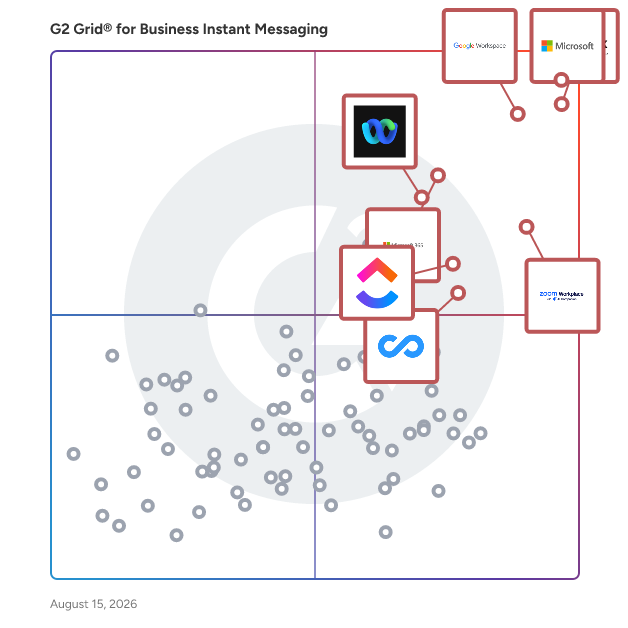
## G2 Grid® for Business Instant Messaging Software
 ![G2 Grid® for Business Instant Messaging Software plotting products by satisfaction and market presence](https://www.g2.com/categories/business-instant-messaging/grids.png?focus%5B%5D=25592&focus%5B%5D=3437&focus%5B%5D=1434&focus%5B%5D=7372&focus%5B%5D=663&focus%5B%5D=18255&focus%5B%5D=25675&focus%5B%5D=20433)

Highlighted products: Microsoft Teams, Slack, Google Workspace, Zoom Workplace, Microsoft 365, Webex Suite, ClickUp, and Connecteam.

Underlying data: [Grid® JSON](https://www.g2.com/categories/business-instant-messaging/grids.json?focus%5B%5D=microsoft-teams&focus%5B%5D=slack&focus%5B%5D=google-workspace&focus%5B%5D=zoom-workplace&focus%5B%5D=microsoft365&focus%5B%5D=cisco-webex-suite&focus%5B%5D=clickup&focus%5B%5D=connecteam)

**Sponsored**

### SAP Integrated Business Planning

Respond to new market expectations with real-time supply chain planning capabilities and fulfill future demand profitably supply chain management. Powered by in-memory computing technology within SAP HANA, this cloud-based solution combines capabilities for sales and operations; demand, response, and supply planning; and inventory optimization. - Cloud deployment - Real-time scenarios and simulation - Social collaboration - Powerful predictive Analytics KEY BENEFITS: Achieve a rapid deployment Get up and running quickly with SAP Integrated Business Planning by using preconfigured process templates for an accelerated implementation. Empower employees with intuitive features Offer a unified, intuitive user experience with SAP Fiori and planning and simulation capabilities based on Microsoft Excel. Plan resources effectively Optimize resource efficiency by creating supply plans based on prioritized demands, allocations, and supply chain constraints. KEY CAPABILITIES: Integration with SAP Supply Chain Control Tower Gain end-to-end visibility of your supply chain, decision support, and fast corrective action through integration with SAP Supply Chain Control Tower. Forecasting and demand management Get full demand transparency with short-term, mid-term, and long-term forecasting. Take advantage of best-in-class capabilities for demand sensing and statistical forecasting. Inventory optimization Establish optimal inventory targets that enable you to maximize profits, while leaving a buffer to help you meet unexpected demand. Sales and operations planning Deliver a cross-departmental sales and operations plan that balances inventory, service levels, and profitability. Response and supply planning Optimize resourcing efficiency by creating supply plans based on prioritized demands, allocations, and supply chain constraints.

[Visit website](https://www.g2.com/external_clickthroughs/record?secure%5Bad_program%5D=ppc&secure%5Bad_slot%5D=category_product_list&secure%5Bcategory_id%5D=2174&secure%5Bchosen_at%5D=2026-07-28T17%3A44%3A23Z&secure%5Bdisplayable_resource_id%5D=134&secure%5Bdisplayable_resource_type%5D=Category&secure%5Bmedium%5D=sponsored&secure%5Bplacement_reason%5D=retargeted_product&secure%5Bplacement_resource_ids%5D%5B%5D=59587&secure%5Bprioritized%5D=false&secure%5Bproduct_id%5D=59587&secure%5Bresource_id%5D=2174&secure%5Bresource_type%5D=Category&secure%5Bsource_type%5D=category_page&secure%5Bsource_url%5D=https%3A%2F%2Fwww.g2.com%2Fcategories%2Fbusiness-instant-messaging%3Fpage%3D8&secure%5Btoken%5D=0fdd15e6d4922190aa114c2f1a7b30e69746c9a89d89d978b978a147dc88f7fe&secure%5Burl%5D=https%3A%2F%2Fwww.sap.com%2Fdocuments%2F2025%2F04%2F5256c341-007f-0010-bca6-c68f7e60039b.html%3Fcampaigncode%3DCRM-YD25-DSC-407451%26source%3DIBP-click-campaign-G2&secure%5Burl_type%5D=custom_url)

[
Cleariest
](https://www.g2.com/products/cleariest/reviews)

By [Cleariest](https://www.g2.com/sellers/cleariest)

[

4.3/5(2)

](https://www.g2.com/products/cleariest/reviews)

Product Description

Cleariest is a team messaging platform that puts transparent communication at the center of how organizations work. Designed with a public-first philosophy, Cleariest encourages teams to communicate i

[
WeekMate e-Connect
](https://www.g2.com/products/weekmate-e-connect/reviews)

By [Weekmate](https://www.g2.com/sellers/weekmate)

[

5/5(2)

](https://www.g2.com/products/weekmate-e-connect/reviews)

Product Description

Revolutionize workplace communication with WeekMate e-Connect—a cost-effective platform combining instant messaging, secure file sharing, peer collaboration, and voice + video calls. Stay connected in

Pros and Cons

[
Ease of Use (2)
](https://www.g2.com/products/weekmate-e-connect/reviews?qs=pros-and-cons)[
Limited Customization (1)
](https://www.g2.com/products/weekmate-e-connect/reviews?qs=pros-and-cons)

[
Ava
](https://www.g2.com/products/pentabay-software-ava/reviews)

By [Pentabay Software](https://www.g2.com/sellers/pentabay-software)

[

3/5(1)

](https://www.g2.com/products/pentabay-software-ava/reviews)

Product Description

Messaging, autonomous AI agent, task tracking, automations, and live calls -- all in one platform. Built for AI coders who want zero project management overhead.

[
convly
](https://www.g2.com/products/convly/reviews)

By [convly](https://www.g2.com/sellers/convly)

[

5/5(1)

](https://www.g2.com/products/convly/reviews)

Product Description

convly lets you manage Microsoft Teams messages directly from Slack. Stay focused in Slack while your clients or partners use Teams -\> no switching, no missed messages. convly supports DMs, gro

[
Heycollab
](https://www.g2.com/products/heycollab/reviews)

By [Heycollab](https://www.g2.com/sellers/heycollab)

[

5/5(4)

](https://www.g2.com/products/heycollab/reviews)

Product Description

Heycollab is a tool that helps you stay organized, manage tasks, and helps employees collaborate by empowering teams to work together. It's an all-in-one productivity management tool for teams & f

[
LetsDial
](https://www.g2.com/products/letsdial/reviews)

By [Letsdial](https://www.g2.com/sellers/letsdial)

[

5/5(1)

](https://www.g2.com/products/letsdial/reviews)

Product Description

Let'sDial, an extraordinary mobile application that revolutionizes international calling. With its remarkable features, Let'sDial enables VoIP calls from blocked countries, seamless SMS receiving and

Pros and Cons

[
Communication (1)
](https://www.g2.com/products/letsdial/reviews?qs=pros-and-cons)

[
#One
](https://www.g2.com/products/dream-broker-ltd-one/reviews)

By [Dream Broker Ltd.](https://www.g2.com/sellers/dream-broker-ltd)

[

5/5(1)

](https://www.g2.com/products/dream-broker-ltd-one/reviews)

Product Description

#One is a secure communication software offering a range of features to simplify communications and boost productivity. #One combines video meetings and conferencing, chats, instant messaging and file

[
Woven
](https://www.g2.com/products/woven-brands-woven/reviews)

By [Woven Brands](https://www.g2.com/sellers/woven-brands)

[

4.5/5(2)

](https://www.g2.com/products/woven-brands-woven/reviews)

Product Description

Woven empowers franchisors and franchisees to maximize unit economics at scale by digitally unifying the frontline workforce, connecting the management of people, operations and facilities in a single

[
YouLinc Connect
](https://www.g2.com/products/youlinc-connect/reviews)

By [YouLinc](https://www.g2.com/sellers/youlinc)

[

3.5/5(1)

](https://www.g2.com/products/youlinc-connect/reviews)

Product Description

YouLinc is a human-first digital connection agency that specializes in helping professionals generate leads, build referral partnerships, and grow their business through authentic outreach. The agency

[
Chatplace
](https://www.g2.com/products/chatplace/reviews)

By [ChatPlace](https://www.g2.com/sellers/chatplace)

[

0/5(0)

](https://www.g2.com/products/chatplace/reviews)

Product Description

ChatPlace.io is a SaaS platform for social media and messaging app marketing designed for bloggers, businesses, and marketers, combining AI agents, chatbots, and content creation tools

[
Grupo Chat
](https://www.g2.com/products/grupo-chat/reviews)

By [Grupo Chat](https://www.g2.com/sellers/grupo-chat)

[

0/5(0)

](https://www.g2.com/products/grupo-chat/reviews)

Product Description

Chat That Converts – Launch a Chatroom Platform That Turns Any Website into a Thriving Community, Driving Engagement and Cash. Featuring group chats, one-to-one chats, video and audio chats, and AI—al

[
M360
](https://www.g2.com/products/m360/reviews)

By [Pocketstop](https://www.g2.com/sellers/pocketstop)

[

4.7/5(23)

](https://www.g2.com/products/m360/reviews)

What do users say?

Users consistently praise the ease of use and responsive customer support of the product, highlighting how quickly they can set up campaigns and engage with customers. The platform's intuitive design

[
Sakari
](https://www.g2.com/products/sakari/reviews)

By [Sakari](https://www.g2.com/sellers/sakari)

[

4.4/5(18)

](https://www.g2.com/products/sakari/reviews)

What do users say?

Users consistently praise the ease of use and excellent customer support provided by Sakari, making it a reliable choice for SMS communication. The seamless integration with HubSpot enhances workflow

Pros and Cons

[
Ease of Use (2)
](https://www.g2.com/products/sakari/reviews?qs=pros-and-cons)[
Contact Management (1)
](https://www.g2.com/products/sakari/reviews?qs=pros-and-cons)

[
Sideline
](https://www.g2.com/products/pinger-com-sideline/reviews)

By [Pinger](https://www.g2.com/sellers/pinger)

[

4.5/5(11)

](https://www.g2.com/products/pinger-com-sideline/reviews)

What do users say?

Users consistently praise the app for its ease of use and the ability to maintain a separate business number without needing an additional phone. This functionality allows for better privacy and conve

Pros and Cons

[
Customer Support (1)
](https://www.g2.com/products/pinger-com-sideline/reviews?qs=pros-and-cons)

- [&lsaquo; Prev‹ Prev](/categories/business-instant-messaging?order=g2_score&page=7#product-list)
- [1](/categories/business-instant-messaging?order=g2_score#product-list)
- [2](/categories/business-instant-messaging?order=g2_score&page=2#product-list)
- …
- [4](/categories/business-instant-messaging?order=g2_score&page=4#product-list)
- [5](/categories/business-instant-messaging?order=g2_score&page=5#product-list)
- [6](/categories/business-instant-messaging?order=g2_score&page=6#product-list)
- [7](/categories/business-instant-messaging?order=g2_score&page=7#product-list)
- 8
- Next &rsaquo;Next ›

Spotlight Categories

[Employee Communications Software](https://www.g2.com/categories/employee-communications)

[Employer of Record (EOR) Software](https://www.g2.com/categories/employer-of-record-eor)

[Corporate Performance Management (CPM) Software](https://www.g2.com/categories/corporate-performance-management-cpm)

[Social Media Listening Tools](https://www.g2.com/categories/social-media-listening-tools)

[Marketing Analytics Tools](https://www.g2.com/categories/marketing-analytics)

Similar Categories

- [Employee Communications](/categories/employee-communications)

- [Enterprise Social Networking (ESN)](/categories/enterprise-social-networking-esn)

- [Frontline Worker Communication Platforms](/categories/frontline-worker-communication-platforms)

[Browse Business Instant Messaging Themes](/categories/business-instant-messaging/themes)

 ![Neeraja Prakash](/assets/transparent-ad5be28fbcd25b7b08d2cebe1d957125437fb5407d75ee717965ad22c8808791.gif "Neeraja Prakash")
NP

Researched and written by [Neeraja Prakash](https://research.g2.com/insights/author/neeraja-prakash)

Updated October 23, 2024

Business instant messaging (BIM) software is a real-time, text-based internal messaging platform for businesses. It typically enables users to create small group chats for team collaboration, as well as larger channels for dispersing company-wide information.

The rapid nature of these instant messaging products provides an internal space to quickly address coworkers without using informal means such as texting from a personal phone number. This enables teams to share information faster and more efficiently, which can help enhance productivity across the enterprise. Regardless of the device used, BIM platforms provide security features via encrypted messages and channel access control. Similar to [email software](https://www.g2.com/categories/email), BIM software enables users to share files, thread messages, archive conversations, and search internally within chats.

A growing number of these products now have artificial intelligence (AI) capabilities, which enable smart replies and auto-responses when activated, as well as sentiment analysis for mood detection with responses.

BIM platforms often have integrations with [AI chatbots software](https://www.g2.com/categories/ai-chatbots) and virtual assistant software to amplify productivity, especially in strengthening search capabilities and real-time language translation. AI also reinforces such platforms’ security features by continually monitoring communication channels and detecting threats to the platform.

Businesses of all types and sizes use BIM solutions with other products, either alongside them or via integrations. This type of communication software allows for customization based on the company’s needs. It can often be integrated with [productivity bots software](https://www.g2.com/categories/productivity-bots), [video conferencing software](https://www.g2.com/categories/best-video-conferencing-software), [screen sharing software](https://www.g2.com/categories/screen-sharing), [project management tools](https://www.g2.com/categories/project-management-tools) and more. Business instant messaging tools can also be integrated with software such as [employee intranet software](https://www.g2.com/categories/employee-intranet) or [employee engagement software](https://www.g2.com/categories/employee-engagement) as ways to strengthen the employee experience. However, there are standalone BIM solutions available that can integrate other productivity software natively. This allows for further personalization based on the needs of the enterprise.

To qualify for inclusion in the Business Instant Messaging (BIM) category, a product must:

- Allow users to engage in peer-to-peer conversations, group chats, or channels in an instant messaging format
- Provide secure file sharing capabilities
- Enable users to search within the channels and chat histories
- Track conversation history
- Integrate with chatbots, employee intranet, video conferencing or productivity apps

Show More

* * *

## How Do You Choose the Right Business Instant Messaging Software?

### What You Should Know About Business Instant Messaging Software

### What is Business Instant Messaging Software?

Business instant messaging software provide users with instant messaging platforms that allow direct and group messaging capabilities within an organization. These tools aim to facilitate quick conversations between team members. Business messaging tools make communicating with coworkers as easy as chatting with friends on social media or via text. Most business instant messaging options include emoji and GIF capability to promote authentic and natural conversation within the workplace.

Key Benefits of Business Instant Messaging Software

- Offer instant communication capability between team members
- Allow teams to connect regardless of location
- Make messages easily searchable
- Provide a less formal virtual space for team communication
- Connect an organization horizontally and vertically

### Why Use Business Instant Messaging Software?

Most modern businesses leverage some type of business instant messaging software. They provide a cornucopia of benefits, making them a mainstay of the modern software stack.

**Rapid —** Business messaging tools support employees by bringing instant messaging to a workforce. Teams can rapidly communicate with one another, facilitating collaboration between remote employees, across teams, or across offices.

**Informal —** Email etiquette is notoriously difficult to master and can feel unnecessarily formal for simple questions. Business messaging tools allow teams to toss out overly professional decorum and focus on content over etiquette.

**Mobile —** All competitive business instant messaging products tout a robust, intuitive mobile application to pair with their desktop offering. Today, business requires people to reachable to support their peers at all times. Business instant messaging platforms are easy to use at work and on the go.

**Adoptable —** Instant messaging feels natural for most users at this point. Millennials now constitute the bulk of the workforce, and business instant messaging software is a natural step for this generation. Adoption rates are high since business messengers feel familiar.

### Who Uses Business Instant Messaging Software?

Organizations across industries use business instant messengers to connect their employees. The software equips users with a quick, streamlined method of communicating with peers for all topics These platforms provide a time-effective alternative to passive mediums such as email or intrusive in-person meetings. The benefits provided by business instant messaging software are useful to businesses of any size—from three people to 3,000 people. Whether coordinating shifts in a university’s psychology lab or meetings in a Fortune 500 company, efficient communication is paramount.

### Kinds of Business Instant Messaging Software

**Stand-alone —** Many business instant messengers are stand-alone products integrations. Dedicated business instant messaging tools sometimes provide additional features like video conferencing, limited VoIP capability, and employee directories to create a comprehensive communication hub.

**Embedded —** Instant messaging might come as an additional feature in other types of software or larger collaboration suites. Business instant messaging functionality is often found in [employee intranet software](https://www.g2.com/categories/employee-intranet), [employee engagement software](https://www.g2.com/categories/employee-engagement), or virtual workspaces. Other types of communication software, like [video conferencing software](https://www.g2.com/categories/video-conferencing), can also provide instant messaging.

**Industry-specific —** Some business instant messengers are built for specific industries with their unique needs in mind. For example, business instant messaging tools for manufacturing and field service will often include [push-to-talk (PTT) software](https://www.g2.com/categories/push-to-talk-ptt) built in so remote employees have multiple instant communication channels. There are also [clinical communication and collaboration platforms](https://www.g2.com/categories/clinical-communication-and-collaboration) and [HIPAA compliant messaging software](https://www.g2.com/categories/hipaa-compliant-messaging) built specifically for health care organizations. These platforms take patient confidentiality into consideration. Some popular, generalized business messengers have started to create industry-specific solutions or build compliance into their product so they’re available for specific industries.

### Business Instant Messaging Software Features

Business instant messaging software share a few basic features across all products. As the space continues to become more competitive, some vendors have added additional communication and productivity features to help their product stand out.

**Instant messaging —** Instant, direct messaging is the main feature of business messenger applications. Users can instantly send direct or group messages. Depending on the administrator’s permissions, additional groups can be made by users or administrators.

**Status updates —** Users can leave a status attached to their profile to indicate their availability.

**Activity feed —** An activity feed is available to update users on new direct messages sent to them or new messages in groups. The feed will sometimes present replies to posts made by the user.

**Notifications —** Business messaging tools provide notifications when a user receives a direct message or a message is posted in a group. Additionally, users can turn notifications off or set certain permissions for notifications.

**Emojis —** Business messaging apps will often come loaded with emojis. Some applications even allow users to create their own.

**Search —** A search bar enables users to use keywords to easily find old messages.

**File sharing —** One of the main benefits of business messaging is the ability to easily and quickly share files and documents. Users can send links to documents hosted in the cloud or attach files saved on a desktop. Some tools even integrate with file repositories for streamlined file sharing.

**Surveys and polls —** Business messengers often provide simple survey and polling features allowing users to rapidly make decisions within the app.

#### Additional Business Instant Messaging Features

**Conferencing —** There has been increased effort to include audio and video conferencing functionality within business instant messaging products. When users can quickly move between text-based and audio-based communications, problems are resolved and questions are answered more efficiently.

**Knowledge base integration —** Some knowledge management tools serve as connectors between business instant messaging apps and knowledge bases. This type of integration attaches questions to answers then sends both to a searchable knowledge base.

**Automatic translation —** Some business messaging applications can automatically translate messages from one language into another via [machine translation software](https://www.g2.com/categories/machine-translation).

**Screen sharing —** Business messengers with video conferencing capability often allow screen sharing between conference participants.

**AI assistants —** AI assistants are sometimes included in business messaging apps. They guide users to behaviors based on the messages they’ve sent. For example, if a user types to another that they need to meet at a certain date or time, an embedded AI assistant can open a prompt for the user to add an event to their calendar.

### Trends Related to Business Instant Messaging Software

**Addition of conferencing features —** Traditionally, businesses relied on one tool for instant messaging and another for video and audio conferencing. This was beneficial since conferencing often includes external entities without access to internal tools. However, more businesses are recognizing the benefits of video conferencing and VoIP for internal use cases. It’s inconvenient for users having a conversation in one application to move to another, even if it would be a more fruitful exchange if they did so.

Subsequently, more businesses are looking for instant messaging tools that provide avenues for voice and video conferencing. More business messengers include video conferencing and VoIP capability in their offering, albeit not the best of breed since they’re not the main feature of the product. This may change as more vendors prioritize audio and video conferencing within their products.

### Potential Issues with Business Instant Messaging Software

**Contextual inappropriateness —** The convenience of instant messaging in the workplace is often a boon. As useful as business instant messaging software is, it is not always the most efficient or appropriate channel for certain situations. Problems can arise when individuals haven’t created clear distinctions for when it is appropriate to use a business messenger over email or another communication channel. While one-line emails could easily be relayed in an instant messenger, long-form messages with potential external participants aren’t appropriate on a business instant messaging platform.

This potential problem can be avoided with the implementation of clear guidelines identifying which communication channels should be used in a given situation. Businesses and organizations should include these guidelines in their onboarding and training process and make them available in a knowledge base for reference. Individuals who don’t use the appropriate channels should be gently reminded to break these habits.

### Software and Services Related to Business Instant Messaging Software

[**Productivity bots**](https://www.g2.com/categories/productivity-bots) **—** There are productivity bots built for specific instant messaging software to extend their functionality. Productivity bots can serve as AI assistants if a product doesn’t have one embedded, or provide helpful features that aren’t otherwise available to users on the native platform. For example, productivity bots can add polls or surveys to products that don’t offer them natively, or connect the app to other tools.

[**Employee intranet**](https://www.g2.com/categories/employee-intranet) **—** Some employee intranet solutions provide a business instant messaging tool within their product. If one isn’t provided, products often integrate with other popular business messaging options to fill this gap. Users benefit from having instant messaging tools deployed within their intranet since the intranet can serve as a consolidated collaboration and communication suite.