
Amita Jain
Amita Jain is a Senior Writer at G2, where she tests and evaluates software to help buyers make sense of the technologies businesses rely on. She brings over five years of technology writing experience, more than a decade as an editor, and a journalism background covering business and education policy. Her interests span finance, data, and marketing technologies. Away from the keyboard, she’s happiest with a philosophical mystery or a blank canvas.
I evaluated 15+ tools to find the best free AI customer support agent software for small businesses in 2026. These are HubSpot Service Hub, Fin, Genesys Cloud CX, Jotform AI Agents, Salesforce Agentforce, Retell AI, and Zendesk for Customer Service.
My evaluation started with one question: can a lean team test the free AI customer support agent on real customer questions before trusting it with consumers or a budget? For founders still handling website chat, email, and support calls themselves, free access creates room to connect FAQs, check answer quality, and see whether the agent knows when to hand off.
HubSpot Service Hub and Zendesk offer broader service platforms, with Genesys Cloud CX going furthest as a full contact center; Fin and Salesforce Agentforce connect support to business knowledge and workflows; Jotform AI Agents takes the no-code route for answering questions and collecting details; and Retell AI focuses on phone support.
I use free broadly here to include permanent free plans, free trials, sandbox environments, and starter credits. Each comes with limits on conversations, AI usage, voice minutes, channels, integrations, or branding, but those limits can still reveal what matters. This list will help you see what each tool lets a small business prove before paying, where free access runs out, and which setup best fits the support work your team wants to take off its plate.
What are the best free AI agents for customer support for small businesses in 2026?
-
Fin: Best for high-volume support teams measuring AI resolution rates
Add an AI agent to the help desk you already run and pay only for the tickets it fully resolves on its own. -
Genesys Cloud CX: Best for stepping up to a full AI contact center
Run voice, chat, email, and messaging on one contact-center platform with native AI agents, copilots, and analytics built in. -
HubSpot Service Hub: Best for support grounded in CRM data
Run support on the CRM your customer data already lives in, so tickets, contacts, and conversation history sit on one record. -
Jotform AI Agents: Best for adding AI intake to forms, phone, and SMS
Train agents on your forms and help content, then let them answer questions and capture leads across chat, phone calls, and text. -
Retell AI: Best for building custom AI voice agents
Design phone agents end-to-end, from voice and script through call transfers, and pay by the minute only when they're talking. -
Salesforce Agentforce: Best for prototyping agents on CRM data
Build agents that read live CRM records to answer customers, take actions, and hand conversations to reps without leaving Salesforce. -
Zendesk for Customer Service: Best for scaling AI agents across omnichannel help desk
Pair AI agents with a copilot for your human reps and run every support channel from a single help desk.
*Tools are listed alphabetically. These tools offer free trials, free forever options, or freemium models.
Comparison of the best free AI agents for customer support for small businesses
Here's a side-by-side look at free plan limits and pricing before diving into the full reviews.
| Tool | G2 rating | What the free plan covers | Paid starts at |
| Fin | 4.5/5 |
|
$0.99/resolution (50 resolutions/ month minimum) |
| Genesys Cloud CX | 4.4/5 |
|
$1.50/hour |
| HubSpot Service Hub | 4.4/5 |
|
$20/month (one core seat; additional seats start at $75/month) |
| Jotform AI Agents | 4.5/5 |
|
$39/user/month |
| Retell AI | 4.8/5 |
|
|
| Salesforce Agentforce | 4.3/5 |
|
$2/conversation or ~$0.10/action (Flex Credits) |
| Zendesk for Customer Service | 4.3/5 |
|
$25/agent /month |
*All pricing details are based on publicly available data at the time of publication and are subject to change.
An AI customer support agent is the first hire a small business never has to interview. It answers customers in chat, email, or on the phone and resolves routine questions end to end, even at 2 a.m., with no queue.
Small businesses are already experimenting with the technology behind these agents: 58% reported using generative AI. Separately, 79% of service leaders mentioned that AI-agent investment was critical, with organizations expecting agents to cut service costs and case-resolution time by roughly 20%.
The catch is most of these products charge by usage (per resolution, per conversation, per minute). So the only number that matters is how many of your tickets an agent actually closes. A free plan or trial lets a small business train an agent on its own help content, run it against real customer questions, and see the resolution rate before a dollar leaves the account.
How did I find and evaluate these free AI agents for customer support?
I started with G2's free AI Customer Support Agents Software category page, which lists tools that offer free plans, free trials, or freemium models. From there, I took the top products as they appear on the page and tested the free plan or trial for each one.
I looked at how well each tool held up for small business use, starting with the signup experience, like whether it needed a credit card, and how quickly I could get a working agent live. I then checked what you can actually build without paying, especially how the agent trains on your own help content or knowledge base, which channels it can answer on (chat widget, email, phone, SMS), whether AI usage is included or metered separately, and how cleanly it hands a conversation to a human when it gets stuck. Another key consideration was identifying the point at which free limitations begin to impact usability, such as conversation caps, one-time credits running dry, trial expiry, or an AI feature locked behind a higher tier.
To complement the hands-on evaluation, I cross-referenced verified G2 user reviews for each tool to understand real-world patterns beyond my own testing. This helped highlight what small businesses consistently praise, what frustrates them over time, and how the free plan holds up in practice.
The screenshots featured in this article may be a mix of those taken from the vendor's G2 page or from publicly available materials.
What I look for in free AI agents for customer support for small businesses
Because free looks very different across AI support tools (a forever-free plan, a 14-day trial, or a one-time credit grant), I judged each tool by how much real support work a small business could do before paying. Here's what I paid attention to:
- Usability of free access: A free plan or trial should let you put a working agent in front of real customers. I looked at how many actual conversations, minutes, or resolutions you get before the limits stop you.
- Setup without a developer: Small businesses rarely have engineering time to spare. I checked whether you can build and train an agent on your own help docs, website, or FAQs through a visual interface, and how long it takes to go live.
- Resolution quality and human handoff: An AI agent that answers confidently but wrongly costs you customers. I paid attention to whether responses stay grounded in your content, and how cleanly the agent escalates to a human when it should.
- Channel coverage: Support doesn't only happen in a chat widget. I noted which channels work without paying: website chat, email, phone, SMS, or WhatsApp, since voice and messaging are often the first features locked away.
- Honest cost mechanics: AI pricing hides in the meter. I checked whether AI usage is included or billed separately, and whether the pricing unit (per resolution, per conversation, per minute, per credit) makes costs predictable as volume grows.
- The specific upgrade trigger: Every free plan has a wall. I looked at where it appears: a conversation cap, credits running dry, a trial expiring, or the AI agent itself sitting a tier or two above the entry price. Knowing this upfront turns a forced, last-minute decision into a planned one.
With this list, I narrowed it down to the seven best free AI agents for customer support. Not all of them tick every box on my criteria list, but each stands out in ways that make it worth considering, depending on your specific needs.
To qualify for inclusion in the AI Customer Support Agents category, a product must:
- Autonomously resolve customer service inquiries or support tickets end-to-end without requiring human intervention for routine cases
- Integrate with business systems such as CRMs, help desks, order management systems, or knowledge bases to retrieve context and deliver informed responses
- Use AI-driven reasoning to interpret customer intent, determine appropriate actions, and handle multi-step resolution workflows beyond rule-based routing or scripted decision trees
- Execute actions within connected systems on behalf of the customer, such as processing refunds, modifying subscriptions, updating account records, or scheduling appointments
- Enable human-in-the-loop escalation with full conversation context for complex, sensitive, or unresolved cases
- Ground responses in the organization’s knowledge base, help center content, or product documentation to provide accurate, source-backed answers
- Support customer service interactions across at least two communication channels, such as email, live chat, messaging apps, social media, or voice
*This data was pulled from G2 in 2026. Some reviews may have been edited for clarity.
Want to learn more about AI Customer Support Agents Software? Explore AI Customer Support Agents products.
1. Fin: Best for high-volume support teams measuring AI resolution rates
Fin's pitch is different from every other tool on this list: it isn't a help desk, it's a resolution engine that sits on top of the one you already have: Zendesk, Salesforce, or Intercom's help desk. That focus shows in how it holds a 4.5/5 star rating across 3,800+ G2 reviews while being, functionally, a single-purpose product. It reads your help center and past conversations, answers the front-line questions, and hands the rest to your team. The most satisfied small-business reviewers describe a similar result: fewer routine questions reaching the human queue.
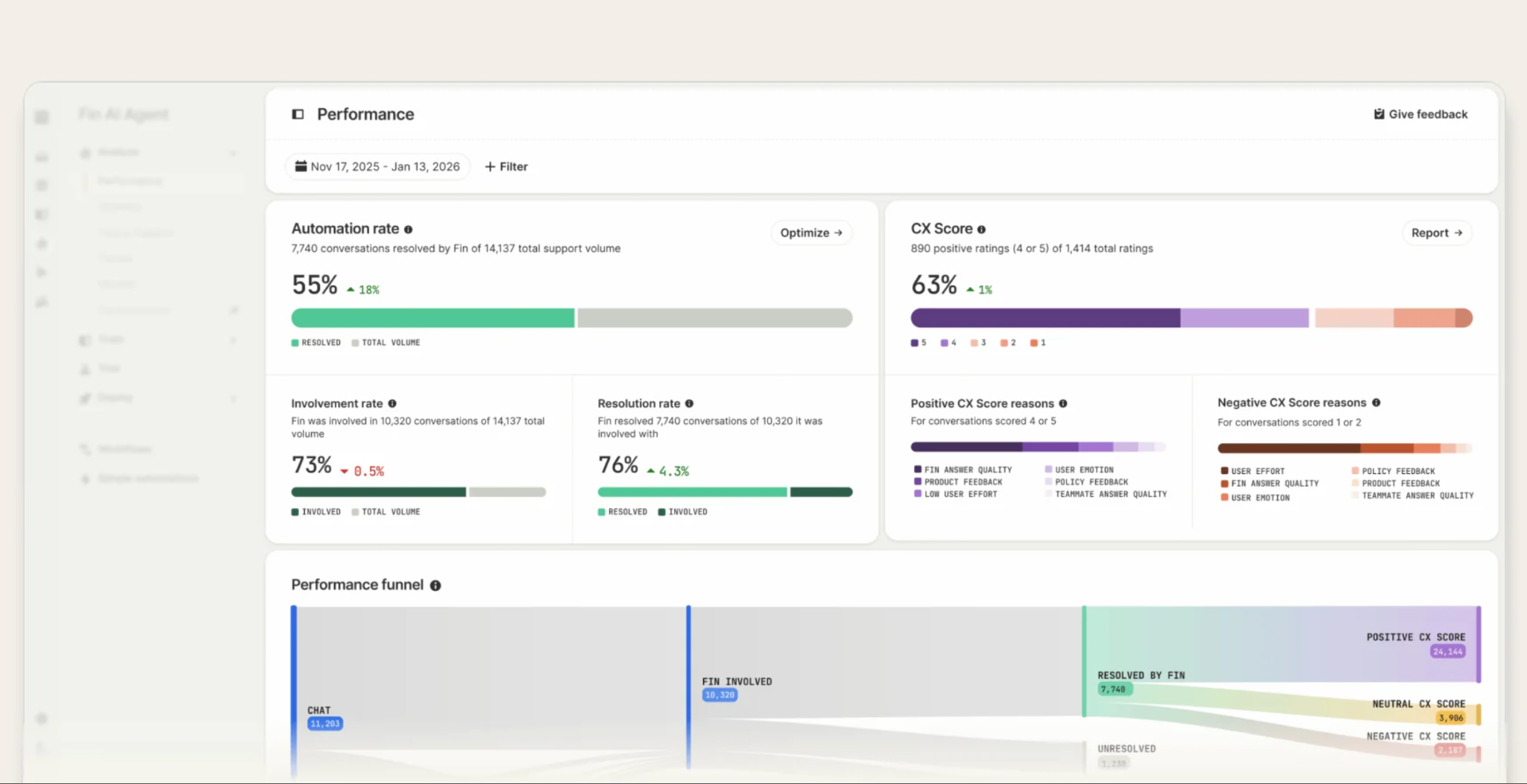
Signing up takes an email address and no card details, and the onboarding steers you almost immediately toward the Fin AI agent and feeding it your content. I pointed it at help-center material and started testing it in the preview, throwing in the kinds of questions customers actually phrase badly, and watching where it pulled each answer from.
The real evaluation is what the trial's structure invites: a two-week, full-scale benchmark. With no usage caps and no seat minimums, you can let Fin face your genuine ticket queue. The number to watch is its resolution rate on conversations you already get because that percentage, times your monthly volume, times $0.99, estimates the resolution portion of your future bill. Configured procedure handoffs can also count as $0.99 outcomes.
If your startup has fewer than 15 people and less than $10M raised, apply to Intercom's Early Stage program before paying anything. Qualifying gets you 300 free Fin outcomes a month for a full year, enough real volume to learn what Fin actually resolves for you. After 300, each outcome bills at the standard $0.99.
What does Fin's free plan or trial include?
- 14-day free trial; no credit card required
- Access to all features on your chosen Intercom plan
- Unlimited Fin resolutions during the trial (no usage caps or seat minimums)
- Works on your existing helpdesk
- Trains on your help center, snippets, and past conversation history
- Guidance and workflow controls for steering answers and escalation
When should you upgrade your Fin free plan or trial?
Upgrade when the trial shows Fin can resolve enough conversations to justify the cost. There’s no free plan after the trial: Fin costs $0.99 per resolved conversation, so 1,000 resolutions would cost about $990. If you use Fin inside Intercom, you’ll also need Intercom seats, starting at $29/seat/month on Essential. If you use Fin with an existing help desk like Zendesk or Salesforce, there are no seat fees at all: it's $0.99 per outcome with a 50-outcome monthly minimum. So about $50/month is your effective floor even in a quiet month. One thing to note: the trial includes the plan you choose plus Pro, Proactive Support Plus, and unlimited Copilot, so those add-ons won’t carry over unless you purchase them. Fin’s core AI Agent is available across all Intercom plans, so the trial is still a fair test of how well it can deflect support conversations.
Where Fin genuinely stands out:
- The training loop is what G2 small business reviews credit most. Fin pulls from help articles, short snippets you write just for it, and years of past chats. A few reviewers described it as reading thousands of conversation histories and cutting requests reaching the team.
- G2 users who go deeper describe Fin as more than an answer engine: it holds the context of a conversation, follows the workflows they've built for welcoming new users, routing questions to the right team, and triggering actions in connected systems like billing tools. The detail small teams keep repeating is that nearly all of this gets configured without a developer.
What G2 users like about Fin:
“Fin AI has helped us manage the volume of tickets we receive every day, and it’s been effective at answering our users’ questions with good accuracy. We’ve also set up workflows to route certain ticket types to human agents, and that has been working well so far.
Beyond that, the platform is easy to navigate. The interface is clean, and I can usually find what I need without any trouble. When I can’t, it’s straightforward to reach out to Fin’s customer support, whether through the AI bot or live support agents, and they’ve been very responsive and helpful.
We’ve also integrated Asana, and it’s simple to create Asana tasks directly from the platform. This makes it easier for us to track progress on tasks that involve other internal teams.”
- Fin review, Su Yi L.
Is Fin right for your small business?
Best for: Teams with real ticket volume, a documented help center, and an existing helpdesk who want AI resolution they can measure, and pay for per outcome.
Not ideal for: Businesses without written help content for Fin to learn from, or very low-volume teams for whom the 50-outcome monthly minimum outweighs the workload it saves.
What I dislike about Fin:
- The per-outcome model cuts both ways. Your bill grows in your best months, and forecasting spend means knowing an outcome rate you can't know until you've run it. The trial exists precisely to close that gap. For teams with enough recurring tickets, that ties cost directly to support outcomes it actually deflects rather than every conversation, although a configured procedure handoff can also count as a billable outcome.
- The most common feedback among G2 small business reviewers is edge-case accuracy. Fin can misread context on complex or unusual requests, occasionally looping on an answer a customer already rejected. The correction tools are decent: snippets and guidance let you patch specific misses, and many reviewers note the misfires are getting rarer as the model improves.
What G2 users dislike about Fin:
“The AI model has been very good, but every once in a while it will ignore hard rules, which have to be rewritten and redone.
In addition, the way the information needs to be divided isn't always so clear. For example, what categories can be put together in one card and what things should be divided between multiple cards.”
- Fin review, Adira W.
Related: If your goal is fewer repetitive tickets reaching humans, compare the best customer self-service software for help centers, portals, and AI-powered deflection.
2. Genesys Cloud CX: Best for stepping up to a full AI contact center
Genesys Cloud CX isn’t the first tool I’d give a solo founder answering a few tickets. It is a full contact-center platform for small businesses that have grown past one shared inbox, one phone line, or one person answering every customer question.
I’d consider it when support has become a team operation: several people handling calls, customers reaching you through voice, chat, email, and social, and a founder or support lead who needs to see queues, wait times, handoffs, and unresolved conversations in one place.
That is where Genesys makes more sense for a small business. Its AI agents, agent copilots, and supervisor tools are built into the same system as routing and reporting. The value isn't just “an AI bot answers questions.” It is helping a small support team manage higher call volume, respond across channels, and understand what is happening in the queue. On G2, it holds a 4.4/5 rating across more than 1,500 reviews, where reviewers repeatedly praise having voice, chat, email, and social on one platform with AI running through the workflow.
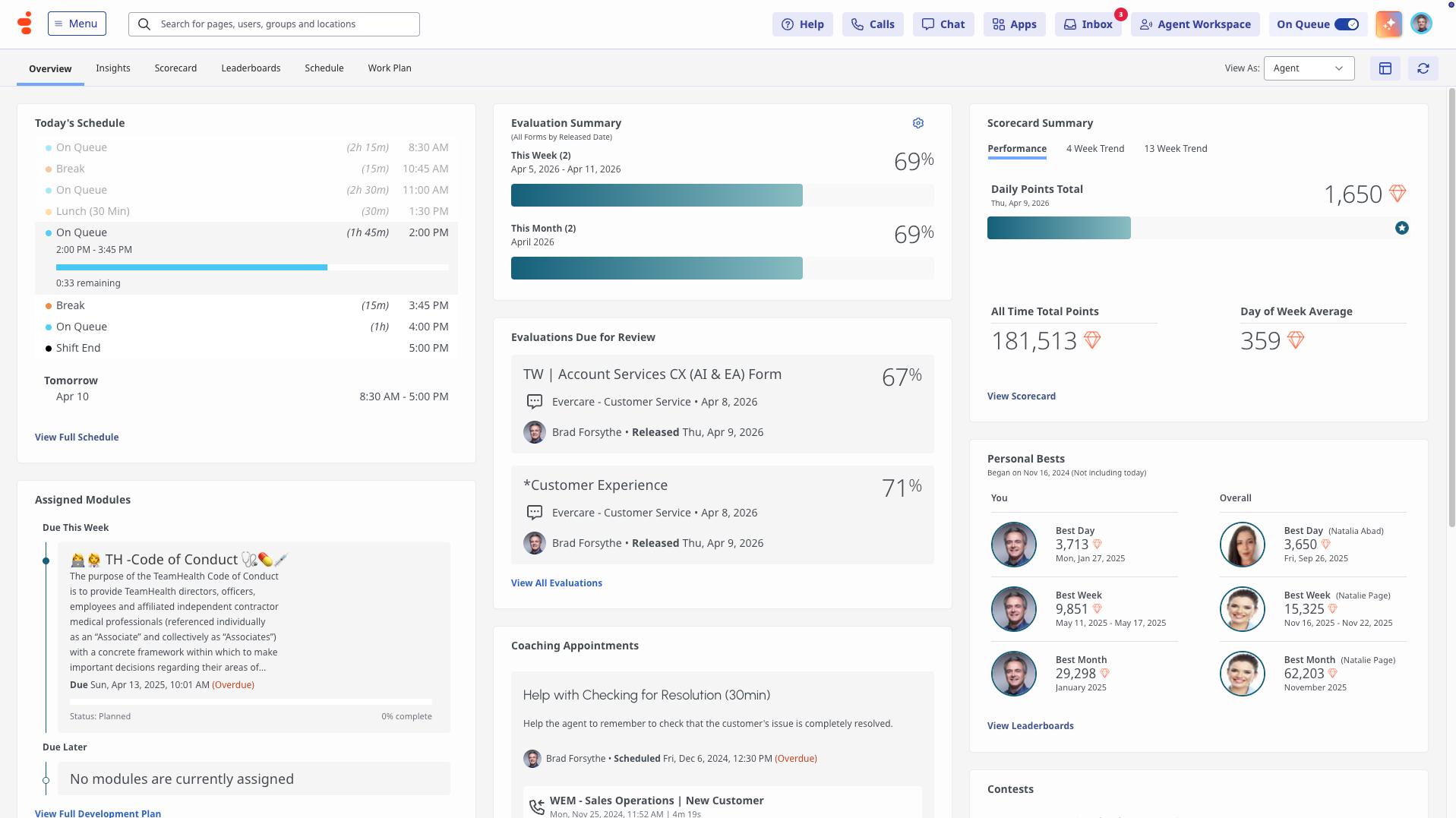
The free trial is also unlike any other I tried for this list. There's no self-serve signup. The trial page is a qualification form that asks for your contact details, industry, level of interest, and no. of agent seats.
Genesys's own fine print explains why: the trial is only available in certain regions, so a representative conversation is required to qualify. Once qualified, you get a non-production trial instance with inbound call, email, and message flows preconfigured and no credit card involved; Genesys has described this as a 30-day window, though the trial page itself doesn't commit to a duration, so I'd confirm it when the rep calls.
I'd go in expecting a guided evaluation with a salesperson in the loop rather than a Saturday-afternoon experiment.
What does Genesys Cloud CX's free trial or plan include?
- Sales-assisted free trial with no credit card required; eligibility and regional availability are confirmed by a Genesys representative.
- Test environment with ready-made setups for handling inbound calls, emails, and messages
- Earlier trial documentation published limits on users, chatbot conversations, and digital messages, but the current public trial page doesn't specify these allowances, so confirm them with your Genesys representative.
- Genesys's trial-program materials describe a 30-day instance, but the current trial page doesn't publish a duration. Confirm the window with your rep
When should you upgrade, and what does Genesys Cloud CX cost after the trial?
Upgrade if the trial confirms you need a full contact-center platform rather than a basic AI support agent. Genesys Cloud CX 1, the entry voice-focused plan, starts at $75 per user per month, billed annually. CX 2 costs $115 and adds digital channels and quality tools, while CX 3 costs $155 and adds workforce management. Some AI features use separate AI Experience tokens, though a monthly allowance is included. An hourly-interacting license (at $1.50/hour) exists for low-volume users as an alternative to fixed seats. For a small business, the trial should prove that these broader routing, analytics, and workforce capabilities justify the cost.
Where Genesys Cloud CX genuinely stands out:
- The AI runs the whole width of the operation, the single most-mentioned strength in the G2 reviews. Many say that one platform's AI covers roles that would take three separate tools elsewhere on this list. Native voicebots and virtual agents on the customer side, Agent Copilot and Supervisor Copilot on the staff side, speech and text analytics underneath.
- The all-in-one architecture is what small business G2 reviewers specifically value: voice, chat, email, and messaging in a single interface, so agents stop switching systems, with open APIs and an integration marketplace that reviewers describe layering into CRMs and helpdesk tools without breaking workflows.
What G2 users like about Genesys Cloud CX:
“What I like most about Genesys is its flexibility and openness. It's not rigid or a one-size-fits-all platform. It's a foundation you can build on. The Open APIs, Architect (very user-friendly), Scripts and embedded workspace allow very easy and flexible implementation. It integrates real-time data and allows you to layer your own AI and automation without breaking agent workflows."
- Genesys Cloud CX review, Lorena L.
Is Genesys Cloud CX right for your small business?
Best for: Growing businesses with real call volume that are ready to run a proper contact center and want AI native to it rather than added on.
Not ideal for: Solo founders and teams whose support runs from a shared inbox or chat widget rather than a staffed contact center.
What I dislike about Genesys Cloud CX:
- The free access has a gatekeeper. You can't touch the product until a representative qualifies you, so evaluation starts with a sales conversation instead of a signup. If you're genuinely evaluating contact centers, though, that conversation comes with preconfigured flows and expert consultations most self-serve trials can’t provide.
- The most common theme in recent reviews is the additional learning period. Configuring the platform takes time, and new users describe menus and settings that need weeks to feel navigable. The effort matches the ambition, though. The same G2 reviewers also describe a system that, once configured, runs an entire contact center's routing, channels, and AI from one place.
What G2 users dislike about Genesys Cloud CX:
"One aspect I find challenging about Genesys Cloud CX is that, due to its extensive range of features, there is a noticeable learning curve when first starting out. It often takes some time for both new users and administrators to become comfortable navigating all the available options and settings."
- Genesys Cloud CX review, Phillip P.
Related: Still deciding whether you need a full help desk or only an AI layer? Compare the best help desk tools for small business ticket visibility before you scale beyond the free plan.
3. HubSpot Service Hub: Best for support grounded in CRM data
HubSpot Service Hub's clearest advantage for a small team is that support sits inside the same CRM as contacts, deals, and conversation history. That connection is a big part of why it holds a 4.4/5 rating across more than 2,900 G2 reviews. When a ticket lands, the team can see the customer record and previous interactions without first connecting a separate help desk to its CRM. For a business already using HubSpot for sales or marketing, that shared context is the strongest reason to consider Service Hub.
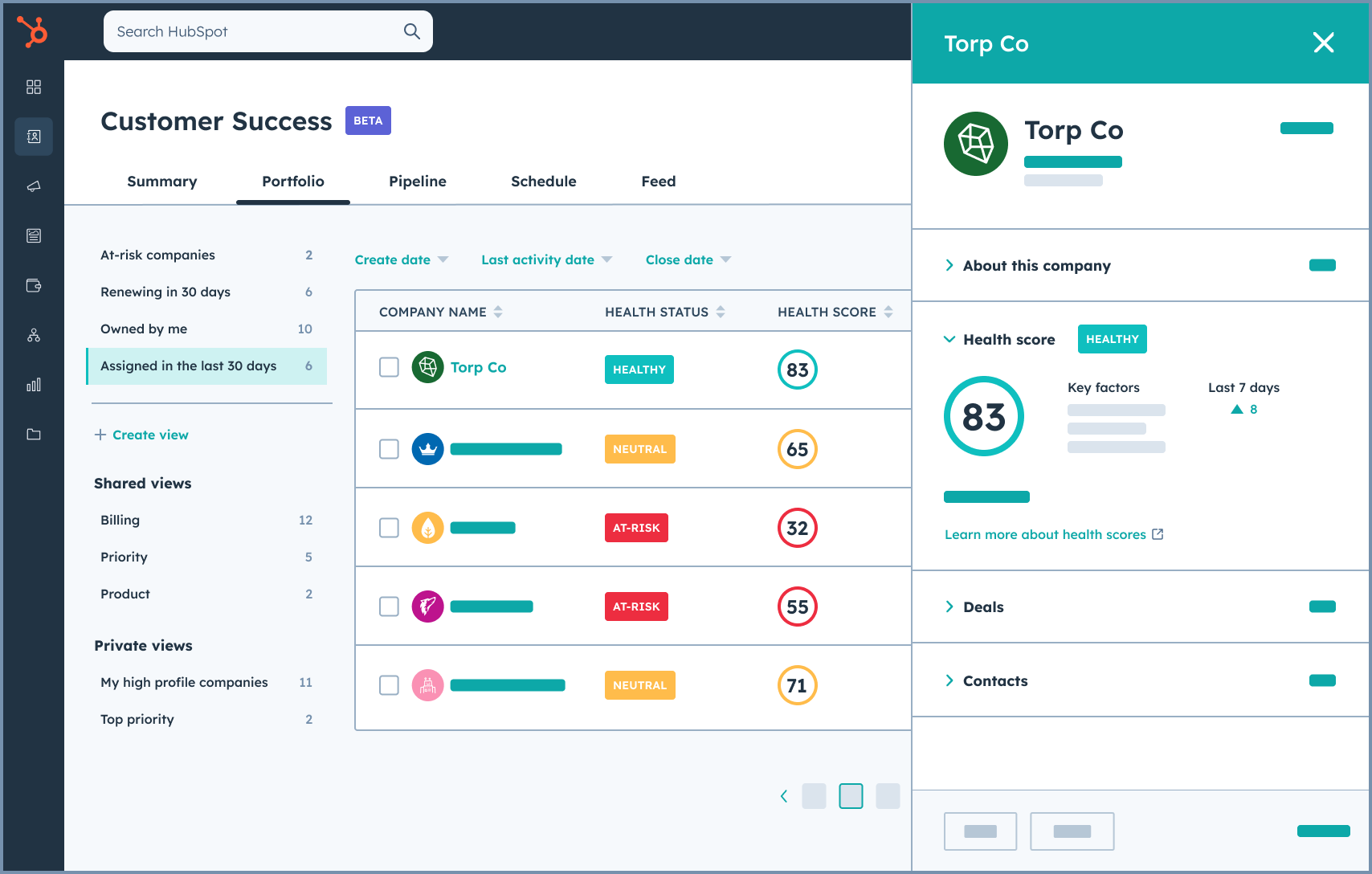
I signed up for the 14-day Service Hub Professional trial rather than HubSpot’s permanent free tools. No credit card was required, and I had a shared inbox receiving tickets in the same session. The trial also gave me access to the Help Desk Workspace and Breeze Customer Agent, so I could evaluate the AI alongside the customer records and ticketing workflow it would actually use.
That distinction matters because Breeze Customer Agent is tied to Professional, not the free tools or Starter plan. I used the trial to connect help content, ask the kinds of questions real customers might send, and see where the agent answered well or needed a human handoff. I would treat those 14 days as the AI evaluation window: first prove whether Breeze can remove enough repetitive work, then decide whether HubSpot’s lower-cost support tools are sufficient or whether Professional is worth the much larger step up.
What does HubSpot Service Hub's free access include?
- Free CRM and basic customer-service tools
- Live chat and basic conversational bots (HubSpot-branded)
- 3 canned snippets, 3 email templates, 10 reporting dashboards
- Ticketing, team email, and a shared inbox
- 14-day Service Hub Professional trial; no credit card
- Professional trial include the Help Desk Workspace, knowledge base, customer portal, and Breeze Customer Agent
When should you upgrade from HubSpot Service Hub free access?
HubSpot leaves a small business with two different upgrade decisions. Starter costs $20/month and includes one Core Seat. It is the lower-cost step when you want to remove HubSpot branding and expand the basic support tools, but it does not include the Breeze Customer Agent, Help Desk Workspace, or knowledge base I tested.
Keeping that AI and advanced service experience means moving to Professional at $100/month per seat on monthly billing, plus HubSpot’s mandatory $1,500 onboarding fee. Professional includes 3,000 HubSpot Credits, and Breeze Customer Agent uses 50 credits per resolved conversation. I would choose Starter when the core CRM and support workflow are enough, and Professional only when the trial shows that Breeze or the advanced workspace can remove enough repetitive work to justify the jump.
Where HubSpot Service Hub genuinely stands out:
- Workflow automation is what G2 small-business reviewers credit most. Ticket routing, status updates, and follow-ups cut manual effort and keep responses consistent, so support quality stops depending on who's at the keyboard.
- G2 reviewers also point to how much context sits behind every conversation. Because tickets live on the CRM record, an agent (human or AI) opens a ticket already knowing the customer's history, past conversations, and deals, without anyone connecting a separate help desk to a separate database.
What G2 users like about HubSpot Service Hub:
"I really like how easy it is to understand and use HubSpot Service Hub. It's very smooth and quick to operate and set up, which makes getting things done much easier. I appreciate that it's user-friendly right from the start without needing a lot of customization. The availability of guides on platforms like YouTube and the HubSpot Academy makes it quick for us to get started with our clients. I also enjoy the centralized system where everything like tickets, conversations, and customer history is in one place; it keeps things organized and increases our productivity since everything is automated now.”
- HubSpot Service Hub review, Nofil M.
Is HubSpot Service Hub right for your small business?
Best for: Small teams already using, or open to adopting, HubSpot CRM that want to test an AI support agent against customer records, tickets, and help content in one connected platform.
Not ideal for: Teams whose first requirement is a permanently free production AI agent or a low-cost standalone help desk. HubSpot’s free tools can cover basic CRM and support work, but Breeze Customer Agent requires Professional and its higher per-seat cost, onboarding fee, and usage credits.
What I dislike about HubSpot Service Hub:
- The trial can set expectations around features that many small teams won’t get on the Starter plan. It shows the value of HubSpot’s more advanced AI support experience, but Starter is still a useful landing point for core help desk tools, simple automation, and a cleaner support workflow before a team decides whether Professional tier is worth the jump.
- What G2 small business reviewers bump into most is its density. Service Hub carries the surface area of a full CRM platform, so first weeks can involve extra clicks between contacts, tickets, and notes, and settings. But that depth is also what makes it better suited to growing support teams. The features a small team ignores at first become useful later for routing, automation, reporting, and customer history.
What G2 users dislike about HubSpot Service Hub:
“The high cost of advanced features and the steep learning curve required to master complex automation and reporting tools.”
- HubSpot Service Hub review, Ayesha N.4. Jotform AI Agents: Best for adding AI intake to forms, phone, and SMS
Jotform AI Agents is the only tool here whose permanent free plan spans chat, voice calls, and SMS, and it approaches support from the intake side. Because the agents sit on Jotform's form platform, they don't just answer questions; they collect structured information, walk people through forms conversationally, and book the appointment while they're at it.
That fits how very small businesses actually experience support: fewer tickets, more can I ask you something before I buy. It carries a 4.5/5 rating across 730+ G2 reviews, and the reviewer base skews exactly this way. Solo operators and tiny teams in real estate, insurance, and local services.
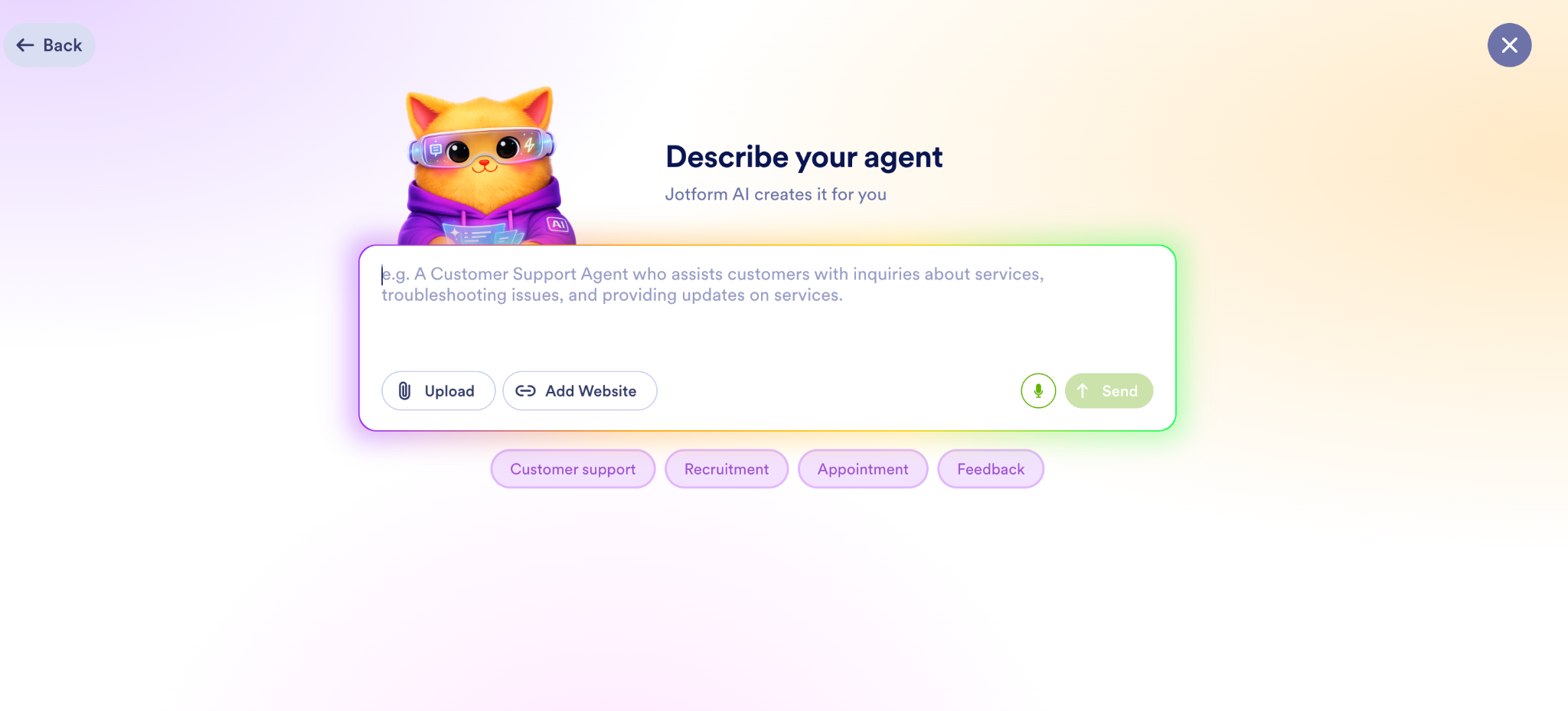
The free plan is the product here. Building my first agent was less configuration than conversation. You hand it your website URL and it scrapes the pages itself, then you refine it by chatting with it, asking questions the way a customer would, correcting what comes back wrong, watching it absorb the fix. Picking a voice and avatar, then embedding the agent with a single line of code, rounds out a setup that reviewers repeatedly describe finishing in one sitting.
What I'd do with the free tier is run it as a live pilot: put the agent on your site for a month and see what share of real visitor questions it fields before a dollar is involved.
What does Jotform AI Agents' free plan include?
- Free forever Starter plan; no credit card required
- 5 AI agents, 100 conversations/month, 10,000 sessions/month
- 50 voice-call minutes and 250 SMS per month
- Training via website scan, document/FAQ upload, and conversational corrections
- Deploys to website chat, phone, SMS, WhatsApp, and Instagram
- Jotform branding; 1 user; standard Jotform form limits apply (5 forms, 100 submissions/month)
When should you upgrade your Jotform AI Agents’ free plan?
The caps are validation-sized, not operation-sized: 100 conversations and 50 voice minutes disappear fast once an agent works. Upgrade when the agent proves it can handle real volume, when branding needs to go, or when phone traffic becomes routine. Bronze runs $39/month and multiplies everything (25 agents, 1,000 conversations, doubled knowledge-base size) with Silver and Gold scaling further for bigger teams or HIPAA needs.
The good part is that the free and paid plans are the same product at different volumes, so what you test is what you buy. Paid plans also come with a 30-day money-back guarantee instead of a separate trial.
Where Jotform AI Agents genuinely stands out:
- Training is genuinely non-technical, and G2 small business reviewers dwell on it more than any feature. The agent learns from a domain scan, uploaded documents, or plain conversation. Several reviewers note it re-scans the site as content changes, so the agent stays current without maintenance becoming a job.
- The channel breadth on a $0 plan is unmatched. The same trained agent answers website chat, speaks on phone calls with selectable voices, replies to SMS, WhatsApp, and Instagram DMs. Reviewers running voice specifically praise letting customers talk instead of type, as several serve clientele who simply won't use a chat widget.
What G2 users like about Jotform AI Agents:
"I like that Jotform AI Agents gives me a professional feeling right from the jump. I also appreciate the ability to train the agent to sound like me, which makes it seem like the agent actually knows the business. It's nice to have the agent available in case someone starts a conversation at 2 am, especially since I'm the sole employee.”
- Jotform AI Agents review, Darian K.
Is Jotform AI Agent right for your small business?
Best for: Solo operators and small teams whose support is really intake (bookings, lead qualification, pre-sales questions) and who want one agent answering across web, phone, and SMS for free.
Not ideal for: Teams that need a real help desk underneath the AI (including ticket pipelines, shared inboxes, SLAs, human agent workflows) or support operations with phone-heavy workflows.
What I dislike about Jotform AI Agents:
- The free caps are sized for proving the concept, not running on it. A hundred conversations can evaporate in a strong week, and there's no way to buy a little more without jumping tiers. But as a permanent, card-free pilot across channels other tools charge for, it's the most generous sandbox in this category, and the $39/month step up is the gentlest here.
- The pattern G2 small business reviewers report most is that answer quality tracks training effort: out of the box, responses can run generically, guess too confidently, or loop on linked forms until you've invested in instructions and knowledge sources. The redeeming part is that the correction loop is the product's best feature, you fix misses by chatting with the agent, and reviewers consistently describe accuracy climbing week over week.
What G2 users dislike about Jotform AI Agents:
"The only downside would be the need to thoroughly train the AI Agent, as doing so solo takes time and care. However, due to ChatGPT and now Claude AI integrations, this is a breeze!"
- Jotform AI Agents review, David F.
Related: Need support conversations across chat, SMS, and messaging? Compare the best conversational support software for keeping context across customer touchpoints.
5. Retell AI: Best for building custom AI voice agents
Retell AI focuses on phone calls, though it also offers chat agents, and that focus shows in the highest rating here with a 4.8/5 rating across 2,600+ G2 reviews. For a small business, this is the tool for a specific kind of pain: the clinic, real-estate office, or home-services company whose front door is a phone number, where every missed call while you're with a customer is a booking that went elsewhere.
It's a build platform rather than a help desk. You compose an agent from a prompt or a visual conversation flow, wire it to a phone number, and pay by the minute for the calls it handles. The thing its reviewers rave about on G2 is the part voice AIs usually get wrong: conversations that don't feel robotic, with response times fast enough that callers don't hit those awkward AI pauses.
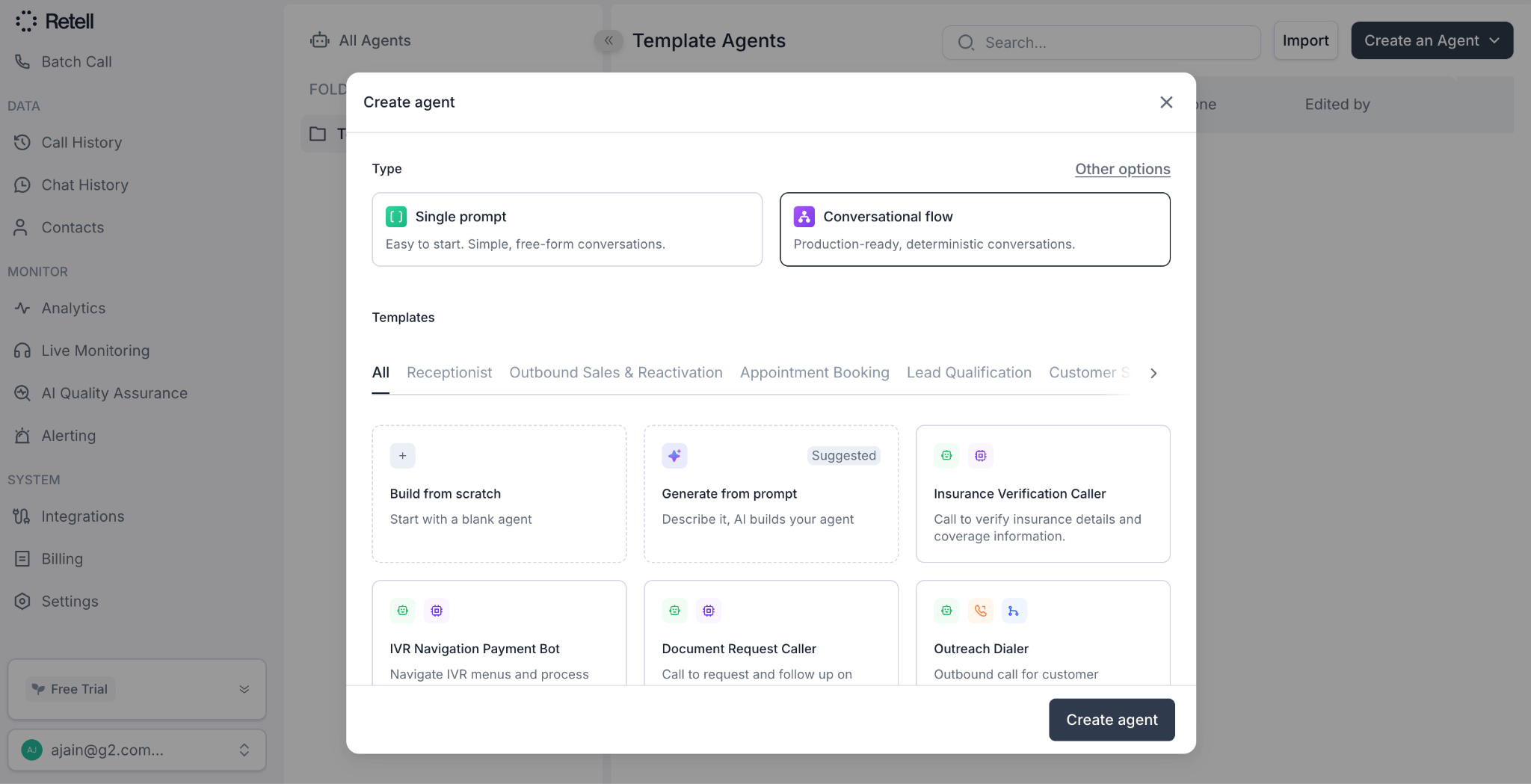
Retell AI was easy to start. I signed up without a credit card, received $10 in free credit, and could test with up to 20 concurrent calls, meaning the agent could handle multiple phone conversations at once. The pay-as-you-go tier gives you full access to build and test agents, while enterprise controls and support sit separately. I’d use the credit on one realistic call flow, like appointment booking, order status, or lead qualification, then call the agent several times and push it off-script to see how well it holds up.
The builder makes the setup path clear. You can start with a single-prompt agent for simple, free-form conversations, build a more structured production flow, use templates for receptionists, appointment booking, or lead qualification, or describe the agent and let AI draft it. Based on typical per-minute rates, the $10 credit should cover roughly an hour of testing, and the pricing estimator helps break down model, voice, and telephony costs so you can understand what the agent would cost once live.
What does Retell AI’s free plan or trial include?
- $10 one-time credit at signup; no credit card required
- Full platform access and no features are locked behind paid tiers
- Single-prompt agents and a visual conversation-flow builder
- 20 concurrent calls, first 10 knowledge bases, and first 100 minutes of AI quality-assurance monitoring free
When should you upgrade from Retell AI’s free plan or trial?
There's no subscription to buy: when the $10 runs out, the same account simply starts metering. Voice calls run $0.07–$0.31 per minute all-in depending on the model and voice stack. Phone numbers purchased through Retell's built-in telephony cost $2/month, bringing your own numbers via custom telephony carries no charge, and extra concurrency or knowledge bases are add-ons. The real decision isn't whether to upgrade but whether per-minute economics fit your call volume.
Where Retell AI genuinely stands out:
- Call quality is its moat as per G2 small business reviewers. Voices sound natural, responses come back fast, and conversations survive interruptions and topic shifts without the stilted turn-taking that makes callers hang up on most phone bots.
- The flow builder spans skill levels. A single prompt gets a working agent for simple cases, while structured visual flows handle controlled environments. A few reviewers describe building for different industry settings, including healthcare, and call the visual method the best of any voice-agent platform they've used.
What G2 users like about Retell AI:
“I like how easy it is to build AI voice agents with Retell AI. The workflow builder is intuitive, and the voice sounds natural, which makes creating AI phone agents for real estate and dental clinic use cases a breeze. The integrations are very useful and save a lot of development time. I also found the pricing to be more transparent, and had a better overall experience getting started. The setup was easy because the interface is intuitive and easy to navigate.”
- Retell AI review, Bellal A.
Is Retell AI right for your small business?
Best for: Businesses where the phone is the front door (say clinics, real estate, home services) and teams (or the agencies serving them) willing to build and tune a custom voice agent.
Not ideal for: Anyone wanting a plug-and-play receptionist without design work, or support that lives in chat and email. Retell's chat agents exist, but voice is the product.
What I dislike about Retell AI:
- The free credit is enough to test Retell AI, but not enough to keep an agent running long term. Once the $10 credit is used, there is no recurring free allowance, so even a low-volume live agent moves into paid usage. The upside is that the free access feels like a real product test rather than a limited demo. Teams can evaluate the full workflow before going live on usage-based pricing.
- The pattern in G2 small business reviews is that depth costs time. Advanced customization and workflow debugging take real learning, and reviewers wish for more ready-made industry templates to shortcut the build. For straightforward call flows, though, the single-prompt path stays genuinely simple and reviewers repeatedly note how fast the team ships improvements.
What G2 users dislike about Retell AI:
“While the platform is powerful, some advanced customizations and workflow debugging can take time to fully understand in the beginning. There’s a learning curve when trying to fine-tune conversations for more complex use cases.”
- Retell AI review, Shyam A.6. Salesforce Agentforce: Best for prototyping agents on CRM data
Salesforce Agentforce's advantage is structural. The agents run inside the system of record instead of alongside it. Where other tools read help articles, an Agentforce service agent reads the customer's actual case history, updates records, triggers flows, and hands a conversation to a rep with the full thread attached because it lives on the same platform as the data.
For a small business, that matters in one specific situation: you already run your customers through Salesforce, your case history is your knowledge, and you'd rather put an agent on top of what you have than train a separate tool from scratch. That's the recurring thread through its 4.3/5 rating across 1200+ G2 reviews, where reviewers describe agents that do logging, summarizing past cases, and executing workflow steps rather than a chat window that answers questions about them.
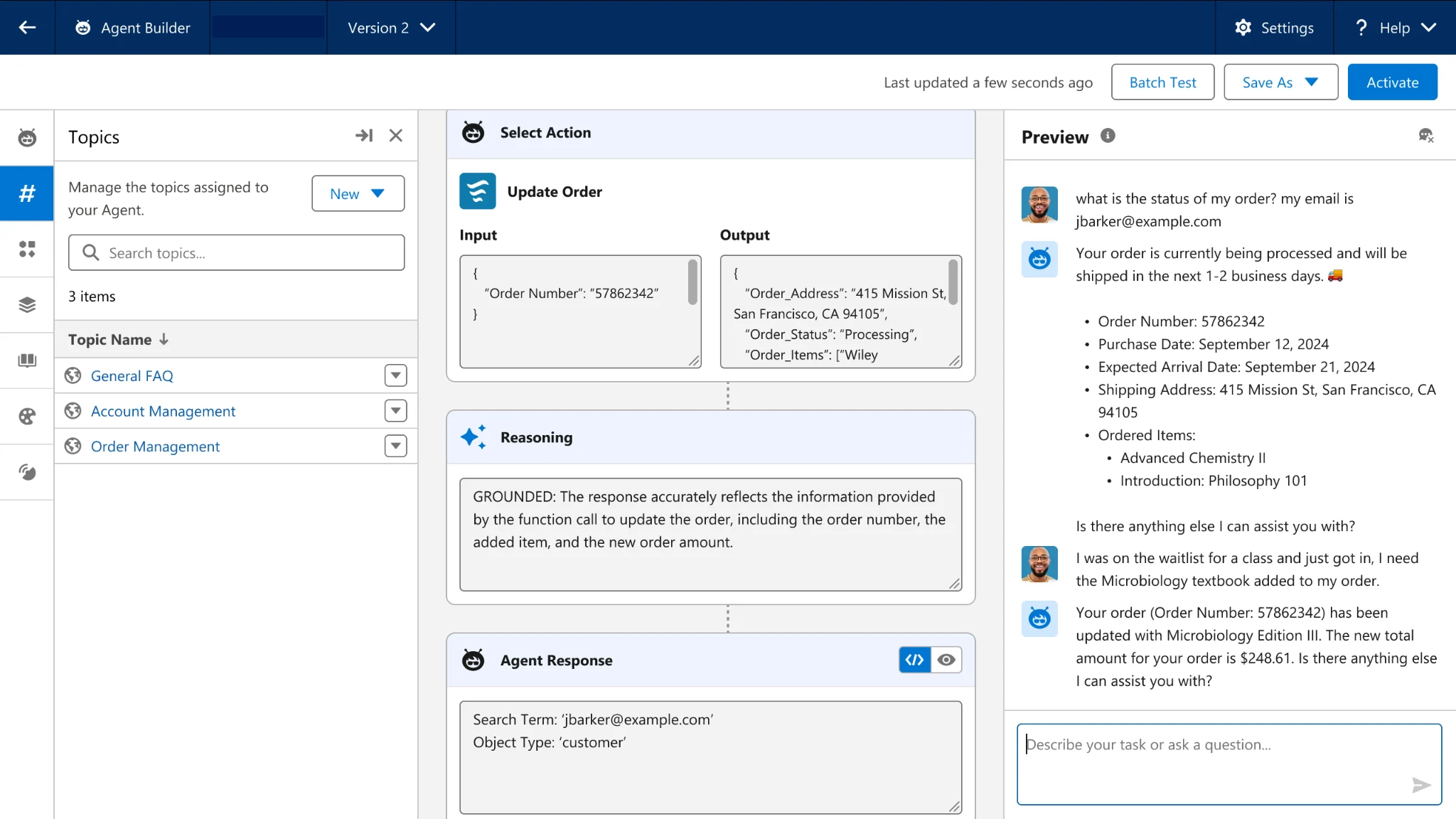
Signing up dropped me into a 30-day trial org with no credit card: a countdown that's worth understanding before you invest the setup effort. This is a time-boxed evaluation environment, not a free plan. The perpetual $0 path, Salesforce Foundations, exists only for businesses already paying for Enterprise Edition or above.
I'd spend the trial window on one narrow, real use case, say a service agent answering your top five case types. This will help learn the two things that matter: whether the Agent Builder is workable for your team, and what an action-based bill (pricing model it works on) would look like at your volume. G2 reviewers are consistent that the setup requires quite some involvement and results track the quality of the knowledge and data you feed it.
What does Salesforce Agentforce’s free plan or trial include?
- 30-day free trial, no credit card required
- Agentforce Builder, Prompt Builder, and prebuilt agent skills (Service Agent, Sales Agent)
- $0 Foundations add-on for eligible existing Salesforce organizations, with included Flex Credits for testing; limits and regional eligibility apply
- Credits are one-time, not monthly; overage fees apply once spent
When should you upgrade from Salesforce Agentforce’s free plan or trial?
Upgrade when the trial proves Agentforce can handle enough real work to justify usage-based pricing. After the trial, Salesforce gives you two main consumption options for Agentforce: Flex Credits or Conversation pricing. Flex Credits cost $500 per 100,000 credits, where a standard action uses 20 credits, or about $0.10 per action. Conversation pricing is simpler at $2 per customer conversation. Choose one: Salesforce says Flex Credits and conversation pricing cannot be used in the same org.
The $5/user/month Agentforce User License you may see is an access license, not a plan: usage still needs credits on top. For teams not already on Salesforce, the bigger entry cost is the Salesforce environment underneath because Agentforce is an add-on to the Salesforce stack, not a standalone support tool.
Where Salesforce Agentforce genuinely stands out:
- G2 small business reviewers consistently describe agents that act rather than answer: updating records, handling cases, triggering flows and automations, fetching from connected data sources.
- It can keep more routine work out of the human queue. G2 reviewers describe routing high volumes of routine inquiries through agents while topics, instructions, and the trust layer keep responses inside set boundaries. Several appreciate the automation it offers with more governance than many lighter tools.
What G2 users like about Salesforce Agentforce:
"I use Salesforce Agentforce to automate customer support, RFQ generation, and streamline sales workflows. What I value most about Salesforce Agentforce is its deep integration with the Salesforce ecosystem, which allows AI agents to access real-time CRM data and work seamlessly across tools like Sales Cloud, Service Cloud, and Slack. The autonomous task execution is a major advantage because the agents can not only assist users but actually perform actions like updating records, routing cases, and automating workflows. I also appreciate the low-code agent creation, which simplifies the process for me.”
- Salesforce Agentforce review, Namita A.
Is Salesforce Agentforce right for your small business?
Best for: Businesses already running Salesforce, especially Service Cloud, that want AI agents working directly on their existing customer records, cases, and workflows.
Not ideal for: Anyone not on (or planning to buy) Salesforce, teams without admin capacity for configuration work, or simple support use cases where this much platform is more overhead than leverage.
What I dislike about Salesforce Agentforce:
- Agentforce is not a standalone AI support tool. It works inside an existing Salesforce setup, and the free Foundations access is mainly useful for teams already inside that ecosystem. For existing Salesforce customers, though, the included credits make it a meaningful way to test AI agents on real workflows before paying.
- Setup takes more than building a simple bot. G2 reviewers mention data, permissions, knowledge articles, and Salesforce terminology as part of the ramp, but many say performance is reliable once configured.
What G2 users dislike about Salesforce Agentforce:
“Pricing is where organizations need to evaluate carefully. Agentforce and related AI capabilities can add to overall Salesforce costs, so the ROI depends on how effectively you leverage these features. If used well — like improving lead conversion or automating decision-making—the investment can be justified, but it may feel expensive for smaller teams or limited use cases. My present company has taken Agentforce, but my previous company, which was smaller, did not buy an Agentforce license because of the high cost involved.”
- Salesforce Agentforce review, Banrrjee S.7. Zendesk for Customer Service: Best for scaling AI agents across omnichannel help desk
Zendesk’s value proposition is the one thing lighter tools can't imitate: every channel (email, chat, voice, WhatsApp, social) lands in one ticket, in one workspace, with AI now woven through the whole pipeline rather than bolted on. For a small business, that matters at a specific moment: when support stops being "the founder answers everything" and becomes a function with a shared phone number, a help center, maybe a first dedicated hire.
On G2, it has a 4.3/5 rating based on 6,990+ reviews, and the recurring praise is scale in both directions: running 24/7 support in twelve languages on it, then using the same product as a jumping-off point for a small 2-person team.
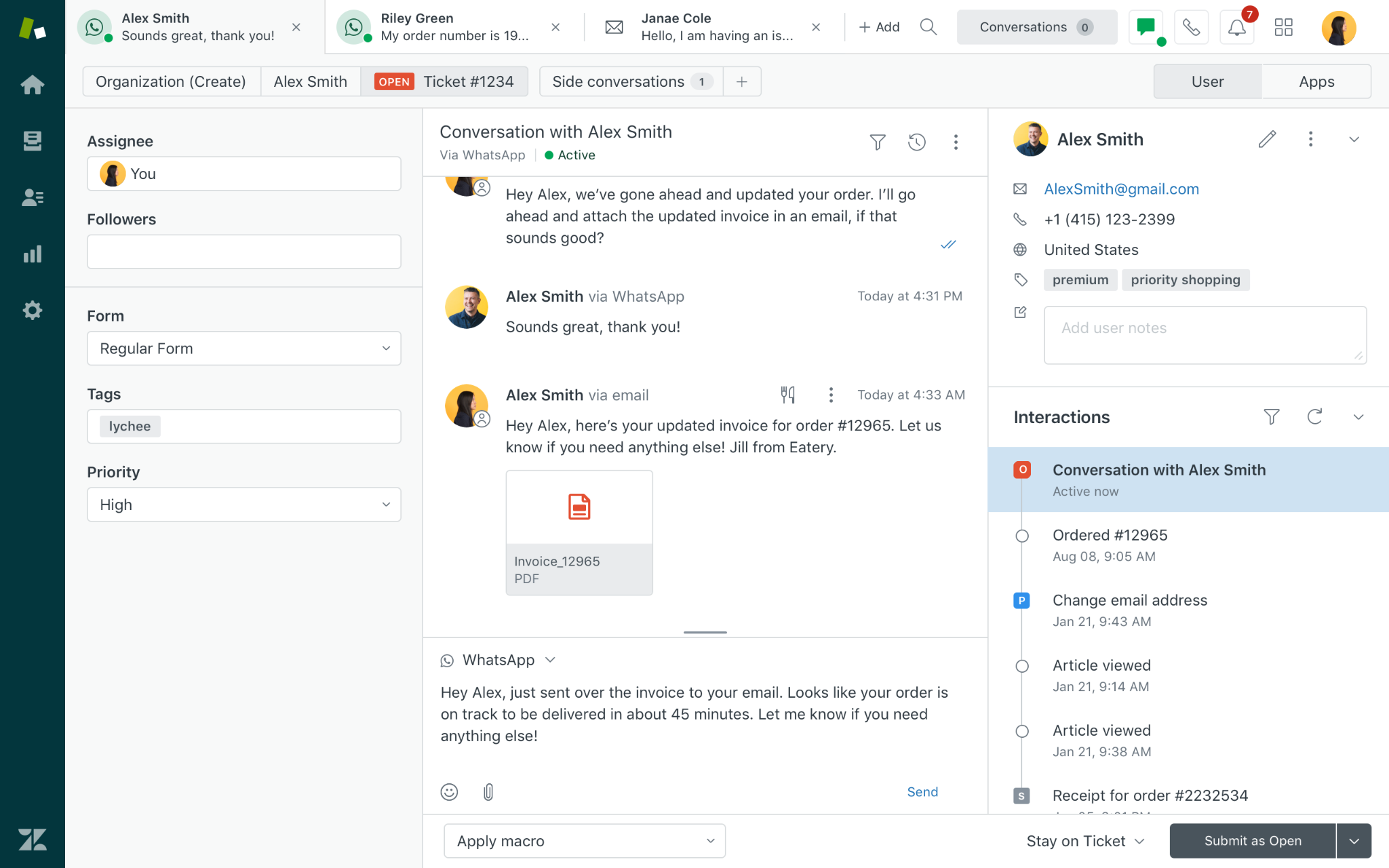
Signing up took an email address and no credit card, and I landed in a fourteen-day trial of the Suite Professional tier, with Copilot's assist features already on. I'd run two tests at once. The first is the AI test: connect your help center, switch AI agents on for email and chat, and watch the automated-resolution count climb, because that's the meter Zendesk eventually bills on. The second is the budget test: the trial puts you two tiers above what a small team is likely to buy, so each time a feature earns its place in your workflow, check whether it exists at Suite Professional or Suite Team, the starting paid tier a small team is actually likely to buy. Zendesk also grants a one-time trial extension if you ask, and small teams should two weeks is tight for this much surface area.
If you're an early-stage startup, check one thing before starting any clock: the Zendesk for Startups program, which gives qualifying companies six months of the Suite free for up to 50 agents, turning a two-week test into half a year of running real support before paying.
What does Zendesk for Customer Service’s free plan or trial include?
- 14-day free trial; no credit card required
- Runs on Suite Professional: omnichannel ticketing (email, chat, voice, messaging), AI agents, help center, analytics
- Copilot add-on (agent-assist AI) included in the trial by default
- One-time trial extension available on request
- Zendesk for Startups offers 6 months of the Suite free for up to 50 agents. Eligibility: new Zendesk customers under 250 employees, funded no later than Series B (bootstrapped qualifies)
When should you upgrade from Zendesk for Customer Service free plan or trial?
Upgrade when the trial proves Zendesk’s AI can resolve real questions from your help content and your team is using the support workflow daily. After the trial, the main choice is between ticketing-first Support plans and the fuller Suite plans. Support starts at $25/agent/month (called Support Team) but doesn’t include the AI agents or chat experience you trialed, while Suite Team starts at $69/agent/month and is the more realistic floor for AI agents, knowledge base, omnichannel routing, live chat, and telephony. The trial runs on Suite Professional at $149/agent/month, so expect some advanced tools to sit even higher than Suite Team, and budget separately for extra AI-resolved conversations beyond the bundled allowance. For eligible startups, the six-month free period simply moves the decision later and gives you better resolution data before you pay.
Where Zendesk for Customer Service genuinely stands out:
- Zendesk keeps every customer conversation in one thread, even when someone switches from email to phone, chat, or social. G2 small-business reviewers value that unified view because it makes multi-channel support easier to manage.
- Its AI supports both deflection and agent productivity. AI agents answer common questions from help-center content, while Copilot and macros help human agents move faster on the tickets that still need them.
What G2 users like about Zendesk for Customer Service:
“I use Zendesk for Customer Service for both external customer interactions and internal support. I really like the ability to track requests and respond in a timely manner. The ease of use is a huge advantage, allowing anyone to manage it even if they do not have an IT background. I also really like using macros and Copilot to shorten our response times and provide consistency. Setting up Enterprise accounts is super easy as a partner, usually within 30-45 days.”
- Zendesk for Customer Service review, Dustin S.
Is Zendesk for Customer Service right for your small business?
Best for: Small businesses building a support operation (multiple agents, channels, and accountability) that want infrastructure they won't outgrow, with AI agents included at every tier.
Not ideal for: Solo founders and very small teams on tight budgets or teams that want plug-and-play systems running in a day.
What I dislike about Zendesk for Customer Service:
- The trial runs on a higher tier than what many small teams may buy next. It runs on Suite Professional, while the lower Support plan is more ticketing-focused. Still, the trial is useful because it shows whether Zendesk’s AI and support setup work on your actual content before you choose a plan.
- Zendesk’s admin setup takes time. G2 reviewers say the agent workspace is easy, but triggers, SLAs, views, routing, and phone setup need careful configuration. For growing support teams, that setup pays off once Zendesk starts routing and organizing work in the background.
What G2 users dislike about Zendesk for Customer Service:
"Admin learning curve is steep; building filters, business rules, macros, SLAs, conditional triggers etc. can take a long time to implement. On an enterprise level, it requires even deeper knowledge.”
- Zendesk for Customer Service review, Emily I. G.
Who should use free AI Customer Support Agents Software for small businesses?
Founders, solo operators, and small teams still answering repeat customer questions themselves. If the same questions keep coming through your website, chat, social DMs, or phone (on shipping, pricing, bookings, returns, availability, or basic troubleshooting) a free plan gives you a low-risk way to train an agent on your FAQs, policies, and website content before paying.
It’s especially useful when you don’t yet know whether AI will work for your customers. The goal isn’t to run support forever on the free tier; it’s to find out which questions the agent can answer correctly, where it needs human handoff, and whether customers are comfortable using it.
When does free stop being enough?
Free stops being enough when the limits start shaping the customer experience. That usually happens when the agent runs out of conversations or voice minutes mid-month, vendor branding starts to feel unprofessional, customers need locked channels like WhatsApp or phone, or a second teammate needs access to conversations, analytics, or handoff rules.
But the better upgrade trigger is proof, not frustration. Once the agent has handled real customer questions, you can look at its resolution rate, the types of questions it answers well, and the time it saves your team. If the paid plan costs less than the hours it gives back, or helps you cover support when no one is available, the upgrade becomes easier to justify.
Frequently asked questions about free AI customer support agents software for small businesses
Got more questions? G2 has the answers!
Q1. Which AI customer support software has the best balance of automation quality and affordable pricing?
Jotform AI Agents offers the friendliest quality-to-cost curve: a permanent free tier for 100 conversations a month, then a flat $39/month, with G2's highest satisfaction score in the AI customer support agents category. Fin is the performance pick: its 14-day Fin and Intercom trial includes unlimited outcomes, and paid usage starts at $0.99 for a resolution or configured procedure handoff.
Q2. What's the best AI customer support platform for small SaaS teams needing fast setup and omnichannel coverage?
Fin fits small SaaS teams best. It trains on your existing help center, answers across chat, email, and messaging, and its no-card 14-day trial sets up in a session. Zendesk's Suite trial is the alternative when you need a full help desk underneath the AI, at the cost of more configuration.
Q3. What are the most reliable AI customer support tools based on real user reviews from small SaaS companies?
Retell AI holds this lineup's highest G2 rating (4.8 across 2,600+ reviews), with software and IT companies its largest reviewer industries, for voice agents. Fin is the most-validated chat option at 4.5 stars across 3,800+ reviews. Both are verifiable free: Retell through $10 in credits, Fin through an uncapped trial.
Q4. Which AI support agents have the most accurate responses and lowest rate of wrong answers?
No AI agent eliminates wrong answers; what differs is control over them. Salesforce Agentforce enforces the strictest boundaries through topics and its trust layer, while Fin's snippets and guidance make corrections fastest — reviewers report misfires declining over time. Across every tool here, accuracy tracks the quality of the help content you train it on.
Q5. Which AI support tools have the most predictable and affordable pricing for small support teams?
Jotform AI Agents is the most predictable: a free tier for 100 conversations a month, then a flat $39/month billed monthly ($34/month annually) with no usage meters. HubSpot Service Hub keeps entry costs flat and seat-based at $20/seat/month billed monthly ($15 annually), though its AI agent bills per resolved conversation at the Professional tier. Per-outcome (Fin) and per-minute (Retell AI) models stay affordable but move with volume.
Q6. Which AI customer support agents integrate most reliably with existing helpdesks?
Fin is built for exactly this: it runs directly on Zendesk, Salesforce, or Intercom, reading their knowledge and resolving tickets without migration. With an existing help desk, there are no Fin seat fees; pricing is $0.99 per outcome with a 50-outcome monthly minimum (roughly a $50/month floor). Its agents work inside your existing cases and records rather than integrating from outside.
Q7. What's the best AI customer support software for omnichannel support with voice and chat automation?
Zendesk unifies voice and chat automation most completely for small teams: Suite Team at $69/agent/month puts AI agents, telephony, live chat, and messaging on one ticket record. Jotform AI Agents is the free-plan route, with one agent answering web chat, phone (50 free minutes monthly), SMS, and WhatsApp — while Genesys Cloud CX is the step up to a full contact center, with native voicebots, agent copilots, and analytics on one platform from $75/user/month.
Q8. What are the best AI customer support tools for omnichannel coverage across chat, email, and messaging without complex setup?
Fin delivers chat, email, and messaging coverage with the least configuration. It learns from help articles and past conversations rather than flows you build. HubSpot Service Hub is the CRM-connected alternative. Its permanent free tools cover basic chat, ticketing, and customer records, while the Breeze Customer Agent I tested requires the Professional tier.
Q9. What are the best AI customer support agents for small SaaS teams that need to automate repetitive queries?
Fin automates the repetitive layer best for SaaS teams: it triages "how-to" questions so humans only see tickets that need them. Zendesk's AI agents are the alternative inside a full help desk, resolving common questions from existing help-center content on every Suite plan.
Start with the repeat, not the platform
You don’t need all seven software, and you don’t need to automate your entire support operation at once. Start with the question or task that keeps returning: an order-status query, an appointment request, or a call that always needs routing. A small ecommerce store answering shipping questions needs a different setup from a clinic handling phone bookings or a SaaS team escalating technical issues.
My recommendation: give one tool one narrow job and test it with 20 to 30 questions taken from real chats, emails, or calls. Record what it answers correctly, where it guesses, when it hands off, and how much context reaches the person taking over. Then calculate what that same usage would cost after the free plan, trial, or starter credits end.
That is the proof worth paying for. When an agent consistently removes repetitive work without creating corrections, apologies, or missed customers, it has earned the upgrade. Until then, keep the test small and the human close.
Once your shortlist is ready, turn to the information behind the agent. G2’s guide to AI knowledge bases can help you organize your FAQs, policies, and help content to connect your knowledge to your customer support channels.