
Siemens Digital Industries Software
- 103 profiles
- 73 categories
Siemens Digital Industries Software Solutions
Discover ready-made solutions that bring related products, reviews, and resources together in one place.
Featured Products

All Products & Services
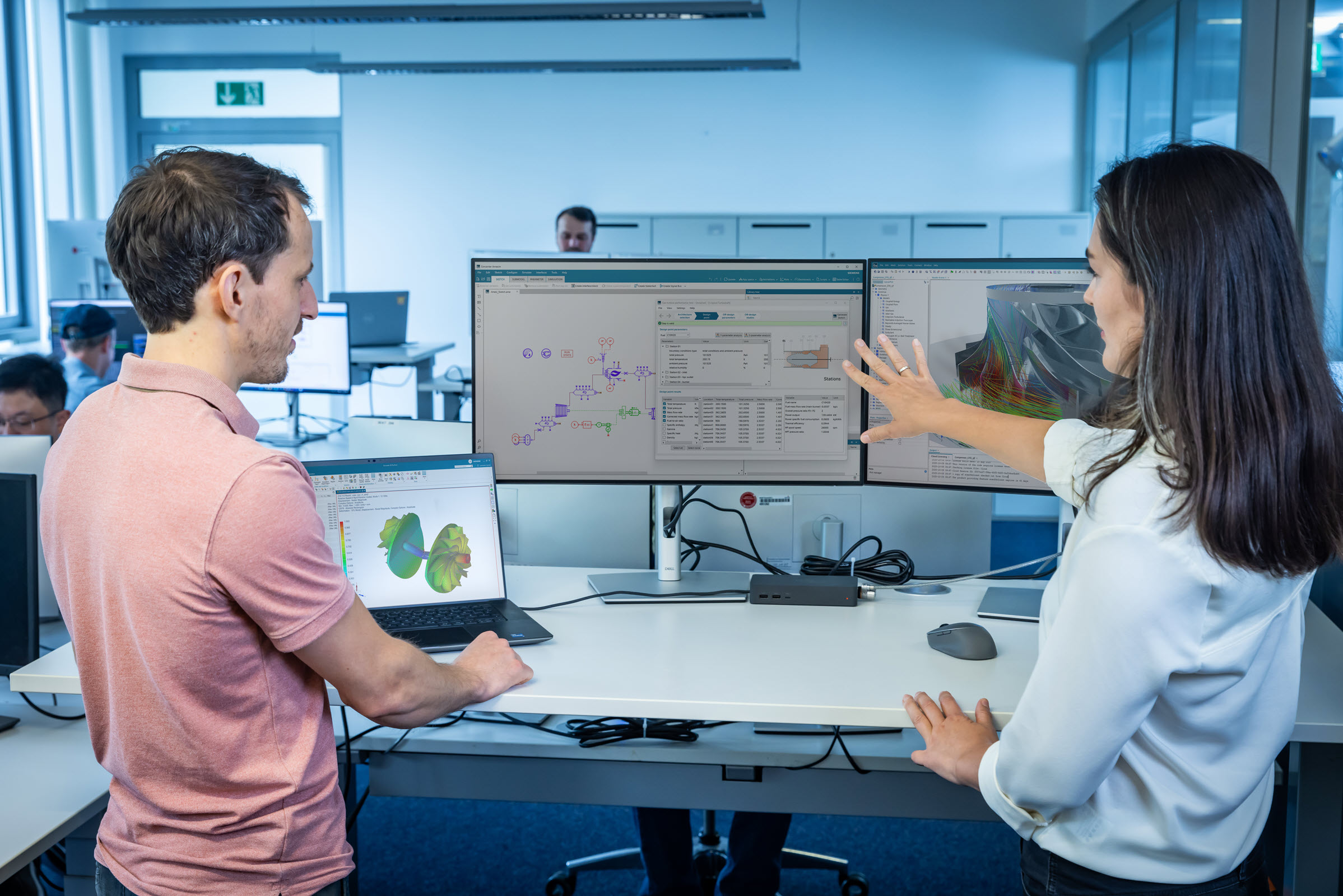
Simcenter PhysicsAI is a simulation acceleration solution from Siemens Digital Industries Software that leverages AI surrogate models trained on high-fidelity simulation data to help engineering teams explore design spaces in real time. Compared with traditional solver-based simulations, it can provide accelerated data-driven insights at a fraction of the time — in some cases up to 1,000x faster. At the core of Simcenter PhysicsAI is geometric deep learning (GDL) technology, which operates directly on meshes and CAD geometries without requiring manual feature engineering. This enables the software to learn complex relationships between shape and physical performance across multi-physics domains - including structural mechanics, computational fluid dynamics (CFD), thermal, electromagnetic and manufacturing analysis. Using data from Siemens and third-party solvers, engineers train AI models from either existing simulation data or new data generated through design of experiments (DOE) studies. Built-in validation tools and error metrics ensure these models accurately capture physical performance trends, giving engineers the confidence to make critical design decisions before predicting the performance of previously unseen geometries. Simcenter PhysicsAI supports a no-code, intuitive workflow that democratizes AI-powered simulation across multidisciplinary engineering teams, making advanced AI capabilities accessible without requiring deep expertise in machine learning or data science. It integrates seamlessly within the Simcenter portfolio - including Simcenter STAR-CCM+, Simcenter Hypermesh, Simcenter Simlab, and Simcenter Inspire - fitting naturally into existing engineering workflows without disruption. Simcenter PhysicsAI is built for simulation engineers, CAE analysts, design engineers, and data scientists working across industries where engineering performance, product reliability, and time-to-market are critical. It is particularly well-suited for organizations that already run large volumes of high-fidelity simulations and want to leverage that data investment to build scalable AI-driven workflows. By shifting early-stage screening from computationally intensive solver runs to AI inference, organizations can accelerate innovation while significantly reducing engineering costs.

Altair Flow Simulator is a comprehensive 3D design tool that facilitates interdisciplinary modeling and optimization of fluid and thermal systems within a CAD-integrated environment. Originally developed by GE Aviation to simulate complex gas turbine applications, it now supports a wide range of industries, including electromobility, renewable energy, and electronics design. The software enables engineers to perform system-level simulations, from initial concept modeling to in-depth analysis, ensuring efficient product development cycles. Key Features and Functionality: - Fully Coupled Flow and Thermal Network Modeling: Offers an extensive library of preconfigured elements and components, utilizing publicly available experimental data for accurate pressure drop and heat transfer characteristics. - Intuitive Interface: Provides a modern, user-friendly interface that integrates seamlessly with 3D CAD environments, allowing for efficient modeling, optimization, and post-processing. - Control System Module: Incorporates proportional-integral-derivative controllers and feedforward mechanisms, enabling optimization of machine operations during cycle or mission analyses. - Optimization Module: Utilizes Monte Carlo, Optimal Latin Hypercube, and N-factorial analyses to explore the entire design space, facilitating cost-effective and efficient design solutions. - User-Defined Elements: Allows integration of custom intellectual property and element formulations through flexible Python scripting and Fortran language support, enhancing adaptability to specific project requirements. Primary Value and Problem Solving: Altair Flow Simulator addresses the need for efficient and accurate system-level simulations in complex fluid and thermal systems. By providing a multidisciplinary, multiphysics, and mixed-fidelity approach, it enables engineers to rapidly iterate designs, understand system behaviors, and optimize performance without leaving their familiar CAD environment. This leads to faster product development, reduced costs, and improved system reliability across various applications, including turbomachinery, energy systems, and mobility solutions.

Altair HyperStudy is a multidisciplinary design exploration and optimization software that empowers engineers and designers to enhance product performance and robustness. By integrating advanced mathematical methods, predictive modeling, and data mining techniques, HyperStudy efficiently navigates the design space of any system model. Its intuitive user interface, combined with seamless integration into Altair's HyperWorks platform, makes design exploration accessible even to non-experts. Key Features and Functionality: - Multidisciplinary Optimization: Supports optimization across various domains, including structural, electromagnetics, computational fluid dynamics , thermal, and multi-body dynamics, facilitating comprehensive product development. - Solver-Neutral Open Environment: Seamlessly integrates with Altair simulation solutions and interfaces with third-party tools, allowing flexible and efficient design studies. - Data Mining Tools: Offers extensive post-processing and data-mining capabilities to help engineers quickly understand complex design problems and explore large datasets. - Guided Process: Provides a step-by-step process for study definition and results analysis, enhancing usability with features like reports and archives. - Automatic Data Generation: Automatically creates intelligent design variants, manages runs, and extracts results, supporting multi-execution solver runs and leveraging Altair's high-performance computing solutions. - Proven Mathematical Methods: Utilizes design of experiments, response surface modeling, and optimization techniques suitable for large finite element analysis models, with machine learning capabilities from imported or collected data. Primary Value and Problem Solved: HyperStudy enables engineers to improve product performance by delivering lighter, safer, and more cost-effective products while reducing development time. It increases productivity and return on investment by guiding multidisciplinary teams to gain insights from simulations and testing data, leading to optimal design solutions. By facilitating smart and efficient design space exploration, HyperStudy reduces trial-and-error iterations, saving time throughout the entire design process.
Give traders, quants, and compliance officers the tools to build and deploy their own monitoring and analysis systems without writing a single line of code.
Altair Access is a user-friendly high-performance computing job submission portal designed for engineers and researchers. It offers a consistent interface for submitting and monitoring jobs on remote clusters, clouds, and other resources, enabling users to concentrate on their core tasks without the need for extensive IT knowledge. The platform's remote visualization and collaboration features provide direct access to high-end 3D visualization hardware, facilitating efficient data analysis and teamwork from any location. Key Features and Functionality: - Easy-to-Use HPC Portal: Provides a straightforward interface for job submission and monitoring, accessible via web, desktop, or mobile devices, eliminating the need for specialized IT skills. - Remote Visualization: Enables users to view and interact with job data and 3D visualizations from any device, reducing the necessity to transfer large datasets. - Rapid Collaboration: Facilitates seamless collaboration by allowing remote colleagues to share session views and controls across wide area networks . - Optimized Resource Management: Integrates with Altair® PBS Professional® to ensure efficient application provisioning and maximum utilization of computing resources. - Zero Data Movement: Transfers only pixels during remote visualization sessions, eliminating the time-consuming process of moving large data files. - Resiliency: Maintains continuity of remote application sessions even during network connectivity disruptions. - Open Architecture: Supports third-party applications without requiring additional software development, offering flexibility in various workflows. Primary Value and Problem Solved: Altair Access streamlines the process of HPC job submission and monitoring, allowing engineers and researchers to focus on their primary work without being hindered by complex IT procedures. Its remote visualization and collaboration capabilities enable efficient teamwork and data analysis from any location, reducing the need for physical presence or extensive data transfers. By integrating with resource management tools and supporting third-party applications, Altair Access enhances productivity, optimizes resource utilization, and ensures a seamless user experience across various platforms.

The Altair® Unlimited™ Data Analytics Appliance is a comprehensive, ready-to-use solution designed to streamline and enhance enterprise-wide data analytics and AI initiatives. This pre-built and pre-configured appliance integrates powerful software tools, including the Altair SLC™ SAS language compiler and execution environment, Altair Analytics Workbench®, and Altair SLC Hub™, enabling users to run programs written in SAS language syntax without translation or the need for third-party licenses. It offers an intuitive coding environment ideal for developing models and programs in the SAS language, complemented by centralized governance and deployment services that cover every step of the data analytics lifecycle. Key Features and Functionality: - Altair SLC™: Executes programs written in SAS language syntax directly, eliminating the need for translation or third-party products, thereby reducing capital and operational expenses. - Altair Analytics Workbench®: Provides a unified platform for connecting, preparing, discovering, and modeling data, featuring a drag-and-drop interface that allows integration of Python, R, and SQL code into SAS language programs without additional licensing requirements. - Altair SLC Hub™: Offers centralized governance and deployment services, enabling organizations to control access to data sources and deployed applications, store audit logs of user actions, and empower users to manage tasks traditionally handled by IT and DevOps teams. - Altair Access: Delivers a consistent interface for submitting and monitoring jobs across various platforms, including Altair Unlimited, remote clusters, and clouds, facilitating easy access to high-performance computing resources without requiring IT expertise. Primary Value and User Solutions: The Altair Unlimited Data Analytics Appliance addresses the challenges organizations face in managing complex data analytics infrastructures by providing a turnkey solution that combines software, system administration, and infrastructure-as-a-service into a single, intuitive unit. It enables enterprises to transition from costly hardware and software solutions built around the SAS language to a modern, cost-effective platform. By offering unlimited access to Altair's data analytics and machine learning software, it empowers users to develop and run multi-language data analytics solutions, including those written in the SAS language, fostering enterprise-wide, data-driven strategies that drive competitive advantages and next-level business results.

Buymanager assists its customers with a full suite of dedicated modules for electronic procurement to help meet new purchasing challenges such as strategic sourcing, digitalisation of communications with suppliers or capitalisation of procurement databases.
Altair® FlowTracer™ is an advanced platform designed for developing, visualizing, and executing complex design workflows. It enables users to create, manage, and optimize design flows across various applications, including semiconductor design, algorithm evaluation, software development, and artificial intelligence and machine learning workflows. By analyzing and identifying inherent parallelism within these workflows, FlowTracer optimizes the utilization of compute resources both on-premises and in the cloud. Its unique tracing technique manages dependencies between files and tools by interacting with them during execution, ensuring accurate and efficient flow management. Key Features and Functionality: - Flow Visualization and Analysis: Provides comprehensive visualization of complex workflows, allowing users to identify and analyze dependencies and parallelism within their design flows. - Real-Time Reporting: Features a powerful Grid View report that displays the results of millions of running jobs, highlighting failing jobs for quick identification, debugging, and resolution. - Dependency Management: Utilizes a unique tracing technique to manage dependencies between files and tools by interacting with them during execution, ensuring accurate and efficient flow management. - Parallel Execution: Identifies inherent parallelism within workflows to optimize compute resource utilization, enabling faster execution and improved scalability. - AI and Machine Learning Integration: Supports AI and machine learning workflows using popular development languages, including Python, Julia, and Jupyter Notebook, facilitating seamless integration into existing workflows. - REST-Based Access and JSON-Based Flow Description: Offers a full REST API for defining and controlling flows in preferred languages, and utilizes JSON-based Flow Definition Notation for efficient transfer of workflow definitions. - Cross-Platform Compatibility: Operates across various platforms, including Windows and Linux x86/ARM, and supports multiple operating modes such as interactive, supervised, and batch modes. Primary Value and User Solutions: FlowTracer addresses the challenges of managing complex design workflows by providing tools for visualization, dependency management, and parallel execution. For designers, it enhances productivity through improved flow control and faster turnaround times. Infrastructure teams benefit from better resource utilization and scalability due to its small memory footprint and built-in scheduler. Management gains from reduced design flow complexity, leading to higher-quality results and improved collaboration through standardized workflows. Overall, FlowTracer streamlines the development process, reduces errors, and accelerates project completion by optimizing the execution of intricate design flows.
Altair® NavOps® is a comprehensive solution designed to optimize high-performance computing (HPC operations by enabling efficient hybrid cloud scaling and cost management. It seamlessly integrates with various cloud providers and workload managers, allowing organizations to prioritize critical workloads while maintaining control over operational compute budgets. With its user-friendly interface and support for infrastructure-as-code (IaC, NavOps facilitates dynamic, on-demand scaling of cloud resources, providing real-time insights into workloads and expenditures. This ensures that businesses can meet their computational needs effectively while keeping cloud spending in check. Key Features and Functionality: - Dynamic Cloud Scaling: Automatically adjusts cloud resources based on demand, ensuring optimal utilization and cost efficiency. - Automation Engine: Filters workloads according to budget constraints, selectively scaling them to the cloud as needed. - Spending Control: Offers real-time visibility into cloud expenditures, including burn rates and accrued costs, enabling proactive budget management. - Centralized Operations: Provides a unified view of cloud operations across multiple platforms, including AWS, Azure, Google Cloud, and Oracle Cloud Infrastructure (OCI. - DevOps Integration: Supports seamless integration into DevOps environments through infrastructure-as-code (IaC, with automated installation and comprehensive CLI/API support. - Intuitive User Interface: Features a user-friendly interface equipped with debugging tools for efficient cloud configuration and operation. Primary Value and Problem Solved: Altair NavOps addresses the complexities associated with managing HPC workloads in hybrid cloud environments. By automating resource provisioning and scaling, it ensures that computational resources are utilized efficiently, reducing unnecessary expenditures. The platform's real-time monitoring capabilities provide organizations with the transparency needed to manage and control cloud spending effectively. Additionally, its compatibility with various cloud providers and workload managers offers the flexibility required to meet diverse business needs, ultimately enhancing productivity and profitability.
Siemens Digital Industries Software Reviews

Sathvika .
Efficient CAD Modeling, Needs Better AI
Sathvika .
Teamcenter: Comprehensive but Needs Interface Improvements
Sabinna R.
Connecting Sustainability With Production
About
What is Siemens Digital Industries Software?
Siemens Digital Industries Software helps organizations of all sizes digitally transform using software, hardware and services from the Siemens Xcelerator business platform. Siemens’ software and the comprehensive digital twin enable companies to optimize their design, engineering and manufacturing processes to turn today’s ideas into the sustainable products of the future. From chips to entire systems, from product to process, across all industries. Siemens Digital Industries Software – Accelerating transformation.