AI-Generated Results
Finding matches…
Sociana is an all-in-one event app and event management platform for in-person events. Every event gets its own white-label mobile event app for iOS and Android, an organiser admin panel, web registration pages and venue screens, all configured, published and run with you by the Sociana team.
Events we power: conferences and summits, annual sales meets and sales kickoffs, dealer, distributor and channel partner meets, supplier meets, product launches, exhibitions and trade shows, association conferences, AGMs and conclaves, awards nights and gala dinners, incentive travel and MICE groups, leadership offsites and town halls, employee engagement and rewards and recognition programmes, corporate step challenges, government workshops and destination weddings.
Before the event: online event registration with approvals, event ticketing and payment processing through Razorpay, RSVP tracking, guest list import, invitations and reminders by WhatsApp, email and SMS, and travel forms that collect ID, flight and room details.
At the event: QR code check-in, session attendance tracking and on-site badge printing; a personalised agenda, speaker, sponsor and exhibitor pages and venue maps; each guest's hotel room, flights, airport transfers and liaison contact; push notifications and a help desk. Attendee engagement runs on live polls, quizzes, word clouds, session feedback, a social wall and photo feed, event gamification with 15+ branded games and AR scavenger hunts, team leaderboards and a rewards store. Event networking covers an attendee directory, 1:1 chat, QR contact exchange and meeting scheduling. Exhibitors capture and export leads by scanning visitor QR codes.
After the event: face recognition photo sharing, organiser-approved AI session summaries, and reports and dashboards for attendance, engagement, leads and feedback.
All year: multi-event apps for associations and event agencies, plus employee engagement, R&R and wellness programmes with step tracking from Apple Health and Health Connect.
Sociana is a managed service. The team sets up your event app in about 10 days, publishes it to the App Store and Google Play and staffs an event-day support desk. Integrations include an API, webhooks, Google Sheets, Airtable, Razorpay and the WhatsApp Business API. 300+ events delivered in six years for Hindustan Coca-Cola Beverages, Zydus Wellness, HSBC, Carlsberg India, EEMA and the Indian Coast Guard. Pricing on request.
Not seeing what you're looking for?
Dive deeper into "Google Sheets" on G2 AI

Preswald is an open-source framework designed to empower developers to build interactive data applications, dashboards, and internal tools using pure Python. By providing a suite of pre-built UI components such as tables, charts, and forms, Preswald eliminates the need for frontend development, allowing users to focus solely on their data and logic. This streamlined approach enables the rapid transformation of Python scripts into shareable, production-ready applications.
Key Features and Functionality:
- Pure Python Interface: Develop and deploy interactive applications without writing any frontend code.
- Pre-Built UI Components: Utilize a variety of components like tables, charts, and forms to create rich user interfaces.
- Stateful Execution: Preswald automatically tracks state and dependencies, ensuring efficient computations by updating only when necessary.
- Automatic UI Generation: Generate user interfaces dynamically based on the Python code, reducing development time.
- Easy Deployment: Deploy applications to the cloud with a single command, making them accessible to a broader audience.
Primary Value and Problem Solving:
Preswald addresses the challenge of bridging the gap between data analysis and application development. Traditionally, creating interactive data applications required knowledge of both backend and frontend technologies, leading to longer development cycles and increased complexity. Preswald simplifies this process by allowing developers to build and deploy interactive applications using only Python. This not only accelerates development but also makes data applications more accessible to a wider range of users, including those without extensive frontend development experience.
By automating tasks such as data ingestion, cleaning, and visualization, Preswald reduces manual effort and minimizes the risk of errors. Its support for various data sources, including CSVs, JSON, Google Sheets, and SQL databases, ensures flexibility in handling diverse datasets. Furthermore, Preswald's ability to integrate with popular visualization libraries like Matplotlib and Fastplotlib allows for the creation of high-performance, GPU-rendered charts, enhancing the user experience.
In summary, Preswald empowers developers and data professionals to rapidly build and share interactive data applications, streamlining workflows and fostering better decision-making through real-time insights.

BuildForm is an AI-powered form builder designed to revolutionize how businesses collect leads and engage with users. By transforming traditional forms into conversational, intelligent interfaces, BuildForm enhances user experience, increases completion rates, and maximizes sales potential. Its intuitive platform allows users to create, customize, and manage a variety of forms effortlessly, from contact forms and surveys to event sign-ups and job applications.
Key Features and Functionality:
- AI-Powered Form Creation: Utilize artificial intelligence to design forms that adapt to user responses, providing a personalized and engaging experience.
- Unlimited Forms and Submissions: Even on the free plan, users can create and collect unlimited forms and submissions, accommodating businesses of all sizes.
- Advanced Analytics and Insights: Gain real-time analytics to understand user behavior, optimize forms, and drive higher conversions with actionable data.
- Seamless Integrations: Connect with popular tools like Slack, Notion, Google Sheets, Zapier, and Calendly to streamline workflows and enhance productivity.
- Custom Branding and Themes: Tailor forms to match your brand identity by customizing colors, fonts, and adding your company logo for a cohesive user experience.
- AI Lead Nurturing: Engage potential customers during and after form completion, providing your sales team with the boost needed to close deals.
- DeepOptimize Technology: An always-on AI agent that monitors form performance, identifies drop-off points, and suggests real-time improvements to enhance conversion rates.
Primary Value and Solutions:
BuildForm addresses the common challenges associated with traditional forms, such as low completion rates and user disengagement. By offering conversational, AI-driven forms, it creates a more interactive and user-friendly experience, leading to higher engagement and increased conversions. The platform's advanced analytics provide valuable insights into user behavior, enabling businesses to make data-driven decisions and optimize their lead generation strategies. With seamless integrations and customizable options, BuildForm empowers users to create forms that not only collect data but also enhance the overall user journey, ultimately boosting sales and business growth.

Angel Match is a comprehensive platform designed to streamline the fundraising process for startups by connecting them with a vast network of over 110,000 angel investors, venture capitalists, and private equity firms. By consolidating extensive investor data into a single, user-friendly interface, Angel Match enables entrepreneurs to efficiently identify and engage potential backers, significantly reducing the time and effort traditionally required to secure funding.
Key Features and Functionality:
- Extensive Investor Database: Access a curated list of 110,000+ investors, complete with detailed profiles, including names, job titles, company affiliations, and contact information.
- Advanced Search and Filtering: Utilize robust search tools to filter investors based on criteria such as investment focus, stage preferences, geographic location, and investor type, ensuring alignment with your startup's specific needs.
- Direct Contact Information: Obtain verified email addresses and phone numbers, facilitating direct communication with potential investors.
- Fundraising CRM Integration: Organize and manage investor outreach efforts with a built-in CRM system, allowing for the creation of customized pipelines, tracking of communications, and monitoring of engagement metrics.
- Email Outreach Capabilities: Send personalized bulk emails directly through the platform, with features for tracking opens, clicks, and replies to optimize engagement strategies.
- Data Export Options: Export investor data to CSV, XLSX, Google Sheets, or integrate with Zapier for seamless workflow management.
- Access to Pitch Deck Database: Gain insights from a collection of over 2,000 pitch decks from top tech companies, serving as valuable references for crafting compelling presentations.
Primary Value and Problem Solved:
Angel Match addresses the common challenge faced by startups in identifying and connecting with suitable investors. By providing a centralized, comprehensive, and up-to-date database, the platform eliminates the need for time-consuming manual searches and fragmented outreach efforts. Entrepreneurs can efficiently target investors whose interests and investment criteria align with their business objectives, thereby increasing the likelihood of securing funding. Additionally, the integrated CRM and outreach tools streamline the management of investor relations, allowing startups to focus more on building their business and less on the complexities of fundraising.

DayRoute is route planning and delivery management software you own, made by EzOps. It turns a spreadsheet of orders into optimized routes, sends them to your drivers' phones and keeps customers updated with live ETAs, under your own brand.
It is built for delivery and field-service companies with about 10 to 120 drivers. Plan every driver's day in one run: DayRoute respects one or two time windows per order, service time, vehicle capacity in packages, weight and volume, driver skills, priorities, and shifts with up to four breaks. A stop that does not fit comes with a plain-English reason.
Drivers use the DayRoute Driver app for Android and iPhone, or a text-message link that opens their route in any phone browser. The app works offline and captures photo, signature, recipient and barcode proof of delivery.
Customers get a live tracking page with ETAs, plus messages by email, SMS (through your own Twilio account) or WhatsApp (through your own WhatsApp Business account).
Dispatchers get live ETAs with late-risk warnings and a shared Needs attention inbox, can replay any day, and see on-time rate, ETA accuracy, stops per hour and miles. Driver pay and timesheets are worked out from the routes driven.
Orders come in by pasting from Excel or Google Sheets, a CSV file, or a REST API (batches of up to 1,000 orders) with signed webhooks. An MCP connector lets your own AI app answer questions about your routes, orders and drivers, read-only.
The dashboard, driver app and customer tracking page are available in English, Spanish, Swedish and Vietnamese.
DayRoute starts with a free 1-month trial: every feature, 500 stops per plan, no credit card. After it, you buy the full system outright for $20,000, paid in 3 milestone installments, with your own logo and colors at no extra cost. Optional: a dev plan at $3,000 a month and basic support from $500 a month.

Toaver is a desktop app for Mac and Windows that puts your spreadsheets, slides and documents in one window, with your AI and your team in the same place. You edit by hand, ask AI, or let a colleague jump in.
Your files. Toaver opens and saves real Excel, PowerPoint and Word files, Google Sheets, Slides and Docs, and Markdown. Keep the files for one client or report together in a project, with their folders on your own device. Every file keeps your templates, colours and fonts, so a deck Toaver builds looks like one your team made.
Your AI. Use Toaver AI, the assistant built into the window, or the AI app you already pay for, such as Claude, ChatGPT, Codex, OpenCode or Antigravity. Ask it to build the model, turn it into a board deck and write the memo that goes with it. Toaver can search the public web from the chat. Each search shows in the chat, and Toaver reads the page before it uses a number from it. PDFs in a project are read on your device, page by page.
Your data. Toaver connects to the tools where your numbers live, such as Stripe, Notion, Linear, Airtable and Hex, more than twenty tools in all. It reads from them freely and asks you before it creates or changes anything.
Your team. Team pilots are open. Share a folder and everyone works on the same spreadsheets, slides and documents. Try changes in your own version first, then merge them in when they are ready.
What it costs. Toaver is free when you use your own AI app; your AI provider bills you as usual. Toaver AI starts with €15 of free credit, then you pay per use and add credit from €10. There is no subscription.
Where your data goes. Your files and chats stay on your device. We never train on your data, and our AI providers may not either. Toaver AI runs in the EU by default. Toaver is built by Chartbuddy B.V. in the Netherlands, SOC 2 Type II audited and GDPR aligned.
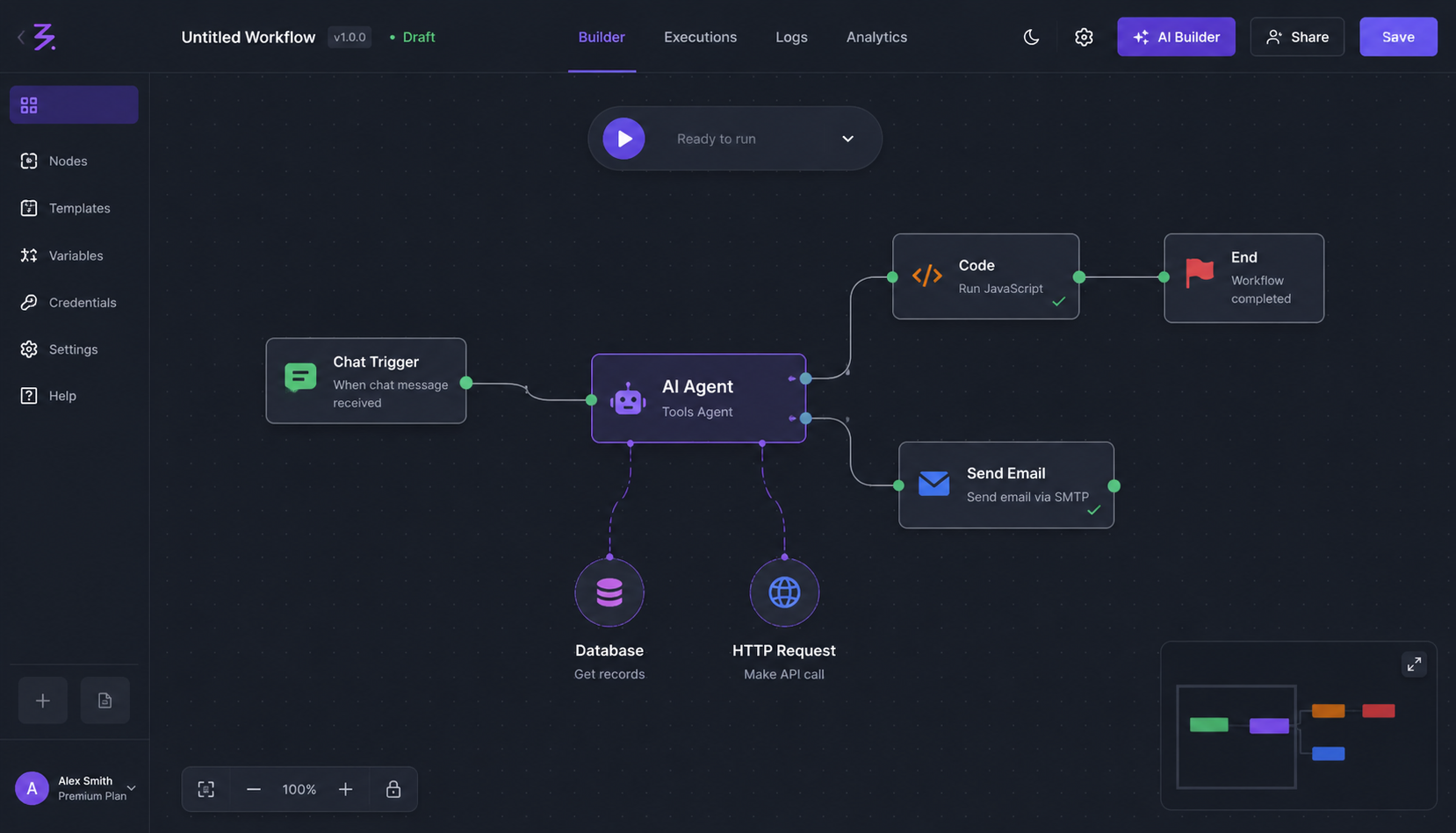
VibeAgent is a visual platform for building AI agents without needing to write a ton of code. You drag things around on a canvas, connect them, and end up with agents
that can actually do stuff—not just chat. These agents can look at context, make decisions, pull from your own documents, and then go act across different tools and
systems. You can kick them off on a schedule, from a chat message, a webhook, an event, or just by hitting a button. That covers everything from basic automations to
more complicated multi-step workflows.The big draw is the visual builder. Instead of dealing with boilerplate or infrastructure, you drop nodes for triggers, agents,
tools, and logic, then wire them together. It’s straightforward to try ideas, see how the flow works, and change things later when requirements shift.
You also get real control over the AI side. Pick from models like GPT-4, Claude, or Gemini, write the system prompt the way you want, and attach whatever tools the
agent needs. So you can shape the agent for a specific job instead of getting a generic response.It plugs into the tools people already use—Gmail, Slack, Google Sheets
, databases, web search, and more. There’s also support for custom connections through MCP (Model Context Protocol), which means it can fit into existing setups
rather than forcing you to rebuild everything.If the agent needs company-specific knowledge, you can upload PDFs, Word docs, or text files into a RAG knowledge base.
That works well for support bots, internal assistants, or anything that has to answer from your own material instead of just the model’s training data.
Workflows can branch with smart routing or hand tasks off to specialized agents. There’s also an analytics dashboard that shows execution history, logs, token use,
and costs in real time, so you can actually see what’s working and what’s costing money.

Vantraa is a sales CRM with AI agents built in, for B2B sales teams, founders and agencies that sell through outbound and social selling. The agents find leads, work them on LinkedIn and email, and log every conversation in the CRM, so the team spends its time on the replies that matter.
Find Leads: describe your ideal customer in plain words. Vantraa finds companies that fit, checks each one against your brief from its own website and LinkedIn page, marks how well it fits with the reasons, and looks up a decision maker. Need a bigger list? Our team pulls it from our B2B database of 900M+ records.
LinkedIn agent: invites with a note, opens the conversation, replies and follows up, and hands hot leads to you. Limits are set by the account's age, it works only in office hours, and it stops at once if LinkedIn pushes back. A LinkedIn inbox shows every conversation, with AI replies waiting for you. Auto Post drafts posts in your voice.
Agentic Email: your templates with AI-written parts, sent from your own mailboxes with daily caps, send windows and warm-up, plus one inbox across all mailboxes.
CRM and deals: a Command Center for today's urgent deals, a deals board with an AI verdict and the promises prospects made, contacts and leads with the live LinkedIn thread, import from CSV, Excel or Google Sheets, custom stages and fields, tasks, a calendar and a booking page.
An AI teammate: Ask Vantraa answers questions about your pipeline in team chat and does tasks and deal updates when you tap Do it. When a lead asks something the agent can't answer, it asks your team first instead of guessing.
WhatsApp and Instagram, on request: AI replies inside WhatsApp's rules and comment-to-DM funnels on Instagram, set up for your workspace by our team.
One plan, Premium: $50 a month at the launch price, every feature included, no credits or per-use charges. 7-day free trial.

Database Browser for G Suite is designed to make Google Sheet an easier way of browsing databases.

ICS to CSV Converter is a Windows desktop program that reads iCalendar (.ics) and older vCalendar (.vcs) files and writes their contents into one CSV table. It handles the ICS to CSV job for a whole folder at once, so a stack of exported calendars, one per colleague or meeting room, ends up as rows you can sort, filter and count in Excel or Google Sheets. Nothing is uploaded: the program opens files from your own drive and saves the result beside them.
📋 How to use it
1. Add files or drop a folder into the window. Subfolders are included, and a single export holding several calendars and thousands of entries is fine.
2. Select any file to look at its events in plain text.
3. Choose a template: Google Calendar, Outlook Calendar or Plain.
4. Decide which clock the output uses: the original zone of each entry, UTC or local Windows time.
5. Use the column mapper to hide, move or rename columns.
6. Click Convert. The queued files are combined into one Calendar.csv in the target folder.
🛠️ Why IT and office teams pick it
Time zones are the usual reason a calendar import goes wrong, with meetings landing one to three hours off. This program works out each offset from the zone definitions saved inside the calendar and uses the summer or winter rule that applied on that date. A one-day holiday stays one day, since the iCalendar end date, which points to the following morning, is corrected. Repeating entries keep their original rule and gain a column that explains it in words. Duplicates are merged by UID, and the CSV is UTF-8 with a BOM, so Excel shows Cyrillic or CJK text correctly on a double click. For an ICS to CSV task that feeds a report, nobody has to fix dates by hand afterwards.
👥 Who uses it
Team leads who total meeting hours per person. IT admins checking calendar data during a mailbox migration. Office staff who received a pile of invitations and simply want to export the calendar to CSV and read it in a spreadsheet. Analysts who prefer filters and pivot tables to a calendar grid. Small business owners who keep bookings in a calendar and want them next to their invoices.
❓ FAQ
Can I convert an ICS file to CSV?
Yes. Add the file or its folder, pick a template and click Convert. Events, tasks and journal entries all go into one ICS to CSV table.
Can you convert ICS to Excel?
Excel cannot open .ics directly. Convert to CSV first and Excel opens the result as an ordinary sheet, with start and end times in separate columns.
Why can't I open an ICS file?
Windows usually passes .ics to a calendar app, which imports it instead of showing the contents. Also, a file sent by Outlook may really be TNEF data with the wrong extension. Open it in Notepad: a real iCalendar file begins with BEGIN:VCALENDAR.
The free trial does not ask you to sign up and converts the first 10 events of each run. Windows 11, 10, 8.1, 8 and 7, works offline.

Contact Center Gamification Wheel
Boost Agent Engagement, Morale, and Performance
The Contact Center Gamification Wheel from Random Wheel Spin is a free, browser-based tool designed for modern customer service teams. It turns recognition, rewards, and team-building into interactive experiences that energize agents and improve results.
With customizable entries and hidden content, managers can gamify routine activities, celebrate high performers, and make daily workflows more engaging—whether in-office or remote.
Why Gamification Matters in Contact Centers
Contact centers are fast-paced, repetitive, and often stressful. Gamification introduces play, recognition, and surprise into everyday routines—making work feel more rewarding while driving measurable outcomes.
Benefits include:
Increased employee engagement and motivation
Higher retention rates and reduced burnout
More consistent customer experiences
Recognition that goes beyond metrics
Stronger team collaboration and culture
Key Use Cases
Teams are already using the Gamification Wheel to:
Recognize top performers: Add names and reward high CSAT scores or resolution rates.
Encourage peer-to-peer praise: Spin to spotlight agents nominated by colleagues.
Promote wellness: Include light challenges like stretch breaks or hydration reminders.
Run QA reviews: Randomly select a call for positive team discussion.
Celebrate Fridays: Spin for micro-rewards like gift cards, playlist control, or early finishes.
Features Designed for Teams
Customizable wheels with names, tasks, colors, and hidden content
Import entries at scale from Google Sheets or Excel
Save, share, or embed wheels across platforms
Accessible design with vocal result announcements
Enterprise-grade fairness using cryptographic randomization technology
Building Culture Across Hybrid & Remote Teams
Recognition shouldn’t stop at the office door. The Contact Center Gamification Wheel integrates seamlessly into:
Video huddles and stand-ups
Slack or Microsoft Teams channels
Zoom wrap-ups and onboarding sessions
By adding moments of fun and recognition, the wheel helps remote teams feel more connected and valued.
Get Started in Seconds
No logins. No downloads. No cost.
Simply add your agents’ names, rewards, or tasks, spin the wheel, and watch engagement rise. The Contact Center Gamification Wheel combines fairness, flexibility, and fun to help customer service leaders build stronger, more motivated teams.

GearChain is an AI-powered, no-code inventory and asset tracking platform designed to streamline and enhance inventory management processes for businesses across various industries. By integrating advanced technologies such as artificial intelligence and blockchain, GearChain offers a secure, efficient, and user-friendly solution for tracking assets in real-time, reducing operational costs, and improving overall productivity.
Key Features and Functionality:
- No-Code App Builder: Empowers users to create customized inventory applications without any programming knowledge, facilitating rapid deployment and adaptability to specific business needs.
- AI-Powered Barcode Scanning: Utilizes advanced AI algorithms to provide fast and accurate scanning of barcodes and QR codes, even in challenging conditions, enhancing data capture efficiency.
- Blockchain Integration: Ensures data integrity and transparency by recording each transaction onto a blockchain, providing an immutable and trustworthy record of all inventory activities.
- Real-Time Inventory Tracking: Offers instant visibility into asset locations, usage, and status across multiple sites, enabling proactive management and reducing the risk of loss or misplacement.
- Customizable Fields and Forms: Allows for the creation of tailored forms and fields to match unique inventory requirements, ensuring flexibility and comprehensive data capture.
- Spreadsheet Synchronization: Seamlessly integrates with Google Sheets and Excel, allowing for easy data import, export, and synchronization, ensuring consistency across platforms.
- Role-Based Access Control: Provides configurable access levels to ensure data security and integrity, allowing teams to collaborate effectively while maintaining control over sensitive information.
Primary Value and Problem Solved:
GearChain addresses the common challenges of manual inventory management, such as inefficiencies, errors, and lack of real-time visibility. By offering a no-code, AI-enhanced platform with blockchain-backed data integrity, GearChain enables businesses to:
- Save Time and Reduce Costs: Automating inventory processes minimizes manual labor and associated errors, leading to significant time and cost savings.
- Enhance Data Accuracy and Security: Blockchain technology ensures that all inventory records are tamper-proof and transparent, fostering trust and compliance.
- Improve Operational Efficiency: Real-time tracking and AI-driven insights allow for better decision-making, optimized stock levels, and streamlined operations.
- Facilitate Scalability: The platform's flexibility and ease of use make it suitable for businesses of all sizes, supporting growth and adaptation to changing inventory needs.
By integrating cutting-edge technologies into a user-friendly platform, GearChain revolutionizes inventory management, empowering businesses to operate more efficiently and effectively.
SysTools CSV Merger is a powerful and user-friendly utility designed to combine multiple CSV files into a single, organized CSV file without data loss. Whether you need to merge customer databases, sales reports, contact lists, inventory records, financial data, or any other comma-separated values (CSV) files, the software performs the merging process quickly while maintaining complete data integrity. It is an ideal solution for businesses, data analysts, marketers, researchers, and professionals who regularly work with large CSV datasets.
The software supports merging unlimited CSV files in a single operation, regardless of their size. Users can add individual CSV files or entire folders containing multiple CSV files, and the application automatically combines them into one consolidated file. It preserves the original data structure, rows, columns, field values, delimiters, and formatting throughout the merging process, ensuring the resulting CSV remains accurate and ready for further use.
SysTools CSV Merger intelligently handles header rows during the merge process by retaining only one header in the final output while appending all remaining data records correctly. This eliminates duplicate column names and creates a clean, well-structured CSV file suitable for importing into databases, spreadsheet applications, CRM systems, or business intelligence tools.
To provide greater flexibility, the software offers advanced merge options that allow users to combine CSV files with similar structures while maintaining data consistency. It supports standard CSV files generated by Microsoft Excel, Google Sheets, LibreOffice Calc, databases, web applications, and other third-party software.
The application is built to process large CSV files efficiently without compromising performance. Even datasets containing millions of records can be merged smoothly while preserving data accuracy. The software ensures that special characters, Unicode text, line breaks, commas, quotes, and delimiters remain intact during processing, preventing data corruption or formatting issues.
SysTools CSV Merger features an intuitive interface that enables users to merge CSV files in just a few simple steps. No technical expertise is required, making it suitable for both beginners and experienced professionals. Users simply add the required CSV files, choose the destination location, and start the merge process.

The AFL UTM Tracker is a WordPress plugin designed to seamlessly capture UTM parameters and conversion data from Gravity Forms submissions. By operating automatically in the background without the need for hidden fields, it simplifies the process of tracking marketing campaign effectiveness and user interactions. This tool provides comprehensive insights into user journeys, enabling marketers to make informed decisions based on accurate attribution data.
Key Features and Functionality:
- Automatic UTM Parameter Capture: Collects first and last touch UTM parameters without manual setup, saving time and reducing errors.
- First Landing Page Identification: Determines the initial page a visitor lands on before form submission, offering insights into effective entry points.
- Referrer Tracking: Identifies the external website that referred the visitor, aiding in understanding traffic sources.
- Conversion Lag Measurement: Calculates the time taken for a visitor to convert from their first visit, helping assess campaign efficiency.
- Click Identifier Capture: Records identifiers like gclid, fbclid, and msclkid, useful for tracking specific ad interactions.
- User Sign-up Attribution: Provides separate reports for WordPress account sign-ups and form submissions, offering detailed conversion data.
- Admin Email Notifications: Embeds full conversion attribution reports into form entry data sent to sales teams, ensuring immediate access to critical information.
- Integration with Webhooks and Automation Tools: Supports sending UTM parameters to platforms like Google Sheets, CRMs, and newsletters via Webhooks, Zapier, or Pabbly.
- First-party Cookies with Custom Expiry: Utilizes first-party cookies to comply with privacy standards and allows customization of cookie expiry durations.
- Bypass Apple's ITP: Enhanced with server-side HTTP cookies to bypass Apple's Intelligent Tracking Prevention (ITP.
- No Usage Limits: Unlike other SaaS companies, our plugin does not limit the report because you have more form submissions.
Primary Value and Problem Solved:
The AFL UTM Tracker addresses the challenge of accurately attributing form submissions to specific marketing campaigns without the need for complex setups or manual input. By automating the capture of UTM parameters and providing detailed conversion reports, it empowers marketers to:
- Gain clear insights into which campaigns and channels are driving conversions.
- Optimize marketing strategies based on precise attribution data.
- Save time and reduce errors associated with manual tracking methods.
This plugin is an essential tool for digital marketers seeking to enhance their understanding of user behavior and improve the effectiveness of their campaigns.

Pemba is a done for you AI visibility service, run on its own platform.
Every month it audits your site for AEO and GEO, scoring how visible you are in ChatGPT, Gemini, Google AI Overviews and AI Mode, Perplexity and Claude, with prioritised P1, P2 and P3 fixes.
Every week it runs technical and on-page SEO checks. It asks the engines your customers' real questions, records whether your business is cited and who is cited instead, then writes and publishes a blog post and FAQ to your WordPress or Shopify site from a fact sheet built from your own pages, so nothing is invented.
Each month also brings off-site drafts: a YouTube script, a Reddit answer and an outreach pitch. Directory citations are tracked across 42 curated directories. A monthly report shows the movement in impressions, clicks, AI citation rate and referring domains. No briefs, no calls, no chasing. From US$347 a month.

CloudReign Technologies LLP, established in 2012, is a Google-authorized partner specializing in delivering comprehensive cloud computing solutions to businesses and educational institutions. With a focus on Google Workspace and Chrome Enterprise, CloudReign offers a suite of services designed to enhance productivity, collaboration, and digital transformation. Their expertise encompasses seamless migrations, change management, and the development of custom applications tailored to client needs. By leveraging the power of cloud computing, CloudReign empowers organizations to streamline operations, improve efficiency, and stay competitive in the digital era.
Key Features and Functionality:
- Google Workspace Implementation: Deployment and management of Google's productivity suite, including Gmail, Drive, Docs, Sheets, and more, facilitating real-time collaboration and communication.
- Chrome Enterprise Solutions: Provision of secure, cloud-based operating systems and devices optimized for business use, ensuring seamless integration and management.
- Application Development: Design and development of custom business applications and workflows using Google Apps Script, Chrome, and Progressive Web Apps (PWA to meet specific organizational requirements.
- Training and Certification: Comprehensive training programs and certifications to equip teams with the necessary skills to effectively utilize cloud technologies.
- Maintenance and Support: Ongoing support and maintenance services to ensure optimal performance and security of deployed solutions.
Primary Value and Solutions Provided:
CloudReign Technologies addresses the critical need for organizations to transition to and thrive in cloud environments. By offering end-to-end services—from strategic planning and implementation to training and support—they enable businesses and educational institutions to:
- Enhance Productivity: Facilitate efficient collaboration and communication through integrated cloud tools.
- Ensure Security: Implement robust security measures to protect sensitive data and maintain compliance.
- Achieve Scalability: Provide flexible solutions that grow with the organization's needs.
- Drive Innovation: Develop custom applications that streamline operations and introduce new capabilities.
By partnering with CloudReign, organizations can effectively navigate the complexities of cloud adoption, ensuring a smooth transition and maximizing the benefits of cloud computing.

Graysync is an agency management platform that lets agencies run their whole operation from one system, from the first brief to the balance sheet.
Many agencies juggle a project tool, finance spreadsheets, a CRM and email chains for client approvals. Graysync replaces that patchwork with one workspace where projects, people, money and client feedback stay connected.
- Project management: plan jobs, tasks, timelines and progress across every client.
- Resource management: see team availability and capacity before taking on new work.
- Financial management: track budgets, expenses, invoices, payments and project profitability.
- Client collaboration: collect briefs, feedback and approvals with shared files, comments and calendars.
- Business intelligence: dashboards and reports on performance and profitability.
- Gracie: a built-in AI assistant that automates repetitive admin steps.
Graysync integrates with Xero, QuickBooks, MYOB, HubSpot, Slack, Google Workspace and Microsoft 365. It is built for creative, digital, social, media, PR and event agencies, in-house marketing teams and professional services firms.

QR to Sheets turns any phone into a QR code and barcode scanner that writes straight into your own Google Sheet. You connect a Google Sheet once, create a scanner link, and send it to the people who scan. They open it in their phone browser and start scanning: no app to install, no account and no training. Each scan becomes a timestamped row in your Sheet, in the order it happened.
Teams use it for attendance and sign-in sheets, event and conference check-in, visitor logs, equipment check-out, warehouse and stock counts, deliveries, patrols and inspections. One scanner link works on any number of phones at once, all writing to the same Sheet. You choose per link whether to accept every scan, once a day or once ever, and optional Staff sign-in records which staff member scanned each row. If the signal drops, the scanner keeps saving scans on the phone and sends them later with their original times.
It reads QR, Data Matrix, Aztec, PDF417, Code 128, Code 39, Code 93, EAN, UPC, ITF and GS1 DataBar. It also includes forms whose submissions become rows, and free tools for bulk QR codes on label sheets and QR ID cards. Your data stays in your own Google Sheet.
Pricing is per scanning phone, never per person: free for 300 scans on one phone, then $7 per phone per month.
VCF to CSV Converter for CRM Import is a Windows program for one job: turning a pile of vCard files into a single vcf to csv export your CRM can read. Staff phones, Outlook address books and card scanner apps all hand out contacts as .vcf, while Salesforce, HubSpot, Zoho CRM and Excel want rows and columns. Point the program at a folder and the vcf to csv pass writes one UTF-8 CSV with every card in it.
📋 How to use it
1. Click Add folder or Add files. Subfolders are scanned and files holding many cards are split.
2. Pick an output template: Google Contacts, Outlook, Yahoo or Plain CSV.
3. Decide whether extra phones and emails go into numbered columns or share one cell.
4. Open Column mapping, untick what the import does not need and set the order with Up and Down.
5. Click Convert and load the file through the import page of your CRM.
🛠️ Why IT and office teams pick it
Many vcf to csv tools stumble on old Android and Nokia exports, where names arrive as quoted-printable codes like =C3=BC. This one decodes quoted-printable and reads each card's charset (UTF-8, UTF-16, windows-1251, windows-1252, GBK), so Cyrillic, Chinese and accented names survive. The CSV carries a BOM, which lets Excel open it correctly on a double-click. Duplicate people from overlapping exports are merged by name plus main contact detail. Custom X- fields become extra columns, photos are saved as image files with the path in the row, and birthdays are written as YYYY-MM-DD. Click any file in the queue and a text preview shows its parsed cards, which helps when checking a tricky export before you commit. Everything runs on the PC with no upload and no account.
👥 Who uses it
CRM admins loading leads that sales reps exported from their phones. Office managers combining address books after a staff change. IT staff moving a team to Google Workspace or Outlook, international names included. Recruiters and event organizers who collect cards from scanner apps every week. Marketers turning a stack of contact cards into a vcf to csv mailing list.
❓ FAQ
How do I convert a VCF file to CSV?
Add the file or its folder, choose a template and click Convert. Every card in the queue lands in one CSV, and the encoding is detected for you.
Can I open the result in Excel?
Yes. The file is UTF-8 with a BOM, so Excel shows non-Latin letters properly. Google Sheets and LibreOffice open it as well.
Why do names come out garbled in other converters?
They skip quoted-printable decoding, so letters stay as codes like =F6. This program decodes them and writes plain UTF-8.
Are VCF and CSV the same thing?
No. A vCard holds contact cards for address books. A CSV is a table that spreadsheets and import wizards read row by row.
The free trial needs no sign-up and converts the first 10 contacts of each run, enough to test a vcard to csv import. Windows 10 and 11, works offline.

Beach Day API is a developer-first REST API for real-time beach, ocean, weather, and coastal condition data. It helps developers answer one simple question: “Should I go to the beach today?”
The API provides clean JSON access to beach data for 17,000+ beaches across 65+ countries, including the United States, Australia, Spain, Italy, France, Croatia, Greece, India, Brazil, Colombia, Chile, Peru, New Zealand, Thailand, Vietnam, China, Morocco, Egypt, Kenya, Tanzania, South Africa, and many more coastal regions worldwide.
Instead of scraping government websites, checking multiple weather services, or stitching together disconnected public datasets, developers can query Beach Day API for structured beach information in one place. Available data may include water quality grades, bacterial contamination indicators, ocean conditions, wave height, water temperature, air temperature, wind, UV index, tide predictions, advisories, closures, beach rules, amenities, lifeguards, parking, restrooms, accessibility information, GPS coordinates, and a proprietary Beach Day Score from 0 to 100.
Beach Day API is built for travel apps, local news and weather widgets, tourism platforms, hotel and destination websites, coastal safety tools, outdoor recreation apps, beach finder apps, AI agents, data dashboards, and developer workflows that need reliable beach-aware data without the scraping headache.
The platform includes official zero-dependency Python and Node.js client libraries, making it easy to integrate into modern applications. Developers can install the Python client from PyPI or the Node.js client from npm and start querying beaches, scored beaches, conditions, and health checks with minimal setup.
Beach Day API also supports workflow and automation platforms. The Zapier integration is available in beta and lets users connect beach conditions, beach scores, and beach search data to Slack, Gmail, Google Sheets, and thousands of other apps. The n8n community node allows teams to use Beach Day API directly in self-hosted or cloud automation workflows. The Apify Actor enables scheduled beach data jobs, dataset exports, webhooks, and AI-agent access through Apify MCP.
Beach Day API is designed for developers, startups, media companies, tourism businesses, and coastal platforms that want practical, structured beach data at scale. Whether you are building a daily beach conditions digest, a coastal safety alert, a travel planning app, a tourism dashboard, or an AI assistant that needs beach and ocean context, Beach Day API provides the data layer to build it faster.