AI-Generated Results
Finding matches…
Aleyant tFLOW is prepress automation software that takes over the hands-on file preparation work prepress staff have traditionally done job by job, including positioning files correctly on the sheet, adding printer marks, adding CCR (color control) marks for printers, cutters, and routers, adding dielines, and imposing files for production. These are steps that take real time to do by hand and are also where costly mistakes tend to happen, since a misaligned die line or an incorrect imposition often means a reprint, not a simple fix.
tFLOW automates this work so it happens the same way every time, without depending on which staff member is at the workstation that day or how many jobs are already in the queue. Files are checked, positioned, marked, and imposed automatically as they move through the workflow, freeing prepress staff from hours of repetitive manual setup on every job and reducing the reprint risk that comes with manual error.
Built-in proofing and approval tools, along with collaboration and chat features, keep customers and internal teams aligned without email back-and-forth, and the platform runs as a 24/7 cloud-based system so files and communication stay centralized and accessible from anywhere.
Integrated with Aleyant Pressero and other web-to-print storefronts, tFLOW closes the gap between order intake and a print-ready, correctly imposed file, so jobs move from submission to press without manual handoffs. It fits any print operation where prepress labor hours and reprint costs from manual file prep have become a real line item, including commercial printers, wide format shops, label converters, and in-plants with high file-turnaround demands.
Feature list:
• Automated file positioning and layout on the sheet
• Automated printer marks
• Automated CCR (color control) marks for printers, cutters, and routers
• Automated dieline placement
• Automated imposition
• Automated preflight checking
• Automated file fixing and correction
• Proofing and approval workflows
• Built-in team and customer collaboration/chat
• File routing to production teams or systems
• Cloud-based, 24/7 file access
• Integration with Pressero and other web-to-print platforms
• Reduces reprint risk from manual prepress error
• Cuts prepress labor hours per job
Not seeing what you're looking for?
Dive deeper into "UFile" on G2 AI
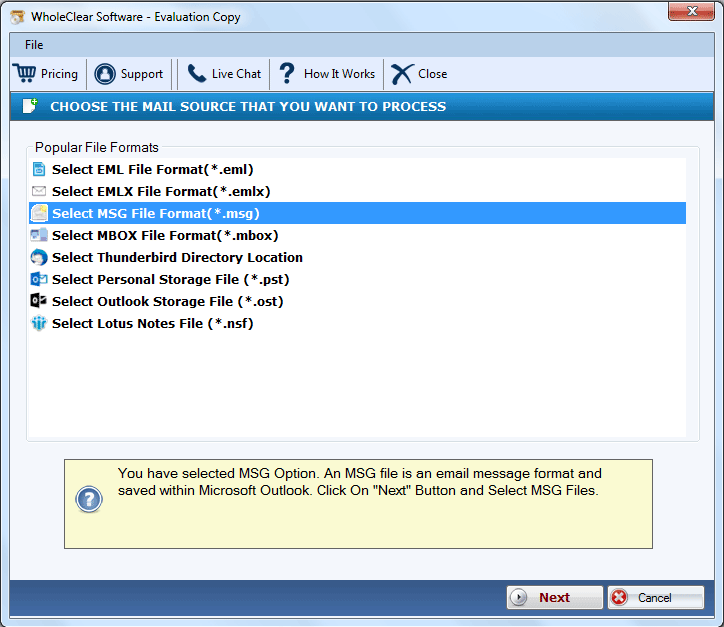
The WholeClear MSG to HTML Converter is an outstanding tool that is employed to convert Outlook files to the HTML file format. With the entire metadata, this application can migrate the Outlook file without affecting it. Users have the ability to select the location for the output HTML file on their devices. It offers a variety of advanced features that can facilitate the migration of the files in a speedy manner. The complete preview of the Outlook MSG file is provided by this software prior to the migration method. It does not need the installation of any other application for functioning and completing the conversion process. The migration process of the files can be finished in just three to four simple steps. It can run flawlessly on any Windows OS version, including Windows 11, 10, 8.1, 8, 7, Vista, and XP. With no technical expertise, this software can be handled simply by any user because of its GUI. The free trial is also provided to the users for examining the features before switching to the licensed edition.
The Softaken OST to TGZ Converter Software is a professional solution for easily converting OST files to TGZ format. It quickly converts multiple OST files to TGZ format without data loss. This software is user-friendly, making it easy for users to utilize. It can convert a large number of OST files of any size to TGZ format. Versions of Microsoft Outlook 2021, 2019, 2016, and 2013 are all compatible with it. When users convert password-protected OST files to Zimbra TGZ files, no data is lost. Users can run this software on any Windows OS version easily. Additionally, it offers a free trial version that anyone can use to see what the software is capable of. It is the safest software ever because it can convert OST files to TGZ format without using MS Outlook or Zimbra. Users can access converted TGZ files in any version of Zimbra with ease because it supports all of them.

Softaken PST to PDF Converter Software is a basic method to convert Outlook PST files to PDF for printing or sharing. The software is built with intelligent algorithms that work together to quickly scan PST files and export them to PDF while maintaining the original structure of folder hierarchy and ensuring emails, including their formatting and all attachments, are preserved. Whether you are migrating email for legal purposes, backup, or business compliance, this is a safe way to do it. You can use this utility to convert both ANSI and Unicode Outlook PST files into a PDF file format. It utilizes all Microsoft Outlook and Windows versions.
Key Highlights:
Convert PST files to PDF in bulk or individually by email.
Preserves folder hierarchy, email headers, and formatting.
Works without installing Outlook.
Lightweight with a user-friendly interface.
Support all Outlook PST files, including large PST files.
Compatible with Windows 11/10/8/7/XP and Vista.
SysInfo ICS Calendar Converter is a powerful tool designed to effortlessly convert .ics files across various versions of the Windows operating system. With its advanced algorithm, users can easily convert and save ICS files into a range of formats, including Outlook PST, Excel, Google CSV, Word, Image, and Document formats. This makes it simple to transform calendar files into different formats or migrate them to other email clients on the same platform. Its intuitive graphical user interface (GUI) ensures that both technical and non-technical users can navigate the software with ease.
Key Features:
- Convert ICS files to PST, PDF, HTML, EML, CSV, JPG, DOCX, and more.
- Efficiently convert multiple calendar files in one go.
- No restrictions on ICS file size, with the original hierarchy preserved.
- Flexible saving options: choose between General CSV or Google CSV formats for your ICS files.

Softaken EML to PDF Converter is a 100% secure tool for conversion. It permits users to convert email messages from EML files to PDF files with attachments. Moreover, this tool allows users to convert bulk EML files into PDFs at a single time. It keeps the information safe of emails such as To, From, Subject, Bcc, and Body. It shows a preview of the converting EML files, with full details. The software offers the features to manage the attachments of EML files while the user saves them into PDF files. User can all also save emails with or without attachments as per their need. The user gets the option to save the EML files in PDF format at any specific location on their system. It supports every version of Windows OS, including Windows latest and older. It is a fully secured software to use to protect your email data from any virus or attack. Try the demo edition to check its functioning.

BitVare Software has launched the BitVare for OST that is created to convert OST files in batch. The OST Converter is reliable method that can simply export OST files to PST, PDF, MBOX, Gmail, Office 365, Outlook.com, Yahoo Mail, ICS, VCF, etc. The OST migration tool is also a forensic solution that helps to analyze OST file data without any app. You can view OST file data in multiple options - content, properties, hex view, raw messages, message header. The OST Converter tool has batch approach that can convert all OST files data in one round processing. The tool has extract option that enables to save attachments, mail address, phone number of emails on your local system. Download the OST converter and convert 10 emails or items from each OST file to other file format, webmail at free of cost.

TrustVare MSG to PDF Converter offers a convenient way to turn Outlook MSG files into PDF documents for easier sharing and long-term access. The software supports batch conversion, allowing multiple MSG files to be exported at once while maintaining important email information. The application provides File Mode and Folder Mode to load selected files or complete folders. A preview panel displays the added MSG files before conversion, helping users verify the data. During the export process, email properties such as To, From, CC, BCC, subject, date and attachments are preserved. The utility works independently and does not require Microsoft Outlook or Adobe Acrobat to complete the conversion. It supports MSG files created by Outlook 2019, 2016, 2013, 2010, 2007 and 2003. With its easy-to-interface, log report generation and support for unlimited file conversion, and the makes it simple to create PDF versions of Outlook emails without affecting data quality.

Softaken MBOX to PST Converter smartly export MBOX files into Outlook PST, MSG, EML, and EMLX formats. This application carries out the conversion of MBOX files in bulk and without any limitations on file size. Users can freely export MBOX file of Thunderbird, Apple Mail, Entourage, etc. into Outlook PST format. The converted PST file can be accessed on all Outlook editions like Outlook 2019, 2016, 2013, 2010, 2007, 2003, and others. Free Thunderbird to Outlook Conversion availability is there to understand the software prior applying for the license edition. Every non-tech user can effortlessly export MBOX file to PST and other formats without any risk of data loss. With this quality conversion tool, one can export MBOX data to PST with high-speed and only with 4 simple steps – add file, choose format, select output path, and convert.
Want to read Lotus Notes emails in Thunderbird or other MBOX email clients? Opt for Sysessential NSF to MBOX Converter and smartly convert Lotus Notes NSF file to MBOX file format. This excellent program is loaded with advanced features like preview, data filter, etc. that helps you to easily and smartly complete the conversion. In a few easy clicks, users can export Lotus Notes file to MBOX file format without any inconvenience. You will not encounter a single issue during Lotus Notes to MBOX conversion task. This power-packed solution can read any size NSF file to export its data MBOX file format. Every healthy NSF file created by all versions of Lotus Notes are supported by the program. This eminent tool can even comfortably work with any Windows operating system. Using free trial, evaluate it first before you buy the license version.

Softaken MSG Attachment Extractor is built for users who need to pull attached files out of Outlook MSG emails without opening every message one by one. It helps when MSG files contain invoices, images, reports, ZIP files, documents, spreadsheets, or other email attachments that need to be saved separately on the system. The software can scan multiple MSG files and extract their attachments in one process. It keeps the folder arrangement organised, so users can manage the output without mixing files. No Outlook installation is needed. The tools support all versions of MSG files from MS Outlook 2021, 2019, 2016, 2013, 2010, and earlier versions. It supports common attachment types such as PDF, DOC, PNG, XLS, ZIP, HTML, TXT and more. It also enables users to choose a destination path for saving extracted files. In addition, the software works flawlessly in all versions of the Windows OS.

Kingshiper PC Cleaner is the best and fastest Windows cleaner. It provides C Drive Cleanup, Large Files Mover, WeChat Cleanup, QQ Cleanup, and APP Manager that allows you to remove junk files, manage big apps and files, clean chat history, and clear caches. With this tool, you can easily free up C disk space to improve your PC performance in minutes.
WHY CHOOSE KINGSHIPER PC CLEANER?
-C Disk Cleanup: Free up space on the C drive or system disk by removing unnecessary files, temporary files, and other junk that may be taking up valuable storage space.
-Large Files Mover: Identifies and allows you to move large files from one location to another, which can help free up space on the C drive or system disk, thus optimizing storage usage.
-WeChat Cleanup: Scan and automatically categorize video and image files, helping you efficiently clean up useless files and speed up your computer.
-QQ Cleanup: Clean up and remove unnecessary files and data associated with QQ, such as privacy files, to optimize performance.
-App Manager: Allows you to manage your installed applications, including options to force uninstall, find the issues of apps, and clear the software leftovers.
GOT QUESTIONS?
Web: https://www.kingshiper.com/pccleaner
Instagram:@kingshipersoft
YouTube: @Kingshiper
Facebook: @KingshiperSoftware
Twitter: @ShiperKing
Kingshiper Support: support@kingshiper.com
ABOUT DEVELOPER
Kingshiper is a leading brand in the desktop and mobile software. We have been established for ten years in China, offering 100% safe, reliable, and cutting-edge products that cater to professionals, students, creatives, and everyday users alike. Our goal is to make things easy, that's also why we aim to offer a comprehensive suite of digital tools designed to meet a variety of needs. From multimedia editing to productivity enhancement, each tool is crafted to simplify and elevate the digital experience. Start cleaning your computer with Kingshiper PC Cleaner.

The MSG Converter Tool by Cigati Solutions is a comprehensive utility designed to facilitate the conversion of MSG files into a variety of formats, including PST, PDF, EML, MBOX, and more. This tool supports batch processing, allowing users to convert multiple MSG files simultaneously, thereby enhancing efficiency. It also offers advanced features such as selective migration through date-range filters, the option to exclude or include attachments, and the ability to import MSG files directly into email clients like Gmail, Yahoo, Thunderbird, and Office 365. With its user-friendly interface and robust functionality, the MSG Converter Tool ensures a seamless and accurate conversion process, making it an ideal solution for both individual users and business professionals.
Key Features and Functionality:
- Multiple Format Conversion: Converts MSG files to various formats, including PST, PDF, EML, MBOX, HTML, and more.
- Batch Processing: Supports the conversion of single or multiple MSG files simultaneously, saving time and effort.
- Email Client Integration: Allows direct import of MSG files into email clients such as Gmail, Yahoo Mail, Thunderbird, Office 365, and IMAP.
- Attachment Management: Provides options to include or exclude attachments during the conversion process.
- Selective Migration: Offers date-range filters to facilitate the selective migration of MSG files.
- Preservation of Data Integrity: Maintains the original folder hierarchy and ensures no data loss during conversion.
- User-Friendly Interface: Features an intuitive interface suitable for both novice and experienced users.
- No File Size Limitations: Handles MSG files of any size without performance degradation.
Primary Value and Problem Solved:
The MSG Converter Tool addresses the challenge of managing and converting MSG files by providing a versatile and efficient solution. It simplifies the process of converting MSG files into multiple formats and importing them into various email clients, thereby eliminating compatibility issues and streamlining email management tasks. This tool is particularly beneficial for users who need to migrate or back up their email data, ensuring data integrity and accessibility across different platforms.
Docpose.cloud is a cloud-based document processing platform that provides file conversion, optical character recognition (OCR), and document automation services. It supports more than 430 file formats across documents, PDFs, images, audio, video, archives, CAD, 3D, and email files. Users can convert files, extract text from scanned documents, compress files, and process batches through a web interface or REST API. The platform is designed for individuals, businesses, and developers who need document processing capabilities for manual or automated workflows. Features include secure cloud processing, API integration, batch conversion, multilingual OCR, and automatic file deletion after processing.

Ease Product Attachments is a Shopify app that is available at no cost and is intended to simplify the process of uploading PDF files and adding necessary product information in different file formats.
Instead of Shopify's default features, which can make it difficult to upload and include important information like user manuals, licenses, certifications, menus, warranties, catalogs, technical specifications, and PDF files, Ease Product Attachments app makes it simple to upload any kind of product file in various formats, including PDFs. This sets it apart and attracts customers' attention, building trust, enhancing customer confidence and sales.
To add attachments, simply follow these four steps: upload attachment files and assign them to your products, add icons to your attachment files, create a section or block of product attachments on your product page template, and customize the product attachments block/section to your liking, such as modifying the title and displaying or hiding the file icon and size.
The key features of this Shopify Product Attachments app include no limits on the number of product attachments that can be uploaded, enhancing the visual appeal of attachments with icons of your choice, assigning attachments to your entire store, specific products, or collections, displaying attachments in a block/section, and controlling their location on your page, as well as uploading product attachments in a range of file formats, including PDFs.
The advantages of using the Ease Product Attachments app include enhancing the customer experience by making essential product information, including PDF files, readily accessible, boosting customer trust and confidence with a transparent and informative product page, and increasing sales by providing an informed and engaged customer base. Don't struggle with adding essential product information - download the Ease Product Attachments app for free today and effortlessly upload PDF files to Shopify.

OLM Exporter is a trustworthy tool that can be used to export Outlook for Mac data files to a variety of other formats. The software is easy to use and supports a variety of features, making it a valuable tool for anyone who needs to export OLM files.
Here are some additional details about the features of OLM Exporter:
1. Easy to use interface: OLM Exporter has a simple and intuitive interface that makes it easy to use, even for users who are not familiar with data migration software.
2. Supports batch processing: The tool supports batch processing, which allows you to export multiple files at once. This can save you a significant amount of time if you need to export a large number of files.
3. Supports a variety of output formats: OLM Exporter supports a variety of output formats, including PST, PDF, EML, MBOX, and CSV. This allows you to export your data in a format that is compatible with the software you want to use.
4. Exports all data from OLM files: This utility exports all data from OLM files, including emails, contacts, calendars, and tasks. This means that you can export all of your data with a single click.
5. Preserves the original formatting of OLM files: It preserves the original formatting of OLM files, so you can be sure that your data will look the same after it is exported.
6. Secure and reliable: Best OLM Exporter is a secure and reliable software application. Your data is protected during the export process, and OLM Exporter is unlikely to crash or cause errors.
Overall, OLM Exporter is a powerful and easy-to-use software application that can be used to export Outlook for Mac data files to a variety of other formats. The software is a valuable tool for anyone who needs to export OLM files.

TrustVare PST to MBOX Converter Tool is a reliable software that allows users to convert their Outlook PST files into MBOX mailbox file format with accuracy. This software provides a high level of reliability while converting emails and attachments mailbox items from PST to MBOX without any data loss. The software is absolutely capable of converting both PST file types ANSI and UNICODE PST files, while working with all versions of Microsoft Outlook also. The software has a user-friendly interface for a non-technical user to convert PST file to MBOX easily. Users can import Outlook data for multiple email clients like Thunderbird, Apple Mail, Eudora, Spicebird, Entourage and others that support MBOX format. This software is compatible with all Windows OS and all versions of MS Outlook.
Key Features:
To output a single or multiple Outlook PST files to MBOX format.
Support conversion of an entire Outlook mailbox (including emails and attachments).
Compatible with ANSI and UNICODE PST files.
Retain original folder structure and email properties.
Option to preview before saving the converted file.
No need to install MS Outlook when completing the conversion.
Supports all versions of Windows OS (11) and all versions of MS Outlook (including 2024, 2021, 2019, 2016, 2013, etc.).
Support batch conversion so you can export multiple PST files.
There is a free demo version available for use that supports the conversion of the first few items in each folder.

MigrateEmails MSG Converter is a premium utility that converts MSG to PDF, EML, MBOX, PST, OST, PNG, DOC, DOCM, DOCX, CSV, TIFF, JPG, GIF, JSON, and other multiple file formats efficiently. It helps to export MSG files to Gmail, Thunderbird, AOL, Amazon WorkMail, HotMail, Office 365, IMAP,iCloud, Opera Mail, and other web-based and cloud-based email clients. It enables bulk migration of MSG files with 100% accuracy. It also facilitate removing duplicate emails from the conversion process to make managing emails smooth. The MSG file converter maintains data originality and folder hierarchy throughout the process and prevents data alteration. Preview feature aids in displaying all the mailbox data of the selected MSG files in a tree structure. The Mail Filter is another advanced feature of this utility that enables the conversion of selective emails of specific dates. MigrateEmails MSG converter tool supports conversion of all MSG files created by different Outlook versions. Users can convert MSG files to the desired format with or without attachments. Its custom folder name option allows setting the desired name for the resultant file. Users can also save the resultant file in the same folder or any other desired location as per their choice. The demo version of this software allows users to convert 50 emails per folder. Its easy-to-use interface makes it convenient to use by both technical and non-technical users. The MSG converter is supported by all early and updated versions of Windows and Mac OS.

Aryson PDF Protection software allows you to protect your PDF documents from editing, printing, copying & extracting file information. This software allows protecting your single as well as multiple PDF files at the same time. PDF File Protection software is able to protect any versions of Adobe Acrobat PDF document. It allows setting user level as well as owner password in PDF file. This stand-alone application which means that Acrobat other PDF products are not required. This software runs with both 32bit and 64-bit windows platforms of all versions of Windows OS including windows10 and other older versions. This software offers a safe and quick way to protect PDF files without requiring Acrobat. It has a lot of interactive features and supports single as well as multiple PDF files at a time. This tool is strongly compatible with all versions of Microsoft OS. This software does not require any prior knowledge or expertise to use, any technical or non-technical person can easily use this. This tool has advanced GUI that makes it easy to use for clients and we also provide free support to the clients who face problems during software use. Aryson PDF protection tool for the protection of single or multiple PDF files from being copied, edited, printed and extracted. Uses password and other parameters for PDF protection and saves protected files at the desired location. This software offers a demo version that allows the to password protect the PDF file and saves it with a watermark.

MacSonik PDF Unlocker Tool for Mac is a tremendous software to decrypt the password protected Mac PDF file without causing any loss of data. Its Interactive simple GUI makes the easy for all kinds of technical and non-technical users. Using the Save Attachment in Sub-folder feature, users can save their attachments of PDF files in a sub-folder without any alteration in Mac PDF file data. This software allows users to save the decrypted PDf file into the user's personal drive or storage. If users need to unlock the PDF file and want to edit the PDF metadata, they can easily remove the password and edit or alter the PDF metadata like Author Name, Title, Subject, Keywords, and Creation/Modified data. PDF Unlocker for Mac supports PDF files created by Adobe Acrobat. This software can remove a single and multiple PDF file for Mac password at a time in no time. It is the most safe and secured tool to decrypt the encrypted PDF files effectively. Also, it runs smoothly with Mac OS on all versions of Mac like Mac OS 10.8 Mountain Lion, 10.9 Mavericks, 10.10 Yosemite, and other above versions. This software is available in a free/demo version to evaluate the conversion performance and features. The Demo version of the software operates similarly to the full version but has some restrictions like it can unlock PDF documents but with a watermark. The software supports the PDF version from 1.2 to 1.7 without causing any kind of hindrance. This software also unlocks or removes the password of the Mac PDf file created by Adobe effectively and efficiently by maintaining the data integrity.