AI-Generated Results
Finding matches…
Optick's Instant AI Ready VSCode Server is a cloud-based integrated development environment (IDE) designed to enhance developer productivity by integrating advanced AI capabilities directly into the coding workflow. This turnkey solution provides a secure, browser-accessible version of Visual Studio Code, preconfigured with support for multiple large language models (LLMs) such as GPT-4, CodeLlama, and others. By leveraging this environment, developers can generate, refactor, and debug code with contextual intelligence, streamlining the development process and fostering efficient collaboration.
Key Features and Functionality:
- Multi-Model Flexibility: Easily switch between various LLM providers, including OpenAI, Hugging Face, Ollama, and private endpoints, through a simple dropdown menu, allowing developers to choose the most suitable model for their specific needs.
- Pre-Installed AI Extensions: The environment comes equipped with essential AI tools such as OpenAI Chat and GitHub Copilot, enabling seamless integration and immediate utilization of AI-powered coding assistance without additional setup.
- Browser-Based VS Code: Access a secure, high-performance version of Visual Studio Code directly from your browser, eliminating the need for local installations and client-side dependencies, thus simplifying the development setup.
- Enterprise-Grade Security: Built on a hardened Ubuntu 24.04 LTS platform, the server includes TLS support, SSH key authentication, and straightforward HTTPS enablement, ensuring robust protection for your code and data.
- Scalability and Cost Efficiency: Deploy instances rapidly, scale resources as needed, and reduce costs by hosting private models or utilizing your own API keys, thereby avoiding per-token egress fees associated with external AI services.
Primary Value and User Solutions:
The Instant AI Ready VSCode Server addresses the growing demand for intelligent coding environments by integrating AI directly into the development process. It accelerates project initiation with AI-powered scaffolding and syntax corrections, enhances code quality through real-time suggestions, and facilitates seamless collaboration by allowing teams to share workspaces and AI sessions for real-time peer review and pair programming. By providing a secure, scalable, and cost-effective solution, it empowers development teams to code smarter and more efficiently, ultimately reducing time-to-market for software products.
Not seeing what you're looking for?
Dive deeper into "SVGcode" on G2 AI

Snipit is a cloud-based code snippet manager designed to help developers and teams efficiently save, organize, and share code snippets. It offers a centralized platform where users can create, categorize, and access their code snippets from anywhere, enhancing productivity and collaboration.
Key Features and Functionality:
- Cloud Storage: Securely save code snippets in the cloud, ensuring accessibility across devices.
- Organizational Tools: Group related snippets into lists and collections, and utilize tags and favorites for easy retrieval.
- Collaboration: Share private lists and collections with team members, granting write access for collaborative development.
- Integration: Seamlessly integrate with IDEs like VSCode and browsers such as Chrome, Safari, and Firefox through dedicated extensions, allowing direct saving and retrieval of snippets.
- Advanced Search: Quickly locate snippets using smart search capabilities, filtering by collection, list, title, syntax, or tags.
- Syntax Highlighting: Edit and view snippets with a syntax-highlighted code editor supporting over 140 programming languages.
Primary Value and User Solutions:
Snipit addresses the common challenge of managing and accessing code snippets by providing a centralized, organized, and collaborative platform. It streamlines the development workflow, reduces redundancy, and enhances team collaboration, ultimately boosting efficiency and code quality.

Back when I started my self-learning part of programming, I was seeking to find the optimal IDE and concluded that VSCode was the one for me. As I was becoming increasingly familiar with this interface, I started realizing that VSCode offered a vast array of shortcuts. However, while I knew of the existence of such shortcuts, it was unclear which one performed a particular function. As a result, finding our which shortcuts were handy for useful and ultimately incorporating them in my daily use, proved to be an unnecessarily time-consuming task.
To overcome this, I have created VSCheatsheet which uses .gifs to illustrate the function of each shortcut. Each illustration, shows in a simple and straight-forward manner the effect of pressing a particular shortcut. A pop-up with the keys pressed is shown at the exact timing the command is given. A prescription of the keys to be pressed for a function (in each particular operating system) is provided at the bottom of the relevant illustration.
👉 15+ illustrations of the most frequently-used shortcuts
👉 5+ illustrations of selected extensions that would enhance your productivity
👉 newsletter alerts for new shortcuts added in the future
Our team welcomes all constructive feedback and shortcut requests by users to optimize this product and create a value-enhancing experience

IceSL is a state of the art slicer (STL → G-code) with advanced modeling capabilities.


CraftWare is a FREE, fast, easy-to-use slicer software that converts your digital 3D object into a .gcode toolpath format understood by most 3D printers.

IMSverify provides a unique NC verification solution to check the postprocessed code that will run on the machine. This goes beyond simple APT or CL file verification within the CAM system. Verification of the actual G-code that will run on the machine provides you with complete confidence that the part will be cut correctly.

Prompt Octopus is a Visual Studio Code (VSCode) extension designed to streamline prompt engineering by enabling developers to evaluate and compare responses from over 40 large language models (LLMs) directly within their codebase. By highlighting a prompt, users can select multiple models—including OpenAI, Anthropic, DeepSeek, Mistral, and Grok—and view their outputs side by side, facilitating efficient model selection and prompt optimization.
Key Features:
- Extensive Model Support: Access to more than 40 LLMs, allowing comprehensive evaluation across various platforms.
- Side-by-Side Comparisons: Directly compare model responses within the VSCode environment to identify the most suitable model for specific tasks.
- Prompt and Model Preference Management: Save and manage preferred prompts and model configurations for consistent and efficient testing.
- Flexible API Key Integration: Users can input their own API keys, which are stored locally and never transmitted to external servers, ensuring privacy and security.
- Free and Paid Options: The extension offers 10 free comparisons without requiring API keys or payment. For unlimited usage via Prompt Octopus servers, users can upgrade for $10 per month.
Primary Value:
Prompt Octopus addresses the challenge of efficiently evaluating and selecting the most appropriate LLM for specific tasks. By integrating directly into the VSCode environment, it eliminates the need for external tools or platforms, streamlining the development workflow. This facilitates rapid iteration and optimization of prompts, ultimately enhancing productivity and the quality of AI-driven applications.

Archittect is an AI-powered code generation tool designed to eliminate the need for writing repetitive boilerplate code, enabling developers to focus on their unique vision and accelerate project delivery. By automating the creation of code templates across various programming languages and frameworks, Archittect enhances productivity and ensures consistency throughout the development process. Its seamless integration with popular development environments, such as Visual Studio Code (VSCode), provides a native and efficient coding experience.
Key Features and Functionality:
- Automated Code Generation: Archittect automatically generates reusable code templates, reducing the time spent on repetitive tasks and allowing developers to concentrate on innovative aspects of their projects.
- Dynamic Templates and Scaffolds: Users can create and customize dynamic templates and scaffolds that combine files, folders, and code snippets, facilitating the rapid assembly of components or entire projects.
- VSCode Extension: The tool offers a powerful extension for VSCode, enabling developers to utilize native shortcuts, create file structures, and incorporate dynamic code elements like variables directly within their preferred coding environment.
- Team Collaboration: Archittect supports team sharing of templates, promoting consistency and efficiency across development teams by allowing members to collaborate and reuse code seamlessly.
- Multi-Language Support: The platform is compatible with various programming languages, making it versatile for diverse development needs.
Primary Value and Problem Solved:
Archittect addresses the common challenge of managing and writing boilerplate code, which often leads to inefficiencies and inconsistencies in software development. By automating code generation and providing dynamic, reusable templates, Archittect streamlines the development workflow, reduces manual errors, and accelerates project timelines. This allows developers and teams to focus more on creative problem-solving and delivering high-quality, customized software solutions.

BringYourAI is an innovative integration tool that seamlessly connects Visual Studio Code (VSCode) with various AI chat platforms, enhancing the coding experience by providing instant codebase context within AI conversations. By bridging your development environment with AI chat interfaces, BringYourAI eliminates the need for cumbersome copy-pasting, streamlining your workflow and boosting productivity.
Key Features and Functionality:
- Instant Code Context Sharing: With a simple '@' command, effortlessly insert code snippets, files, or entire folders from VSCode directly into your AI chat, ensuring precise and relevant context.
- Efficient File and Folder Attachments: Quickly locate and share necessary files without leaving the chat interface, facilitating smoother collaboration and problem-solving.
- Seamless Editor Integration: Directly share your current work, including cursor positions, from VSCode to the AI chat, maintaining continuity and clarity in discussions.
- Organized Context Management: Utilize tidy context chips to manage shared code snippets, allowing easy viewing, editing, or removal, thereby reducing clutter and enhancing clarity.
- Customizable AI Interaction Rules: Define global or project-specific rules for AI interactions, which are automatically applied to every conversation, ensuring consistency and relevance.
- Token Usage Monitoring: Keep track of token usage to stay within model limits, ensuring efficient and effective AI interactions without exceeding constraints.
- Comprehensive Workspace Sharing: Provide AI with a complete snapshot of your current workspace, including all open tabs and file structures, for a holistic understanding of your project.
- Visual File Hierarchy Representation: Clearly visualize your project's file hierarchy without exposing file contents, helping AI comprehend your project's organization.
- On-Demand Diagnostics: Transform errors into instant AI prompts, accelerating the debugging and problem-solving process.
- Optimized Prompt Formatting: Ensure that added context follows best prompt practices automatically, enhancing the quality of AI-generated responses.
- Keyboard Shortcuts for Efficiency: Utilize keyboard shortcuts to quickly add files or selections as context for your AI, saving time and streamlining your workflow.
Primary Value and User Solutions:
BringYourAI addresses the common challenges developers face when integrating AI assistance into their coding workflow. By providing instant access to code context within AI chats, it eliminates the inefficiencies of manual copy-pasting and context switching. This integration allows developers to leverage the latest AI models across various platforms without being confined to a single tool, thereby broadening their horizons and enhancing their coding capabilities. Additionally, BringYourAI maximizes the value of existing AI chat subscriptions by augmenting them with powerful coding features, ultimately leading to a more efficient, organized, and productive development process.

Koi brings visibility and control to the chaos of modern software ecosystems—discover, assess, and govern everything your teams pull from marketplaces like GitHub, Huggingface, VSCode, Homebrew, and beyond.
Apps, MCPs, packages, extensions, AI models—secured before they reach your endpoints.

DNA Studio 4 is CELLINK's premier bioprinting software, designed to streamline the entire bioprinting workflow from model generation to print evaluation. Its user-friendly interface and versatile features empower researchers to efficiently create and optimize 3D bioprinted constructs.
Key Features and Functionality:
- Shape Generator: Allows users to select from a range of predefined shapes and generate 3D models with a single tap, eliminating the need for complex CAD software.
- G-Code Editor: Simplifies the development and editing of G-Code directly from STL files, with integrated visualization to ensure accurate tool paths and successful prints.
- Preview Mode: Enables simulation of prints prior to execution, reducing material waste and enhancing print accuracy.
- Draw and Print: Facilitates the creation of complex constructs by allowing users to draw lines, circles, and squares, and assign different printheads for multi-material constructs.
- Print Report: Generates comprehensive reports capturing all print parameters, aiding in optimization, publication, and quality documentation.
- DNA Studio 4 Vault: An enhanced version developed to support compliance with regulatory requirements, featuring controls for authorization, authentication, and validation, thereby assisting in the transition from pre-clinical to clinical trials.
Primary Value and User Solutions:
DNA Studio 4 addresses the complexities of the bioprinting process by providing an integrated platform that simplifies model creation, print preparation, and documentation. By offering tools like the Shape Generator and G-Code Editor, it reduces the reliance on multiple software solutions and technical expertise, making bioprinting more accessible. The inclusion of DNA Studio 4 Vault ensures that users can maintain compliance with regulatory standards, facilitating the progression of research from the laboratory to clinical applications. Overall, DNA Studio 4 enhances efficiency, accuracy, and reproducibility in bioprinting endeavors.

MobiCAM is desktop CAD/CAM software for furniture workshops. You draw cabinets, kitchens, wardrobes and bathroom units by their dimensions, and the cut list, sheet nesting, CNC G-code, edge-banding list, barcoded part labels and a customer quote with VAT all come out of the same model — change one size and every output follows. It imports DXF and glTF, exports DXF, glTF, OBJ and STEP, and draws, nests and writes G-code without an internet connection (it goes online only now and then, for licence checks and updates). MobiCAM is in a pilot phase: a free 60-day licence from first activation, no credit card, one computer, every feature except the AI assistant. Windows 10/11 (64-bit) and Apple-silicon Macs. Made in Erzincan, Türkiye; Turkish and English interface.

Inbox Academy runs onboarding and training as email sequences, with no portal or app for participants to log into.
Each person's sequence starts the day they're enrolled. Every step after that is timed from the previous one, or held until they complete the quiz or assignment before it, so people who join on different dates follow the same structured path at their own pace, with no cohorts to manage and no schedules to rebuild.
Teams use it for new hire onboarding, client onboarding, compliance refreshers, and partner training. Enrollment can be triggered automatically through Zapier, a public API, or a one-click Google Workspace group import. Completed sequences produce QR-verified certificates suitable for compliance records.
Because lessons arrive as lightweight emails rather than streamed video, Inbox Academy works reliably on slow, metered, or restricted connections where portal-based platforms struggle.
Inbox Academy is the hosted version of django-email-learning, an open-source library.

A newsletter service which build a membership community that connects with your followers and funds your best creative work.
Features:
- Integrate with 3rd-party Editor: Obsidian, VIM, VScode
- Support to push posts to Telegram Channel and Discord
- AI enhanced functionalities
- Support Formula by Mathjax
- Support Mermaid Diagrams
- SEO optimized
- Standard and extended Markdown syntax
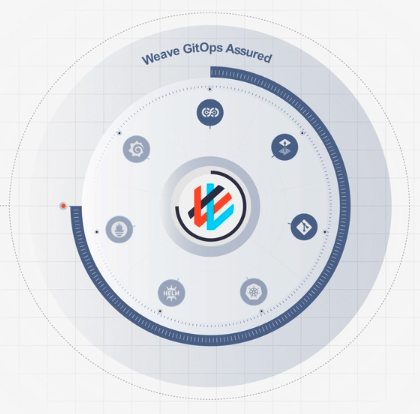
Weave GitOps Assured is a comprehensive solution offered by Weaveworks, combining open-source software, enterprise-grade support, and enhanced features to simplify and automate Continuous Delivery (CD) practices and streamline Kubernetes cluster management.
It includes best-in-class open-source software components: FluxCD, Flagger, Observability UI, Infrastructure TF Controller, Flamingo Flux Subsystem for Argo, Weave Policy Agent, and a VSCode Plugin.

Entelligence.ai is an AI-powered platform designed to enhance the productivity and efficiency of engineering teams by automating critical aspects of the software development lifecycle. By integrating seamlessly with tools like VSCode, Slack, GitHub, GitLab, Jira, and Confluence, Entelligence.ai provides context-aware assistance, streamlines workflows, and offers actionable insights, enabling teams to ship high-quality code faster and more reliably.
Key Features and Functionality:
- AI-Powered Code Reviews: Automates the code review process by providing detailed, context-aware feedback on code changes, including line-by-line reviews and pull request summaries, to catch issues early and improve code quality.
- Automated Documentation Generation: Automatically creates and maintains up-to-date technical documentation from codebases, including architecture summaries and code-level explanations, reducing manual documentation efforts.
- Team Performance Analytics: Offers detailed insights into team productivity, sprint progress, and code quality metrics with real-time monitoring of engineer output and review depth, aiding in informed decision-making.
- Context-Aware Assistance: Provides centralized search across all engineering artifacts, including code, pull requests, issues, and documentation, reducing time spent finding information and minimizing context-switching.
- Seamless Integration: Integrates with documentation, code repositories (e.g., GitHub, GitLab), and project management tools (e.g., Jira), offering context-aware assistance within VSCode, Slack, Discord, and web interfaces.
Primary Value and Problem Solved:
Entelligence.ai addresses the challenges engineering teams face in maintaining code quality, managing documentation, and tracking team performance. By automating code reviews and documentation generation, it reduces manual workload and accelerates development cycles. The platform's analytics and context-aware assistance empower teams to make informed decisions, enhance collaboration, and improve overall productivity, ultimately leading to faster delivery of high-quality software products.

Code Snippets AI is an AI-powered platform designed to enhance developers' productivity by streamlining code generation, refactoring, debugging, and documentation processes. By integrating with multiple AI models, including GPT-4 and Mixtral 7B, it offers context-aware assistance tailored to your codebase. The platform supports cross-platform usage with desktop applications for Windows, Mac, and Linux, as well as extensions for VSCode and Chrome. It also provides a secure, end-to-end encrypted snippets library, facilitating seamless collaboration among team members.
Key Features:
- AI-Powered Code Generation: Automatically generate functions and code snippets, reducing the time spent on repetitive tasks.
- Code Refactoring and Debugging: Identify performance bottlenecks and receive AI-driven suggestions for optimization and error correction.
- Codebase Integration: Enhance AI interactions by integrating with your local codebase, allowing for context-rich conversations and assistance.
- Multiple AI Model Support: Utilize various AI models, such as ChatGPT, GPT-4, Mixtral 7B Instruct, and PaLM 2, within a single chat interface.
- Secure Snippets Library: Save and organize code snippets from your desktop, IDE, or browser into a secure, end-to-end encrypted team library.
- Cross-Platform Availability: Access the platform via desktop apps for Windows, Mac, and Linux, as well as extensions for VSCode and Chrome.
Primary Value and Problem Solved:
Code Snippets AI addresses the challenges of repetitive coding tasks, inefficient debugging, and fragmented collaboration by providing an integrated, AI-driven solution. It empowers developers to write cleaner, optimized code more efficiently, while the secure snippets library enhances team collaboration and knowledge sharing. By leveraging advanced AI models and offering seamless integration with existing development environments, Code Snippets AI significantly boosts productivity and code quality for both individual developers and teams.

FeatureFlags.app is a privacy-first feature flag platform built for .NET developers. Safely release features, control rollouts, and manage application behavior without redeploying code—all while keeping your data private and your infrastructure under your control.

Corte de chapas e barras sem desperdício e sem retrabalho.
Cadastre as peças em minutos, gere o plano de corte com encaixe inteligente e acompanhe a oficina — com mapa de corte, etiquetas e retalhos controlados no estoque.
Tudo o que o corte precisa, em um só lugar
Da engenharia à oficina: planeje, aprove, corte e controle o estoque sem planilhas.
Encaixe inteligente (nesting)
Peças com formas reais, furos e recortes. Peças pequenas são encaixadas dentro de furos e vazios para aproveitar cada chapa.
Retalhos sob controle
Sobras viram retalhos codificados e entram no estoque só quando o plano é marcado como executado.
Mapa de corte e etiquetas
Cada plano gera o mapa com o código das peças e as etiquetas de peças e retalhos, na impressora que você cadastrar.
Planeje sem estoque
Gere planos mesmo sem material. O estoque é conferido e reservado somente quando o plano é aprovado para produção.
Oficina no tablet
O operador vê o passo a passo, confirma cada corte e imprime a etiqueta na hora.
G-code e DXF
Importe peças de arquivos DXF e exporte o G-code do plano para a sua máquina de corte.