AI-Generated Results
Finding matches…
Keep your focus on a daily basis. Daily: notes, ToDo, Google Calendar events, journal, planner, facts, weather and more....
Not seeing what you're looking for?
Dive deeper into "Notelet" on G2 AI
Mindstone was built by a team of engineers, educators, and continuous learners, all determined to bridge the gap that 200 years of education systems have yet to close:
Teaching people how to learn.

RemNote � The all-in-one tool for thinking and learning. RemNote combines Notes, Flashcards, and PDF-Annotation. This unifies previously separated and siloed applications into one. RemNote is perfect for students but also great for professionals.
Grow your audience organically with seamless secure and efficient AI-assisted note publishing Share your knowledge effortlessly on ShowNotes
Smart Online Notepad is an AI-powered writing solution built for professionals, teams, and educational organizations seeking to enhance content creation, streamline communication, and maintain high writing standards across diverse projects. Its features include:
AI Grammar Correction: Ensures all writing is polished by automatically correcting grammar, spelling, and punctuation errors, perfect for error-free team communication.
Text Rewriting: Adjusts the tone and clarity of content to fit various audiences, from internal reports to professional outreach.
Instant Text Sharing: Easily share written content through email or messaging platforms like WhatsApp, enabling quick feedback and collaboration.
Real-Time Word & Character Count: Monitor word and character counts as you write to ensure adherence to content guidelines.
Customizable Dark/Light Mode: Allows users to choose their preferred theme for optimal comfort.
Multi-Language Support: Write in English, Hindi, Hinglish, and more, making it accessible for multilingual teams.
Smart Online Notepad is accessible without sign-ups or downloads, making it a valuable, ready-to-use tool for improving writing efficiency and accuracy in any professional setting.

**TackNote** is a Mac sticky-note app with a twist: every note **pins to the exact thing you're working in** — a specific window, browser tab, document, folder, chat, or task — and only appears when you're there. Switch away and it tucks out of sight; come back and it's waiting, right where you left it.
No more desktops buried under stale stickies. The right note shows up in the right place, automatically.
**What you get:**
- Context-aware notes that follow your windows, tabs, and docs
- TackBoard — a notebook-style board to organize everything
- Checklists, voice notes, reminders, and projects
- 12 themes, including real glass
- Private notes locked behind Touch ID
- Optional iCloud sync, encrypted with your own keys
**Private by design.** Your notes live encrypted on your Mac — no account required. End-to-end encrypted and notarized by Apple, so there's nothing sketchy to trust.
**Simple pricing.** Free 14-day trial, no card. Then a one-time **$24.99** — yours forever, no subscription. Works on up to 3 Macs.
Ideal for anyone juggling multiple projects, research, or workflows who wants quick reference notes without drowning in a giant list.

Synkk Obsidian Everywhere is a self-hosted platform for synchronizing notes across devices. It offers path-level access control, enabling administrators to assign read, write, or hidden permissions to folders. The Safety Shield feature prevents mass deletions by halting syncs that attempt to delete over 10% of notes and saves conflicting edits as timestamped copies. A web-based Markdown editor includes live preview, document navigation, and graph visualization of note relationships. The platform supports character-level simultaneous editing with Yjs technology and uses QR codes for mobile provisioning. Ghost file dehydration syncs large vaults as lightweight stubs that hydrate on demand, saving storage. Data integrity is ensured with SHA-256 fingerprinting, and AES-256-GCM encryption secures data in transit and at rest. Features include version history, data loss prevention scanning for sensitive information, and remote token revocation. Deployment uses Docker with SQLite storage.
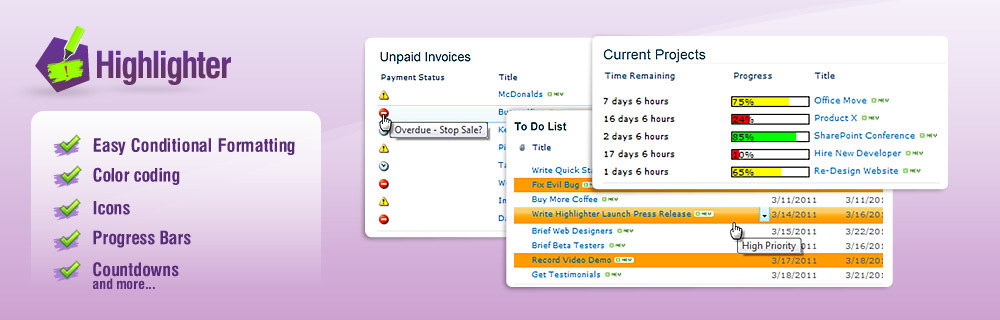
Highlighter is a tool that allows users to easily apply conditional formatting to SharePoint lists to ensure its obvious. Works with all editions of SharePoint and any library or list. Colors, icons, and progress countdown bars help users make lists more friendly.
AskYourPDF is an AI-powered platform designed to revolutionize how users interact with PDF documents. By enabling conversational engagement, it allows users to ask questions, extract key insights, and summarize content directly from their documents. This tool is particularly beneficial for students, researchers, and professionals who need to efficiently navigate and comprehend extensive or complex PDFs.
Key Features and Functionality:
- Conversational Interaction: Engage in dynamic conversations with your PDFs, asking questions and receiving immediate, context-aware responses.
- Document Summarization: Quickly generate concise summaries, distilling essential information from lengthy documents.
- Knowledge Base Integration: Chat with multiple documents simultaneously by organizing them into structured knowledge bases, facilitating comprehensive information gathering.
- Advanced Writing Assistance: Generate essays and articles with valid citations, enhancing the quality and credibility of your writing.
- Automated Source Finding: Automatically locate and reference sources for AI-generated text, ensuring content is backed by credible information.
- Chrome Extension Access: Interact with PDFs directly within your browser, enhancing convenience and workflow efficiency.
- OCR Support: Extract text from scanned documents or images, making all content searchable and interactive.
Primary Value and User Solutions:
AskYourPDF addresses the challenge of efficiently extracting and understanding information from PDF documents. By transforming static files into interactive resources, it saves users significant time and effort in data retrieval and comprehension. The platform's AI capabilities streamline workflows, enhance productivity, and support informed decision-making by providing quick access to relevant information. Whether for academic research, professional analysis, or personal use, AskYourPDF empowers users to interact with their documents in a more meaningful and efficient manner.

NoteAI is an advanced AI-powered note-taking application designed to enhance productivity and streamline the process of capturing, organizing, and retrieving information. Leveraging cutting-edge artificial intelligence, NoteAI offers users an intuitive platform to create, manage, and access their notes efficiently.
Key Features and Functionality:
- AI-Driven Organization: Automatically categorizes and tags notes based on content, making retrieval seamless.
- Voice-to-Text Conversion: Transcribes spoken words into accurate text notes, facilitating hands-free note-taking.
- Smart Search: Utilizes natural language processing to deliver precise search results, even with vague queries.
- Cross-Device Synchronization: Ensures notes are updated and accessible across all user devices in real-time.
- Collaborative Tools: Allows multiple users to edit and comment on notes simultaneously, enhancing teamwork.
- Integration Capabilities: Seamlessly connects with popular productivity tools and platforms for a unified workflow.
Primary Value and User Solutions:
NoteAI addresses the common challenges of information overload and disorganized note management by providing an intelligent system that adapts to user needs. Its AI-driven features save time, reduce manual effort, and improve the accuracy of note-taking. By offering a centralized and organized repository for notes, NoteAI enhances productivity, supports effective collaboration, and ensures critical information is always within reach.


Slacksift is a Slack application designed to streamline your experience by providing concise summaries of lengthy threads. By simply typing `@slacksift summarise` within any thread, users can quickly grasp the key points without sifting through numerous messages. This functionality is particularly beneficial for professionals who need to stay updated without spending excessive time reading through extensive conversations. Slacksift offers a straightforward setup process and operates on a pay-as-you-go pricing model, charging €0.45 per 500 tokens, ensuring users only pay for what they use. With unlimited usage and a 48-hour support response time, Slacksift enhances productivity by simplifying Slack interactions.
Key Features and Functionality:
- Thread Summarization: Quickly condense lengthy Slack threads into concise summaries using the `@slacksift summarise` command.
- Easy Installation: Integrate Slacksift into your Slack workspace in just a few seconds.
- Simple Setup: Activate the service by typing `@slacksift setup` in any channel, thread, or workspace to generate payment links.
- Pay-as-You-Go Pricing: No hidden fees or subscriptions; pay €0.45 per 500 tokens used.
- Unlimited Usage: Utilize the service as much as needed without restrictions.
- Support: Receive responses to inquiries within 48 hours.
Primary Value and User Benefits:
Slacksift addresses the common challenge of managing and understanding extensive Slack threads by providing quick, digestible summaries. This capability allows users to stay informed and respond promptly without the need to read through every message, thereby enhancing workflow efficiency and reducing time spent on communication. The straightforward installation and setup process, coupled with a transparent pay-as-you-go pricing model, make Slacksift an accessible and cost-effective solution for improving Slack productivity.

ChatPRD is an AI-powered platform designed to assist product managers and their teams in transforming ideas into comprehensive product requirements efficiently. By leveraging advanced AI capabilities, ChatPRD streamlines the creation of Product Requirements Documents (PRDs), user stories, and technical specifications, enabling teams to focus on innovation and rapid development.
Key Features and Functionality:
- AI Documentation: Quickly generate detailed PRDs, user stories, and technical specs using AI that understands product management nuances.
- Workflow Integration: Seamlessly connect with tools like Slack, Linear, Notion, and Google Drive to maintain existing workflows.
- Team Collaboration: Facilitate real-time collaboration with features that allow document sharing, feedback collection, and iterative development.
- IDE Integration: Access ChatPRD directly within development environments such as VS Code and Cursor through Model Context Protocol (MCP) integration.
- Security and Privacy: Ensure data protection with enterprise encryption, compliance with GDPR and CCPA, and strict access controls.
Primary Value and User Solutions:
ChatPRD addresses the common challenges product managers face, such as time-consuming documentation, misalignment between product and engineering teams, and maintaining consistency across projects. By automating the documentation process and integrating with existing tools, ChatPRD enhances productivity, ensures alignment, and accelerates product development cycles. Its AI-driven insights and real-time collaboration features empower teams to deliver high-quality products efficiently.
Clipto.AI is an advanced AI-powered transcription and media asset management platform designed to streamline the process of converting audio and video content into accurate, searchable text. With support for over 99 languages and a transcription accuracy rate of 99%, Clipto.AI caters to a diverse range of users, including journalists, researchers, content creators, and business professionals. Its intuitive interface and robust features enable users to efficiently manage and repurpose their media assets, enhancing productivity and content accessibility.
Key Features and Functionality:
- Highly Accurate Transcription: Achieve precise and reliable transcriptions of audio and video files, ensuring clarity and accuracy for every project.
- Multilingual Support: Transcribe content in over 99 languages, facilitating global reach and inclusivity.
- Flexible Import Options: Upload local files, import media links from platforms like YouTube, or record content directly for transcription.
- Speaker Identification: Automatically detect and label multiple speakers within your media files, enhancing the organization and readability of transcripts.
- AI-Generated Summaries: Generate concise summaries of transcriptions, allowing for quick review and extraction of key points.
- Global Translation: Effortlessly translate transcripts into multiple languages, ensuring content accessibility for a worldwide audience.
- Versatile Exporting Solutions: Export transcripts in various formats, including SRT, VTT, TXT, and project files compatible with Final Cut and Premiere, facilitating seamless integration into content creation workflows.
Primary Value and User Solutions:
Clipto.AI addresses the challenges associated with manual transcription and media management by offering an automated, accurate, and efficient solution. Users benefit from significant time savings, enhanced content organization, and the ability to repurpose media assets with ease. The platform's multilingual capabilities and translation features break down language barriers, making content accessible to a broader audience. By integrating advanced AI technologies, Clipto.AI empowers users to focus on content creation and analysis, rather than the labor-intensive tasks of transcription and data management.
Mem.ai is an AI-powered productivity platform designed to streamline note-taking, knowledge management, and team collaboration. By leveraging artificial intelligence, Mem.ai automatically organizes and connects your notes, making information retrieval effortless and enhancing overall productivity.
Key Features and Functionality:
- AI-Powered Organization: Mem.ai intelligently categorizes and links your notes based on events, topics, and people, eliminating the need for manual organization.
- Smart Search: Utilize advanced AI-driven search capabilities to quickly locate specific notes using natural language queries and powerful filters.
- Mem Chat: An AI assistant that interacts with your notes, answering questions, summarizing content, and generating new material based on your existing knowledge base.
- Related Notes: Automatically suggests connections between similar notes, helping you discover and rediscover relevant information.
- AI-Powered Collections: Creates adaptive groupings of related notes, allowing for flexible organization without rigid folder structures.
- Real-Time Collaboration: Share and edit notes with team members in real time, fostering seamless collaboration.
- Multi-Platform Support: Access your notes across web, iOS, and desktop applications, with offline functionality ensuring availability anytime.
Primary Value and User Solutions:
Mem.ai addresses the common challenges of information overload and disorganized note-taking by providing an intelligent, self-organizing workspace. It enhances productivity by automating the categorization and retrieval of information, reducing the time spent searching for notes. For teams, Mem.ai facilitates efficient collaboration through shared access and real-time editing, ensuring that all members are aligned and informed. By integrating AI-driven features, Mem.ai transforms the way individuals and teams manage knowledge, making it more accessible, connected, and actionable.
Wave is an AI-powered note-taking application designed to streamline the process of capturing, transcribing, and summarizing audio content. By eliminating the need for manual note-taking, Wave allows users to focus entirely on their conversations, ensuring that no critical information is missed. Whether it's meetings, phone calls, lectures, or podcasts, Wave provides a seamless solution for recording and organizing audio data.
Key Features and Functionality:
- Audio Recording: Effortlessly record conversations, meetings, and calls directly through the app.
- AI Transcription: Automatically transcribe recorded audio into accurate, speaker-labeled text.
- Summarization: Generate concise summaries of transcriptions, highlighting key points and action items.
- Cross-Device Access: Access recordings, transcriptions, and summaries across multiple devices, including iOS, Android, and web platforms.
- Background Recording: Record audio while using other applications or even when the screen is off.
- Multi-Language Support: Transcribe and summarize content in various languages, catering to a global user base.
Primary Value and User Solutions:
Wave addresses the common challenges associated with manual note-taking, such as missing key moments, losing context, and the distraction it causes during conversations. By automating the recording and transcription process, Wave ensures that users can fully engage in discussions without the worry of capturing every detail. This leads to improved productivity, better information retention, and more efficient communication. Additionally, the ability to access and share transcriptions and summaries across devices enhances collaboration and information dissemination.

Capacities is a versatile note-taking and knowledge management application designed to help users organize and connect their thoughts in a natural, intuitive manner. By moving away from traditional folder-based systems, Capacities introduces an object-oriented approach, allowing users to create and link various content types such as people, books, meetings, and projects. This method fosters a dynamic network of ideas, enhancing creativity and productivity.
Key Features and Functionality:
- Custom Object Types: Users can define their own object types with specific properties, tailoring the system to their unique needs.
- Templating: Streamline workflows by creating templates for frequently used content structures, facilitating faster and more consistent note creation.
- Page Layouts: Choose from various layouts—profile, encyclopedia, index card, or standard page—to present content in the most effective format.
- Powerful, Block-Based Editor: Utilize a flexible editor that supports toggles, lists, headings, and markdown-based shortcuts for efficient content creation.
- Media Integration: Enrich notes with images, tweets, files, audio, and embeds to create comprehensive and engaging content.
- Full-Text Search: Quickly locate information across all notes with a robust search function.
- Contextual Backlinks and Tagging: Establish rich connections between notes using backlinks and tags, creating a cohesive network of ideas.
- Block Linking: Link to individual blocks within notes, allowing for content reuse and enhanced interconnectivity.
- AI Assistant: Leverage an integrated AI assistant to interact dynamically with content, ask questions, and generate new ideas.
- Mobile App: Access and edit notes on the go with a companion mobile app, ensuring productivity across devices.
Primary Value and User Solutions:
Capacities addresses the challenges of information overload and disorganized note-taking by providing a structured yet flexible environment for knowledge management. Its object-based system mirrors natural thought processes, enabling users to build a personalized network of information. This approach not only enhances the organization of ideas but also uncovers hidden connections, fostering deeper understanding and innovation. By integrating powerful tools like AI assistance and customizable templates, Capacities empowers users to transform the vast influx of daily information into a coherent and actionable knowledge base.
Scrintal is a visual note-taking and mind mapping tool that helps people get crystal clear in their thinking and write creatively.
It is an online whiteboard where you can visually organize, group and connect your thoughts. So you can see both the high-level overview and details of your notes at a glance in one place.
As opposed to other mind maps, you can write and add as any many images or media in Scrintal as you want, and connect each piece via backlinks.
Scrintal is a visual alternative to managing your personal knowledge management.
We are on a mission to transform the way professionals engage in meetings. Our innovative AI-powered meeting assistant is designed to make meetings more efficient and productive than ever before. With support for 50+ languages including unique mixed languages like Hinglish (Hindi+English), Spanglish (Spanish+English), and Arabizi (Arabic+English) along with seamless integration with popular CRMs, and a focus on capturing key insights & action items, MeetMinutes is your indispensable partner in achieving meeting excellence. We are committed to helping you reclaim your valuable time and boost your productivity, one meeting at a time.
Sprocket Orbit is a markdown wiki that lives inside Teams and your Microsoft 365 tenant. Connect your AI agents to create your second brain.
Your team writes and edits pages together in real time, links ideas with backlinks, and explores how everything connects in a visual workspace graph. Orbit connects to AI assistants like Copilot and Claude through MCP, so you can save useful AI conversations and agent output straight into a searchable team wiki. Use Ask Orbit to get answers drawn from your own pages.
Orbit stores every page as a plain markdown file in your own OneDrive and SharePoint. Your existing Microsoft 365 permissions, version history and search all apply, and your content stays in your tenant. If you stop using Orbit, your files stay right where they are, with nothing to export.
Install Orbit free from the Microsoft Teams Store, or use it in your browser with a Microsoft sign-in. Your first 10 editors are free, and readers are always free.