# Best Work Instructions Software - Page 5

*By [Neeraja Prakash](https://research.g2.com/insights/author/neeraja-prakash)*


Work instructions software, also called visual work instructions or digital work instructions software, allows users to create and dispense step-by-step instructions for business procedures. While tools like [knowledge management software](https://www.g2.com/categories/knowledge-management) can offer a knowledge base for bullet point facts or information, work instructions solutions enable users to create itemized guides for distinct processes complete with tips, pictures, and even videos.

User guides are universally helpful, but industries that require hands-on, mechanical tasks find even more value in dedicated work instructions platforms. Industries such as manufacturing, oil and gas, and field service are just a few that benefit the most from visual work instructions; some work instructions providers even offer industry-specific add-ons or solutions that include features that accommodate the needs of their use cases.

Work instructions solutions come bundled with integrations that allow them to be comprehensive knowledge management tools. They can integrate with other knowledge management systems and [content management systems](https://www.g2.com/categories/content-management) so guides can pull relevant information, like documents or pictures, from other repositories if necessary.

To qualify for inclusion in the Work Instructions category, a product must:

- Create step-by-step user guides and instructions for business-related processes
- Support version control for user guides
- Store guides in cloud storage and/or local servers
- Collect employee feedback concerning guides and procedures
- Provide multimedia support
- Be available on desktop and mobile devices


## Top Work Instructions Software at a Glance
| # | Product | Rating | Best For | What Users Say |
|---|---------|--------|----------|----------------|
| 1 | [Scribe](https://www.g2.com/products/scribe/reviews) | 4.8/5.0 (863 reviews) | Click-capture SOP and work instruction authoring | "[Effortless Walkthroughs and Smarter Onboarding with AI-Powered Guides](https://www.g2.com/survey_responses/scribe-review-12925105)" |
| 2 | [Connecteam](https://www.g2.com/products/connecteam/reviews) | 4.6/5.0 (3,490 reviews) | Mobile-first work instructions for deskless teams | "[Connecteam Review](https://www.g2.com/survey_responses/connecteam-review-10735494)" |
| 3 | [ABB Electronic Work Instructions](https://www.g2.com/products/abb-electronic-work-instructions/reviews) | 4.4/5.0 (51 reviews) | Paperless shopfloor SOPs with 3D work instructions | "[ABB electronics instructions eliminated paperwork and made tasks easier](https://www.g2.com/survey_responses/abb-electronic-work-instructions-review-12239242)" |
| 4 | [Tango](https://www.g2.com/products/tango-tango/reviews) | 4.7/5.0 (503 reviews) | Auto-captured click-by-click work instructions | "[Tango Makes Process Training Effortless](https://www.g2.com/survey_responses/tango-review-12665989)" |
| 5 | [livepro Knowledge Management](https://www.g2.com/products/livepro-knowledge-management/reviews) | 4.8/5.0 (167 reviews) | Guided work instructions with governed single-source | "[From 5-Inch Binders to Real-Time Answers: Ditching Desk Clutter with LivePro](https://www.g2.com/survey_responses/livepro-knowledge-management-review-12531030)" |
| 6 | [guidde](https://www.g2.com/products/guidde/reviews) | 4.8/5.0 (82 reviews) | AI-generated step-by-step work instructions | "[Instant, Professional Video Guides That Scale Effortlessly](https://www.g2.com/survey_responses/guidde-review-11944787)" |
| 7 | [Clueso](https://www.g2.com/products/clueso/reviews) | 4.8/5.0 (96 reviews) | AI-generated screen-recording work instructions | "[Effortless Video Creation with Clueso](https://www.g2.com/survey_responses/clueso-review-12904248)" |
| 8 | [Poka.io](https://www.g2.com/products/poka-io/reviews) | 4.6/5.0 (222 reviews) | Shop-floor work instructions with multimedia training | "[Bringing real time learning closer to employee at the point of need](https://www.g2.com/survey_responses/poka-io-review-7687618)" |
| 9 | [Tulip](https://www.g2.com/products/tulip-interfaces-tulip/reviews) | 4.5/5.0 (36 reviews) | No-code shop floor work instruction digitization | "[Tulip Makes Life Easier](https://www.g2.com/survey_responses/tulip-review-9174035)" |
| 10 | [VKS](https://www.g2.com/products/vks/reviews) | 4.7/5.0 (16 reviews) | Visual shop-floor work instruction authoring | "[VKS is an outstanding guidebook system](https://www.g2.com/survey_responses/vks-review-10948621)" |


## How Many Work Instructions Software Products Does G2 Track?
**Total Products under this Category:** 90

### Category Stats (Jun 2026)
- **Average Rating**: 4.57/5 The average rating of products in this category, based on all submitted ratings
- **Top Trending Product**: flowdit (+0.109) - Among all products in this category, flowdit recorded the largest rating increase compared to last month
*Last updated: June 01, 2026*


## How Does G2 Rank Work Instructions Software Products?

**Why You Can Trust G2's Software Rankings:**

- 30 Analysts and Data Experts
- 6,700+ Authentic Reviews
- 90+ Products
- Unbiased Rankings

G2's software rankings are built on verified user reviews, rigorous moderation, and a consistent research methodology maintained by a team of analysts and data experts. Each product is measured using the same transparent criteria, with no paid placement or vendor influence. While reviews reflect real user experiences, which can be subjective, they offer valuable insight into how software performs in the hands of professionals. Together, these inputs power the G2 Score, a standardized way to compare tools within every category.


## Which Work Instructions Software Is Best for Your Use Case?

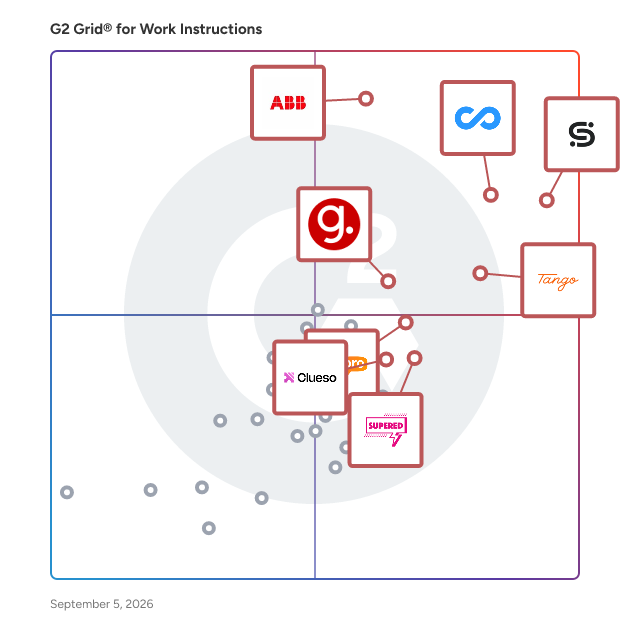
- **Leader:** [Scribe](https://www.g2.com/products/scribe/reviews)
- **Highest Performer:** [livepro Knowledge Management](https://www.g2.com/products/livepro-knowledge-management/reviews)
- **Easiest to Use:** [livepro Knowledge Management](https://www.g2.com/products/livepro-knowledge-management/reviews)
- **Top Trending:** [Tango](https://www.g2.com/products/tango-tango/reviews)
- **Best Free Software:** [Connecteam](https://www.g2.com/products/connecteam/reviews)


---

**Sponsored**

### Knowby

Capture Any Process. Guide Every Worker. Create and Share Any On-Screen or Manual Workflow by QR Code, Link or Embed in Minutes. Full Access Free 30-Day Trial with No Card. Auto-Translate 140+ languages. Minimise Downtime, Speed Up Onboarding and Keep SOPs and Work Instructions up to date. Particularly beneficial for training, onboarding, and everyday operational tasks, enabling teams to transform complex processes into easily digestible instructions. With its availability on both web and mobile platforms, Knowby Pro ensures that assistance is accessible anytime and anywhere, facilitating seamless collaboration and knowledge sharing among team members. Knowby offers four ways to capture work processes from the desk to the shop floor. Capture screen clicks, convert video to step-by-step guides quickly using AI, transform PDF docs into digital know-how or create SOPs from scratch. Targeted primarily at organizations seeking to enhance their training and operational efficiency, Knowby Pro caters to a wide range of industries, including technology, healthcare, and education. The software is designed for teams that require concise and effective communication of procedures, making it an essential resource for onboarding new employees, training staff on new tools, or providing ongoing support for existing processes. By utilizing Knowby Pro, organizations can streamline their training efforts, reduce the time spent on instruction, and improve overall productivity. One of the key features of Knowby Pro is its support for over 140 languages, which allows teams to create inclusive content that caters to diverse audiences. The integration of artificial intelligence enhances the content creation process by automatically generating instructions from video content, suggesting improvements, and providing translation services. This ensures that knowbys are not only accurate but also culturally relevant, as users can manually verify translations for quality assurance. Such capabilities make Knowby Pro a versatile tool for global teams, ensuring that all members can access and understand the necessary information. In addition, Knowby can capture valuable data and feedback from workers as they use instructions, and seamlessly integrate with other business systems. This creates a smooth flow of information across the organisation, strengthening decision-making, compliance, and continuous improvement while closing the gap between workers on the ground and the systems that guide their work. Knowby is grounded in Cognitive Load Theory, which emphasizes the importance of reducing mental effort during the learning process. Each step in a knowby is designed to present only the essential information, minimizing clutter and confusion. This intentional design makes instructions easier to follow and retain, which is particularly advantageous in fast-paced environments where clear communication is critical. By focusing on clarity and simplicity, Knowby helps organizations reduce errors and accelerate the learning curve for new processes or tools. Overall, Knowby stands out in the instructional design software category by offering a user-friendly interface, robust language support, and AI-driven features that enhance content creation. Its commitment to reducing cognitive load and improving communication makes it an invaluable asset for teams looking to optimize their training and operational workflows.


[Visit website](https://www.g2.com/external_clickthroughs/record?secure%5Bad_program%5D=ppc&amp;secure%5Bad_slot%5D=category_product_list&amp;secure%5Bcategory_id%5D=1915&amp;secure%5Bdisplayable_resource_id%5D=1915&amp;secure%5Bdisplayable_resource_type%5D=Category&amp;secure%5Bmedium%5D=sponsored&amp;secure%5Bplacement_reason%5D=page_category&amp;secure%5Bplacement_resource_ids%5D%5B%5D=1915&amp;secure%5Bprioritized%5D=false&amp;secure%5Bproduct_id%5D=1320344&amp;secure%5Bresource_id%5D=1915&amp;secure%5Bresource_type%5D=Category&amp;secure%5Bsource_type%5D=category_page&amp;secure%5Bsource_url%5D=https%3A%2F%2Fwww.g2.com%2Fcategories%2Fwork-instructions%3Fpage%3D5&amp;secure%5Btoken%5D=6b713c28785427c34b8d00a13458266d378ae74a7d309dc3bb05096c9ea55bf3&amp;secure%5Burl%5D=https%3A%2F%2Fwww.knowby.co%2F%3Futm_campaign%3D118467781-G2%26utm_source%3Dppc%26utm_medium%3Dppc%26utm_content%3Dcategory&amp;secure%5Burl_type%5D=free_trial)

---


## What Is Work Instructions Software?

[Knowledge Management Software](https://www.g2.com/categories/knowledge-management)

## What Software Categories Are Similar to Work Instructions Software?

- [Connected Worker Platforms](https://www.g2.com/categories/connected-worker-platform)
- [Manufacturing Intelligence Software](https://www.g2.com/categories/manufacturing-intelligence)
- [Standard Operating Procedures Software](https://www.g2.com/categories/standard-operating-procedures)


---

## How Do You Choose the Right Work Instructions Software?

### What You Should Know About Work Instructions Software

### What is Work Instructions Software?

Work instructions software, also known as visual work instructions or digital work instructions software, allows users to create and dispense step-by-step instructions for business procedures, empowering companies to streamline their workflows. While tools like knowledge management software offer a knowledge base for text articles and other types of informative media, work instructions solutions enable users to create itemized guides for distinct processes, complete with tips, pictures, and videos.

Instruction guides are universally helpful, but industries that require hands-on, mechanical tasks find more value in dedicated work instructions platforms. Industries such as manufacturing, oil and gas, and field service are just a few that benefit the most from visual work instructions. Some work instructions providers even offer industry-specific add-ons that include features that accommodate the needs of their use cases.

### What are the Common Features of Work Instructions Software?

The following are some core features within work instructions software that can help users create practical step-by-step guides for their business procedures:

**Creation of visual guides:** Users can create visual guides consisting of text, checklists, photos, and videos that explain how to carry out certain tasks. New guides can be created for each different procedure a business has, and these guides can all be stored in a central location so all employees can access them.

**Performance monitoring:** If employees are required to use the company’s work instructions platform to follow guides and check off tasks as they are completed, managers can use this real-time data to monitor performance and efficiency at an employee, team, and business level.

**Analytics and reporting:** Work instructions platforms can collect data based on employees’ activity on the platform to help users create reports on production, training, downtime, etc.

**Screen recording:** If a task is meant to be done on a computer, administrators can record their screen to demonstrate how a task is meant to be completed and add the screen recording to the specific guide for that task.

### What are the Benefits of Work Instructions Software?

Besides helping with standardizing business procedures, work instructions software has other benefits, including time savings and boosting employee morale.

**Standardizes processes:** Work instructions platforms digitize and collate paper-based documents or procedures that have been documented and placed in disparate sources throughout the business. This platform becomes the single source of truth for instructions, providing guides on how to complete most, if not all, tasks.

**Saves time in documenting procedures:** Because this software is tailored to meet the needs of managers and workers, it provides the necessary tools, such as templates and authoring and publishing tools, to quickly and accurately document and distribute work procedures.

**Reduces retraining:** Because guides are collated in a central library on work instructions platforms, employees can access them at any time to review procedures they learned in the past. Also, as procedures change within an organization, administrators can update them within the work instructions platform instead of individually informing and training employees.&amp;nbsp;

**Reduces employee errors:** Employees can also have these guides open while completing tasks in real-time, so they can ensure they follow each step correctly to avoid errors. This is especially useful for workers who are visual learners. Being able to see a checklist or videos showing how to carry out a task will resonate with these workers better than just being told what to do.

**Boosts morale:** Visual guides give employees the autonomy to learn at their own pace. It empowers them to review procedures they don’t feel confident with, taking longer on some sections while going quicker through others. Having this sense of control over their own training helps to boost morale.

### Who Uses Work Instructions Software?

There are a few different use cases for work instructions software, as mentioned below:

**Manufacturing and assembly workstations:** Electronic work instructions are beneficial for frontline workers working with their hands on repetitive manufacturing and assembly tasks. Oftentimes, these tasks are time sensitive as there are numerous people involved in the creation of a single product, and instruction guides help complete them quickly and accurately.&amp;nbsp;

**Service work instruction:** Service work often involves helping customers resolve various problems. It doesn’t always make sense to train service workers on every possible issue that may arise, so work instructions are a good way for them to train themselves as different problems need to be addressed.

**Training department:** This use case covers many industries, especially those with high employee turnover. Training time is often very costly, and training guides are a self-service method for employees to train themselves.

### What are the Alternatives to Work Instructions Software?

Alternatives to work instructions software can replace this type of software, either partially or completely:

[Knowledge base software](https://www.g2.com/categories/knowledge-base): Work instructions software is essentially a subset of knowledge base software. Knowledge bases hold information pertaining to a wide range of topics, while work instructions include more action-oriented information.

[Standard operating procedures (SOP) software](http://dures): SOP platforms hold similar information to work instructions platforms. However, SOPs are more high level than work instructions. SOPs summarize the specifications of a process, while work instructions narrow down to individual tasks and explain each of the steps outlined within an SOP.

### Challenges with Work Instructions Software

Work instructions solutions can come with their own set of challenges.&amp;nbsp;

**Rapidly changing processes:** Work instructions software comes in handy in industries and workplaces where processes are undergoing continuous improvement and being updated. It can help make sure employees are staying up to date with the latest guides. However, updating the platform with the latest processes can be tedious and time consuming.

**Supplying workers with a digital interface:** Since work instructions software is a digital product, a digital interface, such as a mobile device, tablet, or laptop, needs to be provided to the employees who will be using the software, which can be costly.

### How to Buy Work Instructions Software

#### Requirements Gathering (RFI/RFP) for Work Instructions Software

Before looking for a software solution for work instructions, buyers should ask themselves what goals they want to accomplish with the software. Are they simpler goals, such as just converting paper documents to a digital format? Or do they need a complete overhaul of their operations practices to make them more automated? Whatever it is, it’s important to note these down before seeking out software as different solutions offer different functionality and levels of robustness. Here are some things to consider:

- Who will be using the software? How easy to use does it need to be?
- Which other systems and tools will the software need to connect with?
- What type of content will be stored in the work instructions platform, and how much storage will be needed?

#### Compare Work Instructions Software Products

**Create a long list**

After listing down requirements, buyers can start to browse products at a high level to create a long list. These products won’t necessarily meet all the requirements, so buyers will need to prioritize their list of requirements. By visiting G2.com’s category for work instructions software, buyers may sift through the work instructions platforms and add products to their “My List” within [G2.com](https://www.g2.com/).

**Create a short list**

Once buyers have created a short list, they can further sort their options by checking the product’s ratings on the G2 Grid® and reading user reviews to understand how their peers experience the software. This way, buyers can find the best work instructions platform for their needs.

**Conduct demos**

After narrowing down the selection, buyers must contact the vendors to schedule demonstrations of the solution. Businesses can contact many vendors directly on G2.com to request demos by selecting the “Get a Quote” button. At each demo, buyers must be sure to ask the same questions and use case scenarios to best evaluate each product.

#### Selection of Work Instructions Software

**Choose a selection team**

Depending on how the platform will be utilized, different people will need to be involved in the selection process. However, in most cases, the people that need to be involved are:

- Those who will be creating the instruction guides
- Those who will be overseeing people using the instruction guides
- Someone on the quality assurance team whose metrics depend on how well the guides are followed

**Negotiation**

Work instructions platforms have set pricing depending on which features a buyer requires, and there typically isn’t any negotiation. Enterprise-level organizations that require larger storage space and other advanced features may be able to negotiate their plan and pricing.

**Final decision**

The team member who will be overseeing the platform the most should make the final decision.

### What Does Work Instructions Software Cost?

Pricing models for these solutions are straightforward. Most providers don’t require buyers to sign a contract to purchase monthly plans. While most providers offer free plans, these come with limited storage space and basic features. Buyers can opt for one of the paid plans, which offer more storage space, advanced automation, and more integrations. These tiers increase in pricing accordingly with the capabilities they offer.

**Return on Investment (ROI)**

ROI on work instructions software can be evaluated by looking at the performance of certain tasks, such as assembly, customer support tickets, and employee training, after implementing the software. Here are some specific factors to consider:

- Time saved on these tasks
- The increase in the amount of tasks completed
- The accuracy/quality of completed tasks
- Customer satisfaction (if the software is being used by customer service teams)
- Employee satisfaction (if employees are using software for day-to-day tasks)


---
## What Are the Most Common Questions About Work Instructions Software?
*AI-generated · Last updated: June  3, 2026*
### Operations Managers evaluating Work Instructions software for compliance documentation and workflow optimization
According to verified users, operations managers tend to value work instructions software that keeps procedures, checklists, and reference content in one accessible place while making updates easier than paper or scattered files. Recent reviews repeatedly mention support for compliance documentation, standard work, onboarding, and day-to-day execution across frontline or distributed teams. Buyers also look for simple setup, mobile or point-of-need access, and clear guidance that helps workers follow the same process consistently. Reviewers also highlight practical needs such as photo or video-backed instructions, searchable knowledge, forms, skills tracking, and audit-friendly visibility into whether tasks, training, or required steps were completed as expected.


### Which Work Instructions platforms integrate seamlessly with existing worker training without custom development
Based on G2 reviews, these products are most often associated with training-friendly work instruction workflows.

- [Poka.io](https://www.g2.com/products/poka-io) — shop-floor training with skills tracking.
- [livepro Knowledge Management](https://www.g2.com/products/livepro-knowledge-management) — guided knowledge for onboarding consistency.
- [Scribe](https://www.g2.com/products/scribe) — step-by-step guides for new hires.
- [Tango](https://www.g2.com/products/tango-tango) — browser-based process training and walkthroughs.


### Work Instructions tools that deliver measurable process consistency improvements within the first quarter
According to verified users, early consistency gains usually come from replacing paper, scattered documents, or repeated one-off explanations with standardized digital instructions. Reviews in this category describe faster access to the latest procedure, more uniform execution across shifts or locations, and fewer gaps caused by tribal knowledge. Teams also mention benefits from guided workflows, checklists, decision support, and reusable training content that makes expectations clearer for both new and experienced workers. In the first few months, the clearest signs of impact in reviews are smoother onboarding, better compliance follow-through, more reliable documentation, and less time spent answering the same process questions over and over.


### What features are most important in work instructions software
According to verified users, the most important features in work instructions software are easy content creation, clear step-by-step guidance, and fast access where work happens. Recent reviews frequently point to visual instructions with screenshots, video, or photos; searchable knowledge; forms and checklists; and quick updates so teams are not following outdated versions. Buyers also care about mobile or shop-floor accessibility, version control, and the ability to share instructions across teams or locations. Many reviewers also emphasize training-related capabilities such as onboarding support, skills tracking, guided workflows, and progress visibility. Across products, the common theme is reducing manual documentation work while making instructions easier to follow consistently.


### How do teams use Work Instructions for onboarding
According to verified users, teams use work instructions for onboarding by giving new hires repeatable, self-serve guidance instead of relying only on live shadowing or verbal handoffs. Recent reviews describe step-by-step guides, screenshots, videos, and structured procedures that help employees learn tasks in the right order and revisit them later without waiting for a trainer. This is especially useful when teams are spread across locations, shifts, or field environments. Reviewers also connect onboarding use cases with knowledge sharing, training consistency, and reduced dependence on experienced staff for repeated explanations. In practice, buyers should expect onboarding value when the software makes procedures easy to create, update, search, and access at the point of work.