Best Statistical Analysis Software - Page 2

How Many Statistical Analysis Software Products Does G2 Track?

Total Products under this Category: 115

Category Stats (Sep 2026)

  • Average Rating: 4.25/5 The average rating of products in this category, based on all submitted ratings
  • Top Trending Product: SAS/STAT (+0.12%) - Among all products in this category, SAS/STAT recorded the largest rating increase compared to last month

Last updated: September 01, 2026

How Does G2 Rank Statistical Analysis Software Products?

Why You Can Trust G2's Software Rankings:

  • 30 Analysts and Data Experts
  • 7,900+ Authentic Reviews
  • 115+ Products
  • Unbiased Rankings

G2's software rankings are built on verified user reviews, rigorous moderation, and a consistent research methodology maintained by a team of analysts and data experts. Each product is measured using the same transparent criteria, with no paid placement or vendor influence. While reviews reflect real user experiences, which can be subjective, they offer valuable insight into how software performs in the hands of professionals. Together, these inputs power the G2 Score, a standardized way to compare tools within every category.

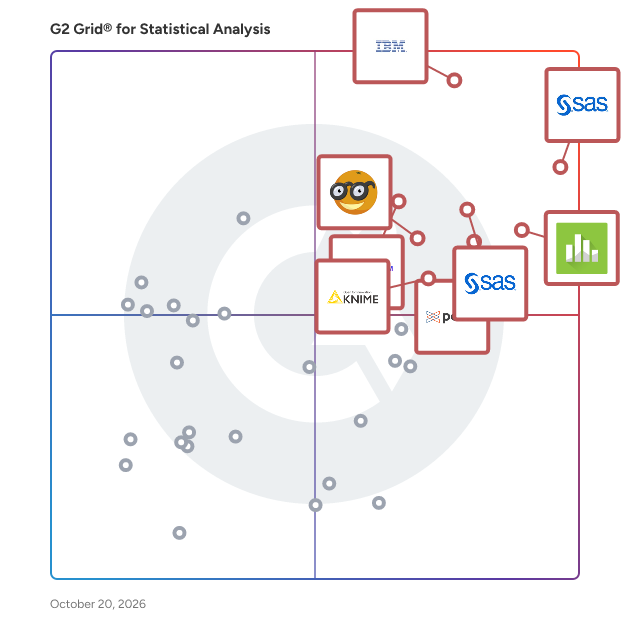
G2 Grid® for Statistical Analysis Software

G2 Grid® for Statistical Analysis Software plotting products by satisfaction and market presence

Highlighted products: SAS Viya, IBM SPSS Statistics, Minitab Statistical Software, Base SAS, Posit Team, Qualtrics Market Research, Orange, and OriginPro.

Underlying data: [Grid® JSON](https://www.g2.com/categories/statistical-analysis/grids.json?focus%5B%5D=sas-sas-viya&focus%5B%5D=ibm-spss-statistics&focus%5B%5D=minitab-statistical-software&focus%5B%5D=base-sas&focus%5B%5D=posit-team&focus%5B%5D=qualtrics-market-research&focus%5B%5D=orange&focus%5B%5D=originpro)

eviews

EViews offers academic researchers, corporations, government agencies, and students access to statistical, forecasting, and modeling tools through an object-oriented interface.

Average Rating: 4.2/5.0

Total Reviews: 111

How Do G2 Users Rate eviews?

  • Quality Control: 7.8/10 (Category avg: 8.3/10)
  • Has the product been a good partner in doing business?: 8.2/10 (Category avg: 8.8/10)
  • Survival Analysis: 7.9/10 (Category avg: 8.4/10)
  • Data Sampling: 8.5/10 (Category avg: 8.6/10)

Who Is the Company Behind eviews?

  • Seller: S&P Global
  • HQ Location: New York, NY
  • Twitter: @SPGlobal
    47,349 Twitter followers
  • LinkedIn® Page: www.linkedin.com
    40,459 employees on LinkedIn®
  • Ownership: NYSE: SPGI

Who Uses This Product?

  • Top Industries: Higher Education, Financial Services
  • Company Size: 40% Medium, 40% Small

What Are Recent G2 Reviews of eviews?

What Are G2 Users Discussing About eviews?

SAS Visual Statistics

Multiple users can explore data, then interactively create and refine predictive models. Distributed, in-memory processing slashes model development time, quickly surfacing valuable insights you can act on.

Average Rating: 4.4/5.0

Total Reviews: 24

How Do G2 Users Rate SAS Visual Statistics?

  • Quality Control: 7.5/10 (Category avg: 8.3/10)
  • Has the product been a good partner in doing business?: 8.1/10 (Category avg: 8.8/10)
  • Survival Analysis: 7.9/10 (Category avg: 8.4/10)
  • Data Sampling: 7.9/10 (Category avg: 8.6/10)

Who Is the Company Behind SAS Visual Statistics?

  • Seller: SAS Institute Inc.
  • Year Founded: 1976
  • HQ Location: Cary, NC
  • Twitter: @SASsoftware
    60,863 Twitter followers
  • LinkedIn® Page: www.linkedin.com
    15,122 employees on LinkedIn®
  • Phone: 1-800-727-0025

Who Uses This Product?

  • Company Size: 52% Large, 32% Small

What Do G2 Reviewers Say About SAS Visual Statistics?

AI-generated summary from verified user reviews

Pros
  • Users value the ease of use in SAS Visual Statistics, noting no training required for effective operation.
  • Users value the automated analytics in SAS Visual Statistics, making data understanding and forecasting straightforward.
  • Users value the proactive customer support of SAS Visual Statistics, enhancing their overall experience with the product.
  • Users value the advanced machine learning capabilities of SAS Visual Statistics for efficient data analysis and predictive modeling.
  • Users value the reliable reporting tools of SAS Visual Statistics for their effective forecasting and clarity.
Cons
  • Users express concerns about the high licensing cost, making SAS Visual Statistics difficult to afford for many.
  • Users find that learning may be difficult without prior experience with SAS tools, limiting usability and understanding.
  • Users are concerned about the high licensing cost and associated infrastructure requirements of SAS Visual Statistics.
  • Users feel that customization difficulty in SAS Visual Statistics hinders their ability to tailor the software effectively.
  • Users struggle with data analysis difficulty, finding it hard to grasp modeling calculations and reconcile approaches effectively.

What Are Recent G2 Reviews of SAS Visual Statistics?

QI Macros SPC Add-in for Excel

Affordable, easy to use add-in for Excel that creates Control Charts, Histograms, Pareto Charts, and more. Your data is already in Excel, shouldn't your SPC software be there too? QI Macros is an all-in-one toolkit used by quality and process improvement professionals for more than 20 years. In addition to drawing charts you can run Statistical Tests, create Fishbone Diagrams and Value Stream Maps, and perform complex analysis like Gage R&R and DOE. You'll save time and look like an expert!

Average Rating: 4.5/5.0

Total Reviews: 28

How Do G2 Users Rate QI Macros SPC Add-in for Excel?

  • Quality Control: 8.5/10 (Category avg: 8.3/10)
  • Has the product been a good partner in doing business?: 9.1/10 (Category avg: 8.8/10)
  • Survival Analysis: 8.4/10 (Category avg: 8.4/10)
  • Data Sampling: 8.7/10 (Category avg: 8.6/10)

Who Is the Company Behind QI Macros SPC Add-in for Excel?

Who Uses This Product?

  • Top Industries: Accounting
  • Company Size: 61% Small, 29% Medium

What Are Recent G2 Reviews of QI Macros SPC Add-in for Excel?

Grapher

Grapher™ is a full-function graphing application for scientists, engineers, and business professionals. With over 80 unique graph types, data is quickly transformed into knowledge. Virtually every aspect of the graph is customizable. Enhance your graph with legends, titles and labels, summation plots, graph magnifiers, and statistical reports. Grapher is used extensively by those who care deeply about the visual quality of their final plot.

Average Rating: 4.5/5.0

Total Reviews: 113

How Do G2 Users Rate Grapher?

  • Quality Control: 8.3/10 (Category avg: 8.3/10)
  • Has the product been a good partner in doing business?: 8.8/10 (Category avg: 8.8/10)
  • Survival Analysis: 8.3/10 (Category avg: 8.4/10)
  • Data Sampling: 7.5/10 (Category avg: 8.6/10)

Who Is the Company Behind Grapher?

  • Seller: Golden Software
  • Year Founded: 1983
  • HQ Location: Golden, CO
  • Twitter: @GoldenSoftware1
    780 Twitter followers
  • LinkedIn® Page: www.linkedin.com
    33 employees on LinkedIn®

Who Uses This Product?

  • Top Industries: Research, Environmental Services
  • Company Size: 39% Large, 33% Medium

What Are Recent G2 Reviews of Grapher?

What Are G2 Users Discussing About Grapher?

Stata

The complete statistical software for data science. Stata delivers everything you need for reproducible data analysis—powerful statistics, visualization, data manipulation, and automated reporting—all in one intuitive platform.

Average Rating: 4.3/5.0

Total Reviews: 163

How Do G2 Users Rate Stata?

  • Quality Control: 8.5/10 (Category avg: 8.3/10)
  • Has the product been a good partner in doing business?: 8.3/10 (Category avg: 8.8/10)
  • Survival Analysis: 8.6/10 (Category avg: 8.4/10)
  • Data Sampling: 8.9/10 (Category avg: 8.6/10)

Who Is the Company Behind Stata?

  • Seller: StataCorp
  • Year Founded: 1985
  • HQ Location: College Station, TX
  • Twitter: @Stata
    32,329 Twitter followers
  • LinkedIn® Page: www.linkedin.com
    140 employees on LinkedIn®

Who Uses This Product?

  • Who Uses This: Analyst, Research Assistant
  • Top Industries: Higher Education, Research
  • Company Size: 42% Large, 31% Medium

What Do G2 Reviewers Say About Stata?

AI-generated summary from verified user reviews

Pros
  • Users value the coding simplification in Stata, enabling easier data analysis and flexibility in usage.
  • Users praise the easy big data analysis and variety of built-in methods offered by Stata.
  • Users appreciate the easy handling of big data with simple coding and diverse analytical methods in Stata.
  • Users find STATA's flexibility in coding and ease of use highly beneficial for effective data management and monitoring.
  • Users find Stata's ease of installation beneficial, allowing for straightforward implementation in data management tasks.
Cons
  • Users find that Stata's memory usage can be excessive, leading to concerns during statistical analyses in the background.
  • Users often find poor customer support with Stata, leading to dissatisfaction and unresolved issues.
  • Users find the poor graphics of Stata unappealing, detracting from their overall experience with the software.

What Are Recent G2 Reviews of Stata?

What Are G2 Users Discussing About Stata?

SAS Enterprise Miner

SAS Enterprise Miner is a comprehensive data mining and predictive analytics software designed to streamline the process of developing descriptive and predictive models. It enables users to analyze vast amounts of data efficiently, uncovering patterns and relationships that inform better decision-making. With an intuitive graphical user interface, SAS Enterprise Miner facilitates the entire data mining process, from data preparation to model assessment, making advanced analytics accessible to both technical and non-technical users. Key Features and Functionality: - User-Friendly Interface: An interactive GUI allows users to build process flow diagrams, simplifying the modeling process. - Advanced Data Preparation: Tools for handling missing values, filtering outliers, and performing data transformations enhance data quality. - Diverse Modeling Techniques: Supports a wide range of algorithms, including decision trees, neural networks, and regression models, catering to various analytical needs. - Open Source Integration: Seamless integration with R enables users to perform data transformations and model training within the platform. - High-Performance Capabilities: Incorporates high-performance data mining nodes to boost processing efficiency. - Automated Scoring: Generates score code in multiple languages (SAS, C, Java, PMML) for deployment across various environments. - Model Comparison and Management: Features for comparing multiple models using lift curves and statistical diagnostics to identify the best-performing models. Primary Value and Solutions Provided: SAS Enterprise Miner empowers organizations to harness the full potential of their data by providing a robust platform for developing accurate predictive models. It addresses challenges such as fraud detection, risk minimization, resource demand forecasting, and customer attrition reduction. By automating and simplifying complex data mining tasks, it enables users to make informed, data-driven decisions, ultimately enhancing operational efficiency and competitive advantage.

Average Rating: 4.2/5.0

Total Reviews: 185

How Do G2 Users Rate SAS Enterprise Miner?

  • Quality Control: 7.8/10 (Category avg: 8.3/10)
  • Has the product been a good partner in doing business?: 8.3/10 (Category avg: 8.8/10)
  • Survival Analysis: 8.1/10 (Category avg: 8.4/10)
  • Data Sampling: 7.2/10 (Category avg: 8.6/10)

Who Is the Company Behind SAS Enterprise Miner?

  • Seller: SAS Institute Inc.
  • Year Founded: 1976
  • HQ Location: Cary, NC
  • Twitter: @SASsoftware
    60,863 Twitter followers
  • LinkedIn® Page: www.linkedin.com
    15,122 employees on LinkedIn®
  • Phone: 1-800-727-0025

Who Uses This Product?

  • Top Industries: Higher Education, Information Technology and Services
  • Company Size: 60% Large, 28% Medium

What Do G2 Reviewers Say About SAS Enterprise Miner?

AI-generated summary from verified user reviews

Pros
  • Users appreciate the ease of installation in SAS Enterprise Miner, allowing for quick node-based analysis setup.
  • Users appreciate the ease of node-based analysis in SAS Enterprise Miner, enhancing their analytical workflow.
  • Users value the ease of creating node-based analyses with SAS Enterprise Miner, enhancing their analytical capabilities.
Cons
  • Users find the learning curve steep, especially when generating output to other SAS products as beginners.
  • Users find SAS Enterprise Miner not user-friendly, especially when generating output without sufficient experience.
  • Users find the steep learning curve of SAS Enterprise Miner challenging, especially when generating output to other SAS products.

What Are Recent G2 Reviews of SAS Enterprise Miner?

What Are G2 Users Discussing About SAS Enterprise Miner?

G*Power

G*Power is a tool to compute statistical power analyses for many different t tests, F tests, χ2 tests, z tests and some exact tests. G*Power can also be used to compute effect sizes and to display graphically the results of power analyses.

Average Rating: 4.7/5.0

Total Reviews: 10

How Do G2 Users Rate G*Power?

  • Quality Control: 9.2/10 (Category avg: 8.3/10)
  • Has the product been a good partner in doing business?: 9.4/10 (Category avg: 8.8/10)
  • Survival Analysis: 8.3/10 (Category avg: 8.4/10)
  • Data Sampling: 8.9/10 (Category avg: 8.6/10)

Who Is the Company Behind G*Power?

Who Uses This Product?

  • Company Size: 40% Large, 40% Small

What Are Recent G2 Reviews of G*Power?

What Are G2 Users Discussing About G*Power?

BlueSky Statistics

Fully featured Statistics application and development framework built on the open source R project Provides familiar powerful user interface available in mainstream statistical applications like SPSS, SAS etc. Unlocks the power of R for the analyst community by providing a rich GUI and output for several popular statistics, data mining, data manipulation and graphics commands, all out of the box... Provide a rich development framework for developing and deploying new statistical modules, applications or functions with rich graphical user interfaces and output, all through intuitive drag and drop user interfaces (No programming required).

Average Rating: 4.5/5.0

Total Reviews: 13

How Do G2 Users Rate BlueSky Statistics?

  • Quality Control: 9.0/10 (Category avg: 8.3/10)
  • Has the product been a good partner in doing business?: 9.2/10 (Category avg: 8.8/10)
  • Survival Analysis: 9.6/10 (Category avg: 8.4/10)
  • Data Sampling: 8.8/10 (Category avg: 8.6/10)

Who Is the Company Behind BlueSky Statistics?

  • Seller: BlueSky Statistics
  • Year Founded: 2014
  • HQ Location: Chicago, Illinois
  • Twitter: @BlueSky_Stat
    45 Twitter followers
  • LinkedIn® Page: www.linkedin.com
    1 employees on LinkedIn®

Who Uses This Product?

  • Company Size: 62% Small, 31% Medium

What Are Recent G2 Reviews of BlueSky Statistics?

nQuery

Design efficient, informative and ethical adaptive trials with nQuery. Use nQuery to minimize costs, reduce risks and boost efficiency in large-scale studies

Average Rating: 4.8/5.0

Total Reviews: 11

How Do G2 Users Rate nQuery?

  • Quality Control: 10.0/10 (Category avg: 8.3/10)
  • Has the product been a good partner in doing business?: 10.0/10 (Category avg: 8.8/10)
  • Survival Analysis: 10.0/10 (Category avg: 8.4/10)
  • Data Sampling: 8.3/10 (Category avg: 8.6/10)

Who Is the Company Behind nQuery?

  • Seller: StatSols
  • Year Founded: 1984
  • HQ Location: Cork, IE
  • Twitter: @Statsols
    950 Twitter followers
  • LinkedIn® Page: www.linkedin.com
    11 employees on LinkedIn®

Who Uses This Product?

  • Company Size: 45% Medium, 27% Small

What Are Recent G2 Reviews of nQuery?

ROOT

ROOT is a modular scientific software framework that provides all the functionalities needed to deal with big data processing, statistical analysis, visualisation and storage, it is mainly written in C++ but integrated with other languages such as Python and R.

Average Rating: 4.3/5.0

Total Reviews: 18

How Do G2 Users Rate ROOT?

  • Quality Control: 8.2/10 (Category avg: 8.3/10)
  • Has the product been a good partner in doing business?: 8.9/10 (Category avg: 8.8/10)
  • Survival Analysis: 7.3/10 (Category avg: 8.4/10)
  • Data Sampling: 8.3/10 (Category avg: 8.6/10)

Who Is the Company Behind ROOT?

  • Seller: CERN
  • HQ Location: N/A
  • Twitter: @ROOT_Project
    840 Twitter followers
  • LinkedIn® Page: www.linkedin.com
    1 employees on LinkedIn®

Who Uses This Product?

  • Company Size: 56% Small, 33% Medium

What Are Recent G2 Reviews of ROOT?

What Are G2 Users Discussing About ROOT?

GNU Octave

GNU Octave is an open-source mathematical modeling and simulation software very similar to using the same language as Matlab and Freemat.

Average Rating: 4.2/5.0

Total Reviews: 54

How Do G2 Users Rate GNU Octave?

  • Quality Control: 8.4/10 (Category avg: 8.3/10)
  • Has the product been a good partner in doing business?: 9.4/10 (Category avg: 8.8/10)
  • Survival Analysis: 8.0/10 (Category avg: 8.4/10)
  • Data Sampling: 8.2/10 (Category avg: 8.6/10)

Who Is the Company Behind GNU Octave?

  • Seller: FreeCAD
  • Year Founded: 2021
  • HQ Location: Brussels
  • LinkedIn® Page: www.linkedin.com
    12 employees on LinkedIn®

Who Uses This Product?

  • Top Industries: Computer Software, Research
  • Company Size: 65% Small, 18% Medium

What Are Recent G2 Reviews of GNU Octave?

What Are G2 Users Discussing About GNU Octave?

NumXL

NumXL is a suite of time series Excel add-ins. It transforms your Microsoft Excel application into a first-class time series software and econometrics tool, offering the kind of statistical accuracy offered by the far more expensive statistical packages. NumXL integrates natively with Excel, adding scores of econometric functions, a rich set of shortcuts, and intuitive user interfaces to guide you through the entire process. NumXL comes packed with scores of functions that you can easily access through the function wizard in Excel, as well as several wizards and shortcut UIs to facilitate the time series analysis process and automate the most common steps (e.g. summary stats, modeling, calibration, diagnosis, forecast, and more.) (1) Description Statistics (2) Statistical Testing. (3) Correlogram Analysis (4) Date & Calendar calculation (5) Brown's, linear & Winter's exponential smoothing (6) ARMA/ARIMA/SARIMA & X12ARIMA (7) ARMAX/SARIMA-X (8) GARCH, E-GARCH & GARCH-M (9) MLR, GLM & PCA (10) Spectral Analysis: DFT, IDFT, HP, BK, convolution & Periodogram (11) Utilities: Interpolation, Regex, etc.

Average Rating: 4.7/5.0

Total Reviews: 17

How Do G2 Users Rate NumXL?

  • Has the product been a good partner in doing business?: 9.6/10 (Category avg: 8.8/10)
  • Survival Analysis: 8.3/10 (Category avg: 8.4/10)
  • Data Sampling: 7.5/10 (Category avg: 8.6/10)

Who Is the Company Behind NumXL?

  • Seller: Spider Financial
  • Year Founded: 2008
  • HQ Location: Chicago, IL
  • Twitter: @spiderfinancial
    40 Twitter followers
  • LinkedIn® Page: www.linkedin.com
    3 employees on LinkedIn®

Who Uses This Product?

  • Company Size: 25% Large, 20% Medium

What Are Recent G2 Reviews of NumXL?

Scilab

Scilab is a free open-source software for numerical computation and simulation similar to Matlab/Simulink.

Average Rating: 4.5/5.0

Total Reviews: 58

How Do G2 Users Rate Scilab?

  • Quality Control: 8.2/10 (Category avg: 8.3/10)
  • Has the product been a good partner in doing business?: 8.3/10 (Category avg: 8.8/10)
  • Survival Analysis: 8.0/10 (Category avg: 8.4/10)
  • Data Sampling: 8.9/10 (Category avg: 8.6/10)

Who Is the Company Behind Scilab?

  • Seller: Scilab Enterprises
  • Year Founded: 2010
  • HQ Location: Rungis, FR
  • Twitter: @Scilab
    2,719 Twitter followers
  • LinkedIn® Page: www.linkedin.com
    4 employees on LinkedIn®

Who Uses This Product?

  • Top Industries: Higher Education, Mechanical or Industrial Engineering
  • Company Size: 58% Small, 22% Medium

What Are Recent G2 Reviews of Scilab?

What Are G2 Users Discussing About Scilab?

Altair SLC

Are SAS Language Programs Mission Critical for Your Business? Many organizations have developed SAS language programs over the years that are vital to their operations. IT and analytics managers are also under pressure to reduce costs and find alternatives for handling their SAS language requirements. Altair SLC (formerly WPS Analytics) runs programs written with SAS language syntax without translation and without licensing other third-party products. Altair SLC is built to handle high levels of throughput and reduces clients’ capital costs and operating expenses. Multi Language, Multi-Platform Solution Altair SLC handles programs, workflows, and models that combine the SAS language and the SQL, Python, and R languages. Its built-in SAS language compiler runs SQL and SAS language code and utilizes Python and R compilers to run Python and R code and exchange Pandas and R data frames. Working on IBM mainframes and in the cloud, as well as on servers and workstations running a host of operating systems, Altair SLC supports remote job submissions and can exchange data between mainframe, cloud, and on-premises installations. Feature-Rich SAS Language Support In addition, Altair SLC doesn’t require any third-party middleware to process applications that contain the SAS language. Altair SLC’s built-in SAS language compiler supports SAS language and macro syntax, and includes procedure support for statistics, time series analytics, operational research, machine learning, matrix manipulation, graphing, and output delivery. Additionally, users can use Altair SLC in batch or standalone mode to execute programs and models or use it with Altair Analytics WorkbenchTM, a GUI/IDE that provides both no-code (workflow) and code facilities to create, maintain, and execute programs and models and interactively explore their outputs.

Average Rating: 4.1/5.0

Total Reviews: 10

How Do G2 Users Rate Altair SLC?

  • Quality Control: 8.1/10 (Category avg: 8.3/10)
  • Has the product been a good partner in doing business?: 8.3/10 (Category avg: 8.8/10)
  • Survival Analysis: 7.6/10 (Category avg: 8.4/10)
  • Data Sampling: 8.5/10 (Category avg: 8.6/10)

Who Is the Company Behind Altair SLC?

  • Seller: Altair
  • Year Founded: 1985
  • HQ Location: Troy, MI
  • LinkedIn® Page: www.linkedin.com
    2,774 employees on LinkedIn®
  • Ownership: NASDAQ:ALTR
  • Total Revenue (USD mm): $458

Who Uses This Product?

  • Company Size: 70% Small, 20% Medium

What Do G2 Reviewers Say About Altair SLC?

AI-generated summary from verified user reviews

Pros
  • Users laud the smooth big data handling of Altair SLC, transforming messy data into valuable insights effortlessly.
  • Users commend the responsive customer support of Altair SLC, offering quick resolutions to inquiries and issues.
  • Users enjoy the easy data import process of Altair SLC, transforming messy data into valuable insights effortlessly.
  • Users find the installation process for Altair SLC incredibly simple, allowing immediate access to its features.
  • Users find the familiar Eclipse SDE environment makes Altair SLC easy to use and navigate effortlessly.
Cons
  • Users struggle with the complexity of Altair SLC, finding it hard to narrow down relevant search results.
  • Users find the limited features of Altair SLC restrict functionality compared to full SAS software capabilities.
  • Users find the help resources inadequate, making it difficult to identify missing functionalities in Altair SLC.
  • Users struggle with the learning curve of Altair SLC, finding it hard to locate specific solutions online.
  • Users find the Altair SLC not user-friendly, struggling with complex search results and Python integration difficulties.

What Are Recent G2 Reviews of Altair SLC?

SigmaPlot

SigmaPlot is a comprehensive scientific software designed to meet the needs of scientists, professional researchers, and engineers by facilitating advanced data analysis and visualization. Its award-winning interface and intuitive wizard technology guide users step-by-step through graph creation and data analysis, enabling the production of high-quality graphs and statistical analyses that surpass the capabilities of standard spreadsheet software. Key Features and Functionality: - Extensive Graphing Options: Offers over 100 types of 2-D and 3-D technical graphs, including scatter plots, contour plots, radar plots, and dot density plots, allowing users to select the most appropriate visual representation for their data. - Advanced Curve Fitting: Provides powerful curve-fitting capabilities with 155 built-in functions, including non-linear, dynamic, and global fitting options, enabling precise modeling of complex data sets. - Comprehensive Statistical Analysis: Includes more than 50 statistical tests, such as t-tests, ANOVA, and regression analysis, with features like Welch’s t-test and frequency tables, ensuring robust data analysis. - Large Data Handling: Supports worksheets with up to 32 million rows and 32,000 columns, accommodating extensive data sets for in-depth analysis. - User-Friendly Interface: Features a customizable ribbon interface, interactive graph wizards, and a notebook manager for efficient organization and editing of worksheets and graphs. - Seamless Integration: Offers compatibility with Microsoft Office, allowing easy import and export of data between SigmaPlot and Excel, as well as integration with PowerPoint for presentations. Primary Value and User Solutions: SigmaPlot addresses the challenges faced by professionals requiring precise and effective data visualization and analysis. By offering a wide array of graphing options, advanced curve-fitting techniques, and comprehensive statistical tools, it enables users to transform complex data into clear, publication-quality graphs and reports. This capability enhances the communication of research findings, supports informed decision-making, and streamlines the workflow of scientists and engineers across various disciplines.

Average Rating: 4.3/5.0

Total Reviews: 23

How Do G2 Users Rate SigmaPlot?

  • Quality Control: 8.9/10 (Category avg: 8.3/10)
  • Has the product been a good partner in doing business?: 8.3/10 (Category avg: 8.8/10)
  • Survival Analysis: 9.4/10 (Category avg: 8.4/10)
  • Data Sampling: 10.0/10 (Category avg: 8.6/10)

Who Is the Company Behind SigmaPlot?

  • Seller: Systat Software
  • HQ Location: BANGALORE, Karnataka
  • Twitter: @systatsoftware
    58 Twitter followers
  • LinkedIn® Page: www.linkedin.com
    4 employees on LinkedIn®

Who Uses This Product?

  • Top Industries: Research
  • Company Size: 58% Small, 29% Medium

What Do G2 Reviewers Say About SigmaPlot?

AI-generated summary from verified user reviews

Pros
  • Users appreciate the customizable graphical visualization in SigmaPlot, enabling tailored plots with specific equations.
  • Users love the customizable visual design of SigmaPlot, allowing them to create tailored plots effortlessly.

What Are Recent G2 Reviews of SigmaPlot?

Bijou Barry
BB
Researched and written by Bijou Barry
Updated March 3, 2025