Best Remote Desktop Software - Page 6

How Many Remote Desktop Software Products Does G2 Track?

Total Products under this Category: 162

Category Stats (Sep 2026)

  • Average Rating: 4.45/5 (↓0.02 vs Aug 2026) The average rating of products in this category, based on all submitted ratings
  • Top Trending Product: HelpWire (+0.17%) - Among all products in this category, HelpWire recorded the largest rating increase compared to last month

Last updated: September 26, 2026

How Does G2 Rank Remote Desktop Software Products?

Why You Can Trust G2's Software Rankings:

  • 30 Analysts and Data Experts
  • 16,400+ Authentic Reviews
  • 162+ Products
  • Unbiased Rankings

G2's software rankings are built on verified user reviews, rigorous moderation, and a consistent research methodology maintained by a team of analysts and data experts. Each product is measured using the same transparent criteria, with no paid placement or vendor influence. While reviews reflect real user experiences, which can be subjective, they offer valuable insight into how software performs in the hands of professionals. Together, these inputs power the G2 Score, a standardized way to compare tools within every category.

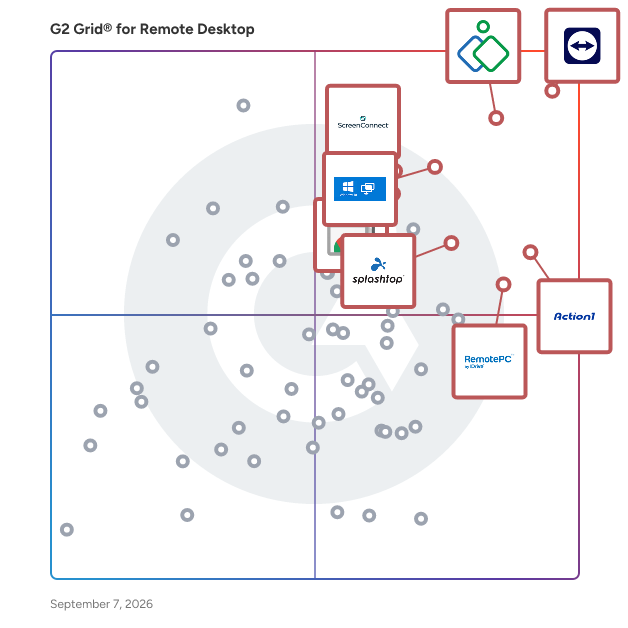
G2 Grid® for Remote Desktop Software

G2 Grid® for Remote Desktop Software plotting products by satisfaction and market presence

Highlighted products: TeamViewer, Zoho Assist, Action1, Microsoft Quick Assist, Chrome Remote Desktop, RemotePC, Splashtop Remote Access, and ScreenConnect.

Underlying data: [Grid® JSON](https://www.g2.com/categories/remote-desktop/grids.json?focus%5B%5D=teamviewer&focus%5B%5D=zoho-assist&focus%5B%5D=action1&focus%5B%5D=microsoft-quick-assist&focus%5B%5D=chrome-remote-desktop&focus%5B%5D=remotepc&focus%5B%5D=splashtop-remote-access&focus%5B%5D=screenconnect&segment=all)

Synergy

Synergy is a software download that shares one mouse and one keyboard between multiple computers. Simply move your mouse between your computers effortlessly. You can even copy and paste between computers. Synergy works on Windows, macOS, Linux, and Raspberry Pi. You only need a regular Ethernet or WiFi network connection, and no special hardware. It works like magic.

Average Rating: 4.5/5.0

Total Reviews: 5

How Do G2 Users Rate Synergy?

  • Has the product been a good partner in doing business?: 6.7/10 (Category avg: 9.0/10)
  • Usage Information: 8.3/10 (Category avg: 8.7/10)
  • Remote Access/Control: 8.3/10 (Category avg: 9.1/10)
  • Device Management: 10.0/10 (Category avg: 8.7/10)

Who Is the Company Behind Synergy?

  • Seller: Symless
  • Year Founded: 2001
  • HQ Location: London, GB
  • Twitter: @Symless
    3,528 Twitter followers
  • LinkedIn® Page: www.linkedin.com
    4 employees on LinkedIn®

Who Uses This Product?

  • Company Size: 60% Medium, 40% Small

What Are Recent G2 Reviews of Synergy?

AnyViewer

AnyViewer - a comprehensive remote access, remote desktop and remote support solution that can access remote computers from Windows, iPhone, Android devices anytime and anywhere safely and quickly. PC-to-PC and Phone-to-PC remote control at anytime from anywhere. Access critical files on working PC even work from home or on business trips. Deliver instant remote support to family, customers, and employees. Transfer files between local computer and remote computer. Play games on the remote desktop regardless of space and time. 100% guaranteed safety & privacy.

Average Rating: 2.7/5.0

Total Reviews: 5

How Do G2 Users Rate AnyViewer?

  • Usage Information: 3.3/10 (Category avg: 8.7/10)
  • Remote Access/Control: 5.8/10 (Category avg: 9.1/10)
  • Device Management: 5.0/10 (Category avg: 8.7/10)

Who Is the Company Behind AnyViewer?

Who Uses This Product?

  • Company Size: 60% Medium, 40% Small

What Do G2 Reviewers Say About AnyViewer?

AI-generated summary from verified user reviews

Pros
  • Users find the pricing of AnyViewer very affordable, enjoying the value of long-term access for just $60.
  • Users find AnyViewer to be simple and easy to use, facilitating a seamless connection experience.
  • Users find the easy connection of AnyViewer to be simple, effective, and user-friendly for their needs.
  • Users find the affordable price of AnyViewer to be a significant advantage for a remote access app.
  • Users find AnyViewer to be user-friendly, highlighting its simplicity in connection and ease of use.
Cons
  • Users report connection issues with AnyViewer, citing instability and slow performance across multiple devices.
  • Users experience delay issues with AnyViewer, citing unstable connections and slow performance across devices.
  • Users report slow connectivity issues with AnyViewer, experiencing unstable connections across multiple devices.
  • Users experience slow performance and unstable connections, leading to frustration when using AnyViewer on multiple devices.
  • Users experience unstable connectivity with AnyViewer, leading to frustratingly slow and random connection issues.

What Are Recent G2 Reviews of AnyViewer?

DeskRoll Remote Desktop

DeskRoll Remote Desktop allows users to sontrol remote desktops, send files and use applications from anywhere over a secure tunnel. No VPN or proxy needed.

Average Rating: 4.5/5.0

Total Reviews: 4

How Do G2 Users Rate DeskRoll Remote Desktop?

  • Has the product been a good partner in doing business?: 10.0/10 (Category avg: 9.0/10)
  • Usage Information: 9.2/10 (Category avg: 8.7/10)
  • Remote Access/Control: 9.6/10 (Category avg: 9.1/10)
  • Device Management: 9.6/10 (Category avg: 8.7/10)

Who Is the Company Behind DeskRoll Remote Desktop?

  • Seller: DeskRoll
  • HQ Location: Hallandale Beach, US
  • Twitter: @DeskRoll
    222 Twitter followers
  • LinkedIn® Page: www.linkedin.com
    2 employees on LinkedIn®

Who Uses This Product?

  • Company Size: 50% Medium, 50% Small

What Are Recent G2 Reviews of DeskRoll Remote Desktop?

What Are G2 Users Discussing About DeskRoll Remote Desktop?

HP Remote Graphics Software

HP Z Remote Graphics Software (RGS) delivers workstation class remote access, enabling power users to securely connect to high performance workstations from anywhere with responsive performance, pixel accurate visuals, and real time collaboration.

Average Rating: 5.0/5.0

Total Reviews: 3

How Do G2 Users Rate HP Remote Graphics Software?

  • Has the product been a good partner in doing business?: 10.0/10 (Category avg: 9.0/10)
  • Usage Information: 10.0/10 (Category avg: 8.7/10)
  • Remote Access/Control: 10.0/10 (Category avg: 9.1/10)
  • Device Management: 10.0/10 (Category avg: 8.7/10)

Who Is the Company Behind HP Remote Graphics Software?

  • Seller: HP
  • Year Founded: 1939
  • HQ Location: Palo Alto, CA
  • Twitter: @HP
    1,091,979 Twitter followers
  • LinkedIn® Page: www.linkedin.com
    144,241 employees on LinkedIn®
  • Ownership: HPQ

Who Uses This Product?

  • Company Size: 75% Large, 25% Medium

What Are Recent G2 Reviews of HP Remote Graphics Software?

What Are G2 Users Discussing About HP Remote Graphics Software?

NoMachine Enterprise Server

NoMachine Enterprise Terminal Server provides secure and reliable access to mission-critical, specialized Linux desktops from any operating system and device, letting you federate all your desktop nodes under a single server. Organizations can conveniently centralize access, management and monitoring whilst empowering their users to run high-end, graphic-intensive OpenGL-based X applications without performance degradation. Create pools of Linux desktop nodes (Terminal Server Nodes) and scale up access to users' virtual desktops by balancing the computing load among them. By adding Enterprise Terminal Servers to a Cloud Server hierarchy, sysadmin can centralize access to multiple NoMachine clusters.

Average Rating: 3.5/5.0

Total Reviews: 3

How Do G2 Users Rate NoMachine Enterprise Server?

  • Usage Information: 10.0/10 (Category avg: 8.7/10)
  • Remote Access/Control: 8.9/10 (Category avg: 9.1/10)
  • Device Management: 7.5/10 (Category avg: 8.7/10)

Who Is the Company Behind NoMachine Enterprise Server?

  • Seller: NoMachine
  • Year Founded: 2003
  • HQ Location: Grand Duchy of Luxembourg, LU
  • Twitter: @NoMachine
    1,157 Twitter followers
  • LinkedIn® Page: www.linkedin.com
    61 employees on LinkedIn®

Who Uses This Product?

  • Company Size: 100% Large

What Are Recent G2 Reviews of NoMachine Enterprise Server?

Thinfinity Workspace

Thinfinity® Workspace 7 is a comprehensive, secure platform that offers a zero-trust approach, enabling secure and contextual access to corporate virtual desktops, virtual applications, internal web apps, SaaS, and files, whether they are on Windows, Linux, or mainframes. It supports various deployment models, including cloud, on-premise, and hybrid settings, and can be deployed on any cloud provider of your choice. With its proprietary reverse gateway technology, Thinfinity® Remote Workspace 7 ensures secure reverse connections over SSL with TLS 1.3 encryption. This robust approach doesn't require client-side installations, firewall modifications, or the opening of inbound ports on your network, thereby enhancing the security infrastructure of your business. The platform ensures all browser-based connections are secured over HTTPS, offering a wide variety of authentication options, from straightforward User/Password to sophisticated Active Directory authentication. Moreover, it seamlessly integrates with any identity provider, such as Okta, DUO, or Azure AD, employing standard security protocols like SAML, OAuth, and Radius for enhanced security and flexibility. The solution protects users, applications, and corporate data against internet web threats and data exfiltration, providing advanced security controls for managed, unmanaged, and BYO devices. With its Role-Based Permissions and native two-factor authentication with Microsoft or Google Authenticator, Thinfinity® Remote Workspace 7 offers an extensive security approach based on zero-trust principles. In addition to its robust security features, Thinfinity® Remote Workspace 7 also delivers an efficient and streamlined remote working experience. Its user-centric interface, combined with advanced features like user analytics and resource reservation views, allows for effective management of remote resources. With its flexible pricing models and an array of advanced features, Thinfinity® Remote Workspace 7 is an optimal solution for organizations aiming to maximize the potential of a virtual workspace. Regardless of your team's size or nature of business, Thinfinity provides a secure, efficient, and tailored solution for your remote access requirements.

Average Rating: 4.1/5.0

Total Reviews: 4

How Do G2 Users Rate Thinfinity Workspace?

  • Has the product been a good partner in doing business?: 10.0/10 (Category avg: 9.0/10)

Who Is the Company Behind Thinfinity Workspace?

Who Uses This Product?

  • Company Size: 75% Medium, 25% Large

What Are Recent G2 Reviews of Thinfinity Workspace?

What Are G2 Users Discussing About Thinfinity Workspace?

CACHATTO

With the proliferation of devices and types of access, securing business application and data has become a major challenge for today’s businesses. At the same time increasing productivity, ensuring business continuity and mitigating cyber threats are also a growing concern. To address these challenges a numerable point product, exist however managing them in cohesive manner has become a nightmare. CACHATTO with its flexible architecture is ideally suited to meet all these challenges in a single cohesive platform which is extremely easy to deploy, manage and scale. CACHATTO with its Zero Trust Model protects business applications, servers, network and data at all times.

Average Rating: 5.0/5.0

Total Reviews: 2

How Do G2 Users Rate CACHATTO?

  • Has the product been a good partner in doing business?: 10.0/10 (Category avg: 9.0/10)
  • Usage Information: 8.3/10 (Category avg: 8.7/10)
  • Remote Access/Control: 8.3/10 (Category avg: 9.1/10)
  • Device Management: 9.2/10 (Category avg: 8.7/10)

Who Is the Company Behind CACHATTO?

  • Seller: CACHATTO
  • Year Founded: 2017
  • HQ Location: Bengaluru, IN
  • Twitter: @Cachatto_India
    3 Twitter followers
  • LinkedIn® Page: www.linkedin.com
    27 employees on LinkedIn®

Who Uses This Product?

  • Company Size: 100% Small

What Are Recent G2 Reviews of CACHATTO?

What Are G2 Users Discussing About CACHATTO?

DeskIn

DeskIn is a powerful remote desktop solution designed for both personal and enterprises. It offers seamless access across Windows, macOS, Android, and iOS platforms, making it ideal for remote work, remote gaming, IT support, and collaborative projects. [Remote Design] Remotely access office servers or workstations to run large-scale, resource-intensive design software. Ideal for scenarios such as design, game development, animation production, and film or television special effects. [Remote Work] Work from anywhere with full access to your office computers—enjoy the freedom, comfort, and productivity of working from home. Transfer files quickly and securely without compromising data safety or efficiency. [Remote Gaming] Play PC games remotely with high resolution and ultra-low latency. Stream graphics-intensive games seamlessly from office or home computers, delivering an immersive gaming experience anytime, anywhere. [Technical Assistance] Provide timely technical support to customers and colleagues with remote diagnosis and troubleshooting. Reduce customer wait times and improve team efficiency by seeing exactly what customers see, bridging communication gaps and making support more accurate and effective. [Equipment Operation and Maintenance] Remotely monitor, upgrade, debug, and troubleshoot numerous unattended devices. Resolve software issues without visiting the site, saving on travel costs. Batch management of hardware and software ensures efficient and streamlined equipment operation and maintenance. [Equipment Management] Manage company computers and servers while providing technical support to internal employees. Reduce costs and increase efficiency in IT support and device management. IT departments can also assign support accounts to external suppliers while maintaining full control over data streams.

Average Rating: 5.0/5.0

Total Reviews: 2

Who Is the Company Behind DeskIn?

  • Seller: Zuler Technology
  • Year Founded: 2021
  • HQ Location: Singapore, SG
  • Twitter: @DeskinRemote
    20 Twitter followers
  • LinkedIn® Page: www.linkedin.com
    10 employees on LinkedIn®

Who Uses This Product?

  • Company Size: 50% Medium, 50% Small

What Are Recent G2 Reviews of DeskIn?

Firefox Send Tabs

Send an open tab on one device to all your others with a single tap. Much easier than texting or emailing yourself those links

Average Rating: 5.0/5.0

Total Reviews: 2

How Do G2 Users Rate Firefox Send Tabs?

  • Usage Information: 8.3/10 (Category avg: 8.7/10)
  • Remote Access/Control: 8.3/10 (Category avg: 9.1/10)

Who Is the Company Behind Firefox Send Tabs?

  • Seller: Mozilla
  • Year Founded: 2005
  • HQ Location: San Francisco, CA
  • Twitter: @mozilla
    261,861 Twitter followers
  • LinkedIn® Page: www.linkedin.com
    1,774 employees on LinkedIn®

Who Uses This Product?

  • Company Size: 100% Small

What Are Recent G2 Reviews of Firefox Send Tabs?

What Are G2 Users Discussing About Firefox Send Tabs?

Impero Connect

Impero Connect is a remote access solution that’s purpose-built for security. Support any device or server, from desktops and smartphones to highly sensitive ATMs, POS machines, smart factory devices, and medical equipment. Impero Connect offers flexible deployment options for cloud, on-premises or hybrid environments. Make sure your organisation can run effectively and safely, no matter where people and devices connect. About Impero Solutions With top talent and best-in-class technology, Impero offers educational and corporate customers the most secure way of remotely accessing devices and supporting students no matter their working or learning environments. Over 9 million users make more than 100 million connections every day using Impero. Learn more about how Impero creates safe, productive online experiences at imperosoftware.com.

Average Rating: 3.3/5.0

Total Reviews: 3

How Do G2 Users Rate Impero Connect?

  • Has the product been a good partner in doing business?: 10.0/10 (Category avg: 9.0/10)
  • Remote Access/Control: 8.3/10 (Category avg: 9.1/10)

Who Is the Company Behind Impero Connect?

  • Seller: Netop
  • Year Founded: 1981
  • HQ Location: Copenhagen, DK
  • Twitter: @NetopTech
    176 Twitter followers
  • LinkedIn® Page: www.linkedin.com
    53 employees on LinkedIn®

Who Uses This Product?

  • Company Size: 50% Small, 25% Large

What Are Recent G2 Reviews of Impero Connect?

PC-Duo by Vector Networks

Award winning PC-Duo provides fast and reliable PC-PC remote control and remote access over LAN/WAN and internet connections. The famous PC-Duo reliability and performance makes it ideal for all environments including conventional PCs, thin client devices and fully virtualized desktops.

Average Rating: 4.3/5.0

Total Reviews: 2

How Do G2 Users Rate PC-Duo by Vector Networks?

  • Usage Information: 6.7/10 (Category avg: 8.7/10)
  • Remote Access/Control: 10.0/10 (Category avg: 9.1/10)
  • Device Management: 10.0/10 (Category avg: 8.7/10)

Who Is the Company Behind PC-Duo by Vector Networks?

  • Seller: Vector Networks
  • HQ Location: Atlanta, US
  • Twitter: @vectornetworks
    301 Twitter followers
  • LinkedIn® Page: www.linkedin.com
    14 employees on LinkedIn®

Who Uses This Product?

  • Company Size: 50% Medium, 50% Small

What Are Recent G2 Reviews of PC-Duo by Vector Networks?

What Are G2 Users Discussing About PC-Duo by Vector Networks?

Dualmon Remote Access

dualmon provides an advanced Software-as-a-Service solution that will keep you connected to your computers from anywhere in the world.

Average Rating: 4.5/5.0

Total Reviews: 1

Who Is the Company Behind Dualmon Remote Access?

  • Seller: Dualmon
  • Year Founded: 2011
  • HQ Location: N/A
  • Twitter: @dualmon
    69 Twitter followers
  • LinkedIn® Page: www.linkedin.com
    2 employees on LinkedIn®

Who Uses This Product?

  • Company Size: 100% Medium

What Are Recent G2 Reviews of Dualmon Remote Access?

What Are G2 Users Discussing About Dualmon Remote Access?

Ericom Connect Enterprise

Ericom Connect is a powerful remote application and desktop access solution. Built on innovative technology and two decades of Ericom's proven expertise in the access market, Ericom Connect offers enterprise-level organizations unparalleled scalability, superior user experience and exceptional ease of use.

Average Rating: 4.0/5.0

Total Reviews: 1

Who Is the Company Behind Ericom Connect Enterprise?

Who Uses This Product?

  • Company Size: 100% Large

What Are Recent G2 Reviews of Ericom Connect Enterprise?

What Are G2 Users Discussing About Ericom Connect Enterprise?

HopToDesk

HopToDesk is a free remote desktop tool paired with an enterprise-grade management dashboard. The client is free for personal and commercial use, with no session limits and no commercial-use lockouts. Sessions are protected with end-to-end encryption, and we do not collect personal data. HopToDesk Dashboard Pro turns the client into a complete fleet management platform for IT teams: Fleet management: enroll and organize devices with groups and tags, see real-time online status, and monitor CPU, memory, disk, and battery across your fleet with automatic offline alerts. Remote operations at scale: run commands on one device or fan them out across the entire fleet, with approval workflows, auto-approve policies, and scheduled runbooks. An AI assistant can execute fleet-wide jobs by tag or group. Mass deployment: generate custom-branded installers (EXE, MSI, Android APK) with baked-in enrollment so devices join your account automatically on first launch. Lock client settings and restrict devices to incoming-only connections. Enterprise controls: SSO, SCIM user provisioning, team roles, scoped API keys, audit logs, and session history. Built-in helpdesk: a full ticketing system with SLA tracking and a customer-facing portal, included at no extra cost. Clients are available for Windows, macOS, Linux, Android, and iOS, plus a browser-based web client that requires no installation.

Average Rating: 5.0/5.0

Total Reviews: 1

How Do G2 Users Rate HopToDesk?

  • Has the product been a good partner in doing business?: 10.0/10 (Category avg: 9.0/10)
  • Usage Information: 10.0/10 (Category avg: 8.7/10)
  • Remote Access/Control: 10.0/10 (Category avg: 9.1/10)
  • Device Management: 10.0/10 (Category avg: 8.7/10)

Who Is the Company Behind HopToDesk?

Who Uses This Product?

  • Company Size: 100% Small

What Are Recent G2 Reviews of HopToDesk?

KairosLink

KairosLink is an RMM and ITSM platform for MSPs and IT teams. Remote access, monitoring, patching, service desk, Microsoft 365 and security run from one multi-tenant panel, so technicians stop paying for and switching between tools that do not share data. REMOTE CONTROL THAT WORKS WHEN NOBODY IS THERE Connect in seconds from the web panel to any managed computer, with nobody on the other side. See the Windows logon screen, enter credentials remotely and keep working after the session change. The viewer reconnects on its own and survives a remote logoff. Traffic runs encrypted over secure WebSocket on port 443, so it works through restrictive firewalls without asking the customer for a VPN or an open port. Screen Wall shows up to 16 live screens at once with one-click remote control. WINDOWS, LINUX AND MACOS Patch management covers Windows, Linux and macOS. On Windows it uses the native Windows Update API for scan and history, with real per-patch progress and no automatic reboots. The Linux agent is a native binary running as a systemd service: inventory, installed software, systemd units, processes, monitoring with alerts, cron and timers, remote file explorer, bash, and patching with apt (Debian family) and dnf (Red Hat family). Windows endpoints also get an interactive remote terminal with audited, replayable sessions. AI WITH A HUMAN IN THE LOOP Describe the task in plain language and the AI writes the script. The technician reviews and approves it before it runs, and every execution stays in the audit trail. SERVICE DESK IN THE SAME PLACE AS THE FIX Tickets with statuses, priorities, SLA policies, multiple technicians, internal notes, live time tracking and per-customer hour banks with alerts at 80% and 100%. Connect to the machine from the ticket in one click. Problem management groups tickets that share a root cause. Customers get their own portal with equipment, monitoring, patches and tickets, isolated from your panel. MICROSOFT 365, MULTI-TENANT One tenant connection per customer through admin consent. Synchronised users, assigned licences and Intune-managed devices, plus a licence table with purchased, assigned and available units. The access diagnostic runs deterministic checks with findings from a fixed catalogue: the same data always produces the same findings. The module is read-only inside the customer tenant. SECURITY AN MSP CAN SELL Security posture scoring per computer and per customer with centralised Microsoft Defender management. AES-256 credential vault with per-folder permissions and audit log. DNS web filtering on the endpoint, per computer, Active Directory group or organizational unit. Active Directory assessment with a 0 to 100 score and PDF report, and GPO-based agent deployment with rollback. From KairosEnterprise: DLP with USB device control, data classification, content inspection and channel control. WHITE LABEL BY DEFAULT Patching, time and ticket reports export to PDF with your logo and company name, plus CSV. PLANS KairosStarter USD 36/month (10 endpoints, 3 technicians). KairosPro USD 105/month (30 endpoints, 5 technicians). KairosBusiness USD 300/month (100 endpoints, 10 technicians). KairosEnterprise USD 1,057/month (500 endpoints, unlimited technicians, DLP, Dedicated Account Manager, assisted onboarding, priority support). KairosEnterpriseFlex: custom pricing and contractual limits, adding corporate SSO, dedicated infrastructure and custom onboarding and migration. 14-day free trial, no credit card required.

Average Rating: 5.0/5.0

Total Reviews: 2

How Do G2 Users Rate KairosLink?

  • Has the product been a good partner in doing business?: 10.0/10 (Category avg: 9.0/10)

Who Is the Company Behind KairosLink?

Who Uses This Product?

  • Company Size: 100% Medium

What Are Recent G2 Reviews of KairosLink?

Tian Lin
TL
Researched and written by Tian Lin
Updated April 9, 2026