  # Best Enterprise Public Records Management Software

  *By [Emma Stein](https://research.g2.com/insights/author/emma-stein)*

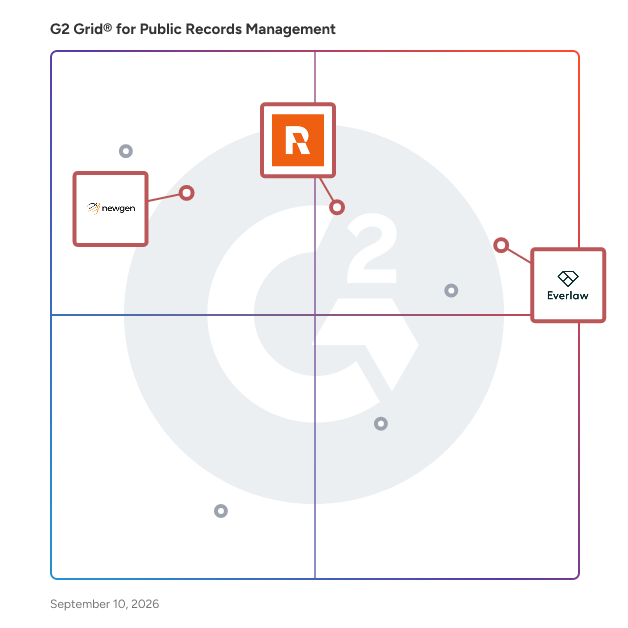
   Products classified in the overall Public Records Management category are similar in many regards and help companies of all sizes solve their business problems. However, enterprise business features, pricing, setup, and installation differ from businesses of other sizes, which is why we match buyers to the right Enterprise Business Public Records Management to fit their needs. Compare product ratings based on reviews from enterprise users or connect with one of G2&#39;s buying advisors to find the right solutions within the Enterprise Business Public Records Management category.

In addition to qualifying for inclusion in the Public Records Management Software category, to qualify for inclusion in the Enterprise Business Public Records Management Software category, a product must have at least 10 reviews left by a reviewer from an enterprise business.


## How Many Public Records Management Software Products Does G2 Track?
**Total Products under this Category:** 35

### Category Stats (May 2026)
- **Average Rating**: 4.56/5
- **New Reviews This Quarter**: 4
- **Buyer Segments**: Small-Business 60% │ Mid-Market 40%

*Last updated: May 19, 2026*

  
## How Does G2 Rank Public Records Management Software Products?

**Why You Can Trust G2's Software Rankings:**

- 30 Analysts and Data Experts
- 1,600+ Authentic Reviews
- 35+ Products
- Unbiased Rankings

G2's software rankings are built on verified user reviews, rigorous moderation, and a consistent research methodology maintained by a team of analysts and data experts. Each product is measured using the same transparent criteria, with no paid placement or vendor influence. While reviews reflect real user experiences, which can be subjective, they offer valuable insight into how software performs in the hands of professionals. Together, these inputs power the G2 Score, a standardized way to compare tools within every category.


  ## What Are the Top-Rated Public Records Management Software Products in 2026?
### 1. [Everlaw](https://www.g2.com/products/everlaw/reviews)
  Everlaw transforms how legal teams navigate the boundaries of legal discovery. The platform is built for the high-stakes demands of modern litigation, empowering law firms, corporations, and government agencies to transform mountains of data into actionable breakthroughs.


  **Average Rating:** 4.7/5.0
  **Total Reviews:** 710
**How Do G2 Users Rate Everlaw?**

- **Workflow Assignment:** 8.7/10 (Category avg: 7.8/10)
- **Quality of Support:** 9.5/10 (Category avg: 8.4/10)
- **Role-Based Permissions:** 9.0/10 (Category avg: 7.7/10)
- **Communication Tools:** 8.6/10 (Category avg: 7.3/10)

**Who Is the Company Behind Everlaw?**

- **Seller:** [Everlaw](https://www.g2.com/sellers/everlaw)
- **Company Website:** https://www.everlaw.com
- **Year Founded:** 2010
- **HQ Location:** Oakland, California
- **Twitter:** @everlaw (3,970 Twitter followers)
- **LinkedIn® Page:** https://www.linkedin.com/company/2139901/ (540 employees on LinkedIn®)

**Who Uses This Product?**
  - **Who Uses This:** Paralegal, Attorney
  - **Top Industries:** Law Practice, Legal Services
  - **Company Size:** 46% Small-Business, 41% Mid-Market


#### What Are Everlaw's Pros and Cons?

**Pros:**

- Ease of Use (96 reviews)
- Customer Support (60 reviews)
- User Interface (44 reviews)
- Intuitive Use (41 reviews)
- Features (36 reviews)

**Cons:**

- Difficult Learning (33 reviews)
- Learning Curve (28 reviews)
- Inefficient Search Functionality (24 reviews)
- Performance Issues (20 reviews)
- Missing Features (19 reviews)

### 2. [Relativity](https://www.g2.com/products/relativity/reviews)
  Relativity is a leading legal data intelligence company that builds technology to help users organize data, discover the truth, and act on it. Its extensible, AI-powered cloud platform, RelativityOne, transforms complex data into actionable insights at massive scale for litigation, investigations, regulatory inquiries, data breach responses, and other legal use cases. The world’s largest law firms and corporations, government agencies, and a robust network of channel partners rely on Relativity’s legal AI software to securely surface and manage the most relevant and impactful information in their matters. The company also expands access to technology by providing its platform at no cost to academic institutions through its Relativity Academic program and to organizations supporting pro bono legal work through its Justice for Change initiative.


  **Average Rating:** 4.6/5.0
  **Total Reviews:** 624
**How Do G2 Users Rate Relativity?**

- **Workflow Assignment:** 8.8/10 (Category avg: 7.8/10)
- **Quality of Support:** 8.3/10 (Category avg: 8.4/10)
- **Role-Based Permissions:** 9.3/10 (Category avg: 7.7/10)
- **Communication Tools:** 8.9/10 (Category avg: 7.3/10)

**Who Is the Company Behind Relativity?**

- **Seller:** [Relativity](https://www.g2.com/sellers/relativity)
- **Company Website:** https://www.relativity.com
- **Year Founded:** 2001
- **HQ Location:** Chicago, IL
- **LinkedIn® Page:** https://www.linkedin.com/company/25027079/ (1,850 employees on LinkedIn®)

**Who Uses This Product?**
  - **Who Uses This:** Project Manager, Manager
  - **Top Industries:** Legal Services, Law Practice
  - **Company Size:** 42% Mid-Market, 33% Enterprise


#### What Are Relativity's Pros and Cons?

**Pros:**

- Ease of Use (85 reviews)
- Innovation (69 reviews)
- Features (61 reviews)
- Document Review (53 reviews)
- User Interface (50 reviews)

**Cons:**

- Performance Issues (69 reviews)
- Difficult Learning (37 reviews)
- Limited Features (30 reviews)
- Not User-Friendly (30 reviews)
- Expensive (29 reviews)

### 3. [NewgenONE Digital Transformation Platform](https://www.g2.com/products/newgenone-digital-transformation-platform/reviews)
  Transform your business with NewgenONE, an intelligent enterprise orchestration platform, featuring a suite of cutting-edge technologies—from task automation to mission-critical, content-rich applications and advanced workflow orchestration. Effortlessly integrate your existing systems and devices into a seamless ecosystem that ensures personalized, efficient experiences across the board. Build powerful applications at lightning speed with NewgenONE, a completely native low-code platform. Enjoy seamless scalability, robust security, and built-in governance and compliance, all while accelerating automation across your enterprise. Automate thousands of enterprise-wide processes and stay ahead of the competition with rapid, innovative solutions.


  **Average Rating:** 4.5/5.0
  **Total Reviews:** 89
**How Do G2 Users Rate NewgenONE Digital Transformation Platform?**

- **Quality of Support:** 8.4/10 (Category avg: 8.4/10)

**Who Is the Company Behind NewgenONE Digital Transformation Platform?**

- **Seller:** [Newgen](https://www.g2.com/sellers/newgen)
- **Year Founded:** 1992
- **HQ Location:** Mclean, VA
- **Twitter:** @newgensoftware (3,367 Twitter followers)
- **LinkedIn® Page:** https://www.linkedin.com/company/newgen (5,283 employees on LinkedIn®)

**Who Uses This Product?**
  - **Top Industries:** Banking, Financial Services
  - **Company Size:** 59% Enterprise, 22% Mid-Market


#### What Are NewgenONE Digital Transformation Platform's Pros and Cons?

**Pros:**

- Automation (1 reviews)
- Automation Efficiency (1 reviews)
- Automation Features (1 reviews)
- Automation Focus (1 reviews)
- Cloud Services (1 reviews)

**Cons:**

- Bug Issues (1 reviews)
- Bugs (1 reviews)
- Complexity (1 reviews)
- Complex Setup (1 reviews)
- Difficult Configuration (1 reviews)


    ## What Is Public Records Management Software?
  [Public Sector Software](https://www.g2.com/categories/public-sector)

  
---

## How Do You Choose the Right Public Records Management Software?

### What You Should Know About Public Records Management Software

### What is Public Records Management Software?

Public records management software helps government agencies and public sector organizations efficiently manage and maintain public records. Public records are official documents and information created and kept by the government, public institutions, or other organizations accessible to the public. These records are subject to certain legal and privacy restrictions.&amp;nbsp;

Public records management systems offer government agencies a centralized and digital end-to-end solution for organizing, tracking, storing, retrieving, and disposing public records. These products streamline the entire records lifecycle, from creation to disposal, ensuring compliance with legal and regulatory requirements.

Conversely, citizens interacting with public records benefit from the transparency and accessibility of public records management software. The software enables citizens to request public records more efficiently by offering public portals and tracking mechanisms, encouraging greater civic engagement.&amp;nbsp;

By enhancing citizens&#39; ability to request and receive public records, these software products foster a stronger sense of accountability and cooperation between government bodies and the public they serve.

### What are the Common Features of Public Records Management Software?

The following are some core features within public records management software that can help users in several ways:

**Document capture and storage:** This enables the digital capture and storage of public records, ensuring efficient filing, indexing, and retrieval of information, thus improving accessibility and retrieval.

**Role-based access:** This enables administrators to establish and oversee user permissions, ensuring that only authorized personnel can access designated records. This feature helps maintain data confidentiality and prevents unauthorized disclosure of sensitive information.

**Redaction:** Redaction helps selectively block out sensitive information within documents that invades personal privacy and compromises security. Digital redaction features automate this process by establishing exemption rules that apply to all documents, ensuring specific types of information, such as social security numbers, phone numbers, and medical records, are obscured when public records requests are made.

**Workflow automation:** Automated workflows streamline review and approval processes for public records. Its flexible design allows customization to meet the unique requirements of different organizations, thereby improving the overall request processing time. The software can also automate various tasks, such as record classification, data entry, request routing, and notification systems, with customizable templates, reducing manual workload and increasing the overall efficiency of public records management.

**Collaboration tools:** Multiple departments or users can simultaneously collaborate, view, and work on public records. It also allows the requesters and staff to communicate if questions arise while fulfilling the request.

**Compliance monitoring:** Public records management software assists in monitoring and managing compliance with relevant laws and regulations governing public records. It helps track record retention schedules, deadlines, and other compliance requirements to avoid legal issues and penalties.

**Audit trail:** Public records management systems create a detailed audit trail that logs all activities related to public records, including user actions, document modifications, and access attempts. This feature promotes transparency and accountability and helps address potential issues or discrepancies.

**Dashboards and reporting:** The dashboards and reporting features visually represent key performance indicators (KPIs), record metrics, and data analytics related to public records management involving stakeholders. This enables administrators to make decisions, identify trends, and optimize processes.

**Public portal:** Citizens can utilize the portal for efficient request management. As milestones are reached, the system can send notifications to citizens, keeping them informed about the status of their requests. The portal also facilitates communication between citizens and government staff.

**Payment processing** : Citizens can pay online if there are fees associated with a records request. These tools can maintain a record of financial and biographical information and produce invoices for offline billing.

### What are the Benefits of Public Records Management Software?

Public records management software has a variety of benefits. They are:

**Data security:** It safeguards sensitive records from unauthorized access and data breaches using robust data security measures. The software mitigates the risk of data loss by adhering to stringent data protection regulations and implementing standardized organization practices. This software enhances disaster preparedness by offering secure data storage solutions like cloud-based repositories and regular automated backups.

**Records transparency:** It promotes transparency by providing a clear and organized platform for accessing and sharing public information with stakeholders. The software enhances public trust and confidence in government agencies by providing a transparent and accountable system.

**Increased productivity:** Finding records can take time. Public records management systems allow requesters to digitally search files and offer online request functionalities, saving time, reducing costs, and increasing productivity. Features like user-friendly reports that help identify bottlenecks and track requests, automated workflows, and task notifications help amplify employee efficiency and timely fulfillment.

**Ensure regulatory compliance:** Robust features and automated processes help ensure adherence to regulatory requirements related to public records management. By maintaining accurate and up-to-date records, the organization can minimize the risk of litigation and legal consequences, promoting a compliant and legally sound environment.

### Who Uses Public Records Management Software?

**Citizens:** In the United States, the open record laws—Freedom of Information Act (FOIA)—mandate the complete or partial disclosure of unreleased or unshared data and documents managed by U.S. federal, state, or other public entities upon request. Similarly, numerous governments globally have their versions of this legislation. Government agencies use public records management software to retrieve and share public records with citizens upon their requests made through the public portal of the software.

**Government agencies:** Management of public records for government agencies is crucial. State, federal, and local governments produce public records constantly. These records provide insight into conduct and actions taken that are of public interest. Public records request management software allows government organizations to accept, process, and respond to FOIA requests.&amp;nbsp;

**Legal teams:** Legal teams use public records management software to access legal documents, court records, and other public information crucial for case management, conducting research, and preparing legal arguments efficiently and accurately.

**Media and journalism outlets:** Journalists utilize public records management systems to access government records, public data, and historical information, enabling them to investigate stories, fact-check information, and provide reliable and accurate news.

### What are the Alternatives to Public Records Management Software?

Alternative solutions that can partially replace public records management software include:

[Enterprise content management (ECM) systems](https://www.g2.com/categories/enterprise-content-management-ecm) **:** ECM systems offer comprehensive records and document management capabilities, advanced workflow, and collaboration features. While ECM solutions can effectively handle public records, they often require more extensive configuration to address the specific legal and compliance nuances required for public sector record management.

[Enterprise information archiving software](https://www.g2.com/categories/enterprise-information-archiving) **:** Enterprise information archiving software can securely store and manage large volumes of critical information, providing long-term storage and efficient retrieval capabilities for archived public records.&amp;nbsp;

#### Software Related to Public Records Management Software

Related solutions that can be used together with public records management software include:

[eDiscovery software](https://www.g2.com/categories/ediscovery) **:** eDiscovery software assists in searching for and retrieving specific documents from the public records management system relevant to legal cases. This process decreases the chance of overlooking important details. Moreover, the software enhances reporting and analysis capabilities, ultimately bolstering legal decision making.

[Citizen engagement software](https://www.g2.com/categories/citizen-engagement) **:** Citizen engagement software facilitates interaction between government entities and citizens, and when combined with public records management software, it enables transparent public access to government information, feedback, and services, fostering a more engaged and informed citizenry.

### Challenges with Public Records Management Software

Public records management software can come with its own set of challenges.

**Digital transformation and legacy data:** Many public records were traditionally kept in physical formats but are now being digitized. Transitioning from paper-based systems to digital formats while preserving the integrity and accessibility of historical records can be complex. Users have cited data accuracy, consistency, and completeness issues during the migration process.

**Data privacy:** Despite all the security features public records management software offers, potential data privacy concerns persist. Data breaches remain a risk, as even the most secure systems can be vulnerable. Additionally, improper access, insider threats, lack of user awareness and training, and evolving regulations can create complexities in safeguarding public records.&amp;nbsp;

### How to Buy Public Records Management Software?

#### Requirements Gathering (RFI/RFP) for Public Records Management Software

Gathering as much information as possible is crucial while planning to purchase public records management software to ensure that the software meets the organization&#39;s needs. Here are some questions to ask while searching for a public records management software solution:

- What are the key features?&amp;nbsp;
- Is the software intuitive and easy to use, or does it require extensive training?&amp;nbsp;
- Is the software customizable to align with the organization&#39;s needs and workflows?
- How does the software ensure the security and confidentiality of sensitive public records?&amp;nbsp;
- Is it compliant with the relevant regulations and standards for public records management, such as HIPAA or GDPR?
- Can the software integrate with other systems the organization uses?
- Does the vendor offer training for the team on how to use the software, and do they offer continuous technical support if issues arise?
- What is the price structure, and does the cost include licensing fees, implementation costs, and ongoing maintenance?
- Can the software handle the potential growth of the agency&#39;s records management needs over time, and are there additional costs associated with scaling up?
- Can the software assist in migrating existing public records from the current system with data integrity?
- Does the vendor provide regular updates and improvements to the software, and are the updates included in the pricing, or do they require additional costs?

Answering these questions might be difficult. However, they provide a solid base to build the long list.

#### Compare Public Records Management Software Products

**Create a long list**

Given the number of options to choose from in the public records management software market, evaluating and comparing the responses to the above questions is crucial. At this stage, it is also essential to evaluate the vendor’s reputation and buyers&#39; experiences from similar organizations by reading authentic user reviews on G2.com.

**Create a short list**

After compiling responses to the above question and comparing them, the next step is to delve into each public records management software with more scrutiny. Buyers need to make a more detailed side-by-side comparison to check whether the software aligns with the organization&#39;s requirements.&amp;nbsp;

This includes evaluating additional features and functionalities beyond essential public records management system features that would benefit the organization. Buyers can use G2 reviews and comparison features to compare products and narrow their list.

**Conduct demos**

After shortlisting the vendors, buyers can request demos to get hands-on experience and evaluate the suitability of the software for their specific needs. It is important to note that for a seamless demo experience, users should ensure that the vendor is well-informed about their needs and requirements in advance. This preparation enables the vendor to tailor their presentation effectively.&amp;nbsp;

During the demo, users should explore various aspects, such as testing the software&#39;s document scanning and upload capabilities, understanding the functionality of the redaction feature, and learning the software&#39;s workflow for managing requests. Understanding how the software streamlines the process for citizens making requests versus employees responding to these requests provides valuable insights into the software&#39;s practicality and user-friendliness.&amp;nbsp;

By simulating scenarios and seeking detailed explanations into specific areas, users can better understand how the software aligns with their operational needs and regulatory compliance, enabling a well-informed decision-making process.

#### Selection of Public Records Management Software

**Choose a selection team**

Choosing the right selection team to decide the best software solution is critical. The selection team for public records management software should include different personas with the required skills, interests, and time from the records management team, IT team, legal and compliance team, and key leaders from different departments.

**Negotiation**

Pricing is a key decision that could make or break a deal. The buyers must discuss the pricing structure and check if there are licensing fees or any additional costs. Buyers can request quotes from multiple vendors, compare them, and use them as leverage to negotiate better terms with their preferred vendor.&amp;nbsp;

The buyer must pay attention to contract terms, including the length of the agreement and renewal terms, and can negotiate terms that work for their organization&#39;s long-term needs and should not hesitate to ask for discounts, especially if they are considering a long-term commitment. Once the buyer has reached an agreement, they must ensure that the negotiated terms are documented in the contract to avoid misunderstandings later.

**Final decision**

Buyers can opt for a software trial if possible. Trialing the software allows users to evaluate its features practically. Post-trial, users can collect feedback that contributes to the ultimate decision-making process. The final decision requires consensus from the entire selection team, which guarantees alignment with the organization’s requirements.

### What Does Public Records Management Software Cost?

The cost of public records management software is influenced by factors like industry, geographical region, features and functionality, and the company offering the software.&amp;nbsp;

There are generally two main ways to purchase this software—a one-time purchase or a subscription model. The upfront cost of a one-time purchase is higher than that of a subscription, but it eliminates ongoing fees for using the software year after year. On the other hand, a subscription model is usually more cost-effective upfront. It allows more flexibility, but it might limit how many users can access it at once.&amp;nbsp;

Customization and integrations might also result in additional expenses. Therefore, getting exact quotations for all the features offered by different vendors and comparing them is crucial. Many vendors also offer free trials or limited versions of public records management software for organizations to try before making a financial commitment.

### Public Records Management Software Trends

**Increasing adoption of cloud platforms**

Cloud offers remote accessibility, scalability, cost efficiency, and automatic updates, fostering collaboration while enhancing security and ensuring compliance with laws. Organizations benefit from reduced IT overhead and robust disaster recovery.&amp;nbsp;

**Integration of AI capabilities**

AI and automation are being integrated into public record management software to streamline record management processes, categorize data, and enhance search capabilities. This has improved the overall efficiency of records management by reducing manual effort.


