Best Patch Management Software for Medium-Sized Businesses - Page 3

How Many Patch Management Software Products Does G2 Track?

Total Products under this Category: 99

Category Stats (Sep 2026)

  • Average Rating: 4.52/5 (↑0.02 vs Aug 2026) The average rating of products in this category, based on all submitted ratings
  • Top Trending Product: Application Workspace (+2.22%) - Among all products in this category, Application Workspace recorded the largest rating increase compared to last month

Last updated: September 26, 2026

How Does G2 Rank Patch Management Software Products?

Why You Can Trust G2's Software Rankings:

  • 30 Analysts and Data Experts
  • 23,900+ Authentic Reviews
  • 99+ Products
  • Unbiased Rankings

G2's software rankings are built on verified user reviews, rigorous moderation, and a consistent research methodology maintained by a team of analysts and data experts. Each product is measured using the same transparent criteria, with no paid placement or vendor influence. While reviews reflect real user experiences, which can be subjective, they offer valuable insight into how software performs in the hands of professionals. Together, these inputs power the G2 Score, a standardized way to compare tools within every category.

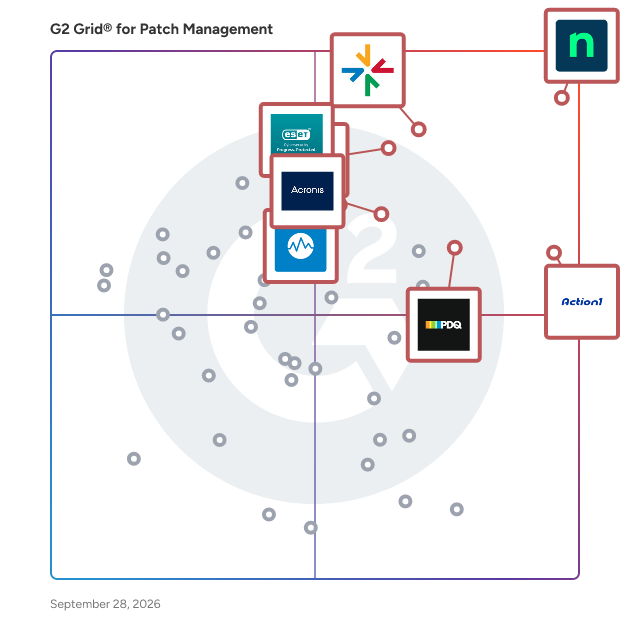
G2 Grid® for Patch Management Software

G2 Grid® for Patch Management Software plotting products by satisfaction and market presence

Highlighted products: NinjaOne, ManageEngine Endpoint Central, Action1, PDQ Connect, TeamViewer, ESET PROTECT, Datto RMM, and Acronis Cyber Protect Cloud.

Underlying data: [Grid® JSON](https://www.g2.com/categories/patch-management/grids.json?focus%5B%5D=ninjaone&focus%5B%5D=manageengine-endpoint-central&focus%5B%5D=action1&focus%5B%5D=pdq-connect&focus%5B%5D=teamviewer&focus%5B%5D=eset-protect&focus%5B%5D=datto-rmm&focus%5B%5D=acronis-cyber-protect-cloud&segment=mid-market)

SUSE Multi-Linux Manager

True open source infrastructure management solution designed to simplify and secure your entire mixed Linux environment — at the core, on the edge or in the cloud(s). Maintain infrastructure security & compliance at any scale — from 10 to 1 million clients — from a single console. Manual or inconsistent patch management is a leading cause of cyber-attacks. SUSE Manager helps to secure your entire mixed Linux environments – from automated patch management to centralized monitoring and management. Automate infrastructure security & compliance Secure your infrastructure with automated patch and configuration management including auto-remediation. Validate your system security against SCAP protocols and perform audit scans on client systems through openSCAP. Ensure system compliance with internal and external requirements. Centralized control and reporting at any scale Scale out your infrastructure and centralize reporting for up to 1 million Linux clients using SUSE Manager’s Hub architecture. Use Prometheus to monitor real-time data and Grafana for visual dashboards. Simplify and automate deployment with the new rearchitected proxy for resource constrained environments. Manage any Linux, anywhere One console to manage and monitor all of your Linux distros wherever thy are located. One-click automation for provisioning, patching, and configuration, which leads to faster, consistent and repeatable server employments. Easy, in-place migration for SUSE Solutions, including openSUSE to SLE, service pack migrations and major version upgrades.

Average Rating: 4.6/5.0

Total Reviews: 47

How Do G2 Users Rate SUSE Multi-Linux Manager?

  • Ease of Admin: 8.2/10 (Category avg: 8.9/10)
  • Has the product been a good partner in doing business?: 9.0/10 (Category avg: 9.1/10)
  • Quality of Support: 9.1/10 (Category avg: 8.9/10)
  • Ease of Use: 8.5/10 (Category avg: 8.8/10)

Who Is the Company Behind SUSE Multi-Linux Manager?

  • Seller: SUSE
  • Company Website:
  • Year Founded: 1992
  • HQ Location: Nürnberg, DE
  • Twitter: @SUSE
    64,779 Twitter followers
  • LinkedIn® Page: www.linkedin.com
    2,718 employees on LinkedIn®

Who Uses This Product?

  • Top Industries: Information Technology and Services
  • Company Size: 45% Large, 31% Medium

What Do G2 Reviewers Say About SUSE Multi-Linux Manager?

AI-generated summary from verified user reviews

Pros
  • Users appreciate the ease of use of SUSE Multi-Linux Manager for centralized management of various Linux distributions.
  • Users value the automation capabilities of SUSE Multi-Linux Manager, which significantly enhance efficiency and reduce manual errors.
  • Users appreciate the ease of patch management across multiple Linux systems, simplifying updates and ensuring smooth operations.
  • Users value the centralized management and monitoring capabilities of SUSE Multi-Linux Manager, enhancing efficiency across diverse Linux environments.
  • Users value the reliability of SUSE Multi-Linux Manager, which ensures consistent management across diverse Linux environments.
Cons
  • Users find the lack of additional features in SUSE Multi-Linux Manager a significant limitation for their needs.
  • Users find the learning curve steep, especially for integrations and advanced features, making initial setup challenging.
  • Users find the complex setup of SUSE Multi-Linux Manager time-consuming, especially without prior centralized Linux management experience.
  • Users report a steep learning curve with SUSE Multi-Linux Manager, complicating the setup and integration for newcomers.
  • Users find the complexity of SUSE Multi-Linux Manager adds time and difficulty to setup and integration processes.

What Are Recent G2 Reviews of SUSE Multi-Linux Manager?

What Are G2 Users Discussing About SUSE Multi-Linux Manager?

SuperOps

SuperOps is an AI-native, unified platform built for modern Managed Service Providers (MSPs) and internal IT teams. It addresses one of the biggest operational challenges in IT- tool sprawl. Many organizations rely on multiple disconnected solutions for Professional Services Automation (PSA), Remote Monitoring and Management (RMM), Mobile Device Management (MDM), asset management, help desk, and network monitoring. Managing these separate tools often leads to complex integrations, fragmented data, and increased operational overhead. SuperOps eliminates this complexity by bringing everything together in a single platform built on a unified architecture. Unlike traditional solutions that connect multiple products through integrations, SuperOps is built on a shared data layer, allowing every feature to work seamlessly together. This unified approach enables IT teams to manage their entire environment from one platform while providing AI with the complete operational context needed to automate tasks and improve decision-making. Key Features 1) Professional Services Automation (PSA) for managing MSP business operations, contracts, billing, SLAs, and service delivery. 2) Remote Monitoring & Management (RMM) with unified endpoint management capabilities. 3) Help Desk & Ticketing with ITSM workflows for incidents, service requests, problems, and change management. 4) Mobile Device Management (MDM) for iOS, iPadOS, and Android devices. 5)Asset Management to maintain complete visibility across IT infrastructure. 6) Network Monitoring using SNMP and ICMP across more than **250+ network vendors. 7) Patch Management** for operating systems as well as third-party applications. 8) IT Documentation** and a modern **self-service portal** for end users. 9) Cross-platform endpoint management** supporting Windows, macOS, Linux, iOS, iPadOS, and Android. Monica AI: AI-Native IT Operations At the heart of SuperOps is **Monica AI**, an agentic AI layer designed alongside the platform from day one. Unlike AI assistants that operate as standalone chatbots, Monica has access to the platform's unified data layer, enabling it to understand the complete IT environment. Monica AI helps teams by: 1) Automatically triaging and prioritizing tickets. 2) Summarizing customer conversations and technician communications. 3) Drafting worklogs and technician notes. 4) Recommending relevant knowledge base articles. 5) Proactively identifying patch vulnerabilities and CVE risks. 6) Automating repetitive tasks such as password resets, software access requests, and recurring remediation workflows. Because Monica operates with complete visibility into tickets, devices, assets, patches, and policies, it can take context-aware actions rather than simply making recommendations. Integrations SuperOps integrates with a broad ecosystem of business, security, and productivity applications, including: - Slack - Microsoft Teams - Microsoft Outlook - Azure Active Directory - Okta - QuickBooks - Xero - Bitdefender - SentinelOne - ESET - Acronis - TeamViewer - ConnectWise Control - Chocolatey - Winget The platform also includes Splashtop and ISL Online remote access at no additional cost, helping organizations reduce software licensing expenses. Benefits for MSPs SuperOps enables MSPs to scale efficiently with features designed for operational growth and profitability. 1) Multi-tenant client management. 2) Real-time profitability tracking using live operational data. 3) Contract and SLA management. 4) Automated billing and invoicing. 5) AI-powered workflow automation to reduce manual effort. 6) Operational scalability without increasing headcount proportionally. Benefits for Internal IT Teams For enterprise IT departments, SuperOps provides centralized visibility and control across modern hybrid environments. - Unified endpoint management across multiple operating systems. - Infrastructure monitoring and asset visibility. - Compliance-ready audit trails. - Structured ITSM workflows. - AI-driven automation for routine IT operations. - Improved efficiency for hybrid and distributed workforces. Why Choose SuperOps? SuperOps combines modern architecture with enterprise-grade capabilities in a single platform designed for today's IT operations. - AI-native platform built from the ground up. - Single unified solution replacing multiple standalone tools. - Shared data architecture that eliminates data silos. - Fast implementation, typically measured in days rather than months. - Transparent pricing with no hidden complexity. - 24/5 human customer support. - Dedicated onboarding and migration assistance. - Continuous innovation from a founder-led product company. SuperOps helps MSPs and internal IT teams consolidate their IT operations stack into one unified platform, replacing reactive, tool-driven workflows with proactive, AI-powered service delivery. By reducing operational complexity and automating repetitive work, organizations can improve efficiency, enhance service quality, and scale without adding unnecessary overhead.

Average Rating: 4.4/5.0

Total Reviews: 204

How Do G2 Users Rate SuperOps?

  • Ease of Admin: 9.0/10 (Category avg: 8.9/10)
  • Has the product been a good partner in doing business?: 9.3/10 (Category avg: 9.1/10)
  • Quality of Support: 9.1/10 (Category avg: 8.9/10)
  • Ease of Use: 8.9/10 (Category avg: 8.8/10)

Who Is the Company Behind SuperOps?

  • Seller: SuperOps Inc
  • Company Website:
  • Year Founded: 2020
  • HQ Location: Claymont, US
  • LinkedIn® Page: www.linkedin.com
    172 employees on LinkedIn®

Who Uses This Product?

  • Who Uses This: Owner, Director
  • Top Industries: Information Technology and Services, Computer & Network Security
  • Company Size: 84% Small, 14% Medium

What Do G2 Reviewers Say About SuperOps?

AI-generated summary from verified user reviews

Pros
  • Users highlight the ease of use of SuperOps, allowing quick onboarding and effortless integration for all team members.
  • Users commend SuperOps for its exceptional customer support, highlighting quick responses and practical solutions from the team.
  • Users appreciate the user-friendly interface and feature-rich capabilities of SuperOps, making it an essential MSP tool.
  • Users praise SuperOps for its intuitive and attractive user interface, enhancing the efficiency of IT support operations.
  • Users love the intuitive interface of SuperOps, making multitasking and operations management effortless and efficient.
Cons
  • Users note a lack of features in SuperOps compared to competitors, affecting functionality and user experience.
  • Users note several feature issues with SuperOps, including limited integrations and cumbersome workflows affecting usability.
  • Users note integration issues with SuperOps, suggesting the need for more enhancements to existing integrations.
  • Users find access limitations frustrating, needing to download files and facing constraints with RMM and file size uploads.
  • Users find a lack of integrations in SuperOps, which limits functionality and potential enhancements.

What Are Recent G2 Reviews of SuperOps?

SmartDeploy

SmartDeploy is a Windows imaging and OS deployment solution that helps IT administrators and sysadmins provision, reimage, and manage Windows endpoints across on-premises, remote, and hybrid environments. Designed for IT teams managing fleets of 50 to 10,000 Windows devices, SmartDeploy simplifies the imaging and deployment cycle from image creation and driver management to bare-metal provisioning and user data migration without the complexity of other legacy tools. Common use cases include: OS reimaging after hardware refresh, bare-metal provisioning of new endpoints, image deployment across mixed-hardware environments, user data and settings migration during device replacement, and OS standardization for compliance-sensitive fleets. SmartDeploy supports both agentless and agent-based deployment modes. In agentless environments, deployments are supported through offline media or WDS/PXE boot. With the SmartDeploy client installed, IT teams can deploy Windows images over the network or directly from cloud storage in addition to offline media. Key capabilities: Hardware-independent imaging with automated driver injection: Create a single WIM-based Windows image and deploy it across different hardware models. Driver injection technology automatically matches and delivers the correct driver pack to each target device, drawing from a library of 1,500+ prebuilt, PDQ-maintained driver packs covering all major OEM business-class models. Flexible deployment methods: Deploy Windows images using offline media, local network servers, WDS/PXE boot, or directly from cloud storage (OneDrive, Box, Dropbox, Google Drive, or S3) without requiring a VPN for remote endpoints. Multi-admin web console with distribution points: A locally hosted web console enables multiple IT administrators to access SmartDeploy concurrently from any networked device. Distribution points allow teams to store deployment assets at local offices or in cloud storage and deploy from the nearest available source. Native USMT integration: Built-in support for the User State Migration Tool (USMT) allows admins to capture and restore user data and settings as part of a standard deployment workflow. Quick setup and ease of use: SmartDeploy delivers comparable Windows imaging and OS deployment capabilities with faster setup, lower administrative overhead, and greater deployment flexibility — designed for teams that don't need full-scale enterprise deployment infrastructure. PDQ is a software company founded in 2001 and headquartered in Salt Lake City, Utah. Built by sysadmins for sysadmins, PDQ develops device management and deployment tools for IT teams. SmartDeploy is PDQ's Windows imaging and OS deployment product, used by IT teams across government, education, healthcare, and compliance-sensitive industries where consistent, auditable Windows provisioning is critical.

Average Rating: 4.7/5.0

Total Reviews: 145

How Do G2 Users Rate SmartDeploy?

  • Ease of Admin: 9.5/10 (Category avg: 8.9/10)
  • Has the product been a good partner in doing business?: 9.6/10 (Category avg: 9.1/10)
  • Quality of Support: 9.5/10 (Category avg: 8.9/10)
  • Ease of Use: 9.3/10 (Category avg: 8.8/10)

Who Is the Company Behind SmartDeploy?

  • Seller: PDQ.com
  • Company Website:
  • Year Founded: 2001
  • HQ Location: Salt Lake City, Utah, United States
  • Twitter: @admarsenal
    987 Twitter followers
  • LinkedIn® Page: www.linkedin.com
    392 employees on LinkedIn®

Who Uses This Product?

  • Who Uses This: Systems Engineer, IT Manager
  • Top Industries: Education Management, Information Technology and Services
  • Company Size: 68% Medium, 18% Large

What Do G2 Reviewers Say About SmartDeploy?

AI-generated summary from verified user reviews

Pros
  • Users find SmartDeploy incredibly easy to use, enabling efficient imaging and setup for numerous computers effortlessly.
  • Users commend the easy deployment process of SmartDeploy, enabling efficient imaging and management of multiple computers.
  • Users find navigation exceptionally easy in SmartDeploy, allowing for efficient imaging and deployment with minimal training.
  • Users praise the easy installation of SmartDeploy, appreciating its intuitive interface and quick setup process.
  • Users value the excellent customer support from SmartDeploy, ensuring assistance whenever needed for seamless deployment.
Cons
  • Users find licensing issues with SmartDeploy cumbersome, as it lacks flexibility and increases costs over time.
  • Users find the missing features in SmartDeploy limit its effectiveness and create unnecessary challenges in usage.
  • Users find the setup complexity challenging, especially with large deployments and time-consuming initial configurations.
  • Users often experience slow performance during setup and operation, particularly with multiple computers in use.
  • Users note the high costs of SmartDeploy, particularly affecting small businesses and raising licensing concerns over time.

What Are Recent G2 Reviews of SmartDeploy?

What Are G2 Users Discussing About SmartDeploy?

Saner CVEM

Prevention-first Vulnerability and Exposure Management for unified visibility, prioritization, compliance, and remediation Saner Continuous Vulnerability and Exposure Management unifies asset exposure, posture anomaly detection, vulnerability assessment, compliance management, risk prioritization, patching, and endpoint actions in one dashboard. Saner CVEM is built to help teams continuously detect, assess, prioritize, and remediate vulnerabilities and other security risks from a unified console Why Choose Saner CVEM? • Unified dashboard with interactive views across visibility, detection, prioritization, and remediation for a single source of truth • Complete asset visibility across endpoint and non-endpoint devices, operating system applications, third-party applications, and lifecycle changes • Continuous risk discovery with rapid scans, daily-updated risk intelligence, and posture anomaly detection that helps surface outliers and misconfigurations faster • Context-driven prioritization with SSVC categories such as Act, Attend, Track, and Track* so teams can focus on the risks that deserve action first. • Continuous compliance management with built-in templates, customizable profiles, daily checks, and deviation tracking across common frameworks. • Integrated patching and remediation with vulnerability-to-patch mapping, automated deployment workflows, and endpoint actions from the same ecosystem. • Machine-learning-assisted analysis to identify deeper risk patterns, detect unusual posture, and support smarter remediation decisions. • Customizable, audit-ready reporting for security, IT, and compliance teams that need clearer evidence and easier tracking. • Flexible deployment on cloud or on-premises, with remediation support across Windows, Linux, macOS, and AIX environments.

Average Rating: 4.5/5.0

Total Reviews: 72

How Do G2 Users Rate Saner CVEM?

  • Ease of Admin: 9.0/10 (Category avg: 8.9/10)
  • Has the product been a good partner in doing business?: 9.1/10 (Category avg: 9.1/10)
  • Quality of Support: 9.2/10 (Category avg: 8.9/10)
  • Ease of Use: 8.6/10 (Category avg: 8.8/10)

Who Is the Company Behind Saner CVEM?

  • Seller: SecPod
  • Company Website:
  • Year Founded: 2008
  • HQ Location: Redwood City, California
  • Twitter: @secpod
    542 Twitter followers
  • LinkedIn® Page: www.linkedin.com
    182 employees on LinkedIn®

Who Uses This Product?

  • Top Industries: Information Technology and Services, Computer & Network Security
  • Company Size: 41% Small, 38% Medium

What Do G2 Reviewers Say About Saner CVEM?

AI-generated summary from verified user reviews

Pros
  • Users value the automatic security updates from Saner CVEM, ensuring timely compliance for remote workforce systems.
  • Users appreciate the advanced automation features of Saner CVEM, streamlining security patch management for remote systems.
  • Users value the seamless integrations of Saner CVEM, enhancing operational efficiency and strengthening digital security across IT processes.
  • Users value the automated compliance management of Saner CVEM, enhancing efficiency and reducing manual intervention significantly.
  • Users highlight the exceptional customer support from Saner CVEM, enhancing security and helping organizations stay protected.
Cons
  • Users often face integration issues with Saner CVEM, leading to frustrations during setup and ongoing maintenance.
  • Users note limited features in Saner CVEM, especially in multi-tenant support and integration capabilities, impacting efficiency.
  • Users experience slow performance when loading large data sets and during initial setup, affecting usability.
  • Users experience slow scanning, especially with initial dashboard load times and large data sets affecting daily checks.
  • Users find the limited cloud integration challenging, requiring workarounds and custom scripts for effective use.

What Are Recent G2 Reviews of Saner CVEM?

What Are G2 Users Discussing About Saner CVEM?

LogMeIn Resolve

LogMeIn Resolve is a unified endpoint management (UEM) platform that helps IT teams and managed service providers (MSPs) centrally manage, secure, and support every device across their organization — from a single intelligent console, without the complexity of disconnected tools. Designed for IT professionals facing growing device diversity, escalating security demands, and relentless pressure to do more with less, Resolve combines proactive endpoint management with AI-driven automation to shift IT from constant firefighting to predictive, outcome-driven support. Whether managing a lean SMB environment or a multi-tenant MSP operation, Resolve scales to fit your team and your workflows. Built on a zero-trust security architecture, Resolve verifies every identity, device, and action before access is granted — making enterprise-grade security a built-in default, not an afterthought. Key capabilities include: -Remote Monitoring & Management (RMM): Automated patch management, IT alerting, and scheduled background maintenance keep endpoints healthy and compliant without technician intervention or end-user disruption -Mobile Device Management (MDM): Enforce security policies, application controls, and remote lock/wipe capabilities across iOS, Android, and BYOD environments to minimize data exposure -AI-driven automation & reporting: Codeless automation, AI-generated scripts, on-demand fleet reporting, and an AI Virtual Technician handle repeatable tasks so technicians can focus on higher-impact work -Integrated helpdesk & knowledge management: AI-powered ticket classification, automated knowledge base article creation, and session summaries capture institutional knowledge and accelerate time-to-resolution -Asset management: Real-time software discovery, license tracking, lifecycle monitoring, and asset-to-ticket correlation give IT full visibility across their environment -Cross-platform remote support: Seamless access and control across Windows, macOS, iOS, Android, and Chrome OS from a single console Resolve integrates with the tools IT teams already rely on — including Microsoft Teams, Microsoft Intune, ServiceNow, Acronis, SentinelOne, Jira Service Desk, ConnectWise PSA, HaloPSA, Logitech, and more — reducing stack complexity and streamlining workflows end-to-end.

Average Rating: 4.3/5.0

Total Reviews: 467

How Do G2 Users Rate LogMeIn Resolve?

  • Ease of Admin: 8.9/10 (Category avg: 8.9/10)
  • Has the product been a good partner in doing business?: 8.7/10 (Category avg: 9.1/10)
  • Quality of Support: 8.7/10 (Category avg: 8.9/10)
  • Ease of Use: 9.0/10 (Category avg: 8.8/10)

Who Is the Company Behind LogMeIn Resolve?

  • Seller: GoTo
  • Company Website:
  • Year Founded: 2003
  • HQ Location: Boston, MA
  • Twitter: @goto
    41,211 Twitter followers
  • LinkedIn® Page: www.linkedin.com
    993 employees on LinkedIn®

Who Uses This Product?

  • Who Uses This: IT Manager, IT Director
  • Top Industries: Information Technology and Services, Computer Software
  • Company Size: 43% Medium, 36% Small

What Do G2 Reviewers Say About LogMeIn Resolve?

AI-generated summary from verified user reviews

Pros
  • Users find LogMeIn Resolve to be very easy to use, facilitating seamless connections with clients across multiple platforms.
  • Users love the easy remote control of LogMeIn Resolve, allowing seamless access for effective tech support anytime, anywhere.
  • Users love the ease of remote access with LogMeIn Resolve, facilitating efficient technical support across various platforms.
  • Users value the convenience and effectiveness of LogMeIn Resolve for efficient remote support and seamless HelpDesk workflows.
  • Users praise the active and authentic customer support of LogMeIn Resolve, enhancing remote assistance experiences.
Cons
  • Users face remote access issues with connection drops and limitations on features like printing documents remotely.
  • Users find LogMeIn Resolve to be expensive compared to alternatives, especially with limited features in the free version.
  • Users experience slow performance during heavy usage, leading to lag in video calls and file transfers.
  • Users experience technical issues on Mac, making it challenging, especially under high load conditions.
  • Users experience connection issues with LogMeIn Resolve, causing occasional lags and affecting performance during use.

What Are Recent G2 Reviews of LogMeIn Resolve?

What Are G2 Users Discussing About LogMeIn Resolve?

Brandon Summers-Miller
BS
Researched and written by Brandon Summers-Miller
Updated