Best Operating Systems - Page 5

How Many Operating Systems Products Does G2 Track?

Total Products under this Category: 146

Category Stats (Sep 2026)

  • Average Rating: 4.31/5 The average rating of products in this category, based on all submitted ratings
  • Top Trending Product: SUSE Multi-Linux Support (+3.13%) - Among all products in this category, SUSE Multi-Linux Support recorded the largest rating increase compared to last month

Last updated: September 01, 2026

How Does G2 Rank Operating Systems Products?

Why You Can Trust G2's Software Rankings:

  • 30 Analysts and Data Experts
  • 18,800+ Authentic Reviews
  • 146+ Products
  • Unbiased Rankings

G2's software rankings are built on verified user reviews, rigorous moderation, and a consistent research methodology maintained by a team of analysts and data experts. Each product is measured using the same transparent criteria, with no paid placement or vendor influence. While reviews reflect real user experiences, which can be subjective, they offer valuable insight into how software performs in the hands of professionals. Together, these inputs power the G2 Score, a standardized way to compare tools within every category.

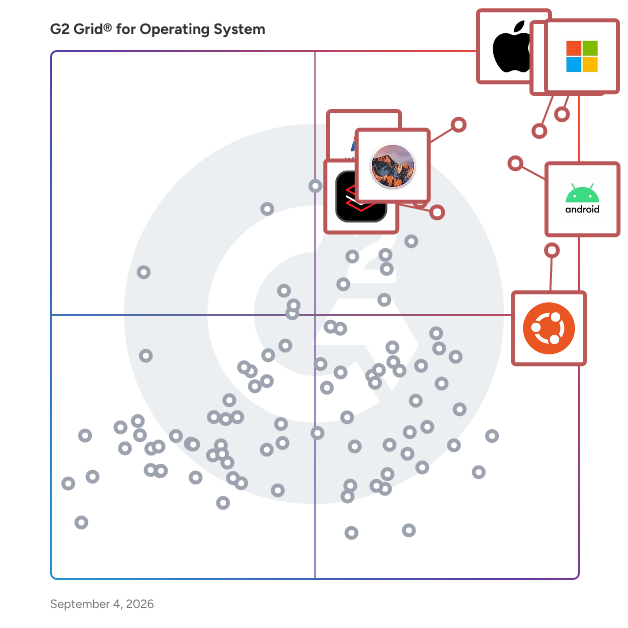
G2 Grid® for Operating Systems

G2 Grid® for Operating Systems plotting products by satisfaction and market presence

Highlighted products: Apple iOS, Windows 11, Chrome OS, Android, macOS Sierra, Ubuntu, Red Hat Enterprise Linux, and Windows 7.

Underlying data: [Grid® JSON](https://www.g2.com/categories/operating-system/grids.json?focus%5B%5D=apple-ios&focus%5B%5D=windows-11&focus%5B%5D=chrome-os&focus%5B%5D=android&focus%5B%5D=apple-macos-sierra&focus%5B%5D=ubuntu&focus%5B%5D=red-hat-enterprise-linux&focus%5B%5D=windows-7)

HPE OpenVMS

HPE OpenVMS is a robust, multi-user, and multiprocessing operating system designed to deliver exceptional reliability, availability, scalability, and security. Originally developed by Digital Equipment Corporation (DEC) for VAX systems, OpenVMS has evolved to support Alpha, Itanium, and x86-64 architectures. It is engineered to handle time-sharing, batch processing, transaction processing, and real-time applications, making it suitable for mission-critical environments. Key Features and Functionality: - High Availability Clustering: OpenVMS supports clustering of up to 96 nodes, enabling the distribution of workloads across multiple physical machines. This ensures continuous operation during both planned maintenance and unexpected outages, with some clusters achieving uptimes measured in years. - Advanced Security Mechanisms: The operating system incorporates comprehensive security features, including access control lists (ACLs), intrusion detection, and detailed auditing capabilities, ensuring robust protection for sensitive data and applications. - Broad Platform Support: OpenVMS has been ported to various hardware platforms, including VAX, Alpha, Itanium, and x86-64 systems, providing flexibility and longevity for diverse IT infrastructures. - Comprehensive Networking Capabilities: It offers integrated support for DECnet and TCP/IP protocols, facilitating seamless communication and resource sharing across networks. - Rich Development Environment: OpenVMS provides a common language environment that supports multiple programming languages, allowing developers to create and maintain applications efficiently. Primary Value and Solutions Provided: OpenVMS addresses the critical need for an operating system that ensures continuous availability and reliability, particularly in sectors where downtime is not an option, such as banking, healthcare, telecommunications, and manufacturing. Its clustering capabilities allow for seamless hardware and software maintenance without disrupting operations, while its robust security features protect against unauthorized access and data breaches. By supporting multiple hardware platforms and offering a stable development environment, OpenVMS provides organizations with a scalable and secure foundation for their mission-critical applications.

Average Rating: 4.4/5.0

Total Reviews: 18

How Do G2 Users Rate HPE OpenVMS?

  • Has the product been a good partner in doing business?: 9.0/10 (Category avg: 8.5/10)
  • Ease of Use: 8.1/10 (Category avg: 8.5/10)
  • Quality of Support: 8.6/10 (Category avg: 8.2/10)
  • Ease of Admin: 7.7/10 (Category avg: 8.5/10)

Who Is the Company Behind HPE OpenVMS?

  • Seller: HP Development Company
  • Year Founded: 1939
  • HQ Location: Palo Alto, CA
  • Twitter: @HPE
    92,685 Twitter followers
  • LinkedIn® Page: www.linkedin.com
    88,985 employees on LinkedIn®
  • Ownership: NYSE: HPQ

Who Uses This Product?

  • Top Industries: Information Technology and Services
  • Company Size: 47% Medium, 32% Large

What Do G2 Reviewers Say About HPE OpenVMS?

AI-generated summary from verified user reviews

Pros
  • Users value the effective cloud functions and support, beneficial for advanced users needing reliable solutions.
  • Users commend the high performance of HPE OpenVMS, enabling efficient data accessibility and zero downtime.
  • Users value the easy storage management of HPE OpenVMS, ensuring zero downtime and enhancing data accessibility performance.
Cons
  • Users note the limited software availability of HPE OpenVMS restricts functionality for managing storage devices effectively.
  • Users find HPE OpenVMS has a steep learning curve, making it complicated for day-to-day use.

What Are Recent G2 Reviews of HPE OpenVMS?

What Are G2 Users Discussing About HPE OpenVMS?

Debian GUI Linux by Techlatest.net

Debian also known as Debian GNU/Linux, is a Linux distribution composed of free and open-source software, developed by the community-supported Debian Project . Debian is one of the oldest operating systems based on the Linux kernel. With this VM you will get Debian 11 (Bullseye)/ Debian 12(Bookworm) based Linux desktop GUI environment packed with many open source productivity tools and applications up and running in minutes. It includes: - RDP based remote desktop environment - Fish- shell with command auto suggestion and completion - Visual Studio Code - Firefox Web Browser

Average Rating: 4.3/5.0

Total Reviews: 15

How Do G2 Users Rate Debian GUI Linux by Techlatest.net?

  • Has the product been a good partner in doing business?: 9.0/10 (Category avg: 8.5/10)
  • Ease of Use: 8.8/10 (Category avg: 8.5/10)
  • Quality of Support: 8.6/10 (Category avg: 8.2/10)
  • Ease of Admin: 9.3/10 (Category avg: 8.5/10)

Who Is the Company Behind Debian GUI Linux by Techlatest.net?

  • Seller: Techlatest.net
  • HQ Location: New York, US
  • Twitter: @TechlatestNet
    217 Twitter followers
  • LinkedIn® Page: www.linkedin.com
    1 employees on LinkedIn®

Who Uses This Product?

  • Top Industries: Computer Software
  • Company Size: 60% Small, 20% Medium

What Do G2 Reviewers Say About Debian GUI Linux by Techlatest.net?

AI-generated summary from verified user reviews

Pros
  • Users admire the user-friendly graphical interface of Debian GUI Linux, appreciating its preconfigured setup and smooth performance.
  • Users love the lightweight size of Debian GUI Linux, ensuring smooth performance even on older hardware.
  • Users find Debian GUI Linux by Techlatest.net to be extremely reliable for daily use, ensuring a smooth and stable experience.
  • Users commend the fast and responsive performance of Debian GUI Linux, ensuring seamless operation on modest hardware.
  • Users commend the stability and reliability of Debian GUI Linux, making it perfect for daily tasks and development.
Cons
  • Users find the requirement of command line usage challenging, especially for those lacking technical knowledge.
  • Users find the difficult setup of Debian GUI Linux can be time-consuming and challenging for beginners.
  • Users face installation issues, including missing packages and complexities that can disrupt workflows and development setups.
  • Users feel the lack of features in Debian GUI Linux limits its user-friendliness for non-technical users.
  • Users note the slow and unresponsive software center hampers efficiency in accessing and managing applications on Debian GUI Linux.

What Are Recent G2 Reviews of Debian GUI Linux by Techlatest.net?

What Are G2 Users Discussing About Debian GUI Linux by Techlatest.net?

Gentoo

Gentoo Linux is a free, source-based operating system that emphasizes configurability and performance. Utilizing the Portage package management system, Gentoo allows users to compile software directly from source code, enabling optimization tailored to specific hardware and application needs. This approach grants users unparalleled control over their system's configuration, making Gentoo a versatile choice for a wide range of applications, from secure servers to gaming systems. Key Features and Functionality: - Portage Package Management: Gentoo's Portage system facilitates the compilation of software from source, allowing for extensive customization and optimization. - USE Flags: This feature enables users to specify desired functionalities for each package, providing fine-grained control over software features and dependencies. - Rolling Release Model: Gentoo follows a rolling release model, ensuring that users have continuous access to the latest software updates and security patches without the need for major system upgrades. - Wide Architecture Support: Gentoo is compatible with a broad range of processor architectures, including x86, x86-64, ARM, PowerPC, and more, enhancing its adaptability across diverse hardware platforms. Primary Value and User Solutions: Gentoo's primary value lies in its flexibility and performance optimization capabilities. By compiling software from source, users can tailor their systems to meet specific performance requirements and hardware configurations. This level of customization is particularly beneficial for advanced users and developers who require a high degree of control over their operating environment. Additionally, Gentoo's rolling release model ensures that systems remain up-to-date with the latest software advancements and security updates, reducing the need for frequent, large-scale system upgrades.

Average Rating: 4.1/5.0

Total Reviews: 37

How Do G2 Users Rate Gentoo?

  • Has the product been a good partner in doing business?: 7.7/10 (Category avg: 8.5/10)
  • Ease of Use: 6.6/10 (Category avg: 8.5/10)
  • Quality of Support: 7.6/10 (Category avg: 8.2/10)
  • Ease of Admin: 7.4/10 (Category avg: 8.5/10)

Who Is the Company Behind Gentoo?

  • Seller: Gentoo Linux
  • Year Founded: 1999
  • HQ Location: N/A
  • Twitter: @gentoo
    10,241 Twitter followers
  • LinkedIn® Page: www.linkedin.com
    67 employees on LinkedIn®

Who Uses This Product?

  • Top Industries: Computer & Network Security, Computer Software
  • Company Size: 53% Small, 26% Large

What Do G2 Reviewers Say About Gentoo?

AI-generated summary from verified user reviews

Pros
  • Users value the extensive customization options of Gentoo, enabling tailored performance and precise software configurations.
  • Users love the exceptional speed and performance of Gentoo, tailored perfectly to their specific hardware needs.
  • Users value the knowledgeable community support of Gentoo, which aids in customizing their systems effectively.
  • Users find Gentoo's ease of use rewarding, but it's best suited for those with a solid Linux background.
  • Users appreciate the unparalleled hardware support of Gentoo, optimizing performance through complete system control and customization.
Cons
  • Users face installation difficulties with Gentoo, requiring significant time and effort to configure effectively.
  • Users find the skill requirements for Gentoo daunting, especially when transitioning from more user-friendly systems.
  • Users highlight the time-consuming setup and maintenance of Gentoo, noting its steep learning curve and complexity.
  • Users find that the slow updates of Gentoo make the experience time-consuming and often overwhelming for beginners.
  • Users find the usage difficulty of Gentoo challenging, citing a tedious installation process and steep learning curve.

What Are Recent G2 Reviews of Gentoo?

What Are G2 Users Discussing About Gentoo?

Evren

Evren offers secure and scalable workspaces tailored for AI teams, enabling developers to utilize AI tools within isolated environments that ensure secure access, full control, and uncompromised performance. Key Features and Functionality: - Isolated & Secure Access to AI Tools: Provides secure, isolated workspaces on third-party unmanaged devices, ideal for BPO and third-party developer access. - Zero-Trust Security by Design: Implements a zero-trust security model to safeguard data and applications. - Optimized for Modern Workforces: Tailors solutions for remote work, outsourcing partners, and high-performance virtual environments. - Scalable and Cost-Effective: Offers scalable solutions that are cost-effective for organizations. - Data Loss Prevention : Implements robust DLP policies to prevent unauthorized access, downloads, and data breaches. - Granular Policy Control: Allows precise control over how devices, applications, and browsers interact with corporate data, ensuring maximum security. - Advanced Reporting & Analytics: Provides actionable insights into user activity, security events, and device usage for informed decision-making. - Application Management: Facilitates easy provisioning, management, and securing of applications. Primary Value and User Solutions: Evren addresses the critical need for secure and efficient remote work environments, especially for AI development teams and third-party contractors. By offering isolated workspaces with zero-trust security, it ensures that sensitive data and intellectual property are protected, even on unmanaged devices. This solution enhances productivity by providing seamless access to necessary tools while maintaining stringent security protocols, thereby reducing IT overhead and mitigating risks associated with remote collaborations.

Average Rating: 4.5/5.0

Total Reviews: 10

How Do G2 Users Rate Evren?

  • Has the product been a good partner in doing business?: 9.4/10 (Category avg: 8.5/10)
  • Ease of Use: 9.0/10 (Category avg: 8.5/10)
  • Quality of Support: 8.7/10 (Category avg: 8.2/10)
  • Ease of Admin: 9.4/10 (Category avg: 8.5/10)

Who Is the Company Behind Evren?

  • Seller: Evren
  • Year Founded: 2022
  • HQ Location: Palo Alto, California, United States
  • Twitter: @atm_near_me
    187 Twitter followers
  • LinkedIn® Page: www.linkedin.com
    25 employees on LinkedIn®

Who Uses This Product?

  • Company Size: 50% Small, 30% Large

What Do G2 Reviewers Say About Evren?

AI-generated summary from verified user reviews

Pros
  • Users commend the ease of use of Evren, enjoying its intuitive setup and seamless organization features.
  • Users value the seamless implementation of Evren, enabling easy setup and efficient organization of tasks and routines.
  • Users value Evren for its user-friendly design, enhancing organization and making habit tracking effortless and enjoyable.
  • Users love the customization and personalization of Evren, enhancing their organization and productivity effectively.
  • Users appreciate the easy setup of Evren, finding it quick and intuitive for a seamless experience.
Cons
  • Users feel that Evren's limited customization options hinder its ability to meet specific needs effectively.
  • Users report compatibility issues with Evren, particularly regarding Microsoft Office support and limited customization options.
  • Users find Evren effective, but desire more customization options and detailed reporting features for an enhanced experience.
  • Users criticize the poor graphics and display of Evren, which detracts significantly from their overall experience.

What Are Recent G2 Reviews of Evren?

What Are G2 Users Discussing About Evren?

Mageia

Mageia is a free and open-source Linux-based operating system that originated as a fork of Mandriva Linux. Managed by the non-profit organization Mageia.Org, it is developed collaboratively by a global community of users and developers. Mageia is designed to be user-friendly, offering a variety of desktop environments and a comprehensive suite of applications to cater to diverse user needs. Key Features and Functionality: - Desktop Environments: Mageia supports multiple desktop environments, including KDE Plasma, GNOME, Xfce, LXDE, LXQt, Cinnamon, MATE, and Enlightenment, allowing users to choose their preferred interface. - Package Management: The distribution utilizes the urpmi package manager, with DNF available as an alternative, facilitating efficient software installation and management. - Comprehensive Software Repository: Mageia offers a vast repository of software, including productivity tools like LibreOffice, web browsers such as Firefox, multimedia applications like VLC, and graphic editors like GIMP. - Hardware Support: The operating system provides robust hardware support, including compatibility with UEFI systems, ensuring it runs on a wide range of hardware configurations. - Mageia Control Center: This centralized configuration tool allows users to manage system settings, hardware, and software installations through an intuitive graphical interface. Primary Value and User Solutions: Mageia aims to deliver a stable, secure, and user-friendly Linux distribution suitable for both newcomers and experienced users. Its extensive hardware support and choice of desktop environments make it adaptable to various user preferences and system requirements. The comprehensive software repository ensures that users have access to a wide array of applications for different tasks, while the Mageia Control Center simplifies system management. By providing a community-driven, open-source platform, Mageia empowers users with control over their computing environment, fostering a collaborative and inclusive ecosystem.

Average Rating: 4.1/5.0

Total Reviews: 14

How Do G2 Users Rate Mageia?

  • Has the product been a good partner in doing business?: 9.2/10 (Category avg: 8.5/10)
  • Ease of Use: 7.9/10 (Category avg: 8.5/10)
  • Quality of Support: 6.5/10 (Category avg: 8.2/10)
  • Ease of Admin: 10.0/10 (Category avg: 8.5/10)

Who Is the Company Behind Mageia?

  • Seller: Mageia
  • Year Founded: 2010
  • HQ Location: Paris, France
  • Twitter: @mageia_org
    3,103 Twitter followers
  • LinkedIn® Page: www.linkedin.com
    19 employees on LinkedIn®

Who Uses This Product?

  • Company Size: 47% Small, 29% Large

What Do G2 Reviewers Say About Mageia?

AI-generated summary from verified user reviews

Pros
  • Users value the active community support of Mageia, enhancing their experience and troubleshooting capabilities.
  • Users value the wide compatibility of Mageia, appreciating its seamless operation across various hardware and constant updates.
  • Users value the free/no cost nature of Mageia, allowing access to transparent and effective computing for everyone.
  • Users value the excellent hardware support of Mageia, ensuring compatibility and seamless performance across various PCs.
  • Users value the regular updates of Mageia that ensure security and optimal performance for all hardware.
Cons
  • Users report persistent driver issues that require manual code input, with a slow community response to new problems.
  • Users are frustrated by the slow updates and frequent delays in major releases of Mageia.
  • Users experience an unfriendly interface that complicates navigation and discourages regular use of Mageia.

What Are Recent G2 Reviews of Mageia?

What Are G2 Users Discussing About Mageia?

BackBox.org

BackBox.org is a free, open-source community project dedicated to enhancing IT security through the promotion and utilization of open-source software. It offers a comprehensive Linux distribution tailored for penetration testing and security assessments, providing a robust toolkit for network and system analysis. Designed for speed and efficiency, BackBox Linux delivers a minimal yet complete desktop environment, featuring its own software repositories that are regularly updated with the latest stable versions of widely recognized ethical hacking tools. Key Features and Functionality: - Comprehensive Security Toolkit: BackBox Linux includes a wide array of security and analysis tools, covering areas such as web application analysis, network analysis, vulnerability assessment, computer forensic analysis, and exploitation. - Lightweight and Efficient: Utilizing the XFCE desktop environment, BackBox is optimized for performance and resource efficiency, making it suitable even for older hardware configurations. - Regular Updates: The distribution maintains its own software repositories, ensuring that users have access to the latest stable versions of essential ethical hacking tools. - Community-Driven Development: As an open-source project, BackBox encourages community involvement, allowing users to contribute to its development and improvement. Primary Value and User Solutions: BackBox.org addresses the need for accessible and effective security assessment tools by providing a free, open-source platform tailored for penetration testing and network analysis. Its lightweight design and comprehensive toolkit enable security professionals and enthusiasts to conduct thorough assessments without the overhead of commercial solutions. By fostering a community-driven approach, BackBox promotes the culture of security within the IT environment, contributing to a safer and more secure digital landscape.

Average Rating: 4.5/5.0

Total Reviews: 13

How Do G2 Users Rate BackBox.org?

  • Has the product been a good partner in doing business?: 8.8/10 (Category avg: 8.5/10)
  • Ease of Use: 8.8/10 (Category avg: 8.5/10)
  • Quality of Support: 7.9/10 (Category avg: 8.2/10)
  • Ease of Admin: 7.9/10 (Category avg: 8.5/10)

Who Is the Company Behind BackBox.org?

  • Seller: BackBox.org
  • Year Founded: 2010
  • HQ Location: Torino, -
  • Twitter: @backbox_org
    3,182 Twitter followers
  • LinkedIn® Page: www.linkedin.com
    6 employees on LinkedIn®

Who Uses This Product?

  • Company Size: 62% Small, 23% Medium

What Do G2 Reviewers Say About BackBox.org?

AI-generated summary from verified user reviews

Pros
  • Users find the ease of use of BackBox.org essential for quickly solving complex coding problems.
  • Users find that BackBox.org offers powerful features that simplify complex coding problems efficiently for engineers and developers.
Cons
  • Users find BackBox.org's poor UI/UX less appealing than other AI tools, affecting their overall experience.

What Are Recent G2 Reviews of BackBox.org?

What Are G2 Users Discussing About BackBox.org?

VyOS

VyOS Networks is the global leader in open networking for organizations that need secure, scalable, automated networking across bare metal, cloud, and edge. Designed with flexibility and scalability in mind, VyOS provides an enterprise-grade networking platform for consistent operations and automation at scale, delivering full control and high performance with zero vendor lock-in. Our mission is to restore ownership of network infrastructure to our users through transparent, high-performance and vendor-neutral networking. Your network, your rules. VyOS Universal Router thrives on bare metal and all major hypervisors and cloud platforms: • Scales seamlessly from small devices to multi-core/nic instances • With this flexibility, you can harmonize your on-premises and cloud networks, eliminating the need for costly, proprietary VPN solutions. • Deploy VyOS Universal Router to create cost-effective, robust remote access VPNs for your off-site personnel or site-to-site VPNs Equipped with an exhaustive suite of features, VyOS Universal Router goes beyond what's expected from a router. From sophisticated routing protocols like BGP, OSPF, and RIP to advanced VPN and tunneling protocols, including IPsec, VTI, L2TP, OpenVPN, Wireguard, GRE, IPIP, SIT, VXLAN, L2TPv3, GENEVE, we have you covered. Enjoy enhanced security with an interface and zone-based firewalls, NAT, and high availability features such as VRRP and connection table synchronization. VyOS Universal Router also offers QoS, NetFlow, sFlow traffic accounting, and Telegraf for enhanced telemetry. VyOS Universal Router simplifies network management like never before. Automation is the cornerstone of modern IT management, and VyOS Universal Router doesn't fall short. With built-in SaltStack integration and an official Ansible module, and Terraform support, automate your configuration workflow effortlessly. VyOS Universal Router provides an HTTP API for those bespoke automation solutions, offering endless possibilities for network configuration and management.

Average Rating: 4.5/5.0

Total Reviews: 56

How Do G2 Users Rate VyOS?

  • Has the product been a good partner in doing business?: 9.5/10 (Category avg: 8.5/10)
  • Ease of Use: 8.7/10 (Category avg: 8.5/10)
  • Quality of Support: 9.0/10 (Category avg: 8.2/10)
  • Ease of Admin: 9.0/10 (Category avg: 8.5/10)

Who Is the Company Behind VyOS?

  • Seller: VyOS Networks
  • Company Website:
  • Year Founded: 2014
  • HQ Location: Poway, California, USA
  • Twitter: @vyos_dev
    2,766 Twitter followers
  • LinkedIn® Page: www.linkedin.com
    44 employees on LinkedIn®

Who Uses This Product?

  • Top Industries: Information Technology and Services, Computer & Network Security
  • Company Size: 49% Small, 32% Medium

What Do G2 Reviewers Say About VyOS?

AI-generated summary from verified user reviews

Pros
  • Users commend VyOS for its ease of use, enabling quick learning and seamless management of complex network configurations.
  • Users value the open-source flexibility of VyOS, enabling customization and cost-effective network solutions across various environments.
  • Users value VyOS for its open-source flexibility, enabling customization without vendor lock-in and high costs.
  • Users praise VyOS for its powerful features, offering flexibility, ease of use, and cost-effective networking solutions.
  • Users value VyOS for its flexibility, enabling diverse configurations and applications across various networking environments.
Cons
  • Users note the insufficient documentation of VyOS, making advanced configurations challenging and time-consuming to troubleshoot.
  • Users note the lack of support in VyOS leaves them relying on community resources for advanced configurations.
  • Users find the learning curve steep due to documentation challenges and a need for advanced setup knowledge.
  • Users face a challenging learning curve with VyOS, as it's heavily reliant on CLI and lacks GUI support.
  • Users find the complex configuration daunting, especially without extensive testing and limited monitoring features.

What Are Recent G2 Reviews of VyOS?

What Are G2 Users Discussing About VyOS?

ReactOS

ReactOS is a free and open-source operating system designed to be compatible with Windows applications and drivers. It aims to provide a familiar user experience by replicating the look and feel of Windows, enabling users to run their favorite Windows software in an open-source environment. ReactOS is developed from scratch, ensuring that it is not a derivative of Linux, but a standalone system with its own architecture. Key Features and Functionality: - Windows Compatibility: ReactOS is capable of running a wide range of Windows applications and drivers, offering users the flexibility to use software they are accustomed to. - Familiar Interface: The operating system mirrors the appearance and functionality of Windows, reducing the learning curve for new users. - Open Source: Being open-source, ReactOS allows users and developers to view, modify, and distribute its source code, fostering a collaborative development environment. - Active Community: The project is supported by a global community, providing opportunities for collaboration, skill enhancement, and contribution to the development of the operating system. Primary Value and User Solutions: ReactOS addresses the need for a free and open-source operating system that maintains compatibility with Windows software and drivers. This is particularly beneficial for users and organizations seeking an alternative to proprietary systems without sacrificing the ability to run essential Windows applications. Additionally, ReactOS serves as an educational platform for those interested in learning about operating system development and Windows internals, offering practical experience in a real-world project.

Average Rating: 4.1/5.0

Total Reviews: 28

How Do G2 Users Rate ReactOS?

  • Has the product been a good partner in doing business?: 7.8/10 (Category avg: 8.5/10)
  • Ease of Use: 8.0/10 (Category avg: 8.5/10)
  • Quality of Support: 7.6/10 (Category avg: 8.2/10)
  • Ease of Admin: 7.8/10 (Category avg: 8.5/10)

Who Is the Company Behind ReactOS?

  • Seller: ReactOS Foundation
  • Year Founded: 2002
  • HQ Location: Amsterdam, North Holland
  • Twitter: @reactos
    22,473 Twitter followers
  • LinkedIn® Page: www.linkedin.com
    13 employees on LinkedIn®

Who Uses This Product?

  • Who Uses This: Software Engineer
  • Top Industries: Information Technology and Services, Computer Software
  • Company Size: 48% Small, 34% Medium

What Do G2 Reviewers Say About ReactOS?

AI-generated summary from verified user reviews

Pros
  • Users appreciate the fully open-source nature of ReactOS, combined with its compatibility with Windows applications and drivers.
  • Users appreciate the full compatibility with Windows applications and drivers, enjoying a familiar and open-source environment.
  • Users value the hardware support of ReactOS, extending the life of older systems and enhancing performance seamlessly.
  • Users appreciate the lightweight size of ReactOS, which ensures fast performance even on older hardware.
  • Users value the customization and personalization options of ReactOS, enhancing their experience and meeting specific testing needs.
Cons
  • Users report driver issues with ReactOS, leading to instability and limited support for hardware and applications.
  • Users experience frequent system crashes with ReactOS due to its early development stage and unstable features.
  • Users are frustrated by compatibility issues, as ReactOS struggles with modern applications and hardware support.
  • Users face hardware limitations with ReactOS, affecting reliability and overall usability for daily tasks.
  • Users find limited software support with ReactOS, leading to compatibility issues and an less reliable overall experience.

What Are Recent G2 Reviews of ReactOS?

What Are G2 Users Discussing About ReactOS?

Remix OS

Remix OS is a now-discontinued operating system developed by Jide Technology that brought the Android experience to personal computers with x86 and ARM architectures. Launched in 2016, it allowed users to run Android applications on compatible Intel-based PCs, offering a unique blend of mobile and desktop functionalities. The system featured a Windows-style interface, complete with a taskbar, start menu, and notification area, providing a familiar environment for users transitioning from traditional desktop operating systems. Remix OS supported advanced multitasking with resizable windows, full mouse and keyboard integration, and a built-in file manager, enhancing productivity and usability. Additionally, it offered portable boot capabilities, enabling users to run the OS from a USB drive without installation, making it convenient for on-the-go use. By bridging the gap between mobile and desktop platforms, Remix OS provided a versatile solution for users seeking to leverage Android's vast app ecosystem on their PCs.

Average Rating: 4.0/5.0

Total Reviews: 31

How Do G2 Users Rate Remix OS?

  • Has the product been a good partner in doing business?: 6.1/10 (Category avg: 8.5/10)
  • Ease of Use: 9.1/10 (Category avg: 8.5/10)
  • Quality of Support: 7.0/10 (Category avg: 8.2/10)
  • Ease of Admin: 7.8/10 (Category avg: 8.5/10)

Who Is the Company Behind Remix OS?

  • Seller: Jide Technology Co
  • Year Founded: 2014
  • HQ Location: Beijing, Beijing
  • Twitter: @RemixGlobal
    5,301 Twitter followers
  • LinkedIn® Page: www.linkedin.com
    3 employees on LinkedIn®

Who Uses This Product?

  • Top Industries: Information Technology and Services
  • Company Size: 65% Small, 16% Medium

What Do G2 Reviewers Say About Remix OS?

AI-generated summary from verified user reviews

Pros
  • Users find Remix OS highly intuitive due to its ease of use, blending mobile design with a desktop interface.
  • Users appreciate the easy navigation of Remix OS, finding it intuitive and fluid for both new and experienced users.
  • Users value the reliability of Remix OS, enjoying smooth performance and intuitive multitasking on various devices.
  • Users find the user-friendly interface of Remix OS intuitive, blending mobile and desktop experiences seamlessly.
  • Users enjoy the intuitive interface of Remix OS, appreciating its blend of mobile and desktop usability.
Cons
  • Users experience hardware limitations leading to stability issues that negatively impact overall usage of Remix OS.
  • Users experience system crashes that lead to instability, negatively impacting their overall experience with Remix OS.

What Are Recent G2 Reviews of Remix OS?

What Are G2 Users Discussing About Remix OS?

BlackArch

BlackArch Linux is an Arch Linux-based distribution tailored for penetration testers, security researchers, and ethical hackers. It offers a comprehensive suite of over 2,800 security tools, organized into categories such as exploitation, forensics, reverse engineering, wireless analysis, fuzzing, malware research, and cryptography. This extensive toolkit enables users to conduct thorough security assessments and research. Key Features and Functionality: - Extensive Toolset: Provides a vast repository of over 2,800 security tools, allowing users to install them individually or in groups. - Arch Linux Compatibility: Fully compatible with existing Arch Linux installations, enabling seamless integration and customization. - Multiple Installation Options: Offers Full and Slim ISO versions, catering to different user needs and system capabilities. - Live ISO Capability: Can be run as a live system, allowing users to test and use the distribution without installation. - Rolling Release Model: Adheres to Arch Linux's rolling release model, ensuring users have access to the latest kernel updates and security packages without needing to reinstall the system. Primary Value and User Solutions: BlackArch Linux addresses the needs of cybersecurity professionals by providing a robust and up-to-date platform for penetration testing and security research. Its extensive collection of tools, combined with the flexibility and customization inherent in Arch Linux, allows users to tailor their environment to specific security assessment requirements. By offering a rolling release model, BlackArch ensures that users have continuous access to the latest security tools and updates, enhancing the effectiveness and efficiency of their security operations.

Average Rating: 4.3/5.0

Total Reviews: 21

How Do G2 Users Rate BlackArch?

  • Has the product been a good partner in doing business?: 9.2/10 (Category avg: 8.5/10)
  • Ease of Use: 7.4/10 (Category avg: 8.5/10)
  • Quality of Support: 8.4/10 (Category avg: 8.2/10)
  • Ease of Admin: 8.6/10 (Category avg: 8.5/10)

Who Is the Company Behind BlackArch?

  • Seller: BlackArch Linux
  • Year Founded: 2013
  • HQ Location: Earth, Earth
  • Twitter: @blackarchlinux
    16,933 Twitter followers
  • LinkedIn® Page: www.linkedin.com
    7 employees on LinkedIn®

Who Uses This Product?

  • Company Size: 48% Small, 38% Medium

What Do G2 Reviewers Say About BlackArch?

AI-generated summary from verified user reviews

Pros
  • Users appreciate the lightweight size of BlackArch, benefiting from high performance and versatility in pentesting tasks.
  • Users value the extensive selection of pentesting tools and continuous updates provided by BlackArch.
  • Users value the extensive selection of pentesting tools in BlackArch, benefiting from a continuously updated repository.
  • Users value the regular updates of BlackArch, ensuring they have the latest tools for pentesting at all times.
  • Users value the extensive security tools in BlackArch, providing comprehensive solutions for various cybersecurity tasks.
Cons
  • Users note the advanced skill requirements of BlackArch, making it challenging for beginners to set up and use.
  • Users find the setup process time-consuming, requiring significant effort and advanced Linux knowledge to configure BlackArch.
  • Users find the command line interface challenging and not beginner-friendly, requiring prior Linux knowledge for effective use.

What Are Recent G2 Reviews of BlackArch?

What Are G2 Users Discussing About BlackArch?

MageStack

MageStack is a cloud operating system built for Magento hosting.

Average Rating: 4.3/5.0

Total Reviews: 13

How Do G2 Users Rate MageStack?

  • Has the product been a good partner in doing business?: 8.3/10 (Category avg: 8.5/10)
  • Ease of Use: 7.6/10 (Category avg: 8.5/10)
  • Quality of Support: 7.4/10 (Category avg: 8.2/10)
  • Ease of Admin: 9.4/10 (Category avg: 8.5/10)

Who Is the Company Behind MageStack?

  • Seller: Sonassi
  • Year Founded: 2008
  • HQ Location: Salford Quays, GB
  • Twitter: @sonassi
    1,107 Twitter followers
  • LinkedIn® Page: www.linkedin.com
    1 employees on LinkedIn®

Who Uses This Product?

  • Company Size: 46% Small, 38% Medium

What Do G2 Reviewers Say About MageStack?

AI-generated summary from verified user reviews

Pros
  • Users commend the ease of use of MageStack, praising its smooth handling of busy periods and security features.
  • Users value the high speed and performance of MageStack, ensuring smooth operation even during peak times.
  • Users appreciate the virus protection of MageStack, ensuring their stores remain safe during busy periods.
Cons
  • Users find the high cost of MageStack makes it less desirable and accessible compared to alternatives.

What Are Recent G2 Reviews of MageStack?

What Are G2 Users Discussing About MageStack?

Sailfish OS

Sailfish OS is a Linux-based mobile operating system developed by Jolla, designed to offer a unique and privacy-focused alternative to mainstream platforms. Emphasizing user control and customization, Sailfish OS provides a gesture-based interface that enhances intuitive navigation and multitasking. Its open-source nature encourages community involvement, fostering a diverse ecosystem of applications and extensions. Notably, Sailfish OS supports Android applications through a compatibility layer, allowing users to access a wide range of apps while maintaining a secure and independent environment. This combination of privacy, flexibility, and compatibility positions Sailfish OS as a compelling choice for users seeking an alternative mobile experience. Key Features and Functionality: - Gesture-Based Navigation: Sailfish OS utilizes intuitive gestures for navigation, enabling users to perform actions with simple swipes and taps, enhancing the overall user experience. - Multitasking Interface: The operating system offers a multitasking view that displays all running applications in a single view, allowing users to control apps directly from this interface without fully opening them. - Open-Source and Community-Driven: Sailfish OS embraces open-source principles, allowing for greater customization and innovation. The active community contributes to the development of the OS, creating a vibrant ecosystem of apps and extensions. - Android App Compatibility: Through a proprietary compatibility layer, Sailfish OS supports the execution of Android applications, providing users access to a vast array of apps while maintaining the OS's unique environment. - Privacy and Security: Sailfish OS emphasizes user privacy, ensuring that data is not collected or analyzed without consent, contrasting with the policies of mainstream platforms. Primary Value and User Solutions: Sailfish OS addresses the growing demand for privacy-centric mobile solutions by offering an independent platform free from the data collection practices common in other operating systems. Its gesture-based interface and multitasking capabilities provide a seamless and efficient user experience. The open-source nature and active community support allow for extensive customization, enabling users to tailor their devices to their preferences. Additionally, the compatibility with Android applications ensures that users do not have to sacrifice app availability when choosing a privacy-focused alternative. Overall, Sailfish OS delivers a secure, customizable, and user-friendly mobile operating system that empowers users to take control of their digital experience.

Average Rating: 3.9/5.0

Total Reviews: 14

How Do G2 Users Rate Sailfish OS?

  • Has the product been a good partner in doing business?: 9.6/10 (Category avg: 8.5/10)
  • Ease of Use: 8.3/10 (Category avg: 8.5/10)
  • Quality of Support: 7.9/10 (Category avg: 8.2/10)
  • Ease of Admin: 8.3/10 (Category avg: 8.5/10)

Who Is the Company Behind Sailfish OS?

  • Seller: Jolla
  • Year Founded: 2011
  • HQ Location: Tampere, Finland
  • Twitter: @JollaHQ
    36,297 Twitter followers
  • LinkedIn® Page: www.linkedin.com
    42 employees on LinkedIn®

Who Uses This Product?

  • Company Size: 50% Small, 29% Large

What Do G2 Reviewers Say About Sailfish OS?

AI-generated summary from verified user reviews

Pros
  • Users appreciate the customization options of Sailfish OS, enabling tailored profiles for various situations seamlessly.
  • Users value the privacy features of Sailfish OS, enjoying robust security measures for their personal data.
  • Users commend the robust security features of Sailfish OS, enhancing their privacy and protecting personal data effectively.
  • Users value the strong security features of Sailfish OS, ensuring privacy and protection of personal data.
Cons
  • Users experience app/game issues on Sailfish OS, with crashes and performance problems limiting reliability and functionality.
  • Users face compatibility issues with Sailfish OS due to limited device support, affecting accessibility and usability.
  • Users face hardware limitations with Sailfish OS, restricting options and complicating installation on various smartphones.
  • Users face installation difficulties with Sailfish OS due to limited hardware compatibility, hindering widespread adoption.
  • Users face performance issues with Sailfish OS due to unstable Android app support, leading to crashes and limited functionality.

What Are Recent G2 Reviews of Sailfish OS?

LynxOS 178 RTOS

LynxOS-178 is a commercial off-the-shelf (COTS) real-time operating system (RTOS) designed to meet the stringent requirements of safety-critical systems, particularly in avionics. It supports x86, Arm, and PowerPC platforms and is built upon open standards, ensuring compatibility and flexibility for developers. LynxOS-178 provides security and safety through strict, hardware-enforced isolation between real-time processes, applications, and the RTOS kernel services and drivers. Key Features and Functionality: - Safety Certification: LynxOS-178 has been certified multiple times to DO-178C Design Assurance Level A (DAL A), the highest level of safety certification for airborne systems. - Standards Compliance: The RTOS is fully compliant with ARINC 653, POSIX, and the Future Airborne Capability Environment (FACE) standards, facilitating software portability and reuse across different platforms. - Reusable Software Component (RSC): LynxOS-178 is the first and only time- and space-partitioned RTOS to have obtained an RSC award from the Federal Aviation Administration (FAA), allowing developers to reuse previously certified software components, thereby reducing certification costs and time. - Hardware Support: It supports multicore processors across x86, Arm, and PowerPC architectures, providing flexibility in hardware selection. - Partitioning: The RTOS offers time, space, and resource partitioning, ensuring that faults or overloads in one partition do not affect others, thereby enhancing system reliability and security. Primary Value and Problem Solving: LynxOS-178 addresses the critical need for a reliable, certifiable RTOS in safety-critical applications, particularly in the aerospace and defense industries. By adhering to open standards and achieving high-level safety certifications, it enables developers to create systems that are both secure and interoperable. The RSC certification significantly reduces the time and cost associated with the certification process, allowing for faster development cycles and more efficient resource utilization. Additionally, its support for multiple hardware architectures and compliance with industry standards ensure that LynxOS-178 can be seamlessly integrated into a wide range of systems, providing a robust foundation for mission-critical applications.

Average Rating: 4.4/5.0

Total Reviews: 15

How Do G2 Users Rate LynxOS 178 RTOS?

  • Has the product been a good partner in doing business?: 9.2/10 (Category avg: 8.5/10)
  • Ease of Use: 8.9/10 (Category avg: 8.5/10)
  • Quality of Support: 8.5/10 (Category avg: 8.2/10)
  • Ease of Admin: 8.3/10 (Category avg: 8.5/10)

Who Is the Company Behind LynxOS 178 RTOS?

Who Uses This Product?

  • Top Industries: Information Technology and Services
  • Company Size: 60% Medium, 40% Small

What Do G2 Reviewers Say About LynxOS 178 RTOS?

AI-generated summary from verified user reviews

Pros
  • Users value the high reliability and safety of LynxOS 178 RTOS, enhancing performance in critical systems.
  • Users appreciate the POSIX compliance of LynxOS 178 RTOS, which simplifies development for safety-critical systems.
  • Users value the commitment to open standards in LynxOS 178 RTOS, enhancing compatibility and innovation in safety-critical systems.
  • Users commend the high reliability and safety of LynxOS 178 RTOS, essential for critical avionics and defense systems.
  • Users highlight the impressive real-time performance of LynxOS 178 RTOS, making it ideal for safety-critical applications.
Cons
  • Users face high costs and complexity with LynxOS 178 RTOS, making customization and avoiding vendor lock-in challenging.
  • Users find the high cost of LynxOS 178 RTOS to be a significant barrier, impacting overall value and accessibility.
  • Users express concerns over limited customization options, impacting flexibility and adaptability in their projects.
  • Users find the time-consuming development process of LynxOS 178 RTOS frustrating due to static configurations.

What Are Recent G2 Reviews of LynxOS 178 RTOS?

What Are G2 Users Discussing About LynxOS 178 RTOS?

BlackBerry QNX

The QNX CAR Platform for Infotainment is a proven, full-featured software stack designed to help automotive manufacturers build graphically-rich, connected infotainment systems that incorporate leading automotive technologies.

Average Rating: 4.1/5.0

Total Reviews: 21

How Do G2 Users Rate BlackBerry QNX?

  • Has the product been a good partner in doing business?: 8.3/10 (Category avg: 8.5/10)
  • Ease of Use: 8.2/10 (Category avg: 8.5/10)
  • Quality of Support: 8.1/10 (Category avg: 8.2/10)
  • Ease of Admin: 7.5/10 (Category avg: 8.5/10)

Who Is the Company Behind BlackBerry QNX?

  • Seller: BlackBerry
  • Year Founded: 1984
  • HQ Location: Waterloo, Ontario
  • Twitter: @BlackBerry
    2,766,747 Twitter followers
  • LinkedIn® Page: www.linkedin.com
    2,000 employees on LinkedIn®
  • Ownership: NYSE:BB

Who Uses This Product?

  • Top Industries: Automotive
  • Company Size: 52% Medium, 29% Large

What Do G2 Reviewers Say About BlackBerry QNX?

AI-generated summary from verified user reviews

Pros
  • Users find the easy setup of BlackBerry QNX beneficial, streamlining the integration into embedded systems.
  • Users appreciate the security and safety features of BlackBerry QNX, enhancing their embedded system capabilities efficiently.
  • Users appreciate the strong security and safety features of BlackBerry QNX, enhancing efficiency in embedded systems.
  • Users value the strong privacy protections of BlackBerry QNX, enhancing security for embedded systems significantly.
  • Users value the unmatched reliability of BlackBerry QNX, ensuring consistent performance in safety-critical environments.
Cons
  • Users find that some Linux commands may not function correctly in BlackBerry QNX, impacting usability.
  • Users find the hardware limitations of BlackBerry QNX to be a drawback due to high costs and resource demands.
  • Users find the high hardware requirements of BlackBerry QNX limit its accessibility for cost-sensitive embedded systems.
  • Users note the steep hardware requirements of BlackBerry QNX can hinder cost-effectiveness and complicate team onboarding.

What Are Recent G2 Reviews of BlackBerry QNX?

What Are G2 Users Discussing About BlackBerry QNX?

AlmaLinux 8 Server w/Updates with Support by Supported Images

AlmaLinux 8 Server with Updates and Support by Supported Images is a robust, enterprise-grade Linux distribution designed for organizations requiring a stable and secure operating system. Built from a clean upstream AlmaLinux 8 release, this server image includes all current patches and updates at the time of publication, ensuring a reliable foundation for production environments across enterprise and government sectors. Key Features and Functionality: - Fully Updated Image: Each instance is consistently maintained, validated for reliability, and prepared for immediate use in production, providing a clean and dependable baseline from the first launch. - Enterprise and Government Focused: Tailored for environments that demand stability, consistency, and ongoing maintenance without the complexity of managing OS updates internally. - Continuous Maintenance and Support: Backed by VM Pro Support, offering continuous image upkeep and dependable OS-level assistance trusted by numerous large-scale organizations. Primary Value and User Solutions: This product addresses the need for a secure and fully maintained operating system, eliminating the overhead of managing OS lifecycles. It is ideal for production workloads, general compute environments, development and staging systems, and any deployment where consistency, performance, and operational simplicity are priorities. Users benefit from timely updates, a clean and predictable configuration, and reliable OS-level support, ensuring uninterrupted operations and peace of mind.

Average Rating: 4.2/5.0

Total Reviews: 14

How Do G2 Users Rate AlmaLinux 8 Server w/Updates with Support by Supported Images?

  • Has the product been a good partner in doing business?: 8.9/10 (Category avg: 8.5/10)
  • Ease of Use: 7.8/10 (Category avg: 8.5/10)
  • Quality of Support: 9.2/10 (Category avg: 8.2/10)
  • Ease of Admin: 7.3/10 (Category avg: 8.5/10)

Who Is the Company Behind AlmaLinux 8 Server w/Updates with Support by Supported Images?

Who Uses This Product?

  • Company Size: 71% Small, 14% Large

What Do G2 Reviewers Say About AlmaLinux 8 Server w/Updates with Support by Supported Images?

AI-generated summary from verified user reviews

Pros
  • Users appreciate the great compatibility of AlmaLinux 8, facilitating easy migration and enterprise application development.
  • Users appreciate the lightweight size of AlmaLinux 8, which facilitates quick and efficient deployment during setup.
  • Users value the long-term support and timely updates of AlmaLinux 8, providing peace of mind for their deployments.
  • Users value the regular updates of AlmaLinux 8 Server, ensuring timely security and long-term support for their applications.
  • Users appreciate the RHEL compatibility of AlmaLinux 8 Server, facilitating seamless migrations and enterprise application development.
Cons
  • Users face integration issues due to less detailed documentation and occasional manual workarounds for third-party packages.
  • Users find the lack of detailed documentation to be a challenge compared to other platforms like RHEL or CentOS.

What Are Recent G2 Reviews of AlmaLinux 8 Server w/Updates with Support by Supported Images?

What Are G2 Users Discussing About AlmaLinux 8 Server w/Updates with Support by Supported Images?

Shalaka Joshi
SJ
Researched and written by Shalaka Joshi
Updated March 5, 2025