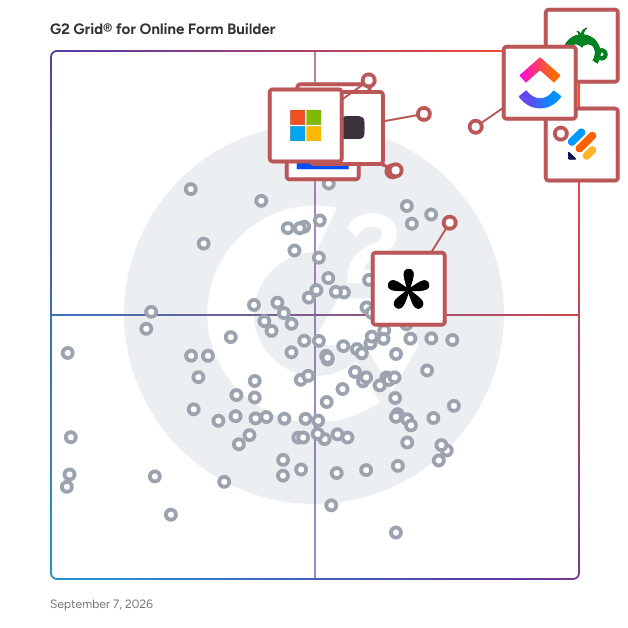
  # Best Online Form Builder Software - Page 26

  *By [Neeraja Prakash](https://research.g2.com/insights/author/neeraja-prakash)*

   Online form builder software allows users to create fillable forms, including surveys, quizzes, and questionnaires, using a drag-and-drop interface, collect responses, and store submission data within the application itself.

### Core Capabilities of Online Form Builder Software

To qualify for inclusion in the Online Form Builder category, a product must:

- Offer a drag-and-drop or simplified interface for building fillable forms
- Provide native form building features without relying on integrations
- Allow users to share forms or embed them on websites for data collection
- Provide analytics on form submission data
- Offer multiple templates for distinct types of fillable forms

### Common Use Cases for Online Form Builder Software

Online form builders are used by teams across functions to quickly gather structured information from internal or external audiences. Common use cases include:

- Collecting lead information from potential customers or clients
- Running internal surveys and feedback forms
- Embedding registration or intake forms on web pages

### How Online Form Builder Software Differs from Other Tools

Some online form builders operate as standalone solutions, while tools like [CRM software](https://www.g2.com/categories/crm), [lead capture software](https://www.g2.com/categories/lead-capture), and [survey software](https://www.g2.com/categories/survey) may include form building as a secondary feature. Dedicated online form builders distinguish themselves through native form creation, robust templating, and broad integration support for sharing and exporting data.

### Insights from G2 on Online Form Builder Software

Based on category trends on G2, ease of use and the variety of available templates stand out as primary strengths. The ability to embed forms directly on websites and quickly analyze submission data is frequently noted as a major productivity benefit.


    ---
## What Are the Most Common Questions About Online Form Builder Software?
*AI-generated · Last updated: May 26, 2026*
  ### What tool provides real-time analytics for form submissions?
  Based on G2 reviews, several products in the online form builder software category are praised for helping teams monitor responses as they come in, especially when users mention dashboards, auto-generated charts, summaries, and organized reporting views. According to verified users, Microsoft Forms is often used for real-time response tracking and automatic chart generation, while SurveyMonkey reviewers mention grouped reports and easy-to-track results. G2 reviewers also mention Jotform for organizing responses in one place and automatically routing data into sheets or dashboards. Buyers focused on ongoing visibility into submissions tend to value simple reporting, easy exports, and clear response summaries more than advanced customization alone.


  ### Which vendor offers advanced conditional logic for form fields?
  Based on G2 reviews, Jotform and Typeform are repeatedly described as strong choices for conditional logic. According to verified users, Jotform is often used for conditional logic that guides customers to the right section, supports dynamic forms, and helps with workflows like payments, onboarding, and registrations. G2 reviewers mention Typeform for logic jumps and branching that make forms feel more conversational and easier for respondents to complete. SurveyMonkey reviewers also mention skip logic and more structured survey flows. If advanced field logic is a top priority, buyers should focus on products where reviewers consistently call out branching, conditional paths, and tailored user journeys in real workflows.


  ### What platform supports payment collection through forms?
  Based on G2 reviews, several platforms support payment collection directly through forms, but Jotform stands out because reviewers repeatedly mention using it for payments, bookings, registrations, invoices, and product orders. According to verified users, Jotform is used to collect payments before submission, connect with Stripe or Square, and combine ordering with form completion in one workflow. G2 reviewers also mention built-in product carts, payment-enabled booking flows, and workshop registrations with signed documents. Other products in the broader dataset mention payment workflows too, but in recent online form builder reviews, Jotform is the most consistently referenced for payment collection tied directly to form experiences.


  ### What is the top online form builder for lead generation campaigns?
  Based on G2 reviews, the strongest lead generation theme appears around Typeform, Tally, and Jotform. According to verified users, Typeform is often chosen when teams want conversational forms that feel more engaging and help reduce drop-off, especially for lead generation and customer feedback. G2 reviewers mention Tally for lead capture, audit tools, and fast setup with generous free-tier functionality. Jotform reviewers mention website integrations, branded forms, and workflows that capture inquiries and route them into business systems. For lead generation campaigns, buyers seem to value ease of publishing, strong user experience, and integrations that reduce manual follow-up after a submission.

**Here are some of the top-rated products on G2:**

- [Jotform](https://www.g2.com/products/jotform) – used for branded website forms, intake flows, and inquiries that connect to business systems
- [Typeform](https://www.g2.com/products/typeform) – favored for conversational lead generation forms that feel more engaging to complete
- [Tally](https://www.g2.com/products/tally-forms-tally) – popular for fast lead capture forms, quizzes, and onboarding flows with easy customization


  ### Which form builder offers the best mobile optimization features?
  Based on G2 reviews, mobile readiness is most commonly associated with Jotform and Typeform. According to verified users, Jotform is praised for mobile-friendly data collection, offline form support, and forms that work well on phones and tablets for field work or events. G2 reviewers mention Typeform for a clean one-question-at-a-time experience that feels light and easy to complete on mobile devices. Reviewers also note that both products help improve completion by keeping the form experience smooth outside desktop use. For buyers prioritizing mobile optimization, the recurring review themes are responsive layouts, ease of use on phones, and shareable links that work cleanly across devices.


  ### What is the best form builder for integrating with CRM systems?
  Based on G2 reviews, Jotform appears most consistently tied to CRM integrations in the online form builder software category. According to verified users, it is used with CRMs, Zendesk, Salesforce, Google Sheets, and website workflows to reduce manual entry and move form data into downstream systems. G2 reviewers mention smooth CRM integrations, customizable submission forms, and onboarding or intake use cases where data moves directly into existing business tools. Typeform also receives positive mentions for CRM syncing, but Jotform is referenced more frequently across recent reviews for this specific need. Buyers focused on CRM workflows should look for repeated reviewer mentions of connected lead capture and simplified handoffs.


  ### Which vendor provides the most customizable form templates?
  Based on G2 reviews, Jotform, Tally, and Paperform are the strongest matches when customization is a priority. According to verified users, Jotform is praised for templates, branding controls, logic options, and the ability to adapt forms to different workflows. G2 reviewers mention Tally for highly customizable forms that still feel fast and intuitive, including strong branding flexibility. Paperform reviewers repeatedly emphasize design flexibility, polished form experiences, and the ability to tailor forms, payments, and workflows for different business uses. If buyers want the broadest template flexibility, the strongest signals in reviews point toward tools that balance speed, branding, and logic-driven customization.


  ### Which online form builder offers the highest form conversion rates?
  Based on G2 reviews, Typeform is the platform most often associated with stronger completion and response quality. According to verified users, its conversational format makes forms feel lighter, less boring, and more engaging than traditional layouts. G2 reviewers mention higher completion rates, reduced form fatigue, and better response quality because the experience feels more like a conversation than a static form. Other tools like Tally and Jotform also help capture responses efficiently, but Typeform has the clearest recurring review language tied directly to conversion and completion. Buyers prioritizing conversion should look closely at user experience, pacing, and the way questions are presented.


  ### Which platform supports multi-language form creation?
  Based on G2 reviews, Typeform and Microsoft Forms show the clearest support signals for multilingual workflows. According to verified users, Typeform is praised for localization support that allows surveys in different languages to live within the same survey structure. G2 reviewers mention Microsoft Forms for multilingual support in sharing and form distribution. SurveyMonkey also has reviewer mentions related to language and translation, though some users note limits or friction in setup. For buyers with multi-language requirements, the most useful review-backed indicators are localization, easy sharing across audiences, and the ability to manage translated content without duplicating too much work.


  ### What is the most affordable online form builder for small businesses?
  Based on G2 reviews, affordable options are most often associated with Tally, SurveyMonkey, and Jotform, depending on needs. According to verified users, Tally is praised for its generous free tier, simple setup, and lower-cost access for teams that want strong functionality without heavy per-user pricing. G2 reviewers mention SurveyMonkey as affordable and accessible in some small-scale use cases, while Jotform is described by many as easy to start with and useful even on lower plans, though some reviewers also flag upgrade limits. Buyers looking for affordability tend to value a usable free tier, simple publishing, and enough integrations to avoid extra software costs.

**Here are some of the top-rated products on G2:**

- [Tally](https://www.g2.com/products/tally-forms-tally) – favored for a generous free tier, low-cost scaling, and fast setup for forms and surveys
- [SurveyMonkey](https://www.g2.com/products/surveymonkey) – often used for simple surveys and feedback collection with accessible setup
- [Jotform](https://www.g2.com/products/jotform) – commonly used for website forms, registrations, and intake workflows with flexible starter options


## How Many Online Form Builder Software Products Does G2 Track?
**Total Products under this Category:** 411

### Category Stats (Jun 2026)
- **Average Rating**: 4.48/5 The average rating of products in this category, based on all submitted ratings
- **New Reviews This Quarter**: 815
- **Buyer Segments**: Small-Business 67% │ Mid-Market 25% │ Enterprise 7% Represents the distribution of reviewers across all products in this category.
- **Top Trending Product**: Tablesprint (+0.107) - Among all products in this category, Tablesprint recorded the largest rating increase compared to last month
*Last updated: June 01, 2026*

  
## How Does G2 Rank Online Form Builder Software Products?

**Why You Can Trust G2's Software Rankings:**

- 30 Analysts and Data Experts
- 106,100+ Authentic Reviews
- 411+ Products
- Unbiased Rankings

G2's software rankings are built on verified user reviews, rigorous moderation, and a consistent research methodology maintained by a team of analysts and data experts. Each product is measured using the same transparent criteria, with no paid placement or vendor influence. While reviews reflect real user experiences, which can be subjective, they offer valuable insight into how software performs in the hands of professionals. Together, these inputs power the G2 Score, a standardized way to compare tools within every category.

  
## Top Online Form Builder Software at a Glance
| # | Product | Rating | Best For | What Users Say |
|---|---------|--------|----------|----------------|
| 1 | [Jotform](https://www.g2.com/products/jotform/reviews) | 4.7/5.0 (4,942 reviews) | Multi-step forms with payment and e-signature | "[Keeping Applications, Referrals, and Onboarding Organized in One Place](https://www.g2.com/survey_responses/jotform-review-12882639)" |
| 2 | [SurveyMonkey](https://www.g2.com/products/surveymonkey/reviews) | 4.4/5.0 (23,206 reviews) | Survey feedback with built-in analytics and AI | "[Efficient Survey Management with Helpful AI-Assisted Features](https://www.g2.com/survey_responses/surveymonkey-review-12877567)" |
| 3 | [Typeform](https://www.g2.com/products/typeform/reviews) | 4.5/5.0 (976 reviews) | Conversational forms with conditional logic and branding | "[Flexible, Easy-to-Use, Robust, and Fits the Budget](https://www.g2.com/survey_responses/typeform-review-12873950)" |
| 4 | [Microsoft Forms](https://www.g2.com/products/microsoft-forms/reviews) | 4.4/5.0 (459 reviews) | Microsoft 365-native surveys with Excel integration | "[Simple and Efficient Tool for Surveys and Academic Forms](https://www.g2.com/survey_responses/microsoft-forms-review-12839124)" |
| 5 | [ClickUp](https://www.g2.com/products/clickup/reviews) | 4.6/5.0 (12,082 reviews) | Form-triggered task automation across connected workflows | "[Versatile views: Kanban and Excel-like table in one click](https://www.g2.com/survey_responses/clickup-review-12941119)" |
| 6 | [ActiveCampaign](https://www.g2.com/products/activecampaign/reviews) | 4.4/5.0 (14,162 reviews) | Lead-capture forms wired into CRM automations | "[Clear UI and Best-in-Class Automations Make CRM Management Effortless](https://www.g2.com/survey_responses/activecampaign-review-12689317)" |
| 7 | [Adobe Acrobat Sign](https://www.g2.com/products/adobe-acrobat-sign/reviews) | 4.4/5.0 (1,016 reviews) | Multi-party contract signing with Adobe integration | "[Incredibly Easy E-Signatures That Save Our Team Time](https://www.g2.com/survey_responses/adobe-acrobat-sign-review-12894291)" |
| 8 | [Laserfiche](https://www.g2.com/products/laserfiche/reviews) | 4.7/5.0 (1,205 reviews) | Government forms with automated retention workflows | "[Document Management and Automation](https://www.g2.com/survey_responses/laserfiche-review-3536890)" |
| 9 | [PandaDoc](https://www.g2.com/products/pandadoc/reviews) | 4.7/5.0 (3,329 reviews) | Contract workflows with e-signature and payment collection | "[Best Proposal Tool with Seamless Gmail Sync](https://www.g2.com/survey_responses/pandadoc-review-12678944)" |
| 10 | [Tally](https://www.g2.com/products/tally-forms-tally/reviews) | 4.9/5.0 (130 reviews) | Notion-style form building with conditional logic | "[Fast, Minimalist Form Builder with Polished Results, Plus Unlimited Free Forms](https://www.g2.com/survey_responses/tally-review-12703783)" |

  
## Which Online Form Builder Software Is Best for Your Use Case?

- **Leader:** [Jotform](https://www.g2.com/products/jotform/reviews)
- **Highest Performer:** [Paperform](https://www.g2.com/products/paperform/reviews)
- **Easiest to Use:** [PandaDoc](https://www.g2.com/products/pandadoc/reviews)
- **Top Trending:** [Tally](https://www.g2.com/products/tally-forms-tally/reviews)
- **Best Free Software:** [SurveyMonkey](https://www.g2.com/products/surveymonkey/reviews)

  
## Which Type of Online Form Builder Software Tools Are You Looking For?
  - [Online Form Builder Software](https://www.g2.com/categories/online-form-builder) *(current)*
  - [Survey Software](https://www.g2.com/categories/survey)
  - [CRM Software](https://www.g2.com/categories/crm)
  - [Lead Capture Software](https://www.g2.com/categories/lead-capture)

  
---

**Sponsored**

### Alchemer Survey

Alchemer Survey is a professional survey platform that helps organizations collect feedback, analyze results, and turn insights into action across customer experience, employee engagement, and market research programs. Designed for teams that need more power and flexibility than basic survey tools — without the complexity of enterprise research platforms — Alchemer Survey scales from a single project to organization-wide feedback programs. What is Alchemer Survey used for? Alchemer Survey is used to run customer satisfaction (CSAT) surveys, Net Promoter Score (NPS) programs, market research studies, employee engagement surveys, product feedback loops, and academic or organizational research. It supports both one-off surveys and ongoing, multi-wave feedback programs across industries including technology, healthcare, education, financial services, and retail. Who is Alchemer Survey for? Alchemer Survey is built for researchers, CX professionals, HR teams, marketers, and product managers who need advanced survey logic and reporting without requiring dedicated IT or data science support. It serves organizations of all sizes — from small teams running targeted studies to enterprises managing global, multi-language feedback programs. Key capabilities: - Advanced survey building with branching logic, piping, randomization, and skip patterns — enabling highly tailored respondent experiences - Pre-built templates for common use cases alongside full custom-build options, so teams can launch fast or go deep - Omnichannel distribution via email, web, SMS, embedded links, QR codes, and social media — maximizing reach and response rates - Real-time reporting and analytics with live dashboards, response filtering, cross-tabulation, and exportable reports for easy stakeholder sharing - Multi-language support for global research programs, with role-based permissions to manage access and data governance at scale - Scalable architecture that grows with organizational needs — from a single survey to enterprise-wide feedback operations How does Alchemer Survey compare to other survey platforms? Alchemer Survey sits between simple tools like SurveyMonkey and Google Forms and enterprise platforms like Qualtrics. It offers research-grade features — advanced logic, robust reporting, and flexible distribution — at a price point and implementation complexity accessible to mid-market teams. Organizations that have outgrown basic tools but don&#39;t need (or want to pay for) a full enterprise suite consistently cite Alchemer Survey as a preferred alternative. Bottom line: Alchemer Survey gives organizations the tools to ask smarter questions, reach the right audiences, and act on what they learn — whether running a quick pulse survey or a comprehensive global research program.


[Visit website](https://www.g2.com/external_clickthroughs/record?secure%5Bad_program%5D=ppc&amp;secure%5Bad_slot%5D=category_product_list&amp;secure%5Bcategory_id%5D=1253&amp;secure%5Bdisplayable_resource_id%5D=1253&amp;secure%5Bdisplayable_resource_type%5D=Category&amp;secure%5Bmedium%5D=sponsored&amp;secure%5Bplacement_reason%5D=page_category&amp;secure%5Bplacement_resource_ids%5D%5B%5D=1253&amp;secure%5Bprioritized%5D=false&amp;secure%5Bproduct_id%5D=1627&amp;secure%5Bresource_id%5D=1253&amp;secure%5Bresource_type%5D=Category&amp;secure%5Bsource_type%5D=category_page&amp;secure%5Bsource_url%5D=https%3A%2F%2Fwww.g2.com%2Fcategories%2Fonline-form-builder%3Fpage%3D26&amp;secure%5Btoken%5D=cd106af094b0c7709f60f2e5cc3de5e64f78730fa113c44ae3313dc6205b4e3a&amp;secure%5Burl%5D=https%3A%2F%2Fwww.alchemer.com%2Fl%2Falchemer-survey-g2-ppc%2F&amp;secure%5Burl_type%5D=book_demo)

---

  
## Buyer Guide: Key Questions for Choosing Online Form Builder Software Software
  ### What does Online Form Builder software do?
  I define Online Form Builder software as a no-code system for creating, publishing, and managing digital forms that collect structured information. Across the G2 feedback I analyzed, users connect this category with surveys, questionnaires, intake forms, registration pages, order forms, payments, e-signatures, CRM sync, conditional logic, and response tracking. These tools help teams turn customer, employee, student, patient, or lead information into clean submissions that can be reviewed, routed, exported, or pushed into other systems. The category matters most when teams want to replace PDFs, email back-and-forth, handwritten details, and spreadsheet-based collection with forms that are easier to send, complete, and manage.


  ### Why do businesses use Online Form Builder software?
  The clearest pattern I saw in G2 reviews was faster data collection without technical help. Users want forms that can be built quickly, shared easily, and adjusted when the information they need changes.

- **Simple form creation:** G2 reviewers often praise drag-and-drop builders, templates, field options, and quick setup for surveys, requests, and questionnaires.
- **Cleaner data capture:** Teams use required fields, dropdowns, file uploads, and structured questions to reduce incomplete or messy submissions.
- **Workflow automation:** Users connect forms with notifications, approvals, email follow-ups, CRM records, and internal task flows.
- **Customer and client intake:** Forms help teams collect leads, applications, orders, feedback, consent, and service details before work begins.

Reviewers point to pricing tiers, response limits, branding restrictions, logic complexity, template edits, and reporting depth as areas to check closely.


  ### Who uses Online Form Builder software primarily?
  When I reviewed G2 reviewer profiles, I saw Online Form Builder software being used by teams that collect information from customers, employees, students, applicants, and internal requesters.

- **Marketing teams:** Create lead forms, surveys, event forms, feedback forms, and campaign intake pages.
- **Operations teams:** Manage internal requests, approvals, order forms, process intake, and recurring submissions.
- **HR and recruiting teams:** Collect applications, employee details, onboarding forms, and policy acknowledgments.
- **Education and training teams:** Build quizzes, polls, course feedback forms, registrations, and student information forms.
- **Small business and service teams:** Capture client details, appointment information, consent forms, payments, and project requests.


  ### What types of Online Form Builder software should I consider?
  G2 reviews show that Online Form Builder tools are usually separated by the level of design control, workflow depth, and data handling a team needs:

- **General form builders:** Suited to surveys, contact forms, request forms, registrations, and everyday data collection.
- **Conversational form tools:** Built around one-question-at-a-time forms, polished survey experiences, and higher-completion feedback flows.
- **Workflow form platforms:** Useful for approvals, routing, internal requests, task creation, and process automation.
- **Document and e-sign form tools:** Designed for PDFs, signatures, contracts, consent forms, and file-heavy workflows.
- **Payment and order form tools:** A strong match for bookings, donations, event fees, product orders, and paid submissions.


  ### What are the core features to look for in Online Form Builder software?
  When evaluating Online Form Builder software, these are the core features that users tend to look for:

- Form design and field control with templates, custom fields, conditional logic, branding, file uploads, and mobile-friendly layouts.
- Response management through submissions, filters, exports, dashboards, and searchable records.
- Automation and routing with notifications, approvals, confirmation emails, task creation, and conditional paths.
- Integrations and data sync across CRM, email, spreadsheets, payment tools, storage systems, and workflow platforms.
- Security and submission controls covering permissions, spam protection, consent, payment handling, e-signatures, and data access.


  ### What trends are shaping Online Form Builder software right now?
  My read of G2 themes and current market signals points to these shifts in Online Form Builder software:

- **AI-generated forms** are shortening setup by creating draft questions, fields, and layouts from prompts.
- **Conversational data collection** is gaining ground as teams use more guided, one-question-at-a-time form experiences.
- **Forms are moving closer to workflow automation** through approvals, routing, notifications, and follow-up tasks.
- **First-party data** is increasing the value of forms as companies collect their own customer, lead, and audience information.
- **Privacy and governance** are becoming buying checks as teams pay closer attention to collected data, access, consent, and storage.


  ### How should I choose an online form builder?
  I would suggest starting with the form your audience completes most often. Marketing teams should place more weight on design control, CRM sync, lead routing, and campaign reporting. Operations-heavy teams need stronger intake logic, approvals, notifications, and submission tracking. When payments, signatures, or sensitive data are involved, security controls, consent handling, file support, and admin permissions deserve closer review. I also advise checking pricing tiers, response limits, branding rules, template editing, and reporting depth because G2 reviewers often tie those details to how well the tool holds up after routine forms become business-critical.


---

  
    ## What Is Online Form Builder Software?
  [Content Management Systems](https://www.g2.com/categories/content-management)
  ## What Software Categories Are Similar to Online Form Builder Software?
    - [Survey Software](https://www.g2.com/categories/survey)
    - [CRM Software](https://www.g2.com/categories/crm)
    - [Lead Capture Software](https://www.g2.com/categories/lead-capture)

  
---

## How Do You Choose the Right Online Form Builder Software?

### What You Should Know About Online Form Builder Software

### Online form builder software buying insights at a glance&amp;nbsp;

[Online form builder software](https://www.g2.com/categories/online-form-builder) helps teams capture requests and collect structured information by turning questions into shareable, mobile-friendly forms that feed directly into the systems where work happens. These platforms typically support templates, drag-and-drop form creation, conditional logic, and routing so submissions can trigger workflows across [CRMs](https://www.g2.com/categories/crm), [service desks,](https://www.g2.com/categories/service-desk) [onboarding processes](https://www.g2.com/categories/onboarding-software), approvals, and analytics. In practice, online form builder software bridges intake and execution—helping organizations move from “what do we need to collect?” to “where should this go next?” with less manual follow-up.

As more customer and internal workflows shift to self-serve experiences, expectations have risen around both polish and speed: forms need to look clean on any device and deliver data that’s immediately usable. That’s why the best online form builder software and modern online form builder platforms aren’t limited to simple surveys; they function as lightweight workflow engines that reduce back-and-forth and keep teams moving.

Based on G2 review data, buyers consistently reward form builder software that’s easy to learn and quick to deploy: the average star rating is 4.62/5, and the average “likely to recommend” score is 9.23/10. Ease scores are especially strong (average 6.46/7 for ease of use; 6.42/7 for ease of setup), reinforcing that the category delivers the most value when it removes friction for both form creators and respondents. While most reviewers didn’t switch tools, 21% did, signaling teams outgrowing basic online form builder tools and moving toward deeper logic, controls, and integrations that better align with how they operate.

**Common use cases (and how businesses benefit)**

- **Lead capture and qualification:** Route form submissions into sales pipelines automatically for faster follow-up.
- **Customer intake, onboarding, and documentation:** Standardize required details upfront to reduce rework and delays.
- **Internal request workflows (IT, HR, facilities, procurement):** Centralize requests with approvals and SLAs to keep work moving.
- **Event registration, payments, and waivers:** Collect attendee data cleanly while minimizing manual errors and reconciliation time.
- **Feedback loops and surveys:** Capture structured responses that can be tied back to teams, accounts, and outcomes.

Most online form builder software vendors offer a free plan or free trial, then tier pricing based on submissions, features (logic, branding, permissions), and integrations. On G2 listings, entry-level pricing for prominent tools often starts at roughly $15-$30/user/month, with higher tiers unlocking advanced logic, admin controls, and reporting.

### Top 5 FAQs from software buyers:

- What platform supports payment collection through forms?
- What tool provides real-time analytics for form submissions?
- Which platform supports multi-language form creation?
- Which vendor offers advanced conditional logic for form fields?
- Which vendor provides the most customizable form templates?

G2’s top-rated **Online Form Builder** software, based on verified reviews, includes [Jotform](https://www.g2.com/products/jotform/reviews) **,** [ActiveCampaign](https://www.g2.com/sellers/activecampaign) **,** [Survey Monkey](https://www.g2.com/products/surveymonkey/reviews) **, and** [Microsoft Forms.](https://www.g2.com/products/microsoft-forms/reviews)

### What are the top-reviewed Online Form Builder on G2?

[Jotform](https://www.g2.com/products/jotform/reviews)

- Number of Reviews: 3445
- Satisfaction: 99&amp;nbsp;
- Market Score: 88
- G2 Score: 94

[ActiveCampaign](https://www.g2.com/sellers/activecampaign)

- Number of Reviews: 2830
- Satisfaction: 89
- Market Score: 84
- G2 Score: 87

[Survey Monkey](https://www.g2.com/products/surveymonkey/reviews)

- Number of Reviews: 5326
- Satisfaction: 75
- Market Score: 94
- G2 Score: 84

[Microsoft Forms](https://www.g2.com/products/microsoft-forms/reviews)

- Number of Reviews: 335
- Satisfaction: 67
- Market Score: 99
- G2 Score: 83

[Click Up](https://www.g2.com/products/clickup/reviews)

- Number of Reviews: 1093
- Satisfaction: 75
- Market Score: 89
- G2 Score: 82

**Satisfaction score** reflects how positively users rate and feel about a product based on review-driven signals (beyond just a star average). ([Source 2](https://www.g2.com/reports))&amp;nbsp;

**Market Presence score** reflects a product’s reach and strength in the market using signals like market share, seller size, and broader visibility/impact indicators. ([Source 2](https://www.g2.com/reports))

**G2 Score** is calculated as a proprietary composite that (in simplified terms) averages Satisfaction and Market Presence to rank products within a category. ([Source 2](https://www.g2.com/reports))

Learn how G2 scores products. ([Source 1](https://documentation.g2.com/docs/research-scoring-methodologies?_gl=1*5vlk6s*_gcl_au*MTAwMzU5MzUxLjE3NjM0MTg0NzYuNjY0NTIxMTY0LjE3NjQ2MTc0NzcuMTc2NDYxNzQ3Nw..*_ga*NzY1MDU0NjE3LjE3NjM0NzQ3ODM.*_ga_MFZ5NDXZ5F*czE3NjYwODk1MTMkbzY3JGcxJHQxNzY2MDkyMjQyJGo1NyRsMCRoMA..))

### What I Often See in Online Form Builder Tools

#### Feedback Pros: What Users Consistently Appreciate

- **Drag-and-drop templates accelerate building branded multi-step forms**

_&quot;What I like best about Jotform is how intuitive and flexible it is. The platform makes it incredibly easy to build forms, collect responses, and streamline workflows without needing any technical background. The drag-and-drop builder is clean and user-friendly, and I love how quickly I can customize designs, add conditional logic, and automate follow-up emails. Jotform also integrates seamlessly with the tools I use every day, which saves me time and keeps everything organized in one place. Whether I need to create a simple sign-off form or a more complex registration workflow, Jotform makes the entire process smooth and efficient.”_

_-_ [_Allison C._](https://www.g2.com/products/jotform/reviews/jotform-review-12077608)_, Jotform Review_

- **Native integrations push submissions into spreadsheets, CRMs, and workflows**

_&quot;What is most helpful about ActiveCampaign is how automation-friendly and integration-ready the platform is. It is built in a way that doesn&#39;t fight me; it actually supports my mindset. The automation builder is honestly one of the cleanest I have used. The webhooks are reliable, the API documentation is solid, and syncing between systems doesn&#39;t feel fragile. The reporting dashboards provide the right level of details.”_

_-_ [_Sathya G._](https://www.g2.com/products/activecampaign/reviews/activecampaign-review-12373182)_,_ _ActiveCampaign Review_

- **Conditional logic and routing reduce manual follow-up and errors**

_“What I don’t like about SurveyMonkey is that many advanced features—such as deeper analytics, logic controls, and export options—are locked behind higher-priced plans. Because of this, the free and lower-tier versions can feel quite limiting if you need more detailed insights. Also, while the interface is easy to use, the design and branding customization options are fairly limited, which can be a downside for teams that want surveys to look more tailored or visually distinctive.”_

_-_ [_Tiwari S_](https://www.g2.com/products/surveymonkey/reviews/surveymonkey-review-12293707)_._ **_,_** _Survey Monkey Review_

#### Cons: Where Many Platforms Fall Short

- **Advanced logic, reporting, and design controls gated by tiers**

_“Many essential features are only available on higher-tier plans, which can become pretty spendy fast. It would also be helpful if the customization options were more flexible without requiring coding knowledge. You can apply some branding to your surveys, but achieving complete design control is difficult unless you upgrade or work directly with CSS. Finally, mastering some of the advanced logic features takes a fair amount of trial and error.”_

_-_ [_Julie K_](https://www.g2.com/products/surveymonkey/reviews/surveymonkey-review-11764117)_._ **_,_** _Survey Monkey Review_

- **Complex forms become clunky; learning curve for new admins**

_“While excellent for basic to intermediate surveys, it lacks the deep analytical and branding features of a dedicated platform like Qualtrics. The customisation options for fonts and themes are limited, which can be a minor drawback for customer-facing surveys that require a fully branded experience. It&#39;s a tool for gathering data efficiently, not for complex customer experience (CX) program management.”_

_-_ [_Krisztián T.,_](https://www.g2.com/products/microsoft-forms/reviews/microsoft-forms-review-11996308)_Microsoft Forms Review_

- **Integration setup can be inconsistent, especially for real-time syncing**

_“The API is great and solid, but the rate limits at times feel tight for high-volume operations when syncing large datasets. This requires batching strategies sometimes.”_

_-_ [_Ramesh K._](https://www.g2.com/products/activecampaign/reviews/activecampaign-review-12313091)_, ActiveCampaign Review_

### My Expert Takeaway on Online Form Builder in 2026

Based on G2 reviews, Online form builder tools score strongly on the signals that typically drive adoption: a 4.62/5 average star rating, 9.23/10 likelihood to recommend, 6.46/7 ease of use, and 6.42/7 ease of setup. That profile suggests the category works well for fast rollouts and quick launches, especially when the workflow is straightforward: collect a submission, route it, and notify the right person.

The differences show up after teams move past the first few forms. For basic intake, templates and drag-and-drop builders are usually enough. As usage expands across departments, requirements become more operational. Teams start needing multi-step flows, conditional logic, dependable data syncing, shared assets, and consistent branding. At that point, the question shifts from “How fast can we build?” to “How well can we run this at scale?” In reviews, friction tends to concentrate in two areas: advanced features are often tied to higher tiers, and administration effort increases as more teams share the same environment.

Teams that get the best long-term outcomes treat form builders as workflow infrastructure. They define where submissions land and who owns downstream systems, standardize repeatable patterns like intake, approvals, and handoffs, and enforce guardrails through permissions, templates, and brand controls. They also validate early with the people building the most complex forms, since platforms that feel simple for basic use cases can strain under heavier logic, reporting needs, and sync expectations.

If you’re choosing an Online form builder for a scaling organization, validate four things up front: conditional logic depth, admin controls and permissions, integration reliability, and pricing that stays predictable as volume and governance needs increase. Teams that confirm these early tend to land on a platform that supports both rapid launches and standardized intake across the business.

### Online Form Builder FAQs

#### **What is the best software to create forms?&amp;nbsp;**

[Jotform](https://www.g2.com/products/jotform/reviews) is known for its large template library, drag-and-drop builder, and support for payments and integrations, making it useful for registrations, intake workflows, and business forms. [Survey Monkey](https://www.g2.com/products/surveymonkey/reviews) is often chosen for surveys and feedback programs where analytics and reporting are important. Microsoft Forms is a strong option for teams already using Microsoft 365 that need quick internal surveys or simple forms.

#### **What is the easiest way to make a fillable form?&amp;nbsp;**

The easiest way to create a fillable form is to use a drag-and-drop online form builder that lets you add fields and publish forms without coding. [Microsoft Forms](https://www.g2.com/products/microsoft-forms/reviews) is often considered one of the simplest tools because of its streamlined interface and quick setup for surveys or quizzes. [Jotform](https://www.g2.com/products/jotform/reviews) also makes it easy to build forms with a drag-and-drop editor and prebuilt templates, which helps teams launch forms quickly.

#### **What is the best free online form builder?**

[Jotform](https://www.g2.com/products/jotform/reviews) provides a free plan with templates, integrations, and the ability to create forms for registrations or data collection. [Survey Monkey](https://www.g2.com/products/surveymonkey/reviews) is commonly used for free surveys and feedback collection with built-in reporting. Microsoft Forms is another free option included with Microsoft 365 and widely used for internal [surveys](https://www.g2.com/categories/survey) and quizzes.

#### **What is the best form builder for integrating with CRM systems?**

[ActiveCampaign](https://www.g2.com/products/activecampaign/reviews) includes built-in forms that connect directly to its [CRM](https://www.g2.com/categories/crm) and marketing automation platform, allowing teams to capture leads and trigger campaigns automatically. [Jotform](https://www.g2.com/products/jotform/reviews) integrates with many CRM systems, making it useful for collecting leads that sync into sales pipelines.

#### **What is the most affordable online form builder for small businesses?**

[Jotform](https://www.g2.com/products/jotform/reviews) is commonly used by small businesses because it offers a free plan and flexible paid options while still supporting features like payments and integrations. [Microsoft Forms](https://www.g2.com/products/microsoft-forms/reviews) can also be cost-effective for organizations already using Microsoft 365 since it’s included in the subscription. [Survey Monkey](https://www.g2.com/products/surveymonkey/reviews) provides entry-level plans that work well for teams focused on surveys and feedback collection.

#### Sources

- [G2 Research Hub](https://research.g2.com/insights/demo-automation)
- [G2 Research Scoring Methodologies](https://documentation.g2.com/docs/research-scoring-methodologies)
- [G2 Market Presence Score Overview](https://www.g2.com/reports)

Researched and written by[Gauri Pawsey](https://research.g2.com/insights/author/gauri-pawsey)[&amp;nbsp;](https://research.g2.com/insights/author/gauri-pawsey)

Date published: March 16, 2026


