Best Online Backup Software for Small Business - Page 4

How Many Online Backup Software Products Does G2 Track?

Total Products under this Category: 182

Category Stats (Nov 2026)

  • Average Rating: 4.37/5 The average rating of products in this category, based on all submitted ratings
  • Top Trending Product: Datto Endpoint Backup (+0.38%) - Among all products in this category, Datto Endpoint Backup recorded the largest rating increase compared to last month

Last updated: November 01, 2026

How Does G2 Rank Online Backup Software Products?

Why You Can Trust G2's Software Rankings:

  • 30 Analysts and Data Experts
  • 17,900+ Authentic Reviews
  • 182+ Products
  • Unbiased Rankings

G2's software rankings are built on verified user reviews, rigorous moderation, and a consistent research methodology maintained by a team of analysts and data experts. Each product is measured using the same transparent criteria, with no paid placement or vendor influence. While reviews reflect real user experiences, which can be subjective, they offer valuable insight into how software performs in the hands of professionals. Together, these inputs power the G2 Score, a standardized way to compare tools within every category.

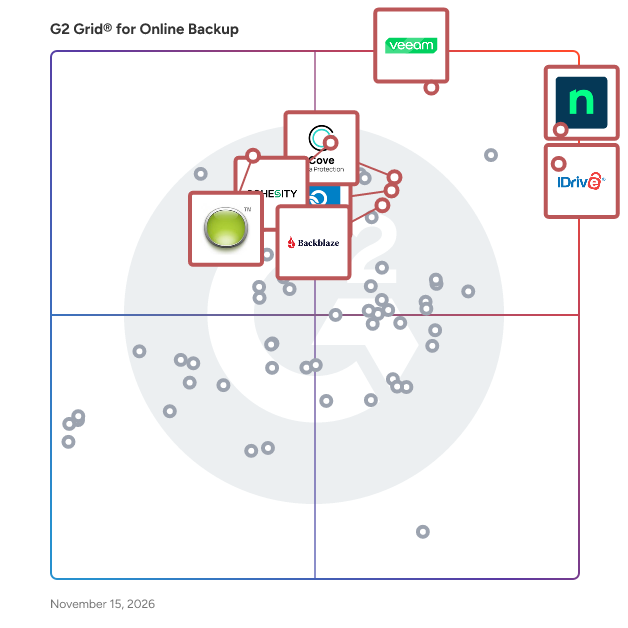
G2 Grid® for Online Backup Software

G2 Grid® for Online Backup Software plotting products by satisfaction and market presence

Highlighted products: NinjaOne, IDrive Online and SaaS Backup, Object Storage e2, Veeam Data Platform, Cove Data Protection, Datto SIRIS, Backblaze Computer Backup, Carbonite Safe, and Cohesity.

Underlying data: [Grid® JSON](https://www.g2.com/categories/online-backup/grids.json?focus%5B%5D=ninjaone&focus%5B%5D=idrive-online-and-saas-backup-object-storage-e2&focus%5B%5D=veeam-data-platform&focus%5B%5D=cove-data-protection&focus%5B%5D=kaseya-datto-siris&focus%5B%5D=backblaze-computer-backup&focus%5B%5D=carbonite-safe&focus%5B%5D=cohesity&segment=small-business)

Barracuda Backup

Barracuda Backup offers businesses a flexible, reliable, and cost-effective solution to backup and restore data. Barracuda Backup can be deployed as a physical or virtual appliance on-premises, which acts as a backup target for data from a variety of different sources such as servers, virtual machines, databases, and applications.

Average Rating: 4.3/5.0

Total Reviews: 55

How Do G2 Users Rate Barracuda Backup?

  • Disk Backup: 9.0/10 (Category avg: 8.5/10)
  • Has the product been a good partner in doing business?: 9.1/10 (Category avg: 8.8/10)
  • Remote Backup: 8.5/10 (Category avg: 8.9/10)
  • Encrypted Storage: 9.6/10 (Category avg: 8.9/10)

Who Is the Company Behind Barracuda Backup?

  • Seller: Barracuda
  • Year Founded: 2002
  • HQ Location: Campbell, CA
  • LinkedIn® Page: www.linkedin.com
    2,327 employees on LinkedIn®
  • Ownership: Private

Who Uses This Product?

  • Top Industries: Information Technology and Services
  • Company Size: 55% Medium, 29% Small

What Do G2 Reviewers Say About Barracuda Backup?

AI-generated summary from verified user reviews

Pros
  • Users appreciate the reliable backup frequency of Barracuda Backup, ensuring their data is always protected efficiently.
  • Users appreciate the ease of use of Barracuda Backup, praising its intuitive interface and effective backup options.
  • Users commend the user-friendly interface and fast data recovery of Barracuda Backup, enhancing their backup experience.
  • Users rave about Barracuda's knowledgeable and timely customer support, enhancing their experience with the backup solution.
  • Users value the wide Linux OS compatibility of Barracuda Backup, enhancing usability across various systems.
Cons
  • Users find the slow performance of Barracuda Backup frustrating, particularly during backup searches and management.
  • Users report backup issues, noting slow performance, especially with large amounts of data to process.
  • Users find the cost of Barracuda Backup to be high, particularly challenging for small businesses.
  • Users face challenges with backup understanding, particularly regarding retention policies and occasional web interface lags.
  • Users find the lack of backup options challenging, especially when transitioning from traditional backup methods.

What Are Recent G2 Reviews of Barracuda Backup?

What Are G2 Users Discussing About Barracuda Backup?

MultCloud.com

MultCloud is a comprehensive cloud management service that enables users to integrate, transfer, and synchronize data across multiple cloud storage platforms through a centralized interface. By consolidating various cloud accounts into one platform, MultCloud simplifies file management, enhances productivity, and eliminates the need to juggle multiple credentials or install numerous applications. Key Features and Functionality: - Cloud Transfer: Directly move files between cloud services without downloading and re-uploading. For example, transfer files from Dropbox to Google Drive seamlessly. - Cloud Sync: Synchronize data between different cloud accounts in real-time or at scheduled intervals, ensuring consistency across platforms. - Cloud Manager: Access and manage all connected cloud accounts from a single dashboard, allowing for operations like uploading, downloading, copying, and renaming files. - Scheduled Transfers and Syncs: Automate repetitive tasks by setting up transfers or synchronizations to occur at specified times or intervals. - File Sharing and Management: Generate secure sharing links and manage shared files across cloud accounts within the MultCloud interface. Primary Value and User Solutions: MultCloud addresses the challenges of managing multiple cloud storage accounts by providing a unified platform for seamless data transfer and synchronization. It enhances productivity by reducing the time and effort required to manage scattered data, making it an ideal solution for individuals and businesses seeking efficient cloud management.

Average Rating: 3.7/5.0

Total Reviews: 25

How Do G2 Users Rate MultCloud.com?

  • Disk Backup: 8.3/10 (Category avg: 8.5/10)
  • Has the product been a good partner in doing business?: 7.4/10 (Category avg: 8.8/10)
  • Remote Backup: 10.0/10 (Category avg: 8.9/10)
  • Encrypted Storage: 9.2/10 (Category avg: 8.9/10)

Who Is the Company Behind MultCloud.com?

Who Uses This Product?

  • Company Size: 44% Small, 32% Medium

What Are Recent G2 Reviews of MultCloud.com?

What Are G2 Users Discussing About MultCloud.com?

OpenDrive

OpenDrive is a solution that allows you to store, backup, and sync data across multiple users and computers.

Average Rating: 3.9/5.0

Total Reviews: 75

How Do G2 Users Rate OpenDrive?

  • Disk Backup: 8.3/10 (Category avg: 8.5/10)
  • Has the product been a good partner in doing business?: 6.9/10 (Category avg: 8.8/10)
  • Remote Backup: 8.3/10 (Category avg: 8.9/10)
  • Encrypted Storage: 8.3/10 (Category avg: 8.9/10)

Who Is the Company Behind OpenDrive?

Who Uses This Product?

  • Top Industries: Information Technology and Services, Computer Software
  • Company Size: 41% Small, 39% Large

What Are Recent G2 Reviews of OpenDrive?

What Are G2 Users Discussing About OpenDrive?

AI can help you find the answers. G2 helps you trust them.

Connect G2 to Claude or ChatGPT for answers grounded in G2's trusted reviews, comparisons, and pricing from real user insights.

How it works

Zoolz

Zoolz is a market leading provider of cloud based storage. Provides an affordable and secure cloud solution for businesses and individuals.

Average Rating: 2.5/5.0

Total Reviews: 17

How Do G2 Users Rate Zoolz?

  • Disk Backup: 7.1/10 (Category avg: 8.5/10)
  • Has the product been a good partner in doing business?: 4.6/10 (Category avg: 8.8/10)
  • Remote Backup: 6.9/10 (Category avg: 8.9/10)
  • Encrypted Storage: 7.1/10 (Category avg: 8.9/10)

Who Is the Company Behind Zoolz?

  • Seller: Genie9
  • Year Founded: 2008
  • HQ Location: Hammersmith, United Kingdom
  • LinkedIn® Page: www.linkedin.com
    27 employees on LinkedIn®

Who Uses This Product?

  • Company Size: 82% Small, 12% Medium

What Are Recent G2 Reviews of Zoolz?

What Are G2 Users Discussing About Zoolz?

Tian Lin
TL
Researched and written by Tian Lin
Updated