Best Network Management Tools - Page 2

How Many Network Management Tools Products Does G2 Track?

Total Products under this Category: 185

Category Stats (Sep 2026)

  • Average Rating: 4.43/5 The average rating of products in this category, based on all submitted ratings
  • Top Trending Product: Cisco DNA Center (+0.32%) - Among all products in this category, Cisco DNA Center recorded the largest rating increase compared to last month

Last updated: September 01, 2026

How Does G2 Rank Network Management Tools Products?

Why You Can Trust G2's Software Rankings:

  • 30 Analysts and Data Experts
  • 4,200+ Authentic Reviews
  • 185+ Products
  • Unbiased Rankings

G2's software rankings are built on verified user reviews, rigorous moderation, and a consistent research methodology maintained by a team of analysts and data experts. Each product is measured using the same transparent criteria, with no paid placement or vendor influence. While reviews reflect real user experiences, which can be subjective, they offer valuable insight into how software performs in the hands of professionals. Together, these inputs power the G2 Score, a standardized way to compare tools within every category.

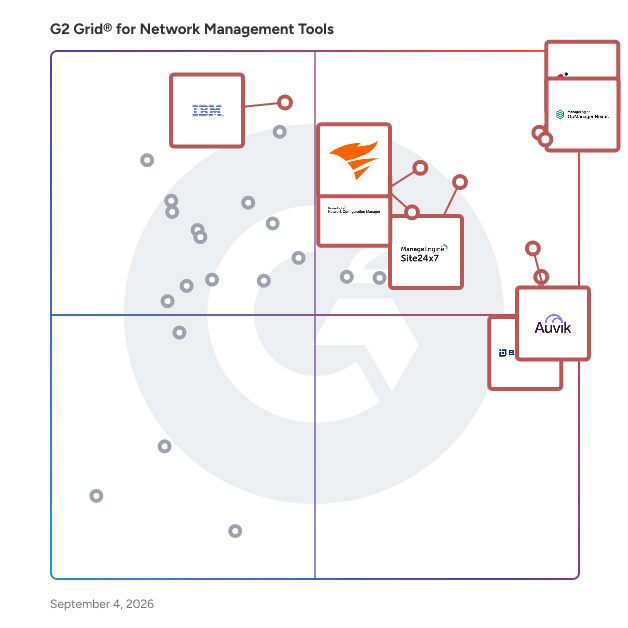
G2 Grid® for Network Management Tools

G2 Grid® for Network Management Tools plotting products by satisfaction and market presence

Highlighted products: Check Point Next Generation Firewalls (NGFWs), OpManager Nexus, Site24x7, Auvik, ManageEngine Network Configuration Manager, BackBox, SolarWinds Observability, and IBM SevOne.

Underlying data: [Grid® JSON](https://www.g2.com/categories/network-management-tools/grids.json?focus%5B%5D=check-point-next-generation-firewalls-ngfws&focus%5B%5D=opmanager-nexus&focus%5B%5D=site24x7&focus%5B%5D=auvik-networks&focus%5B%5D=manageengine-network-configuration-manager&focus%5B%5D=backbox&focus%5B%5D=solarwinds-worldwide-llc-solarwinds-observability&focus%5B%5D=ibm-sevone)

Domotz

Domotz is a network monitoring and management software platform used by MSPs and IT teams to gain visibility and operational control across distributed network environments. It enables organizations to monitor, manage, and troubleshoot network infrastructure across multiple sites or customer environments from a centralized interface. Founded in 2015 and headquartered in Draper, Utah, Domotz supports organizations worldwide that are responsible for maintaining reliable and secure network operations. The platform is used in a wide range of environments, including small and mid sized businesses, enterprise locations, and managed service provider deployments. Domotz provides automated device discovery and asset inventory, allowing teams to identify all devices connected to the network and maintain accurate records over time. It supports SNMP monitoring, alerting, and performance tracking to help teams detect availability issues, degradation, or misconfigurations before they impact users. Network topology visualization helps teams understand how devices are connected and identify potential points of failure. Additional capabilities include configuration backup and change tracking for supported devices, secure remote access without requiring VPNs, and tools for troubleshooting network issues remotely. Domotz can be used to monitor and manage routers, switches, firewalls, access points, servers, cameras, printers, and other IP enabled devices across heterogeneous vendor environments. Domotz is designed for operational use by technical teams. It can be deployed quickly, provides access to real network data, and supports ongoing monitoring and troubleshooting as networks evolve. The platform integrates with common MSP and IT tools to support workflows related to documentation, alerting, and service delivery. Pricing is based on a per device monthly model, currently priced at $1.50 per device per month. This pricing structure allows organizations to scale monitoring based on the number of devices managed while maintaining predictable costs. Users can start with Free Discovery to evaluate their environment using real network data before committing.

Average Rating: 4.8/5.0

Total Reviews: 101

How Do G2 Users Rate Domotz?

  • Network Monitoring: 8.6/10 (Category avg: 9.0/10)
  • Network Asset Mapping: 8.7/10 (Category avg: 8.6/10)
  • Network Discovery: 9.3/10 (Category avg: 8.8/10)
  • Ease of Admin: 9.1/10 (Category avg: 8.7/10)

Who Is the Company Behind Domotz?

  • Seller: Domotz
  • Company Website:
  • Year Founded: 2015
  • HQ Location: Draper, Utah
  • Twitter: @domotz
    2,420 Twitter followers
  • LinkedIn® Page: www.linkedin.com
    73 employees on LinkedIn®

Who Uses This Product?

  • Who Uses This: Owner
  • Top Industries: Information Technology and Services, Computer & Network Security
  • Company Size: 71% Small, 23% Medium

What Do G2 Reviewers Say About Domotz?

AI-generated summary from verified user reviews

Pros
  • Users value the ease of use of Domotz, enhancing their ability to monitor and manage networks effortlessly.
  • Users value the customizable alerts and seamless monitoring of network devices offered by Domotz for efficient troubleshooting.
  • Users value the customizable alert notifications from Domotz, enabling quick responses to network device issues.
  • Users highlight the excellent customer support of Domotz, emphasizing quick responses and helpful assistance.
  • Users highlight the easy setup of Domotz, enabling quick deployment and immediate network monitoring benefits.
Cons
  • Users find the network diagram feature lacking and experience lag with the desktop app when managing multiple devices.
  • Users face challenges with alert issues, including false positives and overwhelming notifications during network outages.
  • Users find the costs prohibitive for SMEs and individuals, with frequent price increases adding to their concerns.
  • Users note the missing features in Domotz, particularly for beginners and flat networks, limiting functionality and flexibility.
  • Users face integration issues due to lack of API support, making setup and notifications challenging initially.

What Are Recent G2 Reviews of Domotz?

What Are G2 Users Discussing About Domotz?

Check Point Quantum Spark Security Management Portal

The Check Point Quantum Spark Security Management Portal is a cloud-based platform designed to streamline the management of Check Point's Quantum Spark small business firewalls. It offers managed service providers (MSPs) an intuitive web interface to efficiently provision and oversee security measures for small businesses. Key Features and Functionality: - Unified Management: Enables MSPs to manage up to 30,000 gateways within a single domain, facilitating scalable security operations. - Zero-Touch Deployment: Allows for rapid, on-site technician-free deployment; devices can be configured remotely via the cloud, ensuring full protection within minutes. - Group-Based Security Provisioning: Supports the creation of management plans that set security policies, firmware updates, backups, and more for groups of gateways, enhancing operational efficiency. - Consolidated Logging and Reporting: Provides extensive logging, reporting, and monitoring capabilities, offering comprehensive insights into network security and performance. - Role-Based Administration: Features granular, role-based administrative controls, allowing for tailored access and management rights. Primary Value and User Solutions: The Quantum Spark Security Management Portal addresses the challenges faced by MSPs in managing multiple small business clients by offering a centralized, cloud-based solution. It reduces operational and maintenance costs through zero-touch deployment and scheduled reporting, while improving the security management experience with its scalable architecture. By consolidating firewall logging and providing actionable reporting, the portal enhances security oversight and response capabilities. Additionally, its user-friendly, web-based interface simplifies the management process, allowing MSPs to efficiently support their clients and generate new revenue opportunities.

Average Rating: 4.6/5.0

Total Reviews: 17

How Do G2 Users Rate Check Point Quantum Spark Security Management Portal?

  • Network Monitoring: 8.3/10 (Category avg: 9.0/10)
  • Network Asset Mapping: 9.2/10 (Category avg: 8.6/10)
  • Network Discovery: 8.3/10 (Category avg: 8.8/10)
  • Ease of Admin: 9.0/10 (Category avg: 8.7/10)

Who Is the Company Behind Check Point Quantum Spark Security Management Portal?

Who Uses This Product?

  • Company Size: 78% Large, 17% Medium

What Do G2 Reviewers Say About Check Point Quantum Spark Security Management Portal?

AI-generated summary from verified user reviews

Pros
  • Users appreciate the alert notifications for providing a clear view and easy management of security devices.
  • Users find Check Point Quantum Spark Security Management Portal to be extremely easy to use, especially compared to competitors.
  • Users value the easy monitoring capabilities that provide a clear view of security devices and their status.
  • Users value the easy monitoring and management of security devices, enhancing their ability to respond to alerts efficiently.
  • Users value the real-time monitoring feature, enhancing device performance and overall user experience significantly.
Cons
  • Users find navigation a bit difficult, which can slightly hinder their overall experience with the portal.

What Are Recent G2 Reviews of Check Point Quantum Spark Security Management Portal?

What Are G2 Users Discussing About Check Point Quantum Spark Security Management Portal?

Cisco FindIT Network Management

Cisco FindIT Network Management is purpose-built for managing networks of Cisco 100 to 500 Series devices. It lets you proactively manage the network instead of just reacting to events. FindIT Network Management is the perfect addition to your business's network.

Average Rating: 4.4/5.0

Total Reviews: 27

How Do G2 Users Rate Cisco FindIT Network Management?

  • Network Monitoring: 8.3/10 (Category avg: 9.0/10)
  • Network Asset Mapping: 8.3/10 (Category avg: 8.6/10)
  • Network Discovery: 10.0/10 (Category avg: 8.8/10)
  • Ease of Admin: 8.3/10 (Category avg: 8.7/10)

Who Is the Company Behind Cisco FindIT Network Management?

  • Seller: Cisco
  • Year Founded: 1984
  • HQ Location: San Jose, CA
  • Twitter: @Cisco
    720,366 Twitter followers
  • LinkedIn® Page: www.linkedin.com
    95,545 employees on LinkedIn®
  • Ownership: NASDAQ:CSCO

Who Uses This Product?

  • Company Size: 50% Medium, 37% Small

What Are Recent G2 Reviews of Cisco FindIT Network Management?

What Are G2 Users Discussing About Cisco FindIT Network Management?

HPE Aruba Networking Management

HPE Aruba Networking Management Software, also known as AirWave, is a comprehensive network operations system designed to manage both wired and wireless infrastructures from HPE Aruba Networking and various third-party manufacturers. It offers granular visibility into devices, users, and applications, enabling IT organizations to proactively optimize network performance, enhance security, and improve the end-user experience. Key Features and Functionality: - Unified Network Management: AirWave provides centralized control over wired and wireless networks, allowing for efficient management of global enterprise infrastructures. - Granular Visibility: The software delivers detailed insights into network devices, user activities, and application performance, facilitating proactive monitoring and troubleshooting. - Real-Time Monitoring and Alerts: AirWave offers real-time diagnostics, proactive alerts, and historical reporting to quickly identify and resolve network issues. - Support for Multi-Vendor Environments: It manages a wide range of devices from HPE Aruba Networking and third-party manufacturers, ensuring flexibility in diverse network environments. - Enhanced Security: The platform strengthens wireless security by providing detailed visibility and control over network access and usage. Primary Value and Solutions Provided: AirWave addresses the challenges of managing complex, multi-vendor network environments by offering a unified platform that simplifies operations and enhances visibility. By providing real-time monitoring, proactive alerts, and detailed reporting, it enables IT teams to optimize network performance, swiftly troubleshoot issues, and ensure a secure and reliable network experience for end-users. This comprehensive approach reduces operational complexity and supports the efficient management of enterprise networks.

Average Rating: 4.6/5.0

Total Reviews: 26

How Do G2 Users Rate HPE Aruba Networking Management?

  • Network Monitoring: 9.8/10 (Category avg: 9.0/10)
  • Network Asset Mapping: 8.9/10 (Category avg: 8.6/10)
  • Network Discovery: 8.9/10 (Category avg: 8.8/10)
  • Ease of Admin: 8.7/10 (Category avg: 8.7/10)

Who Is the Company Behind HPE Aruba Networking Management?

Who Uses This Product?

  • Company Size: 46% Medium, 38% Large

What Do G2 Reviewers Say About HPE Aruba Networking Management?

AI-generated summary from verified user reviews

Pros
  • Users appreciate the configuration ease of HPE Aruba Networking Management, simplifying access point setup from one location.
  • Users value the strong security integration of HPE Aruba Networking Management, enhancing their cybersecurity measures seamlessly.
  • Users find HPE Aruba Networking Management to be easy to use, simplifying access point configuration from one location.
  • Users value the strong security integration in HPE Aruba Networking Management, enhancing their network safety and control.
  • Users value the user-friendly interface of HPE Aruba Networking Management, enhancing their experience with easy navigation.
Cons
  • Users find the complexity of HPE Aruba Networking Management confusing at times due to its nested structure.
  • Users find the additional licensing costs for advanced features of HPE Aruba Networking Management to be quite high.
  • Users find the learning curve steep with HPE Aruba Networking Management, leading to occasional confusion in navigation.

What Are Recent G2 Reviews of HPE Aruba Networking Management?

What Are G2 Users Discussing About HPE Aruba Networking Management?

Symantec Management Center and Reporting

Improve your infrastructure's visibility, scalability, and effectiveness

Average Rating: 4.5/5.0

Total Reviews: 13

How Do G2 Users Rate Symantec Management Center and Reporting?

  • Network Monitoring: 8.7/10 (Category avg: 9.0/10)
  • Network Asset Mapping: 7.0/10 (Category avg: 8.6/10)
  • Network Discovery: 7.4/10 (Category avg: 8.8/10)
  • Ease of Admin: 9.2/10 (Category avg: 8.7/10)

Who Is the Company Behind Symantec Management Center and Reporting?

  • Seller: Broadcom
  • Year Founded: 1991
  • HQ Location: San Jose, CA
  • Twitter: @broadcom
    63,909 Twitter followers
  • LinkedIn® Page: www.linkedin.com
    55,094 employees on LinkedIn®
  • Ownership: NASDAQ: CA

Who Uses This Product?

  • Company Size: 69% Medium, 23% Large

What Do G2 Reviewers Say About Symantec Management Center and Reporting?

AI-generated summary from verified user reviews

Pros
  • Users value the customizable reports in Symantec Management Center, enhancing daily use and providing clear visibility.
  • Users value the centralized management capabilities of Symantec Management Center for improving security and streamlining operations.
  • Users value the single pane of visibility offered by Symantec Management Center, enhancing security management and reporting.
  • Users value the customizable reports in Symantec Management Center, enhancing their reporting capabilities and visibility.
  • Users value the centralized management and monitoring capabilities of Symantec Management Center for enhancing security posture.
Cons
  • Users find the expensive pricing of Symantec Management Center to be a barrier due to time-consuming configuration.
  • Users find the initial configuration complex, leading to a time-consuming setup process for new users.
  • Users find the complex setup for initial configuration frustrating and often time-consuming for new users.
  • Users feel the reporting functionality is inadequate and could use enhancements for better usability and insights.
  • Users note a lack of features in Symantec Management Center compared to similar tools offered by competitors.

What Are Recent G2 Reviews of Symantec Management Center and Reporting?

Azure Virtual WAN

Connect your global branch offices, point-of-sale locations, and sites using Azure and the Microsoft global network. Plan, configure, and seamlessly deploy new connections, tuned for a growing ecosystem of market-leading partners.

Average Rating: 4.3/5.0

Total Reviews: 12

How Do G2 Users Rate Azure Virtual WAN?

  • Ease of Admin: 7.5/10 (Category avg: 8.7/10)

Who Is the Company Behind Azure Virtual WAN?

  • Seller: Microsoft
  • Year Founded: 1975
  • HQ Location: Redmond, Washington
  • Twitter: @microsoft
    13,091,739 Twitter followers
  • LinkedIn® Page: www.linkedin.com
    231,632 employees on LinkedIn®
  • Ownership: MSFT

Who Uses This Product?

  • Company Size: 47% Small, 47% Medium

What Are Recent G2 Reviews of Azure Virtual WAN?

What Are G2 Users Discussing About Azure Virtual WAN?

BloxOne DDI

BloxOne™ DDI is the first and only cloud-native DDI solution that simplifies DDI control and management at scale.

Average Rating: 4.4/5.0

Total Reviews: 27

How Do G2 Users Rate BloxOne DDI?

  • Ease of Admin: 9.4/10 (Category avg: 8.7/10)

Who Is the Company Behind BloxOne DDI?

  • Seller: Infoblox
  • Company Website:
  • Year Founded: 1999
  • HQ Location: Santa Clara, California
  • Twitter: @Infoblox
    11,290 Twitter followers
  • LinkedIn® Page: www.linkedin.com
    3,303 employees on LinkedIn®

Who Uses This Product?

  • Top Industries: Information Technology and Services, Computer & Network Security
  • Company Size: 52% Large, 26% Small

What Are Recent G2 Reviews of BloxOne DDI?

What Are G2 Users Discussing About BloxOne DDI?

Arbor Sightline

NETSCOUT Arbor Sightline is a high-performance network visibility and DDoS detection platform engineered for the demands of large-scale service provider environments. It provides deep, real-time insight into IP traffic by ingesting and analyzing flow data such as NetFlow, sFlow, and IPFIX. For cybersecurity teams, this means having a continuous, comprehensive view of network behavior that enables rapid detection of anomalies, volumetric attacks, and stealthy threats that could otherwise evade traditional perimeter defenses. Designed with scalability and precision in mind, Arbor Sightline empowers practitioners to identify and respond to DDoS attacks with speed and accuracy. It correlates live traffic telemetry with global threat intelligence, allowing teams to pinpoint malicious activity and understand its context within the broader threat landscape. This intelligence-driven approach supports proactive defense strategies, enabling mitigation before service degradation or customer impact occurs. Arbor Sightline also integrates seamlessly with Arbor Threat Mitigation System (TMS) and other mitigation tools, automating response workflows and reducing the operational burden on security teams. Its centralized analytics and customizable dashboards streamline incident investigation and network forensics, helping practitioners reduce mean time to detect (MTTD) and mean time to respond (MTTR). For service providers managing complex, distributed infrastructures, Arbor Sightline is not just a visibility tool—it’s a critical component of a resilient, adaptive security architecture.

Average Rating: 4.6/5.0

Total Reviews: 26

How Do G2 Users Rate Arbor Sightline?

  • Ease of Admin: 8.3/10 (Category avg: 8.7/10)

Who Is the Company Behind Arbor Sightline?

  • Seller: NETSCOUT
  • Company Website:
  • Year Founded: 1984
  • HQ Location: Westford, Mass.
  • Twitter: @NETSCOUT
    13,759 Twitter followers
  • LinkedIn® Page: www.linkedin.com
    2,692 employees on LinkedIn®

Who Uses This Product?

  • Top Industries: Telecommunications
  • Company Size: 67% Large, 19% Medium

What Do G2 Reviewers Say About Arbor Sightline?

AI-generated summary from verified user reviews

Pros
  • Users value Arbor Sightline for its real-time attack visibility, optimizing network performance and enhancing response efficiency.
  • Users value the efficiency of Arbor Sightline in detecting DDoS attacks and optimizing network performance.
  • Users value the deep-flow visibility of Arbor Sightline, enhancing their ability to monitor and optimize network performance.
  • Users value the alert notifications feature of Arbor Sightline, enhancing DDoS attack detection and response effectively.
  • Users value the automation features of Arbor Sightline for enhancing efficiency and mitigating nighttime issues effectively.
Cons
  • Users face limited functionality with Arbor Sightline, finding management complex and resources demanding for effective operation.
  • Users find the complexity of the product creates a learning curve and can intimidate the operations team.
  • Users face challenges due to poor documentation that complicates DDoS mitigation and resource management with Arbor Sightline.
  • Users are frustrated with the high licensing costs for additional features in Arbor Sightline, complicating usage.
  • Users find the high resource usage of Arbor Sightline requires expert staff and significant infrastructure, increasing operational costs.

What Are Recent G2 Reviews of Arbor Sightline?

Cisco DNA Center

Cisco DNA Center is the network management system, foundational controller, and analytics platform at the heart of Cisco’s intent-based network. Cisco DNA Center addresses the demands of digitization, cloud, IoT, and mobility by eliminating IT complexity and facilitating alignment with business intent, unifying policy, automation, and assurance with integrated security. How Cisco DNA Center works Your programmable network infrastructure sends data from routers, switches, and wireless devices to the Cisco DNA Center appliance. The appliance activates features and capabilities on your network devices using Cisco DNA software. Everything is managed from the Cisco DNA Center dashboard.

Average Rating: 4.3/5.0

Total Reviews: 47

How Do G2 Users Rate Cisco DNA Center?

  • Network Monitoring: 8.6/10 (Category avg: 9.0/10)
  • Network Asset Mapping: 9.2/10 (Category avg: 8.6/10)
  • Network Discovery: 9.2/10 (Category avg: 8.8/10)
  • Ease of Admin: 8.2/10 (Category avg: 8.7/10)

Who Is the Company Behind Cisco DNA Center?

  • Seller: Cisco
  • Year Founded: 1984
  • HQ Location: San Jose, CA
  • Twitter: @Cisco
    720,366 Twitter followers
  • LinkedIn® Page: www.linkedin.com
    95,545 employees on LinkedIn®
  • Ownership: NASDAQ:CSCO

Who Uses This Product?

  • Top Industries: Computer & Network Security, Hospital & Health Care
  • Company Size: 37% Large, 23% Medium

What Do G2 Reviewers Say About Cisco DNA Center?

AI-generated summary from verified user reviews

Pros
  • Users find Cisco DNA Center incredibly easy to use, making network management more efficient and streamlined.
  • Users value the productivity improvements of Cisco DNA Center, appreciating its automation and streamlined network management capabilities.
  • Users value the automation capabilities of Cisco DNA Center, which streamline network management and improve operational efficiency.
  • Users value the easy integrations of Cisco DNA Center, enhancing their network management efficiency and productivity.
  • Users value the efficiency of Cisco DNA Center, enjoying streamlined operations and proactive issue resolution.
Cons
  • Users experience compatibility issues with non-Cisco hardware and find scaling complex, impacting overall usability.
  • Users find the complex implementation of Cisco DNA Center requires time and effort to fully utilize its features.
  • Users find the complex interface of Cisco DNA Center challenging, requiring time to fully leverage its features.
  • Users report a steep learning curve with Cisco DNA Center, hindering full utilization and complicating user experience.
  • Users express concerns over high licensing costs for advanced capabilities, making it less accessible for some networks.

What Are Recent G2 Reviews of Cisco DNA Center?

What Are G2 Users Discussing About Cisco DNA Center?

Spiceworks Inventory

Spiceworks Inventory Online is a free, cloud-based IT asset management solution designed for small to medium-sized businesses. It enables IT professionals to efficiently discover, monitor, and manage all IP-enabled devices within their network, including laptops, servers, smartphones, and IoT devices. By integrating seamlessly with other Spiceworks tools like Help Desk and Remote Support, it offers a unified platform for comprehensive IT management. Key Features and Functionality: - Automated Device Discovery: Conducts thorough scans to identify and catalog all network-connected devices, providing detailed information such as manufacturer, MAC address, IP address, device name, and open ports. - Real-Time Monitoring and Alerts: Continuously monitors devices and generates alerts for issues like low disk space, outdated software, or hardware failures, ensuring proactive maintenance. - Software and License Management: Tracks software installations and licenses, aiding in compliance and cost optimization. - Customizable Reporting and Analytics: Generates detailed reports on asset utilization, software usage, and more, facilitating informed decision-making and strategic planning. - Integration with Spiceworks Help Desk: Allows for efficient ticket management and issue resolution by linking asset data with help desk operations. - Mobile Accessibility: Provides mobile access, enabling IT teams to manage assets on-the-go. Primary Value and User Solutions: Spiceworks Inventory Online addresses the critical need for businesses to maintain an accurate and up-to-date inventory of their IT assets without incurring additional costs. By offering a centralized, user-friendly platform, it simplifies asset tracking, enhances compliance, and improves overall IT efficiency. The integration with other Spiceworks tools ensures a cohesive approach to IT management, allowing teams to respond swiftly to issues and make data-driven decisions. Its cloud-based nature ensures accessibility from anywhere, providing flexibility and convenience for IT professionals.

Average Rating: 4.1/5.0

Total Reviews: 29

How Do G2 Users Rate Spiceworks Inventory?

  • Network Monitoring: 10.0/10 (Category avg: 9.0/10)
  • Network Asset Mapping: 10.0/10 (Category avg: 8.6/10)
  • Network Discovery: 10.0/10 (Category avg: 8.8/10)
  • Ease of Admin: 8.8/10 (Category avg: 8.7/10)

Who Is the Company Behind Spiceworks Inventory?

  • Seller: Ziff Davis
  • Year Founded: 1995
  • HQ Location: New York
  • Twitter: @ziffdavis
    1,426 Twitter followers
  • LinkedIn® Page: www.linkedin.com
    6,678 employees on LinkedIn®
  • Ownership: NASDAQ: ZD

Who Uses This Product?

  • Who Uses This: IT Specialist
  • Top Industries: Utilities
  • Company Size: 73% Medium, 13% Large

What Are Recent G2 Reviews of Spiceworks Inventory?

What Are G2 Users Discussing About Spiceworks Inventory?

Cisco Data Center Network Manager

Designed to help you efficiently implement and manage virtualized data centers. It includes a feature-rich, customizable dashboard that provides visibility and control through a single pane of glass to Cisco Nexus and MDS products.

Average Rating: 4.2/5.0

Total Reviews: 15

How Do G2 Users Rate Cisco Data Center Network Manager?

  • Ease of Admin: 9.4/10 (Category avg: 8.7/10)

Who Is the Company Behind Cisco Data Center Network Manager?

  • Seller: Cisco
  • Year Founded: 1984
  • HQ Location: San Jose, CA
  • Twitter: @Cisco
    720,366 Twitter followers
  • LinkedIn® Page: www.linkedin.com
    95,545 employees on LinkedIn®
  • Ownership: NASDAQ:CSCO

Who Uses This Product?

  • Company Size: 59% Large, 41% Medium

What Are Recent G2 Reviews of Cisco Data Center Network Manager?

Spiceworks IP Scanner

IP Scanner is an addition to IT pro toolbox to hit GA release. It scans the network and links to cloud help desk.

Average Rating: 4.0/5.0

Total Reviews: 14

How Do G2 Users Rate Spiceworks IP Scanner?

  • Ease of Admin: 9.2/10 (Category avg: 8.7/10)

Who Is the Company Behind Spiceworks IP Scanner?

  • Seller: Ziff Davis
  • Year Founded: 1995
  • HQ Location: New York
  • Twitter: @ziffdavis
    1,426 Twitter followers
  • LinkedIn® Page: www.linkedin.com
    6,678 employees on LinkedIn®
  • Ownership: NASDAQ: ZD

Who Uses This Product?

  • Company Size: 50% Medium, 36% Small

What Are Recent G2 Reviews of Spiceworks IP Scanner?

What Are G2 Users Discussing About Spiceworks IP Scanner?

Ekahau AI Pro

Ekahau AI Pro is a Wi-Fi design and analysis software tailored for IT professionals managing critical wireless network projects. It offers AI-driven tools for predictive network planning, enabling precise access point placement and configuration to ensure optimal performance across 2.4 GHz, 5 GHz, and the latest 6 GHz (Wi-Fi 6E) bands. The software supports comprehensive visualization and reporting, allowing users to generate detailed heatmaps and professional reports that facilitate effective communication with stakeholders. By integrating with specialized survey hardware, Ekahau AI Pro streamlines the process of conducting physical site surveys, enhancing data accuracy and reducing deployment time. Its intuitive interface and robust feature set make it an invaluable tool for designing, optimizing, and troubleshooting complex Wi-Fi environments. Key Features and Functionality: - AI Auto-Planner: Automates access point placement and configuration, optimizing network design based on real-world environments. - Comprehensive Visualization: Provides detailed heatmaps and performance metrics, aiding in the analysis and optimization of wireless networks. - Advanced Reporting: Generates customizable reports with floor plans and coverage maps, facilitating clear communication with clients and teams. - Hardware Integration: Seamlessly integrates with Ekahau Sidekick for accurate on-site surveys and spectrum analysis. - Multi-Platform Support: Compatible with both Windows and macOS, catering to diverse user preferences. Primary Value and User Solutions: Ekahau AI Pro addresses the complexities of designing and maintaining high-performance Wi-Fi networks by providing tools that automate and simplify the planning process. Its AI-driven features reduce the time and effort required for network design, while comprehensive visualization and reporting capabilities enhance decision-making and communication. The integration with specialized hardware ensures accurate data collection, leading to more reliable network deployments. Overall, Ekahau AI Pro empowers IT professionals to deliver robust wireless solutions that meet the demands of modern business environments.

Average Rating: 4.4/5.0

Total Reviews: 17

How Do G2 Users Rate Ekahau AI Pro?

  • Network Monitoring: 8.3/10 (Category avg: 9.0/10)
  • Network Asset Mapping: 8.3/10 (Category avg: 8.6/10)
  • Network Discovery: 8.3/10 (Category avg: 8.8/10)
  • Ease of Admin: 6.1/10 (Category avg: 8.7/10)

Who Is the Company Behind Ekahau AI Pro?

  • Seller: Ziff Davis
  • Year Founded: 1995
  • HQ Location: New York
  • Twitter: @ziffdavis
    1,426 Twitter followers
  • LinkedIn® Page: www.linkedin.com
    6,678 employees on LinkedIn®
  • Ownership: NASDAQ: ZD

Who Uses This Product?

  • Top Industries: Computer Networking
  • Company Size: 71% Large, 18% Medium

What Do G2 Reviewers Say About Ekahau AI Pro?

AI-generated summary from verified user reviews

Pros
  • Users value the automation capabilities of Ekahau AI Pro, greatly streamlining their network design processes.
  • Users value the great tools for reporting and analysis provided by Ekahau AI Pro for wireless network implementation.
  • Users value the efficiency of Ekahau AI Pro, greatly minimizing time and effort in the network design process.
  • Users commend the in-depth reporting and analysis tools of Ekahau AI Pro for wireless network design and implementation.
Cons
  • Users find the upfront and ongoing costs of Ekahau AI Pro to be quite high and concerning.
  • Users find the high resource usage of Ekahau AI Pro challenging, necessitating powerful hardware for optimal performance.
  • Users find limited visibility through public links, restricting the effectiveness of the Ekahau AI Pro experience.

What Are Recent G2 Reviews of Ekahau AI Pro?

What Are G2 Users Discussing About Ekahau AI Pro?

ngrok

One gateway for all your traffic. ngrok replaces your networking hodgepodge—reverse proxies, load balancers, VPNs, auth layers, model routers, and the rest of the kludge—with one cloud networking platform. Secure, transform, and route traffic to services running anywhere. localhost to prod, APIs to AI models, and much more, already built by millions of developers and trusted by teams at Twilio, GitHub, Okta, Microsoft, Zoom, and Databricks.

Average Rating: 4.2/5.0

Total Reviews: 15

How Do G2 Users Rate ngrok?

  • Network Monitoring: 8.3/10 (Category avg: 9.0/10)

Who Is the Company Behind ngrok?

  • Seller: ngrok
  • Year Founded: 2015
  • HQ Location: San Francisco, US
  • Twitter: @ngrokHQ
    4,596 Twitter followers
  • LinkedIn® Page: www.linkedin.com
    77 employees on LinkedIn®

Who Uses This Product?

  • Company Size: 73% Small, 33% Medium

What Do G2 Reviewers Say About ngrok?

AI-generated summary from verified user reviews

Pros
  • Users find ngrok's service to be easy to set up, enhancing their overall experience with minimal hassle.
  • Users find ngrok's service to be easy to set up, enhancing their experience despite some other issues.
  • Users appreciate the easy setup of ngrok, finding it straightforward and convenient for their needs.
  • Users find ngrok easy to set up, appreciating the straightforward service despite concerns about pricing and support.
Cons
  • Users are frustrated by delayed support, with unhelpful responses that don't address urgent issues effectively.
  • Users find ngrok's pricing to be expensive and convoluted, leading to frustration with unexpected costs and delays.
  • Users express frustration with hidden costs in ngrok's pricing, leading to unexpected charges and poor customer service experiences.
  • Users express frustration with high licensing costs and unclear pricing, leading to unexpected expenses and delays in service activation.
  • Users report poor customer support, with misleading replies and lack of urgency in resolving issues affecting their experience.

What Are Recent G2 Reviews of ngrok?

What Are G2 Users Discussing About ngrok?

Riverbed Network Observability

Alluvio Network Performance Management makes it easy to monitor, troubleshoot, and analyze what’s happening across your hybrid network environment. With end-to-end visibility and actionable insights, you can quickly and proactively resolve any network-based performance issues. Alluvio unified NPM collects all packets, all flows, all device metrics, all the time, across all environments -cloud, virtual, and on-prem, providing enterprise-wide, business-centric monitoring of critical business initiatives.

Average Rating: 4.4/5.0

Total Reviews: 14

How Do G2 Users Rate Riverbed Network Observability?

  • Ease of Admin: 8.3/10 (Category avg: 8.7/10)

Who Is the Company Behind Riverbed Network Observability?

  • Seller: Riverbed Technology
  • Year Founded: 2002
  • HQ Location: San Francisco, CA
  • Twitter: @RIVERBED
    23,829 Twitter followers
  • LinkedIn® Page: www.linkedin.com
    1,590 employees on LinkedIn®

Who Uses This Product?

  • Company Size: 50% Large, 43% Medium

What Do G2 Reviewers Say About Riverbed Network Observability?

AI-generated summary from verified user reviews

Pros
  • Users value the detailed event analysis provided by Riverbed Network Observability, enhancing their network monitoring capabilities.
  • Users value the detailed network activity observation provided by Riverbed Network Observability, enhancing their analysis capabilities.
  • Users benefit from the comprehensive monitoring capabilities of Riverbed Network Observability, enabling detailed analysis of network activity.
  • Users value the comprehensive system monitoring of Riverbed Network Observability, enabling thorough analysis of network activities.
Cons
  • Users face device limitations that can lead to capacity and financial issues based on traffic volume.
  • Users face expensive capacity issues that can lead to financial strains based on their traffic volume needs.
  • Users face capacity-related financial issues with Riverbed Network Observability, impacting overall performance under heavy traffic.
  • Users face pricing issues due to capacity limitations that depend on their network traffic volume.
  • Users report resource limitations affecting financial planning and performance, especially with high traffic volumes.

What Are Recent G2 Reviews of Riverbed Network Observability?

Tian Lin
TL
Researched and written by Tian Lin
Updated October 3, 2024