  # Best Mechanical Computer-aided Design (MCAD) Software - Page 2

  *By [Daniel Rivera](https://research.g2.com/insights/author/daniel-rivera)*

   Mechanical computer-aided design (MCAD) software is primarily used by mechanical engineers and technical designers to create and modify product designs. Also known as mechanical design automation (MDA) software, it enables engineers to produce two-dimensional (2D) and three-dimensional (3D) models with high precision. Generating a virtual 3D representation, it assists users in viewing the object from various angles and testing and simulating it before creating a prototype.

MCAD software is used in various industries, including automotive, construction, electronics, architecture, etc. Simple MCAD software packages help create 2D diagrams of mechanical structures. MCAD software can also be used for generating and modifying complex 3D geometry. The tool helps in simulating designs and documenting manufacturing information.

Product development processes may require mechanical systems to interact with electronic systems. For manufacturing smart electronics, the electronic and mechanical teams need to collaborate to address the complexities of product design and development. While integrated electronic CAD (ECAD) and MCAD solutions are available, it is vital to understand the difference between the two types of software.

Unlike MCAD software, used for designing mechanical structures, ECAD software assists electrical engineers in various stages of electronic product design, from conception to manufacturing. Typically, MCAD software is used for mechanical design; however, it can be used in the electronic design process for designing 3D models of electronic enclosures and equipment. Additionally, it helps in the iteration of designs which involves repeated prototyping, testing, and analyzing a product to refine it.

To qualify for inclusion in the Mechanical Computer-Aided Design (MCAD) category, a product must:

- Assist engineers and technical designers to create and modify 2D drawings or 3D models of mechanical structures
- Allow engineers to simulate the product&#39;s behavior under various physical conditions through thermal and structural analysis.
- Generate output files or engineering documentation containing detailed blueprints conveying information on materials, measurements, tolerance levels at high temperatures, and processes and specifications for manufacturing.
- Assist users in creating mechanical assemblies from 3D models of components.
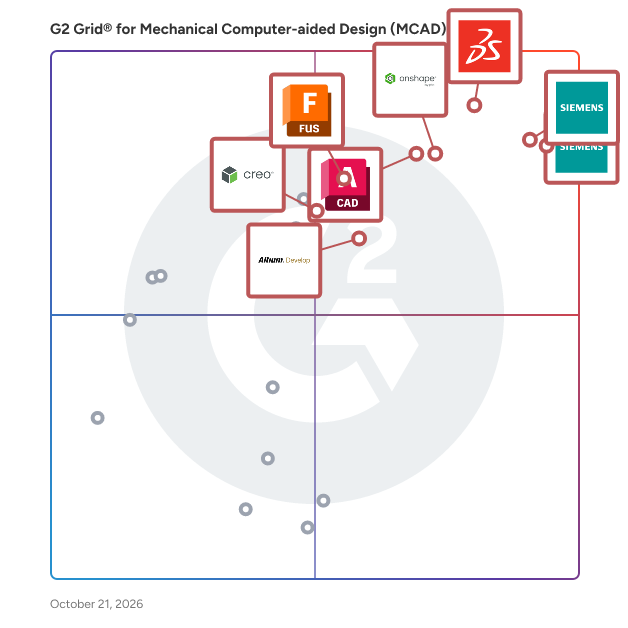


  ## How Many Mechanical Computer-aided Design (MCAD) Software Products Does G2 Track?
**Total Products under this Category:** 37

  
## How Does G2 Rank Mechanical Computer-aided Design (MCAD) Software Products?

**Why You Can Trust G2's Software Rankings:**

- 30 Analysts and Data Experts
- 7,600+ Authentic Reviews
- 37+ Products
- Unbiased Rankings

G2's software rankings are built on verified user reviews, rigorous moderation, and a consistent research methodology maintained by a team of analysts and data experts. Each product is measured using the same transparent criteria, with no paid placement or vendor influence. While reviews reflect real user experiences, which can be subjective, they offer valuable insight into how software performs in the hands of professionals. Together, these inputs power the G2 Score, a standardized way to compare tools within every category.

  
## Which Mechanical Computer-aided Design (MCAD) Software Is Best for Your Use Case?

- **Leader:** [Designcenter NX](https://www.g2.com/products/designcenter-nx/reviews)
- **Highest Performer:** [Alibre Design](https://www.g2.com/products/alibre-design/reviews)
- **Easiest to Use:** [AutoCAD](https://www.g2.com/products/autocad/reviews)
- **Top Trending:** [Designcenter Solid Edge](https://www.g2.com/products/designcenter-solid-edge/reviews)
- **Best Free Software:** [Altium Develop](https://www.g2.com/products/altium-develop/reviews)

  
  ## What Are the Top-Rated Mechanical Computer-aided Design (MCAD) Software Products in 2026?
### 1. [bananaz](https://www.g2.com/products/bananaz/reviews)
  Copilot for Mechanical Engineers. Master design changes, enhance team collaboration, automate documentation, and gain actionable design insights. All embedded into your existing CAD and PDM software. Bananaz picks up where your design tools fall short. AI-powered Validation, Compliance, and Coordination that integrates seamlessly to your design software and turbo-charge your engineers.  Freeing your team to focus on meaningful design and innovation Intelligent Design Validation &amp; Change Management: \* Detecting Differences across 2D drawing and 3D models guiding users through the individual design changes. \* Checklist Compliance verifies whether your design adheres to defined geometrical product specifications on every iteration. \* Issue tracking creates an easy to-do list based on the team communication to ensure the execution meets the requirements. Integrated Collaboration &amp; Workflow Visibility: \* Design Activity Tracking - Auto-generated change logs and visual differences to provide full visibility into the design process. \* Real-Time Notifications Get real-time alerts for design updates, mentions, and tasks requiring your attention. \* Team Comments &amp; Annotations Direct collaboration on 3D and 2D files with synced comments and annotations across versions. \* CAD/PDM Integration - Access control connects seamlessly to your existing design stack, syncs automatically, no manual uploads. Custom Automation &amp; Rule Definition: \* Custom Rules Enforcement - Automated design review tasks - customized to your organization’s standards and processes. \* Flexible Design Review Workflows that align with your organization requirements and adapt to dynamic needs across different projects. \* Automatic Reports Generation - redlining, inspection balloons, audit trail and changes reports are auto-generated according to company templates.


  **Average Rating:** 5.0/5.0
  **Total Reviews:** 2
**How Do G2 Users Rate bananaz?**

- **Ease of Use:** 10.0/10 (Category avg: 8.6/10)
- **Quality of Support:** 9.2/10 (Category avg: 8.4/10)

**Who Is the Company Behind bananaz?**

- **Seller:** [bananaz.ai](https://www.g2.com/sellers/bananaz-ai)
- **Year Founded:** 2023
- **HQ Location:** Tel Aviv, IL
- **LinkedIn® Page:** https://www.linkedin.com/company/bananaz-ai/ (23 employees on LinkedIn®)

**Who Uses This Product?**
  - **Company Size:** 50% Mid-Market, 50% Small-Business


#### What Are bananaz's Pros and Cons?

**Pros:**

- Accuracy (1 reviews)
- Drawing Efficiency (1 reviews)
- Ease of Use (1 reviews)
- Efficiency (1 reviews)
- Features (1 reviews)

**Cons:**

- Limited Options (1 reviews)
- Missing Features (1 reviews)
- Software Limitations (1 reviews)

### 2. [CADMATIC Hull](https://www.g2.com/products/cadmatic-hull/reviews)
  From basic to detailed and production design – CADMATIC Hull creates 3D models and automatically extracts accurate production data for construction parts of any complexity. Hull Basic Design CADMATIC Hull allows you to 3D model the entire hull structure from hull surface import until the end of your project. With an intuitive user interface, we empower your designers to create GAs and other drawings and information for class approval. Hull Detailed Design The core module of the CADMATIC Hull application lets you create detailed 3D models from basic design to production engineering of hull blocks, assemblies, and parts. Hull production Information Obtain accurate, automatic, and customizable output for any manufacturing process in your hull production applications with support for automation, prefabrication, and assembly lines. Shell Plate Development Develop shell plates in 3D and extract complete production data extremely accurately. Plate Nesting Minimize material waste and optimize raw plate material usage with the CADMATIC Plate Nesting module.


  **Average Rating:** 3.5/5.0
  **Total Reviews:** 1
**How Do G2 Users Rate CADMATIC Hull?**

- **Ease of Use:** 8.3/10 (Category avg: 8.6/10)
- **Quality of Support:** 8.3/10 (Category avg: 8.4/10)

**Who Is the Company Behind CADMATIC Hull?**

- **Seller:** [Cadmatic](https://www.g2.com/sellers/cadmatic)
- **Year Founded:** 1982
- **HQ Location:** Turku, FI
- **Twitter:** @CADMATICGroup (188 Twitter followers)
- **LinkedIn® Page:** https://www.linkedin.com/company/cadmatic/ (276 employees on LinkedIn®)

**Who Uses This Product?**
  - **Company Size:** 100% Small-Business


### 3. [ENCY](https://www.g2.com/products/ency/reviews)
  ENCY is a CAD/CAM for a new generation that combines advanced CAM technology with an intuitive user interface and natural workflow. Serving industries such as aerospace, automotive, and consumer goods, ENCY provides powerful tools for 2D/3D modeling, toolpath generation, simulation, and G-code verification, specifically tailored for CNC machining applications. As an integrated CAD/CAM solution, ENCY gives CAM programmers and engineers precise tools to control each machining step. This control ensures highly efficient workflows and consistently accurate parts, tailored to specific production requirements. Main Features and Benefits: - Advanced Toolpath Calculation: Generates optimized, machine-specific toolpaths for various processes, including 2D, 3-axis, 5-axis, and mill-turn operations, maximizing machine capability and precision. - High-Fidelity Simulation: ENCY CAM offers both solid and voxel-based simulations to replicate material removal, additive processes, and painting. These simulations detect potential issues like collisions and out-of-gauge conditions, helping avoid costly errors. - NC-Code Verification: Comprehensive G-code simulation and validation catch errors and discrepancies early, reducing machine downtime and minimizing risk. - Stock Tracking and Material Management: Tracks material removal throughout each machining operation, preventing redundant cuts and optimizing efficiency by ensuring purposeful toolpath creation and shortened machining time. - Machine Setup and Digital Twin Creation: Allows users to build digital twins of CNC machines, including tools, fixtures, and setup configurations. This capability improves setup accuracy and enables seamless transfer of setups across projects. - Integrated Collaboration via ENCY Clouds: ENCY Clouds provides real-time communication between programmers and operators, enhancing project sharing, NC-code fine-tuning, and troubleshooting. ENCY empowers industries focused on high-precision manufacturing with the tools needed to create accurate, efficient, and reliable machining workflows, enhancing productivity and minimizing downtime.


  **Average Rating:** 5.0/5.0
  **Total Reviews:** 3
**How Do G2 Users Rate ENCY?**

- **Ease of Use:** 8.3/10 (Category avg: 8.6/10)
- **Quality of Support:** 10.0/10 (Category avg: 8.4/10)

**Who Is the Company Behind ENCY?**

- **Seller:** [ENCY Software](https://www.g2.com/sellers/ency-software)
- **Year Founded:** 2024
- **HQ Location:** Paphos, CY
- **LinkedIn® Page:** https://www.linkedin.com/company/encycam (15 employees on LinkedIn®)

**Who Uses This Product?**
  - **Company Size:** 100% Small-Business


#### What Are ENCY's Pros and Cons?

**Pros:**

- Tool Efficiency (3 reviews)
- Simulation Tools (2 reviews)
- 3D Modeling (1 reviews)
- Advanced Capabilities (1 reviews)
- CAD Integration (1 reviews)

**Cons:**

- Complexity (1 reviews)
- Component Management (1 reviews)
- Difficult Configuration (1 reviews)
- Expensive (1 reviews)
- Missing Features (1 reviews)

### 4. [Tebis](https://www.g2.com/products/tebis/reviews)
  The industry packages and special packages are ideally configured for the model, mold and die, industrial design and mechanical engineering manufacturing sectors and for workstations with special tasks like laser cutting and trim machining.


  **Average Rating:** 4.5/5.0
  **Total Reviews:** 1
**How Do G2 Users Rate Tebis?**

- **Has the product been a good partner in doing business?:** 8.3/10 (Category avg: 8.4/10)
- **Ease of Use:** 8.3/10 (Category avg: 8.6/10)
- **Quality of Support:** 8.3/10 (Category avg: 8.4/10)

**Who Is the Company Behind Tebis?**

- **Seller:** [Tebis Technische Informationssysteme AG](https://www.g2.com/sellers/tebis-technische-informationssysteme-ag)
- **HQ Location:** Krailling, Bavaria, Germany
- **Twitter:** @TebisUSA (310 Twitter followers)
- **LinkedIn® Page:** https://www.linkedin.com/company/tebis/ (264 employees on LinkedIn®)

**Who Uses This Product?**
  - **Company Size:** 100% Enterprise


### 5. [CadXStudio](https://www.g2.com/products/cadxstudio/reviews)
  CadX Studio is a browser-based AI-powered CAD and CAM platform that enables engineers, product designers, and manufacturers to generate fully parametric 3D models and production-ready CAM outputs directly from text prompts without installing any software. Unlike traditional CAD tools that require manual modeling from scratch, CadX Studio combines generative AI with a full-featured parametric CAD environment in a single web-based interface. Users can describe a part or assembly in plain language and receive an editable 3D model instantly, then refine it manually or continue iterating with AI all within the same session. Key capabilities include: Text-to-3D model generation Input a natural language description and get a parametric 3D model with editable dimensions, constraints, and features AI + manual CAD in one environment Switch between AI-generated outputs and manual parametric editing without leaving the browser CAM output support — Generate machining-ready outputs directly from the platform, reducing the steps between design and production Multi-part assembly support — Design and manage assemblies with multiple components in a single workspace Browser-native architecture — Runs entirely in the browser with no installation required; design files and IP never leave the user&#39;s local environment CadX Studio is built for engineers and manufacturers who want to accelerate design cycles, eliminate repetitive modeling work, and go from concept to production-ready output faster. It is particularly suited for teams working on mechanical parts, custom components, and iterative product development where speed and parametric accuracy both matter. The platform operates on a token-based access model following an initial free trial.


**Who Is the Company Behind CadXStudio?**

- **Seller:** [CadXStudio](https://www.g2.com/sellers/cadxstudio)
- **HQ Location:** N/A
- **LinkedIn® Page:** https://www.linkedin.com/company/No-Linkedin-Presence-Added-Intentionally-By-DataOps (1 employees on LinkedIn®)


### 6. [ENCY Robot](https://www.g2.com/products/ency-robot/reviews)
  ENCY Robot is a comprehensive offline programming (OLP) and simulation software suite designed to simplify robot automation tasks for manufacturing, including material removal, additive processes, welding, painting, and more. This CAD/CAM-integrated solution enables precise toolpath generation, robotic cell simulation, and kinematic control, supporting industries that rely on efficient robotic operations. Built for engineers, CAD/CAM programmers, and automation professionals, ENCY Robot delivers an intuitive interface and robust set of tools to address complex programming and process optimization needs. ENCY Robot falls under the CAD/CAM robotics software category, facilitating end-to-end workflow management from setup to execution. It connects seamlessly with ENCY&#39;s CAD/CAM environment, allowing users to define, simulate, and adjust robotic paths without the need for physical prototypes, saving both time and resources. Key Features and Benefits: - Full Robotic Cell Simulation: High-quality simulation of complete robotic cells, including external axes, for accurate verification and visualization. - Toolpath Generation for Diverse Applications: Supports a wide range of robotic applications, such as milling, trimming, deburring, painting, welding, and pick-and-place. - Advanced Kinematics and Collision Management: Tools for kinematics handling to manage singularities, avoid collisions, and control reach zones, ensuring safe and effective operation. - Digital Twin Creation with MachineMaker: Zero-code digital twin builder for quick creation and customization of robotic cells with a library of components and customizable parts. - Integrated Collaboration via ENCY Clouds: ENCY Clouds provides real-time communication between programmers and operators, enhancing project sharing, NC-code fine-tuning, and troubleshooting. Highlights: - Additive and Subtractive Toolpaths: Generate complex toolpaths for both material addition and removal, including 3D and 5-axis operations. - State-of-the-Art Interface: User-friendly interface designed to simplify robot programming and cell management for faster setup and training. - Error Handling and Optimization: Built-in tools for detecting and correcting potential issues in real-time, such as path singularities and overreach, to ensure operational accuracy. ENCY Robot empowers companies to efficiently design, simulate, and deploy robotic operations with precision, supporting industry-standard workflows in a cohesive, easy-to-navigate platform.


**Who Is the Company Behind ENCY Robot?**

- **Seller:** [ENCY Software](https://www.g2.com/sellers/ency-software)
- **Year Founded:** 2024
- **HQ Location:** Paphos, CY
- **LinkedIn® Page:** https://www.linkedin.com/company/encycam (15 employees on LinkedIn®)


### 7. [Hanomi](https://www.g2.com/products/hanomi/reviews)
  Hanomi is an innovative software and automation company specializing in engineering solutions. Our powerful AI platform transforms your 3D CAD models into precise 2D drawings with remarkable efficiency. Serving clients across the United States and Europe, Hanomi automates critical processes like manufacturing documentation and 3D model conversion. As expert engineering consultants, we help streamline workflows, enhance productivity, and ensure technical drawings meet the highest standards, including GD&amp;T requirements. Hanomi helps businesses optimize design and manufacturing cycles with intelligent, automated technology.


**Who Is the Company Behind Hanomi?**

- **Seller:** [Hanomi](https://www.g2.com/sellers/hanomi)
- **Year Founded:** 2024
- **HQ Location:** San Francisco, US
- **LinkedIn® Page:** https://www.linkedin.com/company/hanomi/ (13 employees on LinkedIn®)


### 8. [HarnessHive](https://www.g2.com/products/harnesshive/reviews)
  HarnessHive is a web-based CAD platform for designing and documenting wire harnesses and cable assemblies directly in the browser. Teams can define system architectures, build schematic and layout views, and manage component libraries that stay synchronized across the organization. All designs are collaborative and shareable, making it easy to work across engineering teams without the friction of traditional desktop tools.


**Who Is the Company Behind HarnessHive?**

- **Seller:** [Harness Hive](https://www.g2.com/sellers/harness-hive)
- **HQ Location:** N/A
- **LinkedIn® Page:** https://www.linkedin.com/company/No-Linkedin-Presence-Added-Intentionally-By-DataOps (1 employees on LinkedIn®)


### 9. [Manufacturing Toolkit (MTK)](https://www.g2.com/products/manufacturing-toolkit-mtk/reviews)
  Manufacturing Toolkit (MTK) is a CAD SDK for developers building quoting, DFM, and MaaS platforms — with DFM checks, native B-Rep, feature recognition, and web visualization.


**Who Is the Company Behind Manufacturing Toolkit (MTK)?**

- **Seller:** [CADEXSOFT](https://www.g2.com/sellers/cadexsoft)
- **Year Founded:** 2014
- **HQ Location:** Tallinn, EE
- **LinkedIn® Page:** https://www.linkedin.com/company/cadexsoft/ (6 employees on LinkedIn®)


### 10. [Strut3D](https://www.g2.com/products/strut3d/reviews)
  Strut3D provides a fast and straightforward way to design, verify and optimize support systems using manufacturer-approved profiles. Built as a lightweight, browser-based platform, Strut3D connects the entire workflow - from system suppliers and design specifiers to metal fabricators. The tool is designed to be highly intuitive and exceptionally easy to use, allowing you to configure safe, compliant structures effortlessly. It automates calculations in the background, helping you complete your design tasks quickly. For more sophisticated structural cases, users can easily use our advanced 3D Frame software. Key Features - Interactive Modeling Structure: Create designs like supports for pipes, ducts, or cable trays, edit steel structures and input loads directly in the browser, with instant calculation results. - Massive Manufacturer Library: Access nearly 1,000 profiles from over 20 market-leading suppliers including e.g. Hilti, fischer, MÜPRO, Sikla, MEFA, Walraven, Unistrut, JCI and more. - Automated Engineering Analysis: Performs FEA-based structural checks (ULS/SLS) in the background, ensuring full compliance with Eurocode standards. - Design Optimization: Easily verify structural strength and select optimal profile sizes to minimize material costs. - Multilingual Reporting: Generate clear, engineering documentation with calculation results in multiple languages. - Zero Installation &amp; Cloud Collaboration: Work on any device, manage projects in a cloud dashboard and share models instantly with your team. \_\_\_\_\_\_\_\_\_\_\_\_\_\_\_\_\_\_\_\_\_\_\_\_\_\_\_\_\_\_\_\_\_\_\_\_\_\_\_\_ Your Benefits Strut3D helps teams work faster by offering an intuitive space to verify structural safety and instantly generate professional reports based on official manufacturer data. This allows you to focus on delivering safe, compliant projects fast, instead of struggling with complicated analysis software. For System Suppliers: We offer the opportunity to integrate your product catalogs directly into our profile database. This grants your brand direct market visibility and makes it easy for clients to select your specific profiles when designing and calculating their support structures. \_\_\_\_\_\_\_\_\_\_\_\_\_\_\_\_\_\_\_\_\_\_\_\_\_\_\_\_\_\_\_\_\_\_\_\_\_\_\_\_ Use Cases - Optimizing project budgets by rapidly testing and selecting safe, cost-effective profile sizes. - Generating ready-to-approve engineering reports instantly to accelerate the sign-off process with clients and approval engineers. - Sharing interactive structure models and project data with partners securely via the cloud. Get Started - Try Strut3D for Free! See how simple support design can be. 👉Test all features in our fully free trial version Start your free trial here: https://strut3d.co/ - Watch the Tutorials: Learn how to model structures and apply loads step-by-step. Watch tutorials here: https://strut3d.com/en-us/category/tutorial/ - Contact Us: Have questions about implementation or need help tailoring the solution to your team? 👉 Reach out at contact@creoox.com.


**Who Is the Company Behind Strut3D?**

- **Seller:** [Creoox AG](https://www.g2.com/sellers/creoox-ag)
- **Year Founded:** 2016
- **HQ Location:** Triesen, LI
- **LinkedIn® Page:** https://www.linkedin.com/company/creoox (13 employees on LinkedIn®)


### 11. [Theia 2D3D](https://www.g2.com/products/theia-2d3d/reviews)
  Theia is the AI-powered platform from SP3D that automatically converts 2D mechanical drawings (PDF, TIF, PNG, JPG) into manufacturable 3D CAD models in STEP format, with engineer validation.


**Who Is the Company Behind Theia 2D3D?**

- **Seller:** [Theia](https://www.g2.com/sellers/theia-86230cd8-090c-40e9-b2bf-f680c5be8843)
- **Year Founded:** 2016
- **HQ Location:** Gratentour, FR
- **LinkedIn® Page:** https://www.linkedin.com/company/spare-parts-3d/ (78 employees on LinkedIn®)


### 12. [Vention](https://www.g2.com/products/vention/reviews)
  Build your machine online. Receive your parts next day. Welcome to the future of machine design. Vention is the only platform where you can design, order and assemble a custom machine directly from a web-browser in just a few days.


**Who Is the Company Behind Vention?**

- **Seller:** [Vention](https://www.g2.com/sellers/vention)
- **Year Founded:** 2016
- **HQ Location:** Montreal, Quebec, Canada
- **LinkedIn® Page:** https://www.linkedin.com/company/vention (313 employees on LinkedIn®)


    ## What Is Mechanical Computer-aided Design (MCAD) Software?
  [CAD Software](https://www.g2.com/categories/cad)
  ## What Software Categories Are Similar to Mechanical Computer-aided Design (MCAD) Software?
    - [General-Purpose CAD Software](https://www.g2.com/categories/general-purpose-cad)
    - [Simulation &amp; CAE Software](https://www.g2.com/categories/simulation-cae)
    - [Additive Manufacturing Software](https://www.g2.com/categories/additive-manufacturing)

  
---

## How Do You Choose the Right Mechanical Computer-aided Design (MCAD) Software?

### What You Should Know About Mechanical Computer-aided Design (MCAD) Software

### What is Mechanical Computer-aided Design (MCAD) Software?

Mechanical engineers and technical designers use mechanical computer-aided design (MCAD) software to create 2D and 3D models of products. It&#39;s widely used in the automotive, construction, and electronics industries to design and simulate simple structures and complex shapes.

In product development, MCAD helps build and test different design versions digitally before making a physical prototype.&amp;nbsp;

### What are the Common Features of Mechanical Computer-aided Design (MCAD) Software?

The following are some core features of mechanical computer-aided design (MCAD) software:

**3D modeling:** MCAD software allows engineers and designers to create accurate 3D models of mechanical components. This includes modeling individual parts, assemblies, and complete systems.

**Parametric design:** This feature allows connections to be established between different elements of a design. When changes are made to one part of the design, the software automatically updates all the connected components, ensuring the entire design remains consistent and works well together.

**Assembly design:** MCAD software assists in creating complex machines and products. It simplifies designing parts, checks for issues, helps with testing, and produces detailed plans.&amp;nbsp;

MCAD works well with other tools in the manufacturing ecosystems and, therefore, becomes an essential tool for streamlining the design and visualization of complex mechanical assemblies.

**Visualization:** Mechanical CAD software provides tools for rendering and visualizing 3D models, allowing users to view and test designs from various angles.

**Simulation and analysis:** It supports simulation and analysis by helping engineers assess and optimize the performance of mechanical systems. It allows them to model and analyze physical behavior, ensuring their designs work well and meet the safety requirements.

**Documentation:** MCAD software assists in creating accurate 2D drawings and technical documentation, which are essential for manufacturing and assembly instructions.

**Library of parts:** MCAD programs include libraries of standard components and parts that can be readily used in the designs.

### What are the Benefits of Mechanical Computer-aided Design (MCAD) Software?

MCAD software significantly improves design accuracy, efficiency, and collaboration, ultimately leading to cost savings and better-designed products.

**Accuracy:** It allows for highly accurate design, ensuring that mechanical components and systems meet exact specifications and tolerances.

**Efficiency:** Designers and engineers can create and modify designs much faster than traditional manual drafting methods, reducing the time required for product development.

**Visualization:** It offers a 3D visualization feature, enabling users to create and view designs in three dimensions. This provides a comprehensive, realistic view of designs from various angles. It also improves communication, making conveying complex design concepts easier for technical and non-technical stakeholders.

**Design validation:** Simulation and analysis tools within MCAD tools enable engineers to test and optimize designs, reducing the need for physical prototypes.

**Cost reduction:** It identifies and resolves design issues early in the process, reducing costly errors and iterations during manufacturing.

**Collaboration:** MCAD software supports collaborative work, allowing multiple team members to work on the same project simultaneously and facilitating easy sharing of design files.

### Who Uses Mechanical Computer-aided Design (MCAD) Software?

Various professionals and industries use MCAD software for designing and drafting mechanical components and systems. Here are some of the key personas that use mechanical CAD software:

**Mechanical engineers:** This tool is used to design and test mechanical systems and machine parts. It creates detailed technical drawings and 3D models, ensuring mechanical engineers their designs work well, are safe, and can be made easily.

**Product designers:** Product designers use mechanical CAD tools to develop new product ideas and improve product designs. This software lets them bring their ideas to life and test ideas for products on the computer before manufacturing them.

**Aerospace industry:** Aerospace engineers and designers use MCAD software to generate and simulate aircraft, spacecraft, and associated elements. The tool conducts vital tasks like aerodynamic analysis, structural design, and planning for manufacturing within the aerospace industry.

**Automotive industry:** The automotive industry relies heavily on MCAD tools to design vehicles, engines, and various automotive components. It optimizes the performance, safety, and fuel efficiency of vehicles.

**Architects and building designers:** Architects and building designers may use mechanical CAD tools for creating detailed drawings and models of heating, ventilation, and air conditioning (HVAC) systems, ensuring they are efficient and safe within the overall building design.

#### Software Related to Mechanical Computer-aided Design (MCAD) Software

MCAD software is essential for designing and modeling mechanical parts and assemblies. This software can use several related solutions to enhance its capabilities and workflow, including:

[Product data management (PDM)](https://www.g2.com/categories/product-data-management-pdm) **:** PDM software helps manage and organize product design data, including CAD files, bills of materials (BOMs), and other related documents. It ensures version control, collaboration, and secure access to design data.

[Simulation and computer-aided engineering (CAE)](https://www.g2.com/categories/simulation-cae) **:** Simulation and CAE software complements MCAD by enabling engineers to perform simulations and analysis on mechanical designs. It simulates structural, thermal, fluid flow, and other physical behaviors to optimize and validate designs.

[3D printing](https://www.g2.com/categories/3d-printing) **:** For rapid prototyping and manufacturing, 3D printing tools can be integrated with MCAD to produce physical prototypes directly from digital designs.

[Computer-aided manufacturing (CAM)](https://www.g2.com/categories/computer-aided-manufacturing-cam) **:** CAM software translates MCAD designs into machine-readable code for CNC machines, ensuring accurate and efficient manufacturing processes.

### Challenges with Mechanical Computer-aided Design (MCAD) Software

MCAD software is an essential tool for engineers and designers in various industries but comes with its fair share of challenges.

**Complexity:** MCAD software is often complex and feature-rich, which can overwhelm new users. Using all the tools and features effectively can take time and effort. As a result of its complexity, the software often has a steep learning curve. New users may need extensive training to become proficient.

**Hardware requirements:** Mechanical computer-aided design (MCAD) software can be resource-intensive, requiring powerful hardware to run smoothly. This can be costly and may necessitate frequent hardware upgrades.

**Compatibility issues:** MCAD software often needs to interact with other software tools, such as simulation software, rendering software, or data management systems. Ensuring compatibility between these tools can be a challenge.

**File size:** Complex 3D models created in MCAD tools can result in large file sizes, which can be challenging to manage, share, and store.

**Customization:** Tailoring MCAD software to specific industry or workflow requirements can be difficult, as it may require scripting or programming skills.

**Performance issues:** Large assemblies or complex models may experience performance issues, such as slow rendering or modeling, which can frustrate users.

### How to Buy Mechanical Computer-aided Design (MCAD) Software

#### Requirements Gathering (RFI/RFP) for Mechanical Computer-aided Design (MCAD) Software

If a company is just starting and looking to purchase its first MCAD, or an organization needs to update a legacy system--wherever a business is in its buying process, [g2.com](https://www.g2.com/) can help select the best mechanical CAD software.

Finding the right MCAD tool for a business can be difficult when considering factors such as the complexity of designs, industry standards, collaboration requirements, and team size.&amp;nbsp;&amp;nbsp;

Depending on the scope of the deployment, it might be helpful to produce an RFI, a one-page list with a few bullet points describing what is needed from the platform.

#### Compare Mechanical Computer-aided Design (MCAD) Software Products

**Create a long list**

Long lists are created by eliminating the options that don’t align with the organization’s cloud strategy. Vendor evaluation is an essential part of the buying process as it helps to prepare a consistent list of questions regarding specific needs and concerns to ask each vendor.

The following considerations should enable the establishment of realistic and achievable goals:

**Budget consideration:** Determining the company’s budget for MCAD software purchases is crucial. Prices can vary significantly, so it&#39;s essential to have a clear idea of how much the organization is willing to spend.

**Compatibility** : The mechanical computer-aided design (MCAD) software should be compatible with the organization&#39;s operating system, hardware, and other software tools. It is important to check system requirements and compatibility lists provided by the software vendor to select compatible applications.

**Licensing:** MCAD software is typically offered in various licensing models, such as perpetual licenses, subscription-based licenses, and cloud-based solutions. Exploring and selecting the one that best suits the organization&#39;s needs and budget is advisable.

**Scalability:** The organization should consider whether the software can scale with its business growth. It is essential to ensure that it can handle increased workloads, additional users, and larger projects.

**Security features:** The organization must assess the software&#39;s security features, especially if the company deals with sensitive or proprietary design data. Encryption, access control, and data backup capabilities are good to have features within the software.

**Training:** The listed vendors should offer training and support on using the MCAD software effectively and allow the company to plan for its integration into their workflow.

**Create a short list**

From the extensive list of vendors, it’s practical to narrow down the list of contenders. Buyers can read user reviews on G2 and gather feedback from professionals with hands-on experience with mechanical computer-aided design (MCAD) software. This approach can yield valuable insights into the software&#39;s advantages and disadvantages, aiding in the selection process.

**Conduct demos**

Demos offer buyers a chance to observe the functionality of an MCAD solution in action. While pre-recorded demonstrations and slide presentations can be accessed on the vendor&#39;s website, exploring trial versions or live demos is crucial to evaluate the software&#39;s capabilities, user interface, and alignment with the organization&#39;s workflow.

#### Selection of Mechanical Computer-aided Design (MCAD) Software

**Choose a selection team**

The selection committee should include subject matter experts, IT professionals, end users, budget specialists, and vendor liaisons. This diverse group will collectively evaluate the software, considering technical, usability, and budgetary concerns, resulting in a comprehensive assessment and informed decision-making.

**Negotiation**

Initiating a discussion about pricing and licensing is essential. For instance, when engaging with the vendor, exploring the possibility of discounts on multi-year contracts or incentives for recommending the product to others can be fruitful.

**Final decision**

After selecting the MCAD software, create an implementation team that includes members from the selection team to oversee the software&#39;s deployment. Before going all in, it is recommended to run a trial period or pilot project using the chosen MCAD software to ensure it meets the company’s expectations before making a final purchase decision.

### Mechanical Computer-aided Design (MCAD) Software Trends

**Cloud-based MCAD**

The adoption of cloud-based MCAD solutions is on the rise. These platforms offer the advantage of collaboration, accessibility from anywhere, and decreased hardware requirements. Users can work on their designs via web browsers, making collaboration easier for distributed teams.

**Generative design**

Generative design technology uses algorithms and artificial intelligence (AI) to optimize designs automatically. MCAD software that integrates generative design empowers engineers to specify design parameters, generating numerous design alternatives within the defined constraints. This functionality assists users in uncovering more efficient and innovative design solutions.

**Design for additive manufacturing (DfAM)**

With the increasing adoption of additive manufacturing (3D printing) technologies, MCAD software is incorporating features specifically designed for optimizing designs for 3D printing, such as lattice structures and support generation tools.

**AI and machine learning (ML)**

AI and ML are employed in MCAD software to assist with various tasks, including design optimization, predictive analytics, and automation of repetitive design tasks.

**Augmented reality (AR) and Virtual reality (VR) integration**

MCAD software can be integrated with AR and VR technologies, allowing designers to visualize and interact with 3D models in immersive environments for design reviews and simulations.

**AI-driven design assistance**

MCAD software can incorporate AI-driven features to assist designers in making design decisions, suggesting design changes, and identifying potential issues early in the design process.


