# Best Enterprise Headless CMS Software

  *By [Gauri Pawsey](https://research.g2.com/insights/author/gauri-pawsey)*

   Products classified in the overall Headless CMS category are similar in many regards and help companies of all sizes solve their business problems. However, enterprise business features, pricing, setup, and installation differ from businesses of other sizes, which is why we match buyers to the right Enterprise Business Headless CMS to fit their needs. Compare product ratings based on reviews from enterprise users or connect with one of G2&#39;s buying advisors to find the right solutions within the Enterprise Business Headless CMS category.

In addition to qualifying for inclusion in the Headless CMS Software category, to qualify for inclusion in the Enterprise Business Headless CMS Software category, a product must have at least 10 reviews left by a reviewer from an enterprise business.


## Category Overview

**Total Products under this Category:** 109


## Trust & Credibility Stats

**Why You Can Trust G2's Software Rankings:**

- 30 Analysts and Data Experts
- 8,900+ Authentic Reviews
- 109+ Products
- Unbiased Rankings

G2's software rankings are built on verified user reviews, rigorous moderation, and a consistent research methodology maintained by a team of analysts and data experts. Each product is measured using the same transparent criteria, with no paid placement or vendor influence. While reviews reflect real user experiences, which can be subjective, they offer valuable insight into how software performs in the hands of professionals. Together, these inputs power the G2 Score, a standardized way to compare tools within every category.


## Best Headless CMS Software At A Glance

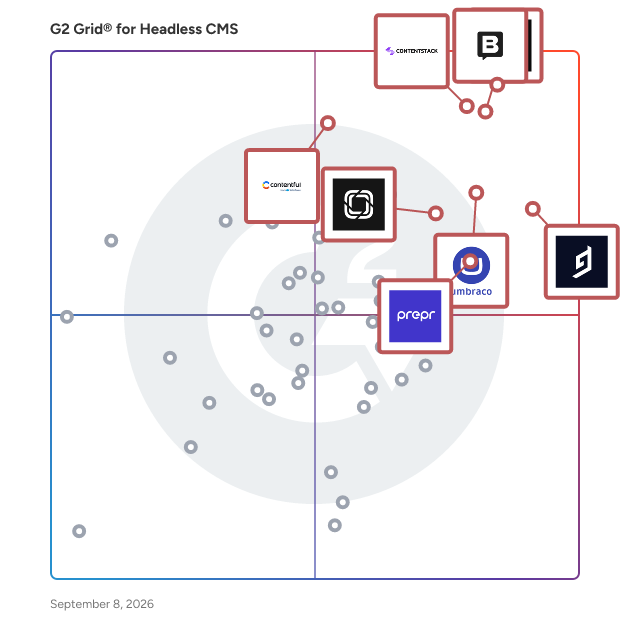
- **Best for Small Businesses:** [Sanity](https://www.g2.com/products/sanity/reviews)
- **Best for Mid-Market:** [Contentstack](https://www.g2.com/products/contentstack/reviews)
- **Best for Enterprise:** [Contentstack](https://www.g2.com/products/contentstack/reviews)
- **Highest User Satisfaction:** [Hygraph](https://www.g2.com/products/hygraph/reviews)
- **Best Free Software:** [Sanity](https://www.g2.com/products/sanity/reviews)


---

**Sponsored**

### Content.One

Content.one is an enterprise-grade composable content and digital experience platform designed to empower organizations to scale content with confidence. It brings together automation, structured workflows, governance, visual editing, AI-driven capabilities and security — so content teams, IT, marketing and enterprise functions can collaborate seamlessly. With Content.one, you can publish across channels, maintain strong governance, accelerate production, and ensure your content infrastructure supports both global scale and mission-driven agility. Key Features &amp; Benefits: Visual editing tools plus generative AI for faster authoring Structured workflows and governance to manage teams, languages, versions Enterprise-grade security, encryption, hosting, and compliance readiness Scalable architecture for growing content volumes and multi-channel needs


[Visit website](https://www.g2.com/external_clickthroughs/record?secure%5Bad_program%5D=ppc&amp;secure%5Bad_slot%5D=category_product_list&amp;secure%5Bcategory_id%5D=1205&amp;secure%5Bdisplayable_resource_id%5D=1205&amp;secure%5Bdisplayable_resource_type%5D=Category&amp;secure%5Bmedium%5D=sponsored&amp;secure%5Bplacement_reason%5D=page_category&amp;secure%5Bplacement_resource_ids%5D%5B%5D=1205&amp;secure%5Bprioritized%5D=false&amp;secure%5Bproduct_id%5D=10301&amp;secure%5Bresource_id%5D=1205&amp;secure%5Bresource_type%5D=Category&amp;secure%5Bsource_type%5D=category_page&amp;secure%5Bsource_url%5D=https%3A%2F%2Fwww.g2.com%2Fcategories%2Fheadless-cms%3Fpage%3D5&amp;secure%5Btoken%5D=f52197a9a9f4b784858b94dce2cb022207f70beb1e7e4aa7fa6938c8b214506f&amp;secure%5Burl%5D=https%3A%2F%2Fwww.content.one%2F&amp;secure%5Burl_type%5D=company_website)

---

## Top-Rated Products (Ranked by G2 Score)
### 1. [Contentstack](https://www.g2.com/products/contentstack/reviews)
  Contentstack is redefining how modern digital experiences are built and managed. As the pioneer of the Agentic Experience Platform (AXP), Contentstack brings together structured content and brand governance (Content Cloud), real-time customer data, omnichannel personalization (Data Cloud) and autonomous AI orchestration (Agent OS) into one unified system. While many organizations adopted headless CMS or standalone AI tools expecting transformation, they often found themselves managing disconnected systems and manual workflows. Contentstack helps enterprises move beyond that complexity by connecting content, data and AI in a way that makes digital experiences faster to launch, easier to manage and more adaptive in real time. Leading brands including Steve Madden, LG Electronics, Subaru of America, Dolce &amp; Gabbana, 1-800-Flowers, Decathlon, and Caesars Entertainment rely on Contentstack to reduce operational friction and deliver personalized, scalable digital experiences with confidence. The company is known for its customer-first culture and commitment to the communities it serves through the Contentstack Cares program. Learn more at https://www.contentstack.com.


  **Average Rating:** 4.4/5.0
  **Total Reviews:** 300

**User Satisfaction Scores:**

- **Has the product been a good partner in doing business?:** 9.3/10 (Category avg: 9.0/10)
- **Content Performance:** 7.7/10 (Category avg: 8.5/10)
- **AR/VR Capability:** 5.8/10 (Category avg: 6.8/10)
- **Form Builder:** 7.0/10 (Category avg: 7.9/10)


**Seller Details:**

- **Seller:** [Contentstack](https://www.g2.com/sellers/contentstack-0aa0d25e-6949-4e56-897b-9403491128f0)
- **Company Website:** https://www.contentstack.com
- **Year Founded:** 2018
- **HQ Location:** Austin, TX
- **Twitter:** @Contentstack (2,401 Twitter followers)
- **LinkedIn® Page:** https://www.linkedin.com/company/18395537/ (683 employees on LinkedIn®)

**Reviewer Demographics:**
  - **Who Uses This:** Software Engineer, Product Manager
  - **Top Industries:** Retail, Computer Software
  - **Company Size:** 43% Mid-Market, 37% Enterprise


#### Pros & Cons

**Pros:**

- Ease of Use (59 reviews)
- Content Management (48 reviews)
- Intuitive (39 reviews)
- Flexibility (31 reviews)
- Features (28 reviews)

**Cons:**

- Content Management (29 reviews)
- Limited Features (17 reviews)
- Missing Features (16 reviews)
- Limited Customization (15 reviews)
- Learning Curve (14 reviews)

### 2. [Storyblok](https://www.g2.com/products/storyblok/reviews)
  Storyblok is a headless CMS that enables marketers and developers to create with joy and succeed in the AI-driven content era. It empowers you to deliver structured and consistent content everywhere: websites, apps, AI search, and beyond. Legendary brands like Virgin Media O2, Oatly, and TomTom use Storyblok to make a bigger, faster market impact. It’s Joyful Headless™, and it changes everything.


  **Average Rating:** 4.5/5.0
  **Total Reviews:** 563

**User Satisfaction Scores:**

- **Has the product been a good partner in doing business?:** 8.9/10 (Category avg: 9.0/10)
- **Content Performance:** 8.2/10 (Category avg: 8.5/10)
- **AR/VR Capability:** 6.0/10 (Category avg: 6.8/10)
- **Form Builder:** 7.3/10 (Category avg: 7.9/10)


**Seller Details:**

- **Seller:** [Storyblok](https://www.g2.com/sellers/storyblok)
- **Company Website:** https://www.storyblok.com
- **Year Founded:** 2017
- **HQ Location:** Linz, Oberösterreich
- **Twitter:** @storyblok (9,251 Twitter followers)
- **LinkedIn® Page:** https://www.linkedin.com/company/17989065/ (292 employees on LinkedIn®)

**Reviewer Demographics:**
  - **Who Uses This:** Software Engineer, Frontend Developer
  - **Top Industries:** Computer Software, Information Technology and Services
  - **Company Size:** 56% Small-Business, 30% Mid-Market


#### Pros & Cons

**Pros:**

- Ease of Use (111 reviews)
- Intuitive (71 reviews)
- Content Management (69 reviews)
- Features (60 reviews)
- Easy Setup (48 reviews)

**Cons:**

- Learning Curve (37 reviews)
- Expensive (22 reviews)
- Missing Features (19 reviews)
- Lack of Features (18 reviews)
- Pricing Issues (18 reviews)

### 3. [Sanity](https://www.g2.com/products/sanity/reviews)
  The Content Operating System—a fully customizable all-code backend for content-driven websites and apps. Power all your content operations from a single platform with a feature-rich content workspace, interactive visual editing, serverless functions, AI agent, and the database optimized for content. Learn more: https://www.sanity.io/ Try it out: https://www.sanity.io/get-started Join the community: https://snty.link/community Get work-ready: https://www.sanity.io/learn Questions? hello@sanity.io


  **Average Rating:** 4.7/5.0
  **Total Reviews:** 901

**User Satisfaction Scores:**

- **Has the product been a good partner in doing business?:** 9.2/10 (Category avg: 9.0/10)
- **Content Performance:** 8.2/10 (Category avg: 8.5/10)
- **AR/VR Capability:** 5.7/10 (Category avg: 6.8/10)
- **Form Builder:** 7.3/10 (Category avg: 7.9/10)


**Seller Details:**

- **Seller:** [Sanity.io](https://www.g2.com/sellers/sanity-io)
- **Company Website:** https://www.sanity.io
- **Year Founded:** 2018
- **HQ Location:** San Francisco, California
- **Twitter:** @sanity_io (14,821 Twitter followers)
- **LinkedIn® Page:** https://www.linkedin.com/company/18400536/ (277 employees on LinkedIn®)

**Reviewer Demographics:**
  - **Who Uses This:** Software Engineer, Web Developer
  - **Top Industries:** Computer Software, Information Technology and Services
  - **Company Size:** 73% Small-Business, 18% Mid-Market


#### Pros & Cons

**Pros:**

- Customizability (93 reviews)
- Features (85 reviews)
- Flexibility (84 reviews)
- Ease of Use (81 reviews)
- Customization (76 reviews)

**Cons:**

- Learning Curve (66 reviews)
- Learning Difficulty (32 reviews)
- Poor Documentation (26 reviews)
- Lack of Tutorials (21 reviews)
- Missing Features (20 reviews)

### 4. [Jahia DXP](https://www.g2.com/products/jahia-dxp/reviews)
  Jahia is a content management system (CMS) and digital experience platform (DXP) designed to assist organizations in creating modern websites and portals. This robust solution is particularly well-suited for businesses operating in multisite and multilingual environments, enabling them to manage diverse content and user experiences efficiently. Jahia streamlines the content management process, allowing users to focus on delivering engaging digital experiences rather than getting bogged down by technical complexities. Targeted at enterprises and organizations that require a flexible and scalable solution, Jahia caters to a wide range of industries, including retail, finance, and education. Its capabilities are ideal for teams that need to manage multiple websites or portals while ensuring consistency in branding and user experience across different languages and regions. Jahia’s user-friendly interface and powerful features make it an attractive option for content creators, marketers, and IT professionals alike, facilitating collaboration and enhancing productivity. One of the standout features of Jahia is its emphasis on personalization and A/B testing, which are essential for optimizing user engagement and conversion rates. The platform allows organizations to leverage customer data effectively, enabling them to create tailored experiences that resonate with their target audiences. By integrating advanced analytics and insights, Jahia empowers users to make informed decisions about content strategies and marketing efforts, ultimately driving better results. In addition to its core functionalities, Jahia offers 10,000+ no-code integrations, making it a versatile addition to any tech stack. This extensive library of integrations allows users to connect with various third-party applications and services seamlessly, enhancing the platform&#39;s capabilities without requiring extensive coding knowledge. This flexibility ensures that organizations can adapt and evolve their digital strategies as needed, making Jahia a future-proof solution for content management and digital experiences. Overall, Jahia stands out in the CMS and DXP landscape by providing a comprehensive, user-friendly platform that simplifies content management while enhancing personalization and user engagement. Its ability to support multisite and multilingual contexts, combined with a wealth of integrations, positions Jahia as a valuable tool for organizations looking to create impactful digital experiences.


  **Average Rating:** 4.4/5.0
  **Total Reviews:** 598

**User Satisfaction Scores:**

- **Has the product been a good partner in doing business?:** 8.9/10 (Category avg: 9.0/10)
- **Content Performance:** 8.5/10 (Category avg: 8.5/10)
- **AR/VR Capability:** 7.2/10 (Category avg: 6.8/10)
- **Form Builder:** 7.6/10 (Category avg: 7.9/10)


**Seller Details:**

- **Seller:** [Jahia](https://www.g2.com/sellers/jahia)
- **Company Website:** https://www.jahia.com
- **Year Founded:** 2002
- **HQ Location:** Geneva, Switzerland
- **Twitter:** @Jahia (5,738 Twitter followers)
- **LinkedIn® Page:** https://www.linkedin.com/company/103891/ (71 employees on LinkedIn®)

**Reviewer Demographics:**
  - **Who Uses This:** Product Owner, Business Analyst
  - **Top Industries:** Insurance, Information Technology and Services
  - **Company Size:** 33% Enterprise, 32% Small-Business


#### Pros & Cons

**Pros:**

- Ease of Use (130 reviews)
- Content Management (107 reviews)
- Flexibility (95 reviews)
- Integrations (94 reviews)
- Intuitive (94 reviews)

**Cons:**

- Learning Curve (129 reviews)
- Steep Learning Curve (71 reviews)
- Difficult Learning (61 reviews)
- Complexity (59 reviews)
- Technical Expertise Required (54 reviews)

### 5. [Hygraph](https://www.g2.com/products/hygraph/reviews)
  Whatever you imagine – whether it’s a global news platform, an ecommerce experience, a learning app, a content hub, or something entirely unique – you can build it with Hygraph. Hygraph is the leading headless CMS for enterprises building content-rich websites, apps, and digital products. It gives teams the tools to create, manage, and deliver structured content anywhere – across web, mobile, or any other platform. With a powerful GraphQL API, flexible content modeling, and fine-grained permissions, both developers and content teams can move faster and work better together. Hygraph is built to handle complex content needs while staying easy to use, so your team can focus on delivering great digital experiences.


  **Average Rating:** 4.4/5.0
  **Total Reviews:** 713

**User Satisfaction Scores:**

- **Has the product been a good partner in doing business?:** 9.0/10 (Category avg: 9.0/10)
- **Content Performance:** 8.3/10 (Category avg: 8.5/10)
- **AR/VR Capability:** 6.3/10 (Category avg: 6.8/10)
- **Form Builder:** 7.5/10 (Category avg: 7.9/10)


**Seller Details:**

- **Seller:** [Hygraph](https://www.g2.com/sellers/hygraph)
- **Company Website:** https://hygraph.com/
- **Year Founded:** 2017
- **HQ Location:** Berlin
- **Twitter:** @hygraph (5,114 Twitter followers)
- **LinkedIn® Page:** https://www.linkedin.com/company/18152461/ (65 employees on LinkedIn®)

**Reviewer Demographics:**
  - **Who Uses This:** Software Engineer, Founder
  - **Top Industries:** Computer Software, Information Technology and Services
  - **Company Size:** 65% Small-Business, 28% Mid-Market


#### Pros & Cons

**Pros:**

- Ease of Use (133 reviews)
- Content Management (91 reviews)
- API Integration (82 reviews)
- Integrations (73 reviews)
- Flexibility (72 reviews)

**Cons:**

- Learning Curve (86 reviews)
- Learning Difficulty (42 reviews)
- Expensive (37 reviews)
- Difficult Usability (36 reviews)
- Pricing Issues (32 reviews)

### 6. [Contentful](https://www.g2.com/products/contentful/reviews)
  Contentful is a digital experience platform (DXP) designed for marketers, developers, and digital teams who need to build, personalize, and deliver impactful experiences across every channel—quickly and at scale. By combining its headless CMS with native, contextual AI, Contentful enables rapid creation, seamless management, and consistent omnichannel delivery of on-brand, data-driven content. Contentful empowers teams to adapt, reuse, personalize, and publish modular content and design components without reliance on developers, enabling rapid iteration and real-time targeting, experimentation, and optimization at the component level. Complemented by a robust ecosystem, and built on an infinitely-extensible, API-first platform, Contentful gives teams the freedom to easily build or deploy new experiences and integrations quickly to meet the ever-evolving needs of their brand. Trusted by global market leaders, Contentful is engineered for enterprise reliability, extensibility, and future-proof growth—helping organizations maximize ROI and outperform in today’s competitive digital landscape.


  **Average Rating:** 4.2/5.0
  **Total Reviews:** 305

**User Satisfaction Scores:**

- **Has the product been a good partner in doing business?:** 8.6/10 (Category avg: 9.0/10)
- **Content Performance:** 7.8/10 (Category avg: 8.5/10)
- **AR/VR Capability:** 7.5/10 (Category avg: 6.8/10)
- **Form Builder:** 7.7/10 (Category avg: 7.9/10)


**Seller Details:**

- **Seller:** [Contentful](https://www.g2.com/sellers/contentful)
- **Company Website:** https://www.contentful.com
- **Year Founded:** 2013
- **HQ Location:** Berlin
- **Twitter:** @contentful (31,840 Twitter followers)
- **LinkedIn® Page:** https://www.linkedin.com/company/2562699/ (1,031 employees on LinkedIn®)

**Reviewer Demographics:**
  - **Who Uses This:** Software Engineer, CTO
  - **Top Industries:** Information Technology and Services, Computer Software
  - **Company Size:** 39% Mid-Market, 33% Small-Business


#### Pros & Cons

**Pros:**

- Ease of Use (14 reviews)
- Content Management (11 reviews)
- Features (9 reviews)
- Ease of Creation (8 reviews)
- Easy Creation (8 reviews)

**Cons:**

- Complexity (7 reviews)
- Expensive (6 reviews)
- Learning Curve (5 reviews)
- Limited Features (5 reviews)
- Steep Learning Curve (5 reviews)

### 7. [Umbraco](https://www.g2.com/products/umbraco/reviews)
  Umbraco is a leading open-source .NET Core CMS with over 700,000 active installs worldwide and a vibrant community of over 220,000 members. Since its inception on February 16, 2005, Umbraco has remained an open-source project backed by a dedicated commercial company. At Umbraco, we pride ourselves on staying at the forefront of technology. Our alignment with Microsoft’s .NET release schedule ensures that Umbraco is always up-to-date with the latest .NET version. Umbraco CMS offers unparalleled flexibility, giving you full control over your website and its features. Beyond the core CMS, we provide two unique products to cater to your specific needs: Umbraco Cloud: The ideal environment for your Umbraco projects, featuring Azure Cloud hosting, automated upgrades, and streamlined workflows to maximize your productivity and project potential. Umbraco Heartcore: Our headless CMS option, equipped with fully managed APIs, GraphQL support, CDN capabilities, and more, providing a robust solution for omnichannel content delivery. Why choose Umbraco? Developers appreciate Umbraco for its flexibility and scalability. It integrates seamlessly with your code, allowing you to create a website that looks, feels, and operates exactly as you envision. With open-source code and APIs, Umbraco is easily extendable and adaptable to meet diverse requirements. For content editors and marketers, Umbraco delivers an exceptional editing experience. Our CMS includes intuitive features and workflows designed to enhance content creation and management. If you have specific needs, Umbraco’s backend can be customized by developers to fit perfectly. Our mission is to provide a platform that empowers you to manage your projects your way. By keeping our system open and adaptable, we ensure that Umbraco remains relevant and efficient for a wide range of project requirements.


  **Average Rating:** 4.5/5.0
  **Total Reviews:** 933

**User Satisfaction Scores:**

- **Has the product been a good partner in doing business?:** 8.8/10 (Category avg: 9.0/10)
- **Content Performance:** 8.0/10 (Category avg: 8.5/10)
- **AR/VR Capability:** 6.4/10 (Category avg: 6.8/10)
- **Form Builder:** 8.1/10 (Category avg: 7.9/10)


**Seller Details:**

- **Seller:** [Umbraco](https://www.g2.com/sellers/umbraco)
- **Company Website:** https://umbraco.com
- **Year Founded:** 2005
- **HQ Location:** Odense
- **Twitter:** @umbraco (3,524 Twitter followers)
- **LinkedIn® Page:** https://www.linkedin.com/company/804354/ (182 employees on LinkedIn®)

**Reviewer Demographics:**
  - **Who Uses This:** Software Engineer, Developer
  - **Top Industries:** Computer Software, Information Technology and Services
  - **Company Size:** 51% Small-Business, 35% Mid-Market


#### Pros & Cons

**Pros:**

- Ease of Use (109 reviews)
- Content Management (67 reviews)
- Intuitive (55 reviews)
- Features (51 reviews)
- Customizability (44 reviews)

**Cons:**

- Learning Curve (26 reviews)
- Limited Features (23 reviews)
- Poor Usability Design (22 reviews)
- Difficult Usability (19 reviews)
- Editor Limitations (19 reviews)

### 8. [Prismic](https://www.g2.com/products/prismic/reviews)
  Prismic is the headless page builder that lets developers use their favourite stack to build modern websites and empowers marketers to launch on-brand website pages independently.


  **Average Rating:** 4.3/5.0
  **Total Reviews:** 361

**User Satisfaction Scores:**

- **Has the product been a good partner in doing business?:** 8.6/10 (Category avg: 9.0/10)
- **Content Performance:** 7.9/10 (Category avg: 8.5/10)
- **AR/VR Capability:** 5.2/10 (Category avg: 6.8/10)
- **Form Builder:** 6.9/10 (Category avg: 7.9/10)


**Seller Details:**

- **Seller:** [Prismic](https://www.g2.com/sellers/prismic)
- **Company Website:** https://prismic.io
- **Year Founded:** 2013
- **HQ Location:** Paris, FR
- **Twitter:** @prismicio (14,001 Twitter followers)
- **LinkedIn® Page:** https://www.linkedin.com/company/3338789/ (99 employees on LinkedIn®)

**Reviewer Demographics:**
  - **Who Uses This:** Software Engineer, Web Developer
  - **Top Industries:** Computer Software, Information Technology and Services
  - **Company Size:** 63% Small-Business, 29% Mid-Market


#### Pros & Cons

**Pros:**

- Ease of Use (60 reviews)
- Intuitive (24 reviews)
- Easy Setup (19 reviews)
- Ease of Learning (16 reviews)
- Content Management (15 reviews)

**Cons:**

- Learning Curve (12 reviews)
- Limited Features (11 reviews)
- Missing Features (9 reviews)
- Limitations (7 reviews)
- Software Bugs (6 reviews)

### 9. [Bloomreach](https://www.g2.com/products/bloomreach-bloomreach/reviews)
  Bloomreach is the agentic platform for personalization. Powering autonomous search, conversational shopping, and autonomous marketing, Bloomreach personalizes the entire customer experience. From retail to financial services, hospitality to gaming, businesses create experiences that drive higher growth and lasting loyalty. Bloomreach drives personalization for 1,400+ brands around the world, including American Eagle, Sonepar, and Pandora. The target audience for Bloomreach encompasses commerce businesses of all sizes that are looking to optimize customer interactions and drive sales growth. Its suite of products is particularly beneficial for marketers, content creators, and ecommerce managers who aim to improve customer engagement and conversion rates. Bloomreach is well-suited for brands operating across multiple channels, as it provides a cohesive strategy to connect with customers effectively. Use cases include personalized marketing campaigns, enhanced product discovery, streamlined content management, and AI-driven customer service, making it a versatile tool for various business needs. Key features of Bloomreach include its Engagement platform, which offers robust marketing automation capabilities that enable businesses to deliver personalized messages and offers based on customer behavior. The Discovery solution enhances the search experience on ecommerce sites, ensuring that customers can easily find products that match their interests. Additionally, the Content product functions as a headless content management system (CMS), allowing for flexible content delivery across various platforms. The Clarity tool, an AI-powered conversational shopping assistant, further enriches the customer experience by facilitating real-time interactions and support. The integration of Loomi, Bloomreach&#39;s AI for ecommerce, significantly amplifies the platform&#39;s capabilities by enabling rapid data processing and analysis. This results in new pathways for customers to engage with products, ultimately leading to increased profitability and accelerated business growth. Bloomreach is designed to simplify complex tasks, offering advanced customer journeys, social ad retargeting, omnichannel support, and AI-powered optimization. This comprehensive feature set provides a holistic view of the customer, optimizing experiences across all channels. The platform is also cost-effective and faster to deploy compared to competitors, reducing reliance on third-party solutions and lowering the total cost of ownership. With high ratings in customer reviews, Bloomreach is recognized for the quality of its user guides, support, and overall reliability, making it a valuable asset for businesses seeking to enhance their ecommerce strategies.


  **Average Rating:** 4.6/5.0
  **Total Reviews:** 749

**User Satisfaction Scores:**

- **Has the product been a good partner in doing business?:** 9.1/10 (Category avg: 9.0/10)
- **Content Performance:** 8.2/10 (Category avg: 8.5/10)
- **AR/VR Capability:** 7.1/10 (Category avg: 6.8/10)
- **Form Builder:** 7.9/10 (Category avg: 7.9/10)


**Seller Details:**

- **Seller:** [Bloomreach](https://www.g2.com/sellers/bloomreach)
- **Company Website:** https://www.bloomreach.com
- **Year Founded:** 2009
- **HQ Location:** Mountain View, CA
- **Twitter:** @bloomreach_tm (10,410 Twitter followers)
- **LinkedIn® Page:** https://www.linkedin.com/company/bloomreach/ (1,124 employees on LinkedIn®)

**Reviewer Demographics:**
  - **Who Uses This:** CRM Manager, Marketing Manager
  - **Top Industries:** Retail, Marketing and Advertising
  - **Company Size:** 49% Mid-Market, 28% Small-Business


#### Pros & Cons

**Pros:**

- Ease of Use (116 reviews)
- Features (106 reviews)
- Helpful (94 reviews)
- Customer Support (90 reviews)
- Customer Engagement (79 reviews)

**Cons:**

- Learning Curve (91 reviews)
- Learning Difficulty (61 reviews)
- Missing Features (59 reviews)
- Limited Features (54 reviews)
- Difficult Learning (51 reviews)

### 10. [Kontent.ai](https://www.g2.com/products/kontent-ai/reviews)
  Kontent.ai is the world’s first Agentic CMS and the only platform that helps organizations intelligently operate content at scale. By embedding AI agents into content workflows, Kontent.ai empowers organizations to automate operations, enforce governance, and accelerate time to market, without adding headcount. Kontent.ai features two core AI capabilities. The AI Agent is activated through natural language prompts and can execute complex tasks such as launching large-scale campaigns, restructuring content in bulk, or supporting content migrations, reducing the need for developer involvement.  Expert Agents operate as always-on, fully customizable digital teammates. Once created by using a natural language prompt, they trigger automatically, eliminating manual steps and ensuring consistency across processes. They can support business specific use cases, from enforcing brand and compliance standards to content audits and localization. You can integrate them with your existing tech stack to extend automation beyond the CMS and coordinate actions across systems. Multiple agents can also be combined to work together, eliminating workflow steps in complex tasks and reducing operational complexity.  Kontent.ai Agentic CMS helps you: - Expand to new markets faster - Improve team productivity - Reduce compliance risk - Improve content performance With a demonstrated ROI of 320%, Kontent.ai customers, including WebMD Ignite, Elanco, Zurich Insurance, PPG, and Oxford University, see measurable improvements in content velocity, operational efficiency, and risk reduction. Kontent.ai is a Microsoft partner recognized by Gartner and Forrester. Learn more at kontent.ai. 


  **Average Rating:** 4.3/5.0
  **Total Reviews:** 171

**User Satisfaction Scores:**

- **Has the product been a good partner in doing business?:** 9.0/10 (Category avg: 9.0/10)
- **Content Performance:** 8.6/10 (Category avg: 8.5/10)
- **AR/VR Capability:** 6.6/10 (Category avg: 6.8/10)
- **Form Builder:** 7.3/10 (Category avg: 7.9/10)


**Seller Details:**

- **Seller:** [Kontent.ai](https://www.g2.com/sellers/kontent-ai-002cd013-3ff3-42c4-af22-40e7fe42fb3c)
- **Year Founded:** 2015
- **HQ Location:** Brno
- **Twitter:** @Kontent_ai (3,904 Twitter followers)
- **LinkedIn® Page:** https://www.linkedin.com/company/kontentai/ (131 employees on LinkedIn®)

**Reviewer Demographics:**
  - **Who Uses This:** Developer
  - **Top Industries:** Computer Software, Information Technology and Services
  - **Company Size:** 42% Mid-Market, 38% Small-Business


#### Pros & Cons

**Pros:**

- Ease of Use (10 reviews)
- Content Management (9 reviews)
- Customer Support (8 reviews)
- Easy Integrations (7 reviews)
- Intuitive (7 reviews)

**Cons:**

- Learning Curve (4 reviews)
- Limited Features (4 reviews)
- Missing Features (4 reviews)
- CMS Limitations (3 reviews)
- Steep Learning Curve (3 reviews)

### 11. [Agility CMS](https://www.g2.com/products/agility-cms/reviews)
  Agility CMS is a headless content management system designed to empower teams in managing and delivering content seamlessly across various digital platforms, including websites, mobile applications, and other digital channels. With its API-first architecture, Agility CMS provides a flexible solution that caters to the diverse needs of both marketing and development teams, facilitating efficient content management without the constraints of traditional CMS platforms. Targeted primarily at marketing teams and developers, Agility CMS enables users to create and update content effortlessly. Marketing professionals can utilize a visual interface to build pages and preview changes in real time, allowing for a hands-on approach without the need for coding expertise. This capability ensures that marketing teams can maintain control over their content while responding quickly to changing demands. On the other hand, development teams benefit from the freedom to work with any framework of their choice, accessing content through RESTful or GraphQL APIs. This flexibility allows for the creation of tailored solutions that meet specific project requirements without being hindered by platform limitations. Agility CMS is equipped with several key features that enhance its functionality and usability. The integrated Content Delivery Network (CDN) ensures that content is published quickly and consistently across all channels, while enterprise-grade security measures safeguard sensitive information. The composable architecture allows organizations to adapt and scale their content management strategies as needed, making it suitable for businesses of all sizes. These features collectively contribute to a streamlined content delivery process, ensuring that users can focus on creating impactful content rather than getting bogged down by technical challenges. What sets Agility CMS apart from other content management systems is its commitment to security, extensive industry experience, and dedicated customer support. With over 20 years of expertise in the CMS space, the Agility team has a deep understanding of the challenges organizations face and designs solutions that address these needs effectively. Additionally, the human support offered by Agility CMS is a significant differentiator; customers can expect prompt assistance from knowledgeable representatives who are genuinely invested in their success. This combination of robust security, industry experience, and personalized support makes Agility CMS a reliable choice for enterprises like Collabria Financial and Mitsubishi, who require secure and scalable content delivery across multiple channels.


  **Average Rating:** 4.4/5.0
  **Total Reviews:** 194

**User Satisfaction Scores:**

- **Has the product been a good partner in doing business?:** 8.9/10 (Category avg: 9.0/10)
- **Content Performance:** 8.6/10 (Category avg: 8.5/10)
- **AR/VR Capability:** 8.1/10 (Category avg: 6.8/10)
- **Form Builder:** 7.9/10 (Category avg: 7.9/10)


**Seller Details:**

- **Seller:** [Agility Inc](https://www.g2.com/sellers/agility-inc)
- **Company Website:** https://www.agilitycms.com
- **Year Founded:** 2002
- **HQ Location:** Toronto
- **Twitter:** @AgilityCMS (2,632 Twitter followers)
- **LinkedIn® Page:** https://www.linkedin.com/company/1865246 (26 employees on LinkedIn®)

**Reviewer Demographics:**
  - **Who Uses This:** Web Developer
  - **Top Industries:** Information Technology and Services, Computer Software
  - **Company Size:** 49% Small-Business, 46% Mid-Market


#### Pros & Cons

**Pros:**

- Ease of Use (22 reviews)
- Content Management (16 reviews)
- Flexibility (15 reviews)
- Features (14 reviews)
- Integrations (12 reviews)

**Cons:**

- Learning Curve (15 reviews)
- Complex Setup (7 reviews)
- Technical Expertise Required (7 reviews)
- Limited Flexibility (6 reviews)
- Customization Difficulty (5 reviews)

### 12. [Butter CMS](https://www.g2.com/products/butter-cms/reviews)
  ButterCMS is a headless content management system (CMS) designed specifically for growth-oriented businesses. It enables users to create, manage, and scale digital experiences quickly and efficiently, eliminating the challenges associated with traditional, hard-coded, or fragmented systems. By adopting an API-first approach, ButterCMS provides a flexible and robust solution that caters to the diverse needs of modern developers and marketers alike. Targeted at businesses looking to enhance their digital presence, ButterCMS is particularly beneficial for developers who require a streamlined and efficient way to integrate content management into their applications. The platform&#39;s well-documented APIs, software development kits (SDKs), and starter projects make it easy for developers to implement and customize content solutions across various technology stacks. This flexibility allows teams to focus on building high-quality digital experiences without being bogged down by the complexities of traditional CMS platforms. ButterCMS is versatile in its use cases, supporting everything from high-converting websites to global e-commerce platforms and mobile applications. Marketers can leverage the platform to publish new content across multiple channels instantly, ensuring that their messaging remains consistent and timely. This capability is particularly valuable for businesses that need to adapt quickly to market changes or launch new campaigns without delays. Key features of ButterCMS include its lightning-fast performance, seamless integrations with popular frameworks and tools, and a user-friendly interface that simplifies content management. The platform&#39;s scalability ensures that as businesses grow, their content management capabilities can expand without the typical headaches associated with legacy systems. By providing a reliable and efficient solution for content delivery, ButterCMS empowers organizations to focus on their core objectives while maintaining a strong digital presence. Overall, ButterCMS stands out in the headless CMS category by offering a comprehensive solution that meets the demands of both developers and marketers. Its combination of speed, flexibility, and ease of use positions it as a valuable asset for businesses aiming to enhance their digital strategies and drive growth.


  **Average Rating:** 4.7/5.0
  **Total Reviews:** 202

**User Satisfaction Scores:**

- **Has the product been a good partner in doing business?:** 9.6/10 (Category avg: 9.0/10)
- **Content Performance:** 8.4/10 (Category avg: 8.5/10)
- **AR/VR Capability:** 6.5/10 (Category avg: 6.8/10)
- **Form Builder:** 7.1/10 (Category avg: 7.9/10)


**Seller Details:**

- **Seller:** [Butter CMS](https://www.g2.com/sellers/butter-cms)
- **Company Website:** https://buttercms.com
- **Year Founded:** 2014
- **HQ Location:** San Francisco, CA
- **Twitter:** @ButterCMS (822 Twitter followers)
- **LinkedIn® Page:** https://www.linkedin.com/company/buttercms/ (19 employees on LinkedIn®)

**Reviewer Demographics:**
  - **Who Uses This:** Software Engineer, CEO
  - **Top Industries:** Computer Software, Information Technology and Services
  - **Company Size:** 65% Small-Business, 28% Mid-Market


#### Pros & Cons

**Pros:**

- Content Management (16 reviews)
- Ease of Use (15 reviews)
- Customer Support (10 reviews)
- Content Creation (7 reviews)
- Integrations (7 reviews)

**Cons:**

- Limited Features (8 reviews)
- Missing Features (6 reviews)
- Expensive (5 reviews)
- App Integration Issues (4 reviews)
- API Issues (3 reviews)

### 13. [dotCMS](https://www.g2.com/products/dotcms/reviews)
  dotCMS is a visual headless content management system (CMS) designed to assist compliance-led organizations in the creation, management, and publication of digital content across various sites, brands, and channels from a unified platform. This innovative solution combines the flexibility of a headless CMS with a user-friendly visual editing interface, making it suitable for both developers and content teams. The platform is particularly relevant for organizations that prioritize governance and compliance, such as those in financial services, healthcare, government, telecom, and manufacturing. It is ideal for use cases that involve managing multi-site brand and regional websites, intranets, customer portals, product and marketing sites, and localized content. By providing a centralized system, dotCMS allows users to maintain control over their content while ensuring that it meets regulatory requirements. Key features of dotCMS include its API-first design, which supports GraphQL, REST, and Page API, enabling developers to integrate with various front-end technologies like React, Next.js, and Angular. This flexibility allows for seamless integration with other systems, such as commerce, digital asset management (DAM), and product information management (PIM). Content editors benefit from a visual interface that includes drag-and-drop functionality and live preview capabilities, streamlining the content creation process. Governance and compliance are at the forefront of dotCMS&#39;s offerings, with built-in workflows, approval processes, audit trails, granular permissions, and version history. This ensures that organizations can maintain oversight of their content operations, with configurable roles and multi-step approval processes that enhance accountability. Furthermore, dotCMS is aligned with enterprise security and compliance standards, such as SOC 2 Type II and ISO 27001, providing peace of mind for organizations handling sensitive information. Organizations like BNP Paribas, Telus, and various regional health systems utilize dotCMS to consolidate their content platforms, standardize governance practices, and reduce operational overhead. The platform is tailored for teams that require both content flexibility and stringent control over publishing processes, making it a robust solution for managing digital content in a compliant manner.


  **Average Rating:** 4.1/5.0
  **Total Reviews:** 106

**User Satisfaction Scores:**

- **Has the product been a good partner in doing business?:** 8.6/10 (Category avg: 9.0/10)
- **Content Performance:** 8.3/10 (Category avg: 8.5/10)
- **AR/VR Capability:** 7.1/10 (Category avg: 6.8/10)
- **Form Builder:** 7.6/10 (Category avg: 7.9/10)


**Seller Details:**

- **Seller:** [dotCMS](https://www.g2.com/sellers/dotcms)
- **Company Website:** https://dotcms.com
- **Year Founded:** 2003
- **HQ Location:** Miami, Florida
- **Twitter:** @dotcms (1,340 Twitter followers)
- **LinkedIn® Page:** https://www.linkedin.com/company/2307658/ (74 employees on LinkedIn®)

**Reviewer Demographics:**
  - **Top Industries:** Higher Education, Information Technology and Services
  - **Company Size:** 46% Mid-Market, 46% Enterprise


#### Pros & Cons

**Pros:**

- Content Management (5 reviews)
- Ease of Use (4 reviews)
- Customer Support (3 reviews)
- Integrations (3 reviews)
- API Flexibility (2 reviews)

**Cons:**

- Learning Curve (3 reviews)
- Developer Challenges (2 reviews)
- Expensive (2 reviews)
- Steep Learning Curve (2 reviews)
- Bugs (1 reviews)

### 14. [Contensis](https://www.g2.com/products/contensis/reviews)
  Contensis is a headless Content Management System (CMS) with an integrated deployment platform. It’s built by UK-based company, Zengenti. It provides a single place to create, maintain and deliver your content. Its content modelling, authoring, and governance features help you and your teams to create and keep on top of well-structured content. Open APIs make it easy to integrate with leading platforms and products to deliver immersive digital experiences for your customers. Contensis powers websites for world-leading organisations across various industries such as higher education, local government, and the private sector.


  **Average Rating:** 4.4/5.0
  **Total Reviews:** 61

**User Satisfaction Scores:**

- **Has the product been a good partner in doing business?:** 9.3/10 (Category avg: 9.0/10)
- **Content Performance:** 6.9/10 (Category avg: 8.5/10)
- **AR/VR Capability:** 5.0/10 (Category avg: 6.8/10)
- **Form Builder:** 4.2/10 (Category avg: 7.9/10)


**Seller Details:**

- **Seller:** [Zengenti](https://www.g2.com/sellers/zengenti)
- **Year Founded:** 2001
- **HQ Location:** Ludlow, Shropshire
- **Twitter:** @Zengenti (756 Twitter followers)
- **LinkedIn® Page:** https://www.linkedin.com/company/3210898 (44 employees on LinkedIn®)

**Reviewer Demographics:**
  - **Top Industries:** Higher Education, Government Administration
  - **Company Size:** 69% Enterprise, 26% Mid-Market


### 15. [Mura CMS](https://www.g2.com/products/mura-cms/reviews)
  Content-focused software that drives business performance. Mura CMS is a cloud-based, content management platform to build and deploy web and mobile experiences faster and easier. Trusted worldwide by over 5000 companies such as Intuit, CSX, US Senate, NATO, Scientific American, &amp; nvoicepay. Mura CMS Is Built to Meet Your Needs Powerful: Powerful features out-of-the-box allow you to build quickly without custom development. Flexible: Headless, decoupled, or integrated configurations to meet your content publishing needs. Scalable: Multi-site management, extendable architecture, and robust APIs allow Mura CMS to grow with your content needs. Secure: Mura’s cloud services provide your business with the highest levels of security and compliance.


  **Average Rating:** 4.5/5.0
  **Total Reviews:** 80

**User Satisfaction Scores:**

- **Has the product been a good partner in doing business?:** 9.3/10 (Category avg: 9.0/10)
- **Content Performance:** 10.0/10 (Category avg: 8.5/10)
- **Form Builder:** 7.5/10 (Category avg: 7.9/10)


**Seller Details:**

- **Seller:** [Mura Software](https://www.g2.com/sellers/mura-software)
- **Year Founded:** 2001
- **HQ Location:** Austin, US
- **Twitter:** @MuraExpPlatform (644 Twitter followers)
- **LinkedIn® Page:** https://www.linkedin.com/company/murasoftware/ (1 employees on LinkedIn®)

**Reviewer Demographics:**
  - **Top Industries:** Information Technology and Services, Computer Software
  - **Company Size:** 65% Small-Business, 28% Mid-Market


## Parent Category

[Content Management Systems](https://www.g2.com/categories/content-management)


## Related Categories

- [Web Content Management Software](https://www.g2.com/categories/web-content-management)
- [Digital Experience Platforms (DXP)](https://www.g2.com/categories/digital-experience-platforms-dxp)
- [WebOps Platforms](https://www.g2.com/categories/webops-platforms)


---

## Buyer Guide

### What You Should Know About Headless CMS Software

### What is Headless CMS Software?

A headless CMS, also known as API-first CMS, is a back-end exclusive content management system where the content repository “body&quot; is decoupled from the front-end presentation layer. The architecture of a headless CMS differs from traditional CMS architecture. Instead of a static front-end display, content is pulled from the repository via a RESTful API (web services that implement a REST API), which allows it to be displayed on any type of device. Since content is pulled from a RESTful API, the front-end presentation is generated on the end user’s side and developers can create digital experiences without creating bespoke front-end displays for different types of devices.&amp;nbsp;

The ability to avoid the development of unique, device-specific front-end displays is the main purpose of a headless CMS. Traditional web content management systems (WCMS), also known as monolithic CMS, struggled in this regard, and developers were often tasked with creating multiple, device-specific user interface displays for their websites and other digital experiences. While some traditional B2B CMS are advertised as being mobile friendly and ready to be viewed on mobile apps, many are unable to take into account all the types of devices a web page could be viewed from, including smartwatches, smart TVs, gaming consoles, and other internet of things (IoT) devices. Since a headless CMS is entirely device agnostic, it can deliver and format content to any of the above devices and more. With a headless CMS, developers can develop as many front-end layers as they would like in whatever coding language they prefer. Further, because the back-end is decoupled from the front-end, headless CMS allows for real-time editing and collaboration.

Decoupled content management systems are also discussed alongside headless CMS; both have similarities, but the differences are stark. Both headless and decoupled content management systems separate the back-end content repository from the front-end presentation layer of a website or application. However, a decoupled CMS will provide traditional WCMS features like content templates and what you see is what you get (WYSIWYG) editors to create front-end content experiences. This can be beneficial for marketers who may find headless CMSs too technical to use for publishing content.

**What Does Headless CMS Stand For?**

Headless CMS stands for headless content management system. A content management system is a software application that manages web content and allows multiple contributors to create, edit, and publish content. In a traditional CMS, the content is stored in a database and users can select templates and extensions to design and customize the front-end. Headless CMS is a type of content management system that only deals with content. Once the content is created, it is published through an API.

#### What Types of Headless CMS Software Exist?

Headless CMS providers offer the same core features across most solutions. There can be variation in functionality if the headless CMS is part of a larger software solution like a digital experience platform (DXP), but most standalone options are very similar. The key difference between headless CMS solutions is how they are licensed. Headless CMS, like many other content management systems, are either open source or software-as-a-service (SaaS) solutions.

**Open source**

Some headless CMS options are completely open-source software solutions, meaning developers can access the source code if need be. Open-source content management systems are easier to customize and tailor to a business’ needs. Since open-source software can be modified, developer communities tend to build around them, allowing programmers to collaborate and solve problems together. Open-source solutions are great options for developers looking for community support and collaboration for their software of choice.

**SaaS**

Many headless CMS options are available as SaaS products that can either be hosted in the cloud or on site. In either case, SaaS solutions require a license to use, so businesses must purchase the product. Since the software is licensed, developers won’t be able to modify the source code. However, one key benefit of SaaS headless CMS options is their focus on business use cases, and typically SaaS headless CMS options provide some specific, predefined modifications so businesses have some customization options. Another benefit to SaaS solutions is access to vendor-provided technical support—something open-source solutions very rarely have.

### What are the Common Features of Headless CMS Software?

The following are features that make managing content using a headless CMS efficient for an organization.

**RESTful API:** REST stands for representational state transfer, an architectural style for communications utilized in web services. An API is a set of procedures or functions that allow programmers to access features or data of an application, operating system, or database within their application. A RESTful API uses HTTP calls to GET, PUT, POST, and DELETE resources from a content repository. A RESTful API is the backbone of a headless CMS. Without it, device and channel-agnostic content delivery wouldn’t be possible since developers would need to create bespoke front-end layers for every device and channel. With a RESTful API, how content should be displayed is already built into the code and isn’t dictated by a static presentation layer.

**Editor interface:** Like other web CMS software, a headless CMS provides an editor interface or dashboard where users can draft content, upload and manage assets, and view different project layers.

**Content repository:** A core component of a headless CMS is its content repository. The content repository houses all content that will be delivered through a website or application via the RESTful API, including written content, images, video, and audio files.

**Content taxonomy and tagging:** A headless CMS often provides a comprehensive taxonomy and tagging system for content added to the content repository. This provides structure to the content repository for ease of navigation and simplifies reusing assets.

**Versioning:** Headless CMS options also provide content versioning akin to versioning features in other content management systems. This feature allows content authors to keep track of changes and revert edits to content if the need arises.

**User permissions:** User permissions features allow administrators to designate access to specific features or permission to view and edit particular projects and content. Permissions and roles are standard features in content management systems, including headless CMSs. Every user working within a headless CMS does not need access to every project or piece of content; locking specific features or access to content is a practical solution to ensure security and prevent mistakes.

**Workflows:** Many headless CMS providers provide built-in agile workflows to enhance efficiency within the application. This allows teams to delegate tasks and keep track of the different stages of a project.

Other features of headless CMS software: [AR/VR Capabilities](https://www.g2.com/categories/headless-cms/f/ar-vr-capability), [Content Performance](https://www.g2.com/categories/headless-cms/f/content-performance), [Form Building](https://www.g2.com/categories/headless-cms/f/form-builder), and [Unlimited Environments](https://www.g2.com/categories/headless-cms/f/unlimited-environments).

### What are the Benefits of Headless CMS Software?

**Multi-platform and omnichannel content delivery:** A headless CMS allows for omnichannel content delivery, meaning that it gives companies the ability to distribute content to users through various channels and build a cohesive user experience across multiple platforms. A headless CMS streamlines operations and allows for content management to occur from a single location, making content optimization and delivery efficient.&amp;nbsp;

**Flexibility for developers while developing front-end layers:** Using a traditional CMS structure can be extremely limiting for developers because the front-end layers are dependent on the back-end, meaning that there needs to be separate code for each type of device that the content will be displayed on. With a headless CMS, the front-end presentation layer is decoupled from the content repository, giving the user freedom to build a front-end framework that makes sense for the project. Headless CMS allows users to focus on content creation as opposed to content management, allowing for more freedom and scalability.&amp;nbsp;

### Who Uses Headless CMS Software?

**Developers and programmers:** While a headless CMS provides many benefits over a traditional CMS, it does require more technical coding knowledge. In a traditional CMS, marketers would be provided a WYSIWYG editor to draft content for publishing or a functionality of website builder software to design and publish a website. Since headless CMS removes the static front-end delivery of a WCMS, presentation layers must be built before content can be delivered. While developers and programmers have always had a hand in creating their business’s web experiences, marketers have less knowledge of what they can typically do in a headless CMS. As a result, the majority of a workforce’s time spent in a headless CMS belongs to development teams.

**Marketers and content creators:** While developers and programmers will likely spend the most time within a headless CMS, marketers, content creators, and content editors still leverage some features within one. In particular, written content and assets still need to be added to the CMS’s content repository. Since marketers and other content creators handle writing text-based content or designing assets, they might also be tasked with adding their new content (text, images, or videos) to a headless CMS’s content repository.

### What are the Alternatives to Headless CMS Software?

Alternatives to headless CMS can replace this type of software, either partially or completely:

**Traditional CMS:** A traditional CMS is similar to a headless CMS in that they are both forms of content repositories and are used to manage web content. The main difference between the two types of CMS is that headless CMS doesn’t have a presentation layer, meaning that using a headless CMS requires more development knowledge. Users of headless CMS can switch to a traditional CMS if they find the development process using headless CMS to be too complex and want something quicker and simpler. While a traditional CMS is better for simpler websites, such as blogs, a headless CMS is better for more complex material, such as e-commerce sites. A traditional CMS may be better suited for smaller organizations that don’t have the required resources to effectively use a headless CMS.

**Hybrid CMS:** A hybrid CMS is a CMS that is decoupled from the front-end, similar to a headless CMS. However, unlike a headless CMS, a hybrid CMS includes a presentation layer similar to a traditional CMS. Because it has features of both a headless CMS and traditional CMS, a hybrid CMS gives developers some flexibility and freedom to deliver content across multiple channels while allowing for a marketer-user friendly interface and a content publishing experience that includes WYSIWYG editing.

[Website builder software:](https://www.g2.com/categories/website-builder) Website builders are another common way to build websites. Unlike headless CMS, using website builders does not require coding and developing knowledge as they utilize ready-made templates and drag-and-drop options instead to create simple websites.

### Challenges with Headless CMS Software

Headless CMS options can come with their own set of challenges.&amp;nbsp;

**No WYSIWYG functionality:** The main drawback of a headless CMS is the lack of WYSIWYG functionality. Marketers accustomed to formatting their content within a CMS in a provided WYSIWYG editor don’t have that luxury with a headless CMS. Instead, developers code formatting protocols into their website or application, so marketing and development teams will have to work together closely to ensure they have a cohesive vision of how content should appear to customers and visitors. While this functionality can better guarantee formatting consistencies, it removes marketers’ ability to change formatting styles themselves.

As mentioned above, a decoupled CMS provides the benefits of a headless CMS while still providing the WYSIWYG editing marketers lean on to publish content. If hands-on, immediate content formatting permissions are a must for a marketing team, a decoupled CMS can be a great compromise.

**Security:** There are security concerns with headless CMS because it’s difficult to decide the level of access different users need. The code in the client’s browser along with the data transferred from APIs is an open book, meaning that anyone has access to this data and there is a risk of delivering confidential information to non-authorized users.

**Preview:** Because the presentation layer is decoupled from the content repository, there is no built-in way to preview how the presentation layer will react to coding changes in the CMS.&amp;nbsp;

**SEO:** Most of the SEO work has to be implemented manually using a headless CMS because there&#39;s usually no plugin or add-ons that can do it for the user. Further, most headless CMS and front-end frameworks at the moment are Javascript-based, so SEO for these environments can be complicated to use because crawlers aren&#39;t able to render Javascript easily.&amp;nbsp;

### How to Buy Headless CMS Software

#### Requirements Gathering (RFI/RFP) for Headless CMS Software

Purchasing a headless CMS is a significant purchase that needs to be made carefully as the chosen product is a long-term decision. The first step is evaluating the needs of the business and the functionality that the website needs to have. Because there are alternatives to headless CMS (traditional CMS and hybrid CMS) which are often simpler to set up and implement, it’s important to decide if using a headless CMS is necessary for creating an effective website. Once it is decided that an organization needs a headless CMS, here are additional areas to evaluate:

**How content needs to be managed in the CMS:** It is important to look at the type of content that will be managed on the CMS. This will ensure that the selected solution allows matching the data types to the required content structure. If data types are complex and frequently changed, a user-friendly builder should be prioritized.&amp;nbsp;

**How file assets need to be managed from the CMS:** Some websites include rich media assets, such as images and videos. In that case, the CMS needs to provide an asset management capability along with the ability to store files through the CMS in a cloud storage environment. Different headless CMS solutions will have varying limitations on these parameters, so it’s important to consider factors such as size limit per asset, included bandwidth, and total storage amount.&amp;nbsp;

**Integration extensions:** A headless CMS needs to have extensions that allow it to integrate with third-party applications such as CRM, PIM, email marketing programs, localization tools, and more. These extensions allow for the [personalization](https://www.g2.com/categories/headless-cms/f/personalization) of content.

**How many support resources are needed:** Depending on the level of development expertise that the organization has, it will need more or less support resources, such as solid documentation, a customer service team, and community support (e.g., Slack, forums, etc.)

#### Compare Headless CMS Software Products

**Create a long list**

There is an extensive amount of options when it comes to headless CMS software. Once buyers understand the requirements, they should search for solutions by browsing the internet. Most product websites will have a ‘Features’ page that will provide a high-level picture of what the software encompasses. G2.com is a good place to start.

**Create a short list**

Next, buyers should research further into the long list of solutions to create a short list. There is lots of research (articles and videos) that explain and review different products from different perspectives. Buyers should find research that caters to their industry. G2.com’s ‘Compare’ feature will help to stack software up side by side to compare specific features and learn how real users rate them.

**Conduct demos**

Demos are a great way to get a firsthand look at potential solutions and the ability to ask the right questions to determine which product is right for the organization. Buyers should prepare for each demo by having a standard list of questions and clarifications to ask each vendor.&amp;nbsp;

#### Selection of Headless CMS Software

**Choose a selection team**

Given the complex and technical nature of operating a headless CMS, it will be developers and programmers who will be most involved with the use of a headless CMS. Thus, they need to be included in the conversation when choosing a solution. Content creators and marketers should also be included in the selection process as they are most familiar with the type of content that will be managed through the CMS.

**Negotiation**

At this stage, it is important to discuss pricing and ask if any discounts are available, whether it be for purchasing a larger number of licenses or for a longer duration. Buyers should explore payment options and implementation and onboarding services at this time as well.&amp;nbsp;

**Final decision**

Now that buyers know which software solution they want to purchase, they should ask for a trial run of the product to test how it will be implemented and adopted by their teams. If it is well integrated with existing technology and the teams receive it well, the buyer can be confident that the purchase will be successful.

### Headless CMS Software Trends

**More copycat headless CMS products popping up:** With the rapid growth of the headless CMS market and new solutions coming to market faster than ever, legacy CMS solutions are struggling to compete. Oftentimes, traditional CMS players will market themselves as headless, when in reality, these platforms only offer APIs and not a true decoupled experience that allows for the flexibility that actual headless CMS solutions offer. Buyers should be cautious of this.