Best Embedded Business Intelligence Software - Page 5

How Many Embedded Business Intelligence Software Products Does G2 Track?

Total Products under this Category: 175

Category Stats (Sep 2026)

  • Average Rating: 4.44/5 (↑0.01 vs Aug 2026) The average rating of products in this category, based on all submitted ratings
  • Top Trending Product: ClicData (+1.36%) - Among all products in this category, ClicData recorded the largest rating increase compared to last month

Last updated: September 01, 2026

How Does G2 Rank Embedded Business Intelligence Software Products?

Why You Can Trust G2's Software Rankings:

  • 30 Analysts and Data Experts
  • 18,200+ Authentic Reviews
  • 175+ Products
  • Unbiased Rankings

G2's software rankings are built on verified user reviews, rigorous moderation, and a consistent research methodology maintained by a team of analysts and data experts. Each product is measured using the same transparent criteria, with no paid placement or vendor influence. While reviews reflect real user experiences, which can be subjective, they offer valuable insight into how software performs in the hands of professionals. Together, these inputs power the G2 Score, a standardized way to compare tools within every category.

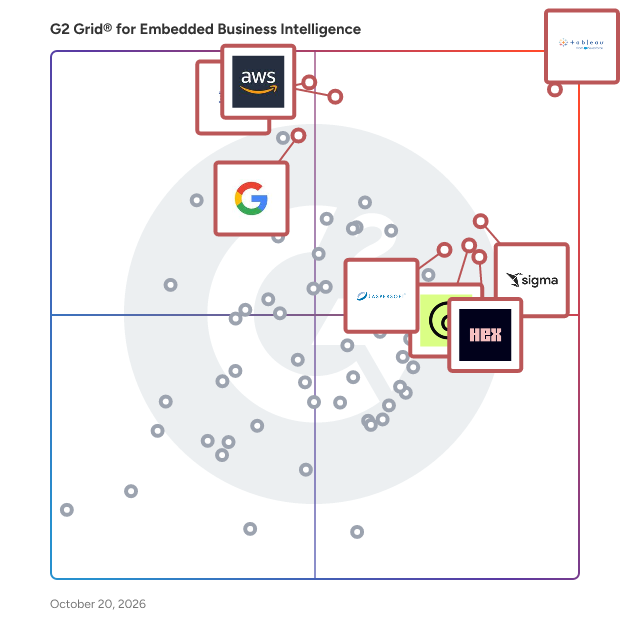
G2 Grid® for Embedded Business Intelligence Software

G2 Grid® for Embedded Business Intelligence Software plotting products by satisfaction and market presence

Highlighted products: Tableau, Amazon Quick, GoodData.AI, IBM Cognos Analytics, Hex, Sigma, Jaspersoft, and Domo.

Underlying data: [Grid® JSON](https://www.g2.com/categories/embedded-business-intelligence/grids.json?focus%5B%5D=tableau&focus%5B%5D=amazon-quick&focus%5B%5D=gooddata-ai&focus%5B%5D=ibm-cognos-analytics&focus%5B%5D=hex-tech-hex&focus%5B%5D=sigma-computing-sigma&focus%5B%5D=jaspersoft&focus%5B%5D=domo)

Astrato

𝗔𝘀𝘁𝗿𝗮𝘁𝗼 𝗔𝗻𝗮𝗹𝘆𝘁𝗶𝗰𝘀 𝗶𝘀 𝗮 𝘄𝗮𝗿𝗲𝗵𝗼𝘂𝘀𝗲-𝗻𝗮𝘁𝗶𝘃𝗲 𝗯𝘂𝘀𝗶𝗻𝗲𝘀𝘀 𝗶𝗻𝘁𝗲𝗹𝗹𝗶𝗴𝗲𝗻𝗰𝗲 𝗽𝗹𝗮𝘁𝗳𝗼𝗿𝗺 𝘁𝗵𝗮𝘁 𝗲𝗻𝗮𝗯𝗹𝗲𝘀 𝗼𝗿𝗴𝗮𝗻𝗶𝘀𝗮𝘁𝗶𝗼𝗻𝘀 𝘁𝗼 𝗯𝘂𝗶𝗹𝗱, 𝗲𝗺𝗯𝗲𝗱, 𝗮𝗻𝗱 𝘀𝗵𝗮𝗿𝗲 𝗶𝗻𝘁𝗲𝗿𝗮𝗰𝘁𝗶𝘃𝗲 𝗱𝗮𝘀𝗵𝗯𝗼𝗮𝗿𝗱𝘀 𝗮𝗻𝗱 𝗱𝗮𝘁𝗮 𝗮𝗽𝗽𝗹𝗶𝗰𝗮𝘁𝗶𝗼𝗻𝘀 𝗱𝗶𝗿𝗲𝗰𝘁𝗹𝘆 𝗼𝗻 𝘁𝗼𝗽 𝗼𝗳 𝗰𝗹𝗼𝘂𝗱 𝗱𝗮𝘁𝗮 𝘄𝗮𝗿𝗲𝗵𝗼𝘂𝘀𝗲𝘀 𝗶𝗻𝗰𝗹𝘂𝗱𝗶𝗻𝗴 𝗦𝗻𝗼𝘄𝗳𝗹𝗮𝗸𝗲, 𝗕𝗶𝗴𝗤𝘂𝗲𝗿𝘆, 𝗗𝗮𝘁𝗮𝗯𝗿𝗶𝗰𝗸𝘀, 𝗖𝗹𝗶𝗰𝗸𝗛𝗼𝘂𝘀𝗲, 𝗦𝘂𝗽𝗮𝗯𝗮𝘀𝗲, 𝗔𝗺𝗮𝘇𝗼𝗻 𝗥𝗲𝗱𝘀𝗵𝗶𝗳𝘁, 𝗣𝗼𝘀𝘁𝗴𝗿𝗲𝗦𝗤𝗟, 𝗮𝗻𝗱 𝗗𝗿𝗲𝗺𝗶𝗼. Astrato's zero-copy architecture connects to the warehouse via a live-query engine, which means every dashboard, report, and workflow runs against the source data in real time — without extracts, data movement, or cached copies. Security policies such as row-level access controls and PII masking are inherited directly from the warehouse, reducing governance overhead for IT and data teams. 𝗧𝗵𝗲 𝗽𝗹𝗮𝘁𝗳𝗼𝗿𝗺 𝘀𝘂𝗽𝗽𝗼𝗿𝘁𝘀 𝘁𝗵𝗿𝗲𝗲 𝗽𝗿𝗶𝗺𝗮𝗿𝘆 𝘂𝘀𝗲 𝗰𝗮𝘀𝗲𝘀: • 𝗚𝘂𝗶𝗱𝗲𝗱 𝘀𝗲𝗹𝗳-𝘀𝗲𝗿𝘃𝗶𝗰𝗲 𝗕𝗜. A no-code interface with 70+ out-of-the-box chart types allows business users to explore data, build dashboards, and generate reports without SQL. A shared semantic layer ensures governed, reusable metric definitions across all users and content. No-code Actions let designers chain clicks, filters, and navigation into guided flows — so end users get an app-like experience, not a blank dashboard. • 𝗖𝘂𝘀𝘁𝗼𝗺𝗲𝗿-𝗳𝗮𝗰𝗶𝗻𝗴 𝗮𝗻𝗱 𝗶𝗻𝘁𝗲𝗿𝗻𝗮𝗹 𝗲𝗺𝗯𝗲𝗱𝗱𝗲𝗱 𝗮𝗻𝗮𝗹𝘆𝘁𝗶𝗰𝘀. Fully white-labeled dashboards and workflows can be embedded into external products, portals, CRMs, ERPs, and intranet tools. Three embedding modes are supported — single object, grouped visuals, or full interactive workbooks — delivered via iframe with mobile-responsive layouts. Multi-tenant isolation is enforced at both warehouse and application level via row-level filters, group permissions, and SSO pass-through. Built-in usage telemetry tracks engagement, exploration patterns, and drop-off. • 𝗢𝗽𝗲𝗿𝗮𝘁𝗶𝗼𝗻𝗮𝗹 𝗱𝗮𝘁𝗮 𝗮𝗽𝗽𝘀 𝗮𝗻𝗱 𝘄𝗼𝗿𝗸𝗳𝗹𝗼𝘄𝘀. Writeback capabilities let users push data back into the warehouse from any dashboard, app, or embedded view — supporting planning, forecasting, approvals, and field updates. No-code forms with validation, conditional logic, and multi-step flows can be built without engineering. Action buttons can trigger stored procedures, external functions, Salesforce updates, Slack posts, and emails, so analytics drive downstream action. 𝗔𝗱𝗱𝗶𝘁𝗶𝗼𝗻𝗮𝗹 𝗰𝗮𝗽𝗮𝗯𝗶𝗹𝗶𝘁𝗶𝗲𝘀 𝗶𝗻𝗰𝗹𝘂𝗱𝗲: • 𝗦𝗰𝗵𝗲𝗱𝘂𝗹𝗲𝗱 𝗿𝗲𝗽𝗼𝗿𝘁𝗶𝗻𝗴 & 𝗱𝗶𝘀𝘁𝗿𝗶𝗯𝘂𝘁𝗶𝗼𝗻. Live, branded reports generated from the warehouse and delivered automatically in PDF, Excel, PowerPoint, or image format to email, Slack, Microsoft Teams, or SharePoint. Teams can upload their own Excel or PowerPoint templates and have them populated with live data at run-time. Per-recipient row-level security ensures governed distribution, and reports can be archived to S3, Google Drive, or SharePoint for audit and compliance. • 𝗚𝗲𝗻 𝗔𝗜 & 𝗕𝗜 𝗖𝗼𝗽𝗶𝗹𝗼𝘁. Contextual AI Insights generate summaries that regenerate as users filter and drill. BI Copilot accelerates build time by generating chart titles, business-friendly field labels, and complex measures like YoY growth or retention from plain-language input. Custom Report lets end users ask questions in natural language and get visualizations back. Every AI output is grounded in the semantic layer. Bring your own LLM — Snowflake Cortex, OpenAI, Azure OpenAI, Claude by Anthropic, or Google Gemini — or use the default provider. With Snowflake Cortex, queries execute inside the warehouse and data never leaves. Admins control AI features via independent per-capability toggles. • 𝗘𝗺𝗯𝗲𝗱𝗱𝗶𝗻𝗴 𝗮𝗻𝗱 𝗶𝗻𝘁𝗲𝗴𝗿𝗮𝘁𝗶𝗼𝗻. Dashboards can be embedded with full white-label control over colours, fonts, logos, layout, and domain. Authentication is handled via SSO pass-through, OAuth, or token-based access. SCIM and APIs support automated user provisioning at scale. • 𝗚𝗼𝘃𝗲𝗿𝗻𝗮𝗻𝗰𝗲 & 𝗹𝗶𝗳𝗲𝗰𝘆𝗰𝗹𝗲 𝗰𝗼𝗻𝘁𝗿𝗼𝗹. Role-based access control across view, edit, design, export, and admin. Workbook lifecycle governance with draft, version, publish workflows and change tracking. Row-level security inherited from the warehouse or configured per semantic layer. • 𝗘𝗻𝘁𝗲𝗿𝗽𝗿𝗶𝘀𝗲-𝗴𝗿𝗮𝗱𝗲 𝘀𝗲𝗰𝘂𝗿𝗶𝘁𝘆 & 𝗰𝗼𝗺𝗽𝗹𝗶𝗮𝗻𝗰𝗲: SOC 2 Type II, ISO 27001 certified, HIPAA compliant, GDPR-ready. Snowflake Technology Partner and Google Cloud Ready – BigQuery. Astrato is used by data teams, product teams, and analytics leaders across SaaS companies, data businesses, agencies, and enterprises. Pricing is structured to scale with embedded use cases involving large numbers of external users.

Average Rating: 4.7/5.0

Total Reviews: 24

How Do G2 Users Rate Astrato?

  • Has the product been a good partner in doing business?: 10.0/10 (Category avg: 8.9/10)
  • Steps to Answer: 8.6/10 (Category avg: 8.3/10)
  • Reports Interface: 9.5/10 (Category avg: 8.8/10)
  • Calculated Fields: 9.0/10 (Category avg: 8.5/10)

Who Is the Company Behind Astrato?

Who Uses This Product?

  • Company Size: 40% Medium, 32% Small

What Do G2 Reviewers Say About Astrato?

AI-generated summary from verified user reviews

Pros
  • Users praise the ease of use of Astrato, highlighting its intuitive design and minimal dependency on technical resources.
  • Users commend the exceptional customer support of Astrato, enhancing usability and reducing the learning curve effectively.
  • Users love the seamless integration with Snowflake, enabling quick setup and efficient analytics workflows.
  • Users value the easy, user-friendly learning experience of Astrato, enabling quick mastery and effective data exploration.
  • Users value the dashboard customization of Astrato, enabling easy and flexible solutions for non-technical professionals.
Cons
  • Users note the missing features in Astrato hinder functionality compared to more established tools, affecting overall user experience.
  • Users report encountering bugs and usability issues with Astrato, complicating their experience and affecting efficiency.
  • Users find that complex data modeling in Astrato can be challenging, requiring significant expertise for optimal results.
  • Users note that Astrato's complex usage can be challenging, especially with bugs and less intuitive features compared to established tools.
  • Users find that Astrato has a steep learning curve due to bugs and usability challenges compared to established tools.
What Are Recent G2 Reviews of Astrato?

Cluvio

Cluvio is a cloud-based business intelligence (BI) platform that enables companies to analyze data and create interactive dashboards using SQL and R. Designed for startups and data-driven teams, Cluvio allows users to connect directly to their databases, run queries, and visualize results in real-time, facilitating informed decision-making across organizations. Key Features: - SQL-Based Analytics: Utilize SQL to perform data analysis, with an advanced editor supporting syntax highlighting, code completion, and parameterized queries. - R Integration: Enhance analytical capabilities by incorporating R scripts for advanced statistical analysis. - Interactive Dashboards: Create dynamic dashboards with customizable filters and real-time data updates, accessible on various devices. - Collaboration Tools: Share dashboards securely within teams or externally via private links, with options for embedding into applications. - SQL Alerts: Set up automated alerts based on specific data conditions to monitor key metrics effectively. - Security and Compliance: Implement robust security measures, including two-factor authentication, single sign-on (SSO), and compliance with EU GDPR and optional HIPAA standards. Primary Value and Solutions: Cluvio addresses the need for accessible, efficient data analysis by providing a user-friendly platform that integrates seamlessly with existing databases. By combining the power of SQL and R, it empowers users to extract meaningful insights without extensive technical expertise. The platform's interactive dashboards and collaboration features ensure that data-driven decisions are easily shared and acted upon across teams. Additionally, Cluvio's scalable pricing plans, including a free tier, make advanced analytics attainable for organizations of all sizes, from startups to large enterprises.

Average Rating: 4.7/5.0

Total Reviews: 13

How Do G2 Users Rate Cluvio?

  • Has the product been a good partner in doing business?: 9.4/10 (Category avg: 8.9/10)
  • Steps to Answer: 9.4/10 (Category avg: 8.3/10)
  • Reports Interface: 9.3/10 (Category avg: 8.8/10)
  • Calculated Fields: 9.7/10 (Category avg: 8.5/10)

Who Is the Company Behind Cluvio?

  • Seller: Cluvio
  • Year Founded: 2015
  • HQ Location: Berlin, DE
  • Twitter: @Cluvio
    54 Twitter followers
  • LinkedIn® Page: www.linkedin.com
    2 employees on LinkedIn®

Who Uses This Product?

  • Company Size: 69% Medium, 23% Small

What Do G2 Reviewers Say About Cluvio?

AI-generated summary from verified user reviews

Pros
  • Users appreciate the easy charting capabilities of Cluvio, enabling quick visualizations and effective presentations.
  • Users value the easy data visualization capabilities of Cluvio, allowing quick insights and effective presentations.
  • Users praise Cluvio's excellent customer support and easy data integration, enhancing their scholarship evaluation process.
  • Users praise Cluvio for its easy data handling and integration, facilitating effective scholarship evaluation and support.
  • Users appreciate the ease of use of Cluvio, enabling quick data visualization and efficient feature feedback.

What Are Recent G2 Reviews of Cluvio?

What Are G2 Users Discussing About Cluvio?

Kyubit Business Intelligence

Kyubit is a collaborative, web-based Business Intelligence platform designed for simplicity, speed, and performance. Easy to implement and intuitive to use, it empowers teams to transform existing data into meaningful insights without complex setup or long development cycles. Kyubit BI connects directly to your SSAS OLAP (Tabular and Multidimensional) models, SQL databases, and Excel/CSV data sources — leveraging your existing infrastructure to deliver fast, visually compelling reports and interactive dashboards. Users can effortlessly slice, drill down, and explore data to uncover the insights that matter most. Advanced analytic capabilities are available both for your existing OLAP databases and for new analytic models created within Kyubit using SQL or Excel/CSV data. This flexibility allows organizations to enhance their current Microsoft BI environment while also expanding their analytics strategy when needed. BI content in Kyubit is secure, centrally managed, and built for collaboration. Reports and dashboards can be safely shared across teams, embedded into other applications, or distributed automatically through scheduled subscriptions. With role-based security and governance controls, organizations maintain full control over their data while enabling broader access to insights. With Kyubit BI, analytic dashboards and reports are created in minutes — not weeks — and are immediately ready for secure collaboration, interactive data exploration, and automated delivery. The result is faster decision-making, reduced reporting bottlenecks, and a more agile approach to enterprise analytics. Kyubit turns your existing data into a powerful, collaborative intelligence platform — helping your organization move from static reporting to dynamic, insight-driven performance.

Average Rating: 4.4/5.0

Total Reviews: 12

How Do G2 Users Rate Kyubit Business Intelligence?

  • Has the product been a good partner in doing business?: 9.4/10 (Category avg: 8.9/10)
  • Reports Interface: 8.1/10 (Category avg: 8.8/10)
  • Calculated Fields: 7.1/10 (Category avg: 8.5/10)

Who Is the Company Behind Kyubit Business Intelligence?

Who Uses This Product?

  • Company Size: 42% Small, 33% Medium

What Are Recent G2 Reviews of Kyubit Business Intelligence?

ConverSight

ConverSight is a Contextual Decision Intelligence Platform, built based on its patented Augmented Conversational AI and Analytics techniques. ConverSight's AI assistant, Athena, delivers business insights by connecting to customer’s data and generating insights & recommendations using machine learning techniques. With ConverSight, businesses are able to implement artificial intelligence in their response planning methods, allowing for better accuracy, stronger decision-making, and smoother reaction times, which ultimately reduces costs and drastically improves the function of the supply chain. ConverSight acts as a Supply Chain Control Tower to help businesses optimize operations, minimize disruptions, and resolve critical issues in real time. ConverSight's AI business assistant, Athena, offers businesses greater data visibility and insights to proactively improve their supply chains and make other accurate, informed decisions

Average Rating: 4.5/5.0

Total Reviews: 40

How Do G2 Users Rate ConverSight?

  • Has the product been a good partner in doing business?: 9.7/10 (Category avg: 8.9/10)
  • Steps to Answer: 8.2/10 (Category avg: 8.3/10)
  • Reports Interface: 8.5/10 (Category avg: 8.8/10)
  • Calculated Fields: 8.3/10 (Category avg: 8.5/10)

Who Is the Company Behind ConverSight?

  • Seller: ConverSight
  • Company Website:
  • Year Founded: 2017
  • HQ Location: Indianapolis, IN
  • Twitter: @ConverSight_ai
    176 Twitter followers
  • LinkedIn® Page: www.linkedin.com
    91 employees on LinkedIn®

Who Uses This Product?

  • Top Industries: Food & Beverages
  • Company Size: 81% Small, 16% Medium

What Do G2 Reviewers Say About ConverSight?

AI-generated summary from verified user reviews

Pros
  • Users find ConverSight to be extremely easy to use, simplifying report generation and data access effortlessly.
  • Users highlight the efficiency of ConverSight in providing instant insights and ensuring faster, informed decisions.
  • Users appreciate the seamless integrations of ConverSight, enabling quick access to comprehensive insights across multiple systems.
  • Users value the speed and integration of ConverSight, enabling quick, informed decisions across multiple operational systems.
  • Users value ConverSight's insightful and interactive capabilities, enabling efficient data analysis and real-time strategic planning.
Cons
  • Users find the complexity of querying and data integration in ConverSight challenging and time-consuming.
  • Users express frustration with limited customization options in ConverSight, particularly regarding chart appearance and vocabulary understanding.
  • Users find data integration to be complex, requiring specific tailoring and causing challenges with compliance and natural language queries.
  • Users face integration issues that complicate data connectivity and customization, affecting overall user experience and efficiency.
  • Users find the learning curve steep with ConverSight, requiring significant effort to master complex queries and integrations.

What Are Recent G2 Reviews of ConverSight?

What Are G2 Users Discussing About ConverSight?

Cyberquery

Cyberquery is a fast, easy-to-use, Business Intelligence solution which includes dashboards, reporting, analysis and data exploration for power users, occasional users and IT professionals.

Average Rating: 4.8/5.0

Total Reviews: 9

How Do G2 Users Rate Cyberquery?

  • Has the product been a good partner in doing business?: 9.4/10 (Category avg: 8.9/10)
  • Steps to Answer: 10.0/10 (Category avg: 8.3/10)
  • Reports Interface: 10.0/10 (Category avg: 8.8/10)
  • Calculated Fields: 10.0/10 (Category avg: 8.5/10)

Who Is the Company Behind Cyberquery?

Who Uses This Product?

  • Top Industries: Information Technology and Services
  • Company Size: 50% Medium, 40% Large

What Are Recent G2 Reviews of Cyberquery?

What Are G2 Users Discussing About Cyberquery?

Databrain

DataBrain helps SaaS businesses make the most of their data by embedding powerful analytics right into their applications. With an intuitive platform that combines AI and flexible design, DataBrain lets companies give every end-user access to valuable insights right where they work. The platform is built to be simple, adaptable, efficient, and ready to grow with your needs. Whether you're a small startup or a large enterprise, Databrain allows your customers to explore data, create smart dashboards, and make better decisions with AI-enhanced analytics. 1. Customization: DataBrain offers extensive customization options, allowing businesses to tailor the look and feel of their analytics solution to match their brand identity. With white-labeling capabilities, organizations can create pixel-perfect dashboards that align with their Figma designs, ensuring a consistent and cohesive user experience. 2. Integration: The platform provides seamless integration with various data sources, including databases, data warehouses, APIs, and cloud-based data platforms. This enables organizations to connect and analyze data from different sources within the embedded analytics platform, providing a holistic view of their data landscape. 3. Augmented Analytics: DataBrain leverages the power of AI to deliver advanced analytics capabilities: a. AI Summary: Generates natural language summaries for individual reports and entire dashboards, providing users with quick insights and actionable recommendations6. b. Predictive Analytics: Utilizes machine learning and artificial intelligence to uncover patterns, make data-driven predictions, and gain deeper insights. c. Self-Service Analytics: Empowers end-users to perform ad-hoc analysis, create custom reports, and visualize data without relying on IT or data analysts. 4. Developer Efficiency: DataBrain accelerates the development and deployment of embedded analytics solutions: a. No-Code Tools: Offers a user-friendly interface with drag-and-drop functionality, enabling rapid dashboard creation without extensive coding expertise. b. Scalability: Designed to handle large volumes of data and growing user demands, ensuring performance as organizations scale.

Average Rating: 4.9/5.0

Total Reviews: 8

How Do G2 Users Rate Databrain?

  • Has the product been a good partner in doing business?: 10.0/10 (Category avg: 8.9/10)
  • Steps to Answer: 9.2/10 (Category avg: 8.3/10)
  • Reports Interface: 9.8/10 (Category avg: 8.8/10)
  • Calculated Fields: 9.2/10 (Category avg: 8.5/10)

Who Is the Company Behind Databrain?

Who Uses This Product?

  • Company Size: 50% Small, 50% Medium

What Do G2 Reviewers Say About Databrain?

AI-generated summary from verified user reviews

Pros
  • Users commend the excellent customer support of Databrain, enhancing their overall experience and satisfaction.
  • Users highlight the powerful dashboards and reporting capabilities of DataBrain, enhancing their analytics and reporting experiences.
  • Users find Databrain easy to use, enjoying its intuitive navigation and seamless dashboard creation features.
  • Users love the easy integration with various platforms, enhancing dashboard creation and overall experience effortlessly.
  • Users appreciate the intuitive reporting capabilities of DataBrain, which enhance productivity and user experience significantly.
Cons
  • Users find that some advanced features of Databrain involve a steep learning curve, making initial use challenging.
  • Users find the learning difficulty in configuring Databrain's features can hinder a smooth setup process.
  • Users find the learning curve for advanced features steep, wishing for more pre-built report templates to ease usage.
  • Users face a steep learning curve for advanced features, making it challenging to utilize Databrain effectively.

What Are Recent G2 Reviews of Databrain?

EspressReport

EspressReport is a robust Java-based business intelligence reporting engine designed to help organizations extract, analyze, and present data from various sources. It offers a comprehensive suite of tools for designing, scheduling, and delivering interactive reports and dashboards, enabling users to transform raw data into actionable insights. With its user-friendly interface and extensive customization options, EspressReport caters to businesses of all sizes seeking to enhance their data reporting capabilities. Key Features and Functionality: - Data Integration: Connects seamlessly with multiple data sources, including databases, Excel files, XML files, text files, and Java arrays, ensuring comprehensive data access. - Report Design: Provides a visual design environment that allows users to create highly customizable reports, controlling all aspects of report formatting to meet organizational standards. - Charting Capabilities: Supports the creation of various 2D and 3D charts, including trend lines, histograms, and Pareto charts, facilitating effective data visualization. - Scheduling and Automation: Enables scheduling of reports and command-line operations, automating the reporting process to improve efficiency. - Interactive Dashboards: Offers tools to build interactive dashboards with features like drill-down capabilities, data filtering, and real-time data refresh, enhancing user engagement and insight discovery. - Export Options: Allows reports to be exported in multiple formats, including DHTML, PDF, Excel, RTF, XML, and CSV, providing flexibility in data sharing and presentation. Primary Value and Problem Solved: EspressReport addresses the challenge of transforming complex and disparate data into clear, actionable reports and visualizations. By offering a powerful yet user-friendly platform, it empowers organizations to make informed decisions, monitor key performance indicators, and streamline their reporting processes. Its ability to integrate with various data sources and provide customizable reporting solutions makes it an invaluable tool for businesses aiming to enhance their data-driven strategies.

Average Rating: 4.4/5.0

Total Reviews: 6

How Do G2 Users Rate EspressReport?

  • Has the product been a good partner in doing business?: 7.8/10 (Category avg: 8.9/10)
  • Steps to Answer: 8.0/10 (Category avg: 8.3/10)
  • Reports Interface: 8.7/10 (Category avg: 8.8/10)
  • Calculated Fields: 7.5/10 (Category avg: 8.5/10)

Who Is the Company Behind EspressReport?

  • Seller: Quadbase Systems
  • Year Founded: 1988
  • HQ Location: Santa Clara
  • Twitter: @quadbase
    11 Twitter followers
  • LinkedIn® Page: www.linkedin.com
    6 employees on LinkedIn®

Who Uses This Product?

  • Company Size: 67% Small, 33% Medium

What Are Recent G2 Reviews of EspressReport?

Orbit Analytics

Embedding ORBIT Analytics offers the full power of a business intelligence platform for reporting capabilities with the same look and feel as your current application.

Average Rating: 3.8/5.0

Total Reviews: 6

How Do G2 Users Rate Orbit Analytics?

  • Steps to Answer: 6.7/10 (Category avg: 8.3/10)
  • Reports Interface: 7.7/10 (Category avg: 8.8/10)
  • Calculated Fields: 8.3/10 (Category avg: 8.5/10)

Who Is the Company Behind Orbit Analytics?

  • Seller: ORBIT Analytics
  • HQ Location: Alpharetta, Georgia, United States
  • Twitter: @orbitanalytics
    216 Twitter followers
  • LinkedIn® Page: www.linkedin.com
    114 employees on LinkedIn®

Who Uses This Product?

  • Company Size: 67% Small, 33% Large

What Do G2 Reviewers Say About Orbit Analytics?

AI-generated summary from verified user reviews

Pros
  • Users love the user-friendly interface of Orbit Analytics, simplifying complex data for quick decision-making.
  • Users value the robust integration options of Orbit Analytics, streamlining data workflows from various sources effortlessly.
  • Users value the customizable dashboards of Orbit Analytics, enabling focused insights for effective decision-making.
  • Users appreciate the powerful data visualization capabilities of Orbit Analytics, which simplify complex data for quick decisions.
  • Users love the user-friendly interface of Orbit Analytics, enhancing their ability to visualize and understand complex data easily.
Cons
  • Users experience an initial difficulty when mastering advanced features, which requires time and additional training.
  • Users find the initial learning curve for advanced features challenging, requiring time and possibly extra training.
  • Users experience performance issues with occasional lag and a steep learning curve for advanced Orbit Analytics features.

What Are Recent G2 Reviews of Orbit Analytics?

PowerBI Tiles Pro

PowerBI Tiles Pro is a Microsoft Office add-in designed to help professionals bring Power BI and Fabric data into the documents, presentations, and emails they use every day. It allows users to embed Power BI reports directly into PowerPoint, Word, and Outlook, replacing static screenshots with a faster, more efficient way to communicate data-driven insights. Built for teams that regularly analyze, present, and share business data, PowerBI Tiles Pro helps streamline reporting workflows and improve the way insights are delivered across the organization. Instead of manually exporting visuals and updating slides or documents one by one, users can add Power BI content in seconds and refresh it whenever needed while keeping formatting, styles, and themes unchanged. PowerBI Tiles Pro includes both Desktop and Online capabilities. The Desktop experience allows users to embed high-quality Power BI visuals into PowerPoint presentations, Word documents, and Outlook messages, making it easier to create polished business materials. The Online experience allows users to embed live Power BI visualizations into PowerPoint, enabling always-refreshed data and interactive reporting directly inside presentations. By connecting Microsoft Power BI with the Office tools professionals already rely on, PowerBI Tiles Pro helps organizations save time, reduce manual work, improve reporting accuracy, and tell more impactful stories with data.

Average Rating: 4.5/5.0

Total Reviews: 28

How Do G2 Users Rate PowerBI Tiles Pro?

  • Has the product been a good partner in doing business?: 8.3/10 (Category avg: 8.9/10)
  • Calculated Fields: 10.0/10 (Category avg: 8.5/10)

Who Is the Company Behind PowerBI Tiles Pro?

Who Uses This Product?

  • Top Industries: Information Technology and Services, Consulting
  • Company Size: 52% Large, 24% Small

What Do G2 Reviewers Say About PowerBI Tiles Pro?

AI-generated summary from verified user reviews

Pros
  • Users appreciate the ease of use of Power BI Tiles Pro, benefiting from its user-friendly interface and clear navigation.
  • Users value the versatile tile creation options and automation features of Power BI Tiles Pro for enhanced functionality.
  • Users love the presentation enhancement capabilities of Power BI Tiles Pro, making it easy to integrate and showcase data.
  • Users value the easy integrations of PowerBI Tiles Pro, seamlessly embedding dashboards in various Microsoft applications.
  • Users value the enhanced data visualization in PowerBI Tiles Pro, enabling easy and frequent insights for dashboards.
Cons
  • Users find the complexity of PowerBI Tiles Pro challenging, especially for beginners in data visualization and modeling.
  • Users experience connection issues that slow data refresh and require constant sign-ins, complicating the user experience.
  • Users find the limited customization of PowerBI Tiles Pro can be frustrating and time-consuming for different project needs.
  • Users note the limited features of PowerBI Tiles Pro, specifically the inability to interact with filters on dashboards.
  • Users note the limited visualization capabilities in PowerBI Tiles Pro, impacting interactivity and performance with complex datasets.

What Are Recent G2 Reviews of PowerBI Tiles Pro?

BIRD Analytics

Lightning fast insights at business scale! BIRD Analytics platform provides real time insights on any data, be it batch data or data-in-motion. With its cloud native full-stack capabilities, in-built scalable enterprise data warehouse, 100+ out-of-box connectors with readymade KPI driven dashboards, ERP accelerators and streaming/event driven capabilities, be rest assured that your investments are secured on the right technology platform for the near future.

Average Rating: 4.9/5.0

Total Reviews: 6

How Do G2 Users Rate BIRD Analytics?

  • Has the product been a good partner in doing business?: 10.0/10 (Category avg: 8.9/10)
  • Steps to Answer: 9.7/10 (Category avg: 8.3/10)
  • Reports Interface: 9.7/10 (Category avg: 8.8/10)
  • Calculated Fields: 9.7/10 (Category avg: 8.5/10)

Who Is the Company Behind BIRD Analytics?

  • Seller: BirdAnalytics
  • Year Founded: 2014
  • HQ Location: Newark, US
  • Twitter: @BIRDanalytics
    71 Twitter followers
  • LinkedIn® Page: www.linkedin.com
    17 employees on LinkedIn®

Who Uses This Product?

  • Company Size: 100% Medium

What Are Recent G2 Reviews of BIRD Analytics?

DataClarity

DataClarity Unlimited Analytics is the only free modern embeddable data and analytics platform in the world that provides a self-service, powerful, secure and seamless end-to-end experience. DataClarity Unlimited Analytics Highlights · Simplified Data Integration – Easily connect, join, curate, cache, and catalog diverse data through drag and drop experience, custom SQL builder, and AI-powered data profiling. · Interactive Storyboards – Craft compelling storyboards using 80 stunning visualizations, geospatial maps, and flexibility to bring your own charts. · Real-time Analysis – Perform advanced analysis and data exploration using drill-down, drill-through, filters, built-in statistical and predictive models, and leverage your own Python and R code. · Seamless Application Integration – Achieve smooth integration with versatile APIs, tailor-made configurations, and flexible embedding features. · Security & Governance – Ensure adherence to your security guidelines, governance standards, multitenancy, row-level data protection, and Single Sign-On (SSO) capabilities. About DataClarity DataClarity is a trailblazing innovator of embedded self-service data and analytics. With an unwavering commitment to delivering groundbreaking capabilities that bring unparalleled value to ISV’s, SaaS providers, consultancies, and IT teams, DataClarity is reshaping industries through its forward-thinking solutions and pioneering business model.

Average Rating: 4.9/5.0

Total Reviews: 5

How Do G2 Users Rate DataClarity?

  • Has the product been a good partner in doing business?: 10.0/10 (Category avg: 8.9/10)
  • Steps to Answer: 9.3/10 (Category avg: 8.3/10)
  • Reports Interface: 9.3/10 (Category avg: 8.8/10)
  • Calculated Fields: 9.7/10 (Category avg: 8.5/10)

Who Is the Company Behind DataClarity?

Who Uses This Product?

  • Company Size: 60% Medium, 20% Large

What Are Recent G2 Reviews of DataClarity?

Dotnet Report Builder

# Dotnet Report Dotnet Report is an embedded self-service reporting and business intelligence platform for software vendors, SaaS applications, and enterprise development teams. It enables you to add powerful reporting, dashboards, charts, analytics, and data exports directly into your own application without building a reporting engine from scratch. Designed specifically for developers, Dotnet Report integrates seamlessly into existing .NET applications while providing an intuitive drag-and-drop report builder that empowers end users to create their own reports, charts, dashboards, and KPIs—without requiring SQL knowledge or developer assistance. Whether you're building a multi-tenant SaaS platform, an internal business application, or an enterprise solution, Dotnet Report helps reduce development time while giving your customers the flexibility to analyze their own data. ## Key Features ### Self-Service Report Builder Allow business users to create custom reports using an intuitive drag-and-drop interface. Users can filter, group, sort, summarize, and customize reports without writing code. ### Interactive Dashboards Build personalized dashboards with charts, tables, KPIs, gauges, and multiple visualizations that update in real time. ### Rich Data Visualizations Create bar charts, line charts, pie charts, area charts, stacked charts, scatter plots, gauges, pivot tables, and more to visualize business data. ### Embedded Analytics Embed reporting and dashboards directly into your application with full white-label support, allowing users to stay within your own branded experience. ### Developer-Friendly Integration Built for .NET developers with straightforward integration into ASP.NET Core, .NET Framework, MVC, Blazor, and other .NET applications. REST APIs and JavaScript components make embedding simple. ### Multi-Tenant Architecture Perfect for SaaS applications. Securely isolate customer data while allowing each tenant to build and save their own reports and dashboards. ### Flexible Data Sources Connect to SQL Server, PostgreSQL, MySQL, Oracle, Azure SQL, and many other relational databases. ### Advanced Filtering & Drill-Down Enable users to drill into reports, create advanced filters, use parameters, perform grouping, create calculated fields, and explore data interactively. ### Scheduling & Distribution Automatically generate and email reports on a schedule, export reports in multiple formats, and deliver insights to users when they need them. ### Export Options Export reports to PDF, Excel, CSV, Word, and other popular formats for sharing and offline analysis. ### Security & Permissions Control access through role-based security, user permissions, row-level filtering, and application authentication. ### White-Label Ready Customize the appearance to match your application's branding, colors, navigation, and user experience. ## Why Customers Choose Dotnet Report * Reduce months of custom reporting development * Empower users with true self-service analytics * Eliminate constant report requests for developers * Embed analytics without sending users to a separate BI platform * Fully white-label the reporting experience * Scale from small applications to enterprise SaaS platforms * Developer-focused architecture with complete control over your data and security ## Ideal For * SaaS Software Companies * ISVs (Independent Software Vendors) * Enterprise Software * Internal Business Applications * CRM Systems * ERP Platforms * Healthcare Applications * Financial Systems * Manufacturing Software * Construction Management Software * Government Applications * Logistics & Supply Chain Platforms ## Typical Use Cases * Customer self-service reporting * Operational dashboards * Executive KPI dashboards * Sales analytics * Financial reporting * Inventory reporting * Compliance reporting * Business intelligence * Embedded analytics * Custom ad hoc reporting Dotnet Report gives software companies the power of enterprise reporting and business intelligence without the complexity and cost of building it themselves. With a developer-first architecture and an intuitive experience for end users, you can deliver modern embedded analytics that your customers will actually use.

Average Rating: 4.4/5.0

Total Reviews: 5

How Do G2 Users Rate Dotnet Report Builder?

  • Has the product been a good partner in doing business?: 8.3/10 (Category avg: 8.9/10)
  • Steps to Answer: 8.3/10 (Category avg: 8.3/10)
  • Reports Interface: 9.2/10 (Category avg: 8.8/10)
  • Calculated Fields: 8.3/10 (Category avg: 8.5/10)

Who Is the Company Behind Dotnet Report Builder?

Who Uses This Product?

  • Company Size: 60% Medium, 40% Large

What Are Recent G2 Reviews of Dotnet Report Builder?

What Are G2 Users Discussing About Dotnet Report Builder?

Holistics Data

Holistics is an AI analytics platform for teams that need governed, trustworthy answers across dashboards, self-service, and AI. It's built on a code-based semantic layer, so the metrics your team relies on stay consistent whether they're viewed in an embedded dashboard, explored by a business user, or surfaced through AI. With Holistics, you can: - Trust your AI analytics: Holistics AI reasons over your governed metric definitions rather than raw tables, so answers stay consistent with the numbers your team already uses. - Give business users real self-service: Business users can answer their own questions inside the governed semantic layer instead of filing analyst ticket. The layer is expressive enough to handle complex follow-ups—cohort retention, period comparisons, ratios across grains—so exploration doesn't dead-end in spreadsheets. - Manage analytics like software: Every model, metric, and dashboard is defined as code, version-controlled in Git, and promoted through environments. Pull requests, code review, and rollbacks all work the way they do for application code. How Holistics is built differently Most BI tools now ground their AI in a semantic layer, but the layer underneath can only express first-order queries (slice, filter, group). AI hits a ceiling on real analytical questions like period comparisons, cohort retention, and ratios across grains, and self-service stops at simple breakdowns. Holistics is built on a deeper foundation: 1/ A programmable semantic layer. Most BI tools define their semantic layer in YAML configs, which are schemaless, error-prone, and require Jinja workarounds for any reuse. Holistics uses AML, a typed modeling language where models, dimensions, measures, and relationships are first-class language constructs—with modules, extends, partials, conditionals, and IDE tooling. A real language built for analytics modeling, not generic key-value configs. 2/ A composable query language on top. Most semantic layers treat metrics as SQL strings that can't combine or reuse. AQL treats metrics as first-class composable objects, so period comparisons, cohort retention, and ratios across grains stay inside the metric layer instead of leaking into derived tables and spreadsheets. 3/ Analytics-as-code infrastructure. Most BI tools are UI-first with Git bolted on as an afterthought (if at all). In Holistics, every definition is version-controlled in Git from day one, reviewable through pull requests, and promotable through environments. Code is the source of truth. Key capabilities - Governed AI analytics that reasons over defined metrics, not raw tables. Programmable semantic layer (AML), a typed modeling language for metrics, dimensions, and relationships - Self-service exploration for non-technical users, safely bounded by the governed layer - Analytics-as-code: Git version control, pull-request review, and environment promotion from day one. - Interactive dashboards and reporting with filters, drill-downs, and scheduled delivery - Embedded analytics with embeddable AI chatbot, custom themes white-labeling and row-level security for customer-facing use cases

Average Rating: 4.3/5.0

Total Reviews: 15

How Do G2 Users Rate Holistics Data?

  • Has the product been a good partner in doing business?: 8.6/10 (Category avg: 8.9/10)
  • Steps to Answer: 7.2/10 (Category avg: 8.3/10)
  • Reports Interface: 8.2/10 (Category avg: 8.8/10)
  • Calculated Fields: 8.1/10 (Category avg: 8.5/10)

Who Is the Company Behind Holistics Data?

  • Seller: Holistics
  • Company Website:
  • Year Founded: 2015
  • HQ Location: Central Business District
  • Twitter: @holistics_bi
    652 Twitter followers
  • LinkedIn® Page: www.linkedin.com
    66 employees on LinkedIn®

Who Uses This Product?

  • Company Size: 53% Small, 40% Medium

What Do G2 Reviewers Say About Holistics Data?

AI-generated summary from verified user reviews

Pros
  • Users laud the powerful analytics of Holistics Data, benefiting from deep insights and seamless integrations.
  • Users commend the excellent and responsive support team of Holistics Data, enhancing overall user experience significantly.
  • Users love the dashboard customization capabilities of Holistics Data, enhancing their BI experience with powerful tools and integrations.
  • Users value the powerful data visualization capabilities of Holistics Data, enhancing their analytical insights and efficiency.
  • Users commend the powerful dashboarding capabilities of Holistics Data, enhancing analysis with AQL, Canvas, and AI assistance.
Cons
  • Users find dynamic AQL challenging, though the new AI assistant provides some helpful guidance for analysis.
  • Users find the initial difficulty with dynamic AQL challenging, although the AI assistant provides some assistance.
  • Users find the learning curve steep for Holistics Data, though the AI assistant provides helpful support.
  • Users find the SQL issues challenging, especially with dynamic AQL, though the AI assistant offers some assistance.

What Are Recent G2 Reviews of Holistics Data?

What Are G2 Users Discussing About Holistics Data?

Perforce Visualization

Visualization software provides graphical libraries in different languages — C++, Java, and Adobe Flex.

Average Rating: 4.2/5.0

Total Reviews: 5

How Do G2 Users Rate Perforce Visualization?

  • Has the product been a good partner in doing business?: 6.7/10 (Category avg: 8.9/10)
  • Steps to Answer: 7.8/10 (Category avg: 8.3/10)
  • Reports Interface: 6.7/10 (Category avg: 8.8/10)
  • Calculated Fields: 7.8/10 (Category avg: 8.5/10)

Who Is the Company Behind Perforce Visualization?

  • Seller: Perforce
  • Year Founded: 1995
  • HQ Location: Minneapolis, MN
  • Twitter: @perforce
    5,090 Twitter followers
  • LinkedIn® Page: www.linkedin.com
    2,034 employees on LinkedIn®

Who Uses This Product?

  • Company Size: 60% Medium, 40% Small

What Are Recent G2 Reviews of Perforce Visualization?

What Are G2 Users Discussing About Perforce Visualization?

Alibaba Quick BI

Alibaba Quick BI allows you to perform data analytics, exploration, and reporting on mass data with drag-and-drop features and a rich variety of visuals. Quick BI enables users to perform data analytics, exploration, and reporting, and empowers enterprise users to view and explore data and make informed, data-driven decisions.

Average Rating: 4.1/5.0

Total Reviews: 6

How Do G2 Users Rate Alibaba Quick BI?

  • Has the product been a good partner in doing business?: 8.3/10 (Category avg: 8.9/10)

Who Is the Company Behind Alibaba Quick BI?

  • Seller: Alibaba
  • HQ Location: Hangzhou
  • Twitter: @alibaba_cloud
    1,189,812 Twitter followers
  • LinkedIn® Page: www.linkedin.com
    5,110 employees on LinkedIn®
  • Ownership: BABA
  • Total Revenue (USD mm): $509,711

Who Uses This Product?

  • Company Size: 50% Medium, 33% Large

What Are Recent G2 Reviews of Alibaba Quick BI?

What Are G2 Users Discussing About Alibaba Quick BI?

Bijou Barry
BB
Researched and written by Bijou Barry
Updated October 3, 2024