# Best Desktop Search Software

*By [Neeraja Prakash](https://research.g2.com/insights/author/neeraja-prakash)*


Desktop search software allows users to quickly find files, folders, or specific content stored on their personal computers and certain connected applications. These applications promote individual productivity by helping employees track down important information, launch applications, and share timely content or data with team members. Desktop search tools can be utilized by anyone with a personal desktop or laptop computer used for business. Proper use of these tools can greatly reduce time spent searching for relevant files or specific information and improve efficiency and communication across an organization.

Products in the Desktop Search category are smaller-scale versions of [enterprise search software](https://www.g2.com/categories/enterprise-search), which offers convenient indexing and access to shared folders and applications within an organization. Desktop search products will typically index files stored on-premise within the user’s [operating system](https://www.g2.com/categories/operating-system); however, it is important to note that some products are only compatible with specific operating systems. Additionally, these tools may sync with a user’s [file storage and sharing software](https://www.g2.com/categories/file-storage-and-sharing), [email software](https://www.g2.com/categories/email), [calendar software](https://www.g2.com/categories/calendar), and/or [note-taking management software](https://www.g2.com/categories/note-taking-management) to ensure the containing content is accounted for with local searches.

To qualify for inclusion in the Desktop Search category, a product must:

- Index compatible files within a user’s personal computer and/or relevant applications
- Offer comprehensive search functionality based on keywords and other fields (e.g., publication date, file type, etc.)
- Allow users to restore, launch, or share relevant files and applications as needed


## How Many Desktop Search Software Products Does G2 Track?
**Total Products under this Category:** 28

### Category Stats (Jul 2026)
- **Average Rating**: 4.42/5 The average rating of products in this category, based on all submitted ratings

*Last updated: July 01, 2026*


## How Does G2 Rank Desktop Search Software Products?

**Why You Can Trust G2's Software Rankings:**

- 30 Analysts and Data Experts
- 200+ Authentic Reviews
- 28+ Products
- Unbiased Rankings

G2's software rankings are built on verified user reviews, rigorous moderation, and a consistent research methodology maintained by a team of analysts and data experts. Each product is measured using the same transparent criteria, with no paid placement or vendor influence. While reviews reflect real user experiences, which can be subjective, they offer valuable insight into how software performs in the hands of professionals. Together, these inputs power the G2 Score, a standardized way to compare tools within every category.


## Which Desktop Search Software Is Best for Your Use Case?

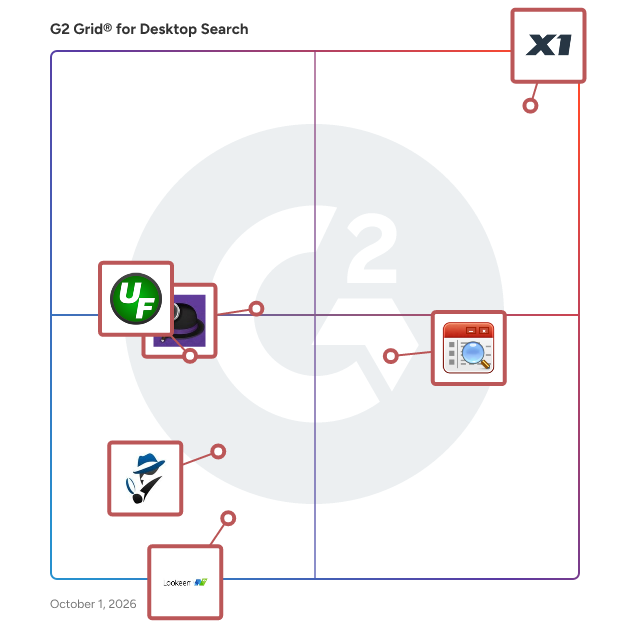
- **Leader:** [X1 Search](https://www.g2.com/products/x1-search/reviews)
- **Highest Performer:** [AI File Pro](https://www.g2.com/products/ai-file-pro/reviews)
- **Top Trending:** [X1 Search](https://www.g2.com/products/x1-search/reviews)
- **Best Free Software:** [X1 Search](https://www.g2.com/products/x1-search/reviews)


## What Are the Top-Rated Desktop Search Software Products in 2026?
### 1. [X1 Search](https://www.g2.com/products/x1-search/reviews)
Stop Searching and Start Finding — with X1 Search. X1 Search empowers you to instantly find the exact information you need across all your data sources — including emails, files, chats, documents, and more — from Microsoft 365 (Mail, Teams, SharePoint, OneDrive, Exchange), Google Workspace, Slack, local files, and cloud storage. All in a single, lightning-fast search using one powerful solution. Powered by X1’s fast-as-you-type technology, this intuitive desktop application delivers real-time results across your content — helping you work smarter and save hours every day. Designed for both business and personal use, X1 Search streamlines your workflow by consolidating years of content into a single, unified interface and providing: • Unified search across email, files, chats, and cloud sources • Full-fidelity previews • Built-in hit highlighting • Blazing-fast performance • Advanced review &amp; tagging tools for efficient data organization • More accurate results than OS or legacy desktop search tools With X1 Search 10, you no longer need to switch between apps or struggle with fragmented systems. Everything is indexed. Everything is searchable. And everything is available — instantly. Experience unmatched speed, precision, and simplicity — all in one solution built to handle the demands of modern information workflows. X1 Search is currently supported on Windows-based operating systems and is available for immediate purchase on our website. Simply buy online and download to get started within minutes.


**Average Rating:** 4.5/5.0
**Total Reviews:** 64
**How Do G2 Users Rate X1 Search?**

- **Efficiency:** 9.5/10 (Category avg: 9.0/10)
- **Fields:** 9.5/10 (Category avg: 8.9/10)
- **Ease of Use:** 9.0/10 (Category avg: 9.4/10)
- **Resources:** 8.7/10 (Category avg: 8.8/10)

**Who Is the Company Behind X1 Search?**

- **Seller:** [X1](https://www.g2.com/sellers/x1)
- **Year Founded:** 2003
- **HQ Location:** Pasadena, CA
- **Twitter:** @X1Discovery (1,233 Twitter followers)
- **LinkedIn® Page:** https://www.linkedin.com/company/2320224/ (147 employees on LinkedIn®)

**Who Uses This Product?**
- **Top Industries:** Information Technology and Services, Higher Education
- **Company Size:** 62% Small-Business, 20% Mid-Market


#### What Are X1 Search's Pros and Cons?

**Pros:**

- Search Functionality (2 reviews)
- Customer Support (1 reviews)
- Ease of Use (1 reviews)
- Efficiency (1 reviews)
- Fast Search (1 reviews)

**Cons:**

- Search Functionality (1 reviews)


### What Do G2 Reviewers Say About X1 Search?
*AI-generated summary from verified user reviews*

**Pros:**

- Users rave about X1&#39;s **fast and thorough search functionality** , making file retrieval effortless and boosting productivity significantly.
- Users highly praise the **excellent customer support** from X1, with quick and effective solutions from the support team.
- Users find X1 Search to be incredibly **easy to use** , enhancing their productivity with swift and efficient performance.
- Users emphasize the **exceptional efficiency** of X1 Search, delivering fast and accurate results to enhance productivity.
- Users value the **fast search capability** of X1 Search, efficiently locating emails and old data without limitations.

**Cons:**

- Users are frustrated by the lack of a **wildcard search function** , making it difficult to find incomplete or mistyped product names.

#### What Are Recent G2 Reviews of X1 Search?

**"[Enormously increases productivity](https://www.g2.com/survey_responses/x1-search-review-11508549)"**

**Rating:** 5.0/5.0 stars
*— Stanley R.*

[Read full review](https://www.g2.com/survey_responses/x1-search-review-11508549)

---

**"[Easy, Fast, Reliable—X1 is simply the best search tool available.](https://www.g2.com/survey_responses/x1-search-review-12862563)"**

**Rating:** 5.0/5.0 stars
*— Norman K.*

[Read full review](https://www.g2.com/survey_responses/x1-search-review-12862563)

---


#### What Are G2 Users Discussing About X1 Search?

- [Is X1 Search free?](https://www.g2.com/discussions/is-x1-search-free)
- [What is the current version of X1 Search?](https://www.g2.com/discussions/what-is-the-current-version-of-x1-search)
- [Does X1 Search work with Gmail?](https://www.g2.com/discussions/does-x1-search-work-with-gmail)
- [What will X1 use to find search results?](https://www.g2.com/discussions/what-will-x1-use-to-find-search-results) - 1 comment

### 2. [AI File Pro](https://www.g2.com/products/ai-file-pro/reviews)
AI File Pro is an innovative document organization and search software designed to help users transform disorganized file and folder structures into optimized, efficient ones using deep AI file understanding technology. This solution automatically analyzes content, classifies documents, applies consistent naming conventions, builds intuitive folder hierarchies, and enables natural language queries for rapid retrieval. By empowering teams to reclaim hours lost to clutter, AI File Pro enhances productivity and fosters a more organized work environment. Targeted primarily at businesses and professionals who manage large volumes of documents, AI File Pro addresses common challenges such as vague file names, compliance risks, and manual delays. The software is capable of processing a wide variety of file types, including PDFs, Word documents, Excel sheets, videos, voice recordings, images, and emails, converting them into easily searchable structures. Users can simply drop files into the system for instant categorization and renaming, while also engaging in conversational queries like “What’s the report due date?” to receive accurate answers with source links. This functionality not only simplifies document management but also enhances the overall efficiency of workflows. One of the standout features of AI File Pro is its advanced extraction capabilities. By leveraging artificial intelligence and intelligent character recognition (ICR), the software intelligently extracts text, handwriting, entities, and metadata from scanned documents and handwritten notes, achieving high accuracy even in complex layouts. This feature is particularly beneficial for users who handle a mix of digital and physical documents, ensuring that all relevant information is captured and organized effectively. The ability to manage both types of documents seamlessly allows for a more comprehensive approach to document organization. Security and confidentiality are paramount in document management, and AI File Pro is designed with this in mind. The software ensures maximum confidentiality and data protection, with no human access to user content at any point. All operations are fully automated, and local files are protected with AES-256 encryption. Additionally, data is encrypted both in transit and at rest, aligning with key industry standards such as GDPR, HIPAA, and ISO/IEC 27001. This commitment to security ensures that users can trust AI File Pro to handle sensitive information responsibly. Overall, AI File Pro stands out in the document organization software category by offering a robust, user-friendly solution that integrates seamlessly into existing workflows. With its powerful features and commitment to security, it provides significant value to organizations looking to enhance their document management processes.


**Average Rating:** 4.9/5.0
**Total Reviews:** 18
**How Do G2 Users Rate AI File Pro?**

- **Efficiency:** 10.0/10 (Category avg: 9.0/10)
- **Fields:** 10.0/10 (Category avg: 8.9/10)
- **Ease of Use:** 9.7/10 (Category avg: 9.4/10)

**Who Is the Company Behind AI File Pro?**

- **Seller:** [FabSoft](https://www.g2.com/sellers/fabsoft)
- **Company Website:** https://www.fabsoft.com/
- **Year Founded:** 1992
- **HQ Location:** Montville, US
- **Twitter:** @FabsoftTech (63 Twitter followers)
- **LinkedIn® Page:** https://www.linkedin.com/company/fabsoftsoftware (10 employees on LinkedIn®)

**Who Uses This Product?**
- **Top Industries:** Information Technology and Services
- **Company Size:** 156% Mid-Market, 122% Small-Business


#### What Are AI File Pro's Pros and Cons?

**Pros:**

- Accuracy (16 reviews)
- Data Extraction (16 reviews)
- Document Automation (16 reviews)
- Search Functionality (16 reviews)
- Ease of Use (14 reviews)

**Cons:**

- Slow Performance (7 reviews)
- Integration Issues (4 reviews)
- Compatibility Issues (2 reviews)
- Connection Issues (2 reviews)
- Missing Features (2 reviews)


### What Do G2 Reviewers Say About AI File Pro?
*AI-generated summary from verified user reviews*

**Pros:**

- Users appreciate the **exceptional accuracy** of AI File Pro, effectively locating documents and relevant content quickly and efficiently.
- Users value the **effective data extraction** of AI File Pro, making document organization and retrieval seamless and efficient.
- Users value the **document automation** of AI File Pro, enhancing organization and accessibility of diverse records effortlessly.
- Users value the **plain-language search** functionality of AI File Pro, enhancing efficiency in locating important documents swiftly.
- Users commend the **ease of use** of AI File Pro, appreciating its intuitive organization and efficient search capabilities.

**Cons:**

- Users experience **slow performance** with large files and syncing, noting occasional lags affecting efficiency.
- Users feel the **integration issues** hinder smoother workflows, with desired connections to platforms like Microsoft Teams and SharePoint missing.
- Users face **compatibility issues** with AI File Pro, as it’s limited to Windows and struggles with rare file formats.
- Users experience **connection issues** that require manual sync for large files, hindering the seamless data flow desired.
- Users note the **missing features** in AI File Pro, particularly in handling complex code files and specialized templates.

#### What Are Recent G2 Reviews of AI File Pro?

**"[A practical solution for food startup document chaos](https://www.g2.com/survey_responses/ai-file-pro-review-12614996)"**

**Rating:** 4.5/5.0 stars
*— Lauren M.*

[Read full review](https://www.g2.com/survey_responses/ai-file-pro-review-12614996)

---

**"[Effortless AI Document Automation with Fast, Natural Language Search](https://www.g2.com/survey_responses/ai-file-pro-review-12645651)"**

**Rating:** 5.0/5.0 stars
*— Eugenie  F.*

[Read full review](https://www.g2.com/survey_responses/ai-file-pro-review-12645651)

---


### 3. [Listary](https://www.g2.com/products/listary/reviews)
Listary is a powerful search utility designed to enhance file and application access on Windows systems. It offers a seamless and efficient way to locate files, launch applications, and navigate directories, significantly improving productivity for users who manage extensive data and software. Key Features and Functionality: - Instant Search: Quickly find files, folders, and applications by typing a few characters, with real-time results that refine as you type. - Quick Launch: Open applications and documents directly from any location without navigating through menus or folders. - Integration with File Managers: Works seamlessly with popular file managers, enhancing their search capabilities without disrupting workflow. - Customizable Shortcuts: Assign personalized keyboard shortcuts to frequently used commands and searches for faster access. - Smart Commands: Execute commands and operations directly from the search interface, such as copying, moving, or deleting files. - Fuzzy Matching: Locate items even when the exact name is unknown, thanks to intelligent search algorithms that handle typos and partial matches. - Recent and Favorite Items: Access recently used and favorite files and folders quickly, reducing the time spent searching for commonly used items. Primary Value and User Solutions: Listary addresses the common challenge of efficiently managing and accessing a vast array of files and applications on Windows systems. By providing an intuitive and lightning-fast search experience, it eliminates the need for manual navigation through complex directory structures. This streamlined approach saves time, reduces frustration, and enhances overall productivity, making it an invaluable tool for professionals, developers, and power users who require quick and reliable access to their digital resources.


**Average Rating:** 4.3/5.0
**Total Reviews:** 24
**How Do G2 Users Rate Listary?**

- **Efficiency:** 8.6/10 (Category avg: 9.0/10)
- **Fields:** 8.7/10 (Category avg: 8.9/10)
- **Ease of Use:** 9.2/10 (Category avg: 9.4/10)
- **Resources:** 8.7/10 (Category avg: 8.8/10)

**Who Is the Company Behind Listary?**

- **Seller:** [Bopsoft](https://www.g2.com/sellers/bopsoft)
- **HQ Location:** N/A
- **Twitter:** @UseListary (426 Twitter followers)
- **LinkedIn® Page:** https://www.linkedin.com/company/No-Linkedin-Presence-Added-Intentionally-By-DataOps (1 employees on LinkedIn®)

**Who Uses This Product?**
- **Top Industries:** Marketing and Advertising
- **Company Size:** 76% Small-Business, 28% Mid-Market


#### What Are Recent G2 Reviews of Listary?

**"[A lightweight and easy to use search tool.](https://www.g2.com/survey_responses/listary-review-8208540)"**

**Rating:** 4.5/5.0 stars
*— Rajat C.*

[Read full review](https://www.g2.com/survey_responses/listary-review-8208540)

---

**"[Super fast Search- Free to use](https://www.g2.com/survey_responses/listary-review-11369721)"**

**Rating:** 5.0/5.0 stars
*— Akash J.*

[Read full review](https://www.g2.com/survey_responses/listary-review-11369721)

---


#### What Are G2 Users Discussing About Listary?

- [What is Listary used for?](https://www.g2.com/discussions/what-is-listary-used-for)

### 4. [Alfred](https://www.g2.com/products/alfred/reviews)
Alfred is an app for Mac OS X designed to boost efficiency with hotkeys, keywords, text expansion and others.


**Average Rating:** 4.5/5.0
**Total Reviews:** 34
**How Do G2 Users Rate Alfred?**

- **Efficiency:** 10.0/10 (Category avg: 9.0/10)
- **Fields:** 8.9/10 (Category avg: 8.9/10)
- **Ease of Use:** 9.5/10 (Category avg: 9.4/10)
- **Resources:** 10.0/10 (Category avg: 8.8/10)

**Who Is the Company Behind Alfred?**

- **Seller:** [Alfred](https://www.g2.com/sellers/alfred)
- **HQ Location:** United Kingdom
- **Twitter:** @alfredapp (49,491 Twitter followers)
- **LinkedIn® Page:** https://www.linkedin.com/company/No-Linkedin-Presence-Added-Intentionally-By-DataOps (1 employees on LinkedIn®)

**Who Uses This Product?**
- **Top Industries:** Computer Software
- **Company Size:** 65% Small-Business, 21% Enterprise


#### What Are Alfred's Pros and Cons?

**Pros:**

- Ease of Use (1 reviews)
- Efficiency (1 reviews)

**Cons:**

- Learning Difficulty (1 reviews)
- Poor UI Design (1 reviews)


### What Do G2 Reviewers Say About Alfred?
*AI-generated summary from verified user reviews*

**Pros:**

- Users love the **ease of use** with Alfred, finding hotkeys simple and efficient for their workflow.
- Users find the **efficient hotkey system** of Alfred enhances productivity and simplifies their workflow significantly.

**Cons:**

- Users experience a **significant learning difficulty** initially, which can be overwhelming before they become comfortable with Alfred.
- Users find the **UI design lacking fluidity** , impacting their initial experience and creating a learning curve.

#### What Are Recent G2 Reviews of Alfred?

**"[Your google search for files](https://www.g2.com/survey_responses/alfred-review-8293434)"**

**Rating:** 5.0/5.0 stars
*— Tanay  G.*

[Read full review](https://www.g2.com/survey_responses/alfred-review-8293434)

---

**"[Alfred, a one stop HotKey Repository](https://www.g2.com/survey_responses/alfred-review-8816010)"**

**Rating:** 5.0/5.0 stars
*— Adithya M.*

[Read full review](https://www.g2.com/survey_responses/alfred-review-8816010)

---


#### What Are G2 Users Discussing About Alfred?

- [Is Alfred available for Windows?](https://www.g2.com/discussions/is-alfred-available-for-windows)
- [Is Alfred on Mac free?](https://www.g2.com/discussions/is-alfred-on-mac-free) - 1 comment
- [What is Alfred app?](https://www.g2.com/discussions/what-is-alfred-app)
- [What does Alfred do on Mac?](https://www.g2.com/discussions/what-does-alfred-do-on-mac)

### 5. [UltraFinder](https://www.g2.com/products/ultrafinder/reviews)
UltraFinder is a quick and lightweight Windows search program designed to find text in files anywhere. UltraFinder also allows you to find duplicates and eliminate or delete duplicates, keeping your computer clean and uncluttered while conserving hard drive space.


**Average Rating:** 4.2/5.0
**Total Reviews:** 14
**How Do G2 Users Rate UltraFinder?**

- **Ease of Use:** 8.7/10 (Category avg: 9.4/10)

**Who Is the Company Behind UltraFinder?**

- **Seller:** [Idera, Inc.](https://www.g2.com/sellers/idera-inc-6c9eda01-43cf-4bd5-b70c-70f59610d9a0)
- **Year Founded:** 1999
- **HQ Location:** Houston, TX
- **Twitter:** @MigrationWiz (482 Twitter followers)
- **LinkedIn® Page:** https://www.linkedin.com/company/bittitan (73 employees on LinkedIn®)

**Who Uses This Product?**
- **Top Industries:** Information Technology and Services
- **Company Size:** 71% Small-Business, 14% Mid-Market


#### What Are UltraFinder's Pros and Cons?

**Pros:**

- Search Functionality (6 reviews)
- Ease of Use (3 reviews)
- Speed (3 reviews)
- Fast Search (2 reviews)
- Tool Efficiency (2 reviews)

**Cons:**

- Cost Increase (1 reviews)
- Expensive (1 reviews)
- Limited Customization (1 reviews)
- Slow Loading (1 reviews)
- Slow Performance (1 reviews)


### What Do G2 Reviewers Say About UltraFinder?
*AI-generated summary from verified user reviews*

**Pros:**

- Users value the **robust search functionality** of UltraFinder, making it effortless to locate any file quickly.
- Users appreciate the **ease of use** of UltraFinder, facilitating quick and efficient file searching across various types.
- Users appreciate the **speedy file searching** capabilities of UltraFinder, making it effortless to locate files quickly.
- Users praise the **fast search capabilities** of UltraFinder, allowing quick and efficient file and content retrieval.
- Users find **UltraFinder&#39;s efficiency** invaluable for quickly locating files, duplicates, and text across various formats.

**Cons:**

- Users feel the **cost increase** may deter potential users despite no other significant flaws noted.
- Users find the **pricing steep** , which may limit accessibility despite the software&#39;s other features.
- Users find the **limited customization** frustrating, particularly due to the lack of layout options and minimized functionality.
- Users notice **slow loading** times with UltraFinder when searching large file sets, impacting overall search efficiency.
- Users experience **slow performance** with UltraFinder when searching large file sets, particularly by date modified or size.

#### What Are Recent G2 Reviews of UltraFinder?

**"[Clear and organise your files via UltraFinder](https://www.g2.com/survey_responses/ultrafinder-review-8559387)"**

**Rating:** 5.0/5.0 stars
*— Ömer K.*

[Read full review](https://www.g2.com/survey_responses/ultrafinder-review-8559387)

---

**"[Search Your Files And Remove Duplicate Files With UltraFinder](https://www.g2.com/survey_responses/ultrafinder-review-8694326)"**

**Rating:** 4.5/5.0 stars
*— Akash S.*

[Read full review](https://www.g2.com/survey_responses/ultrafinder-review-8694326)

---


#### What Are G2 Users Discussing About UltraFinder?

- [What is UltraFinder used for?](https://www.g2.com/discussions/what-is-ultrafinder-used-for)

### 6. [Agent Ransack](https://www.g2.com/products/agent-ransack/reviews)
Agent Ransack is a free software program for finding files on your PC or network drives. It is a lite version of FileLocator Pro and is a free for both personal and commercial use.


**Average Rating:** 4.6/5.0
**Total Reviews:** 20
**How Do G2 Users Rate Agent Ransack?**

- **Efficiency:** 8.6/10 (Category avg: 9.0/10)
- **Fields:** 8.9/10 (Category avg: 8.9/10)
- **Ease of Use:** 9.3/10 (Category avg: 9.4/10)
- **Resources:** 8.4/10 (Category avg: 8.8/10)

**Who Is the Company Behind Agent Ransack?**

- **Seller:** [Mythicsoft Ltd.](https://www.g2.com/sellers/mythicsoft-ltd)
- **Year Founded:** 2004
- **HQ Location:** Cambridge, England
- **Twitter:** @mythicsoft (161 Twitter followers)
- **LinkedIn® Page:** https://www.linkedin.com/company/11755204/ (1 employees on LinkedIn®)

**Who Uses This Product?**
- **Top Industries:** Information Technology and Services
- **Company Size:** 70% Enterprise, 25% Small-Business


#### What Are Agent Ransack's Pros and Cons?

**Pros:**

- Fast Search (1 reviews)
- Speed (1 reviews)


### What Do G2 Reviewers Say About Agent Ransack?
*AI-generated summary from verified user reviews*

**Pros:**

- Users love the **fast search capability** of Agent Ransack, quickly locating files and text within documents effortlessly.
- Users appreciate the **speed and flexibility** of Agent Ransack, enabling quick searches for files and text content.


#### What Are Recent G2 Reviews of Agent Ransack?

**"[Excellent tool for searching files on PC or network.](https://www.g2.com/survey_responses/agent-ransack-review-5188795)"**

**Rating:** 5.0/5.0 stars
*— Verified User in Business Supplies and Equipment*

[Read full review](https://www.g2.com/survey_responses/agent-ransack-review-5188795)

---

**"[Amazingly fast](https://www.g2.com/survey_responses/agent-ransack-review-8628195)"**

**Rating:** 5.0/5.0 stars
*— Dave B.*

[Read full review](https://www.g2.com/survey_responses/agent-ransack-review-8628195)

---


### 7. [Lookeen](https://www.g2.com/products/lookeen/reviews)
Lookeen Desktop Search Finds Everything Your time is too valuable to waste on inefficient and ineffective search – use Lookeen to improve your productivity with its lightning fast file and email search. The Lookeen toolbar integrates itself smoothly into the Windows system tray and into Outlook. A professional solution for Outlook users with a high volume of email, or any business person with gigabytes of data to work with. If it&#39;s there, Lookeen will find it. &quot;It&quot; can be anything from a file or email, to a contact, task, attachment, or appointment. &quot;There&quot; can be in any Outlook PST/OST file and any account type — from Exchange to POP or IMAP — or any local, network or virtual drive. It solves the problem of search in VDI environments and on standard desktops. In an enterprise environment Lookeen can search external indices of shared archives and servers, while following Active Directory rights and group policies so that your data remains secure.


**Average Rating:** 4.0/5.0
**Total Reviews:** 32
**How Do G2 Users Rate Lookeen?**

- **Efficiency:** 7.5/10 (Category avg: 9.0/10)
- **Fields:** 5.4/10 (Category avg: 8.9/10)
- **Ease of Use:** 8.3/10 (Category avg: 9.4/10)
- **Resources:** 6.3/10 (Category avg: 8.8/10)

**Who Is the Company Behind Lookeen?**

- **Seller:** [Axonic Informationssysteme GmbH](https://www.g2.com/sellers/axonic-informationssysteme-gmbh)
- **Year Founded:** 2003
- **HQ Location:** Karlsruhe, Germany
- **LinkedIn® Page:** https://www.linkedin.com/company/1367012/ (17 employees on LinkedIn®)

**Who Uses This Product?**
- **Top Industries:** Computer Software
- **Company Size:** 78% Small-Business, 13% Mid-Market


#### What Are Lookeen's Pros and Cons?

**Pros:**

- Search Functionality (1 reviews)

**Cons:**

- Limited Automation (1 reviews)


### What Do G2 Reviewers Say About Lookeen?
*AI-generated summary from verified user reviews*

**Pros:**

- Users value the **wildcard search functionality** of Lookeen, enhancing their ability to find products even with typos.

**Cons:**

- Users find the **search result limited to 20,000** , restricting access to older emails when needed.

#### What Are Recent G2 Reviews of Lookeen?

**"[Wildcard function](https://www.g2.com/survey_responses/lookeen-review-10742443)"**

**Rating:** 4.0/5.0 stars
*— Jeffrey B.*

[Read full review](https://www.g2.com/survey_responses/lookeen-review-10742443)

---

**"[Saves tons of time searching for files / emails](https://www.g2.com/survey_responses/lookeen-review-9536060)"**

**Rating:** 4.0/5.0 stars
*— Verified User in Consulting*

[Read full review](https://www.g2.com/survey_responses/lookeen-review-9536060)

---


#### What Are G2 Users Discussing About Lookeen?

- [What is Lookeen used for?](https://www.g2.com/discussions/what-is-lookeen-used-for)

### 8. [TeamSlide](https://www.g2.com/products/teamslide/reviews)
TeamSlide is a slide search and library solution with a PowerPoint add-in. Access all of your slides, images, and videos without ever leaving PowerPoint. TeamSlide checks your presentations for version control, prompting you when there are out-of-date slides. Seamlessly connect TeamSlide to SharePoint, Box, OneDrive, Google Drive, or any other content management system. Maximize the value of your content and build better presentations through TeamSlide&#39;s slide library capabilities.


**Average Rating:** 4.7/5.0
**Total Reviews:** 42
**How Do G2 Users Rate TeamSlide?**

- **Efficiency:** 8.8/10 (Category avg: 9.0/10)
- **Fields:** 9.2/10 (Category avg: 8.9/10)
- **Ease of Use:** 9.5/10 (Category avg: 9.4/10)
- **Resources:** 9.2/10 (Category avg: 8.8/10)

**Who Is the Company Behind TeamSlide?**

- **Seller:** [Aploris](https://www.g2.com/sellers/aploris)
- **Year Founded:** 2015
- **HQ Location:** Hamburg, Germany
- **LinkedIn® Page:** https://www.linkedin.com/company/teamslide/ (6 employees on LinkedIn®)

**Who Uses This Product?**
- **Top Industries:** Consulting
- **Company Size:** 50% Small-Business, 36% Mid-Market


#### What Are TeamSlide's Pros and Cons?

**Pros:**

- Ease of Use (27 reviews)
- Search Functionality (13 reviews)
- Easy Access (11 reviews)
- Collaboration (9 reviews)
- Customer Support (9 reviews)

**Cons:**

- Learning Curve (6 reviews)
- Learning Difficulty (4 reviews)
- Slow Loading (4 reviews)
- Update Issues (3 reviews)
- Access Issues (2 reviews)


### What Do G2 Reviewers Say About TeamSlide?
*AI-generated summary from verified user reviews*

**Pros:**

- Users appreciate the **ease of use** of TeamSlide, particularly enjoying its friendly interface and effective search functionality.
- Users praise the **search functionality** of TeamSlide for quickly accessing and organizing slides with ease.
- Users appreciate the **easy access** to resources, enabling quick retrieval and enhancing team efficiency across projects.
- Users value the **effective collaboration** with a centralized content library, ensuring consistent and compliant presentations.
- Users praise the **responsive customer support** of TeamSlide, enhancing their overall experience and satisfaction with the tool.

**Cons:**

- Users find a **learning curve** for TeamSlide, with initial frustration but ease improves once set up.
- Users find there&#39;s a **learning difficulty** for newcomers, making initial setup somewhat challenging and technical.
- Users experience **slow loading times** for slides and features, causing frustration with the overall performance of TeamSlide.
- Users face challenges with **update issues** , experiencing delays and misalignments in slide management and formatting.
- Users face a **learning curve and limited offline access** , complicating onboarding and usage for new team members.

#### What Are Recent G2 Reviews of TeamSlide?

**"[Ensures Consistency and Keeps Slides Up-to-Date](https://www.g2.com/survey_responses/teamslide-review-12749588)"**

**Rating:** 4.5/5.0 stars
*— Vanessa J.*

[Read full review](https://www.g2.com/survey_responses/teamslide-review-12749588)

---

**"[Finally, a Smart Slide Library Built on SharePoint](https://www.g2.com/survey_responses/teamslide-review-12670312)"**

**Rating:** 5.0/5.0 stars
*— Nikhil A.*

[Read full review](https://www.g2.com/survey_responses/teamslide-review-12670312)

---


### 9. [Copernic Desktop Search](https://www.g2.com/products/copernic-desktop-search/reviews)
Copernic Desktop Search is the best alternative to Windows Search as it allows you to centralize your document, file &amp; email searches in one unique interface. It creates a unique map of keywords that allow you to search Windows using a powerful index. You can search any documents on your computer, external and network drives with the full version. Start now and increase your search speed and your organization&#39;s productivity while reducing the time lost trying to find those documents. Join the 4,000,000+ users in more than 125 countries.


**Average Rating:** 3.5/5.0
**Total Reviews:** 16
**How Do G2 Users Rate Copernic Desktop Search?**

- **Efficiency:** 9.2/10 (Category avg: 9.0/10)
- **Fields:** 8.3/10 (Category avg: 8.9/10)
- **Ease of Use:** 8.1/10 (Category avg: 9.4/10)
- **Resources:** 8.3/10 (Category avg: 8.8/10)

**Who Is the Company Behind Copernic Desktop Search?**

- **Seller:** [Copernic](https://www.g2.com/sellers/copernic)
- **Year Founded:** 1996
- **HQ Location:** Quebec City, CA
- **Twitter:** @Copernic (1,205 Twitter followers)
- **LinkedIn® Page:** https://www.linkedin.com/company/21448/ (23 employees on LinkedIn®)

**Who Uses This Product?**
- **Company Size:** 69% Small-Business, 19% Mid-Market


#### What Are Recent G2 Reviews of Copernic Desktop Search?

**"[A wonderful product to find what&#39;s missing!](https://www.g2.com/survey_responses/copernic-desktop-search-review-4822403)"**

**Rating:** 4.5/5.0 stars
*— Verified User in Hospital &amp; Health Care*

[Read full review](https://www.g2.com/survey_responses/copernic-desktop-search-review-4822403)

---

**"[Worthless waste of code](https://www.g2.com/survey_responses/copernic-desktop-search-review-1195412)"**

**Rating:** 4.0/5.0 stars
*— David G.*

[Read full review](https://www.g2.com/survey_responses/copernic-desktop-search-review-1195412)

---


#### What Are G2 Users Discussing About Copernic Desktop Search?

- [Is Copernic Desktop safe?](https://www.g2.com/discussions/is-copernic-desktop-safe)
- [What is a desktop search tool?](https://www.g2.com/discussions/what-is-a-desktop-search-tool)
- [What is the use of search in desktop management?](https://www.g2.com/discussions/what-is-the-use-of-search-in-desktop-management)
- [What is Copernic Desktop Search?](https://www.g2.com/discussions/what-is-copernic-desktop-search)

### 10. [DocFetcher](https://www.g2.com/products/docfetcher/reviews)
DocFetcher is an Open Source desktop search application: It allows you to search the contents of files on your computer.


**Average Rating:** 4.3/5.0
**Total Reviews:** 6
**How Do G2 Users Rate DocFetcher?**

- **Efficiency:** 8.8/10 (Category avg: 9.0/10)
- **Fields:** 9.6/10 (Category avg: 8.9/10)
- **Ease of Use:** 9.6/10 (Category avg: 9.4/10)
- **Resources:** 8.8/10 (Category avg: 8.8/10)

**Who Is the Company Behind DocFetcher?**

- **Seller:** [DocFetcher](https://www.g2.com/sellers/docfetcher)
- **HQ Location:** N/A
- **LinkedIn® Page:** https://www.linkedin.com/company/No-Linkedin-Presence-Added-Intentionally-By-DataOps (1 employees on LinkedIn®)

**Who Uses This Product?**
- **Company Size:** 83% Small-Business, 17% Enterprise


#### What Are DocFetcher's Pros and Cons?

**Pros:**

- Ease of Use (1 reviews)
- Fast Search (1 reviews)
- Search Functionality (1 reviews)
- Time-saving (1 reviews)

**Cons:**

- Learning Difficulty (1 reviews)


### What Do G2 Reviewers Say About DocFetcher?
*AI-generated summary from verified user reviews*

**Pros:**

- Users appreciate the **ease of use** in DocFetcher, effortlessly indexing and searching their files for keywords.
- Users appreciate the **fast search capabilities** of DocFetcher, effortlessly indexing and locating keywords within files.
- Users appreciate the **search functionality** of DocFetcher, which allows for easy keyword searches across all indexed files.
- Users appreciate the **time-saving** features of DocFetcher, providing quick local search capabilities similar to Google.

**Cons:**

- Users find the **learning difficulty** of DocFetcher challenging at first but appreciate its unique search capabilities once mastered.

#### What Are Recent G2 Reviews of DocFetcher?

**"[I don&#39;t know what I would do without DocFetcher](https://www.g2.com/survey_responses/docfetcher-review-10338381)"**

**Rating:** 5.0/5.0 stars
*— Casey H.*

[Read full review](https://www.g2.com/survey_responses/docfetcher-review-10338381)

---

**"[I use DocFetcher](https://www.g2.com/survey_responses/docfetcher-review-10326993)"**

**Rating:** 4.5/5.0 stars
*— Slava N.*

[Read full review](https://www.g2.com/survey_responses/docfetcher-review-10326993)

---


#### What Are G2 Users Discussing About DocFetcher?

- [What is DocFetcher used for?](https://www.g2.com/discussions/what-is-docfetcher-used-for) - 1 comment

### 11. [SearchMyFiles](https://www.g2.com/products/searchmyfiles/reviews)
SearchMyFiles is an alternative to the standard &quot;Search For Files And Folders&quot; module of Windows. It allows you to easily search files in your system by wildcard, by last modified/created/last accessed time, by file attributes, by file content (text or binary search), and by the file size.


**Average Rating:** 4.5/5.0
**Total Reviews:** 6
**How Do G2 Users Rate SearchMyFiles?**

- **Efficiency:** 7.8/10 (Category avg: 9.0/10)
- **Fields:** 8.3/10 (Category avg: 8.9/10)
- **Ease of Use:** 8.3/10 (Category avg: 9.4/10)
- **Resources:** 8.3/10 (Category avg: 8.8/10)

**Who Is the Company Behind SearchMyFiles?**

- **Seller:** [NirSoft](https://www.g2.com/sellers/nirsoft)
- **HQ Location:** Torrance, us
- **Twitter:** @nirsoft (2,788 Twitter followers)
- **LinkedIn® Page:** https://www.linkedin.com/company/nirsoft/about/ (1 employees on LinkedIn®)

**Who Uses This Product?**
- **Company Size:** 50% Mid-Market, 50% Small-Business


#### What Are SearchMyFiles's Pros and Cons?

**Pros:**

- Customizable Search (1 reviews)
- Features (1 reviews)
- Filtering Options (1 reviews)
- Link Management (1 reviews)
- Results (1 reviews)

**Cons:**

- Outdated Interface (1 reviews)
- Setup Difficulty (1 reviews)


### What Do G2 Reviewers Say About SearchMyFiles?
*AI-generated summary from verified user reviews*

**Pros:**

- Users value the **customizable search** options in SearchMyFiles for efficiently managing large data sets and finding duplicates.
- Users appreciate the **advanced search filters and duplicate file finder** of SearchMyFiles for efficient data management.
- Users love the **advanced filtering options** in SearchMyFiles for precise searches and effective file management.
- Users appreciate the **advanced search filters and duplicate file finder** in SearchMyFiles for efficient data management.
- Users value the **advanced search filters and duplicate file finder** , enhancing data management and efficiency significantly.

**Cons:**

- Users find the **outdated interface** frustrating, as it necessitates time-consuming manual setup for each search.
- Users find the **setup difficulty** daunting as it requires manual configuration for each search, consuming valuable time.

#### What Are Recent G2 Reviews of SearchMyFiles?

**"[User-Friendly and Powerful File Search Tool for Windows Users](https://www.g2.com/survey_responses/searchmyfiles-review-10553185)"**

**Rating:** 5.0/5.0 stars
*— Sagar K.*

[Read full review](https://www.g2.com/survey_responses/searchmyfiles-review-10553185)

---

**"[SearchMyFiles - portable and surprisingly good!](https://www.g2.com/survey_responses/searchmyfiles-review-4425856)"**

**Rating:** 4.5/5.0 stars
*— Frank W.*

[Read full review](https://www.g2.com/survey_responses/searchmyfiles-review-4425856)

---


### 12. [SeekFast](https://www.g2.com/products/seekfast/reviews)
SeekFast is a software tool, allowing you to quickly and easily search text in files on your computer. It supports all common document file types: Microsoft Word Documents (DOCX, DOC) PDF files (PDF) Microsoft Excel Spreadsheets (XLSX, XLS) Microsoft PowerPoint files (PPTX, PPT) OpenOffice Document Text (ODT) LibreOffice Writer documents (ODT) LaTeX documents (TEX) Rich Text Format (RTF) Text files (TXT, HTML, XML, PHP, CPP, CS, JAVA, PL, PY, JS and others) You choose which types of files and in which folder (and its subfolders) you want to search on your computer. SeekFast is available for Windows and Mac operating systems.


**Average Rating:** 5.0/5.0
**Total Reviews:** 4
**How Do G2 Users Rate SeekFast?**

- **Efficiency:** 10.0/10 (Category avg: 9.0/10)
- **Fields:** 10.0/10 (Category avg: 8.9/10)
- **Ease of Use:** 10.0/10 (Category avg: 9.4/10)
- **Resources:** 9.4/10 (Category avg: 8.8/10)

**Who Is the Company Behind SeekFast?**

- **Seller:** [Slaviana soft Ltd](https://www.g2.com/sellers/slaviana-soft-ltd)
- **Year Founded:** 2008
- **HQ Location:** Sofia, BG
- **LinkedIn® Page:** https://www.linkedin.com/company/slaviana-soft-ltd-/ (3 employees on LinkedIn®)

**Who Uses This Product?**
- **Company Size:** 50% Small-Business, 50% Mid-Market


#### What Are Recent G2 Reviews of SeekFast?

**"[Speed ​​up your PhD thesis with Seekfast](https://www.g2.com/survey_responses/seekfast-review-10846736)"**

**Rating:** 5.0/5.0 stars
*— Bilge B.*

[Read full review](https://www.g2.com/survey_responses/seekfast-review-10846736)

---

**"[Versatile app for quickly searching through ALL your documents](https://www.g2.com/survey_responses/seekfast-review-10910562)"**

**Rating:** 5.0/5.0 stars
*— Verified User in Information Technology and Services*

[Read full review](https://www.g2.com/survey_responses/seekfast-review-10910562)

---


#### What Are G2 Users Discussing About SeekFast?

- [What is SeekFast used for?](https://www.g2.com/discussions/what-is-seekfast-used-for)

### 13. [ExplorerMax](https://www.g2.com/products/explorermax/reviews)
OSToto Co., Ltd. is a world’s leading computer software and software services provider. Registered in 2016, this company has well developed into a strong technology team by providing excellent and professional computer software and services. As for ExplorerMax, it&#39;s a chrome-styled file manager for Windows users. Download URL: https://explorermax.drivethelife.com/download/explorermax.exe 1. Tabs - Tabs let you keep multiple folders open and switch between them quickly. 2. Quick Search - Search the files from your system or specific disk. And it&#39;s returning the results in groups / Categories clearly. 3. Bookmarks - Keep your favorite files or folders quickly accessible through bookmarks. 4. Timeline - Locate to your file-managing history and recent files efficiently. 5. Skin - Light or dark mode is available. 6. Batch Rename - Smart rename your files. 7. Compression/Extraction - Easy to compress and extract the files in most types. 8. Dual-pane: support better file-to-file operations. It offers a 30-day free trial without any restrictions. Please try it now. And we keep improving it all the time. Also, we are launching a review program that rewards the great public review with the free license. If you&#39;re interested in that, please contact submit@drivethelife or leave a message to our Facebook page (ostotosoftware).


**Average Rating:** 4.0/5.0
**Total Reviews:** 2

**Who Is the Company Behind ExplorerMax?**

- **Seller:** [Ostoto software Co,.Ltd](https://www.g2.com/sellers/ostoto-software-co-ltd)
- **HQ Location:** N/A
- **Twitter:** @OSToto_Software (1,242 Twitter followers)
- **LinkedIn® Page:** https://www.linkedin.com/company/18041565/

**Who Uses This Product?**
- **Company Size:** 100% Small-Business


#### What Are Recent G2 Reviews of ExplorerMax?

**"[One of the best file manager for windows users!!](https://www.g2.com/survey_responses/explorermax-review-7412069)"**

**Rating:** 4.0/5.0 stars
*— Nishad K.*

[Read full review](https://www.g2.com/survey_responses/explorermax-review-7412069)

---

**"[One of the fastest searching file manager.](https://www.g2.com/survey_responses/explorermax-review-7426199)"**

**Rating:** 4.0/5.0 stars
*— Mary S.*

[Read full review](https://www.g2.com/survey_responses/explorermax-review-7426199)

---


### 14. [Glarysoft Quick Search](https://www.g2.com/products/glarysoft-quick-search/reviews)
Locate files and folders by key words. Quick file indexing


**Average Rating:** 4.5/5.0
**Total Reviews:** 2
**How Do G2 Users Rate Glarysoft Quick Search?**

- **Efficiency:** 6.7/10 (Category avg: 9.0/10)
- **Fields:** 6.7/10 (Category avg: 8.9/10)
- **Ease of Use:** 10.0/10 (Category avg: 9.4/10)
- **Resources:** 8.3/10 (Category avg: 8.8/10)

**Who Is the Company Behind Glarysoft Quick Search?**

- **Seller:** [Glarysoft Ltd.](https://www.g2.com/sellers/glarysoft-ltd)
- **HQ Location:** Vancouver, CA
- **Twitter:** @Glarysoft (1,054 Twitter followers)
- **LinkedIn® Page:** https://www.linkedin.com/company/19550311/ (1 employees on LinkedIn®)

**Who Uses This Product?**
- **Company Size:** 100% Small-Business


#### What Are Recent G2 Reviews of Glarysoft Quick Search?

**"[Great for lost files](https://www.g2.com/survey_responses/glarysoft-quick-search-review-8485336)"**

**Rating:** 4.0/5.0 stars
*— Steve P.*

[Read full review](https://www.g2.com/survey_responses/glarysoft-quick-search-review-8485336)

---

**"[This tools is free and easy to use](https://www.g2.com/survey_responses/glarysoft-quick-search-review-1026698)"**

**Rating:** 5.0/5.0 stars
*— Sanjay K.*

[Read full review](https://www.g2.com/survey_responses/glarysoft-quick-search-review-1026698)

---


#### What Are G2 Users Discussing About Glarysoft Quick Search?

- [What is Glarysoft Quick Search used for?](https://www.g2.com/discussions/what-is-glarysoft-quick-search-used-for)

### 15. [mysys](https://www.g2.com/products/mysys/reviews)
mysys indexes your entire system&#39;s files and folders for instant search. Contents are not indexed but uses multi-threading along with the index to get results fast! Searches inside PDF&#39;s, e-book formats, MS Word/Excel and others. Able to play movies and audio files from within the app. View HTML and PDF&#39;s also.


**Average Rating:** 4.8/5.0
**Total Reviews:** 2
**How Do G2 Users Rate mysys?**

- **Ease of Use:** 10.0/10 (Category avg: 9.4/10)

**Who Is the Company Behind mysys?**

- **Seller:** [IntegriTech](https://www.g2.com/sellers/integritech)
- **Year Founded:** 1999
- **HQ Location:** Mascouche, CA
- **LinkedIn® Page:** https://www.linkedin.com/company/integritech-ca/ (2 employees on LinkedIn®)

**Who Uses This Product?**
- **Company Size:** 50% Small-Business, 50% Mid-Market


#### What Are mysys's Pros and Cons?

**Pros:**

- Ease of Use (2 reviews)
- Fast Search (1 reviews)
- Search Functionality (1 reviews)
- Speed (1 reviews)

**Cons:**

- Expensive (1 reviews)


### What Do G2 Reviewers Say About mysys?
*AI-generated summary from verified user reviews*

**Pros:**

- Users value the **ease of use** in Mysys, enabling quick and efficient searches within their systems.
- Users value the **fast search capability** in Mysys, enabling quick access to files and their contents effortlessly.
- Users praise the **efficient search functionality** of Mysys, enabling quick and easy access to files and content.
- Users love the **fast search capability** of Mysys, allowing quick access to files and content effortlessly.

**Cons:**

- Users find the product **expensive** due to the need for multiple packages and subscription costs.

#### What Are Recent G2 Reviews of mysys?

**"[Collection of libraries](https://www.g2.com/survey_responses/mysys-review-8437599)"**

**Rating:** 5.0/5.0 stars
*— B K S.*

[Read full review](https://www.g2.com/survey_responses/mysys-review-8437599)

---

**"[Find Anything Quickly From The System With mysys](https://www.g2.com/survey_responses/mysys-review-8508781)"**

**Rating:** 4.5/5.0 stars
*— Rashmi S.*

[Read full review](https://www.g2.com/survey_responses/mysys-review-8508781)

---


### 16. [QuikFynd](https://www.g2.com/products/quikfynd/reviews)
QuikFynd lets you search your fragmented data from your personal mobile devices in a secure and easy manner.


**Average Rating:** 3.8/5.0
**Total Reviews:** 2
**How Do G2 Users Rate QuikFynd?**

- **Ease of Use:** 8.3/10 (Category avg: 9.4/10)

**Who Is the Company Behind QuikFynd?**

- **Seller:** [QuikFynd](https://www.g2.com/sellers/quikfynd)
- **Year Founded:** 2013
- **HQ Location:** Portland, US
- **Twitter:** @quikfynd (91 Twitter followers)
- **LinkedIn® Page:** https://www.linkedin.com/company/3537664 (3 employees on LinkedIn®)

**Who Uses This Product?**
- **Company Size:** 100% Small-Business


#### What Are Recent G2 Reviews of QuikFynd?

**"[QuikFynd is a  great way to manage multiple cloud storage in an organized way.](https://www.g2.com/survey_responses/quikfynd-review-4438614)"**

**Rating:** 4.0/5.0 stars
*— pranav k.*

[Read full review](https://www.g2.com/survey_responses/quikfynd-review-4438614)

---


#### What Are G2 Users Discussing About QuikFynd?

- [What is QuikFynd used for?](https://www.g2.com/discussions/what-is-quikfynd-used-for)

### 17. [FYI](https://www.g2.com/products/fyi/reviews)
FYI lets users search and organize all the documents from one place.


**Average Rating:** 5.0/5.0
**Total Reviews:** 1
**How Do G2 Users Rate FYI?**

- **Efficiency:** 10.0/10 (Category avg: 9.0/10)
- **Fields:** 10.0/10 (Category avg: 8.9/10)
- **Ease of Use:** 10.0/10 (Category avg: 9.4/10)
- **Resources:** 10.0/10 (Category avg: 8.8/10)

**Who Is the Company Behind FYI?**

- **Seller:** [Usefyi](https://www.g2.com/sellers/usefyi)
- **Year Founded:** 2018
- **HQ Location:** San Francisco, US
- **Twitter:** @usefyi (2,243 Twitter followers)
- **LinkedIn® Page:** https://www.linkedin.com/company/usefyi/about/ (14 employees on LinkedIn®)

**Who Uses This Product?**
- **Company Size:** 100% Small-Business


#### What Are Recent G2 Reviews of FYI?

**"[Easy to use and train new staff](https://www.g2.com/survey_responses/fyi-review-5264568)"**

**Rating:** 5.0/5.0 stars
*— Verified User in Hospital &amp; Health Care*

[Read full review](https://www.g2.com/survey_responses/fyi-review-5264568)

---


#### What Are G2 Users Discussing About FYI?

- [What is FYI used for?](https://www.g2.com/discussions/what-is-fyi-used-for)

### 18. [Noggle](https://www.g2.com/products/noggle/reviews)
Noggle is a standalone desktop search and knowledge assistant application to provide fast and simple access to the information you need.


**Average Rating:** 4.5/5.0
**Total Reviews:** 1
**How Do G2 Users Rate Noggle?**

- **Efficiency:** 8.3/10 (Category avg: 9.0/10)
- **Fields:** 8.3/10 (Category avg: 8.9/10)
- **Ease of Use:** 8.3/10 (Category avg: 9.4/10)
- **Resources:** 6.7/10 (Category avg: 8.8/10)

**Who Is the Company Behind Noggle?**

- **Seller:** [Noggle](https://www.g2.com/sellers/noggle)
- **Year Founded:** 2015
- **HQ Location:** Hamburg, DE
- **LinkedIn® Page:** https://www.linkedin.com/company/10122327 (3 employees on LinkedIn®)

**Who Uses This Product?**
- **Company Size:** 50% Mid-Market, 50% Small-Business


#### What Are Noggle's Pros and Cons?

**Pros:**

- Customer Support (1 reviews)
- Ease of Implementation (1 reviews)
- Easy Access (1 reviews)
- Easy Integrations (1 reviews)
- Results (1 reviews)


### What Do G2 Reviewers Say About Noggle?
*AI-generated summary from verified user reviews*

**Pros:**

- Users appreciate the **delightful customer support** from Noggle, enhancing their seamless integration and overall experience.
- Users find Noggle&#39;s **ease of implementation** refreshing, enhancing their workflows and supporting effective information retrieval.
- Users find Noggle&#39;s **easy access** to information enhances workflows and simplifies data management significantly.
- Users appreciate the **easy integrations** of Noggle, significantly enhancing their workflows and data management experiences.
- Users commend the **seamless integration** of Noggle, enhancing workflows and simplifying information retrieval effectively.


#### What Are Recent G2 Reviews of Noggle?

**"[Amazing helper tool!](https://www.g2.com/survey_responses/noggle-review-9717197)"**

**Rating:** 4.5/5.0 stars
*— Verified User in Investment Banking*

[Read full review](https://www.g2.com/survey_responses/noggle-review-9717197)

---

**"[Best Document Manager](https://www.g2.com/survey_responses/noggle-review-8722511)"**

**Rating:** 5.0/5.0 stars
*— Rishabh J.*

[Read full review](https://www.g2.com/survey_responses/noggle-review-8722511)

---


### 19. [SSuite Desktop Search](https://www.g2.com/products/ssuite-desktop-search/reviews)
SSuite Desktop Search and Find is a useful windows desktop search engine that can find files, folders, and file content. This small application is also multi-threaded for instant search results.


**Average Rating:** 4.0/5.0
**Total Reviews:** 1
**How Do G2 Users Rate SSuite Desktop Search?**

- **Efficiency:** 10.0/10 (Category avg: 9.0/10)
- **Fields:** 10.0/10 (Category avg: 8.9/10)
- **Ease of Use:** 10.0/10 (Category avg: 9.4/10)
- **Resources:** 10.0/10 (Category avg: 8.8/10)

**Who Is the Company Behind SSuite Desktop Search?**

- **Seller:** [SSuite Office Software](https://www.g2.com/sellers/ssuite-office-software)
- **HQ Location:** N/A
- **LinkedIn® Page:** https://www.linkedin.com/company/No-Linkedin-Presence-Added-Intentionally-By-DataOps (1 employees on LinkedIn®)

**Who Uses This Product?**
- **Company Size:** 100% Mid-Market


#### What Are Recent G2 Reviews of SSuite Desktop Search?

**"[Fast and Efficient desktop search ](https://www.g2.com/survey_responses/ssuite-desktop-search-review-1741856)"**

**Rating:** 4.0/5.0 stars
*— Jessica R.*

[Read full review](https://www.g2.com/survey_responses/ssuite-desktop-search-review-1741856)

---


#### What Are G2 Users Discussing About SSuite Desktop Search?

- [What is SSuite Desktop Search used for?](https://www.g2.com/discussions/what-is-ssuite-desktop-search-used-for)

### 20. [Wise JetSearch](https://www.g2.com/products/wise-jetsearch/reviews)
Wise JetSearch will search for you automatically and then show you the basic details of the file/folder. It is much faster than the built-in search feature in Windows.


**Average Rating:** 5.0/5.0
**Total Reviews:** 1
**How Do G2 Users Rate Wise JetSearch?**

- **Efficiency:** 10.0/10 (Category avg: 9.0/10)
- **Fields:** 10.0/10 (Category avg: 8.9/10)
- **Ease of Use:** 10.0/10 (Category avg: 9.4/10)
- **Resources:** 10.0/10 (Category avg: 8.8/10)

**Who Is the Company Behind Wise JetSearch?**

- **Seller:** [WiseCleaner.com](https://www.g2.com/sellers/wisecleaner-com)
- **HQ Location:** N/A
- **Twitter:** @WiseCleaner (4,182 Twitter followers)
- **LinkedIn® Page:** https://www.linkedin.com/company/4832671 (3 employees on LinkedIn®)

**Who Uses This Product?**
- **Company Size:** 100% Small-Business


#### What Are Recent G2 Reviews of Wise JetSearch?

**"[Makes life 100 times easier](https://www.g2.com/survey_responses/wise-jetsearch-review-1032223)"**

**Rating:** 5.0/5.0 stars
*— Verified User in Marketing and Advertising*

[Read full review](https://www.g2.com/survey_responses/wise-jetsearch-review-1032223)

---


#### What Are G2 Users Discussing About Wise JetSearch?

- [What is Wise JetSearch used for?](https://www.g2.com/discussions/what-is-wise-jetsearch-used-for)

### 21. [Auslogics Duplicate File Finder](https://www.g2.com/products/auslogics-software-auslogics-duplicate-file-finder/reviews)
Duplicate file finder scans your whole system using its smart algorithms and searches the contents of files for duplicate data. This duplicate cleaner detects even the smallest differences in files to ensure that the files it labels are true copies and not just similar important files that you should keep. Its intuitive interface guides you through the scanning and removal process, making it easy even for PC novices. You can choose to scan specific folders or drives, or add filters to exclude certain files from the scan. Once the scan is complete, you may look through the results and choose which duplicate files to remove. Deleting these completely unnecessary files gives you access to more disk space for important files and software without having to buy new storage devices. With its powerful features and user-friendly interface, it&#39;s the perfect solution for anyone who wants to get rid of unnecessary duplicate files.


**Who Is the Company Behind Auslogics Duplicate File Finder?**

- **Seller:** [Auslogics Software](https://www.g2.com/sellers/auslogics-software)
- **Year Founded:** 2008
- **HQ Location:** Sydney, AU
- **LinkedIn® Page:** https://www.linkedin.com/company/auslogics-software-pty-ltd/ (25 employees on LinkedIn®)


### 22. [CybervoreQuery](https://www.g2.com/products/cybervorequery/reviews)
File search engine working with Microsoft Outlook helping to locate, retrieve, organize and share any data anywhere.


**Who Is the Company Behind CybervoreQuery?**

- **Seller:** [Cybervore](https://www.g2.com/sellers/cybervore)
- **HQ Location:** Red Bank, US
- **Twitter:** @Cybervore_Inc (889 Twitter followers)
- **LinkedIn® Page:** https://www.linkedin.com/company/cybervore-inc. (6 employees on LinkedIn®)


### 23. [Exselo Desktop](https://www.g2.com/products/exselo-desktop/reviews)
Exselo Desktop is a business productivity desktop search and collaboration tool that helps you with your informational and operational needs. It effectively find the information you need to get the job done through the power of search. It supports all your local and cloud based files and all items inside Outlook. It comes with an easy to use interface both inside of Outlook and for your desktop. It allows users to collaborate, search and share data in real time using encrypted peer-to-peer technology. The product is available for both Microsoft Windows and Apple OS X.


**Who Is the Company Behind Exselo Desktop?**

- **Seller:** [Exselo](https://www.g2.com/sellers/exselo)
- **Year Founded:** 2014
- **HQ Location:** Oslo, NO
- **Twitter:** @ExseloCompany (221 Twitter followers)
- **LinkedIn® Page:** https://www.linkedin.com/company/exselo-pte-ltd- (1 employees on LinkedIn®)


### 24. [Findit 6](https://www.g2.com/products/findit-6/reviews)
Professional file search without indexing. Trusted by German lawyers &amp; journalists since 1995. New to G2 - be among the first international reviewers! Findit 6 is a professional desktop search application for Windows that enables users to find any file by its content in seconds — without requiring index creation, while delivering a level of performance that makes index-free full-text search practical for everyday use. Unlike traditional enterprise search tools such as dtSearch, FileLocator Pro, or DocFetcher that require building and maintaining large indexes before searching, Findit delivers immediate results through direct file analysis. It can search through 50 GB of data in approximately 20 seconds without any preparation time, making it ideal for ad-hoc searches and dynamic data environments where files change frequently. The software supports over 200 file formats out-of-the-box, including Microsoft Office documents (DOC, DOCX, XLS, XLSX, PPT, PPTX), PDFs, emails (EML, MSG) with attachments, and compressed archives (ZIP, RAR, 7z) - even when nested multiple levels deep. Built-in OCR functionality enables searching within scanned PDFs and images without requiring external tools or pre-processing steps. Findit&#39;s fault-tolerant text extraction can recover content from damaged or non-standard files that parser-based systems typically fail on. The software searches email attachments automatically and penetrates archive files recursively, finding content that remains invisible to many competitors. It also supports exotic formats like executable files and system libraries. The target audience includes journalists managing legacy archives, lawyers handling mixed client data, IT professionals working with heterogeneous datasets, researchers dealing with international documents, and any professional who needs complete, reliable search results rather than just fast ones. Beyond interactive search, Findit also supports fully automated, repeatable search workflows. Searches can be defined using any combination of file properties, timestamps, metadata, and content, saved, and executed unattended. Result sets can be exported with timestamps or processed automatically in the background, including copying, moving, or packaging matched files into ZIP archives. This makes Findit suitable not only for archival research, but also for IT operations, compliance checks, scheduled audits, and lightweight forensic or maintenance tasks where deterministic, script-free file selection and processing is required. Index-free full-text search — finally practical for everyday use At this level of performance, index-free full-text search becomes similarly fast and spontaneous to use as index-based systems — without preparation time, index maintenance, or structural limitations. Searches can be started immediately, refined, and repeated, even on large and constantly changing data sets. Findit combines the flexibility of index-free search with the everyday usability of traditional search solutions. It is not limited to finding “lost” files. Content-based search often becomes faster and more practical than manually navigating to a known location — even in well-structured archives. Findit is available as a one-time purchase ($39-59) with lifetime validity and no subscription requirements, offering significant cost savings compared to enterprise solutions priced at $150-200+ or requiring annual subscriptions. Free updates included with every license purchase. English interfacace als well as German interface plus three additional languages supported.


**Who Is the Company Behind Findit 6?**

- **Seller:** [Findit](https://www.g2.com/sellers/findit)
- **HQ Location:** N/A
- **LinkedIn® Page:** https://www.linkedin.com/company/No-Linkedin-Presence-Added-Intentionally-By-DataOps (1 employees on LinkedIn®)


### 25. [Himeji](https://www.g2.com/products/himeji/reviews)
Himeji is a privacy-first AI assistant that instantly finds answers in your own files, emails, and calendars, on desktop or cloud, with zero complex setup.


**Who Is the Company Behind Himeji?**

- **Seller:** [Vauban Cloud](https://www.g2.com/sellers/vauban-cloud)
- **HQ Location:** N/A
- **LinkedIn® Page:** https://www.linkedin.com/company/No-Linkedin-Presence-Added-Intentionally-By-DataOps (1 employees on LinkedIn®)


## What Is Desktop Search Software?

[Content Management Systems](https://www.g2.com/categories/content-management)