Best Database Management Systems (DBMS) - Page 19

How Many Database Management Systems (DBMS) Products Does G2 Track?

Total Products under this Category: 301

Category Stats (Oct 2026)

  • Average Rating: 4.3/5 (↑0.01 vs Sep 2026) The average rating of products in this category, based on all submitted ratings
  • Top Trending Product: BMC AMI Data (+1.05%) - Among all products in this category, BMC AMI Data recorded the largest rating increase compared to last month

Last updated: October 26, 2026

How Does G2 Rank Database Management Systems (DBMS) Products?

Why You Can Trust G2's Software Rankings:

  • 30 Analysts and Data Experts
  • 11,100+ Authentic Reviews
  • 301+ Products
  • Unbiased Rankings

G2's software rankings are built on verified user reviews, rigorous moderation, and a consistent research methodology maintained by a team of analysts and data experts. Each product is measured using the same transparent criteria, with no paid placement or vendor influence. While reviews reflect real user experiences, which can be subjective, they offer valuable insight into how software performs in the hands of professionals. Together, these inputs power the G2 Score, a standardized way to compare tools within every category.

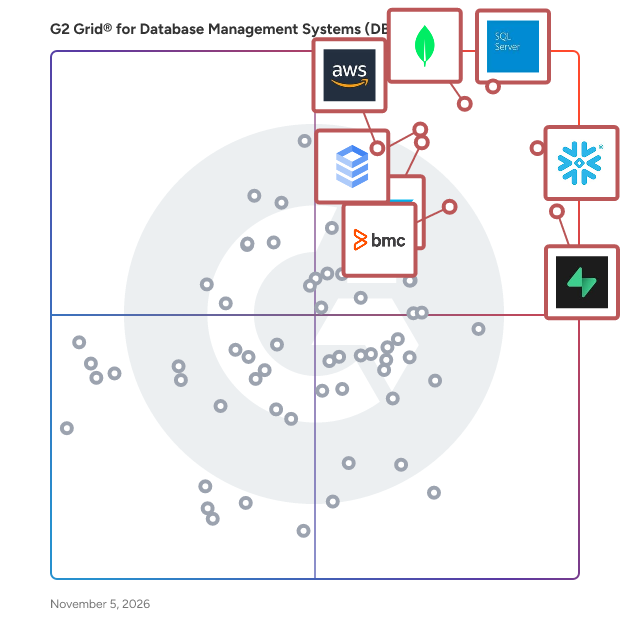
G2 Grid® for Database Management Systems (DBMS)

G2 Grid® for Database Management Systems (DBMS) plotting products by satisfaction and market presence

Highlighted products: Microsoft SQL Server, Snowflake, MongoDB Atlas, Supabase, SAP HANA Cloud, Google Cloud SQL, BMC AMI Data, and Amazon Athena.

Underlying data: [Grid® JSON](https://www.g2.com/categories/database-management-systems-dbms/grids.json?focus%5B%5D=microsoft-sql-server&focus%5B%5D=snowflake&focus%5B%5D=mongodb-atlas&focus%5B%5D=supabase-supabase&focus%5B%5D=sap-hana-cloud-2025-10-01&focus%5B%5D=google-cloud-sql&focus%5B%5D=bmc-ami-data&focus%5B%5D=amazon-athena)

Sadas Engine

Sadas Engine is a columnar Database Management System able to perform more than 100 times faster than transactional DBMSs and able to carry out searches on huge quantities of data over a period even longer than 10 years. Benchmarks proved that Sadas Engine is much faster than other columnar DBMSs as well. Sadas Engine was designed to store, manage and analyze huge quantities of data, and seamlessly integrates with any data warehouse environment. It ensures exceptional performances during the phases of ETL and enquiry. Sadas Engine is specifically designed to achieve outstanding performances in Data Warehouse environments, making access to information easy and quick. It is able to simplify structures and procedures without overlooking efficiency and quality of performances.

Who Is the Company Behind Sadas Engine?

  • Seller: Sadas Srl
  • Year Founded: 2013
  • HQ Location: Milan, IT
  • Twitter: @SadasEngine
    7 Twitter followers
  • LinkedIn® Page: www.linkedin.com
    127 employees on LinkedIn®

SAS In-Database Technologies

SAS® In-Database Technologies Shorten the time needed for data quality and analytical processes by performing them within the database. Our in-database technologies leverage increasing amounts of data by integrating select SAS technology into databases or data warehouses. Run scoring models, some SAS procedures and formatted SQL queries inside the database.

Who Is the Company Behind SAS In-Database Technologies?

  • Seller: SAS Institute
  • Year Founded: 1976
  • HQ Location: Cary, NC
  • Twitter: @SASsoftware
    60,863 Twitter followers
  • LinkedIn® Page: www.linkedin.com
    15,122 employees on LinkedIn®
  • Phone: 1-800-727-0025

Secured SQuirreL SQL on Windows 2016

Secured SQuirreL SQL on Windows 2016 is a pre-configured Amazon Machine Image that combines the SQuirreL SQL Client with Windows Server 2016, offering a secure and ready-to-use environment for database management. SQuirreL SQL Client is a versatile, Java-based graphical tool that allows users to interact with any JDBC-compliant database, facilitating tasks such as viewing database structures, browsing table data, and executing SQL commands. Key Features and Functionality: - Pre-Configured Environment: The AMI comes with SQuirreL SQL Client installed on Windows Server 2016, reducing setup time and ensuring compatibility. - Universal Database Support: SQuirreL SQL Client supports a wide range of databases through JDBC, enabling connections to various database systems. - Graphical User Interface: The client provides an intuitive interface for database navigation, query execution, and data visualization. - Security Enhancements: The AMI is designed with security best practices, including the latest patches and configurations to safeguard data and applications. Primary Value and Problem Solved: Secured SQuirreL SQL on Windows 2016 addresses the need for a secure, efficient, and user-friendly database management solution. By offering a pre-configured environment, it eliminates the complexities associated with manual setup and configuration, allowing database administrators and developers to focus on their core tasks. The integration of SQuirreL SQL Client with Windows Server 2016 ensures a stable and reliable platform for managing diverse databases, enhancing productivity and operational efficiency.

Who Is the Company Behind Secured SQuirreL SQL on Windows 2016?

AI can help you find the answers. G2 helps you trust them.

Connect G2 to Claude or ChatGPT for answers grounded in G2's trusted reviews, comparisons, and pricing from real user insights.

How it works

Sekoya Tech

Sekoya Tech is a browser-based database management IDE deployed as a container with data infrastructure. It supports 17 database engines, including PostgreSQL, MySQL, Oracle, MongoDB, and Redis, offering a unified interface for various systems. Queries run via HTTPS, keeping data within private networks without port forwarding or SSH tunnels. The Monaco-based editor provides schema-aware SQL completion, formatting, snippets, and shortcuts. Visual EXPLAIN generates graphical plan trees, and entity-relationship diagrams show foreign-key relationships with filtering and export options. An AI assistant helps create or explain SQL queries from plain language, with code visible for review. Features include a live health dashboard for monitoring sessions, slow queries, and storage. Mobile optimization allows management from phones and tablets. Security is enhanced with role-based access control and audit logging. Deployment options include containers.

Who Is the Company Behind Sekoya Tech?

SQL Admin Toolset

Database administrators need simple and quick ways to manage their SQL Server environment. SQL Admin Toolset provides 24 essential desktop tools for SQL Server to save time by simplifying routine administrative and troubleshooting tasks. Reduce time spent on daily SQL Server administration. Easily run daily admin tasks across multiple SQL Server instances. Simplify migrating, consolidating, and creating SQL Server instances. Eliminate manual, time-consuming, and error-prone admin tasks.

Who Is the Company Behind SQL Admin Toolset?

  • Seller: Idera, Inc.
  • Year Founded: 2007
  • HQ Location: Austin, US
  • Twitter: @MigrationWiz
    482 Twitter followers
  • LinkedIn® Page: www.linkedin.com
    285 employees on LinkedIn®

SQLife

SQLife is a modern, cross-platform database management tool built with JavaFX that brings a rich, unified workspace to database administrators, developers, and data analysts. It connects to a wide range of relational databases - Oracle, PostgreSQL, MySQL, MariaDB, Microsoft SQL Server, SQLite, H2, IBM DB2, Apache Derby, HyperSQL, DuckDB, ClickHouse, Databricks, and Snowflake - as well as middleware such as Redis, MongoDB, Kafka, and RabbitMQ. The application centers on a powerful SQL editor with syntax highlighting, error detection, formatting, and intelligent auto-completion with code navigation, plus a tabbed interface for managing multiple connections, editors, and tasks at once. Users can browse and manage objects such as tables, views, procedures, functions, triggers, indexes, sequences, packages, materialized views, and partitions; edit data inline with multi-cell selection and clipboard support; and import or export data in SQL, CSV, TSV, JSON, XML, Excel, HTML, Markdown, and PNG formats, including CLOB/BLOB handling. Productivity features include SQL history, Oracle Scheduler job management, DBMS_OUTPUT capture, schema comparison, a database locks monitor, a Git-integrated file workspace, workspace state recovery after crashes, SSH tunnel and HTTP/SOCKS proxy support, and a plugin system. SQLife also includes MCP (Model Context Protocol) support and an LLM Agent with OpenAI, DeepSeek, and Ollama, with function-call safety checks. The interface ships in 13 languages with dark mode. The latest update (2026-09-19) adds a searchable AI model selector beside the Send button, notifications when the AI finishes or needs input, Markdown-style headings and comment blocks in the SQL outline, a data-grid column visibility menu with hidden columns, whole-folder SFTP transfers with collapsible tabs and favorite paths, caret position in viewers, and an enhanced AI assistant with sessions, MCP tools, activity logs, and interactive pre-check/confirm forms.

Who Is the Company Behind SQLife?
SQLInfo

SQLInfo is a SaaS database documentation tool that generates clear, always up-to-date documentation for your MySQL, PostgreSQL, and SQL Server databases — in just a few clicks. Connect your database once and SQLInfo instantly imports your schema: tables, columns, relationships, constraints. Your team can then enrich the documentation collaboratively in real time, adding descriptions, business context, and version history — without ever leaving the platform. Who it's for: Development teams, tech leads, BI analysts, and business analysts who need shared visibility into their database architecture — and are tired of documentation that goes stale the moment it's written. Key features: Automatic schema import from MySQL, PostgreSQL, and SQL Server Real-time team collaboration Schema and relationship visualization Version tracking — follow how your database evolves over time Error prevention — catch inconsistencies before they reach production Why SQLInfo: Most database documentation tools are either too basic (diagram-only, no narrative) or too expensive for small and mid-sized teams (enterprise platforms starting at $9,000/year). SQLInfo fills that gap: the documentation depth you need, at a price that makes sense — starting free, with team plans from €25/month. Try SQLInfo in freemium plan — no credit card required.

Who Is the Company Behind SQLInfo?

  • Seller: ICEB
  • Year Founded: 1988
  • HQ Location: CHATOU, FR
  • LinkedIn® Page: www.linkedin.com
    27 employees on LinkedIn®

SQLly

SQLly is a fast, native SQL client and database IDE for macOS, Windows and Linux, written in Rust. It connects to 30 database engines, including SQL Server, PostgreSQL, MySQL/MariaDB, SQLite, DuckDB, ClickHouse, Oracle, libSQL/Turso and Redis. Developers and DBAs get schema-aware IntelliSense with join suggestions, query plans, a streaming results grid with pivots, charts and export (CSV, Excel, JSON, SQL), schema compare, ER diagrams and table structure editing. Guardrails warn before risky statements such as UPDATE or DELETE without WHERE and can require an OS identity check before touching production. There is no telemetry, and an optional end-to-end encrypted relay reaches remote databases. Free tier for hobbyists; one-time licenses ($100 for every 1.x release or $200 lifetime), no subscriptions. Also available as SQLly Embedded for hosting the browser build inside your own web app.

Who Is the Company Behind SQLly?

SQL Management Studio for PostgreSQL

SQL Management Studio for PostgreSQL is a complete solution for PostgreSQL database administration and development. The single workbench provides you with must-have tools for managing PostgreSQL databases and objects, as well as for database design, migration, extraction, query building, data import and export, database comparison, and running service tasks.

Who Is the Company Behind SQL Management Studio for PostgreSQL?

SQL Manager for DB2

SQL Manager for DB2 - design, explore and maintain databases, build compound SQL query statements, manage database user rights, and manipulate data fast and conveniently.

Who Is the Company Behind SQL Manager for DB2?

SQL Manager for MySQL

Design, explore and maintain databases, build compound SQL query statements, manage database user rights, and manipulate data fast and convenient.

Who Is the Company Behind SQL Manager for MySQL?

SQL Manager for PostgreSQL

SQL Manager for PostgreSQL is a powerful tool for PostgreSQL database administration and development. It simplifies management tasks ranging from initial database creation and data manipulation to everyday maintenance. The software makes creating and editing PostgreSQL database objects fast and easy, allowing you to run SQL scripts, manage users and privileges, build SQL queries visually, extract and search metadata, view and edit BLOB fields, and much more. Its intuitive visual interface and system of wizards make it accessible even to novice users. KEY FEATURES Simplified Management of PostgreSQL Objects and Services Easily manage a wide range of PostgreSQL objects and services, including databases, security elements, schemas, tables, views, triggers, functions, and tablespaces. You can manipulate tables and subobjects, check data integrity, monitor server logs and connection info, track user activity, and view server configurations. Additionally, you can collect table statistics, reclaim storage (VACUUM), and rebuild corrupted indexes. Comprehensive Data Manipulation Tools SQL Manager offers diverse tools for handling database content, such as a BLOB viewer/editor with multiple viewing modes, data grouping, summarizing, and fast filtering. Features like master-detail view for linked tables, table and card views, an advanced printing system, and the ability to copy, paste, or duplicate records streamline your workflow. Effective Security Management The platform includes a User Manager for administering global privileges, a Group Manager for managing group memberships, and a Grant Manager to precisely set user access for specific databases, tables, views, functions, sequences, schemas, tablespaces, and languages. Advanced Visual and Text Tools for Query Building SQL Manager provides several tools for executing and managing SQL queries. The SQL Text Editor supports formatting, code completion, code folding, and syntax highlighting. For those less familiar with SQL syntax, the Visual Query Designer allows for building complex queries without writing code. Robust Data Export and Import Capabilities Export data from PostgreSQL databases into structured files or import data from external sources. The program supports 17 popular formats, including MS Excel, MS Access, DBF, XML, ODF, TXT, and CSV. Additionally, you can export data as SQL INSERT statements or use the PostgreSQL "COPY FROM" command for high-speed data loading. All settings can be saved as templates for future use.

Who Is the Company Behind SQL Manager for PostgreSQL?

Shalaka Joshi
SJ
Researched and written by Shalaka Joshi
Updated October 3, 2024