# Best Client Portal Software

*By [Neeraja Prakash](https://research.g2.com/insights/author/neeraja-prakash)*


Client portal software serve as gateway for a business and its clients, where each party can interact with one another remotely. Client portals are a one-stop solution for businesses or organizations that work with multiple external stakeholders or clients. Businesses can use client portals to share and request documents, send project updates and invoices, solicit feedback, and communicate with clients and stakeholders.

The exact functionality of a client portal can vary widely between vendors and use cases. Some vendors will offer an optional client portal attachment to their larger [virtual data room software](https://www.g2.com/categories/virtual-data-room) or [cloud content collaboration software](https://www.g2.com/categories/cloud-content-collaboration) offering. Many client portals come bundled with [project management software](https://www.g2.com/categories/project-management) features, easily allowing clients to track project progress and businesses to provide transparency to their customers.

Client portals can also offer a variety of supporting features depending on industry. Many vendors will offer industry-specific options or can add extra features to support industry needs. Law firms, accounting and insurance firms, and design studios are among businesses that utilize client portals to communicate with their customers.

To qualify for inclusion in the Client Portal category, a product must:

- Provide a client-facing dashboard
- Share files and documents within the application
- Offer custom branding and/or watermarking features
- Structure workflows around content-related procedures


## Top Client Portal Software at a Glance
| # | Product | Rating | Best For | What Users Say |
|---|---------|--------|----------|----------------|
| 1 | [trumpet](https://www.g2.com/products/trumpet/reviews) | 4.7/5.0 (1,207 reviews) | Buyer-engagement portals with deal-room analytics | "[Creating an easier sales process](https://www.g2.com/survey_responses/trumpet-review-13043108)" |
| 2 | [Aligned](https://www.g2.com/products/teamaligned/reviews) | 4.7/5.0 (1,172 reviews) | Buyer-facing deal rooms with engagement analytics | "[Cohesive Customer Experiences and Powerful Engagement Tracking for Complex Sales Cycles](https://www.g2.com/survey_responses/aligned-review-12678609)" |
| 3 | [Zoho CRM](https://www.g2.com/products/zoho-crm/reviews) | 4.1/5.0 (2,827 reviews) | Centralized client data with Zoho-native automation | "[Intuitive and Feature-Rich CRM](https://www.g2.com/survey_responses/zoho-crm-review-12765202)" |
| 4 | [Softr](https://www.g2.com/products/softr/reviews) | 4.7/5.0 (692 reviews) | Airtable-connected client portals without developer dependency | "[Great platform for building internal and external portals](https://www.g2.com/survey_responses/softr-review-13012079)" |
| 5 | [Assembly](https://www.g2.com/products/assemblysoftware/reviews) | 4.7/5.0 (316 reviews) | White-labeled client portals with consolidated billing | "[Smooth Client Data Capture with a Stable, White-Label-Friendly UI](https://www.g2.com/survey_responses/assembly-review-13020502)" |
| 6 | [Kontentino](https://www.g2.com/products/kontentino/reviews) | 4.6/5.0 (362 reviews) | — | "[Makes Social Media Management Much Easier to Handle](https://www.g2.com/survey_responses/kontentino-review-12957750)" |
| 7 | [DocSend](https://www.g2.com/products/dropbox-docsend/reviews) | 4.6/5.0 (559 reviews) | Secure document sharing with engagement analytics | "[Easy Onboarding and User-Friendly E‑Signing That Streamlines Contracts](https://www.g2.com/survey_responses/docsend-review-12740184)" |
| 8 | [Dock](https://www.g2.com/products/dock/reviews) | 4.6/5.0 (448 reviews) | Centralized client portals across full sales-to-onboarding lifecycle | "[Customizable Templates and Easy Client Onboarding—No Account Needed](https://www.g2.com/survey_responses/dock-review-12938077)" |
| 9 | [TaxDome](https://www.g2.com/products/taxdome/reviews) | 4.7/5.0 (699 reviews) | Tax firm client portal with workflow automation | "[Smooth, Customizable, and Stress-Reducing for Tax Season](https://www.g2.com/survey_responses/taxdome-review-12466074)" |
| 10 | [Moxo](https://www.g2.com/products/moxo-g2/reviews) | 4.5/5.0 (192 reviews) | Branded client portals with automated onboarding flows | "[Productivity enhancer and time saver!](https://www.g2.com/survey_responses/moxo-review-11687484)" |

---
## What Are the Most Common Questions About Client Portal Software?
*AI-generated · Last updated: May 26, 2026*
### What most affordable client portal software for small agencies that scales without per-client pricing spikes?
Based on G2 reviews, buyers looking for affordable client portal software often focus on tools that reduce the need for multiple subscriptions while still covering core needs like portals, communication, onboarding, and document sharing. According to verified users, several products are praised for value because they consolidate workflows into one system and help small teams avoid adding extra tools as they grow. G2 reviewers mention that affordability is especially tied to predictable pricing, all-in-one functionality, and ease of scaling for service businesses. Reviewers also note tradeoffs such as setup effort or limits in certain integrations, so the best fit depends on whether your team prioritizes simplicity, white-label presentation, or broader workflow automation.

**Here are some of the top-rated products on G2:**

- [SuiteDash](https://www.g2.com/products/suitedash/reviews/suitedash-review-12715474) – frequently used by service businesses to combine CRM, invoicing, portals, and project workflows in one platform
- [Softr](https://www.g2.com/products/softr/reviews/softr-review-12803929) – valued for competitive pricing and building multi-tenant or customer portals with flexible data connections
- [LaunchBay](https://www.g2.com/products/launchbay/reviews/launchbay-review-12270226) – used by agencies to create streamlined client-facing portals for onboarding and project collaboration


### What client portal software with the best uptime and reliability for small agencies?
Based on G2 reviews, [trumpet](https://www.g2.com/products/trumpet/reviews/trumpet-review-12845000) stands out here because reviewers repeatedly describe stable performance, fast loading, and a smooth experience for both internal teams and external stakeholders. According to verified users, reliability shows up through consistent access to shared resources, responsive pages, and fewer worries about broken links or interrupted buyer experiences. G2 reviewers mention similar themes in other client portal tools as well, including smooth document sharing, centralized communication, and dependable day-to-day usage. For small agencies, reliability in reviews is usually tied to keeping projects, files, and updates in one place without forcing clients back into messy email chains, especially during onboarding, approvals, or high-stakes client interactions.


### What best client portal tools for file sharing approvals and client communication in one place?
Based on G2 reviews, the strongest options in this category are the ones that combine document sharing, approval workflows, and messaging inside a single workspace. According to verified users, this helps reduce back-and-forth across email, spreadsheets, and separate storage tools. G2 reviewers mention that buyers value clear task ownership, organized file access, and the ability to keep comments or approvals attached to the work itself. They also often call out client visibility as a major benefit, since customers can track status and respond in context. For agencies and service teams, the most praised tools are the ones that create a centralized experience without making the portal hard for clients to understand or adopt.

**Here are some of the top-rated products on G2:**

- [Assembly](https://www.g2.com/products/assemblysoftware/reviews/assembly-review-12524822) – used to centralize client communication, tasks, file uploads, contracts, and billing in one portal
- [LaunchBay](https://www.g2.com/products/launchbay/reviews/launchbay-review-12474374) – supports design approvals, task management, and branded client collaboration in one workspace
- [Aligned](https://www.g2.com/products/teamaligned/reviews/aligned-review-12691366) – helps teams keep shared materials, next steps, and stakeholder collaboration in a single workspace


### What white label client portal software for small businesses that want a branded client experience?
Based on G2 reviews, white-label needs usually center on giving clients a polished portal that feels native to your brand rather than a generic third-party tool. According to verified users, the products most often praised here help teams customize portals, centralize files and communication, and create a more premium experience for onboarding and ongoing service delivery. G2 reviewers mention that branding matters not only for presentation but also for trust, especially when clients are asked to upload files, review deliverables, or track progress. Reviewers also note that some tools pair white-labeling with workflow automation, while others focus more on simplicity and client-facing clarity, so the right choice depends on how much customization your small business needs.


### What best client portal software for small agencies and consulting firms?
Based on G2 reviews, the best client portal software for small agencies and consulting firms tends to balance professionalism, organization, and ease of collaboration. Reviewers often highlight platforms that keep files, tasks, updates, and client communication in one place so teams can reduce scattered emails and manual follow-ups. According to verified users, the strongest products also help standardize onboarding and make it easier to reuse templates across client engagements. G2 reviewers mention that consulting and agency teams especially value branded portals, straightforward client access, and enough flexibility to support different service workflows. The best fit often depends on whether your team wants heavier automation, stronger white-labeling, or a simpler portal focused on document exchange and communication.

**Here are some of the top-rated products on G2:**

- [Assembly](https://www.g2.com/products/assemblysoftware/reviews/assembly-review-12660843) – gives clients a white-labeled portal for assets, tasks, deliverables, and centralized interactions
- [trumpet](https://www.g2.com/products/trumpet/reviews/trumpet-review-12765723) – brings content, conversations, and next steps into one shared interactive workspace
- [Softr](https://www.g2.com/products/softr/reviews/softr-review-12671390) – used to create customer-specific portals with permissions, document sharing, and task visibility


### What best client portal for small agencies needing white label branding file sharing and task management?
Based on G2 reviews, buyers with this combination of needs usually want a portal that feels branded on the front end while still helping teams manage tasks and shared files behind the scenes. According to verified users, the best options reduce the number of separate systems agencies need to run projects, communicate with clients, and collect documents. G2 reviewers mention that white-label presentation is especially valuable for agencies trying to look more polished and consistent during onboarding and delivery. They also frequently call out task visibility, organized file access, and centralized communication as must-haves. For smaller agencies, the top products tend to be the ones that offer that professional client experience without becoming too hard to manage daily.

**Here are some of the top-rated products on G2:**

- [Assembly](https://www.g2.com/products/assemblysoftware/reviews/assembly-review-12660843) – offers a white-labeled portal with centralized files, tasks, and client deliverables
- [SuiteDash](https://www.g2.com/products/suitedash/reviews/suitedash-review-12670011) – combines white-label client portals with CRM, project workflows, and billing tools
- [LaunchBay](https://www.g2.com/products/launchbay/reviews/launchbay-review-12474374) – supports customizable client portals, task workflows, and file-based collaboration


### What client portal tools with the best ease of use for non-technical clients based on agency reviews?
Based on G2 reviews, ease of use for non-technical clients usually comes down to whether customers can log in, find what they need, and complete tasks without training. According to verified users, the best client portal tools reduce confusion with clean interfaces, simple navigation, and centralized access to files, messages, and next steps. G2 reviewers mention that teams often adopt these tools specifically to replace confusing email chains or cluttered workspaces with something clients can follow on their own. Reviewers also note that intuitive client-facing portals help reduce support questions, improve follow-through, and create a more professional experience. For agencies, easy adoption matters as much as features, especially when clients vary widely in technical comfort.


### What best client portal software for agencies that need file sharing task management and messaging together?
Based on G2 reviews, agencies that need file sharing, task management, and messaging together usually prefer platforms that act as a single workspace instead of a collection of point tools. According to verified users, these products help teams keep project information organized while giving clients one place to upload files, review progress, and respond to updates. G2 reviewers mention that bringing communication into the same portal as tasks and assets cuts down on missed details and repetitive follow-up. They also say that shared visibility makes it easier to know what is outstanding, who owns it, and what should happen next. For agency workflows, the best tools are typically the ones that make all three functions feel connected rather than bolted together.

**Here are some of the top-rated products on G2:**

- [Assembly](https://www.g2.com/products/assemblysoftware/reviews/assembly-review-12524822) – centralizes messaging, tasks, file uploads, forms, contracts, and billing for client work
- [LaunchBay](https://www.g2.com/products/launchbay/reviews/launchbay-review-12663565) – keeps project status, tasks, files, and client communication organized in one hub
- [Wayfront](https://www.g2.com/products/wayfront/reviews/wayfront-review-11776134) – combines files, messages, updates, invoices, and task management in a unified client portal


### What client portal software with the best reviews from small agencies and consulting firms?
Based on G2 reviews, client portal software with the best feedback from small agencies and consulting firms usually earns praise for helping teams look more organized while reducing admin work. According to verified users, highly reviewed tools tend to centralize documents, client communication, tasks, and onboarding workflows so teams can avoid switching between scattered apps. G2 reviewers mention that small firms care a lot about clean client experience, template reuse, and visibility into project progress. They also often point to responsive support and straightforward setup as part of the reason a product gets strong reviews. In this category, the most positively reviewed tools are usually the ones that improve both internal efficiency and the client-facing experience.

**Here are some of the top-rated products on G2:**

- [trumpet](https://www.g2.com/products/trumpet/reviews/trumpet-review-12745854) – praised for centralizing client interactions, collaboration, and onboarding steps in one workspace
- [Aligned](https://www.g2.com/products/teamaligned/reviews/aligned-review-12675744) – valued for creating an organized shared space for resources, next steps, and buyer collaboration
- [Softr](https://www.g2.com/products/softr/reviews/softr-review-12398929) – reviewed positively for customizable client portal dashboards, user logins, and automation support


### What client portal software with the highest client adoption rates based on agency reviews?
Based on G2 reviews, high client adoption tends to come from tools that are simple for customers to access and easy to understand without much training. According to verified users, adoption is strongest when portals replace scattered email threads with one clear place for tasks, files, and updates. G2 reviewers mention that intuitive interfaces, cleaner onboarding, and reduced friction around uploads or approvals all help clients actually use the portal instead of ignoring it. They also note that strong adoption often depends on how naturally the platform fits the workflow, especially for agencies asking clients to log in regularly. In reviews, the best-adopted tools are usually the ones clients can navigate confidently from day one.


## How Many Client Portal Software Products Does G2 Track?
**Total Products under this Category:** 152

### Category Stats (Jun 2026)
- **Average Rating**: 4.52/5 The average rating of products in this category, based on all submitted ratings
- **Top Trending Product**: LaunchBay (+0.13%) - Among all products in this category, LaunchBay recorded the largest rating increase compared to last month
*Last updated: June 24, 2026*


## How Does G2 Rank Client Portal Software Products?

**Why You Can Trust G2's Software Rankings:**

- 30 Analysts and Data Experts
- 17,700+ Authentic Reviews
- 152+ Products
- Unbiased Rankings

G2's software rankings are built on verified user reviews, rigorous moderation, and a consistent research methodology maintained by a team of analysts and data experts. Each product is measured using the same transparent criteria, with no paid placement or vendor influence. While reviews reflect real user experiences, which can be subjective, they offer valuable insight into how software performs in the hands of professionals. Together, these inputs power the G2 Score, a standardized way to compare tools within every category.
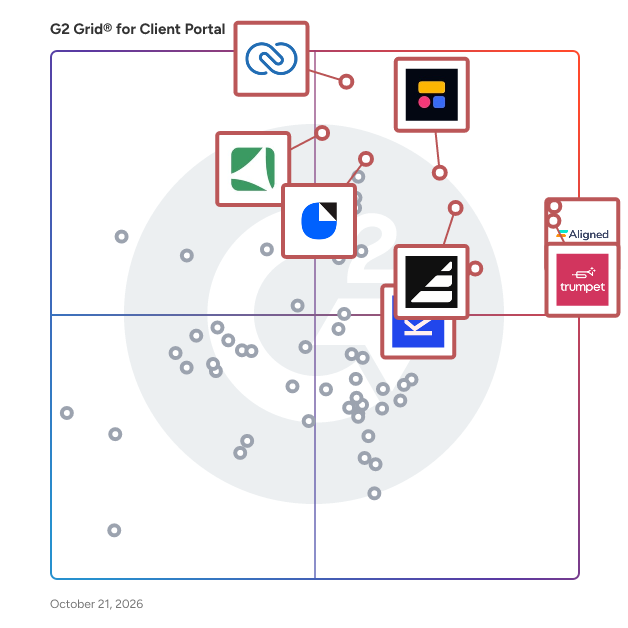

## Which Client Portal Software Is Best for Your Use Case?

- **Leader:** [trumpet](https://www.g2.com/products/trumpet/reviews)
- **Highest Performer:** [Content Snare](https://www.g2.com/products/content-snare/reviews)
- **Easiest to Use:** [Aligned](https://www.g2.com/products/teamaligned/reviews)
- **Top Trending:** [Assembly](https://www.g2.com/products/assemblysoftware/reviews)
- **Best Free Software:** [SuiteDash](https://www.g2.com/products/suitedash/reviews)


---

**Sponsored**

### Tresorit

Tresorit is a secure content collaboration platform designed to help individuals and organizations store, sync, and share sensitive information while prioritizing privacy. This comprehensive solution integrates encrypted storage, file sharing, collaboration tools, data rooms, and e-signatures into a single product family. Trusted by thousands of organizations worldwide, Tresorit is part of Swiss Post and serves as a privacy-first alternative to mainstream cloud tools, particularly for teams managing confidential files, regulated data, or client-facing work. At the heart of Tresorit is its commitment to zero-knowledge, end-to-end encryption. This means that files are encrypted on the user&#39;s device before being uploaded, and the encryption keys remain inaccessible to Tresorit itself. As a result, the platform cannot read customer content, ensuring that sensitive information remains protected even in the event of infrastructure compromise. Tresorit&#39;s cryptographic design choices are specifically intended to prevent data leakage through content matching or server-side visibility, providing users with peace of mind regarding their data security. Tresorit SecureCloud serves as an encrypted workspace that facilitates both internal collaboration and external exchanges. It supports secure file storage, syncing, and team collaboration while maintaining user-friendly workflows. The platform offers personal and business plans, with personal use functioning as an encrypted vault for sensitive documents and business use providing a secure workspace that emphasizes IT control, governance, and collaboration. This dual approach caters to a wide range of users, from individuals to large organizations. The Tresorit Drive experience allows users to access encrypted content through familiar interfaces such as Windows File Explorer and macOS Finder. This feature includes “cloud-only” access, which prevents the need to store all files locally, thus enhancing efficiency while maintaining centralized control. Administrators have the capability to take action if a device is lost or compromised, such as revoking access and unlinking the device to mitigate risks. For secure external sharing, Tresorit FileSharing offers robust access control features. Users can protect sharing links with expiration rules, passwords, watermarks, and restrictions on downloading or printing, all while benefiting from detailed activity tracking and auditing. Additionally, Tresorit integrates seamlessly into email workflows like Outlook and Gmail, helping to minimize the risks associated with sending sensitive attachments. For structured client collaboration, Tresorit Engage provides customizable, encrypted data rooms that support ongoing projects, role-based access control, and granular permissions, making it particularly useful for industries such as legal, finance, and consulting. Tresorit also enhances its offerings with Tresorit eSign, which combines document signing with encrypted file handling, supporting EU-qualified electronic signatures for high-trust workflows. Tresorit Email Encryption allows users to send encrypted emails directly from Outlook, ensuring secure communication without imposing complex setups on recipients. On the compliance front, Tresorit boasts strong security validation and certifications, including ISO 27001:2022 and Common Criteria EAL4+, while also supporting compliance with frameworks like GDPR and HIPAA. With data residency options across multiple regions, organizations can align their storage locations with legal and governance requirements, further solidifying Tresorit&#39;s position as a trusted solution for secure content collaboration.


[Visit website](https://www.g2.com/external_clickthroughs/record?secure%5Bad_program%5D=ppc&amp;secure%5Bad_slot%5D=category_product_list&amp;secure%5Bcategory_id%5D=2232&amp;secure%5Bdisplayable_resource_id%5D=2232&amp;secure%5Bdisplayable_resource_type%5D=Category&amp;secure%5Bmedium%5D=sponsored&amp;secure%5Bplacement_reason%5D=page_category&amp;secure%5Bplacement_resource_ids%5D%5B%5D=2232&amp;secure%5Bprioritized%5D=false&amp;secure%5Bproduct_id%5D=20629&amp;secure%5Bresource_id%5D=2232&amp;secure%5Bresource_type%5D=Category&amp;secure%5Bsource_type%5D=category_page&amp;secure%5Bsource_url%5D=https%3A%2F%2Fwww.g2.com%2Fcategories%2Fclient-portal%3Fpage%3D11&amp;secure%5Btoken%5D=fc582856b94c0de825f1c4ce16b06c9e2cc491786c046be79f759376aa497c2d&amp;secure%5Burl%5D=https%3A%2F%2Ftresorit.com&amp;secure%5Burl_type%5D=company_website)

---

## What Are the Top-Rated Client Portal Software Products in 2026?
### 1. [trumpet](https://www.g2.com/products/trumpet/reviews)
Trumpet is the Intelligent GTM Layer, an AI-powered workspace that connects your entire revenue journey. At its core are Digital Sales Rooms, the central hub where your content lives, collaboration happens, and intelligence flows back into your deals. In one connected workspace, revenue teams can centralise sales content, video recordings, mutual action plans, proposals, forms, and e-signatures, all powered by real-time buyer insights and AI recommendations. Move deals faster and create standout buyer experiences by keeping every seller, customer, and stakeholder aligned from first touch to renewal. Why teams choose trumpet? ↳ Smart Enablement Surface the content that wins deals — personalised to each stage, persona, and buyer. ↳ Unified Collaboration Bring buyers and sellers together in one interactive Digital Sales Room that keeps conversations, actions and materials aligned. ↳ Actionable Intelligence Turn engagement signals into deal health, intent, and AI-guided next steps. ↳ Scalable Consistency Templates and AI workflows standardise best practices across every team. ↳ Connected Stack Seamlessly integrate with your CRM and surrounding tools to create one flow from lead to renewal. Trusted by leading revenue teams including → Gong, Cognism, Personio, TestGorilla, HubSpot, Stripe and Miro “Trumpet creates a data-driven, personalised and engaging sales process leading to higher conversion rates and faster deal cycles.” — Lesley Ronaldson, VP EMEA, Gong “We’ve eliminated chaotic follow-ups and are collaborating with our buyers. It’s boosted win rates and given me visibility across all deals.” — Koen Stam, Head of Benelux, Personio “We now see exactly what a buyer is engaging with. It’s helped my team close faster and stay in control of deals — even asynchronously.” — Isa Sher, Sales Manager, Cognism Trumpet = [Enablement + Collaboration + Intelligence] powered by Digital Sales Rooms → Faster revenue, stronger relationships.


**Average Rating:** 4.7/5.0
**Total Reviews:** 1,207
**How Do G2 Users Rate trumpet?**

- **Has the product been a good partner in doing business?:** 9.5/10 (Category avg: 9.4/10)
- **Billing and Invoicing:** 7.4/10 (Category avg: 8.1/10)
- **Versioning:** 8.3/10 (Category avg: 8.1/10)
- **Feedback:** 8.9/10 (Category avg: 8.5/10)

**Who Is the Company Behind trumpet?**

- **Seller:** [trumpet](https://www.g2.com/sellers/trumpet)
- **Company Website:** https://www.sendtrumpet.com/
- **Year Founded:** 2021
- **HQ Location:** London, GB
- **LinkedIn® Page:** https://www.linkedin.com/company/sendtrumpet/ (72 employees on LinkedIn®)

**Who Uses This Product?**
- **Who Uses This:** Account Executive, Senior Account Executive
- **Top Industries:** Computer Software, Information Technology and Services
- **Company Size:** 47% Mid-Market, 30% Small-Business


#### What Are trumpet's Pros and Cons?

**Pros:**

- Ease of Use (426 reviews)
- Customer Support (182 reviews)
- Time-saving (170 reviews)
- Engagement Tracking (150 reviews)
- Centralization (147 reviews)

**Cons:**

- Learning Curve (66 reviews)
- Missing Features (54 reviews)
- Limited Features (51 reviews)
- Layout Issues (42 reviews)
- Steep Learning Curve (36 reviews)


### What Do G2 Reviewers Say About trumpet?
*AI-generated summary from verified user reviews*

**Pros:**

- Users appreciate the **ease of use** of Trumpet, finding it enjoyable and efficient for creating proposals.
- Users praise the **outstanding customer support** of Trumpet, highlighting quick answers and helpful training resources.
- Users value the **time-saving features** of Trumpet, streamlining processes for sales and partnerships effortlessly.
- Users appreciate the **engagement tracking** in Trumpet, enhancing visibility into buyer intent and improving proposal interactions.
- Users favor the **centralized organization** of Trumpet, which enhances workflow and simplifies information management.

**Cons:**

- Users find the **learning curve challenging** initially, but it becomes intuitive after training and practice.
- Users highlight **missing features** in Trumpet, such as limited integrations and insufficient analytics capabilities hindering efficiency.
- Users find **limited features** frustrating, especially with clunky editing and inability to customize widgets easily.
- Users report **layout issues** in Trumpet, notably with the chat box being hard to navigate and limited in functionality.
- Users find the **steep learning curve** challenging at first, but appreciate the ease after setup with templates.

#### What Are Recent G2 Reviews of trumpet?

**"[Creating an easier sales process](https://www.g2.com/survey_responses/trumpet-review-13043108)"**

**Rating:** 4.0/5.0 stars
*— Jonny A.*

[Read full review](https://www.g2.com/survey_responses/trumpet-review-13043108)

---

**"[Trumpet’s Digital Sales Rooms and Analytics Are a Game-Changer for Renewals](https://www.g2.com/survey_responses/trumpet-review-13043063)"**

**Rating:** 5.0/5.0 stars
*— Patsy K.*

[Read full review](https://www.g2.com/survey_responses/trumpet-review-13043063)

---


### 2. [Aligned](https://www.g2.com/products/teamaligned/reviews)
Aligned is the buyer-facing AI Deal Workspace where revenue teams run deals in one shared link. Aligned brings structure to the messy space between your CRM and your buyer, where most deals actually win or stall: stakeholder complexity, unclear next steps, champions selling internally, and decisions happening asynchronously across emails, decks, threads, and scattered tools. CRMs record what happened. Aligned is the system of action that helps teams execute what needs to happen next, together with the buyer. Used by Account Executives, Sales Leaders, Enablement, RevOps, and Customer Success teams, Aligned combines a Digital Sales Room and Client Portal into a single workspace that supports the full revenue lifecycle, from pipeline creation to onboarding and expansion. Teams consolidate all buyer and customer materials, plans, and communications in one place, with visibility and control over the deal narrative. With the AI Deal Workspace, Aligned goes beyond organizing content. AI works inside the workflow with full deal context to keep execution moving forward: \* Auto-builds deal resources after every call, including an executive summary, requested content, and action items, with no prompts or setup \* Reads signals across calls, email, CRM, and workspace engagement to flag risk, surface what changed, and recommend the next best move \* Maps stakeholders automatically to uncover hidden influencers, track buying signals, and guide multithreading \* Generates and maintains key deal assets like business cases, mutual action plans, recap pages, and follow-up emails for review and send \* Gives buyers AI inside the workspace to summarize content, answer security and compliance questions, and progress decisions asynchronously, all in one link with no login under the seller’s control By replacing traditional workflows like email threads, spreadsheets, attachments, and disconnected links, Aligned reduces buyer friction, improves alignment across the buying committee, equips champions, and creates more predictable execution for complex B2B deals. Key capabilities include: \* Digital Sales Rooms for proposals, decks, demo recordings, stakeholder content, and mutual action plans \* Buyer engagement signals across stakeholders to guide follow-up and prioritize execution \* Shared onboarding and customer workspaces to streamline implementation and reduce time-to-value \* Client Portal-style collaboration for ongoing customer management, expansions, and renewals Aligned is used by 50,000+ sales and customer success teams, with 1M+ buyers collaborating in workspaces every month, and is recognized by G2 as a category leader.


**Average Rating:** 4.7/5.0
**Total Reviews:** 1,172
**How Do G2 Users Rate Aligned?**

- **Has the product been a good partner in doing business?:** 9.2/10 (Category avg: 9.4/10)
- **Billing and Invoicing:** 7.2/10 (Category avg: 8.1/10)
- **Versioning:** 8.3/10 (Category avg: 8.1/10)
- **Feedback:** 8.7/10 (Category avg: 8.5/10)

**Who Is the Company Behind Aligned?**

- **Seller:** [Aligned](https://www.g2.com/sellers/aligned-a2fce055-0d38-4926-9b33-4576c5960995)
- **Company Website:** https://alignedup.com
- **Year Founded:** 2021
- **HQ Location:** Tel Aviv
- **Twitter:** @Aligned_up (5 Twitter followers)
- **LinkedIn® Page:** https://www.linkedin.com/company/alignedup (72 employees on LinkedIn®)

**Who Uses This Product?**
- **Who Uses This:** Account Executive, Enterprise Account Executive
- **Top Industries:** Computer Software, Information Technology and Services
- **Company Size:** 47% Mid-Market, 45% Small-Business


#### What Are Aligned's Pros and Cons?

**Pros:**

- Ease of Use (446 reviews)
- Centralization (216 reviews)
- Team Collaboration (202 reviews)
- Efficiency (196 reviews)
- Organization (188 reviews)

**Cons:**

- Limited Customization (80 reviews)
- Missing Features (75 reviews)
- Learning Curve (74 reviews)
- Integration Issues (65 reviews)
- Limited Features (65 reviews)


### What Do G2 Reviewers Say About Aligned?
*AI-generated summary from verified user reviews*

**Pros:**

- Users appreciate the **ease of use** of Aligned, finding it simple to navigate and implement for client engagement.
- Users value the **centralization of client communication and deliverables** , enhancing organization and streamlining the engagement process.
- Users praise **team collaboration features** of Aligned, highlighting its ease of use and organized client communication.
- Users value the **efficiency** of Aligned, enhancing organization and productivity while streamlining communication and decision-making.
- Users value the **superior organization** offered by Aligned, enhancing deal leverage and streamlining the buying experience.

**Cons:**

- Users note a **lack of customization** in Aligned, limiting personalization and flexibility in features like org charts.
- Users report **missing features** like limited customization, basic reports, and inadequate proposal designs, impacting overall satisfaction.
- Users find the **learning curve steep** initially, requiring time and guidance to fully leverage Aligned&#39;s capabilities.
- Users encounter **integration issues** with Aligned, particularly with Salesforce and CRM connections causing frustration.
- Users find the **limited features** of Aligned disappointing, lacking essential tools and requiring expensive upgrades for usability.

#### What Are Recent G2 Reviews of Aligned?

**"[Cohesive Customer Experiences and Powerful Engagement Tracking for Complex Sales Cycles](https://www.g2.com/survey_responses/aligned-review-12678609)"**

**Rating:** 5.0/5.0 stars
*— Will M.*

[Read full review](https://www.g2.com/survey_responses/aligned-review-12678609)

---

**"[Creates a Straight Forwards Sales Room for Prospects](https://www.g2.com/survey_responses/aligned-review-12663931)"**

**Rating:** 4.0/5.0 stars
*— Aaron B.*

[Read full review](https://www.g2.com/survey_responses/aligned-review-12663931)

---


### 3. [Zoho CRM](https://www.g2.com/products/zoho-crm/reviews)
Zoho CRM is a cloud-based 360° customer relationship management tool that caters to business needs of mid-scale businesses to large-scale enterprises. Key features include contact management, sales funnels, pipeline management, workflow automation, AI-powered conversational assistant, task management, managing marketing campaigns, sales forecasting, customer support &amp; service, inventory management, reporting &amp; analytics, and seamlessly integrating with 500+ popular business apps in a single business system.


**Average Rating:** 4.1/5.0
**Total Reviews:** 2,827
**How Do G2 Users Rate Zoho CRM?**

- **Has the product been a good partner in doing business?:** 8.0/10 (Category avg: 9.4/10)
- **Billing and Invoicing:** 8.8/10 (Category avg: 8.1/10)
- **Versioning:** 8.6/10 (Category avg: 8.1/10)
- **Feedback:** 8.6/10 (Category avg: 8.5/10)

**Who Is the Company Behind Zoho CRM?**

- **Seller:** [Zoho](https://www.g2.com/sellers/zoho-b00ca9d5-bca8-41b5-a8ad-275480841704)
- **Year Founded:** 1996
- **HQ Location:** Austin, TX
- **Twitter:** @Zoho (137,880 Twitter followers)
- **LinkedIn® Page:** https://www.linkedin.com/company/38373/ (30,766 employees on LinkedIn®)
- **Phone:** +1 (888) 900-9646 

**Who Uses This Product?**
- **Who Uses This:** Owner, CEO
- **Top Industries:** Information Technology and Services, Computer Software
- **Company Size:** 62% Small-Business, 33% Mid-Market


#### What Are Zoho CRM's Pros and Cons?

**Pros:**

- Ease of Use (261 reviews)
- Features (169 reviews)
- Integrations (137 reviews)
- Easy Integrations (113 reviews)
- Lead Management (113 reviews)

**Cons:**

- Learning Curve (112 reviews)
- Integration Issues (71 reviews)
- Limited Features (71 reviews)
- Complexity (68 reviews)
- Poor Customer Support (64 reviews)


### What Do G2 Reviewers Say About Zoho CRM?
*AI-generated summary from verified user reviews*

**Pros:**

- Users laud the **ease of use** of Zoho CRM, appreciating its intuitive interface and smooth workflow management.
- Users value the **powerful AI features** of Zoho CRM, enhancing sales, marketing, and customer support efficiency.
- Users value the **seamless integration** of Zoho CRM, enhancing workflow across marketing and sales processes.
- Users value the **easy integrations** with Zoho CRM, enhancing workflow efficiency and simplifying overall management.
- Users highlight the **seamless lead management** in Zoho CRM, enhancing workflows and integrations for better efficiency.

**Cons:**

- Users experience a **steep learning curve** with Zoho CRM, struggling to master its more advanced features initially.
- Users find the **integration issues** with Zoho CRM frustrating, limiting automation and usability across systems.
- Users find the **limited features** of Zoho CRM restrict their ability to fully utilize the system&#39;s potential.
- Users find the **complexity** of Zoho CRM challenging, especially for first-time users without prior CRM experience.
- Users experience **poor customer support** with Zoho CRM, often facing slow responses and frustration during integration issues.

#### What Are Recent G2 Reviews of Zoho CRM?

**"[User-Friendly, Feature-Rich CRM That Streamlines Work and Boosts Productivity](https://www.g2.com/survey_responses/zoho-crm-review-12762599)"**

**Rating:** 5.0/5.0 stars
*— Suraj B.*

[Read full review](https://www.g2.com/survey_responses/zoho-crm-review-12762599)

---

**"[Intuitive and Feature-Rich CRM](https://www.g2.com/survey_responses/zoho-crm-review-12765202)"**

**Rating:** 5.0/5.0 stars
*— Kristina Y.*

[Read full review](https://www.g2.com/survey_responses/zoho-crm-review-12765202)

---


#### What Are G2 Users Discussing About Zoho CRM?

- [What are the key strengths of Zoho CRM in managing customer relationships compared to other CRM platforms?](https://www.g2.com/discussions/zoho-crm-what-are-the-key-strengths-of-zoho-crm-in-managing-customer-relationships-compared-to-other-crm-platf) - 3 comments, 1 upvote
- [What are the key strengths of Zoho CRM in managing customer relationships compared to other CRM platforms?](https://www.g2.com/discussions/what-are-the-key-strengths-of-zoho-crm-in-managing-customer-relationships-compared-to-other-crm-platforms) - 3 comments
- [What is Zoho CRM used for?](https://www.g2.com/discussions/zoho-crm-what-is-zoho-crm-used-for) - 2 comments, 2 upvotes
- [Is Zoho CRM really free?](https://www.g2.com/discussions/is-zoho-crm-really-free) - 4 comments, 5 upvotes
- [What are the features of CRM software?](https://www.g2.com/discussions/zoho-crm-what-are-the-features-of-crm-software) - 2 comments, 1 upvote

### 4. [Softr](https://www.g2.com/products/softr/reviews)
Softr is the leading AI platform for building business software — including apps, databases, workflow automation, and forms — without code. Most teams are held back by fragmented systems: work is scattered across spreadsheets, docs, messages, and tools that don&#39;t connect. Softr replaces that fragmentation with a single platform for building software tailored to your exact workflows and business logic — without waiting on developers, IT, or outside help. Start with the AI app builder, then switch to visual editing anytime. Add features, adjust logic, and make changes yourself as your business evolves. No technical overhead, no tickets, no waiting. With Softr, you can build client portals, internal tools, CRMs, project trackers, dashboards, employee intranets, inventory management systems, partner portals, ERP systems, lead capture forms, and more. Key features: - All-in-one platform: Build and connect apps, databases, workflow automation, and forms in a single platform, without having to switch between tools. - Native databases and 17+ data source integrations: Store and manage data in Softr Databases, or sync in real time with external sources, including Airtable, HubSpot, Notion, monday.com, Coda, ClickUp, Google Sheets, SQL data sources, and more. - Production-ready infrastructure: User management, hosting, and security are built in from day one, making your apps ready to deploy securely. - AI-powered building: Describe what you need in plain language and get a working app, then customize visually without writing code. - Custom user groups and granular permissions: Control exactly who can see, access, and edit what across your apps. - Built to scale: Add features, make changes, and grow your software as your business evolves, all without technical debt or developer dependencies. Softr is used by operations, HR, finance, sales, customer success, and business teams at organizations of all sizes, as well as agencies and consultants who need professional, branded software without hiring a developer. Trusted by 1M+ organizations worldwide, from Fortune 500s to fast-growing startups.


**Average Rating:** 4.7/5.0
**Total Reviews:** 692
**How Do G2 Users Rate Softr?**

- **Has the product been a good partner in doing business?:** 9.2/10 (Category avg: 9.4/10)
- **Billing and Invoicing:** 7.9/10 (Category avg: 8.1/10)
- **Versioning:** 7.5/10 (Category avg: 8.1/10)
- **Feedback:** 8.3/10 (Category avg: 8.5/10)

**Who Is the Company Behind Softr?**

- **Seller:** [Softr](https://www.g2.com/sellers/softr)
- **Company Website:** https://softr.io/
- **Year Founded:** 2020
- **HQ Location:** Berlin, DE
- **Twitter:** @softr_io (15,629 Twitter followers)
- **LinkedIn® Page:** https://www.linkedin.com/company/softr/ (77 employees on LinkedIn®)

**Who Uses This Product?**
- **Who Uses This:** Founder, CEO
- **Top Industries:** Computer Software, Consulting
- **Company Size:** 87% Small-Business, 7% Mid-Market


#### What Are Softr's Pros and Cons?

**Pros:**

- Ease of Use (169 reviews)
- Customer Support (110 reviews)
- Easy Setup (96 reviews)
- Integrations (85 reviews)
- Easy Integration (83 reviews)

**Cons:**

- Limited Customization (75 reviews)
- Missing Features (67 reviews)
- Limited Features (64 reviews)
- Limitations (31 reviews)
- Expensive (30 reviews)


### What Do G2 Reviewers Say About Softr?
*AI-generated summary from verified user reviews*

**Pros:**

- Users love the **ease of use** of Softr, enabling effortless project creation and seamless integration with other tools.
- Users commend Softr for its **excellent and responsive customer support** , ensuring quick resolutions and helpful updates.
- Users value the **easy setup** of Softr, allowing quick implementation and efficient use for all skill levels.
- Users value the **easy integrations** with Airtable and Monday.com, enhancing their app-building experience seamlessly.
- Users highlight the **easy integration** of Softr with various apps, enhancing their workflow seamlessly and efficiently.

**Cons:**

- Users desire more **customization options** in Softr to enhance their visual and layout experience for branding purposes.
- Users find **missing features** in Softr, like limited action buttons and lack of blogging practicality, frustrating.
- Users express concern about Softr&#39;s **limited features** , noting the absence of app store availability and frequent change disruptions.
- Users find **limitations in customization and functionality** with Softr, impacting their overall control and experience.
- Users feel that Softr&#39;s pricing is **expensive** , especially as scaling can lead to higher costs than anticipated.

#### What Are Recent G2 Reviews of Softr?

**"[Softr Helped Me Build Professional Web Apps Without Coding](https://www.g2.com/survey_responses/softr-review-13036562)"**

**Rating:** 5.0/5.0 stars
*— Kathy UGC Creator .*

[Read full review](https://www.g2.com/survey_responses/softr-review-13036562)

---

**"[Great platform for building internal and external portals](https://www.g2.com/survey_responses/softr-review-13012079)"**

**Rating:** 4.5/5.0 stars
*— Marcel M.*

[Read full review](https://www.g2.com/survey_responses/softr-review-13012079)

---


#### What Are G2 Users Discussing About Softr?

- [What is Softr used for?](https://www.g2.com/discussions/what-is-softr-used-for)

### 5. [Assembly](https://www.g2.com/products/assemblysoftware/reviews)
Create remarkable client experiences. CRM, portal, payments, tasks, contracts &amp; more — with an AI Assistant that works for you. Assembly is the AI-powered platform for professional service firms. It replaces a patchwork of point tools with one place to run client work — so clients get a clean, branded portal for tasks, payments, messages, files, contracts, and forms, and your team runs on a simple CRM with an AI Assistant that knows full client context. The result: faster onboarding, improved retention, and happier clients. Assembly also fits the stack you already use. Embed Calendly, Airtable, and 1,000s of other products, connect Zapier/Make and webhooks, or build Custom Apps with our API so your workflow drives the software, not the other way around. Trusted by 1,000+ businesses serving 1M+ clients. SOC 2 Type II and HIPAA. Start a 14-day trial at assembly.com.


**Average Rating:** 4.7/5.0
**Total Reviews:** 316
**How Do G2 Users Rate Assembly?**

- **Has the product been a good partner in doing business?:** 9.5/10 (Category avg: 9.4/10)
- **Billing and Invoicing:** 8.5/10 (Category avg: 8.1/10)
- **Versioning:** 7.8/10 (Category avg: 8.1/10)
- **Feedback:** 8.8/10 (Category avg: 8.5/10)

**Who Is the Company Behind Assembly?**

- **Seller:** [Assembly](https://www.g2.com/sellers/assembly-a15c4322-09e3-4e56-ade0-1ad0a66d9bd1)
- **Company Website:** https://assembly.com/
- **Year Founded:** 2020
- **HQ Location:** New York, US
- **Twitter:** @copilot (60,010 Twitter followers)
- **LinkedIn® Page:** https://www.linkedin.com/company/assemblycom/ (42 employees on LinkedIn®)

**Who Uses This Product?**
- **Who Uses This:** CEO, Owner
- **Top Industries:** Marketing and Advertising, Accounting
- **Company Size:** 91% Small-Business, 4% Mid-Market


#### What Are Assembly's Pros and Cons?

**Pros:**

- Ease of Use (147 reviews)
- Easy Setup (80 reviews)
- Customer Support (75 reviews)
- Intuitive (73 reviews)
- Integrations (72 reviews)

**Cons:**

- Missing Features (96 reviews)
- Limited Features (66 reviews)
- Limited Customization (47 reviews)
- Lacking Features (44 reviews)
- Integration Issues (33 reviews)


### What Do G2 Reviewers Say About Assembly?
*AI-generated summary from verified user reviews*

**Pros:**

- Users value the **ease of use** of Assembly, which enhances client interactions and streamlines information sharing.
- Users enjoy the **easy setup** of Assembly, enabling quick implementation and seamless customer interactions without issues.
- Users appreciate the **responsive customer support** of Assembly, valuing the helpful assistance and quick solutions provided.
- Users value the **intuitive setup and easy integration** of Assembly, streamlining client management and improving productivity.
- Users love the **seamless integrations** of Assembly, enhancing workflows and centralizing client management efficiently.

**Cons:**

- Users express a need for **missing features** , hoping for improved integration and support for rich text and HTML.
- Users find the **limited features** of Assembly restrict useful integrations and hinder overall customization opportunities.
- Users desire more **customization options** for Assembly, especially for the client-facing portal and order forms.
- Users note the **lack of features** on Assembly, reminiscent of a ‘beta version’, but hope for future updates.
- Users find **integration issues** with Assembly, desiring better compatibility with other services like payment processing and Zapier.

#### What Are Recent G2 Reviews of Assembly?

**"[Custom Workflows, Forms, and Easy Client Billing in One System](https://www.g2.com/survey_responses/assembly-review-12715760)"**

**Rating:** 5.0/5.0 stars
*— John M.*

[Read full review](https://www.g2.com/survey_responses/assembly-review-12715760)

---

**"[Smooth Client Data Capture with a Stable, White-Label-Friendly UI](https://www.g2.com/survey_responses/assembly-review-13020502)"**

**Rating:** 4.5/5.0 stars
*— Verified User in Civil Engineering*

[Read full review](https://www.g2.com/survey_responses/assembly-review-13020502)

---


#### What Are G2 Users Discussing About Assembly?

- [What is the purpose and features of a portal?](https://www.g2.com/discussions/what-is-the-purpose-and-features-of-a-portal)
- [What are the functions of a portal?](https://www.g2.com/discussions/what-are-the-functions-of-a-portal) - 1 upvote
- [What are the features of customer portal?](https://www.g2.com/discussions/portal-what-are-the-features-of-customer-portal) - 1 upvote
- [What are the features of a portal?](https://www.g2.com/discussions/what-are-the-features-of-a-portal)

### 6. [Kontentino](https://www.g2.com/products/kontentino/reviews)
Kontentino is a collaborative social media tool that turns chaos into clarity - helping teams plan, approve, and schedule together effortlessly. It brings marketing teams, clients, and stakeholders into a single structured workflow — replacing scattered emails and endless feedback loops with clarity, speed, and control. Approvals without the friction Clients review and approve posts through a clean interface. No login required. Fewer misunderstandings, faster sign-offs, stronger relationships. Real collaboration, in real time Copywriters, designers, managers, and clients work together in one place. No version confusion, no lost feedback threads. Multi-brand, multi-channel clarity Manage dozens of brands and profiles from one calendar. Always know what&#39;s scheduled, what needs approval, and what&#39;s going live next. Publish and measure, all in one place Autopublish to Facebook, Instagram, LinkedIn, TikTok, and more. Then track performance with visual reports that actually make sense. AI that works the way you do Smart AI features for content creation and localization - built into your workflow, not bolted on. Backed by real human support when you need it. Support from real people, fast When you need help, a real person responds. Quickly. Kontentino support team knows the product and social media landscape, and always aims to solves problems. Built for agencies managing multiple clients, and in-house teams who can&#39;t afford messy processes. Kontentino scales with you — from a handful of profiles to a full portfolio.


**Average Rating:** 4.6/5.0
**Total Reviews:** 362
**How Do G2 Users Rate Kontentino?**

- **Has the product been a good partner in doing business?:** 9.4/10 (Category avg: 9.4/10)

**Who Is the Company Behind Kontentino?**

- **Seller:** [Kontentino](https://www.g2.com/sellers/kontentino)
- **Company Website:** https://www.kontentino.com
- **Year Founded:** 2014
- **HQ Location:** Bratislava, Slovakia
- **Twitter:** @Kontentino (582 Twitter followers)
- **LinkedIn® Page:** https://www.linkedin.com/company/10633766/ (32 employees on LinkedIn®)

**Who Uses This Product?**
- **Who Uses This:** Social Media Manager, CEO
- **Top Industries:** Marketing and Advertising, Computer Software
- **Company Size:** 69% Small-Business, 17% Mid-Market


#### What Are Kontentino's Pros and Cons?

**Pros:**

- Ease of Use (27 reviews)
- Customer Service (14 reviews)
- Calendar View (12 reviews)
- Content Creation (11 reviews)
- Post Scheduling (11 reviews)

**Cons:**

- High Pricing (5 reviews)
- Performance Issues (5 reviews)
- Scheduling Issues (5 reviews)
- Lack of Analytics (4 reviews)
- Social Media Limitations (4 reviews)


### What Do G2 Reviewers Say About Kontentino?
*AI-generated summary from verified user reviews*

**Pros:**

- Users value the **ease of use** of Kontentino, enhancing efficiency in managing multiple social media profiles effortlessly.
- Users praise Kontentino&#39;s **responsive and friendly customer service** , which enhances the overall experience and support.
- Users love the **calendar view** of Kontentino for its clarity and streamlined scheduling, enhancing team collaboration.
- Users appreciate the **effective content creation tools** of Kontentino, streamlining collaboration and enhancing productivity for teams.
- Users value the **Post Scheduling feature** of Kontentino for its efficiency and integrated content planning abilities.

**Cons:**

- Users find Kontentino&#39;s pricing to be **a bit expensive** , especially compared to its competitors in the market.
- Users experience **performance issues** with slow loading times and difficulties in publishing posts across multiple accounts.
- Users find **scheduling issues** with Kontentino frustrating, especially the inability to schedule TikTok and upload PDFs.
- Users find the **lack of advanced analytics** in Kontentino limits their ability to interpret and utilize data effectively.
- Users find the **analytics functionality lacking** and face annoying login requirements for publishing content.

#### What Are Recent G2 Reviews of Kontentino?

**"[Easy to use, great support, and an excellent workflow for social media agencies](https://www.g2.com/survey_responses/kontentino-review-12856165)"**

**Rating:** 4.0/5.0 stars
*— Thirsa d.*

[Read full review](https://www.g2.com/survey_responses/kontentino-review-12856165)

---

**"[Makes Social Media Management Much Easier to Handle](https://www.g2.com/survey_responses/kontentino-review-12957750)"**

**Rating:** 5.0/5.0 stars
*— Ishan S.*

[Read full review](https://www.g2.com/survey_responses/kontentino-review-12957750)

---


### 7. [DocSend](https://www.g2.com/products/dropbox-docsend/reviews)
Dropbox DocSend helps business professionals like you to securely share and control the content that drives your business forward. Dropbox DocSend&#39;s powerful link-based system makes it easy to set security preferences for each stakeholder, receive notifications each time someone views your file, analyze content performance on a page-by-page basis, and create modern virtual deal rooms. With DocSend, business can offload administrative burdens and securely share the most impactful proprietary information faster. DocSend’s Virtual Data Rooms manage sensitive documents securely and gets team real-time deal insights, simplying the entire deal process from initial pitch to final signature. Join over 34,000 companies that rely on Dropbox DocSend to share and manage sensitive information.


**Average Rating:** 4.6/5.0
**Total Reviews:** 559
**How Do G2 Users Rate DocSend?**

- **Has the product been a good partner in doing business?:** 8.8/10 (Category avg: 9.4/10)
- **Billing and Invoicing:** 6.1/10 (Category avg: 8.1/10)
- **Versioning:** 8.6/10 (Category avg: 8.1/10)
- **Feedback:** 6.7/10 (Category avg: 8.5/10)

**Who Is the Company Behind DocSend?**

- **Seller:** [Dropbox](https://www.g2.com/sellers/dropbox)
- **Year Founded:** 2007
- **HQ Location:** San Francisco, California
- **Twitter:** @Dropbox (3,279,477 Twitter followers)
- **LinkedIn® Page:** https://www.linkedin.com/company/167251/ (4,149 employees on LinkedIn®)
- **Ownership:** NASDAQ: DBX

**Who Uses This Product?**
- **Who Uses This:** CEO, Founder
- **Top Industries:** Computer Software, Information Technology and Services
- **Company Size:** 76% Small-Business, 21% Mid-Market


#### What Are DocSend's Pros and Cons?

**Pros:**

- Ease of Use (53 reviews)
- Document Management (45 reviews)
- Features (37 reviews)
- Tracking Features (35 reviews)
- Security (32 reviews)

**Cons:**

- Expensive (17 reviews)
- App Functionality (10 reviews)
- Lacking Features (10 reviews)
- Limited Features (9 reviews)
- Limitations (8 reviews)


### What Do G2 Reviewers Say About DocSend?
*AI-generated summary from verified user reviews*

**Pros:**

- Users praise the **ease of use** of DocSend, highlighting its straightforward setup and efficient document management.
- Users value the **powerful and secure document sharing** capabilities of DocSend, enhancing their workflow and client engagement.
- Users appreciate the **real-time analytics** of DocSend, providing valuable insights for effective follow-ups and document control.
- Users appreciate the **real-time tracking features** of DocSend, allowing insights into document engagement and audience interest.
- Users commend the **secure and reliable document sharing** of DocSend, which enhances control and professionalism in communications.

**Cons:**

- Users find DocSend to be **expensive** , especially for startups due to high pricing and limited capabilities.
- Users are frustrated by the **poor connectivity and limited functionality** of DocSend, impacting their overall experience.
- Users are frustrated by **lacking features** , particularly limitations on connectivity and high costs for essential upgrades.
- Users find DocSend&#39;s **limited features** unworthy of the high cost, especially without a startup program.
- Users face **limitations** with advanced features locked behind higher tiers, slow loading, and a less intuitive mobile experience.

#### What Are Recent G2 Reviews of DocSend?

**"[Effortless Controlled Document Sharing with One Always-Up-to-Date Link](https://www.g2.com/survey_responses/docsend-review-12503276)"**

**Rating:** 4.0/5.0 stars
*— Vikram A.*

[Read full review](https://www.g2.com/survey_responses/docsend-review-12503276)

---

**"[Easy Onboarding and User-Friendly E‑Signing That Streamlines Contracts](https://www.g2.com/survey_responses/docsend-review-12740184)"**

**Rating:** 4.5/5.0 stars
*— Konjengbam  M.*

[Read full review](https://www.g2.com/survey_responses/docsend-review-12740184)

---


#### What Are G2 Users Discussing About DocSend?

- [Is DocSend safe?](https://www.g2.com/discussions/is-docsend-safe)
- [How do I use DocSend?](https://www.g2.com/discussions/how-do-i-use-docsend)
- [What is DocSend?](https://www.g2.com/discussions/what-is-docsend)

### 8. [Dock](https://www.g2.com/products/dock/reviews)
Dock is the Al revenue enablement platform built for the way people buy today. Collaborate with customers, share content, and enable reps in real time. Dock is an enablement platform for the full customer lifecycle, offering: - Digital sales rooms - Customer onboarding &amp; client portals - Content management - Learning management (courses &amp; playbooks) - AI Enablement Agent that guide reps in real time - AI Documents for generating personalized customer documents - Sales order forms &amp; CPQ - HubSpot and Salesforce CRM integrations and automations


**Average Rating:** 4.6/5.0
**Total Reviews:** 448
**How Do G2 Users Rate Dock?**

- **Has the product been a good partner in doing business?:** 9.6/10 (Category avg: 9.4/10)
- **Billing and Invoicing:** 6.9/10 (Category avg: 8.1/10)
- **Versioning:** 8.2/10 (Category avg: 8.1/10)
- **Feedback:** 8.3/10 (Category avg: 8.5/10)

**Who Is the Company Behind Dock?**

- **Seller:** [Dock](https://www.g2.com/sellers/dock)
- **Year Founded:** 2021
- **HQ Location:** San Francisco, California
- **Twitter:** @Dock_us (582 Twitter followers)
- **LinkedIn® Page:** https://www.linkedin.com/company/dock-us/ (25 employees on LinkedIn®)

**Who Uses This Product?**
- **Who Uses This:** Account Executive, Enterprise Account Executive
- **Top Industries:** Computer Software, Information Technology and Services
- **Company Size:** 36% Mid-Market, 33% Small-Business


#### What Are Dock's Pros and Cons?

**Pros:**

- Ease of Use (273 reviews)
- Setup Ease (120 reviews)
- Helpful (115 reviews)
- Easy Setup (109 reviews)
- Centralization (107 reviews)

**Cons:**

- Limited Customization (50 reviews)
- Missing Features (41 reviews)
- Missing Functionality (38 reviews)
- Integration Issues (37 reviews)
- Learning Curve (35 reviews)


### What Do G2 Reviewers Say About Dock?
*AI-generated summary from verified user reviews*

**Pros:**

- Users appreciate the **ease of use** of Dock, enjoying its seamless navigation and straightforward functionality.
- Users find the **setup ease** of Dock intuitive, enhancing their experience and increasing professionalism for presentations.
- Users appreciate the **user-friendly and shareable nature** of Dock, enhancing customer engagement and professionalism in communications.
- Users find the **easy setup** of Dock intuitive, enhancing productivity and professionalism in sharing information with prospects.
- Users value the **centralized collaboration** in Dock, enhancing customer onboarding and streamlining communication and resources.

**Cons:**

- Users find the **limited customization** options frustrating, wishing for a more intuitive and streamlined experience on Dock.
- Users find the **missing features** in Dock&#39;s content library and chat function limit their overall effectiveness.
- Users face **missing functionality** with logo updates, chat improvements, and buggy table of contents navigation.
- Users often face **integration issues** with Dock, hindering the seamless functionality of its messaging and AI features.
- Users find the **learning curve challenging** , requiring multiple attempts and tutorials to effectively set up Dock.

#### What Are Recent G2 Reviews of Dock?

**"[Customizable Templates and Easy Client Onboarding—No Account Needed](https://www.g2.com/survey_responses/dock-review-12938077)"**

**Rating:** 5.0/5.0 stars
*— Parveen K.*

[Read full review](https://www.g2.com/survey_responses/dock-review-12938077)

---

**"[Dock Modernized Our Client Collaboration with a Polished, Centralized Portal](https://www.g2.com/survey_responses/dock-review-12920837)"**

**Rating:** 5.0/5.0 stars
*— Kristy R.*

[Read full review](https://www.g2.com/survey_responses/dock-review-12920837)

---


#### What Are G2 Users Discussing About Dock?

- [What do you like most about Dock for documentation management, and what improvements would you suggest?](https://www.g2.com/discussions/what-do-you-like-most-about-dock-for-documentation-management-and-what-improvements-would-you-suggest)
- [What is Dock used for?](https://www.g2.com/discussions/what-is-dock-used-for)

### 9. [TaxDome](https://www.g2.com/products/taxdome/reviews)
Winner of the Comprehensive Firm Workflow Solutions category in the 2024 CPA Practice Advisor Readers’ Choice Awards, TaxDome is the leading practice management platform for tax, bookkeeping and full-service accounting firms. Trusted by more than 10,000 firms to communicate with more than 3 million of their clients, TaxDome focuses not just on firm operations, but on elevating the client experience. The TaxDome client mobile app consistently rates in the top 100 of the iOS app store Finance category and has a 4.9/5 rating across 6,000+ ratings. TaxDome’s user-friendly and comprehensive practice management platform improves team collaboration, provides managers with visibility, and enables tax preparers and bookkeepers to accomplish their work faster and more effectively. The product suite includes workflow automation, CRM, secure document storage, client engagement tools, AI-reporting and analytics, proposals, engagement letters, e-signatures and more. Accessible from desktop and mobile, TaxDome is the complete solution for any firm, allowing accountants to focus on value-adding meaningful client interactions. Every client, every email, every job, every invoice, all in one shared hub for your team.


**Average Rating:** 4.7/5.0
**Total Reviews:** 699
**How Do G2 Users Rate TaxDome?**

- **Has the product been a good partner in doing business?:** 9.0/10 (Category avg: 9.4/10)
- **Billing and Invoicing:** 8.4/10 (Category avg: 8.1/10)
- **Versioning:** 7.6/10 (Category avg: 8.1/10)
- **Feedback:** 8.2/10 (Category avg: 8.5/10)

**Who Is the Company Behind TaxDome?**

- **Seller:** [TaxDome](https://www.g2.com/sellers/taxdome)
- **Year Founded:** 2017
- **HQ Location:** New York, US
- **LinkedIn® Page:** https://www.linkedin.com/company/taxdome/ (329 employees on LinkedIn®)

**Who Uses This Product?**
- **Who Uses This:** Owner, President
- **Top Industries:** Accounting, Financial Services
- **Company Size:** 99% Small-Business, 0% Mid-Market


#### What Are TaxDome's Pros and Cons?

**Pros:**

- Ease of Use (78 reviews)
- Efficiency (39 reviews)
- Client Management (37 reviews)
- Customer Support (37 reviews)
- Document Management (37 reviews)

**Cons:**

- Learning Curve (32 reviews)
- Missing Features (26 reviews)
- Difficult Learning (20 reviews)
- Time-Consuming Setup (18 reviews)
- Limited Features (17 reviews)


### What Do G2 Reviewers Say About TaxDome?
*AI-generated summary from verified user reviews*

**Pros:**

- Users appreciate the **ease of use** of TaxDome, finding it convenient and efficient for their practice operations.
- Users highlight the **efficiency** of TaxDome, transforming their operations and saving time during tax season.
- Users value the **client management features** of TaxDome, which streamline operations and enhance client interactions effectively.
- Users rave about the **responsive customer support** from TaxDome, enhancing their overall experience and workflow efficiency.
- Users appreciate the **document management** features of TaxDome, enabling organized, secure, and efficient client interactions and workflows.

**Cons:**

- Users note the **steep learning curve** with TaxDome, requiring time and effort to fully utilize its features.
- Users find **missing features** in TaxDome, including inadequate writing tools and clumsy file organization.
- Users find **difficult learning** with TaxDome, requiring additional training for effective use and navigation of features.
- Users often find the **time-consuming setup** process challenging, needing substantial effort to fully benefit from TaxDome.
- Users find the **limited features** of TaxDome, like lack of customization and poor organization, quite frustrating.

#### What Are Recent G2 Reviews of TaxDome?

**"[TaxDome Pipelines &amp; Integrations Save Us Time](https://www.g2.com/survey_responses/taxdome-review-12560172)"**

**Rating:** 4.5/5.0 stars
*— Eric J.*

[Read full review](https://www.g2.com/survey_responses/taxdome-review-12560172)

---

**"[Smooth, Customizable, and Stress-Reducing for Tax Season](https://www.g2.com/survey_responses/taxdome-review-12466074)"**

**Rating:** 5.0/5.0 stars
*— Heather  B.*

[Read full review](https://www.g2.com/survey_responses/taxdome-review-12466074)

---


#### What Are G2 Users Discussing About TaxDome?

- [How do you use Taxdome?](https://www.g2.com/discussions/taxdome-how-do-you-use-taxdome)
- [How do you use Taxdome?](https://www.g2.com/discussions/how-do-you-use-taxdome) - 2 comments
- [Does TaxDome integrate with Drake?](https://www.g2.com/discussions/taxdome-does-taxdome-integrate-with-drake) - 1 comment
- [Does TaxDome integrate with Drake?](https://www.g2.com/discussions/does-taxdome-integrate-with-drake) - 3 comments
- [Is TaxDome cloud based?](https://www.g2.com/discussions/taxdome-is-taxdome-cloud-based) - 1 comment

### 10. [Moxo](https://www.g2.com/products/moxo-g2/reviews)
Moxo is the AI orchestration platform built for business operations teams. From manual coordination to intelligent orchestration, Moxo transforms the way organizations run complex processes. The old way relies on scattered emails and manual follow-ups; the Moxo way keeps every step clear, connected, and accountable. We put human actions and decisions at the center of workflows, while AI and automation clear the manual work behind the scenes. By connecting people, systems, and AI, Moxo drives the right actions, from the right people, at the right time —whether it’s client onboarding, multi-party approvals, or ongoing account management. Business teams can eliminate bottlenecks, reduce drop-offs, and keep critical milestones moving forward. Trusted by leading global enterprises across financial services, consulting, legal, and healthcare, Moxo is the smarter way to orchestrate mission-critical workflows with confidence.


**Average Rating:** 4.5/5.0
**Total Reviews:** 192
**How Do G2 Users Rate Moxo?**

- **Has the product been a good partner in doing business?:** 9.5/10 (Category avg: 9.4/10)
- **Billing and Invoicing:** 7.8/10 (Category avg: 8.1/10)
- **Versioning:** 8.5/10 (Category avg: 8.1/10)
- **Feedback:** 8.8/10 (Category avg: 8.5/10)

**Who Is the Company Behind Moxo?**

- **Seller:** [Moxo](https://www.g2.com/sellers/moxo)
- **Company Website:** https://www.moxo.com
- **Year Founded:** 2012
- **HQ Location:** Cupertino, CA
- **Twitter:** @PoweredByMoxo (10,432 Twitter followers)
- **LinkedIn® Page:** https://www.linkedin.com/company/2858507/ (232 employees on LinkedIn®)

**Who Uses This Product?**
- **Who Uses This:** Director, CEO
- **Top Industries:** Financial Services, Marketing and Advertising
- **Company Size:** 80% Small-Business, 18% Mid-Market


#### What Are Moxo's Pros and Cons?

**Pros:**

- Ease of Use (76 reviews)
- Customer Support (68 reviews)
- Team Collaboration (39 reviews)
- Helpful (35 reviews)
- Communication (30 reviews)

**Cons:**

- Missing Features (39 reviews)
- Limited Features (28 reviews)
- Lacking Features (22 reviews)
- Limited Customization (22 reviews)
- Integration Issues (14 reviews)


### What Do G2 Reviewers Say About Moxo?
*AI-generated summary from verified user reviews*

**Pros:**

- Users love the **ease of use** of Moxo, appreciating its user-friendly interface and efficient functionality for their needs.
- Users commend Moxo&#39;s **outstanding customer support** , which enhances their experience through dedicated assistance and responsiveness.
- Users value the **ease of task creation and assignment** in Moxo, enhancing team collaboration and communication.
- Users applaud Moxo for its **helpful support team** that provides quick, knowledgeable assistance and enhances overall experience.
- Users value the **seamless communication** in Moxo, enhancing collaboration and efficiency in client interactions.

**Cons:**

- Users note a **lack of essential features** in Moxo, such as client portal simulation and advanced notifications.
- Users find the **limited features** of Moxo lacking, particularly in client simulation and notification control.
- Users note a **lack of key features** , such as client portal simulation and improved calendar integrations, impacting functionality.
- Users feel the **limited customization** options in Moxo hinder their ability to tailor the product to their needs.
- Users experience **integration issues** with Moxo, noting challenges in calendar syncing and limited automation options.

#### What Are Recent G2 Reviews of Moxo?

**"[Mass Inbound’s Review of Moxo](https://www.g2.com/survey_responses/moxo-review-11776761)"**

**Rating:** 5.0/5.0 stars
*— Dillon L.*

[Read full review](https://www.g2.com/survey_responses/moxo-review-11776761)

---

**"[Productivity enhancer and time saver!](https://www.g2.com/survey_responses/moxo-review-11687484)"**

**Rating:** 5.0/5.0 stars
*— Matt H.*

[Read full review](https://www.g2.com/survey_responses/moxo-review-11687484)

---


#### What Are G2 Users Discussing About Moxo?

- [What does Moxtra do?](https://www.g2.com/discussions/what-does-moxtra-do)
- [What is the use of Moxtra?](https://www.g2.com/discussions/what-is-the-use-of-moxtra)
- [Is Moxtra open source?](https://www.g2.com/discussions/is-moxtra-open-source)
- [Is Moxtra the same as zoom?](https://www.g2.com/discussions/is-moxtra-the-same-as-zoom)

### 11. [Planhat](https://www.g2.com/products/planhat/reviews)
Planhat is a customer platform that provides software and services to help organizations grow lifelong customers. Our platform powers sales, service and customer success products that scale with our customers’ needs all the way from startup to household name and beyond. Each day worldwide, over 2.6 million customers are attracted, engaged and delighted with our intuitive yet flexible system of action. The Planhat platform empowers everyone in your organization to consolidate, analyze and act on all your data, becoming more customer-centric and data-driven than ever before. From rolling out autonomous transport systems to distributing new medicines, we’re proud to help make our customers better at what they do best. Alongside our customers, we’re building at the forefront of healthcare &amp; life sciences, finance, connected business, and more. And we need curious, daring minds to help us.


**Average Rating:** 4.5/5.0
**Total Reviews:** 926
**How Do G2 Users Rate Planhat?**

- **Has the product been a good partner in doing business?:** 9.3/10 (Category avg: 9.4/10)
- **Billing and Invoicing:** 6.5/10 (Category avg: 8.1/10)
- **Versioning:** 6.8/10 (Category avg: 8.1/10)
- **Feedback:** 7.1/10 (Category avg: 8.5/10)

**Who Is the Company Behind Planhat?**

- **Seller:** [Planhat](https://www.g2.com/sellers/planhat)
- **Company Website:** https://www.planhat.com
- **Year Founded:** 2015
- **HQ Location:** Stockholm, Stockholm County
- **Twitter:** @planhat (1,045 Twitter followers)
- **LinkedIn® Page:** https://www.linkedin.com/company/10168756/ (232 employees on LinkedIn®)

**Who Uses This Product?**
- **Who Uses This:** Customer Success Manager, Head of Customer Success
- **Top Industries:** Computer Software, Information Technology and Services
- **Company Size:** 59% Mid-Market, 32% Small-Business


#### What Are Planhat's Pros and Cons?

**Pros:**

- Ease of Use (172 reviews)
- Customer Support (122 reviews)
- Customization (88 reviews)
- Automation (83 reviews)
- Efficiency (82 reviews)

**Cons:**

- Learning Curve (92 reviews)
- Complexity (63 reviews)
- Integration Issues (45 reviews)
- Steep Learning Curve (45 reviews)
- Limitations (42 reviews)


### What Do G2 Reviewers Say About Planhat?
*AI-generated summary from verified user reviews*

**Pros:**

- Users find Planhat to be **extremely easy to use** , benefiting from its intuitive interface and seamless integration.
- Users commend Planhat for its **excellent customer support** , highlighting responsiveness and technical knowledge that enhance the user experience.
- Users commend the **deep customization** options in Planhat, allowing tailored processes to suit diverse business needs.
- Users appreciate the **automation capabilities** of Planhat, which save time and enhance efficiency in managing customer workflows.
- Users appreciate the **efficiency** of Planhat, streamlining post-sales activities and significantly reducing manual work.

**Cons:**

- Users experience a **difficult learning curve** with Planhat due to complex setup and insufficient documentation.
- Users find the **complexity** of Planhat challenging, as it lacks intuitive guidance for navigating its features.
- Users report **limited integration** with customer product usage analytics, complicating data accuracy and insights.
- Users experience a **steep learning curve** with Planhat, finding it challenging to navigate and utilize effectively.
- Users note the **limitations in reporting functionality** and experience delays in customer support response times.

#### What Are Recent G2 Reviews of Planhat?

**"[A Game-Changer for CSMs with Powerful Automations](https://www.g2.com/survey_responses/planhat-review-13032622)"**

**Rating:** 4.5/5.0 stars
*— Kateryna K.*

[Read full review](https://www.g2.com/survey_responses/planhat-review-13032622)

---

**"[User-Friendly Interface with Customizable Views](https://www.g2.com/survey_responses/planhat-review-13032593)"**

**Rating:** 4.5/5.0 stars
*— Justin G.*

[Read full review](https://www.g2.com/survey_responses/planhat-review-13032593)

---


#### What Are G2 Users Discussing About Planhat?

- [What is Planhat used for?](https://www.g2.com/discussions/what-is-planhat-used-for)

### 12. [Vendasta AI Platform](https://www.g2.com/products/vendasta-ai-platform/reviews)
From agency to enterprise, the Vendasta platform is the only end-to-end management software for selling digital solutions to local businesses. Consolidate your tech stack, acquire new clients, and bill and fulfill projects—all within a single platform. Vendasta turns complex data and instructions into easy-to-manage AI employees that work across the Vendasta platform, so businesses can grow while staying focused on what they do best. Vendasta’s AI employees come pre-configured with the skills and personality to fit any business. You can easily customize them using simple language too—no coding required. Whether it’s lead capture, automating customer communication, or managing content, the AI employees have you covered.


**Average Rating:** 4.5/5.0
**Total Reviews:** 523
**How Do G2 Users Rate Vendasta AI Platform?**

- **Has the product been a good partner in doing business?:** 9.0/10 (Category avg: 9.4/10)
- **Billing and Invoicing:** 10.0/10 (Category avg: 8.1/10)
- **Versioning:** 10.0/10 (Category avg: 8.1/10)
- **Feedback:** 10.0/10 (Category avg: 8.5/10)

**Who Is the Company Behind Vendasta AI Platform?**

- **Seller:** [Vendasta](https://www.g2.com/sellers/vendasta)
- **Company Website:** https://www.vendasta.com
- **Year Founded:** 2008
- **HQ Location:** Saskatchewan
- **Twitter:** @Vendasta (3,930 Twitter followers)
- **LinkedIn® Page:** https://www.linkedin.com/company/203666/ (751 employees on LinkedIn®)

**Who Uses This Product?**
- **Who Uses This:** Owner, CEO
- **Top Industries:** Marketing and Advertising, Management Consulting
- **Company Size:** 84% Small-Business, 10% Mid-Market


#### What Are Vendasta AI Platform's Pros and Cons?

**Pros:**

- Helpful (51 reviews)
- Customer Support (41 reviews)
- Ease of Use (41 reviews)
- Features (27 reviews)
- Efficiency (24 reviews)

**Cons:**

- Learning Curve (24 reviews)
- Limited Features (18 reviews)
- Difficult Learning (16 reviews)
- Missing Features (16 reviews)
- Complexity (13 reviews)


### What Do G2 Reviewers Say About Vendasta AI Platform?
*AI-generated summary from verified user reviews*

**Pros:**

- Users value the **intuitive design** of the Vendasta AI Platform, enhancing client services and streamlining workflows effectively.
- Users commend Vendasta AI Platform for its **outstanding customer support** , highlighting responsiveness and thorough assistance from the team.
- Users find the **ease of use** of the Vendasta AI Platform to be intuitive and highly supportive for their needs.
- Users value the **comprehensive AI services** of Vendasta AI Platform, streamlining their marketing and enhancing client management.
- Users value the **efficiency** of Vendasta AI Platform, significantly saving time and enhancing business scalability daily.

**Cons:**

- Users find the **learning curve steep** , making it challenging to navigate integrations and automations effectively.
- Users find the **limited features** of Vendasta AI Platform restrictive compared to competitors, affecting usability and integration.
- Users note a **difficult learning experience** due to bugs and challenging integrations with the Vendasta AI Platform.
- Users find the **missing features** of Vendasta AI Platform frustrating, highlighting bugs and necessary improvements in the UI and project management.
- Users find the **complexity of setup and integrations** frustrating, hindering effective use of the Vendasta AI Platform.

#### What Are Recent G2 Reviews of Vendasta AI Platform?

**"[Revolutionized Our Client Marketing with Seamless AI Integration](https://www.g2.com/survey_responses/vendasta-ai-platform-review-12265277)"**

**Rating:** 5.0/5.0 stars
*— Chris H.*

[Read full review](https://www.g2.com/survey_responses/vendasta-ai-platform-review-12265277)

---

**"[Excellent Value, Easy to Use, and AI That Keeps Getting Better](https://www.g2.com/survey_responses/vendasta-ai-platform-review-12695901)"**

**Rating:** 4.5/5.0 stars
*— Zebulon W.*

[Read full review](https://www.g2.com/survey_responses/vendasta-ai-platform-review-12695901)

---


#### What Are G2 Users Discussing About Vendasta AI Platform?

- [How has CalendarHero improved your scheduling processes, and what features do you find most useful?](https://www.g2.com/discussions/how-has-calendarhero-improved-your-scheduling-processes-and-what-features-do-you-find-most-useful) - 1 comment
- [What is Vendasta used for?](https://www.g2.com/discussions/what-is-vendasta-used-for)
- [What is About.Me used for?](https://www.g2.com/discussions/what-is-about-me-used-for)
- [What is MatchCraft&#39;s AdVantage used for?](https://www.g2.com/discussions/what-is-matchcraft-s-advantage-used-for)
- [How do you automate zoom?](https://www.g2.com/discussions/calendarhero-how-do-you-automate-zoom) - 1 comment

### 13. [Tresorit](https://www.g2.com/products/tresorit/reviews)
Tresorit is a secure content collaboration platform designed to help individuals and organizations store, sync, and share sensitive information while prioritizing privacy. This comprehensive solution integrates encrypted storage, file sharing, collaboration tools, data rooms, and e-signatures into a single product family. Trusted by thousands of organizations worldwide, Tresorit is part of Swiss Post and serves as a privacy-first alternative to mainstream cloud tools, particularly for teams managing confidential files, regulated data, or client-facing work. At the heart of Tresorit is its commitment to zero-knowledge, end-to-end encryption. This means that files are encrypted on the user&#39;s device before being uploaded, and the encryption keys remain inaccessible to Tresorit itself. As a result, the platform cannot read customer content, ensuring that sensitive information remains protected even in the event of infrastructure compromise. Tresorit&#39;s cryptographic design choices are specifically intended to prevent data leakage through content matching or server-side visibility, providing users with peace of mind regarding their data security. Tresorit SecureCloud serves as an encrypted workspace that facilitates both internal collaboration and external exchanges. It supports secure file storage, syncing, and team collaboration while maintaining user-friendly workflows. The platform offers personal and business plans, with personal use functioning as an encrypted vault for sensitive documents and business use providing a secure workspace that emphasizes IT control, governance, and collaboration. This dual approach caters to a wide range of users, from individuals to large organizations. The Tresorit Drive experience allows users to access encrypted content through familiar interfaces such as Windows File Explorer and macOS Finder. This feature includes “cloud-only” access, which prevents the need to store all files locally, thus enhancing efficiency while maintaining centralized control. Administrators have the capability to take action if a device is lost or compromised, such as revoking access and unlinking the device to mitigate risks. For secure external sharing, Tresorit FileSharing offers robust access control features. Users can protect sharing links with expiration rules, passwords, watermarks, and restrictions on downloading or printing, all while benefiting from detailed activity tracking and auditing. Additionally, Tresorit integrates seamlessly into email workflows like Outlook and Gmail, helping to minimize the risks associated with sending sensitive attachments. For structured client collaboration, Tresorit Engage provides customizable, encrypted data rooms that support ongoing projects, role-based access control, and granular permissions, making it particularly useful for industries such as legal, finance, and consulting. Tresorit also enhances its offerings with Tresorit eSign, which combines document signing with encrypted file handling, supporting EU-qualified electronic signatures for high-trust workflows. Tresorit Email Encryption allows users to send encrypted emails directly from Outlook, ensuring secure communication without imposing complex setups on recipients. On the compliance front, Tresorit boasts strong security validation and certifications, including ISO 27001:2022 and Common Criteria EAL4+, while also supporting compliance with frameworks like GDPR and HIPAA. With data residency options across multiple regions, organizations can align their storage locations with legal and governance requirements, further solidifying Tresorit&#39;s position as a trusted solution for secure content collaboration.


**Average Rating:** 4.5/5.0
**Total Reviews:** 256
**How Do G2 Users Rate Tresorit?**

- **Has the product been a good partner in doing business?:** 8.9/10 (Category avg: 9.4/10)

**Who Is the Company Behind Tresorit?**

- **Seller:** [Tresorit](https://www.g2.com/sellers/tresorit)
- **Company Website:** https://tresorit.com
- **Year Founded:** 2011
- **HQ Location:** Zurich, Zurich
- **Twitter:** @Tresorit (7,446 Twitter followers)
- **LinkedIn® Page:** https://www.linkedin.com/company/2449399/ (144 employees on LinkedIn®)

**Who Uses This Product?**
- **Who Uses This:** CEO, Manager
- **Top Industries:** Information Technology and Services, Non-Profit Organization Management
- **Company Size:** 84% Small-Business, 15% Mid-Market


#### What Are Tresorit's Pros and Cons?

**Pros:**

- Ease of Use (98 reviews)
- Security (85 reviews)
- File Sharing (64 reviews)
- Secure Sharing (57 reviews)
- Security Focus (36 reviews)

**Cons:**

- Access Limitations (24 reviews)
- Expensive (23 reviews)
- File Management Issues (20 reviews)
- Syncing Issues (19 reviews)
- File Sharing Issues (18 reviews)


### What Do G2 Reviewers Say About Tresorit?
*AI-generated summary from verified user reviews*

**Pros:**

- Users appreciate the **user-friendly interface** of Tresorit, making secure file sharing straightforward and efficient.
- Users appreciate the **strong security focus** of Tresorit, ensuring their data is protected and easily managed.
- Users value the **seamless document sharing** features of Tresorit, enabling privacy while maintaining efficiency in collaboration.
- Users appreciate **secure sharing** with Tresorit, enabling safe exchange of private information without privacy concerns.
- Users value Tresorit for its **robust end-to-end encryption** and privacy-focused features, ensuring secure file sharing and management.

**Cons:**

- Users find **access limitations** frustrating, complicating tasks like file organization and collaboration for a smoother experience.
- Users find Tresorit to be **expensive** , especially for small businesses and solo practitioners on a limited budget.
- Users struggle with **file management issues** in Tresorit, finding it slow and cumbersome compared to other file managers.
- Users experience **syncing issues** with Tresorit, especially with large folders and accidental deletions impacting all devices.
- Users face **cumbersome file sharing issues** with Tresorit, complicating real-time collaboration and overall usability.

#### What Are Recent G2 Reviews of Tresorit?

**"[Keeping Important Work Files and Shared Resources Better Organized and Easier to Access](https://www.g2.com/survey_responses/tresorit-review-12881466)"**

**Rating:** 5.0/5.0 stars
*— Ishan S.*

[Read full review](https://www.g2.com/survey_responses/tresorit-review-12881466)

---

**"[Peace of Mind with True Zero-Knowledge Encryption and Seamless Secure Sharing](https://www.g2.com/survey_responses/tresorit-review-13018526)"**

**Rating:** 5.0/5.0 stars
*— Gaetano Mauro F.*

[Read full review](https://www.g2.com/survey_responses/tresorit-review-13018526)

---


#### What Are G2 Users Discussing About Tresorit?

- [Is Tresorit really safe?](https://www.g2.com/discussions/is-tresorit-really-safe) - 2 comments
- [Can you edit documents in Tresorit?](https://www.g2.com/discussions/can-you-edit-documents-in-tresorit) - 1 comment
- [Is Tresorit end-to-end encrypted?](https://www.g2.com/discussions/is-tresorit-end-to-end-encrypted) - 2 comments
- [What is Tresorit used for?](https://www.g2.com/discussions/what-is-tresorit-used-for) - 2 comments

### 14. [vcita](https://www.g2.com/products/vcita/reviews)
vcita: All-in-one business management solution designed to help busy business owners stay organized and deliver exceptional client experiences. vcita is a comprehensive business management software designed to empower small and medium-sized businesses with digital tools to automate administrative tasks and deliver exceptional client experiences. With vcita, business owners can streamline operations, save time, and drive growth through smart automation and seamless integration. Key Features of vcita’s All-in-One Solution: • CRM &amp; Client Management: Easily manage client information, communication history, and track interactions with customizable client cards and workflows. • Payment Collection &amp; Invoicing: Automate billing, estimates, invoicing, and payment collection to ensure getting paid on time 3x faster. • Online Scheduling &amp; Calendar Management: Let clients schedule appointments 24/7,keeping your and your staff’s calendar full with automated reminders and meeting confirmations. • SMS &amp; Email Marketing: Run targeted campaigns and automated follow-ups via SMS and email campaigns to nurture relationships and retain clients. • Lead Capture: Securely capture new leads directly from your website, ensuring seamless integration into your CRM and business flow.. • Client Portal: Let your clients book, pay, send messages and share documents through a secure and branded client portal - any time, from any device. • Documents &amp; Files Management: Store, share, and manage documents securely in one place for easy access. • Automated Reminders: Set reminders for clients and staff to ensure no appointment or payment is missed. • Marketing Automation: Engage clients with automated SMS and email campaigns, saving you time and effort on routine communications. Latest Updates: • BizAI -AI assistant: A fully integrated AI-powered business advisor that offers personalized insights and automates tasks like scheduling, client communication. It learns from user feedback and business data to provide tailored recommendations, allowing business owners to stay in control. • Facebook Messenger Integration: Capture leads directly from Facebook Messenger and integrate them into your CRM, making communication with prospects more seamless. • Multi-Service Scheduling: Schedule multiple services within a single client appointment, allowing for easier management of complex client needs. • Calls &amp; Texting App: New integration allows businesses to manage both calls and text messages from a single business phone number, streamlining communication and offering features like call recording, missed call logs, and custom greetings. • Payment Workflows: New streamlined payment workflows allow businesses to charge clients directly from the service catalog, providing a POS-like experience for quicker payments. Why Choose vcita? Join over 100,000 businesses globally using vcita to automate tasks, improve client relationships, and grow their business. Whether you’re looking to streamline billing, enhance marketing efforts, or offer a better client experience, vcita delivers a powerful, easy-to-use solution that covers it all.


**Average Rating:** 4.5/5.0
**Total Reviews:** 79
**How Do G2 Users Rate vcita?**

- **Has the product been a good partner in doing business?:** 9.1/10 (Category avg: 9.4/10)
- **Billing and Invoicing:** 8.9/10 (Category avg: 8.1/10)
- **Versioning:** 7.7/10 (Category avg: 8.1/10)
- **Feedback:** 7.6/10 (Category avg: 8.5/10)

**Who Is the Company Behind vcita?**

- **Seller:** [vcita](https://www.g2.com/sellers/vcita)
- **Year Founded:** 2010
- **HQ Location:** St. Petersburg Florida
- **Twitter:** @vCita (1,739 Twitter followers)
- **LinkedIn® Page:** https://www.linkedin.com/company/1816111/ (154 employees on LinkedIn®)

**Who Uses This Product?**
- **Top Industries:** Alternative Medicine, Marketing and Advertising
- **Company Size:** 86% Small-Business, 11% Mid-Market


#### What Are vcita's Pros and Cons?

**Pros:**

- Ease of Use (13 reviews)
- Automations (6 reviews)
- Customer Support (6 reviews)
- Integration (6 reviews)
- Integrations (6 reviews)

**Cons:**

- Integration Issues (7 reviews)
- Missing Features (5 reviews)
- Expensive (4 reviews)
- Lack of Integration (3 reviews)
- Linking Issues (3 reviews)


### What Do G2 Reviewers Say About vcita?
*AI-generated summary from verified user reviews*

**Pros:**

- Users highlight the **ease of use** of vCita, making client bookings and scheduling efficient and seamless.
- Users value the **automated reminders and confirmations** , enhancing client interactions and simplifying business management.
- Users commend the **exceptional customer support** of Vcita, appreciating their prompt assistance and helpful solutions.
- Users appreciate the **seamless integration** of vcita with websites and calendars, enhancing appointment booking and management.
- Users appreciate the **seamless integrations** with websites and calendars, enhancing appointment booking and customer interaction.

**Cons:**

- Users face significant **integration issues** with vcita, leading to confusion and inefficiencies with scheduling and calendars.
- Users desire more **missing features** , such as partial refunds and better task management integrations with vcita.
- Users find the platform **expensive** due to mandatory upgrades for essential features and limitations on document uploads.
- Users struggle with **lack of integration** for merchant services and task management, impacting overall efficiency on vcita.
- Users face significant **linking issues** with vcita, complicating integrations and affecting client communications.

#### What Are Recent G2 Reviews of vcita?

**"[Outstanding backend system transformed my business](https://www.g2.com/survey_responses/vcita-review-9522081)"**

**Rating:** 5.0/5.0 stars
*— Neil D.*

[Read full review](https://www.g2.com/survey_responses/vcita-review-9522081)

---

**"[A god-send for our non-profit community mental health service](https://www.g2.com/survey_responses/vcita-review-12206525)"**

**Rating:** 5.0/5.0 stars
*— Verified User in Hospital &amp; Health Care*

[Read full review](https://www.g2.com/survey_responses/vcita-review-12206525)

---


#### What Are G2 Users Discussing About vcita?

- [What does Vcita do?](https://www.g2.com/discussions/what-does-vcita-do)
- [Does vcita have an app?](https://www.g2.com/discussions/does-vcita-have-an-app)
- [How does vcita work?](https://www.g2.com/discussions/how-does-vcita-work)
- [What is vcita used for?](https://www.g2.com/discussions/what-is-vcita-used-for) - 1 upvote

### 15. [SuiteDash](https://www.g2.com/products/suitedash/reviews)
More than just Client Portal Software, SuiteDash is a fully integrated cloud-based platform that will completely satisfy the software needs of most small to medium-sized businesses. Unfortunately, many business owners have become incredibly frustrated with software because they&#39;ve spent far too much time &amp; money trying to learn multiple systems, and then get those multiple systems to work together. SuiteDash solves this problem by combining the most commonly used business tools into one.


**Average Rating:** 4.8/5.0
**Total Reviews:** 606
**How Do G2 Users Rate SuiteDash?**

- **Has the product been a good partner in doing business?:** 9.6/10 (Category avg: 9.4/10)
- **Billing and Invoicing:** 9.4/10 (Category avg: 8.1/10)
- **Versioning:** 8.9/10 (Category avg: 8.1/10)
- **Feedback:** 9.4/10 (Category avg: 8.5/10)

**Who Is the Company Behind SuiteDash?**

- **Seller:** [SuiteDash](https://www.g2.com/sellers/suitedash)
- **Year Founded:** 2012
- **HQ Location:** Research Triangle Park, NC
- **Twitter:** @SuiteDash (1,174 Twitter followers)
- **LinkedIn® Page:** https://www.linkedin.com/company/suitedash/ (15 employees on LinkedIn®)

**Who Uses This Product?**
- **Who Uses This:** Owner, CEO
- **Top Industries:** Marketing and Advertising, Information Technology and Services
- **Company Size:** 98% Small-Business, 1% Mid-Market


#### What Are SuiteDash's Pros and Cons?

**Pros:**

- Customer Support (20 reviews)
- Features (20 reviews)
- Easy Setup (17 reviews)
- Automation (16 reviews)
- Customization (16 reviews)

**Cons:**

- Learning Curve (24 reviews)
- Steep Learning Curve (18 reviews)
- Learning Difficulty (9 reviews)
- Complex Setup (6 reviews)
- Limited Customization (5 reviews)


### What Do G2 Reviewers Say About SuiteDash?
*AI-generated summary from verified user reviews*

**Pros:**

- Users praise the **responsive customer support** of SuiteDash, which acts as a valuable partner in their business success.
- Users love the **extensive features** of SuiteDash, appreciating its integration capabilities and comprehensive business solutions.
- Users love the **easy setup** of SuiteDash, facilitating quick integration for smooth daily business operations.
- Users love the **seamless automation** in SuiteDash, enhancing their workflows and streamlining daily operations effectively.
- Users love the **extensive customization options** in SuiteDash, tailoring the platform to perfectly fit their business needs.

**Cons:**

- Users face a **steep learning curve** with SuiteDash, requiring time and patience to fully utilize its capabilities.
- Users find the **steep learning curve** challenging, emphasizing the need for patience and time to master SuiteDash.
- Users find the **learning difficulty** of SuiteDash challenging, often requiring time to acclimate to its features.
- Users find the **complex setup** of SuiteDash challenging initially, yet its customization benefits come through eventually.
- Users find the **limited customization options** frustrating, particularly regarding templates and website design features.

#### What Are Recent G2 Reviews of SuiteDash?

**"[Client Portal the way it should be.](https://www.g2.com/survey_responses/suitedash-review-8129930)"**

**Rating:** 5.0/5.0 stars
*— Duane E.*

[Read full review](https://www.g2.com/survey_responses/suitedash-review-8129930)

---

**"[SuiteDash: Intuitive, Reliable All-in-One with Huge ROI for Solo Operators](https://www.g2.com/survey_responses/suitedash-review-12715474)"**

**Rating:** 5.0/5.0 stars
*— mike l.*

[Read full review](https://www.g2.com/survey_responses/suitedash-review-12715474)

---


#### What Are G2 Users Discussing About SuiteDash?

- [What is SuiteDash used for?](https://www.g2.com/discussions/what-is-suitedash-used-for)

### 16. [Clinked](https://www.g2.com/products/clinked/reviews)
Clinked is a secure, cloud-based client portal and virtual data room that gives teams, clients, and external stakeholders one place to work together without relying on endless email chains, scattered file-sharing links, or disconnected tools. Instead of hunting through inboxes for the latest document, approval, or update, everyone works from the same branded workspace with access to the information relevant to them. Used by organisations across professional services, legal, finance, healthcare, government organisations and other high-trust industries, Clinked helps businesses manage sensitive documents, client communication, projects, and approvals in a secure environment. Whether you&#39;re onboarding clients, managing ongoing projects, coordinating due diligence, or sharing confidential information, Clinked brings files, conversations, tasks, and updates together in a single location. Organisations can choose from a range of solutions, including a branded client portal, a fully customised portal experience, or a virtual data room designed for confidential transactions and document-heavy projects. This flexibility allows teams to create an experience that matches both their workflow and their clients&#39; expectations. One of Clinked&#39;s defining features is its extensive white-label capability. Businesses can customise portals with their own logos, colours, domains, email templates, and branding elements, creating an experience that feels like a natural extension of their company. Clients interact with your brand, not a third-party platform. Branded mobile apps for iOS and Android further extend that experience beyond the desktop. Clinked is built around reducing the friction that often comes with client work. Instead of sharing files through email, discussing them in separate chat tools, and tracking progress elsewhere, teams can manage documents, conversations, tasks, approvals, events, and project activity in one place. Activity feeds and dashboards provide visibility into what has changed, while task management tools help teams assign responsibilities, track progress, and keep projects moving forward. Document management is a core strength of the platform. Teams can organize files with granular permission controls, version tracking, audit trails, approvals, and secure sharing. Users can quickly find information through intelligent search tools and structured workspaces, while document previews, annotations, and comments make collaboration easier without requiring downloads or lengthy email exchanges. Security remains central to everything Clinked offers. The platform is ISO 27001 certified and protects data through bank-grade encryption, detailed permission controls, two-factor authentication, audit logs, and secure infrastructure. These safeguards make it well suited for organizations handling confidential information, regulated data, or client records where visibility and accountability matter. Clinked also connects with widely used business tools including Zapier, Google Workspace, Microsoft 365, DocuSign, Jotform, and many other third-party applications. Through integrations, APIs, and automation capabilities, organizations can connect Clinked to existing workflows while keeping client-facing collaboration in a secure, branded environment. For organizations looking to reduce email dependency, improve visibility across projects, and provide a more professional experience for clients, Clinked offers a practical alternative to juggling multiple systems. It combines secure document management, communication, project coordination, and branding flexibility in a single platform designed around how modern client work actually happens.


**Average Rating:** 4.8/5.0
**Total Reviews:** 143
**How Do G2 Users Rate Clinked?**

- **Has the product been a good partner in doing business?:** 9.7/10 (Category avg: 9.4/10)
- **Billing and Invoicing:** 9.1/10 (Category avg: 8.1/10)
- **Versioning:** 9.1/10 (Category avg: 8.1/10)
- **Feedback:** 9.4/10 (Category avg: 8.5/10)

**Who Is the Company Behind Clinked?**

- **Seller:** [Clinked](https://www.g2.com/sellers/clinked)
- **Company Website:** https://clinked.com/
- **Year Founded:** 2008
- **HQ Location:** Cambridge, UK
- **Twitter:** @clinked (1,295 Twitter followers)
- **LinkedIn® Page:** https://www.linkedin.com/company/clinked/about (20 employees on LinkedIn®)

**Who Uses This Product?**
- **Top Industries:** Computer Software, Marketing and Advertising
- **Company Size:** 66% Small-Business, 25% Mid-Market


#### What Are Clinked's Pros and Cons?

**Pros:**

- Ease of Use (235 reviews)
- Collaboration (202 reviews)
- Team Collaboration (181 reviews)
- File Sharing (117 reviews)
- Functionality (117 reviews)

**Cons:**

- Limited Customization (32 reviews)
- Learning Curve (22 reviews)
- Missing Features (21 reviews)
- Integration Issues (20 reviews)
- Limited Features (17 reviews)


### What Do G2 Reviewers Say About Clinked?
*AI-generated summary from verified user reviews*

**Pros:**

- Users find Clinked to be **quick and easy to use** , making document sharing with clients effortless.
- Users value the **easy collaboration** features of Clinked, enhancing organization and streamlining communication across projects.
- Users value the **seamless team collaboration** in Clinked, enhancing communication and project management efficiency.
- Users love the **quick and easy file sharing** capabilities of Clinked, enhancing their communication and project management.
- Users value the **all-in-one functionality** of Clinked, streamlining project management and enhancing client communication effectively.

**Cons:**

- Users find the **limited customization** of Clinked&#39;s dashboard restricts personalization and hampers project management efficiency.
- Users find the **learning curve to be steep** , requiring extra time to get comfortable with the Clinked platform.
- Users note a **lack of advanced features** , such as enhanced chat options and email syncing capabilities.
- Users face **integration issues** with Clinked, but appreciate the prompt assistance from customer support.
- Users identify **limited features** in Clinked&#39;s mobile app compared to the desktop version, impacting task management on the go.

#### What Are Recent G2 Reviews of Clinked?

**"[Easy to Use with Smooth External Feature Integration](https://www.g2.com/survey_responses/clinked-review-12988424)"**

**Rating:** 5.0/5.0 stars
*— Verified User in Consulting*

[Read full review](https://www.g2.com/survey_responses/clinked-review-12988424)

---

**"[Reliable platform for client collaboration and secure document sharing](https://www.g2.com/survey_responses/clinked-review-12299037)"**

**Rating:** 4.0/5.0 stars
*— Christian K.*

[Read full review](https://www.g2.com/survey_responses/clinked-review-12299037)

---


#### What Are G2 Users Discussing About Clinked?

- [What does Clinked do?](https://www.g2.com/discussions/what-does-clinked-do)
- [What should be included in a client portal?](https://www.g2.com/discussions/what-should-be-included-in-a-client-portal)
- [What does a client portal do?](https://www.g2.com/discussions/what-does-a-client-portal-do) - 2 comments, 1 upvote
- [What is Clinked com?](https://www.g2.com/discussions/what-is-clinked-com) - 2 comments

### 17. [Rocketlane](https://www.g2.com/products/rocketlane-corp/reviews)
Rocketlane is the world’s first Agentic Professional Services Automation (PSA) platform, built to transform how professional services teams deliver value in the AI-first era. While traditional PSAs focus on recording work, Rocketlane accelerates it through a connected system that unifies the entire front and back office. The platform brings together project delivery, resource management, time tracking, billing, and financial operations alongside collaboration capabilities such as Spaces, real-time chat, a modern client portal, Sheets for structured data, and a powerful Custom Apps framework that lets teams model any workflow inside Rocketlane. Everything lives in a single ecosystem, eliminating tool sprawl and fragmented data that slows down services teams. At the core of this is Nitro, Rocketlane&#39;s agentic execution layer: a network of intelligent AI agents that execute real delivery tasks, automate setup, manage workflows, detect risks, enforce governance, and continuously learn from patterns across the organization. This shift unlocks faster go-lives, better utilization, proactive issue detection, consistent delivery quality, and a level of operational resilience that was previously impossible. Over 650 companies, including Retool, Coursera, Postman, Intercom, Glean, AuditBoard, Vercel, Sprinklr, Worldpay, Grafana, OpenGov, and Outreach trust Rocketlane to run their mission-critical delivery processes. Customers across SaaS, services, and consulting use Rocketlane to shorten onboarding timelines, reduce escalations, improve forecasting accuracy, and accelerate moving from booked to consumed revenue. Founded in 2020, headquartered in the US, and operating globally with teams across India and the UK, Rocketlane is backed by leading investors, including Nexus Venture Partners and 8VC. The company’s rapid growth reflects strong market confidence in its category-defining vision for Agentic PSA.


**Average Rating:** 4.7/5.0
**Total Reviews:** 831
**How Do G2 Users Rate Rocketlane?**

- **Has the product been a good partner in doing business?:** 9.5/10 (Category avg: 9.4/10)
- **Billing and Invoicing:** 5.8/10 (Category avg: 8.1/10)
- **Versioning:** 9.4/10 (Category avg: 8.1/10)
- **Feedback:** 9.7/10 (Category avg: 8.5/10)

**Who Is the Company Behind Rocketlane?**

- **Seller:** [Rocketlane Corp](https://www.g2.com/sellers/rocketlane-corp-a131cbb6-f2af-4f5b-a775-6d3bc6cda8e6)
- **Company Website:** https://www.rocketlane.com/
- **Year Founded:** 2020
- **HQ Location:** Walnut, US
- **Twitter:** @RocketlaneHQ (1,470 Twitter followers)
- **LinkedIn® Page:** https://www.linkedin.com/company/rocketlane/ (290 employees on LinkedIn®)

**Who Uses This Product?**
- **Who Uses This:** Customer Success Manager, Software Engineer
- **Top Industries:** Computer Software, Information Technology and Services
- **Company Size:** 56% Mid-Market, 28% Small-Business


#### What Are Rocketlane's Pros and Cons?

**Pros:**

- Project Management (41 reviews)
- Ease of Use (34 reviews)
- Team Collaboration (29 reviews)
- Project Tracking (26 reviews)
- Task Management (25 reviews)

**Cons:**

- Missing Features (16 reviews)
- Slow Performance (14 reviews)
- Filtering Issues (10 reviews)
- Learning Curve (10 reviews)
- Limited Customization (10 reviews)


### What Do G2 Reviewers Say About Rocketlane?
*AI-generated summary from verified user reviews*

**Pros:**

- Users appreciate the **comprehensive features** of Rocketlane, streamlining onboarding and project management in one tool.
- Users appreciate the **ease of use** of Rocketlane, valuing its flexibility and quick report generation.
- Users appreciate the **streamlined team collaboration** with Rocketlane, enhancing organization and visibility across projects and stakeholders.
- Users value the **ease of project tracking** in Rocketlane, enhancing organization and collaboration across teams.
- Users value the **effective task management** in Rocketlane, making onboarding and project coordination seamless and efficient.

**Cons:**

- Users find the **lack of essential features** in Rocketlane frustrating, impacting their ability to monitor customer health effectively.
- Users experience **slow performance** with Rocketlane, especially as the workload increases and during complex migration processes.
- Users report **filtering issues** and bugs that complicate navigation, leading to a frustrating experience with Rocketlane.
- Users find the **learning curve steep** , requiring significant resources and commitment for successful implementation and migration.
- Users express frustration over **limited customization** in reporting features, impacting overall user experience and functionality.

#### What Are Recent G2 Reviews of Rocketlane?

**"[The definitive &quot;Nerve Center&quot; for our project delivery and resource orchestration.](https://www.g2.com/survey_responses/rocketlane-review-12802223)"**

**Rating:** 5.0/5.0 stars
*— Pablo C.*

[Read full review](https://www.g2.com/survey_responses/rocketlane-review-12802223)

---

**"[End-to-End PSA with Real-Time Reporting, Customization, and Leading AI Automation](https://www.g2.com/survey_responses/rocketlane-review-12717042)"**

**Rating:** 4.5/5.0 stars
*— Kristen R.*

[Read full review](https://www.g2.com/survey_responses/rocketlane-review-12717042)

---


#### What Are G2 Users Discussing About Rocketlane?

- [What is Rocketlane used for?](https://www.g2.com/discussions/what-is-rocketlane-used-for)

### 18. [Jahia DXP](https://www.g2.com/products/jahia-dxp/reviews)
Jahia is a digital platform combining a hybrid CMS and DXP, built for organizations that manage complex content environments and require strong control over their data, architecture, and digital operations. A hybrid CMS for editorial flexibility and distribution agility: Jahia CMS supports both traditional and headless approaches. Content teams work through rich editorial interfaces, while developers distribute content via APIs to any front-end experience, including websites, mobile applications, portals, and third-party systems. This architecture is particularly suited to multi-site, multi-brand, and portal deployments where content governance and distribution speed are equally critical. A DXP with native CDP capabilities: On the experience side, Jahia collects, unifies, and activates customer data through built-in CDP capabilities, enabling real-time personalization without requiring a separate CDP. Organizations retain ownership of their customer data within a controlled environment, without adding unnecessary data silos. AI-assisted productivity: Built-in AI features, including automatic translation, writing assistance, and automated content classification, reduce manual effort and accelerate time to market for both editorial and technical teams, helping business users move faster while developers stay focused on high-value work. Open architecture, built for complex ecosystems: Jahia is built on a modular, API-first architecture that integrates with existing systems such as CRM, analytics, DAM, and e-commerce platforms. It deploys in the cloud or on-premises, giving organizations control over their infrastructure, security posture, and compliance requirements without locking teams into a rigid technology stack. Designed for collaboration: Jahia bridges the gap between business and technical teams. Granular roles, permissions, and workflows give each team the autonomy they need without creating governance gaps. Content editors, marketers, and developers work in the same environment, with clear boundaries and shared visibility. Trusted by NASA, Marriott Vacations Worldwide, Ben &amp; Jerry’s, and the European Parliament, Jahia is designed for teams that treat data control, architectural flexibility, and digital experience performance not as options, but as requirements.


**Average Rating:** 4.4/5.0
**Total Reviews:** 597
**How Do G2 Users Rate Jahia DXP?**

- **Has the product been a good partner in doing business?:** 8.9/10 (Category avg: 9.4/10)
- **Billing and Invoicing:** 8.3/10 (Category avg: 8.1/10)
- **Versioning:** 8.3/10 (Category avg: 8.1/10)
- **Feedback:** 8.6/10 (Category avg: 8.5/10)

**Who Is the Company Behind Jahia DXP?**

- **Seller:** [Jahia](https://www.g2.com/sellers/jahia)
- **Company Website:** https://www.jahia.com
- **Year Founded:** 2002
- **HQ Location:** Geneva, CH
- **Twitter:** @jahia (5,723 Twitter followers)
- **LinkedIn® Page:** https://www.linkedin.com/company/103891/ (71 employees on LinkedIn®)

**Who Uses This Product?**
- **Who Uses This:** Product Owner, Business Analyst
- **Top Industries:** Insurance, Information Technology and Services
- **Company Size:** 33% Enterprise, 33% Small-Business


#### What Are Jahia DXP's Pros and Cons?

**Pros:**

- Ease of Use (130 reviews)
- Content Management (107 reviews)
- Flexibility (95 reviews)
- Integrations (94 reviews)
- Intuitive (94 reviews)

**Cons:**

- Learning Curve (129 reviews)
- Steep Learning Curve (71 reviews)
- Difficult Learning (61 reviews)
- Complexity (59 reviews)
- Technical Expertise Required (54 reviews)


### What Do G2 Reviewers Say About Jahia DXP?
*AI-generated summary from verified user reviews*

**Pros:**

- Users find Jahia DXP to be a **user-friendly platform** , making digital experience management simple and enjoyable.
- Users value the **flexible and modular architecture** of Jahia DXP, enhancing content management across multiple channels seamlessly.
- Users appreciate the **flexibility** of Jahia DXP, enabling easy content management and efficient integrations for diverse needs.
- Users value the **integration-friendly design** of Jahia DXP, enabling seamless collaboration and simplified content management across channels.
- Users enjoy Jahia DXP&#39;s **intuitive interface** , enhancing productivity and making digital experience management enjoyable and straightforward.

**Cons:**

- Users find the **learning curve steep** , making initial use and navigation of Jahia DXP challenging and time-consuming.
- Users face a **steep learning curve** with Jahia DXP, requiring technical skills for advanced features and customization.
- Users report a **difficult learning curve** with Jahia DXP, requiring substantial time and technical skills to master.
- Users find Jahia DXP&#39;s **complexity** leads to a steep learning curve, hindering setup and maintenance for new users.
- Users find that **technical expertise is required** for Jahia DXP, complicating setup and maintenance for new or non-technical users.

#### What Are Recent G2 Reviews of Jahia DXP?

**"[Impressive Flexibility and Scalability](https://www.g2.com/survey_responses/jahia-dxp-review-12186392)"**

**Rating:** 5.0/5.0 stars
*— Anhao M.*

[Read full review](https://www.g2.com/survey_responses/jahia-dxp-review-12186392)

---

**"[Indispensable for Successful Customer Management](https://www.g2.com/survey_responses/jahia-dxp-review-12136476)"**

**Rating:** 4.5/5.0 stars
*— Lucas M.*

[Read full review](https://www.g2.com/survey_responses/jahia-dxp-review-12136476)

---


#### What Are G2 Users Discussing About Jahia DXP?

- [What are the benefits and challenges of using Jahia DXP for digital experience management?](https://www.g2.com/discussions/what-are-the-benefits-and-challenges-of-using-jahia-dxp-for-digital-experience-management)

### 19. [Knack](https://www.g2.com/products/knack/reviews)
Knack is an AI-powered no-code platform for building custom, database-driven applications, internal tools, and portals. Businesses use Knack to create systems that manage data, automate workflows, and support day-to-day operations, all in one place. The platform combines a built-in relational database, AI app builder, customizable forms, and workflow automation. Users can define their data model, create user roles, and control access with granular permissions. Applications can be deployed as internal tools or external portals, and embedded into existing websites. Knack supports a wide range of use cases, including customer and vendor portals, custom CRMs, project and task management systems, inventory tracking, logistics and supply chain tools, membership and volunteer management, and government operations. Teams can start from scratch, from a template, or use AI to build fully custom applications tailored to their processes. Knack&#39;s healthcare-specific offering, Knack Health, allows organizations to build secure, HIPAA-compliant applications for patient intake, scheduling, care coordination, and operational workflows. The platform supports role-based permissions, record history logs, and secure data handling for protected health information (PHI), with a signed business associate agreement (BAA) available for covered entities. For more advanced use cases, developers can extend applications using a REST API, custom CSS, and JavaScript. Knack also supports integrations with 500+ third-party tools to fit into existing workflows. Knack is designed for flexibility and scale, making it a fit for SMBs, nonprofits, and enterprise teams that need systems tailored to how their business actually operates.


**Average Rating:** 4.3/5.0
**Total Reviews:** 110
**How Do G2 Users Rate Knack?**

- **Has the product been a good partner in doing business?:** 8.5/10 (Category avg: 9.4/10)
- **Billing and Invoicing:** 7.5/10 (Category avg: 8.1/10)
- **Versioning:** 0.8/10 (Category avg: 8.1/10)
- **Feedback:** 8.3/10 (Category avg: 8.5/10)

**Who Is the Company Behind Knack?**

- **Seller:** [Knack](https://www.g2.com/sellers/knack)
- **Year Founded:** 2010
- **HQ Location:** New York, NY
- **Twitter:** @knackhq (1,923 Twitter followers)
- **LinkedIn® Page:** https://www.linkedin.com/company/knackhq (89 employees on LinkedIn®)

**Who Uses This Product?**
- **Top Industries:** Construction, Information Technology and Services
- **Company Size:** 56% Small-Business, 32% Mid-Market


#### What Are Knack's Pros and Cons?

**Pros:**

- Ease of Use (11 reviews)
- Intuitive (7 reviews)
- Customer Support (6 reviews)
- Ease of Learning (6 reviews)
- Simplicity (6 reviews)

**Cons:**

- Missing Features (8 reviews)
- Limited Customization (5 reviews)
- Feature Limitations (4 reviews)
- Limited Features (4 reviews)
- Feature Issues (2 reviews)


### What Do G2 Reviewers Say About Knack?
*AI-generated summary from verified user reviews*

**Pros:**

- Users find Knack&#39;s **ease of use** refreshing, simplifying tasks that are complex in traditional tools like Excel.
- Users find Knack **intuitive and user-friendly** , allowing quick app development without complex setups like Excel.
- Users praise the **responsive customer support** of Knack, enhancing their overall experience and satisfaction with the product.
- Users find Knack&#39;s platform **easy to learn** , with intuitive design and quick onboarding processes enhancing their experience.
- Users value Knack&#39;s **simplicity** , finding it easy to configure and use for various tasks without Excel&#39;s complexities.

**Cons:**

- Users struggle with **missing features** in Knack, such as duplicate removal and limited page management tools.
- Users find **limited customization options** in Knack frustrating, especially for managing large applications and data visualization.
- Users find **feature limitations** in Knack, particularly with duplication, filtering, and advanced visualization options.
- Users find the **limited features** of Knack frustrating, hindering overall functionality and usability for complex applications.
- Users struggle with **feature limitations** in Knack, including inadequate search options and restricted visualization tools.

#### What Are Recent G2 Reviews of Knack?

**"[Strong Upgrade with the New Builder](https://www.g2.com/survey_responses/knack-review-11328466)"**

**Rating:** 5.0/5.0 stars
*— Craig H.*

[Read full review](https://www.g2.com/survey_responses/knack-review-11328466)

---

**"[Ten Year Knack user](https://www.g2.com/survey_responses/knack-review-9968994)"**

**Rating:** 4.5/5.0 stars
*— Verified User in Non-Profit Organization Management*

[Read full review](https://www.g2.com/survey_responses/knack-review-9968994)

---


#### What Are G2 Users Discussing About Knack?

- [Is knack Hipaa compliant?](https://www.g2.com/discussions/is-knack-hipaa-compliant)
- [What is knack help?](https://www.g2.com/discussions/what-is-knack-help)
- [What is knack database?](https://www.g2.com/discussions/what-is-knack-database)
- [What is knack software?](https://www.g2.com/discussions/what-is-knack-software)

### 20. [Content Snare](https://www.g2.com/products/content-snare/reviews)
Content Snare helps accounting firms, mortgage brokers, law firms, and professional services teams collect documents and information from clients without endless email back-and-forth. Customers report a 71% reduction in time spent gathering information, a 67% reduction in stalled projects, and a 23.9× return on investment. Send clients a secure, branded portal with a checklist of exactly what you need. Auto-saving progress means clients can complete the request over multiple sessions; automatic reminders handle the follow-up; in-context approvals and rejections replace the email back-and-forth when something needs correcting. Used by 1,900+ companies across 103 countries to collect tax documents, onboarding information, workpapers, KYC, and ongoing client requests. ISO 27001 certified. Integrates with Xero, Zapier, Make, Google Drive, Dropbox, OneDrive, and SharePoint.


**Average Rating:** 4.7/5.0
**Total Reviews:** 53
**How Do G2 Users Rate Content Snare?**

- **Has the product been a good partner in doing business?:** 9.8/10 (Category avg: 9.4/10)
- **Billing and Invoicing:** 7.0/10 (Category avg: 8.1/10)
- **Versioning:** 8.5/10 (Category avg: 8.1/10)
- **Feedback:** 9.7/10 (Category avg: 8.5/10)

**Who Is the Company Behind Content Snare?**

- **Seller:** [Content Snare](https://www.g2.com/sellers/content-snare)
- **Year Founded:** 2016
- **HQ Location:** Brisbane, Queensland
- **Twitter:** @contentsnare (901 Twitter followers)
- **LinkedIn® Page:** https://www.linkedin.com/company/content-snare/about (7 employees on LinkedIn®)

**Who Uses This Product?**
- **Top Industries:** Accounting, Marketing and Advertising
- **Company Size:** 89% Small-Business, 11% Mid-Market


#### What Are Content Snare's Pros and Cons?

**Pros:**

- Ease of Use (6 reviews)
- Efficiency (5 reviews)
- Client Management (4 reviews)
- Customer Support (4 reviews)
- Customization (4 reviews)

**Cons:**

- Email Functionality (2 reviews)
- Expensive (2 reviews)
- Bugs (1 reviews)
- Data Saving Issues (1 reviews)
- Email Integration (1 reviews)


### What Do G2 Reviewers Say About Content Snare?
*AI-generated summary from verified user reviews*

**Pros:**

- Users love the **ease of use** of Content Snare, streamlining client interactions and reducing time-consuming communication.
- Users find **Content Snare&#39;s efficiency** remarkable, streamlining client communication and significantly reducing tedious follow-ups.
- Users value the **efficient client management** capabilities of Content Snare, significantly streamlining document collection and communication.
- Users praise the **responsive customer support** of Content Snare, highlighting its quick assistance and genuine care for success.
- Users love the **customization options** in Content Snare, enhancing efficiency and client interaction through tailored templates.

**Cons:**

- Users feel that the **email functionality is overwhelming** and can clutter clients&#39; inboxes with frequent notifications.
- Users feel that Contentsnare&#39;s service is **expensive and lacking in support** during critical business moments, leading to frustration.
- Users report significant losses due to **technical errors and poor support** from Content Snare, leading to dissatisfaction.
- Users report **data saving issues** , noting clients lack access to links for completed requests, affecting communication.
- Users find the **email integration overwhelming** as it sends multiple emails instead of consolidating them into one daily update.

#### What Are Recent G2 Reviews of Content Snare?

**"[Saves so much time!!](https://www.g2.com/survey_responses/content-snare-review-11239458)"**

**Rating:** 5.0/5.0 stars
*— Malisa L.*

[Read full review](https://www.g2.com/survey_responses/content-snare-review-11239458)

---

**"[Content Snare has been a total game changer for us](https://www.g2.com/survey_responses/content-snare-review-11717925)"**

**Rating:** 5.0/5.0 stars
*— Verified User in Financial Services*

[Read full review](https://www.g2.com/survey_responses/content-snare-review-11717925)

---


#### What Are G2 Users Discussing About Content Snare?

- [What is Content Snare used for?](https://www.g2.com/discussions/what-is-content-snare-used-for) - 1 comment, 1 upvote

### 21. [Wayfront](https://www.g2.com/products/wayfront/reviews)
For digital marketing, SEO, and content agencies that want to streamline operations and grow revenue, Wayfront is the complete agency platform that unifies client management, project delivery, billing, and growth tools in one white-labeled solution. Unlike fragmented point solutions that leave agencies juggling multiple logins and broken workflows, Wayfront provides everything agencies need with advanced features competitors lack: white-label partner programs, referral tracking, order management, and native helpdesk support. Trusted by 1,000+ agencies who&#39;ve processed $500M+ in services, with a proven track record of helping agencies scale. Free 14-day trial available.


**Average Rating:** 4.7/5.0
**Total Reviews:** 20
**How Do G2 Users Rate Wayfront?**

- **Has the product been a good partner in doing business?:** 9.7/10 (Category avg: 9.4/10)
- **Billing and Invoicing:** 9.7/10 (Category avg: 8.1/10)
- **Versioning:** 9.2/10 (Category avg: 8.1/10)
- **Feedback:** 9.7/10 (Category avg: 8.5/10)

**Who Is the Company Behind Wayfront?**

- **Seller:** [Wayfront](https://www.g2.com/sellers/wayfront)
- **Year Founded:** 2014
- **HQ Location:** Remote, OO
- **Twitter:** @WayfrontHQ (595 Twitter followers)
- **LinkedIn® Page:** https://www.linkedin.com/company/wayfront/ (4 employees on LinkedIn®)

**Who Uses This Product?**
- **Who Uses This:** Founder
- **Top Industries:** Marketing and Advertising
- **Company Size:** 95% Small-Business, 5% Mid-Market


#### What Are Wayfront's Pros and Cons?

**Pros:**

- Ease of Use (6 reviews)
- Customer Support (5 reviews)
- Efficiency (3 reviews)
- Centralization (2 reviews)
- Client Communication (2 reviews)

**Cons:**

- Integration Issues (2 reviews)
- Limited Design Capabilities (1 reviews)
- Limited Features (1 reviews)
- Missing Features (1 reviews)
- Update Issues (1 reviews)


### What Do G2 Reviewers Say About Wayfront?
*AI-generated summary from verified user reviews*

**Pros:**

- Users commend the **ease of use** of Wayfront, enjoying its seamless functionality for clients and team alike.
- Users value the **responsive customer support** of Wayfront, which enhances their overall experience and satisfaction.
- Users value the **efficiency** of Wayfront, streamlining services, payments, and communication for improved productivity.
- Users value the **centralization of services** in Wayfront, streamlining processes and enhancing client interactions effectively.
- Users value the **efficient client communication** facilitated by Wayfront, enhancing service management and customer interactions.

**Cons:**

- Users face **integration issues** with Wayfront, as API access is limited to the enterprise plan and options are few.
- Users wish for **easier custom design options** in Wayfront that don&#39;t involve using CSS.
- Users note the **limited features** available in Wayfront, particularly regarding API access in non-enterprise plans.
- Users find the **missing features** in Wayfront frustrating, with updates taking too long to implement.
- Users feel that **update issues** lead to delays in feature implementation and missing functionalities in Wayfront.

#### What Are Recent G2 Reviews of Wayfront?

**"[Great for Organization with a Few Setup Challenges](https://www.g2.com/survey_responses/wayfront-review-12522884)"**

**Rating:** 4.0/5.0 stars
*— Zach P.*

[Read full review](https://www.g2.com/survey_responses/wayfront-review-12522884)

---

**"[Wayfront Keeps Our Video Agency Business Running Smoothly](https://www.g2.com/survey_responses/wayfront-review-11776134)"**

**Rating:** 5.0/5.0 stars
*— Verified User in Media Production*

[Read full review](https://www.g2.com/survey_responses/wayfront-review-11776134)

---


#### What Are G2 Users Discussing About Wayfront?

- [What is Service Provider Pro used for?](https://www.g2.com/discussions/what-is-service-provider-pro-used-for)

### 22. [Hubflo](https://www.g2.com/products/hubflo/reviews)
Hubflo is a next-generation client portal that is specifically built for service businesses that want to make operations more efficient and provide a frictionless client experience. Hubflo is built to eliminate friction in client interactions by bringing everything—onboarding, communication, invoicing, and project management—on to a user-friendly platform. With fully customizable client portals, automated payment and invoicing, task management, secure document sharing, and integrated messaging, Hubflo replaces multiple disparate tools with a single effective solution. SmartDocs even simplifies sending contracts, proposals, and forms to clients to complete and sign—making workflows hassle-free and seamless. By simplifying administrative burdens and optimizing client interactions, Hubflo allows businesses to work smarter. From project management to contracts to payment processing, Hubflo streamlines every client transaction to be efficient, professional, and seamless.


**Average Rating:** 4.7/5.0
**Total Reviews:** 36
**How Do G2 Users Rate Hubflo?**

- **Has the product been a good partner in doing business?:** 9.7/10 (Category avg: 9.4/10)
- **Billing and Invoicing:** 8.5/10 (Category avg: 8.1/10)
- **Versioning:** 10.0/10 (Category avg: 8.1/10)
- **Feedback:** 8.5/10 (Category avg: 8.5/10)

**Who Is the Company Behind Hubflo?**

- **Seller:** [Hubflo](https://www.g2.com/sellers/hubflo)
- **Year Founded:** 2022
- **HQ Location:** Paris 8e Arrondissement, FR
- **Twitter:** @hubflo_app (13 Twitter followers)
- **LinkedIn® Page:** https://www.linkedin.com/company/hubflo (17 employees on LinkedIn®)

**Who Uses This Product?**
- **Top Industries:** Marketing and Advertising, Consulting
- **Company Size:** 94% Small-Business, 3% Mid-Market


#### What Are Hubflo's Pros and Cons?

**Pros:**

- Customer Support (6 reviews)
- Ease of Use (6 reviews)
- Automation (2 reviews)
- Centralization (2 reviews)
- Easy Setup (2 reviews)

**Cons:**

- Difficult Setup (1 reviews)
- Document Management (1 reviews)
- Learning Curve (1 reviews)
- Limited Features (1 reviews)
- Limited Reporting (1 reviews)


### What Do G2 Reviewers Say About Hubflo?
*AI-generated summary from verified user reviews*

**Pros:**

- Users commend Hubflo&#39;s **outstanding customer support** , praising its helpfulness from setup to ongoing operations.
- Users find Hubflo&#39;s platform extremely easy to use, with **outstanding support** throughout the setup and operation process.
- Users appreciate the **ease of automation** with Hubflo, enjoying seamless CRM connections and comprehensive business tracking.
- Users value the **centralized system** of Hubflo, seamlessly integrating invoicing, accounts, and projects for efficient business tracking.
- Users love the **easy setup** of Hubflo, with quick implementation and exceptional customer support throughout the process.

**Cons:**

- Users find the **difficult setup** of Hubflo challenging, hindering their ability to navigate its functions effectively.
- Users express a desire for a **folder locking limitation** feature in Hubflo&#39;s Document Management system for improved security.
- Users experience a **steep learning curve** with Hubflo, making the initial setup challenging for client portals.
- Users feel the need for **greater tracking features** at the individual user level to enhance their experience with Hubflo.
- Users highlight the **limited reporting capabilities** of Hubflo, which hinders effective use and responsiveness.

#### What Are Recent G2 Reviews of Hubflo?

**"[Hubflo Is a Game-Changer: Streamlined Client Portals and Centralized Workflows](https://www.g2.com/survey_responses/hubflo-review-12509072)"**

**Rating:** 4.5/5.0 stars
*— Blake N.*

[Read full review](https://www.g2.com/survey_responses/hubflo-review-12509072)

---

**"[Hubflo centralizes everything: a professional client portal and top-notch organization](https://www.g2.com/survey_responses/hubflo-review-12703488)"**

**Rating:** 5.0/5.0 stars
*— D’AMBROSIO C.*

[Read full review](https://www.g2.com/survey_responses/hubflo-review-12703488)

---


### 23. [LaunchBay](https://www.g2.com/products/launchbay/reviews)
LaunchBay is the client experience platform for B2B service providers, agencies, and software companies that want to deliver a best-in-class customer experience without having to hire more staff or add work to their existing team&#39;s plate. From onboarding and implementation to ongoing service delivery, LaunchBay brings every step including tasks, communication, approvals, time tracking, resource management, and data collection into one platform your team and your clients actually use. For internal teams, LaunchBay delivers the operational clarity of a professional services automation tool with the client experience layer most PSA platforms leave out. A real-time projects dashboard gives ops leaders visibility into health scores, project status, and blockers across every active engagement. Spot which projects are on track and which are behind at a glance, drill into any blocker instantly, and take action before clients complain. Reusable templates standardize delivery across every project, automated reminders replace manual follow-up, and a shared message center with private internal notes keeps client communication centralized and your team aligned. For clients, LaunchBay creates a premium self-service experience. Each customer gets a secure, branded portal with loginless access via magic link, no account creation required. Clients complete tasks with clear context on what to do and why, track their own project progress in real time, and always know exactly where things stand without emailing your team to ask. The result is faster time-to-value, fewer status calls, and a client experience that reflects your brand&#39;s professionalism at every touchpoint. Whether you&#39;re a SaaS company managing customer onboarding, a marketing agency running client kickoff projects, or a professional services firm delivering complex implementations, LaunchBay gives you the workflow automation, task management, and client communication tools to deliver with speed, consistency, and confidence. LaunchBay helps growing B2B teams run all client work in one place, streamline service delivery, and deliver an exceptional client experience.


**Average Rating:** 4.6/5.0
**Total Reviews:** 54
**How Do G2 Users Rate LaunchBay?**

- **Has the product been a good partner in doing business?:** 9.4/10 (Category avg: 9.4/10)
- **Billing and Invoicing:** 6.4/10 (Category avg: 8.1/10)
- **Versioning:** 6.8/10 (Category avg: 8.1/10)
- **Feedback:** 9.4/10 (Category avg: 8.5/10)

**Who Is the Company Behind LaunchBay?**

- **Seller:** [LaunchBay](https://www.g2.com/sellers/launchbay)
- **Year Founded:** 2022
- **HQ Location:** Boulder , US
- **LinkedIn® Page:** https://www.linkedin.com/company/launchbaysoftware/ (11 employees on LinkedIn®)

**Who Uses This Product?**
- **Top Industries:** Marketing and Advertising
- **Company Size:** 98% Small-Business, 2% Mid-Market


#### What Are LaunchBay's Pros and Cons?

**Pros:**

- Ease of Use (13 reviews)
- Client Management (8 reviews)
- Customer Support (7 reviews)
- Centralization (5 reviews)
- Intuitive (4 reviews)

**Cons:**

- Limited Features (3 reviews)
- Missing Features (3 reviews)
- Document Management (2 reviews)
- Inefficient Task Management (2 reviews)
- Integration Issues (2 reviews)


### What Do G2 Reviewers Say About LaunchBay?
*AI-generated summary from verified user reviews*

**Pros:**

- Users highlight the **ease of use** of LaunchBay, praising its intuitive interface and streamlined client collaboration.
- Users value the **streamlined client management** of LaunchBay, enhancing communication and project efficiency significantly.
- Users commend the **excellent customer support** of LaunchBay, enhancing the overall experience and client collaboration.
- Users appreciate the **centralization of communication and tasks** in LaunchBay, enhancing organization and project management.
- Users appreciate the **intuitive interface** of LaunchBay, making project management and client collaboration effortless and effective.

**Cons:**

- Users find the **limited features** of LaunchBay restrict their project management and integration capabilities.
- Users feel LaunchBay has **missing features** like robust project management, storage options, and basic time tracking functionality.
- Users find the **document management features lacking** , wishing for better storage and internal functionality within LaunchBay.
- Users find **inefficient task management** as it complicates simple tasks and hinders project completion.
- Users face **integration issues** with LaunchBay, limiting connectivity and complicating the execution of simple tasks.

#### What Are Recent G2 Reviews of LaunchBay?

**"[Best system we have tried in years](https://www.g2.com/survey_responses/launchbay-review-11290879)"**

**Rating:** 4.5/5.0 stars
*— Emma P.*

[Read full review](https://www.g2.com/survey_responses/launchbay-review-11290879)

---

**"[LaunchBay Standardizes Workflows and Boosts Speed, Efficiency, and Quality](https://www.g2.com/survey_responses/launchbay-review-12663389)"**

**Rating:** 4.0/5.0 stars
*— Boston S.*

[Read full review](https://www.g2.com/survey_responses/launchbay-review-12663389)

---


### 24. [Hudu](https://www.g2.com/products/hudu/reviews)
Hudu is a comprehensive IT documentation platform designed to help organizations streamline their operations and improve team efficiency. It provides a centralized hub for storing critical documentation—covering everything from systems, processes, and policies to credentials, SOPs, and asset records. With Hudu, teams can ensure that important information is always organized, easy to access, and kept up to date, making day-to-day work smoother and decision-making faster. While originally built for internal IT departments and MSPs, Hudu is flexible enough to support a wide range of industries, including finance, healthcare, education, and construction. Its structure can be tailored to fit the needs of any organization, whether you&#39;re managing internal infrastructure, supporting clients, or coordinating distributed teams. Teams can build custom asset layouts to track hardware, software, or industry-specific data. Knowledge base articles and SOPs support rich formatting, embedded content, and reusable templates to keep documentation consistent and easy to follow. Passwords and OTPs are stored securely with full access controls and history tracking for auditability and compliance. Hudu supports detailed permission management, so teams can control access at a granular level across departments, roles, or clients. It integrates with popular tools like Microsoft 365, ConnectWise, HaloPSA, NinjaOne, N-able, and many more to automatically sync key data and reduce manual entry. A browser extension and mobile app make it easy to access or update documentation on the go, whether in the office or the field. For more advanced workflows, Hudu offers a powerful API, allowing teams to automate documentation or integrate with internal systems. Organizations with strict security requirements can also choose to deploy Hudu on-premises with full control over their environment. With Hudu, teams can reduce onboarding time, cut down on repetitive questions, and ensure processes are followed consistently. It replaces scattered documentation with a centralized source of truth that’s easy to manage and scale. If your team depends on shared knowledge to operate efficiently, Hudu helps you keep it organized, accessible, and secure—no matter your industry or size.


**Average Rating:** 4.7/5.0
**Total Reviews:** 357
**How Do G2 Users Rate Hudu?**

- **Has the product been a good partner in doing business?:** 9.5/10 (Category avg: 9.4/10)
- **Billing and Invoicing:** 10.0/10 (Category avg: 8.1/10)
- **Versioning:** 10.0/10 (Category avg: 8.1/10)
- **Feedback:** 10.0/10 (Category avg: 8.5/10)

**Who Is the Company Behind Hudu?**

- **Seller:** [Hudu](https://www.g2.com/sellers/hudu)
- **Company Website:** https://hudu.com/
- **Year Founded:** 2018
- **HQ Location:** Fort Collins, Colorado
- **Twitter:** @HuduHQ (500 Twitter followers)
- **LinkedIn® Page:** https://www.linkedin.com/company/hudu-technologies/ (32 employees on LinkedIn®)

**Who Uses This Product?**
- **Who Uses This:** Owner, Director
- **Top Industries:** Information Technology and Services, Computer &amp; Network Security
- **Company Size:** 70% Small-Business, 12% Mid-Market


#### What Are Hudu's Pros and Cons?

**Pros:**

- Ease of Use (207 reviews)
- Features (110 reviews)
- Integrations (103 reviews)
- Easy Setup (95 reviews)
- Simple (85 reviews)

**Cons:**

- Missing Features (75 reviews)
- Poor Integration (43 reviews)
- UX Improvement (41 reviews)
- Limited Features (38 reviews)
- Integration Issues (36 reviews)


### What Do G2 Reviewers Say About Hudu?
*AI-generated summary from verified user reviews*

**Pros:**

- Users praise the **clean and simple interface** of Hudu, enhancing ease of use and effective asset customization.
- Users appreciate the **intuitive interface** of Hudu, praising its ability to organize IT data effortlessly.
- Users praise the **seamless integration capabilities** of Hudu, making it easy to transition and optimize existing systems.
- Users highlight the **extremely easy setup** of Hudu, enabling quick customization and efficient access to documentation.
- Users praise Hudu for its **clean and simple design** , making it easy to use and customize for diverse needs.

**Cons:**

- Users express a desire for **missing features** , such as a unified search bar and improved customization options.
- Users find the **poor integration** setup complicated and desire more options for enhanced efficiency.
- Users note the need for **UX improvements** , particularly in search, navigation, and overall modern design.
- Users find **limited features** in Hudu, particularly with support for third-party integrations and API functionalities.
- Users face **integration issues** with Hudu, citing limited support and lack of compatibility with other tools.

#### What Are Recent G2 Reviews of Hudu?

**"[Self-Hosted Documentation with a Clean API and Flexible MSP Asset Modeling](https://www.g2.com/survey_responses/hudu-review-12577291)"**

**Rating:** 5.0/5.0 stars
*— Mark H.*

[Read full review](https://www.g2.com/survey_responses/hudu-review-12577291)

---

**"[Secure Self-Hosting, Great UI, and Seamless HaloPSA Integration](https://www.g2.com/survey_responses/hudu-review-12997857)"**

**Rating:** 5.0/5.0 stars
*— Anthony R.*

[Read full review](https://www.g2.com/survey_responses/hudu-review-12997857)

---


#### What Are G2 Users Discussing About Hudu?

- [What is Hudu used for?](https://www.g2.com/discussions/what-is-hudu-used-for) - 1 comment

### 25. [Enablix](https://www.g2.com/products/enablix/reviews)
Enablix is a comprehensive B2B enablement platform designed for modern organizations to deliver personalized digital experiences at scale throughout the customer lifecycle. It empowers revenue teams—including sales, partners, and customer success—to enhance customer engagement, resulting in increased deal closures, revenue growth, and improved retention. Today&#39;s B2B buyers expect tailored experiences. Enablix addresses the common challenge of fragmented and generic enablement by providing the tools and insights necessary to create personalized interactions at every stage of the customer journey, from purchasing and onboarding to ongoing support. By facilitating personalized engagement, Enablix helps organizations build credibility, boost engagement, and nurture stronger customer relationships, ultimately driving better business outcomes.


**Average Rating:** 4.7/5.0
**Total Reviews:** 343
**How Do G2 Users Rate Enablix?**

- **Has the product been a good partner in doing business?:** 9.8/10 (Category avg: 9.4/10)
- **Billing and Invoicing:** 7.2/10 (Category avg: 8.1/10)
- **Versioning:** 9.0/10 (Category avg: 8.1/10)
- **Feedback:** 8.2/10 (Category avg: 8.5/10)

**Who Is the Company Behind Enablix?**

- **Seller:** [Enablix](https://www.g2.com/sellers/enablix)
- **Company Website:** https://www.enablix.com
- **Year Founded:** 2017
- **HQ Location:** Ashburn, VA
- **Twitter:** @enablix (43 Twitter followers)
- **LinkedIn® Page:** https://www.linkedin.com/company/9254174/ (16 employees on LinkedIn®)

**Who Uses This Product?**
- **Who Uses This:** Account Executive, Product Marketing Manager
- **Top Industries:** Computer Software, Financial Services
- **Company Size:** 68% Mid-Market, 16% Enterprise


#### What Are Enablix's Pros and Cons?

**Pros:**

- Ease of Use (72 reviews)
- Document Management (37 reviews)
- Easy Sharing (23 reviews)
- Centralization (20 reviews)
- Sharing Ease (20 reviews)

**Cons:**

- Missing Features (20 reviews)
- Email Functionality (10 reviews)
- Missing Functionality (10 reviews)
- Search Functionality (10 reviews)
- Email Integration (7 reviews)


### What Do G2 Reviewers Say About Enablix?
*AI-generated summary from verified user reviews*

**Pros:**

- Users commend the **ease of use** of Enablix, appreciating its user-friendly setup and intuitive navigation.
- Users love the **document management capabilities** of Enablix, enhancing organization and engagement with marketing materials.
- Users appreciate the **easy sharing** capabilities of Enablix, allowing seamless distribution of content and insightful engagement tracking.
- Users appreciate the **centralized content organization** of Enablix, facilitating seamless access to training and promotional materials.
- Users appreciate the **sharing ease** of Enablix, enjoying streamlined access to demos and valuable engagement insights.

**Cons:**

- Users find **search functionality lacking** and desire improved email customization and multi-send settings in Enablix.
- Users find the **email functionality lacking** , wishing for better customization and reliability in sending emails.
- Users find the **missing functionality** in proposal creation and CRM integrations limits the platform&#39;s effectiveness and efficiency.
- Users feel the **search functionality is lacking** , suggesting improvements for better usability compared to competitors.
- Users find the **email integration frustrating** due to unnecessary notifications cluttering their inbox and lacking measurement tools.

#### What Are Recent G2 Reviews of Enablix?

**"[Efficient Content Management with Smart Features](https://www.g2.com/survey_responses/enablix-review-12321047)"**

**Rating:** 4.5/5.0 stars
*— Verified User in Information Technology and Services*

[Read full review](https://www.g2.com/survey_responses/enablix-review-12321047)

---

**"[Effortless Resource Management, Needs Link Improvement](https://www.g2.com/survey_responses/enablix-review-11232336)"**

**Rating:** 4.0/5.0 stars
*— Jacob B.*

[Read full review](https://www.g2.com/survey_responses/enablix-review-11232336)

---


#### What Are G2 Users Discussing About Enablix?

- [What is Enablix used for?](https://www.g2.com/discussions/what-is-enablix-used-for)


## What Is Client Portal Software?

[Content Management Systems](https://www.g2.com/categories/content-management)

## What Software Categories Are Similar to Client Portal Software?

- [CRM Software](https://www.g2.com/categories/crm)
- [Cloud Content Collaboration Software](https://www.g2.com/categories/cloud-content-collaboration)
- [Client Onboarding Software](https://www.g2.com/categories/client-onboarding)


