Top Free Classroom Management Software - Page 2

How Many Classroom Management Software Products Does G2 Track?

Total Products under this Category: 154

Category Stats (Sep 2026)

  • Average Rating: 4.4/5 (↑0.01 vs Aug 2026) The average rating of products in this category, based on all submitted ratings
  • Top Trending Product: iClicker (+1.08%) - Among all products in this category, iClicker recorded the largest rating increase compared to last month

Last updated: September 01, 2026

How Does G2 Rank Classroom Management Software Products?

Why You Can Trust G2's Software Rankings:

  • 30 Analysts and Data Experts
  • 3,700+ Authentic Reviews
  • 154+ Products
  • Unbiased Rankings

G2's software rankings are built on verified user reviews, rigorous moderation, and a consistent research methodology maintained by a team of analysts and data experts. Each product is measured using the same transparent criteria, with no paid placement or vendor influence. While reviews reflect real user experiences, which can be subjective, they offer valuable insight into how software performs in the hands of professionals. Together, these inputs power the G2 Score, a standardized way to compare tools within every category.

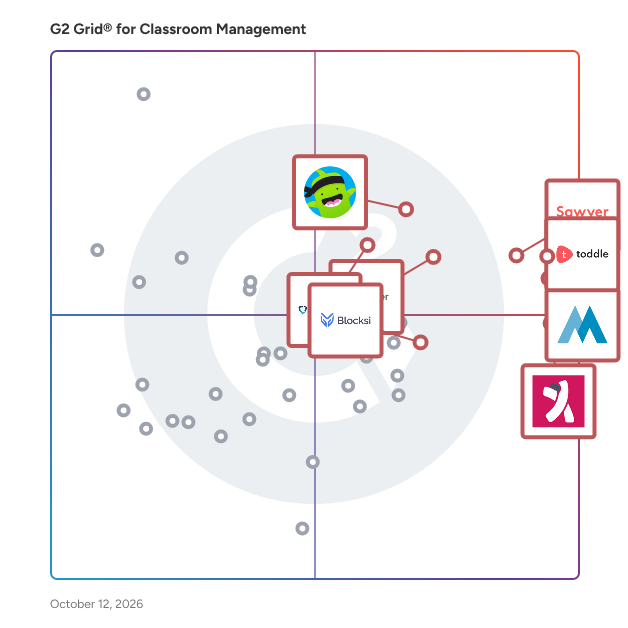
G2 Grid® for Classroom Management Software

G2 Grid® for Classroom Management Software plotting products by satisfaction and market presence

Highlighted products: Toddle, Sawyer, Minga, KINDERPEDIA, ClassDojo, iClicker, GoGuardian Teacher, and Edsby.

Underlying data: [Grid® JSON](https://www.g2.com/categories/classroom-management/grids.json?focus%5B%5D=toddle&focus%5B%5D=sawyer&focus%5B%5D=minga&focus%5B%5D=kinderpedia&focus%5B%5D=classdojo&focus%5B%5D=iclicker&focus%5B%5D=goguardian-teacher&focus%5B%5D=edsby)

LanSchool

Backed by Lenovo, LanSchool has placed purposeful technology in the hands of passionate educators for over 30 years. LanSchool’s classroom management, filtering, and student safety solutions guide learning, promote collaboration, and maximize teaching time – all while keeping students and school networks safe. With LanSchool, teachers can support student learning both in the classroom and remotely. Available as a cloud-based or locally–hosted solution, LanSchool is compatible with Windows, Mac, and Chrome operating systems. LanSchool also supports mixed device environments and makes it easy for schools and districts to scale their 1:1 programs. Additionally, easy installation and on-boarding saves time for both IT teams and teaching staff. Popular classroom management features include Screen Monitoring, Limit Web, Blank Screen, Messaging, Share Screen, Push Website, Snapshot, and Battery Status. LanSchool also includes a free student safety solution as well as a best-in-class filtering solution. The student safety solution provides student account monitoring with AI and human threat detection, image removal, and a parent portal, while the filtering solution offers content filtering and threat protection with one-click CIPA compliance and an easy-to-use dashboard.

Average Rating: 4.2/5.0

Total Reviews: 113

How Do G2 Users Rate LanSchool?

  • Ease of Use: 7.9/10 (Category avg: 8.6/10)
  • Student Assignment Distribution: 8.1/10 (Category avg: 8.1/10)
  • Student Assignment Collection: 8.0/10 (Category avg: 8.1/10)
  • Progress Reporting: 7.8/10 (Category avg: 8.3/10)

Who Is the Company Behind LanSchool?

  • Seller: Lenovo
  • Year Founded: 1984
  • HQ Location: Beijing
  • Twitter: @Lenovo_in
    231,470 Twitter followers
  • LinkedIn® Page: www.linkedin.com
    47,747 employees on LinkedIn®
  • Ownership: HKG:0992

Who Uses This Product?

  • Who Uses This: Teacher
  • Top Industries: Education Management, Primary/Secondary Education
  • Company Size: 58% Medium, 22% Large

What Are Recent G2 Reviews of LanSchool?

What Are G2 Users Discussing About LanSchool?

NetSupport School

With over 34 years’ development expertise, NetSupport School is the market-leading and most feature-rich classroom instruction and monitoring solution available for multiple platforms across LAN and WAN. Version 15 out now! With dedicated assessment, monitoring, collaboration and control features, all easily reached through its intuitive interface, NetSupport School allows teachers to leverage the full value of technology-enhanced teaching. It also supports social distancing within the school, as teachers can deliver instruction and assessment across multiple rooms, monitor students’ screens and keep them on task from afar – while students can request help without having to leave their desks. Why not try it FREE at https://www.netsupportschool.com/

Average Rating: 4.3/5.0

Total Reviews: 18

How Do G2 Users Rate NetSupport School?

  • Ease of Use: 9.0/10 (Category avg: 8.6/10)
  • Student Assignment Distribution: 5.5/10 (Category avg: 8.1/10)
  • Student Assignment Collection: 5.0/10 (Category avg: 8.1/10)
  • Progress Reporting: 6.0/10 (Category avg: 8.3/10)

Who Is the Company Behind NetSupport School?

  • Seller: NetSupport Limited
  • Year Founded: 1989
  • HQ Location: Market Deeping, United Kingdom
  • Twitter: @NetSupportGroup
    6,759 Twitter followers
  • LinkedIn® Page: www.linkedin.com
    110 employees on LinkedIn®

Who Uses This Product?

  • Top Industries: Education Management, Primary/Secondary Education
  • Company Size: 50% Medium, 28% Small

What Do G2 Reviewers Say About NetSupport School?

AI-generated summary from verified user reviews

Pros
  • Users praise the exceptional customer support of NetSupport School, ensuring prompt and dedicated assistance whenever issues arise.
  • Users value the access control in NetSupport School, allowing individual support while managing student web access effectively.
  • Users appreciate the ease of use of NetSupport School, allowing seamless monitoring and assistance without disruptions.
  • Users value the screen monitoring capabilities of NetSupport School, enhancing personalized support while minimizing classroom disruption.
  • Users value the real-time updates in NetSupport School for effective classroom management and enhanced student monitoring.
Cons
  • Users struggle with access restrictions, as controlling student access to certain websites proves challenging and inefficient.
  • Users experience occasional reconnection issues with NetSupport School, which can disrupt the overall experience.

What Are Recent G2 Reviews of NetSupport School?

Kaltura

Kaltura helps organizations turn content, knowledge, and audience signals into personalized, AI-powered experiences that move people forward. Our platform brings together content, video, data, intelligence, and agentic AI to help businesses engage customers, enable employees, and guide every user with the right content, interaction, or next step in the moment. Kaltura’s solutions are built around two critical business challenges: accelerating revenue across the customer journey and helping people learn, perform, and succeed at scale. **Agentic Revenue Engagement** Kaltura Agentic Revenue Engagement helps organizations create connected, personalized experiences across the buyer and customer journey. Instead of leaving people to navigate static websites, disconnected content, forms, webinars, and follow-up on their own, Kaltura turns these touchpoints into interactive experiences that understand intent and actively guide each user forward. Organizations can create digital destinations, events, webinars, content experiences, and AI-powered conversational interactions that adapt to each buyer or customer. Agentic experiences can answer questions, recommend relevant content, help users explore solutions, capture intent, identify meaningful engagement signals, and connect people with sales or customer teams when human involvement adds value. For marketing and revenue teams, this creates a more continuous journey from first engagement through purchase, onboarding, adoption, and expansion, while providing richer insight into what each account and individual actually cares about. Teams can use Kaltura to: • Create personalized digital experiences for buyers and customers • Run webinars, virtual events, and always-on content destinations • Turn video and other content into interactive, discoverable experiences • Deploy AI-powered agents that answer questions and guide users in real time • Recommend content and next steps based on user needs and behavior • Capture and activate engagement and intent signals • Support customer onboarding, education, activation, and ongoing engagement • Connect digital interactions with revenue workflows and business outcomes The goal is simple: reduce friction across the journey and help every interaction create momentum toward the next meaningful action. **Agentic Learning & Enablement** Kaltura Agentic Learning & Enablement helps organizations turn institutional knowledge into personalized learning, practice, and on-demand guidance that improves performance. Traditional learning often depends on static courses, fragmented knowledge, and one-size-fits-all training. Kaltura creates a more continuous model of enablement, where employees, sales teams, customers, and partners can access the knowledge, practice, and guidance they need at the moment they need it. Organizations can create and manage learning content at scale, transform existing knowledge and video into new learning experiences, personalize learning based on individual needs, and give users AI-powered guides that help them find answers and apply knowledge in their day-to-day work. Kaltura also supports interactive practice and simulation, allowing people to rehearse important conversations and scenarios and receive immediate feedback. This can include sales conversations, customer interactions, leadership scenarios, onboarding, certification, and other high-stakes situations where practice directly affects performance. Teams can use Kaltura to: • Create and manage video, learning, and enablement content at scale • Generate and repurpose content using AI-powered creation tools • Deliver personalized onboarding, upskilling, and continuous learning • Give employees on-demand access to company knowledge and guidance • Provide sales teams with training, coaching, and in-the-moment enablement • Run realistic roleplay and simulation experiences with AI-powered feedback and assessment • Educate and enable customers and partners • Support structured learning paths, certifications, and skills development • Understand engagement, readiness, and learning effectiveness • Connect learning and enablement programs more closely to business performance Rather than treating learning as an occasional activity, Kaltura helps make knowledge and guidance available continuously, embedded into the way people work and perform. **One platform for intelligent digital experiences** Both solutions are powered by the same Kaltura foundation. Kaltura has spent years helping global organizations create, manage, distribute, and understand video and digital content at enterprise scale. Today, those capabilities are combined with AI, audience intelligence, content generation, conversational agents, analytics, and experience orchestration. This means organizations do not have to treat content, engagement, learning, and AI as separate layers. Kaltura can help teams turn existing content and organizational knowledge into active, reusable intelligence; understand what each user needs based on context and behavior; and deliver a personalized experience that responds in real time. The result is a new type of digital experience: one that does more than present information. It understands, interacts, guides, and helps each person take the next step. Whether that next step is booking a meeting, exploring a solution, completing onboarding, learning a new skill, practicing an important conversation, adopting a product, or finding the right answer, Kaltura helps organizations make every interaction more relevant, useful, and measurable. Kaltura is used by organizations around the world to power digital experiences across marketing, sales, customer engagement, learning, employee enablement, education, media, and communications.

Average Rating: 4.3/5.0

Total Reviews: 117

How Do G2 Users Rate Kaltura?

  • Ease of Use: 8.6/10 (Category avg: 8.6/10)
  • Student Assignment Distribution: 7.1/10 (Category avg: 8.1/10)
  • Student Assignment Collection: 8.3/10 (Category avg: 8.1/10)
  • Progress Reporting: 8.5/10 (Category avg: 8.3/10)

Who Is the Company Behind Kaltura?

  • Seller: Kaltura
  • Company Website:
  • Year Founded: 2006
  • HQ Location: New York, NY
  • Twitter: @Kaltura
    8,954 Twitter followers
  • LinkedIn® Page: www.linkedin.com
    734 employees on LinkedIn®

Who Uses This Product?

  • Top Industries: Higher Education, Education Management
  • Company Size: 42% Medium, 33% Large

What Do G2 Reviewers Say About Kaltura?

AI-generated summary from verified user reviews

Pros
  • Users find the ease of use of Kaltura Video Cloud makes creating and managing business videos seamless and efficient.
  • Users appreciate Kaltura's robust features for video creation, including seamless integration, analytics, and superb customer support.
  • Users value the seamless integrations of Kaltura, enhancing video solutions for diverse business applications effortlessly.
  • Users praise Kaltura for its excellent features, allowing seamless video creation for various business purposes and needs.
  • Users highlight the reliability of Kaltura, with smooth performance and consistent functionality boosting their experience.
Cons
  • Users find the reporting system lacking customization, making it difficult to access detailed insights efficiently.
  • Users find the difficult setup process cumbersome, requiring internal readiness before implementing Kaltura's platform.
  • Users experience integration issues with Kaltura’s PATH tool, though support helps resolve some problems quickly.
  • Users report technical issues with Kaltura involving slow uploads, high bandwidth needs, and integration challenges.
  • Users find Kaltura's setup process complex and requiring developer assistance, making updates challenging and unintuitive.

What Are Recent G2 Reviews of Kaltura?

What Are G2 Users Discussing About Kaltura?
VEDAMO Virtual Classroom

VEDAMO is a virtual classroom platform and online teaching software designed for educators, tutors, training providers, corporate teams, and educational organizations of all kinds that need structured, engaging, and scalable live learning. Built specifically for education and training, VEDAMO goes beyond standard video conferencing by combining a virtual classroom, classroom management tools, and LMS functionality in one platform. Teachers and tutors can deliver interactive online lessons using a powerful whiteboard, breakout rooms, quizzes, and real-time collaboration tools. Built-in classroom management features such as distraction monitoring and participation controls help keep learners focused and engaged. Training providers, language schools, and educational organizations can streamline their operations with reusable lesson templates, structured course delivery, and efficient session management, saving time while maintaining consistency across programs. Corporate teams can run effective employee training, onboarding, and client education through live, instructor-led sessions in a controlled and professional environment. VEDAMO integrates with leading LMS platforms and supports custom API and LTI integrations, making it easy to fit into existing ecosystems. It also connects with systems like Salesforce and TutorCruncher, enabling organizations to manage training, learners, and business operations in one connected workflow. Whether you are teaching one-on-one, running group classes, or managing large-scale training programs, VEDAMO provides the tools to deliver engaging, structured, and results-driven online learning experiences.

Average Rating: 4.7/5.0

Total Reviews: 68

How Do G2 Users Rate VEDAMO Virtual Classroom?

  • Ease of Use: 9.2/10 (Category avg: 8.6/10)
  • Student Assignment Distribution: 7.5/10 (Category avg: 8.1/10)
  • Student Assignment Collection: 6.7/10 (Category avg: 8.1/10)
  • Progress Reporting: 6.7/10 (Category avg: 8.3/10)

Who Is the Company Behind VEDAMO Virtual Classroom?

  • Seller: Vedamo
  • Year Founded: 2013
  • HQ Location: Sofia, Sofia
  • Twitter: @vedamoelearning
    353 Twitter followers
  • LinkedIn® Page: www.linkedin.com
    14 employees on LinkedIn®

Who Uses This Product?

  • Top Industries: E-Learning, Primary/Secondary Education
  • Company Size: 87% Small, 12% Medium

What Do G2 Reviewers Say About VEDAMO Virtual Classroom?

AI-generated summary from verified user reviews

Pros
  • Users appreciate the interactive tools of VEDAMO, which enhance learning and make lessons engaging and effective.
  • Users value the collaborative features of Vedamo Virtual Classroom that enhance interactive learning and communication.
  • Users value the effective communication tools of VEDAMO, enhancing engagement and learning in virtual classrooms.
  • Users commend Vedamo's excellent customer support, appreciating their responsiveness and commitment to enhancing the platform.
  • Users love the customization options in VEDAMO Virtual Classroom, tailoring lessons to meet individual learner needs effectively.
Cons
  • Users find the interface design lacking, noting it feels less smooth compared to Zoom and Teams.

What Are Recent G2 Reviews of VEDAMO Virtual Classroom?

What Are G2 Users Discussing About VEDAMO Virtual Classroom?

Kannu

Kannu is a learning management system designed by educators, for educators. Our goal is to activate online learning with pedagogical flexibility and peer interaction, on a thoughtfully designed platform. With Kannu, courses are engaging, interactive, and customizable.

Average Rating: 4.7/5.0

Total Reviews: 18

How Do G2 Users Rate Kannu?

  • Ease of Use: 9.4/10 (Category avg: 8.6/10)
  • Student Assignment Distribution: 9.2/10 (Category avg: 8.1/10)
  • Student Assignment Collection: 9.2/10 (Category avg: 8.1/10)
  • Progress Reporting: 10.0/10 (Category avg: 8.3/10)

Who Is the Company Behind Kannu?

  • Seller: Kadenze
  • Year Founded: 2013
  • HQ Location: Valencia, CA
  • Twitter: @KadenzeOfficial
    2,990 Twitter followers
  • LinkedIn® Page: www.linkedin.com
    14 employees on LinkedIn®

Who Uses This Product?

  • Top Industries: Higher Education
  • Company Size: 37% Small, 32% Large

What Are Recent G2 Reviews of Kannu?

What Are G2 Users Discussing About Kannu?

Top Hat

Top Hat is the leader in student engagement for higher education. Grounded in learning science and powered by AI, our platform helps educators create interactive, personalized learning experiences that deepen connection and drive student success. Used by 35,000+ instructors at over 1,500 institutions, Top Hat supports learning for more than three million students, turning classrooms into spaces of active exploration and growth. We combine polling and discussion tools with flexible course content, assignments, testing, and analytics. Educators can extend engagement beyond class with interactive, customizable course materials—all in a single platform that integrates with major LMS providers like Canvas, Blackboard, D2L, and Moodle. At the center is Top Hat Ace, our AI-powered assistant that helps educators implement active learning more easily and gives students personalized, on-demand study support tailored to their course materials.

Average Rating: 4.0/5.0

Total Reviews: 23

How Do G2 Users Rate Top Hat?

  • Ease of Use: 8.8/10 (Category avg: 8.6/10)
  • Student Assignment Distribution: 9.2/10 (Category avg: 8.1/10)
  • Student Assignment Collection: 9.6/10 (Category avg: 8.1/10)
  • Progress Reporting: 8.9/10 (Category avg: 8.3/10)

Who Is the Company Behind Top Hat?

  • Seller: Top Hat
  • Year Founded: 2009
  • HQ Location: Toronto, Ontario
  • Twitter: @tophat
    11,381 Twitter followers
  • LinkedIn® Page: www.linkedin.com
    464 employees on LinkedIn®

Who Uses This Product?

  • Top Industries: Higher Education, Education Management
  • Company Size: 43% Large, 30% Medium

What Are Recent G2 Reviews of Top Hat?

What Are G2 Users Discussing About Top Hat?

Showbie

Showbie is the teacher-preferred digital learning platform empowering educators to quickly and easily deliver personalized feedback and assessment to students of all learning abilities on any device. In one easy-to-use platform, Showbie allows you to create a collaborative and interactive classroom so learning can happen in any environment - in class, remotely, or anywhere in between. Designed for the way teachers work, Showbie makes it easy to manage classroom workflow, saving time for what matters most - teaching and learning. Create and distribute assignments, upload any file type, launch collaborative student groups and discussions, manage all your feedback and keep parents in the loop - all in one app. With a variety of built-in annotation tools that can be placed on any file type, students can demonstrate their learning, in the way that suits them best. Showbie's assessment and quick marking features keep feedback organized, efficient and impactful so there’s more time to teach your best lesson and engage with students.

Average Rating: 4.7/5.0

Total Reviews: 25

How Do G2 Users Rate Showbie?

  • Ease of Use: 9.5/10 (Category avg: 8.6/10)
  • Student Assignment Distribution: 10.0/10 (Category avg: 8.1/10)
  • Student Assignment Collection: 10.0/10 (Category avg: 8.1/10)
  • Progress Reporting: 8.3/10 (Category avg: 8.3/10)

Who Is the Company Behind Showbie?

  • Seller: Showbie
  • Year Founded: 2012
  • HQ Location: Edmonton, CA
  • Twitter: @Showbie
    11,656 Twitter followers
  • LinkedIn® Page: www.linkedin.com
    55 employees on LinkedIn®

Who Uses This Product?

  • Top Industries: Education Management, Primary/Secondary Education
  • Company Size: 76% Medium, 24% Small

What Are Recent G2 Reviews of Showbie?

WeSchool

WeSchool is a learning platform for teams and companies seeking a user-friendly digital and blended training environment. With its accessible features and seamless onboarding flow, the platform provides guidance to instructors in creating high-quality courses - yes, even without prior knowledge of modern learning design. The ease of use enhances learners' engagement, while the platform also offers the right analytics tools to measure learning success and scalable solutions to meet growing needs. To do so, we focus on three pillars: 1. Guide: WeSchool guides instructors through course creation, even without expertise in learning design. Our intuitive solutions and onboarding process simplify the implementation of advanced teaching methodologies, making it effortless for instructors to deliver exceptional learning experiences. 2. Engaging: WeSchool fosters learner engagement by combining innovative educational techniques with state-of-the-art social features. Our platform facilitates active learning, encourages discussions around course content, and creates interactive experiences. By prioritizing learner engagement, we ensure higher retention rates and improved performance outcomes. 3. Measuring: WeSchool goes beyond traditional metrics by introducing data-driven KPIs that connect learning outcomes with business performance. By leveraging data insights, users can continuously enhance their experiences and align them with organizational growth. But what are the platform’s main features that can help you create those engaging learning experiences? - The Wall: the social environment where both educators and learners can contribute to the discussion by interacting, sharing ideas and diving deeper into course contents. Here you can also broadcast training updates and key dates; - The Calendar: the tool that allows you to manage, plan and oversee activities, live sessions, tests and assignments for individual learners or groups. You can plan live sessions directly within the Calendar and host them on your favorite video conferencing tool without leaving the platform. - Test and assessments: create individual or collective tests and assessments and make them more engaging by choosing among 10 different and innovative question types. - The Chat: start group-based and private conversations with learners and facilitate discussions between them. - Lessons and modules: build learner-centered learning paths, defining prerequisites and milestones for each module while encouraging learners to add their own materials for higher participation rates. Don't forget to state if the module will be optional or mandatory. - Board: An interactive board to support teaching and collaboration in real-time. - Analytics and Management Dashboard: manage all Groups and users in an AI centralized panel to track engagement rates and training hours delivered. You can access and download detailed monthly overviews of users’ activity: from daily logins to Live sessions attendance and time spent on asynchronous activities. View filtered and in-depth data with easy-to-read graphics to leverage its insights to improve your own training. Who is this platform for? WeSchool is for teams and companies starting their first learning solution. It's ideal for those seeking a user-friendly platform to guide learning and engage learners effectively. The mobile learning platform version further makes learning accessible and flexible. It enables learners to access learning materials wherever and whenever they want through the WeSchool app, available for Android, iOS and Huawei devices. Ready to get started? Request your demo now, so we can show you our platform in action!

Average Rating: 4.5/5.0

Total Reviews: 11

How Do G2 Users Rate WeSchool?

  • Ease of Use: 8.9/10 (Category avg: 8.6/10)
  • Student Assignment Distribution: 9.2/10 (Category avg: 8.1/10)
  • Student Assignment Collection: 9.4/10 (Category avg: 8.1/10)
  • Progress Reporting: 9.2/10 (Category avg: 8.3/10)

Who Is the Company Behind WeSchool?

  • Seller: WeSchool
  • Year Founded: 2016
  • HQ Location: Milan, Lombardy
  • LinkedIn® Page: www.linkedin.com
    40 employees on LinkedIn®

Who Uses This Product?

  • Company Size: 64% Small, 36% Medium

What Are Recent G2 Reviews of WeSchool?

classroom.cloud

Award-winning cloud-based, classroom management, safeguarding and IT management platform for schools! Super easy to set up and use, classroom.cloud is a low-cost and scalable cloud-based solution, providing the essential tools for supporting schools worldwide. Teachers can easily connect to their students’ devices quickly and easily by a range of methods and see thumbnails of all connected students’ devices on their screen to monitor activity. With classroom.cloud, teachers can easily explain and demonstrate lesson activity using the screen sharing and audio broadcast features – plus remedy any unwanted activity with remote control tools or by simply locking the students’ screens. Keeping students focused and on track is easy with ‘allowed’ and ‘restricted’ lists of websites and applications – as well as chat and messaging tools for interaction, guidance and collaboration.   Using class surveys, teachers gain instant feedback on topic understanding and can gamify assessment by using the ‘random select’ mode which selects students at random to answer the question. In addition, to reinforce good behavior, correct answers, and celebrate great pieces of work, teachers can assign ‘rewards’ during the lesson. Any students who find themselves struggling with a task can send discreet help requests directly to the teacher.   In addition, schools can ensure that their students are safe at all times (and in any location) with the optional safeguarding toolkit. This helps to keep the school’s online environment protected by monitoring concerning activity, identifying students at risk, and spotting online safety trends – even in Microsoft Teams. Its range of proactive and reactive tools include multi-language keyword and phrase monitoring, word cloud of trending topics, contextual intelligence-based Risk Index, full reporting, and more. Schools can also set school-wide internet restrictions to block and approve websites and set the times they can be accessed. With the new Enhanced Safeguarding feature, Image Analysis (optional), schools can also monitor and detect inappropriate images displayed on students’ screens from websites, apps, and media. With no swapping between solutions required for in-school and/or remote learning, classroom.cloud provides a simple and effective way to provide continuity for students and reduce edtech fatigue for teachers.  For technicians, classroom.cloud is easy to set up, configure, manage, and use – virtually taking care of itself! Integrating directly with the school's existing infrastructure and with Google Classroom, ClassLink, Microsoft School Data Sync and Clever, they can deploy it in minutes and manage teacher and student devices centrally – saving a bunch of time.  Plus, with hardware and software inventories, power management, PowerShell, school-wide internet and application metering, and more, they can see at a glance how school technology is being used and how to maximize it.

Average Rating: 4.9/5.0

Total Reviews: 4

How Do G2 Users Rate classroom.cloud?

  • Ease of Use: 9.4/10 (Category avg: 8.6/10)
  • Student Assignment Distribution: 9.4/10 (Category avg: 8.1/10)
  • Student Assignment Collection: 8.3/10 (Category avg: 8.1/10)
  • Progress Reporting: 9.4/10 (Category avg: 8.3/10)

Who Is the Company Behind classroom.cloud?

  • Seller: NetSupport Limited
  • Year Founded: 1989
  • HQ Location: Market Deeping, United Kingdom
  • Twitter: @NetSupportGroup
    6,759 Twitter followers
  • LinkedIn® Page: www.linkedin.com
    110 employees on LinkedIn®

Who Uses This Product?

  • Company Size: 50% Small, 50% Medium

What Are Recent G2 Reviews of classroom.cloud?

What Are G2 Users Discussing About classroom.cloud?

Codio

Codio is a cloud-based learning platform for education, workforce development, and professional training. It provides educators, trainers, and institutions with tools to create, deliver, and manage courses focused on technical subjects such as computer science, cybersecurity, software development, and data science. Codio enables users to develop, manage, and deploy immersive learning experiences that meet the needs of today’s learners by emphasizing job-specific training and practical skills development. It is utilized by a range of organizations, including higher education, bootcamps, MOOC platforms, and corporate training programs, to prepare learners for real-world technical challenges.

Average Rating: 4.2/5.0

Total Reviews: 23

How Do G2 Users Rate Codio?

  • Ease of Use: 8.1/10 (Category avg: 8.6/10)
  • Student Assignment Distribution: 10.0/10 (Category avg: 8.1/10)
  • Student Assignment Collection: 10.0/10 (Category avg: 8.1/10)
  • Progress Reporting: 10.0/10 (Category avg: 8.3/10)

Who Is the Company Behind Codio?

  • Seller: Codio
  • Year Founded: 2014
  • HQ Location: Cambridge, Massachusetts
  • Twitter: @CodioHQ
    5,414 Twitter followers
  • LinkedIn® Page: www.linkedin.com
    31 employees on LinkedIn®

Who Uses This Product?

  • Top Industries: Higher Education, Primary/Secondary Education
  • Company Size: 54% Small, 33% Medium

What Are Recent G2 Reviews of Codio?

What Are G2 Users Discussing About Codio?

Acadly

Acadly is a classroom interactivity tool with features for in-class student response, math-TeX support and no limits on the number of responses. It includes an instant messenger, Q&A and class management tools, and can be used both inside as well as outside the classroom.

Average Rating: 3.5/5.0

Total Reviews: 2

How Do G2 Users Rate Acadly?

  • Ease of Use: 5.0/10 (Category avg: 8.6/10)

Who Is the Company Behind Acadly?

  • Seller: Acadly, Inc.
  • Year Founded: 2015
  • HQ Location: N/A
  • Twitter: @acadlydotcom
    248 Twitter followers
  • LinkedIn® Page: www.linkedin.com
    8 employees on LinkedIn®

Who Uses This Product?

  • Company Size: 50% Medium, 50% Large

What Are Recent G2 Reviews of Acadly?

What Are G2 Users Discussing About Acadly?

Net Control 2 Classroom

Net Control 2 Classroom is a classroom management software that was specially designed for use in educational environment, for easy management multiple computers at a time. It is award-winning, ultimate and universal solution for teaching, network managing and presentation making. Perfect for teaching process organization and arrangement of communication between students and an instructor. Net Control 2 Clasroom includes screen sharing tools, which allows teachers to show their screen to students, or a screen of one of students to others. Using remote assistance tools teachers can help students to solve their issues without coming to their computers. Manage access to Internet, use restriction tools to attract attention, use Virtual Whiteboard and Desktop Recorder teaching tools, communicate with students using various messaging tools, including text message services, chats and Speech Manager. Net Control 2 Classroom supports all modern versions of Windows, including Windows 10; additional modules are available for Mac, Android and iOS.

Average Rating: 4.0/5.0

Total Reviews: 1

How Do G2 Users Rate Net Control 2 Classroom?

  • Ease of Use: 8.3/10 (Category avg: 8.6/10)
  • Student Assignment Distribution: 10.0/10 (Category avg: 8.1/10)
  • Student Assignment Collection: 10.0/10 (Category avg: 8.1/10)
  • Progress Reporting: 10.0/10 (Category avg: 8.3/10)

Who Is the Company Behind Net Control 2 Classroom?

  • Seller: Net Software
  • HQ Location: N/A
  • Twitter: @Net_Control_2
    54 Twitter followers
  • LinkedIn® Page: www.linkedin.com
    1 employees on LinkedIn®

Who Uses This Product?

  • Company Size: 100% Medium

What Are Recent G2 Reviews of Net Control 2 Classroom?

What Are G2 Users Discussing About Net Control 2 Classroom?

Orchestra

Orchestra by QuickSchools serves as a master schedule software aimed at school counselors and master schedulers. An automated software that will help schools to build complex schedules. Some of the features for Orchestra are:- 1) Can handle complex schedules We understand that every school is different and we can accommodate your unique requirements. Whether it is an A/B block, 4x4 block, multi-period block, or the traditional schedule, we've got you covered. 2) Planning ahead Course requests is what drives the master schedule. You can get your course requests early from students and plan all your resources well in advanced. Your team will be able to provide a schedule that accurately reflects the needs of your students. 3) Cloud-based Orchestra is 100% cloud-based, making collaborating with all your stakeholders easily no matter where they are. Edit and make changes in real time without constant downloads and emails. You will also have our engineering team ensuring that your system is always running, secure and fast. With back up. 4) Stand-alone master schedule Orchestra is part of QuickSchools but that doesn't mean you also have to have the QuickSchools SIS. Orchestra is a stand-alone product and can complement your current SIS. 5) 24/7 live support No matter what time or day, you can get real-time support from us. Our live chat is always open and with you every step of the way. And you get to chat with real people. No robots. Get your master schedule done in a matter of days!

Average Rating: 4.0/5.0

Total Reviews: 1

How Do G2 Users Rate Orchestra?

  • Ease of Use: 8.3/10 (Category avg: 8.6/10)
  • Student Assignment Distribution: 8.3/10 (Category avg: 8.1/10)
  • Student Assignment Collection: 8.3/10 (Category avg: 8.1/10)
  • Progress Reporting: 8.3/10 (Category avg: 8.3/10)

Who Is the Company Behind Orchestra?

  • Seller: QuickSchools
  • Year Founded: 2009
  • HQ Location: Sunnyvale, CA
  • Twitter: @QuickSchools
    428 Twitter followers
  • LinkedIn® Page: www.linkedin.com
    10 employees on LinkedIn®

Who Uses This Product?

  • Company Size: 100% Large

What Do G2 Reviewers Say About Orchestra?

AI-generated summary from verified user reviews

Pros
  • Users praise the high efficiency and accuracy of Orchestra, enhancing flexibility in managing schedules seamlessly.
Cons
  • Users find the difficult learning curve challenging, especially when switching from another established tool.
  • Users find the cost burdensome, especially if transitioning from another tool with an established learning curve.

What Are Recent G2 Reviews of Orchestra?

SmartClass

VISO Classroom Management (SmartClass) A state-of-the-art classroom management solution that provides educators with the tools to facilitate efficient collaborative learning across all devices. Enrich your students’ learning experience and keep your finger on the classroom pulse. With VISO Classroom Management, teachers can easily manage their class’s learning on school or BYOD devices, whether tablets, iPads or laptops are used. Teachers can monitor student activities and evaluate performance in real-time, share any screen, provide individual or group assistance and implement collaborative learning methodologies. VISO Classroom Management lets you focus on teaching again! It seamlessly integrates Chromebooks into teaching methodologies and allows you to manage interactive touchscreens and VR devices in the classroom to assimilate immersive learning experiences into the curriculum. VISO Classroom Management can also be installed as a stand-alone module. Available versions: cloud-based, on-premise or VDI.

Average Rating: 4.5/5.0

Total Reviews: 1

How Do G2 Users Rate SmartClass?

  • Ease of Use: 10.0/10 (Category avg: 8.6/10)
  • Student Assignment Distribution: 8.3/10 (Category avg: 8.1/10)
  • Student Assignment Collection: 10.0/10 (Category avg: 8.1/10)

Who Is the Company Behind SmartClass?

Who Uses This Product?

  • Company Size: 100% Medium

What Are Recent G2 Reviews of SmartClass?

COOL School Portal

The COOL platform is the base of a solution that helps teachers stay in control in the classroom. It saves time and is easy to use. It’s the homepage for your students. Here they can find all the online educational materials the teacher has selected for them. COOL applies the group layout from your Google console G Suite environment, so the right teachers are connected to the right groups and classes. You can use the platform in combination with different modules that enhance the learning experience for teachers and students. Choose the modules that fit you. Try it out: 60 days for free! The COOL Platform consists of, - COOL Picture log-in - COOL Monitoring - COOL Exam mode - COOL Plagiarism check COOL Picture log-in The Picture log-in module makes logging in easier for younger students. Their password consists of a combination of pictures. No need to remember the complicated number or letter combinations. An easy way to make the children use their own account instead of a group account, which is sometimes used as a quick fix so that they only have to remember one password that everyone knows. Using group accounts makes tracking individual progress difficult and is not compliant with privacy regulations. With the picture log-in, they have access to their own Google accounts and are also logged into the COOL platform. COOL Monitoring Keep track of your students: what are they working on? Where are they in the assignment? From the comfort of your own device, you can see the browser screens of your students. It gives you the opportunity to observe from distance and give direction during the process instead of after. Students can see on their screen when they are monitored. The tool comes with many handy functionalities, such as pushing a website to the devices of the whole class or to individuals. You can also block the screens when you want the attention of the classroom and close unwanted tabs. You can even make different or smaller groups from the students who are assigned to you as a teacher. This is convenient for pushing activities to students who need special attention or extra educational input. If you’ve used COOL Monitoring, you can check the browser history of your students up until seven days ago. The COOL admin of your school is able to consult a report about when which teacher was using COOL Monitoring and for which students. This provides the much-wanted transparency. COOL Exam mode This functionality is part of the COOL Monitoring module. That means that you can monitor students from a distance while they are in exam mode. COOL Exam mode makes sure that students can’t change tabs while taking a test. You can lock your students on the page of the test. They can’t open other tabs to find answers on the internet. You decide the amount of time they are locked. Use it for individual students or for the whole class with one click. COOL Plagiarism check Check the Google documents that your students are handing in through Google Classroom. The Google Classroom app is integrated into our COOL platform. As a teacher, you can check your students’ work by starting the plagiarism check. It will look for text matches online and the documents of your other students. You can check the same document three times over so you have the possibility to give feedback to your students and give the opportunity to improve the text. In the overview of the results, you’ll see what the percentage of plagiarism is and on which websites the matches are found. Try it out: 60 days for free!

Who Is the Company Behind COOL School Portal?