Best Bookmark Manager Software - Page 4

How Many Bookmark Manager Software Products Does G2 Track?

Total Products under this Category: 67

Category Stats (Sep 2026)

  • Average Rating: 4.45/5 The average rating of products in this category, based on all submitted ratings

Last updated: September 08, 2026

How Does G2 Rank Bookmark Manager Software Products?

Why You Can Trust G2's Software Rankings:

  • 30 Analysts and Data Experts
  • 1,800+ Authentic Reviews
  • 67+ Products
  • Unbiased Rankings

G2's software rankings are built on verified user reviews, rigorous moderation, and a consistent research methodology maintained by a team of analysts and data experts. Each product is measured using the same transparent criteria, with no paid placement or vendor influence. While reviews reflect real user experiences, which can be subjective, they offer valuable insight into how software performs in the hands of professionals. Together, these inputs power the G2 Score, a standardized way to compare tools within every category.

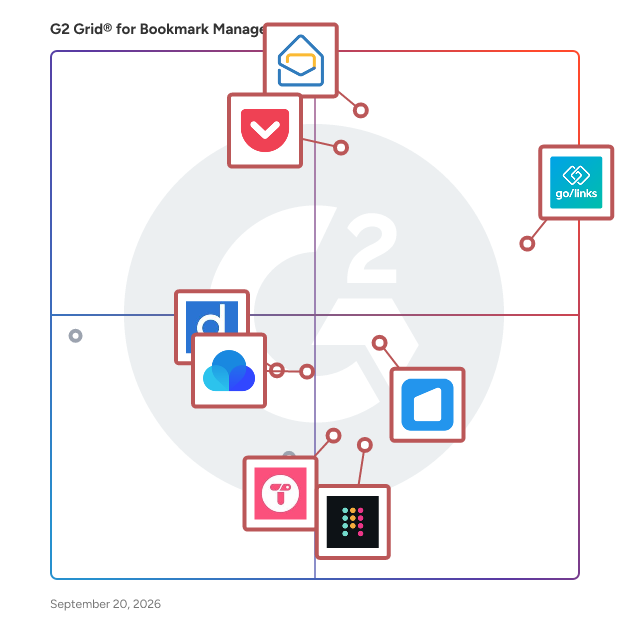
G2 Grid® for Bookmark Manager Software

G2 Grid® for Bookmark Manager Software plotting products by satisfaction and market presence

Highlighted products: GoLinks, Zoho Mail, Pocket, start.me, Raindrop.io, Superdense, Diigo, and Toby.

Underlying data: [Grid® JSON](https://www.g2.com/categories/bookmark-manager/grids.json?focus%5B%5D=golinks&focus%5B%5D=zoho-mail&focus%5B%5D=pocket&focus%5B%5D=start-me&focus%5B%5D=raindrop-io&focus%5B%5D=superdense&focus%5B%5D=diigo&focus%5B%5D=toby)

Tagpacker

Tagpacker is a free tool to save, organize, and share your favourite links.

Average Rating: 4.5/5.0

Total Reviews: 1

How Do G2 Users Rate Tagpacker?

  • Quality of Support: 5.0/10 (Category avg: 8.7/10)
  • Syncing: 10.0/10 (Category avg: 8.9/10)
  • Tags: 8.3/10 (Category avg: 8.8/10)
  • Broswer Agnostic: 10.0/10 (Category avg: 9.0/10)

Who Is the Company Behind Tagpacker?

Who Uses This Product?

  • Company Size: 100% Large

What Are Recent G2 Reviews of Tagpacker?

TeamSync Bookmarks

TeamSync Bookmarks enables users to share and manage bookmarks across a team or friends in real-time. Share, manage, and sync anything with a URL in group folders that you create. Then, invite friends, family, coworkers, or teammates to your shared bookmark. How can you use TeamSync Bookmarks? Here is how some people are using it * Onboard new team members so they have immediate access to the most important online websites and tools * Keep team members current with new tools and sites by immediately sharing it with them in their browser * Plan trips and events with friends and family Pricing - https://teamsyncbookmarks.com/#pricing Firefox version: https://addons.mozilla.org/en-US/firefox/addon/teamsync-bookmarks/ Slack integration: https://teamsyncbookmarks.com/#integrations (Beta) Features -- Have multiple group folders that you can share with different friends and team members -- Turn on an admin capability so you are the only one who can add or delete bookmarks -- Password protect your bookmark folders -- Easily add friends and team members to shared bookmark folders This is a great tool for on-boarding new team members, sharing frequently-used research websites, and ensuring team-wide awareness of online tools and research sources. TeamSync Bookmarks is actively being developed. Learn more about the extension at teamsyncbookmarks.com.

Total Reviews: 1

How Do G2 Users Rate TeamSync Bookmarks?

  • Quality of Support: 0.0/10 (Category avg: 8.7/10)
  • Syncing: 0.0/10 (Category avg: 8.9/10)
  • Broswer Agnostic: 1.7/10 (Category avg: 9.0/10)

Who Is the Company Behind TeamSync Bookmarks?

Who Uses This Product?

  • Company Size: 100% Small

What Are G2 Users Discussing About TeamSync Bookmarks?

Tefter.io

Get your team on the same page faster with lightning-speed access to all your important links, from any device and Slack

Average Rating: 4.5/5.0

Total Reviews: 1

How Do G2 Users Rate Tefter.io?

  • Quality of Support: 10.0/10 (Category avg: 8.7/10)
  • Syncing: 10.0/10 (Category avg: 8.9/10)
  • Tags: 10.0/10 (Category avg: 8.8/10)
  • Broswer Agnostic: 10.0/10 (Category avg: 9.0/10)

Who Is the Company Behind Tefter.io?

Who Uses This Product?

  • Company Size: 100% Medium

What Are Recent G2 Reviews of Tefter.io?

Thinkery

Thinkery is a lightweight tool for storing notes, bookmarks, todos, organized through hashtags and bookmarks are stored in full-text runs on Android and iOS app.

Average Rating: 3.8/5.0

Total Reviews: 4

How Do G2 Users Rate Thinkery?

  • Quality of Support: 10.0/10 (Category avg: 8.7/10)

Who Is the Company Behind Thinkery?

  • Seller: appstretto
  • HQ Location: N/A
  • Twitter: @thinkeryme
    178 Twitter followers
  • LinkedIn® Page: www.linkedin.com
    1 employees on LinkedIn®

Who Uses This Product?

  • Company Size: 50% Large, 50% Small

What Are Recent G2 Reviews of Thinkery?

What Are G2 Users Discussing About Thinkery?

Trunker

Trunker is a content production planner. It is an easy and intuitive content production scheduler that allows you to distribute and track content creation. With Trunker you assign articles, videos, slideshows, images, or audio files to a team of in-house or freelance producers who get notified through the app or by email when a piece of content is assigned to them. As the administrator, you can designate which production capabilities each team member has, so you can assign articles only to writers or images, only to designers for example. The website panel allows you to register all your websites allowing you to keep track of the production for each website and keep your ideal content mix for each one. Content submitted by producers follows an approval process before it is available for publishing, keeping communication with your team, and reflecting in their app only the progress of their work, while administrators have the whole picture. Easy and intuitive Project management and task remainder are also available to assign additional activities to your team members like link creation or any other content related jobs. When content is already published, it can be posted to Facebook, Twitter, and LinkedIn, to notify your followers about your brand new piece of content and in the case of articles, you can get AI automatically generated descriptions and tags to make this promotion a matter of seconds.

Average Rating: 5.0/5.0

Total Reviews: 1

How Do G2 Users Rate Trunker?

  • Quality of Support: 10.0/10 (Category avg: 8.7/10)

Who Is the Company Behind Trunker?

Who Uses This Product?

  • Company Size: 100% Small

What Are Recent G2 Reviews of Trunker?

What Are G2 Users Discussing About Trunker?

WebCull

WebCull works just like your browser bookmark manager but makes it easier to save, organize, search, share, and access your bookmarks from anywhere on the web.

Average Rating: 5.0/5.0

Total Reviews: 1

Who Is the Company Behind WebCull?

  • Seller: WebCull
  • Year Founded: 2019
  • HQ Location: Montreal, CA
  • LinkedIn® Page: www.linkedin.com
    1 employees on LinkedIn®

Who Uses This Product?

  • Company Size: 100% Small

What Are Recent G2 Reviews of WebCull?

What Are G2 Users Discussing About WebCull?

Bookmark PDF

Bookmark PDF is a free, web-based tool designed to make adding bookmarks to your PDF files quick, easy, and secure. With no need to upload your files to external servers, Bookmark PDF ensures maximum privacy by processing everything directly in your browser. Whether you're organizing large documents or enhancing navigation in your PDFs, this intuitive platform allows you to create, edit, or remove bookmarks seamlessly. Accessible from any device, Bookmark PDF is the perfect solution for individuals and professionals who need a reliable and privacy-focused PDF bookmarking tool.

Who Is the Company Behind Bookmark PDF?

Bublup

Bublup is an AI-powered online community management platform that combines structured content organization, member collaboration, and discussion tools in a single visual environment. Designed for communities built around shared resources, ideas, and collaboration, Bublup enables organizations to create engaging spaces where members can connect, contribute, and easily discover information. COMMUNITY STRUCTURE & MEMBER EXPERIENCE Bublup allows you to create dedicated community spaces for forums, chats, and shared resources. Members can explore curated content, join discussions, and navigate community hubs without the clutter of traditional chat-based platforms. Bublup is HIPAA and SOC 2 Type II compliant. DISCUSSIONS & ENGAGEMENT Built-in discussions, comments, reactions, and activity feeds allow members to engage directly within the context of shared content. Bublup includes AI-powered content moderation tools to help keep communities safe, respectful, and on-topic. Admins can apply pre-defined moderation rules or customize their own, making it easier to manage conversations at scale while maintaining a positive community environment. CONTENT MANAGEMENT & DISCOVERABILITY Unlike traditional community platforms, Bublup is designed to organize both content and conversations. Users can save links, documents, notes, videos, and more into structured collections that are easy to browse, search, and revisit—making it ideal for knowledge-driven communities. COMMUNITY MAPS & MEMBER DIRECTORY Bublup provides interactive community maps and directories that help members discover people, resources, and content geographically and contextually. Admins can enable searchable member profiles, tag content with location data, and visualize communities on maps—making it easier to find relevant people and information. PERMISSIONS & ADMIN CONTROL Admins can manage access with flexible permission settings, role-based assignments, and team structures. Features like controlled-access communities, bulk user imports, and role-based grouping make it easy to scale and manage large or private communities. ROLLS: TURN CONTENT INTO WEB PAGES Bublup’s unique “Rolls” feature allows users to turn any folder into a visually rich website in one click. Community admins can publish curated content as branded web pages, share them publicly, and keep them updated automatically as content evolves. Rolls include customizable layouts, themes, and interactive elements for showcasing community resources. USE CASES - Bublup supports a wide range of community types, including: - Membership and subscription communities - Nonprofits and associations - Internal team and employee communities - Education programs and cohorts - Creator and interest-based communities ALL-IN-ONE PLATFORM Bublup replaces the need for multiple tools by combining features typically spread across community platforms, cloud storage, and collaboration apps. It serves as an alternative to using separate solutions for chat, file sharing, content management, and community engagement. By bringing together community interaction, structured content organization, and publishing capabilities, Bublup offers a unique approach to building communities that are not only active—but also organized, discoverable, and scalable over time.

Average Rating: 3.7/5.0

Total Reviews: 3

How Do G2 Users Rate Bublup?

  • Quality of Support: 5.0/10 (Category avg: 8.7/10)

Who Is the Company Behind Bublup?

Who Uses This Product?

  • Company Size: 100% Small

What Do G2 Reviewers Say About Bublup?

AI-generated summary from verified user reviews

Pros
  • Users love the visual organization and intuitive design of Bublup, making project management enjoyable and efficient.
  • Users appreciate the visual organization capabilities of Bublup, making project management intuitive and collaborative.
  • Users enjoy the visual organization capabilities of Bublup, making project management and collaboration intuitive and appealing.
  • Users value the all-in-one solutions provided by Bublup for efficient project and task management in one platform.
  • Users value the visual organization and collaboration features of Bublup, enhancing project sharing effortlessly.
Cons
  • Users find the cost prohibitive, especially after previously enjoying free access and limited shared space for large communities.
  • Users experience access issues due to the 500 limit on shared space, restricting larger communities from full participation.
  • Users face access limitations due to a 500 limit on shared space, restricting larger communities from full participation.
  • Users face capacity limitations with Bublup, restricting access for larger communities even on the pricier plan.
  • Users express frustration with restrictive export limitations, feeling betrayed by the abrupt shift to a paid model.
What Are Recent G2 Reviews of Bublup?

Clibben

Clibben is a smart, keyboard-first bookmarking extension designed to accelerate workflows for developers, designers, and knowledge workers. Rather than forcing users into a separate web dashboard, Clibben operates as a lightweight productivity layer directly over the browser. It allows professionals to save, organize, and retrieve web resources without breaking their focus or context-switching. Key features include a 'Spotlight-style' command overlay for instant link retrieval across active tabs, zero-friction background saving via hotkeys, and an intelligent auto-collection engine that categorizes saved resources automatically.

Who Is the Company Behind Clibben?

Elevated Bookmarks

Elevated Bookmarks is a visual bookmark manager and knowledge workspace. Import your bookmarks, let AI organize them into smart collections with automatic tags, then rediscover everything with semantic search, AI summaries, playlists, and a built-in research engine — synced across devices and available in 20 languages. Built for researchers, students, professionals, and teams. Free plan or one-time lifetime license — no subscriptions.

Who Is the Company Behind Elevated Bookmarks?

Hookmark

Who Is the Company Behind Hookmark?

Keep Mates

Keep Mates is a Chrome extension that helps you save exactly what you find online, not just the webpage. Save images, videos, links, products, colors, fonts, selected page elements, screenshots and more directly from your browser. Add notes, tags and folders to keep everything organized and easy to find later. Instead of losing useful content between bookmarks, screenshots, open tabs and messages, Keep Mates gives you one place to build your personal internet library. Use Keep Mates to: * Save images, links, videos and products * Capture colors and fonts * Save specific webpage elements * Take screenshots * Add notes and tags * Organize items into folders * Return to the original source Everything is stored locally on your device. No cloud, no Keep Mates server. You can also import and export your data whenever you want. Save it once. Find it again when you need it.

Who Is the Company Behind Keep Mates?

Not24Get

not24get.me is a knowledge manager for people and teams who work on the web. Bookmarks are the capture layer. The product is the library that sits on top: saved pages, notes, tags, and summaries you can search when the original tab is long gone. Most teams already collect links. Few treat those links as knowledge. A URL in a chat thread is not a record. A toolbar folder is not a library. not24get.me turns each save into a small knowledge card. You keep the page, a note about why it mattered, and topic tags that describe the content, not only the domain. The workflow is still simple. Save from the browser in one click. Organize with folders, tags, and workspaces. Find the knowledge later by the words you remember. The difference is what gets stored. Optional AI enrichment reads the page itself. It suggests a clear title, topic tags, and a short summary. You approve the result before it lands in the workspace. Full-text search then covers titles, notes, tags, and archived page text on paid plans. A half-remembered phrase is enough. Preview lets you reopen the live page without leaving the workspace. Link monitoring shows whether a source is still healthy. Together they keep the library trustworthy, not a pile of dead ends. This is for researchers, operators, and small teams whose work lives in articles, docs, and reference pages. If the web is the source, not24get.me is the knowledge layer that keeps those sources findable. Personal collections become team knowledge when a list outgrows one person. Shared workspaces and role-based access (owner, admin, editor, viewer) keep a common knowledge library in one place. Selected folders can be shared publicly so guests can review sources without full access. A public API lets other tools search and add records. WebMCP connects a local agent or the browser extension so assistants can browse folders and create links in a session. not24get.me is GDPR-ready, with EU data hosting. Start free with unlimited bookmarks as the intake path. Add full-text search and more workspaces on Pro. Bring shared collections and team roles when the library becomes a workplace reference. Visit not24get.me. Capture the page. Keep the knowledge.

Who Is the Company Behind Not24Get?

Organization Plan

Arbor Nota is a browser productivity workspace that helps individuals and organizations save, organize, launch, and protect the web resources they rely on every day. Rather than leaving important links scattered across browser bookmarks, tabs, emails, chat messages, documents, and spreadsheets, Arbor Nota provides one centralized place to manage the tools, dashboards, portals, and resources that power daily work. Organizations can build shared resource libraries, organize content with nested folders, tags, search, and flexible views, and make critical information easy for every team member to find. Whether onboarding new employees, managing client resources, maintaining internal documentation, or organizing research, Arbor Nota helps teams reduce friction and work more efficiently. Beyond traditional bookmarking, Arbor Nota includes workflow launching, allowing users to open all the web pages required for a project, client, or recurring task with a single click. Focus controls help users stay productive by restricting or blocking distracting websites, domains, and applications during designated work sessions. Additional features include secure encrypted folders, AI-assisted organization, page backups, annotations, link health monitoring, and optional credential storage for supported resources. Built for individuals and digital teams (including agencies, marketing teams, software teams, operations teams, customer success teams, researchers, and remote organizations), Arbor Nota is designed to simplify browser-based work across multiple devices and browsers. Browser extensions, mobile apps, and desktop applications are also planned to provide an even more seamless cross-platform experience. Arbor Nota offers a free plan for individuals, affordable paid plans for professionals and organizations, and a mission that extends beyond productivity. A portion of every paid subscription supports reforestation efforts, helping customers organize their work while contributing to a healthier planet.

Who Is the Company Behind Organization Plan?

Neeraja Prakash
NP
Researched and written by Neeraja Prakash
Updated October 3, 2024