Best Assessment Software for Small Business - Page 3

How Many Assessment Software Products Does G2 Track?

Total Products under this Category: 623

Category Stats (Nov 2026)

  • Average Rating: 4.29/5 The average rating of products in this category, based on all submitted ratings
  • Top Trending Product: Wooclap (+1.32%) - Among all products in this category, Wooclap recorded the largest rating increase compared to last month

Last updated: November 01, 2026

How Does G2 Rank Assessment Software Products?

Why You Can Trust G2's Software Rankings:

  • 30 Analysts and Data Experts
  • 13,100+ Authentic Reviews
  • 623+ Products
  • Unbiased Rankings

G2's software rankings are built on verified user reviews, rigorous moderation, and a consistent research methodology maintained by a team of analysts and data experts. Each product is measured using the same transparent criteria, with no paid placement or vendor influence. While reviews reflect real user experiences, which can be subjective, they offer valuable insight into how software performs in the hands of professionals. Together, these inputs power the G2 Score, a standardized way to compare tools within every category.

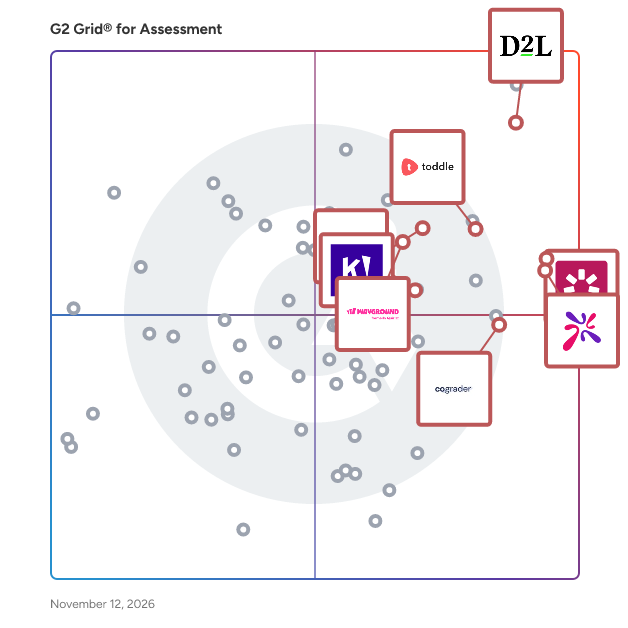
G2 Grid® for Assessment Software

G2 Grid® for Assessment Software plotting products by satisfaction and market presence

Highlighted products: AhaSlides, iSpring Suite, D2L Brightspace, Kahoot!, Quizizz, Toddle, CoGrader, and ProProfs Quiz Maker.

Underlying data: [Grid® JSON](https://www.g2.com/categories/assessment/grids.json?focus%5B%5D=ahaslides&focus%5B%5D=ispring-suite&focus%5B%5D=d2l-brightspace&focus%5B%5D=kahoot&focus%5B%5D=quizizz&focus%5B%5D=toddle&focus%5B%5D=cograder&focus%5B%5D=proprofs-quiz-maker&segment=small-business)

WeVideo

WeVideo is the interactive video learning platform where instruction, demonstration, and assessment happen in one place. Purpose-built for K-12 school districts and higher education institutions, WeVideo closes the loop from creation directly through to the gradebook, helping educators save time while giving institutions clear evidence of student understanding. By consolidating video creation, interactivity, screen recording, and hosting into a single platform, WeVideo replaces redundant tech stack line items and delivers measurable learning outcomes. The platform empowers educators to transform passive video viewing into active, measurable learning. Teachers build interactive lessons with embedded questions, branched pathways, and real-time polls to quickly gauge who is understanding the material. At the same time, students can record video reflections to explain and defend their reasoning in their own words, giving instructors observable proof of critical thinking. WeVideo unifies the entire learning lifecycle into a single cloud-based tool. Educators and students can record, edit, and access over 2 million royalty-free media assets. Instructors can evaluate student video submissions against custom rubrics, monitor real-time engagement, and track concept mastery across classrooms or programs. Built with enterprise-grade LTI 1.3 integrations, WeVideo connects seamlessly with major LMS platforms—including Canvas, Blackboard, D2L, Moodle, and Schoology—for secure Single Sign-On, easy assignment distribution, and automatic grade passback.

Average Rating: 4.6/5.0

Total Reviews: 95

How Do G2 Users Rate WeVideo?

  • Ease of Use: 9.2/10 (Category avg: 8.5/10)

Who Is the Company Behind WeVideo?

  • Seller: WeVideo
  • Year Founded: 2011
  • HQ Location: Lake Forest, US
  • LinkedIn® Page: www.linkedin.com
    106 employees on LinkedIn®

Who Uses This Product?

  • Who Uses This: Teacher
  • Top Industries: Primary/Secondary Education, Education Management
  • Company Size: 40% Medium, 32% Small

What Do G2 Reviewers Say About WeVideo?

AI-generated summary from verified user reviews

Pros
  • Users appreciate the creativity offered by WeVideo, enabling unique and engaging video content for interactive learning.
  • Users love the ease of use of WeVideo, finding it intuitive and empowering for their creative projects.
  • Users appreciate the seamless AI integration of WeVideo, enhancing engagement and interactivity for a more dynamic learning experience.
  • Users highlight the intuitive user interface of WeVideo, making video creation accessible and engaging for educators and students.
  • Users appreciate the outstanding customer support of WeVideo, enhancing their overall experience and satisfaction with the product.
Cons
  • Users express frustration with the limitations of the free version, which restricts access to valuable video and picture resources.
  • Users face output limitations with WeVideo's tiered system, restricting video quality to only 720p at some institutions.
  • Users report issues with software bugs affecting key features like video rewind, impacting usability for students.

What Are Recent G2 Reviews of WeVideo?

What Are G2 Users Discussing About WeVideo?

Sibme

Sibme improves the way professionals learn at work. We help teams build cultures of continuous improvement. Sibme’s Learning Engagement Platform powers professional development through virtual- and hybrid-coaching, peer-to-peer collaboration, cohort-based professional learning communities, and micro-credentials. Sibme works with more than 1,000 innovative schools, districts, and institutions–including Houghton Mifflin Harcourt, ASCD, Scholastic, the University of Texas, and Houston Independent School District. Sibme is designed by teachers. From K-12 and higher education to corporate learning & development, educators trust us to encourage critical conversations about real work, using real tools, with real people -- from anywhere at any time. Sibme’s Learning Engagement Platform embeds practice and collaboration in every workday, engaging employees while building a stronger community of learners. Sibme encourages teams to more frequently and authentically discuss the work, the challenges and, ultimately, the opportunities to maximize capacity through real-world experience.

Average Rating: 4.8/5.0

Total Reviews: 65

How Do G2 Users Rate Sibme?

  • Ease of Use: 9.3/10 (Category avg: 8.5/10)
  • Analytics dashboard: 8.3/10 (Category avg: 8.4/10)
  • White-labeling: 8.3/10 (Category avg: 7.9/10)

Who Is the Company Behind Sibme?

  • Seller: Sibme
  • Year Founded: 2013
  • HQ Location: Houston, US
  • LinkedIn® Page: www.linkedin.com
    70 employees on LinkedIn®

Who Uses This Product?

  • Top Industries: Education Management, Primary/Secondary Education
  • Company Size: 56% Small, 39% Medium

What Are Recent G2 Reviews of Sibme?

TestInvite

TestInvite is specialized online assessment software designed to empower organizations to create custom assessments secured with anti-cheating safeguards and systematically randomized questions for each test-taker. These assessments are delivered online natively without requiring any app or extension installation, ensuring they are fair, comprehensive, and balanced. Additionally, TestInvite produces customizable reports with valuable insights. TestInvite also offers a Talent Library, which allows organizations to use our pre-employment skill-based tests to evaluate potential hires effectively. This feature provides a comprehensive solution for organizations seeking reliable and affordable web-based online assessments.

Average Rating: 4.7/5.0

Total Reviews: 16

How Do G2 Users Rate TestInvite?

  • Ease of Use: 8.9/10 (Category avg: 8.5/10)
  • Real-time assessment: 8.7/10 (Category avg: 8.5/10)
  • Analytics dashboard: 8.6/10 (Category avg: 8.4/10)
  • White-labeling: 9.0/10 (Category avg: 7.9/10)

Who Is the Company Behind TestInvite?

Who Uses This Product?

  • Top Industries: Higher Education
  • Company Size: 81% Small, 13% Medium

What Do G2 Reviewers Say About TestInvite?

AI-generated summary from verified user reviews

Pros
  • Users value the quick and responsive customer support from TestInvite, enhancing their overall experience.
  • Users appreciate the efficient data management of TestInvite, noting its ease of use and reliability.
  • Users find TestInvite very easy to use, enabling them to navigate the platform without assistance.
Cons
  • Users find the missing features in TestInvite, such as limited tests and imperfect translations, somewhat frustrating.
  • Users find TestInvite not user-friendly, with issues in translation and limitations in basic plan tests.
  • Users experience translation issues in French, affecting the clarity of the content in TestInvite.

What Are Recent G2 Reviews of TestInvite?

What Are G2 Users Discussing About TestInvite?

AI can help you find the answers. G2 helps you trust them.

Connect G2 to Claude or ChatGPT for answers grounded in G2's trusted reviews, comparisons, and pricing from real user insights.

How it works

Testportal

Testportal is an AI-powered skills and knowledge assessment platform used by more than 2.5 million business and educational users worldwide. It delivers automated insights for every online assessment.

Average Rating: 4.7/5.0

Total Reviews: 35

How Do G2 Users Rate Testportal?

  • Ease of Use: 9.6/10 (Category avg: 8.5/10)
  • Real-time assessment: 9.3/10 (Category avg: 8.5/10)
  • Analytics dashboard: 9.1/10 (Category avg: 8.4/10)
  • White-labeling: 9.6/10 (Category avg: 7.9/10)

Who Is the Company Behind Testportal?

Who Uses This Product?

  • Top Industries: Higher Education, Information Technology and Services
  • Company Size: 54% Small, 31% Medium

What Do G2 Reviewers Say About Testportal?

AI-generated summary from verified user reviews

Pros
  • Users find Testportal to be extremely easy to use, enhancing their overall assessment experience with intuitive features.
  • Users value Testportal for its user-friendly and feature-rich assessments, which significantly streamline the evaluation process.
  • Users appreciate the excellent customer support provided by Testportal, enhancing their overall experience and satisfaction.
  • Users love the customization options of Testportal, enhancing the user-friendly experience with tailored branding.
  • Users value the efficiency of Testportal, praising its intuitive design and excellent support that enhances their experience.
Cons
  • Users find the modification process for existing questions complicated, leading to disruptions and inconvenience in managing tests.
  • Users face limited content support, but can find workarounds with guidance from the support team to meet needs.
  • Users find the modification process time-consuming, as duplicating tests disrupts workflow and creates new links.

What Are Recent G2 Reviews of Testportal?

Smart Quiz Builder

Smart Quiz Builder (SQB) is an AI-powered quiz funnel builder designed to help users create engaging and interactive quizzes, surveys, and assessments. It enables businesses, educators, and marketers to enhance user engagement, generate leads, and personalize marketing efforts without requiring coding skills. Key Features and Functionality: - AI-Powered Quiz Creation: SQB's AI add-on allows users to build personality quizzes, scoring quizzes, and surveys in minutes by simply entering a topic. The AI suggests titles, generates questions, and maps answers to outcomes automatically. - Personalized PDF Reports: The platform can automatically generate customized PDF reports based on quiz outcomes, which can be emailed directly to leads. Users can add image and text slides, reorder content, and personalize text using AI-generated content and merge tags. - Diverse Quiz Types: SQB supports various quiz formats, including personality quizzes, assessments, surveys, scoring quizzes, polls, forms, and calculators, catering to a wide range of user engagement strategies. - Interactive Video Quizzes: Users can create video-based quizzes and survey funnels to provide a more personalized experience for leads, enhancing engagement and conversion rates. - Smart Branching Logic: The visual branching logic builder allows for the creation of quizzes where subsequent questions depend on previous answers, enabling dynamic and personalized quiz experiences. - Email Platform Integration: SQB integrates seamlessly with leading email marketing platforms such as AWeber, ActiveCampaign, ConvertKit, Drip, SendInBlue, and MailChimp. It also supports HTML-form-based integration and Webhook notifications for advanced marketing automation. - Google Sheets Integration: Users can directly integrate quizzes with Google Sheets without the need for external platforms like Zapier, facilitating efficient data management and analysis. Primary Value and Solutions Provided: Smart Quiz Builder addresses the need for interactive and personalized content to boost user engagement and lead generation. By offering AI-driven quiz creation, personalized reporting, and diverse quiz formats, SQB empowers users to create customized experiences that resonate with their audience. Its integrations with email marketing platforms and data management tools streamline marketing efforts, making it an invaluable asset for businesses and educators aiming to enhance their digital engagement strategies.

Average Rating: 5.0/5.0

Total Reviews: 14

How Do G2 Users Rate Smart Quiz Builder?

  • Ease of Use: 9.4/10 (Category avg: 8.5/10)
  • Real-time assessment: 9.7/10 (Category avg: 8.5/10)
  • Analytics dashboard: 9.4/10 (Category avg: 8.4/10)
  • White-labeling: 5.0/10 (Category avg: 7.9/10)

Who Is the Company Behind Smart Quiz Builder?

Who Uses This Product?

  • Top Industries: Marketing and Advertising
  • Company Size: 86% Small

What Do G2 Reviewers Say About Smart Quiz Builder?

AI-generated summary from verified user reviews

Pros
  • Users value the excellent customer support from Smart Quiz Builder, enhancing the overall experience with the product.
  • Users find Smart Quiz Builder to be very easy to use, offering versatility for both simple and complex quizzes.
  • Users value the easy creation of various quizzes and forms, benefiting from seamless functionality and excellent support.
Cons
  • Users find that the difficult learning curve makes initial use challenging, but the plugin becomes powerful with time.

What Are Recent G2 Reviews of Smart Quiz Builder?

What Are G2 Users Discussing About Smart Quiz Builder?

Watermark Planning & Self-Study

Watermark gives higher education institutions the tools they need to easily track, manage, and examine their data. For over twenty years, colleges and universities have used Watermark solutions to complete assessment and accreditation requirements, capture and analyze student feedback, showcase faculty accomplishments, and improve student engagement. Watermark's Educational Impact Suite (EIS) puts data into context so faculty and staff can focus on what really matters: institutional and student success. Learn why Watermark is trusted by over 1,700 colleges and universities to support continuous improvement at www.watermarkinsights.com.

Average Rating: 4.2/5.0

Total Reviews: 71

How Do G2 Users Rate Watermark Planning & Self-Study?

  • Ease of Use: 7.8/10 (Category avg: 8.5/10)
  • Real-time assessment: 8.1/10 (Category avg: 8.5/10)
  • Analytics dashboard: 7.9/10 (Category avg: 8.4/10)
  • White-labeling: 7.0/10 (Category avg: 7.9/10)

Who Is the Company Behind Watermark Planning & Self-Study?

Who Uses This Product?

  • Top Industries: Higher Education, Education Management
  • Company Size: 65% Medium, 21% Large

What Do G2 Reviewers Say About Watermark Planning & Self-Study?

AI-generated summary from verified user reviews

Pros
  • Users find Watermark Planning & Self-Study to be straight-forward and user-friendly, facilitating easy collaboration and understanding.
  • Users value the effective organization of Watermark Planning & Self-Study, simplifying assessments and historical data access.
  • Users value the collaboration and customization features of Watermark Planning & Self-Study, enhancing teamwork and efficiency.
  • Users appreciate the user-friendly design and excellent support of Watermark Planning & Self-Study for effective collaboration.
  • Users value the affordability of Watermark Planning & Self-Study, making it accessible for everyone needing its features.
Cons
  • Users face assessment issues due to adapting old processes to Watermark Planning & Self-Study, impacting efficiency.
  • Users find the assessment and planning aspects too rudimentary, limiting their ability to track improvements effectively.
  • Users find insufficient training videos for Watermark Planning & Self-Study, limiting their ability to fully utilize the product.
  • Users find the limited customization options frustrating as it requires consulting a Watermark representative for changes.
  • Users find Watermark Planning & Self-Study not intuitive, especially for administrators transitioning from Taskstream.

What Are Recent G2 Reviews of Watermark Planning & Self-Study?

What Are G2 Users Discussing About Watermark Planning & Self-Study?

PowerSchool Schoology Learning

Schoology Learning, the leading K-12 learning management system (LMS), is part of the PowerSchool Unified Classroom solution. The system is designed to help schools and districts improve student performance, parent engagement, and overall communication and collaboration. With Schoology Learning, you can support student growth with individualized instruction and equitable access to learning for every student—at home, at school, or anywhere in between.

Average Rating: 4.4/5.0

Total Reviews: 382

How Do G2 Users Rate PowerSchool Schoology Learning?

  • Ease of Use: 8.5/10 (Category avg: 8.5/10)
  • Real-time assessment: 8.3/10 (Category avg: 8.5/10)
  • Analytics dashboard: 7.9/10 (Category avg: 8.4/10)
  • White-labeling: 7.6/10 (Category avg: 7.9/10)

Who Is the Company Behind PowerSchool Schoology Learning?

Who Uses This Product?

  • Who Uses This: Teacher, Educator
  • Top Industries: Primary/Secondary Education, Education Management
  • Company Size: 48% Medium, 34% Large

What Do G2 Reviewers Say About PowerSchool Schoology Learning?

AI-generated summary from verified user reviews

Pros
  • Users value the organized resource management of Schoology, facilitating easy access for students and efficient teaching.
  • Users value the ease of organizing and accessing assessments with PowerSchool Schoology Learning, enhancing curriculum support and data analysis.
  • Users appreciate the efficient assignment management in PowerSchool Schoology, enhancing organization and resource access for teachers and students.
  • Users appreciate the ease of use of PowerSchool Schoology Learning, making it simple for students to navigate and submit work.
  • Users appreciate the organized lesson resources and seamless integration for professional support and curriculum management in PowerSchool Schoology Learning.
Cons
  • Users find the lack of intuitiveness in PowerSchool Schoology Learning frustrating, complicating basic tasks and navigation.
  • Users find the add-ins and features not intuitive, leading to frustrating troubleshooting and a steep learning curve.
  • Users find the interface not user-friendly, struggling with non-intuitive features and a dated design.
  • Users face technical glitches in Schoology's quiz features, leading to frustration and complicating the assessment process.
  • Users experience integration issues with outside resources, leading to a less seamless learning experience in PowerSchool Schoology.

What Are Recent G2 Reviews of PowerSchool Schoology Learning?

What Are G2 Users Discussing About PowerSchool Schoology Learning?

Seesaw

Seesaw is trusted and loved by 25 million educators, students, and families worldwide and is the only elementary Learning Experience Platform that offers a suite of award-winning tools, resources, and curriculum for teachers to deliver joyful, inclusive instruction. Through interactive lessons, digital portfolios, and two-way communication features, Seesaw keeps everyone in the learning loop by providing continuous visibility into the student's learning experience to support and celebrate their learning.

Average Rating: 4.4/5.0

Total Reviews: 47

How Do G2 Users Rate Seesaw?

  • Ease of Use: 8.5/10 (Category avg: 8.5/10)
  • Real-time assessment: 8.5/10 (Category avg: 8.5/10)
  • Analytics dashboard: 7.8/10 (Category avg: 8.4/10)
  • White-labeling: 9.0/10 (Category avg: 7.9/10)

Who Is the Company Behind Seesaw?

  • Seller: Seesaw
  • Year Founded: 2015
  • HQ Location: San Francisco, California
  • LinkedIn® Page: www.linkedin.com
    259 employees on LinkedIn®

Who Uses This Product?

  • Top Industries: Primary/Secondary Education, Education Management
  • Company Size: 40% Medium, 33% Small

What Do G2 Reviewers Say About Seesaw?

AI-generated summary from verified user reviews

Pros
  • Users appreciate the easy communication features of Seesaw, allowing quick and effective interactions with peers and teachers.
  • Users value the ease of use of Seesaw, appreciating its simplicity in setup and quick communication options.
  • Users appreciate the easy setup and usability of Seesaw, allowing quick communication and sharing within groups.
Cons
  • Users find the poor navigation in Seesaw frustrating due to clunky older messages and content cluttering the app.

What Are Recent G2 Reviews of Seesaw?

What Are G2 Users Discussing About Seesaw?

Explorance Blue

- What is Explorance Blue: Explorance Blue is a feedback analytics platform that helps institutions and organizations gather, analyze, and act on feedback at scale. From course evaluations and student experience surveys to employee engagement and 360-degree feedback, Blue supports a wide range of feedback use cases. With flexible workflows, deep integration capabilities, and powerful analytics, Blue adapts to your unique structures and systems – whether centralized or decentralized. Automate survey delivery, streamline reporting, and turn feedback into meaningful insights that drive continuous improvement in student and employee experiences. - Explorance Blue for Higher Education: Institutions are increasingly looking for ways to boost survey response rates and streamline feedback across diverse academic structures. Explorance Blue solves this with automated workflows, deep customization, robust reporting, and seamless integration with your SIS, LMS, and other existing IT systems. It improves student participation by delivering timely, personalized surveys and simplifies feedback collection across schools, departments, and programs. With real-time response rate monitoring and automated reporting, institutions can turn feedback into actionable insights that drive teaching effectiveness and improve the student experience. * Use Cases: All central and major feedback gathering initiatives within an institution, including: Course evaluations, Midterm surveys, Peer evaluations, 360-degree Feedback, Student engagement surveys, Clinical rotations, Placement surveys, Student exit surveys, Faculty/Staff surveys, Alumni surveys - Explorance Blue for the Workplace: Forward-thinking HR teams are seeking better ways to translate employee feedback into impactful organizational change. Explorance Blue simplifies the process with automated survey delivery, built-in data governance, and integration with existing HR systems. It empowers leaders with clear, real-time insights to employee engagement drivers, track trends, and make data-informed decisions. The result is stronger engagement, better performance, and a more responsive workplace culture. * Use Cases: All central and major feedback gathering initiatives within an organization, including: Employee engagement surveys, Employee experience surveys, employee listening strategies, Voice of the employee initiatives, 360-degree feedback, Stay/exit surveys - Key Features: 1- Automated and Flexible Survey Management: * Automatically distributes personalized surveys with delegated customization across departments, roles, and programs * Uses organizational hierarchies and role-based logic for targeted survey and report delivery * Native support for complex course evaluation scenarios including cross-listed and team-taught courses, and unique course stat/end dates. * Leverages existing data sources to minimize manual setup and reduce administrative workload 2- Multi-Channel Delivery and Inclusive Accessibility * Delivers surveys through LMS, HRIS, email, SMS, and QR codes to maximize response rates * Fully responsive and compliant with WCAG 2.1 AA and Section 508 accessibility standards * Supports multiple languages for global and diverse respondent groups * Real-time response rate monitoring, built-in reporting and dashboard suites, and automated reminders to drive survey participation 3- Insightful Reporting with Built-In Privacy and Security * Offers real-time analytics, data visualizations, and contextualized reports with internal benchmarks * Global Employee Engagement benchmarks across key themes such as Culture & Values, Career Development, Inclusiveness/DEI, Teamwork, and more. * Enables role-based access and automated report distribution based on organizational hierarchy, roles, and responsibilities * Provides AI-powered qualitative analysis through Explorance MLY for deeper understanding of open-ended feedback * Ensures data privacy with configurable confidentiality settings and secure delivery workflows 4- Seamless Integration and Centralized Oversight * Integrates with SIS, LMS, HRIS, and data warehouses for a unified feedback ecosystem * Automated supports for roster syncs and dynamic data updates * Centralized platform to manage diverse feedback types—from engagement and satisfaction surveys to 360-degree feedback and course evaluations

Average Rating: 4.2/5.0

Total Reviews: 58

How Do G2 Users Rate Explorance Blue?

  • Ease of Use: 7.9/10 (Category avg: 8.5/10)
  • Real-time assessment: 8.9/10 (Category avg: 8.5/10)
  • Analytics dashboard: 9.1/10 (Category avg: 8.4/10)
  • White-labeling: 8.8/10 (Category avg: 7.9/10)

Who Is the Company Behind Explorance Blue?

  • Seller: Explorance
  • Year Founded: 2003
  • HQ Location: Montreal, Quebec
  • LinkedIn® Page: www.linkedin.com
    249 employees on LinkedIn®

Who Uses This Product?

  • Top Industries: Higher Education
  • Company Size: 41% Large, 36% Small

What Do G2 Reviewers Say About Explorance Blue?

AI-generated summary from verified user reviews

Pros
  • Users find Blue to be incredibly easy to use, enhancing convenience and efficiency for various tasks.
  • Users love the efficiency of Explorance Blue, streamlining processes and saving valuable time during data collection.
  • Users find the initial setup very easy, enhancing productivity and streamlining the process for data collection and creativity.
  • Users find the initial setup easy, enhancing their experience with quick deployment and data collection for creative tasks.
  • Users find the initial setup simplicity of Explorance Blue greatly enhances their creativity and data collection efforts.
Cons
  • Users find the login requirement frustrating, as it interrupts quick access and delays essential recording functions.
  • Users find the difficult setup of Explorance Blue challenging, often requiring time and patience to configure.
  • Users find Explorance Blue to be expensive and resource-intensive, often challenging for initial setup and learning.

What Are Recent G2 Reviews of Explorance Blue?

What Are G2 Users Discussing About Explorance Blue?

Emma Stein
ES
Researched and written by Emma Stein
Updated