Best Analytics Platforms for Medium-Sized Businesses - Page 2

How Many Analytics Platforms Products Does G2 Track?

Total Products under this Category: 607

Category Stats (Oct 2026)

  • Average Rating: 4.52/5 (↑0.01 vs Sep 2026) The average rating of products in this category, based on all submitted ratings
  • Top Trending Product: inzicht (+3.71%) - Among all products in this category, inzicht recorded the largest rating increase compared to last month

Last updated: October 13, 2026

How Does G2 Rank Analytics Platforms Products?

Why You Can Trust G2's Software Rankings:

  • 30 Analysts and Data Experts
  • 29,800+ Authentic Reviews
  • 607+ Products
  • Unbiased Rankings

G2's software rankings are built on verified user reviews, rigorous moderation, and a consistent research methodology maintained by a team of analysts and data experts. Each product is measured using the same transparent criteria, with no paid placement or vendor influence. While reviews reflect real user experiences, which can be subjective, they offer valuable insight into how software performs in the hands of professionals. Together, these inputs power the G2 Score, a standardized way to compare tools within every category.

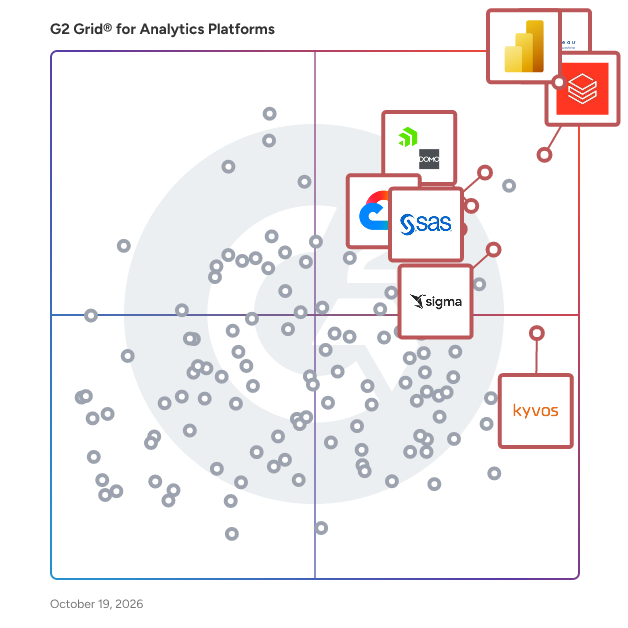
G2 Grid® for Analytics Platforms

G2 Grid® for Analytics Platforms plotting products by satisfaction and market presence

Highlighted products: Tableau, Microsoft Power BI, Databricks, Domo, Sigma, Looker, SAS Viya, and Kyvos Semantic Layer.

Underlying data: [Grid® JSON](https://www.g2.com/categories/analytics-platforms/grids.json?focus%5B%5D=tableau&focus%5B%5D=microsoft-microsoft-power-bi&focus%5B%5D=databricks&focus%5B%5D=domo&focus%5B%5D=sigma-computing-sigma&focus%5B%5D=looker&focus%5B%5D=sas-sas-viya&focus%5B%5D=kyvos-semantic-layer&segment=mid-market)

Omni Analytics

Omni is the AI analytics platform that helps Condé Nast, Guitar Center, and dbt Labs accelerate AI adoption, improve self-service, and embed AI analytics into their products. Powered by a governed semantic layer, Omni grounds AI in your business metrics and logic to deliver accurate, contextual insights. Users explore data with AI, spreadsheets, SQL, or a point-and-click UI to receive trustworthy, enterprise-grade intelligence across workflows. Every team moves faster: analysts focus on strategy, stakeholders get reliable answers, and product teams build smarter applications. We build our product fast and in the open, with new features releasing every week. You can follow along by watching our public engineering demos at: omni.co/demos To learn more about how companies like BuzzFeed, Synthesia, and Heidi use Omni, check out: omni.co/customer-case-studies

Average Rating: 4.8/5.0

Total Reviews: 70

How Do G2 Users Rate Omni Analytics?

  • Has the product been a good partner in doing business?: 9.9/10 (Category avg: 9.2/10)
  • Steps to Answer: 8.8/10 (Category avg: 8.4/10)
  • Reports Interface: 9.0/10 (Category avg: 8.8/10)
  • Calculated Fields: 9.1/10 (Category avg: 8.5/10)

Who Is the Company Behind Omni Analytics?

  • Seller: Omni Analytics, Inc
  • Company Website:
  • Year Founded: 2022
  • HQ Location: San Francisco, CA
  • Twitter: @omni
    4,282 Twitter followers
  • LinkedIn® Page: www.linkedin.com
    920 employees on LinkedIn®

Who Uses This Product?

  • Top Industries: Computer Software, Information Technology and Services
  • Company Size: 44% Medium, 41% Small

What Do G2 Reviewers Say About Omni Analytics?

AI-generated summary from verified user reviews

Pros
  • Users value the ease of use in Omni Analytics, benefiting from seamless integrations and flexible BI features.
  • Users appreciate the helpful customer support at Omni Analytics, always responsive and ready to assist when needed.
  • Users praise the easy integrations of Omni Analytics, effortlessly connecting with their modern data stack for efficiency.
  • Users admire the innovative AI features of Omni Analytics, enhancing efficiency and user experience significantly.
  • Users value the ease of creating interactive dashboards with Omni Analytics, enhancing both user experience and engagement.
Cons
  • Users note the missing features in Omni Analytics compared to established tools, indicating room for improvement.
  • Users note a steep learning curve due to delayed documentation and evolving features, leading to confusion while adapting.
  • Users note the limited features of Omni Analytics, which is still evolving and lacks parity with established tools.
  • Users highlight the need for improved complex data modeling features, as navigation and stability can be challenging.
  • Users find the difficult setup of topics challenging, affecting overall ease of use and customization in Omni Analytics.

What Are Recent G2 Reviews of Omni Analytics?

Phocas Software

Phocas Software delivers cloud-based business intelligence (BI) and financial planning and analysis (FP&A) solutions for mid-market businesses in wholesale distribution, manufacturing, and retail. Phocas delivers an intuitive, accessible platform that simplifies data analysis and financial planning, empowering organizations to make confident, data-driven decisions. Seamlessly integrating with ERP systems and any other source, Phocas consolidates data into a centralized platform. Unlocking the potential of ERP data and delivering improvements at every business level. Its BI core enables users to explore data, spot trends, and find opportunities. FP&A tools support dynamic financial reporting, flexible budgeting, performance tracking and accurate forecasts. Plus, Phocas offers automated rebate management. Phocas Analytics A BI tool that connects businesses around one central data source. It’s fast, secure and designed to be self-serve for everyone. Up-to-date data is easy to access and explore empowering people to understand and improve the business at any level – by branch, division, sales, product, customer. • Data consolidation: ERP + other data sources automatically consolidated into a centralized platform • AI natural language: query data using Phocas AI and get instant answers • Drill down: Explore data from high-level overviews to transactional detail • Enhanced analysis: Flexible pivot tables enable custom data analysis • Ad hoc reporting: Build custom reports and dashboards in minutes and with ease • Visualizations & dashboards: Transform live data into custom dashboards, charts, graphs and sparklines Phocas Financial Statements Designed to help businesses easily and accurately report on their financial health and performance. ERP numbers are transformed into dynamic profit and loss (income statement), balance sheet and cashflow statements. Empowering users to quickly explore data in detail and to proactively solve problems. • Customize: Easily adjust statements to suit cross-functional teams • Fast: speed up month-end with automated financial data consolidation and reporting • Live actuals: work with reliable, up-to-date actuals with formulas and ratios baked into the tool • Drill down: slice, dice and drill down to transaction-level detail • Side-by-side analysis: compare statements across different periods, branches, divisions • User-based access: secure visibility and direction for end business users Phocas Budgets & Forecasts Consolidates planning across the business in one place – financial budgets, sales forecasts, headcount, demand planning. As easy to use as a spreadsheet, just faster and custom-built. • Automated: budgets and forecasts are populated with live ERP data so actuals are always reliable • Flexible: adapts to growing business needs; handles increased complexity, detailed planning • Easy tracking: use live actuals to regularly track performance, compare to budgets, quickly reforecast • Collaborative: assignment, submission and approval processes make cross-functional input quick and stress-free • Versatile: facilitates driver-based, multi-level, 3-statement budgeting, unlimited scenario planning Phocas Rebates Automated payable and receivable rebate management that improves accuracy and delivers more profitable outcomes. A self-serve tool that makes it easy to identify trends, spot near misses, and assess overall performance. With real-time updates, users can quickly optimize product offers, pricing, and purchasing decisions to align with emerging opportunities. Enabling businesses to maximize profitability and strengthen partnerships.

Average Rating: 4.6/5.0

Total Reviews: 194

How Do G2 Users Rate Phocas Software?

  • Has the product been a good partner in doing business?: 9.0/10 (Category avg: 9.2/10)
  • Steps to Answer: 8.5/10 (Category avg: 8.4/10)
  • Reports Interface: 8.7/10 (Category avg: 8.8/10)
  • Calculated Fields: 8.2/10 (Category avg: 8.5/10)

Who Is the Company Behind Phocas Software?

  • Seller: Phocas Software
  • Company Website:
  • Year Founded: 1999
  • HQ Location: Sydney, AU
  • LinkedIn® Page: www.linkedin.com
    333 employees on LinkedIn®

Who Uses This Product?

  • Top Industries: Wholesale, Electrical/Electronic Manufacturing
  • Company Size: 67% Medium, 22% Small

What Do G2 Reviewers Say About Phocas Software?

AI-generated summary from verified user reviews

Pros
  • Users appreciate the ease of use of Phocas Software, highlighting its intuitive interface and helpful tutorials.
  • Users appreciate the speed to insight and operational clarity provided by Phocas Software, empowering effective decision-making.
  • Users value the efficient report creation in Phocas Software, simplifying complex data for informed decision-making.
  • Users appreciate the data analysis capabilities of Phocas Software, enabling clear insights and impactful decision-making.
  • Users rave about Phocas Software's excellent customer support, quickly addressing queries and ensuring a smooth experience.
Cons
  • Users experience feature limitations in Phocas Software, particularly in budgeting and user support across complex systems.
  • Users note that improvements are needed in data structure and budgeting features for a smoother operational experience.
  • Users express frustration over the missing features in Phocas Software, particularly with data handling and user experience.
  • Users find missing real-time data updates frustrating, relying on outdated information and experiencing limitations in user support.
  • Users report bugs and date format issues that complicate setup and require troubleshooting, causing delays in usage.

What Are Recent G2 Reviews of Phocas Software?

What Are G2 Users Discussing About Phocas Software?

GoodData.AI

GoodData is the full-stack, AI-native decision intelligence platform that helps businesses turn data into actionable, enterprise-grade insights. Designed for governed, scalable analytics, GoodData enables organizations to build, operationalize, and embed decisions, workflows, and AI agents directly within products and business workflows. The platform combines Analytics as Code, a governed semantic and metrics layer, APIs, SDKs, and open AI interoperability to help teams create composable analytics and AI experiences across products, workflows, and customer environments. From embedded analytics and dashboards to assistants, AI workflows, and interoperable agents, GoodData gives teams the foundation to move from insight to action with governance, performance, and deployment flexibility built in. Today, GoodData serves over 140,000 companies and 3.2 million users worldwide.

Average Rating: 4.3/5.0

Total Reviews: 591

How Do G2 Users Rate GoodData.AI?

  • Has the product been a good partner in doing business?: 8.4/10 (Category avg: 9.2/10)
  • Steps to Answer: 8.3/10 (Category avg: 8.4/10)
  • Reports Interface: 8.6/10 (Category avg: 8.8/10)
  • Calculated Fields: 8.2/10 (Category avg: 8.5/10)

Who Is the Company Behind GoodData.AI?

  • Seller: GoodData.AI
  • Company Website:
  • Year Founded: 2007
  • HQ Location: San Francisco, CA
  • Twitter: @gooddata
    1 Twitter followers
  • LinkedIn® Page: www.linkedin.com
    290 employees on LinkedIn®

Who Uses This Product?

  • Who Uses This: Data Analyst, Product Manager
  • Top Industries: Computer Software, Consumer Services
  • Company Size: 44% Medium, 40% Small

What Do G2 Reviewers Say About GoodData.AI?

AI-generated summary from verified user reviews

Pros
  • Users appreciate the ease of use of GoodData.AI, enabling quick report creation and smooth integration with data systems.
  • Users appreciate the impressive data visualization features of GoodData.AI, enabling clear insights for all users.
  • Users appreciate the seamless integration of GoodData.AI with data sources, enhancing efficiency throughout the data lifecycle.
  • Users find GoodData.AI intuitive and easy to use, enabling quick reporting and data visualization for everyone.
  • Users value the customization capabilities of GoodData.AI, enhancing flexibility and enabling tailored business insights.
Cons
  • Users experience a steep learning curve with GoodData, making adaptation to business needs challenging and slow.
  • Users find the learning difficulty with GoodData.AI challenging, particularly in understanding MAQL language and complex data models.
  • Users find GoodData.AI lacking important features and documentation, making it hard to access insights and data.
  • Users find GoodData.AI's complexity challenging, especially during setup and when adapting to changing data structures.
  • Users find the limited customization options of GoodData.AI hinder their ability to fully tailor visualizations and reports.

What Are Recent G2 Reviews of GoodData.AI?

AI can help you find the answers. G2 helps you trust them.

Connect G2 to Claude or ChatGPT for answers grounded in G2's trusted reviews, comparisons, and pricing from real user insights.

How it works

Lightdash

Lightdash is the fastest way for modern data teams to build and scale AI-powered self-serve analytics. It enables analysts to define metrics and make them accessible to non-technical users, who can explore data and build dashboards without writing SQL. Lightdash integrates with modern data stacks, supports a governed semantic layer, and offers developer-friendly features like Git-based workflows. It is designed to reduce the overhead of maintaining BI tools, streamline metric definitions, and improve access to consistent data across teams. Lightdash is used and trusted by companies of all sizes, from start ups to international publicly listed organisations.

Average Rating: 4.9/5.0

Total Reviews: 19

How Do G2 Users Rate Lightdash?

  • Has the product been a good partner in doing business?: 10.0/10 (Category avg: 9.2/10)
  • Steps to Answer: 8.1/10 (Category avg: 8.4/10)
  • Reports Interface: 9.4/10 (Category avg: 8.8/10)
  • Calculated Fields: 8.3/10 (Category avg: 8.5/10)

Who Is the Company Behind Lightdash?

  • Seller: Lightdash
  • HQ Location: San Francisco, US
  • Twitter: @lightdash_devs
    2,416 Twitter followers
  • LinkedIn® Page: www.linkedin.com
    33 employees on LinkedIn®

Who Uses This Product?

  • Company Size: 58% Medium, 21% Large

What Are Recent G2 Reviews of Lightdash?

Splunk Enterprise

Find out what is happening in your business and take meaningful action quickly with Splunk Enterprise. Automate the collection, indexing and alerting of machine data that's critical to your operations. Uncover the actionable insights from all your data — no matter the source or format. Leverage artificial intelligence and machine learning for predictive and proactive business decisions.

Average Rating: 4.3/5.0

Total Reviews: 415

How Do G2 Users Rate Splunk Enterprise?

  • Has the product been a good partner in doing business?: 8.7/10 (Category avg: 9.2/10)
  • Reports Interface: 5.0/10 (Category avg: 8.8/10)
  • Calculated Fields: 8.3/10 (Category avg: 8.5/10)

Who Is the Company Behind Splunk Enterprise?

  • Seller: Cisco
  • Year Founded: 1984
  • HQ Location: San Jose, CA
  • Twitter: @Cisco
    720,366 Twitter followers
  • LinkedIn® Page: www.linkedin.com
    95,294 employees on LinkedIn®
  • Ownership: NASDAQ:CSCO

Who Uses This Product?

  • Who Uses This: Software Engineer, Senior Software Engineer
  • Top Industries: Information Technology and Services, Computer Software
  • Company Size: 64% Large, 28% Medium

What Do G2 Reviewers Say About Splunk Enterprise?

AI-generated summary from verified user reviews

Pros
  • Users value the innovation of Splunk Enterprise, appreciating its user-friendly features and powerful analytics capabilities.
  • Users value the customization features of Splunk Enterprise, enabling tailored insights and dynamic dashboards for effective monitoring.
  • Users find Splunk Enterprise's ease of use remarkable, enabling quick access and seamless integration of large datasets.
  • Users value the robust data ingestion capabilities of Splunk Enterprise, efficiently managing diverse data sources.
  • Users value the powerful reporting features of Splunk Enterprise, enhancing data analysis and visualization capabilities significantly.
Cons
  • Users find Splunk Enterprise to be expensive, with high renewal costs and limitations that affect large organizations.
  • Users find the learning curve steep, struggling to quickly grasp Splunk Enterprise's many features and functionalities.
  • Users highlight the expensive licensing of Splunk Enterprise, making it difficult for some companies to adopt.
  • Users face integration issues with Splunk Enterprise, requiring better add-ons and simpler architecture for easier deployment.
  • Users feel that Splunk Enterprise has missing features, lacking important add-ons and more flexible data onboarding options.

What Are Recent G2 Reviews of Splunk Enterprise?

What Are G2 Users Discussing About Splunk Enterprise?

Intellicus

Intellicus helps organizations put their data to work and helps business leaders gain actionable insights. Driven by AI, auto ML and sophisticated machine learning models, Intellicus helps CXOs use data to accelerate their growth. Intellicus Technologies tailor solutions based on your needs, instead of retrofitting them to ‘customizable’ one-size-fits-all solutions. Intellicus offers end-to-end data integration through ETL, integrating sophisticated databases, ERP solutions, legacy systems, telephony, ACDs till flat file systems into a data warehouse that becomes the single source of truth. Intellicus’ self-serve reporting, OLAP capabilities and interactive analytics dashboards allow users to drill down & drill up, zoom out or slice-and-dice data to create a 360-degree view of the business. Auto-ML based what-if predictions deliver power and agility to small and large enterprises so that they can make business critical decisions based on science. Ready to take the next step in your digital transformation? Write to marketing@intellicus.com today

Average Rating: 4.6/5.0

Total Reviews: 119

How Do G2 Users Rate Intellicus?

  • Has the product been a good partner in doing business?: 8.9/10 (Category avg: 9.2/10)
  • Steps to Answer: 8.3/10 (Category avg: 8.4/10)
  • Reports Interface: 8.7/10 (Category avg: 8.8/10)
  • Calculated Fields: 8.3/10 (Category avg: 8.5/10)

Who Is the Company Behind Intellicus?

Who Uses This Product?

  • Top Industries: Information Technology and Services, Computer Software
  • Company Size: 59% Medium, 23% Large

What Do G2 Reviewers Say About Intellicus?

AI-generated summary from verified user reviews

Pros
  • Users love the live dashboards of Intellicus for their fresh metrics and effective daily check-ins.
  • Users value the ease of use of Intellicus, enjoying its user-friendly interface and seamless data handling.
  • Users value the dashboard customization in Intellicus, enhancing their ability to tailor reports and metrics efficiently.
  • Users value the high-speed OLAP feature of Intellicus for its insightful data analytics and easy setup.
  • Users value the advanced data visualization capabilities of Intellicus, enhancing their business intelligence and decision-making efforts.
Cons
  • Users note that complex usability can hinder new users, making tasks challenging compared to tools like Power BI or Tableau.
  • Users find difficult learning curve in Intellicus, especially those without a coding background struggling to adapt.
  • Users find Intellicus to have a steep learning curve, often feeling overwhelmed by its complex interface and setup.
  • Users find the complexity of advanced features challenging, requiring expertise for effective report and workflow creation.
  • Users find the learning difficulty with Intellicus challenging, particularly for those without a coding background.

What Are Recent G2 Reviews of Intellicus?

What Are G2 Users Discussing About Intellicus?

Apache Superset

Apache Superset is an open-source data exploration and visualization platform designed to handle data at scale. It enables users to create interactive dashboards and perform complex data analyses with ease. Superset supports a wide range of data sources and integrates seamlessly with various databases, making it a versatile tool for data professionals. Key Features and Functionality: - Interactive Dashboards: Build and customize dashboards with a variety of visualization options to represent data effectively. - SQL IDE: Utilize a rich SQL editor with syntax highlighting and autocomplete features for efficient query writing. - Extensive Database Support: Connect to numerous databases, including relational and non-relational systems, through a robust connector framework. - Security and Authentication: Implement granular access control and integrate with various authentication backends to ensure data security. - Scalability: Designed to scale out to large, distributed environments, accommodating the needs of growing organizations. Primary Value and User Solutions: Apache Superset empowers organizations to make data-driven decisions by providing an intuitive platform for data visualization and exploration. It addresses the need for a scalable and flexible tool that can integrate with diverse data sources, allowing users to derive insights without extensive technical expertise. By offering a user-friendly interface and powerful features, Superset enhances productivity and facilitates a deeper understanding of complex datasets.

Average Rating: 4.4/5.0

Total Reviews: 50

How Do G2 Users Rate Apache Superset?

  • Has the product been a good partner in doing business?: 9.1/10 (Category avg: 9.2/10)
  • Steps to Answer: 8.5/10 (Category avg: 8.4/10)
  • Reports Interface: 8.9/10 (Category avg: 8.8/10)
  • Calculated Fields: 8.9/10 (Category avg: 8.5/10)

Who Is the Company Behind Apache Superset?

Who Uses This Product?

  • Top Industries: Financial Services, Computer Software
  • Company Size: 45% Medium, 34% Small

What Do G2 Reviewers Say About Apache Superset?

AI-generated summary from verified user reviews

Pros
  • Users find Apache Superset easy to use, appreciating its powerful features and seamless data access.
  • Users value the automation of reports and dashboards, enjoying seamless integration with Gmail and Slack.
  • Users find Apache Superset to be easy to understand and use, enhancing their reporting and dashboard experience.
  • Users appreciate the easy access provided by Apache Superset, enhancing their ability to utilize powerful data tools.
  • Users find the speed of Apache Superset makes data access quick and effortless, enhancing their overall experience.
Cons
  • Users often experience slow performance as queries can get stuck or hang during execution, causing frustration.
  • Users experience frequent SQL execution issues, as queries can hang and lead to inefficiencies in usage.
  • Users find the lack of interactivity in visualizations disappointing, hindering a more engaging data exploration experience.

What Are Recent G2 Reviews of Apache Superset?

What Are G2 Users Discussing About Apache Superset?

Luzmo

Customers choose Luzmo to give their users clean, intuitive analytics directly inside their product, without forcing them into a separate BI tool. Reviews highlight how fast teams can move from raw data to fully branded dashboards, how easy it is for non‑technical users to explore and customize their own views, and how seamless the embedding experience feels. Many users call out Luzmo’s customer‑first support and dedicated CSMs as a key reason they can roll out new analytics experiences quickly and keep improving them over time.

Average Rating: 4.6/5.0

Total Reviews: 70

How Do G2 Users Rate Luzmo?

  • Has the product been a good partner in doing business?: 9.4/10 (Category avg: 9.2/10)
  • Steps to Answer: 8.2/10 (Category avg: 8.4/10)
  • Reports Interface: 8.8/10 (Category avg: 8.8/10)
  • Calculated Fields: 8.1/10 (Category avg: 8.5/10)

Who Is the Company Behind Luzmo?

  • Seller: Luzmo NV
  • Year Founded: 2015
  • HQ Location: Brooklyn, US
  • Twitter: @luzmo_official
    895 Twitter followers
  • LinkedIn® Page: www.linkedin.com
    51 employees on LinkedIn®

Who Uses This Product?

  • Who Uses This: CEO
  • Top Industries: Computer Software, Information Technology and Services
  • Company Size: 59% Small, 32% Medium

What Do G2 Reviewers Say About Luzmo?

AI-generated summary from verified user reviews

Pros
  • Users praise the ease of use of Luzmo, enabling quick dashboard creation without a steep learning curve.
  • Users value Luzmo's embedding features, enabling fast, integrated analytics that enhance user experience and engagement.
  • Users value the customization capabilities of Luzmo, enabling tailored solutions and efficient management of diverse tenant applications.
  • Users commend Luzmo for its intuitive interface and rapid deployment, significantly enhancing analytics and user engagement.
  • Users find the setup process of Luzmo incredibly easy, facilitating quick deployment and enhancing overall experience.
Cons
  • Users find Luzmo's complexity burdensome, with challenges in setup, performance, and dashboard editing capabilities.
  • Users face limited options for complex queries and chart configurations in Luzmo, impacting their data management experience.
  • Users face performance issues with large datasets, experiencing lags and sync problems that hinder productivity.
  • Users experience table limitations in Luzmo, hindering complex queries and chart functionalities in their data management.
  • Users face performance and sync issues with larger datasets, impacting efficiency and usability within Luzmo.

What Are Recent G2 Reviews of Luzmo?

What Are G2 Users Discussing About Luzmo?

SAS Enterprise Guide

SAS Enterprise Guide is a Windows-based client application that provides a user-friendly, point-and-click interface to the powerful analytics capabilities of SAS software. Designed to cater to both novice and experienced users, it facilitates data access, management, analysis, and reporting without the need for extensive programming knowledge. By integrating a wide array of analytical tasks with an intuitive graphical interface, SAS Enterprise Guide empowers users to efficiently conduct complex analyses and share results across their organization. Key Features and Functionality: - Intuitive Interface and Wizards: Offers guided access to SAS capabilities, from basic reporting to advanced analyses, through flexible wizards and an intuitive process flow diagram facility. - Comprehensive Analytical Tasks: Includes over 100 prebuilt tasks for descriptive statistics, predictive modeling, regression analysis, and more, enabling users to perform complex analyses without writing code. - Data Management: Provides a powerful graphical query builder for accessing and manipulating various data types, including SAS datasets and native Windows data types, without requiring SQL expertise. - OLAP Access and Visualization: Supports dynamic slicing, drilling, and pivoting of data for exploration, with integration capabilities for SAS OLAP Server and other third-party vendors supporting OLE DB for OLAP. - Result Distribution and Sharing: Facilitates the distribution of results through multiple channels, including SAS BI report/content repository, Microsoft Office documents, and email, ensuring seamless sharing and collaboration. - High-Performance Computing and Grid Enablement: Automatically detects grid environments for efficient processing, analyzes SAS programs to optimize performance, and enables parallel execution of tasks on the same server. Primary Value and User Solutions: SAS Enterprise Guide addresses the need for a self-service analytics environment that empowers business analysts and other users to perform sophisticated data analyses without relying heavily on IT departments. By providing guided access to data integration, preparation, analytics, and reporting, it enables users to quickly access data, conduct analyses, and distribute results, thereby accelerating decision-making processes. The integration with SAS Viya further enhances its capabilities, allowing users to leverage modern, cloud-based platforms for scalable and efficient analytics. This comprehensive toolset ultimately helps organizations harness their data effectively, leading to more informed business decisions and improved operational efficiency.

Average Rating: 4.3/5.0

Total Reviews: 112

How Do G2 Users Rate SAS Enterprise Guide?

  • Has the product been a good partner in doing business?: 9.0/10 (Category avg: 9.2/10)
  • Steps to Answer: 7.9/10 (Category avg: 8.4/10)
  • Reports Interface: 8.4/10 (Category avg: 8.8/10)
  • Calculated Fields: 8.1/10 (Category avg: 8.5/10)

Who Is the Company Behind SAS Enterprise Guide?

  • Seller: SAS Institute
  • Year Founded: 1976
  • HQ Location: Cary, NC
  • Twitter: @SASsoftware
    60,863 Twitter followers
  • LinkedIn® Page: www.linkedin.com
    15,122 employees on LinkedIn®
  • Phone: 1-800-727-0025

Who Uses This Product?

  • Top Industries: Banking, Hospital & Health Care
  • Company Size: 57% Large, 26% Medium

What Do G2 Reviewers Say About SAS Enterprise Guide?

AI-generated summary from verified user reviews

Pros
  • Users appreciate the ease of use of SAS Enterprise Guide, making it accessible for beginners and non-technical users.
  • Users appreciate the flexible interface of SAS Enterprise Guide, combining coding and GUI features for enhanced usability.
  • Users laud SAS Enterprise Guide for its comprehensive data analysis capabilities, enhancing real-time decision-making efficiency.
  • Users value the effective data visualization in SAS Enterprise Guide, enhancing analytics and decision-making processes.
  • Users find the ease of learning in SAS Enterprise Guide exceptional, suitable for both beginners and experts alike.
Cons
  • Users experience slow performance in SAS Enterprise Guide, facing difficulties in data handling and debugging.
  • Users find the complex usage of SAS Enterprise Guide challenging, especially first-time navigation through the GUI.
  • Users find the clunky interface challenging, struggling with navigation and complex options within SAS Enterprise Guide.
  • Users report bugs and slowness, making data manipulation challenging and frustrating in SAS Enterprise Guide.
  • Users face integration issues that hinder connectivity with certain systems, impacting overall usability and functionality.

What Are Recent G2 Reviews of SAS Enterprise Guide?

What Are G2 Users Discussing About SAS Enterprise Guide?

datapine

datapine is a business intelligence & dashboarding platform that is focused on self-service, but also offers advanced analytics features such as predictive analytics or intelligent data alerts based on artificial intelligence and machine learning. With a few clicks, datapine integrates dozens of data sources such as databases, flat files, marketing analytics, social media data, CRM, and ERP data as well as helpdesk data. Thanks to an intuitive user interface, users of all skill levels can visualize and make sense of complex data by asking important questions and receiving answers immediately. The core of the product are dynamic, interactive business dashboards, that help to share insights within the organization effectively. datapine enables managers to data scientists to explore, visualize, analyze and report data in one central analytics platform and empowers modern, KPI driven businesses to grow further. datapine is a RIB Software GmbH solution.

Average Rating: 4.6/5.0

Total Reviews: 26

How Do G2 Users Rate datapine?

  • Has the product been a good partner in doing business?: 8.8/10 (Category avg: 9.2/10)
  • Steps to Answer: 10.0/10 (Category avg: 8.4/10)
  • Reports Interface: 10.0/10 (Category avg: 8.8/10)
  • Calculated Fields: 10.0/10 (Category avg: 8.5/10)

Who Is the Company Behind datapine?

  • Seller: RIB Software
  • Year Founded: 1961
  • HQ Location: Stuttgart, DE
  • Twitter: @RIB_Global
    1,214 Twitter followers
  • LinkedIn® Page: www.linkedin.com
    1,426 employees on LinkedIn®
  • Ownership: ETR:RIB

Who Uses This Product?

  • Company Size: 50% Medium, 42% Small

What Are Recent G2 Reviews of datapine?

Qlik Sense

Qlik Sense empowers people to make better data-driven decisions and take action. The solution provides augmented analytics for every business need from visualization and dashboards to natural language analytics, custom and embedded analytics, reporting and alerting. Our unique associative technology enhances human intuition with AI-powered insights, offering unmatched capabilities for combining data and exploring information. It indexes the associations in your data, and exposes related and unrelated values as you click, revealing hidden insights that would be missed by query-based tools. And it performs calculations as fast as you can think. Qlik Sense helps users move from passive to active analytics for real-time collaboration and action. And you get robust data integration, application automation and the convenience of SaaS with hybrid multi-cloud capabilities. See why we’ve been named a Gartner Magic Quadrant Leader for Analytics and BI platforms for 11 years in a row. Visit us at https://www.qlik.com/us/

Average Rating: 4.4/5.0

Total Reviews: 762

How Do G2 Users Rate Qlik Sense?

  • Has the product been a good partner in doing business?: 8.5/10 (Category avg: 9.2/10)
  • Steps to Answer: 8.3/10 (Category avg: 8.4/10)
  • Reports Interface: 8.4/10 (Category avg: 8.8/10)
  • Calculated Fields: 8.4/10 (Category avg: 8.5/10)

Who Is the Company Behind Qlik Sense?

  • Seller: Qlik
  • Year Founded: 1993
  • HQ Location: Radnor, PA
  • Twitter: @qlik
    64,130 Twitter followers
  • LinkedIn® Page: www.linkedin.com
    4,399 employees on LinkedIn®
  • Phone: 1 (888) 994-9854

Who Uses This Product?

  • Who Uses This: Consultant, Analyst
  • Top Industries: Information Technology and Services, Computer Software
  • Company Size: 41% Large, 41% Medium

What Do G2 Reviewers Say About Qlik Sense?

AI-generated summary from verified user reviews

Pros
  • Users love the ease of use in Qlik Sense, enhancing their productivity with minimal IT support needed.
  • Users commend the robust data visualization capabilities of Qlik Sense, enhancing insights with its user-friendly interface.
  • Users appreciate the rapid development capabilities of Qlik Sense, enabling quick creation and deployment of analytics applications.
  • Users value the robust data visualization capabilities of Qlik Sense, enhancing their insights and business strategies.
  • Users value the versatile and user-friendly tools in Qlik Sense, enhancing data representation and insights across levels.
Cons
  • Users find the limited features of Qlik Sense restrict their ability to create custom visualizations effectively.
  • Users find the missing features in Qlik Sense restrictive, particularly lacking personal object additions and static report options.
  • Users find Qlik Sense expensive, which limits its accessibility despite its capabilities.
  • Users note the limited automation in data updates and desire better organization and visualization capabilities in Qlik Sense.
  • Users find the learning curve steep, especially with scripting functions and integration challenges for beginners.

What Are Recent G2 Reviews of Qlik Sense?

What Are G2 Users Discussing About Qlik Sense?

Deepnote

Deepnote is a data workspace where agents and humans work together. It's designed to simplify data exploration, accelerate analysis, and quickly deliver actionable insights for you and your team. Unlike outdated tools such as Jupyter, Deepnote is built with the next decade in mind. Deepnote gives anyone working with data superpowers. It unifies your data workflow through an integrated semantic layer, preparing your data for advanced AI applications. You can also leverage our AI data copilot to chat with your data, create charts, write code, or turn your AI notebooks into fully-fledged data dashboards or apps. Combine data, SQL or Python code, and visualizations side-by-side on a flexible canvas - enhanced with cutting-edge AI reasoning models. 🤖 Analyze with AI • Generate code and visualizations by describing your goal. • Auto-write, run, and debug code with AI. • Move faster with context-aware AI suggestions. 🔗 Unify • Connect to 60+ data sources like BigQuery, Snowflake, and PostgreSQL. • Combine Python and SQL in one notebook. • Build reusable ETL, analytics, and metric modules. • Create a semantic layer with shared definitions and trusted metrics. ⚖️ Scale • Instantly boost compute power, more included than Colab. • Schedule jobs and get notified with fresh results. • Organize work in projects and folders for team clarity. • Manage workflows via REST API. 🚀 Launch • Turn notebooks into dashboards or data apps, natively or with Streamlit. • Let users explore data with interactive inputs. • Share secure, live apps in one click.

Average Rating: 4.5/5.0

Total Reviews: 383

How Do G2 Users Rate Deepnote?

  • Has the product been a good partner in doing business?: 8.6/10 (Category avg: 9.2/10)
  • Steps to Answer: 7.7/10 (Category avg: 8.4/10)
  • Reports Interface: 8.0/10 (Category avg: 8.8/10)
  • Calculated Fields: 8.2/10 (Category avg: 8.5/10)

Who Is the Company Behind Deepnote?

  • Seller: Deepnote
  • Company Website:
  • Year Founded: 2019
  • HQ Location: San Francisco , US
  • Twitter: @DeepnoteHQ
    5,239 Twitter followers
  • LinkedIn® Page: www.linkedin.com
    21 employees on LinkedIn®

Who Uses This Product?

  • Who Uses This: Student, Data Analyst
  • Top Industries: Computer Software, Higher Education
  • Company Size: 67% Small, 25% Medium

What Do G2 Reviewers Say About Deepnote?

AI-generated summary from verified user reviews

Pros
  • Users find Deepnote's ease of use enhances collaboration and simplifies data analysis with its intuitive interface.
  • Users value the seamless collaboration capabilities of Deepnote, enhancing teamwork and efficiency in data projects.
  • Users value the real-time collaboration capabilities of Deepnote, enhancing teamwork and efficiency in analytics processes.
  • Users value the easy integrations in Deepnote, enabling faster development and seamless data management across platforms.
  • Users find data management effortless with Deepnote, benefiting from easy integrations and seamless analysis capabilities.
Cons
  • Users notice slow performance when handling large datasets, affecting analysis speed and user experience.
  • Users find the limited features of Deepnote restricts their ability to fully utilize its potential.
  • Users experience data management issues with slow performance and an unintuitive file management system, affecting usability.
  • Users experience lagging performance with Deepnote, particularly when processing large datasets, affecting efficiency during critical tasks.
  • Users face slow loading times in Deepnote, particularly with larger projects, which can hinder productivity and frustrate experiences.

What Are Recent G2 Reviews of Deepnote?

What Are G2 Users Discussing About Deepnote?

Mode

Mode is the first BI platform to embrace the way modern data teams work, which enables data leaders to drive more efficient, higher impact analysis and increased data maturity through true self-service. As the unified intelligence layer, Mode maximizes modern data stack ROI and turns data into a competitive advantage for leading businesses across all sectors and stages.

Average Rating: 4.5/5.0

Total Reviews: 319

How Do G2 Users Rate Mode?

  • Has the product been a good partner in doing business?: 9.1/10 (Category avg: 9.2/10)
  • Steps to Answer: 8.1/10 (Category avg: 8.4/10)
  • Reports Interface: 8.7/10 (Category avg: 8.8/10)
  • Calculated Fields: 8.3/10 (Category avg: 8.5/10)

Who Is the Company Behind Mode?

  • Seller: Mode Analytics, Inc.
  • Year Founded: 2013
  • HQ Location: San Francisco, California
  • Twitter: @ModeAnalytics
    6,658 Twitter followers
  • LinkedIn® Page: www.linkedin.com
    699 employees on LinkedIn®

Who Uses This Product?

  • Who Uses This: Data Scientist, Data Analyst
  • Top Industries: Information Technology and Services, Computer Software
  • Company Size: 47% Medium, 29% Large

What Do G2 Reviewers Say About Mode?

AI-generated summary from verified user reviews

Pros
  • Users appreciate the user-friendly interface and robust feature tracking, enhancing self-service exploration and data analysis.
  • Users highlight the customization options in Mode, enabling tailored experiences for both analysts and business users.
  • Users find the ease of implementation with Mode's SSO functionality enhances accessibility and efficiency across the organization.
  • Users appreciate the ease of use in Mode, benefiting from a clean UI and role-based features for all.
  • Users value the efficiency of Mode, benefiting from clear visibility and streamlined data analysis for all roles.
Cons
  • Users find the complex setup challenging for non-technical users, requiring significant admin support for authentication.
  • Users find complex usage a barrier, especially for less technical users needing significant admin support for onboarding.
  • Users find that on-boarding less technical users is challenging, as it requires substantial admin support for data integration.
  • Users find difficult learning curves for onboarding less technical users, requiring admin support for effective integration.
  • Users find initial difficulty in onboarding less technical users, requiring substantial support for effective integration.

What Are Recent G2 Reviews of Mode?

Coefficient

Coefficient is a new way to work with your company data better, faster, and more accurately without ever leaving your spreadsheet, integrating with the tools you already use. Install the Coefficient Excel or Google Sheets extension and use it in a new or existing sheet in seconds. Once installed, Coefficient lives as a sidebar companion so your company data is only a couple of clicks away at any time. Any data source that you work with is available directly in your Coefficient sidebar – such as Salesforce, HubSpot, Snowflake, NetSuite, QuickBooks, MySQL, and Looker – with the ability to consolidate your data from multiple systems into one spreadsheet. Use Coefficient filters to easily customize your imports to only work with the data you need, keeping your spreadsheets performant. Quickly go back anytime to add more data in the same report. Never rebuild the same analysis twice by keeping your data up to date with scheduled updates. And, use Coefficient alerts to trigger Slack or email messages anytime your spreadsheet updates. Now, you can turn your spreadsheet into the most flexible, powerful monitoring system across all of your company data. Say “goodbye” to manual data workflows and “hello” to connected spreadsheets.

Average Rating: 4.7/5.0

Total Reviews: 203

How Do G2 Users Rate Coefficient?

  • Has the product been a good partner in doing business?: 9.0/10 (Category avg: 9.2/10)
  • Reports Interface: 10.0/10 (Category avg: 8.8/10)
  • Calculated Fields: 10.0/10 (Category avg: 8.5/10)

Who Is the Company Behind Coefficient?

  • Seller: Coefficient
  • Company Website:
  • Year Founded: 2020
  • HQ Location: Palo Alto, CA
  • Twitter: @coefficient_io
    346 Twitter followers
  • LinkedIn® Page: www.linkedin.com
    70 employees on LinkedIn®

Who Uses This Product?

  • Top Industries: Computer Software, Information Technology and Services
  • Company Size: 46% Medium, 35% Small

What Do G2 Reviewers Say About Coefficient?

AI-generated summary from verified user reviews

Pros
  • Users appreciate the ease of use of Coefficient, enjoying seamless data extraction and hassle-free synchronization across tools.
  • Users value the automation capabilities of Coefficient, making data management effortless and efficient.
  • Users appreciate the seamless integrations of Coefficient, enabling effortless data flow between systems like Salesforce and QuickBooks.
  • Users value the time-saving automation of Coefficient, reclaiming hours in their weekly reporting tasks.
  • Users find easy integrations with Coefficient seamless, enhancing productivity and simplifying their data workflow considerably.
Cons
  • Users find the limited filtering options in Coefficient restrictive and detrimental to their data analysis experience.
  • Users find the feature limitations of Coefficient frustrating, particularly with filtering and integration challenges.
  • Users find the limit of Google Sheets for multiple filters and imports restricts their data management capabilities.
  • Users find the missing features in Coefficient limiting, especially with filters and integrating charts from SFDC.
  • Users face integration issues with Coefficient, leading to frustrating limitations when connecting to other tools and systems.

What Are Recent G2 Reviews of Coefficient?

Metabase

Metabase is the easy-to-use, open source Business Intelligence tool that lets everyone work with data, with or without SQL, for internal and customer-facing, embedded analytics. Install and setup in 5 minutes. Works with what’s already in your data stack, including SQL and NoSQL databases, from PostgreSQL to MongoDB. Let your whole team explore data on their own, create charts, interactive dashboards, and set up subscriptions and alerts - even to people outside of your org. The native SQL editor and advanced data tools will win over your data team. From Open Source (Always Free) to Enterprise, from Metabase Cloud to self-hosted, Metabase has everything you need scale with you with a number of affordable plans. Try free for 14 days.

Average Rating: 4.4/5.0

Total Reviews: 145

How Do G2 Users Rate Metabase?

  • Has the product been a good partner in doing business?: 8.9/10 (Category avg: 9.2/10)
  • Steps to Answer: 8.5/10 (Category avg: 8.4/10)
  • Reports Interface: 8.9/10 (Category avg: 8.8/10)
  • Calculated Fields: 8.3/10 (Category avg: 8.5/10)

Who Is the Company Behind Metabase?

  • Seller: Metabase
  • Year Founded: 2014
  • HQ Location: Lucknow, Uttar Pradesh
  • Twitter: @metabase
    8,751 Twitter followers
  • LinkedIn® Page: www.linkedin.com
    127 employees on LinkedIn®

Who Uses This Product?

  • Who Uses This: Product Manager, Business Analyst
  • Top Industries: Information Technology and Services, Computer Software
  • Company Size: 52% Medium, 34% Small

What Do G2 Reviewers Say About Metabase?

AI-generated summary from verified user reviews

Pros
  • Users find Metabase's ease of use and intuitive interface make reporting and data exploration straightforward and quick.
  • Users find the implementation ease of Metabase remarkable, enabling quick insights and effortless data exploration for all skill levels.
  • Users value the intuitive interface of Metabase, enabling effortless report generation and data visualization for everyone.
  • Users value Metabase for its user-friendly data visualization features, empowering anyone to easily create insightful charts.
  • Users laud the easy setup of Metabase, enabling swift connections and intuitive configurations for all skill levels.
Cons
  • Users face slow performance with Metabase, experiencing long query load times and issues with large datasets.
  • Users notice missing features in Metabase, such as limited visualizations and the absence of an AI query assistant.
  • Users experience slow loading times with queries and dashboards, which can lead to frustrating timeouts.
  • Users experience performance issues with Metabase, especially when handling large datasets or high query volumes.
  • Users feel the dashboard creation UI needs improvement and suggest enhancements for visualizations and chart options.

What Are Recent G2 Reviews of Metabase?

What Are G2 Users Discussing About Metabase?

Tian Lin
TL
Researched and written by Tian Lin
Updated